Bricks vs Spectra Pro
This comparison pits the powerhouse theme builder Bricks against the feature-packed Spectra Pro toolkit. They both promise blinding speed, but they use wildly different approaches to get there. Bricks offers total design freedom, while Spectra Pro unlocks the native WordPress Block Editor's full potential. The choice depends entirely on how much customization you truly need.
Best for: Developers obsessed with clean code and high performance scores, Agencies needing unlimited, high-value lifetime licenses
Best for: Users who want to maximize the native WordPress Block Editor, Beginners needing AI assistance for content and design
Performance-Driven Builder, Technical Onboarding Required
We find Bricks offers industry-leading performance and clean code generation, which is ideal for complex or scalable agency work. Its integrated features, like the native WooCommerce and Query Loop builders, provide depth unavailable in many competitors. Overall, this is a technically brilliant builder, but prospective users should know that documentation and community responsiveness present significant onboarding hurdles.
Pros
- Outputs exceptionally clean code for superior site performance.
- Native integration of advanced features (Query Loop, conditions, WooCommerce Builder).
- Flexible pricing options, including a $599 unlimited lifetime license.
- Offers full visual control over all site components (header, footer, content).
Cons
- Relies heavily on its own theme, leading to vendor lock-in.
- Complete reference documentation appears scarce or nonexistent.
- Reportedly requires solid CSS knowledge for non-professional users.
- Community support is sometimes perceived as unhelpful to detailed user questions.
Pros
Cons
AboutBricks
Bricks is an innovative, community-driven visual site builder theme. It is built specifically for your self-hosted WordPress website. This powerful tool empowers you to handle full site editing visually, from the header to the footer, using simple drag & drop functionality. It's often called the best developer-friendly builder because it offers 100% flexibility on the development side of things. Bricks fills the critical gap between heavy visual builders and needing to write clean code from scratch. 💡
AboutSpectra Pro
Spectra Pro is a premium web design toolkit that works seamlessly inside the native WordPress editor. It's designed for website creators—from beginners to professionals—who want to build stunning, high-performance sites without complex code dependencies. It delivers a suite of powerful blocks, templates, and smart design tools to elevate your workflow. 💡
Highlights
Feature Comparison
Features Overview
We highlight the main differences and pick a winner for each feature.
Design Control & Flexibility
Bricks offers total visual freedom via Flexbox and CSS Grid. Spectra Pro is limited by the native WordPress block editor structure.
Bricks provides deep, developer-level control over every layout element. You can use native Flexbox and CSS Grid for complex, modern structures. Bricks also offers unlimited custom breakpoints for pixel-perfect responsive design across devices. Spectra Pro works within the boundaries of the Gutenberg editor. It leverages advanced blocks but cannot fundamentally change the structure like Bricks can. Bricks is built for true custom design; Spectra Pro is built for fast, powerful block editing. If design purity and full custom code control matter most, Bricks is superior. This level of granular control is essential for professional web designers.
AI and Design Assistance
Spectra Pro includes a built-in AI assistant for content and design. Bricks requires manual design and copywriting efforts.
Spectra Pro features Spectra AI to assist with content creation instantly. This smart assistant generates compelling copy and customized web pages for efficiency. Spectra AI also helps personalize existing templates and block patterns easily. Bricks does not include native generative AI features in its core builder experience. Bricks focuses on providing the tools for design, not generating the content itself. For users who need rapid prototyping or help filling empty templates, Spectra Pro provides immediate value. Spectra Pro is ideal for quickly producing polished, content-rich websites.
Dynamic Content & Querying
Bricks offers a full, native Query Loop Builder. Spectra Pro excels at integrating external dynamic data sources.
Bricks uses its robust Query Loop Builder for deep database access. Users can visually query data or input custom PHP queries for extreme flexibility. Bricks natively provides features like AJAX pagination and infinite scroll. Spectra Pro utilizes the native Loop Builder, focusing on integration. It seamlessly connects with dynamic data from ACF, PODS, and Meta Box instantly. The feature set in Bricks is more aligned with professional developers needing raw querying power. Spectra Pro is fantastic for content creators relying on custom fields built outside the builder. Bricks provides the more powerful, native querying system.
Conversion & Marketing Tools
Spectra Pro offers specific blocks like Popups and Timers. Bricks relies on general conditional logic for similar functionality.
Spectra Pro has dedicated marketing tools to drive conversions effectively. You get a Popup Builder, Modal Pro, and a customizable Countdown Timer. These tools feature triggers like exit intent to maximize lead capture. Bricks can achieve basic overlay marketing using its conditional logic features. However, it lacks out-of-the-box features like dedicated exit intent or cookie-based triggering. Spectra Pro is clearly the better choice if boosting conversions via timely popups is a priority. These targeted blocks make Spectra Pro faster for focused marketing strategies.
E-commerce Building
Bricks has a dedicated visual WooCommerce Builder. Spectra Pro relies on dynamic content to customize store functionality.
Bricks includes a comprehensive, specialized WooCommerce Builder. Users can visually customize every part of their online store layout. This includes product pages, cart, checkout, and archive pages quickly. Spectra Pro integrates well with WooCommerce using dynamic content tags. However, it does not offer the same dedicated, deep visual customization of checkout steps. Bricks offers a more complete, tailored solution for building bespoke e-commerce experiences. If you have any custom shop design requirements, Bricks is necessary.
Lifetime Value & Guarantee
Bricks offers a superior 60-day money-back guarantee. Spectra Pro has a shorter 14-day refund window.
The Bricks Ultimate Lifetime plan includes perpetual updates and support for $599. All Bricks purchases are backed by a generous 60-day guarantee. This gives users plenty of time to build sites and confirm satisfaction. Spectra Pro also offers lifetime options across its toolkits but provides only a 14-day refund guarantee. While both offer lifetime deals, Bricks provides lower risk with its testing period. Bricks’ longer trial period removes much of the initial purchasing anxiety.
Integration Approach
Bricks is a theme replacing the entire structure. Spectra Pro is an add-on enhancing the native editor.
Bricks fundamentally replaces your current theme, serving as a comprehensive design framework. It features native tools that often eliminate the need for extra plugins. Bricks lets you start clean with minimal dependencies. Spectra Pro functions as a high-powered plugin layered on top of Gutenberg. It seamlessly integrates and enhances existing block editor capabilities. Users already relying on the Block Editor will find Spectra Pro familiar. The key trade-off is full theme control (Bricks) versus native editor familiarity (Spectra Pro).
Support and Agency Tools
Spectra Pro offers 24/7 VIP support and agency collaboration features. Bricks provides standard email support.
Spectra Pro offers escalating support tiers, including 24/7 VIP Support in its Business Toolkit. The Business Toolkit also includes SureFeedback for easier client collaboration and reviews. Bricks provides standard technical support via email for its subscribers and community access. Support is perpetual for Bricks Lifetime users but is not explicitly 24/7 or priority. Agencies needing dedicated, round-the-clock support should look toward the Spectra Pro Business Toolkit. Spectra Pro provides better, clearly defined support options.
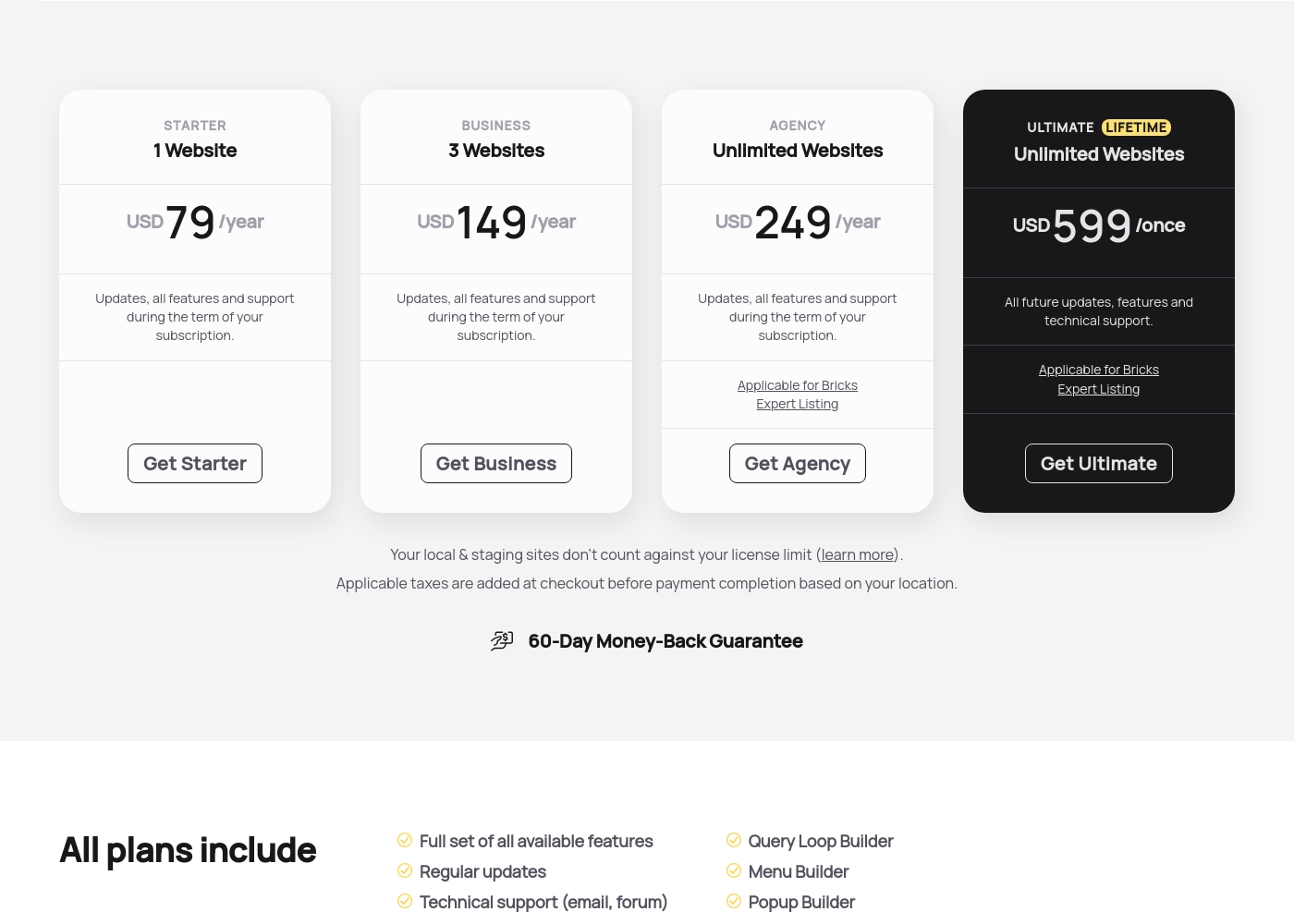
Bricks costs between $79 and $599 yearly or once with four plans: Starter at $79/year, Business at $149/year, Agency at $249/year, and Ultimate Lifetime at $599/once.
Here are the details for each available license type you can secure today. Every plan includes the full feature set, technical support, and access to all 110+ elements.
Starter
Price: USD 79 /year Websites Supported: 1 Website Best For: Single-site projects or personal blogs Refund Policy: 60-Day Money-Back Guarantee Other Features: Updates, all features, and support during the term of your subscription, Query Loop Builder, WooCommerce Builder.
- Full set of all available features
- Regular updates
- Technical support (email, forum)
- Access to community templates
- All 110+ elements
- Full set of all available features
- Regular updates
- Technical support (email, forum)
- Access to community templates
- All 110+ elements
- Full set of all available features
- Regular updates
- Technical support (email, forum)
- Access to community templates
- All 110+ elements
- All future updates, features and technical support
- Applicable for Bricks Expert Listing
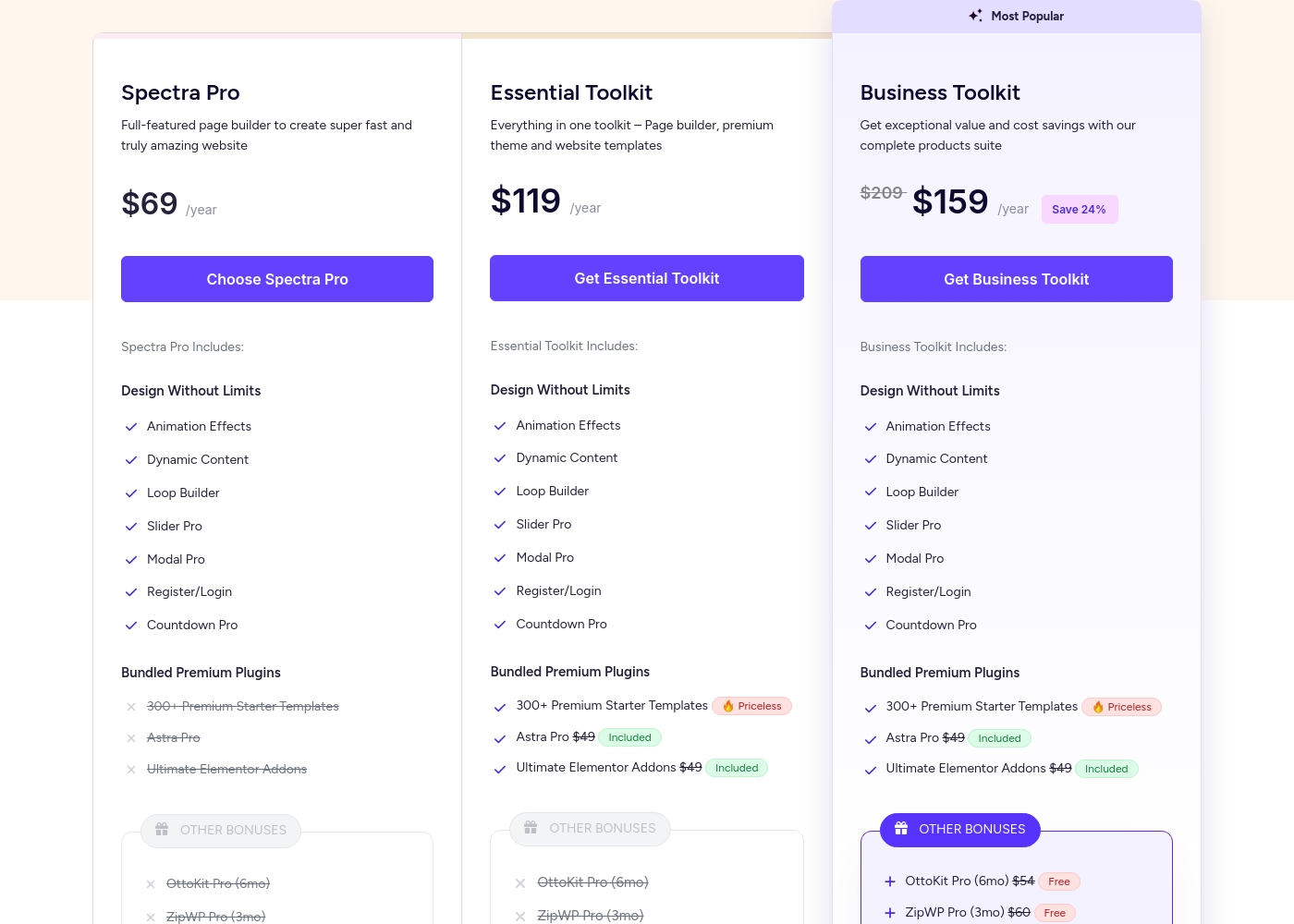
Spectra Pro pricing: Spectra Pro offers flexible subscription plans starting at $69/year for use on up to 3 websites. Users can choose between annual subscriptions or one-time lifetime payments across three distinct product tiers: Spectra Pro, Essential Toolkit, and Business Toolkit.
All plans are backed by a 14-day 100% money-back guarantee for peace of mind. Note that free version of Spectra is also available for those who want to try the basics first before upgrading to a paid plan.
Check out the current pricing below to find the best fit for your needs and budget. For those looking for the best value, the Business Toolkit includes a comprehensive suite of tools for web agencies and professionals.
Pricing Notes
- Bricks annual plans include the full feature set regardless of the price tier.
- Spectra Pro prices displayed are introductory offers that will renew at a higher, standard price.
- The Bricks Ultimate Lifetime deal provides perpetual updates and support for unlimited websites.
- Spectra Pro features are structured in three ascending toolkits (Pro, Essential, Business).
- Bricks offers a generous 60-day money-back guarantee, significantly longer than Spectra Pro's 14 days.
Pricing Head-to-Head
User Reviews
Users overwhelmingly praise Bricks for its speed, stability, and high performance, calling it their must-have stack for building scalable websites. Reviewers describe the builder as "super smooth and powerful," noting its strong capacity to handle client projects effectively.
However, user satisfaction is notably polarized around documentation and support responsiveness. A recurring concern is the lack of cohesive, complete documentation and proper references within the official 'Bricks Academy.' Users feel forced to rely on disparate YouTube videos or figure out technical aspects alone, suggesting the tool requires existing solid CSS knowledge, especially for non-professionals.
The experience has been great across all my different projects. It's super smooth, fast, and very stable in performance. The available add-ons make it easy to bring designs to life, and I'm very impressed with the future outlook.
Our Verdict
Choosing between Bricks and Spectra Pro feels like a battle of approaches, not features. Both tools are modern and incredibly fast, leading to excellent performance scores. The right choice depends on your starting point and desired level of technical control. Bricks is the theme builder champion, suitable for designers and developers who demand total control. It excels with native Flexbox, CSS Grid, and a robust Query Loop Builder. If you need bespoke client work or plan to build unlimited sites long-term, the Bricks Lifetime deal is unmatched value. Spectra Pro is the perfect complement to the native WordPress Block Editor. Its superpower is wrapping high-end functionality, like AI assistance and conversion tools, into simple blocks. Spectra Pro allows users to rapidly deploy functional, beautiful sites without mastering a new interface. The deciding factor is design depth: Can you live within the boundaries of Gutenberg? If you need complex, pixel-perfect designs with custom breakpoints, Bricks is your tool. If speed via familiarity and built-in AI are paramount, stick with Spectra Pro. Ultimately, pick Bricks if you are building highly customized stores and complex web applications. Choose Spectra Pro if you are prioritizing quick deployment, conversion optimization, and leveraging the native WordPress ecosystem.
Frequently Asked Questions
Which is better for website performance: Bricks or Spectra Pro?
Both Bricks and Spectra Pro prioritize peak performance and clean code output. Spectra Pro uses a just-in-time compiler to load assets dynamically, promoting speed. Bricks generates extremely clean code, which makes it fast and maintainable. You will likely achieve excellent Core Web Vitals scores with either Bricks or Spectra Pro.
Does Bricks offer AI features like Spectra Pro?
No, Bricks currently does not include native generative AI for content or design. Spectra Pro includes Spectra AI for generating copy, customizing patterns, and creating custom pages quickly. If AI assistance is crucial to your workflow, choose Spectra Pro.
Can I use Spectra Pro to build the whole site, like Bricks?
Spectra Pro is a robust plugin that enhances the functionality of the native block editor. Bricks is a full WordPress theme builder that replaces the theme completely. Bricks offers total control over every site element, including the header and footer.
Is the Bricks Ultimate Lifetime plan worth the cost over Spectra Pro's lifetime deal?
The Bricks Ultimate plan is strong because it includes all features for unlimited sites forever. Spectra Pro offers tiered lifetime deals based on the toolkit chosen. Bricks provides a simpler feature set with better long-term scalability and value.
Which tool is better for professional client work, Bricks or Spectra Pro?
Bricks offers superior design flexibility and clean code necessary for bespoke client projects. Spectra Pro's Business Toolkit includes SureFeedback and VIP Support, which smooth client communication. For complex design flexibility, choose Bricks; for collaboration ease, choose Spectra Pro.
What is the key difference in the money-back guarantees for Bricks and Spectra Pro?
Bricks provides a 60-day money-back guarantee on all its purchase plans. Spectra Pro only offers a 14-day refund period if the product isn't suitable. Bricks gives you much more time to thoroughly test the full builder on your own projects.
Ready to Choose?
Both tools have their strengths. Choose based on your specific needs.