Bricks vs Droip
Bricks and Droip are both elite visual builders, but they serve different priorities. Bricks prioritizes clean code output and superior website performance. Droip targets designers needing Webflow-level visual finesse and pixel precision.
Best for: Agencies prioritizing clean code and high site performance, E-commerce businesses needing visual WooCommerce customization
Best for: Professional web designers focused on pixel-perfect accuracy, Projects requiring complex, dynamic timeline animations
Performance-Driven Builder, Technical Onboarding Required
We find Bricks offers industry-leading performance and clean code generation, which is ideal for complex or scalable agency work. Its integrated features, like the native WooCommerce and Query Loop builders, provide depth unavailable in many competitors. Overall, this is a technically brilliant builder, but prospective users should know that documentation and community responsiveness present significant onboarding hurdles.
Pros
- Outputs exceptionally clean code for superior site performance.
- Native integration of advanced features (Query Loop, conditions, WooCommerce Builder).
- Flexible pricing options, including a $599 unlimited lifetime license.
- Offers full visual control over all site components (header, footer, content).
Cons
- Relies heavily on its own theme, leading to vendor lock-in.
- Complete reference documentation appears scarce or nonexistent.
- Reportedly requires solid CSS knowledge for non-professional users.
- Community support is sometimes perceived as unhelpful to detailed user questions.
Deep Control for WordPress Designers
We assess Droip as a truly advanced visual builder that empowers designers with Webflow-level precision within WordPress. We noted its focus on complex layout controls, precision typography, and dedicated timeline animations. Overall, Droip provides exceptional technical support and superior design control, positioning it as a top contender for professional web builders.
Pros
- Access to a "Webflow-in-WordPress" interface providing deep customization.
- Exceptional customer support noted for responsiveness, patience, and technical expertise.
- Allows creating complex, interactive sites free from typical WordPress limitations.
- Achieves pixel-perfect and seamless responsiveness across all device sizes.
Cons
- The dedicated community interaction appears currently limited primarily to Facebook channels.
- Initial introductory pricing renews at a significantly higher annual rate ($20 to $69).
- Features localization support is still being developed and expanded.
AboutBricks
Bricks is an innovative, community-driven visual site builder theme. It is built specifically for your self-hosted WordPress website. This powerful tool empowers you to handle full site editing visually, from the header to the footer, using simple drag & drop functionality. It's often called the best developer-friendly builder because it offers 100% flexibility on the development side of things. Bricks fills the critical gap between heavy visual builders and needing to write clean code from scratch. 💡
AboutDroip
Droip is a dynamic, visual tool designed to help you create stunning, responsive websites. It’s built for designers who demand unmatched accuracy and finesse in their work. Instead of battling restrictive interfaces, you gain specialized tools for complex layout structuring. You can experience pure creative freedom while speeding up your overall workflow. 💡
Highlights
Feature Comparison
Features Overview
We highlight the main differences and pick a winner for each feature.
Code Output & Speed
Bricks excels at clean code; Droip focuses more on visual finesse during the build process.
Bricks produces exceptionally clean and lightweight code. This focus ensures your website loads very quickly. Clean output quality significantly benefits SEO efforts. Droip prioritizes granular visual control for designers. Code output quality is not highlighted as its single most important feature. The tool emphasizes complex design execution. Choose Bricks for optimized speed and raw performance benefits. If every millisecond matters, Bricks has the measurable edge. This cleaner code minimizes bloat, making Bricks a great choice for high-traffic, competitive sites.
Design Finesse
Droip offers “Webflow-in-WordPress” precision; Bricks is fast and incredibly flexible.
Bricks gives total control for header-to-footer site editing. Users can use Flexbox and CSS Grid natively. It offers deep global style controls and custom classes. Droip provides unmatched accuracy and finesse for professional designers. It features specialized precision typography tools. Complex layout structuring is greatly simplified. Droip is explicitly built for pixel-perfect design accuracy. Bricks focuses more on performance alongside its strong flexibility. The Webflow comparison suggests Droip allows for finer, more granular CSS control than Bricks' powerful visual editing.
Dynamic Content
Bricks features a dedicated Query Loop Builder; Droip’s dynamic focus is on interactions.
Bricks includes a powerful native Query Loop Builder. You can visually query the database for complex posts. It supports AJAX pagination and infinite scroll built-in. Dynamic content collection is less emphasized in Droip's listed features. Its strength lies in interactions and layouts rather than complex data querying. Bricks is the clear choice for visually handling complex database queries. It replaces the immediate need for many third-party plugins. Developers will find Bricks’ Query Loop instantly useful and powerful.
Animations & Interactions
Droip uses a timeline editor for dynamic animations; Bricks handles interaction via conditional logic.
Bricks allows simple conditional logic to show or hide content. You can define triggers and basic actions. This covers many essential website interactivity needs. Droip includes a dedicated timeline animation editor. You get detailed control over easing functions and delays. Trigger sequences based on scrolling or hovering events. Droip wins for creating deeply complex, multi-step animations. Bricks handles interactivity primarily through conditions only. If you require rich, scrolling-based visual storytelling, Droip provides the better toolset immediately.
E-commerce Support
Bricks has a robust, specialized WooCommerce Builder; Droip does not list similar features.
Bricks allows visual customization of every WooCommerce element. Design single product listings and checkout pages easily. This feature is fully included in all Bricks licenses. Droip does not explicitly list comprehensive e-commerce features. You might need additional third-party plugins. Droip focuses heavily on core layout and design. Bricks is significantly better for building custom WooCommerce shops. It offers a total visual e-commerce solution natively. This builder means you avoid relying on WooCommerce's default, often restrictive templates entirely.
Customer Support
Droip’s support receives outstanding reviews; Bricks offers standard technical support via email.
Bricks provides technical support via email for all registered users. Support is valid for the term of your subscription. Lifetime users receive perpetual support. Droip customer support is described as “top notch” and highly responsive. Users were impressed by proactive help even during their free trial. Droip gets the nod based on overwhelmingly positive user sentiment. Excellent support can be critical for complex feature usage. If rapid, personalized support is vital to your workflow, Droip seems to consistently deliver better service.
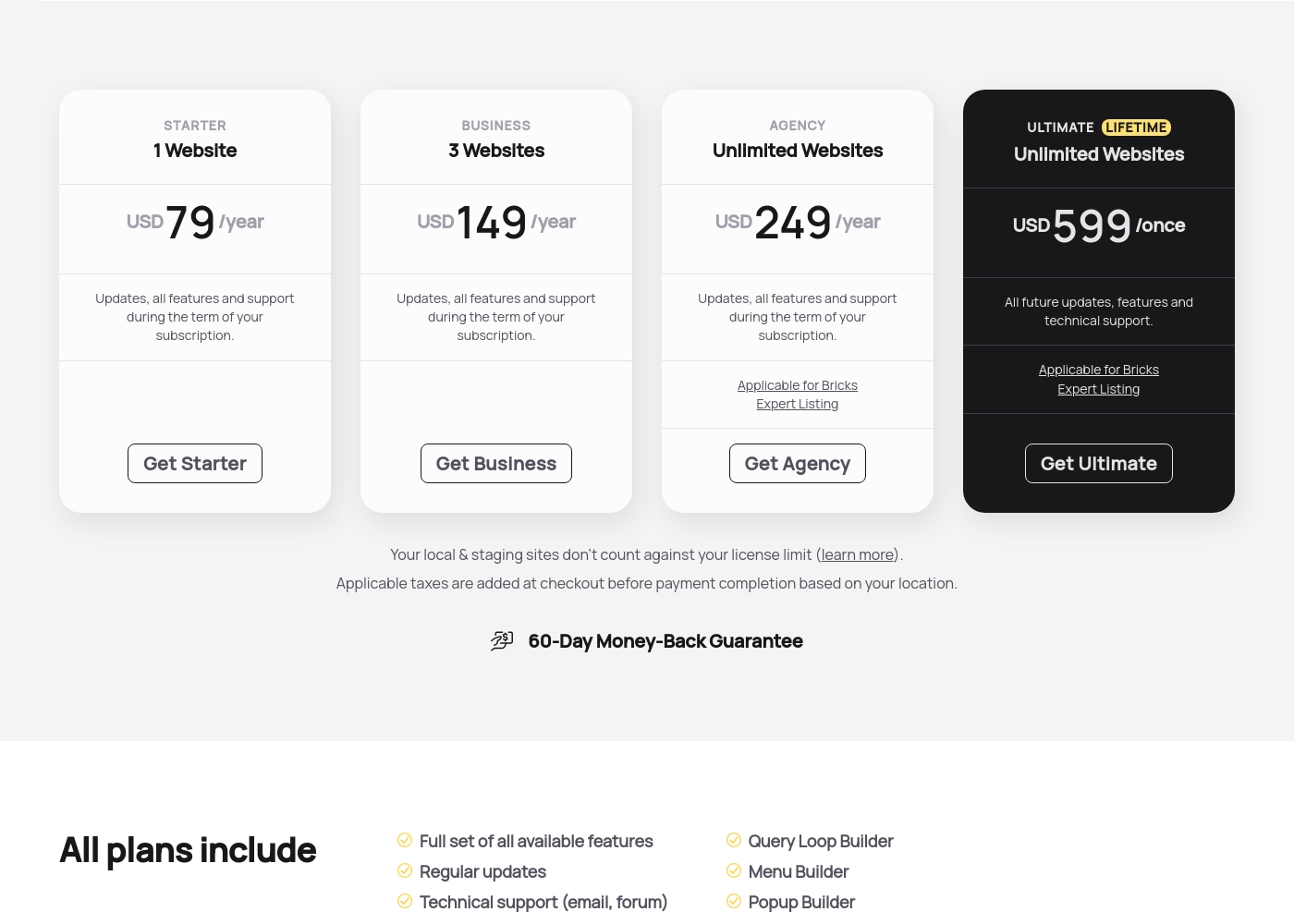
Bricks costs between $79 and $599 yearly or once with four plans: Starter at $79/year, Business at $149/year, Agency at $249/year, and Ultimate Lifetime at $599/once.
Here are the details for each available license type you can secure today. Every plan includes the full feature set, technical support, and access to all 110+ elements.
Starter
Price: USD 79 /year Websites Supported: 1 Website Best For: Single-site projects or personal blogs Refund Policy: 60-Day Money-Back Guarantee Other Features: Updates, all features, and support during the term of your subscription, Query Loop Builder, WooCommerce Builder.
- Full set of all available features
- Regular updates
- Technical support (email, forum)
- Access to community templates
- All 110+ elements
- Full set of all available features
- Regular updates
- Technical support (email, forum)
- Access to community templates
- All 110+ elements
- Full set of all available features
- Regular updates
- Technical support (email, forum)
- Access to community templates
- All 110+ elements
- All future updates, features and technical support
- Applicable for Bricks Expert Listing
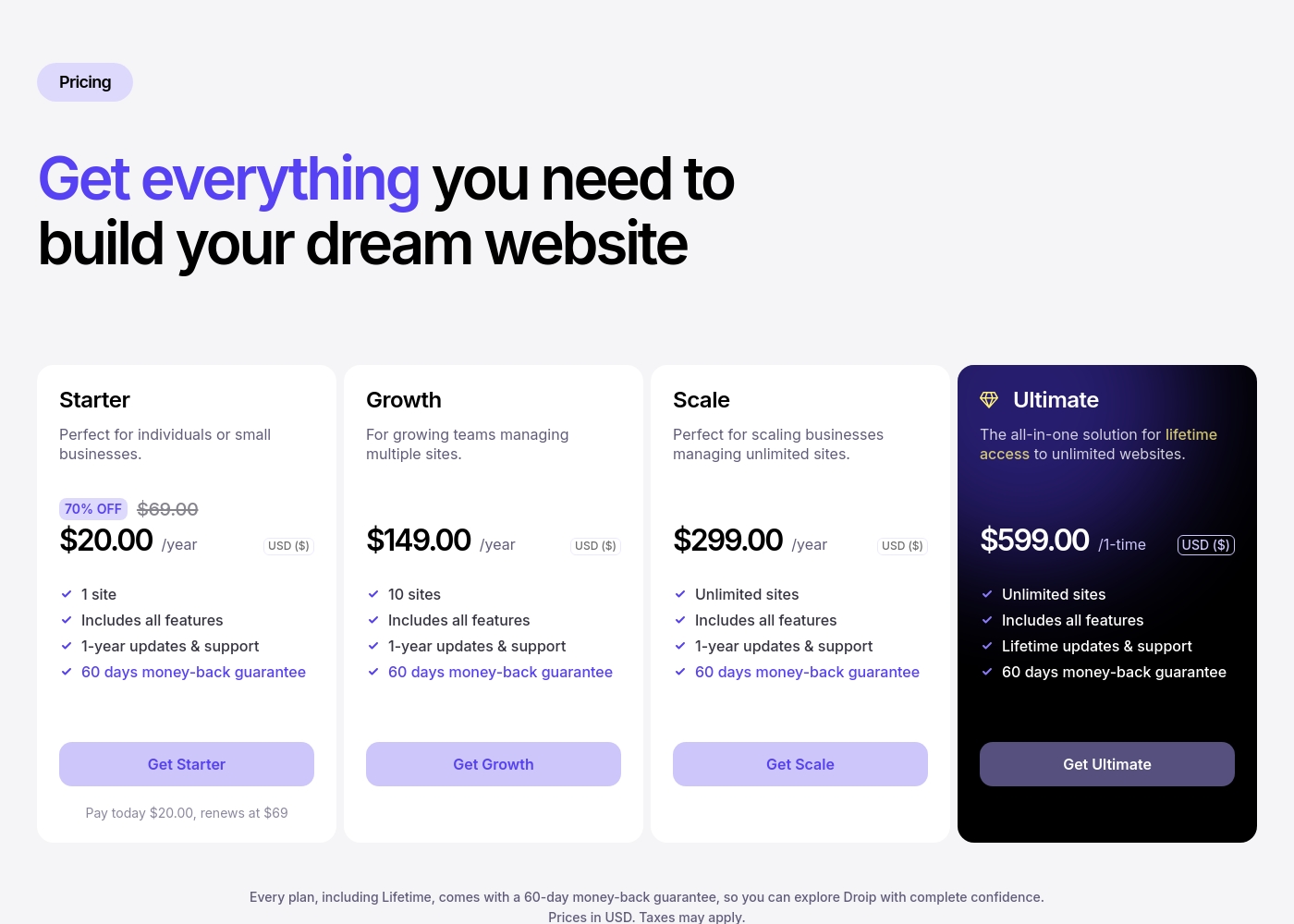
Droip costs between $20 per year (introductory offer) and $599 one-time with 4 plans: Starter at $20/year (renews at $69/year), Growth at $149/year, Scale at $299/year, and Ultimate at $599 one-time.
You can choose the plan that best fits your needs, whether you're just starting out or managing many client sites.
Starter
Price: $20.00 per year (renews at $69.00 per year) Websites Supported: 1 site Best For: Individuals or small businesses Refund Policy: 60 days money-back guarantee Other Features: Includes all features, 70% off introductory offer, 1-year updates & support. The Starter plan is perfect if you only need one website for your business or personal project. You get a massive initial discount on the first year, making it super accessible. Even at the renewal rate, it's a great entry point to experience all of Droip's powerful design tools.
- 1 site
- Includes all features
- 1-year updates & support
- 60 days money-back guarantee
- 10 sites
- Includes all features
- 1-year updates & support
- 60 days money-back guarantee
- Unlimited sites
- Includes all features
- 1-year updates & support
- 60 days money-back guarantee
- Unlimited sites
- Includes all features
- Lifetime updates & support
- 60 days money-back guarantee
Pricing Notes
- Droip offers a generous 90-day free trial; Bricks only offers an online playground demo.
- Droip has a cheap introductory price of $20 for the first year, renewing at $69/year.
- Both Bricks and Droip offer an Ultimate Lifetime License for $599.
- Bricks' unlimited site annual plan ($249) is cheaper than Droip's unlimited plan ($299).
- Both Bricks and Droip offer a 60-day money-back guarantee on all plans.
Pricing Head-to-Head
User Reviews
Users overwhelmingly praise Bricks for its speed, stability, and high performance, calling it their must-have stack for building scalable websites. Reviewers describe the builder as "super smooth and powerful," noting its strong capacity to handle client projects effectively.
However, user satisfaction is notably polarized around documentation and support responsiveness. A recurring concern is the lack of cohesive, complete documentation and proper references within the official 'Bricks Academy.' Users feel forced to rely on disparate YouTube videos or figure out technical aspects alone, suggesting the tool requires existing solid CSS knowledge, especially for non-professionals.
The experience has been great across all my different projects. It's super smooth, fast, and very stable in performance. The available add-ons make it easy to bring designs to life, and I'm very impressed with the future outlook.
Droip maintains an excellent 4.5/5 rating on Trustpilot, driven primarily by outstanding customer support. Users frequently describe the support team as quick, active, and highly responsive, solving technical issues, often through personalized methods like providing screencasts.
They note this high level of attention persists even during the free trial period. Regarding usability, users view Droip as a "Webflow in a WordPress" experience.
The support is top notch! Rashed and his team solved my simple problems instantly. I was patiently answered even while still in the Free Trial mode. They made a great product.
Our Verdict
Choosing between Bricks and Droip is genuinely difficult because both are excellent. They represent the current pinnacle of visual WordPress building. The decision ultimately boils down to whether you prioritize speed or design precision. Bricks wins the performance optimization race hands down. It produces exceptionally clean, lightweight code output. Its $249 Agency plan is the best value for unlimited annual sites. Bricks is superb for developers building high-traffic, performance-focused sites. Droip is the design precision master, offering Webflow-like control. Its timeline editor enables complex, dynamic animations that Bricks cannot match. Designers seeking finer typographic and layout accuracy will prefer Droip immediately. Do you prioritize a powerful Query Loop and e-commerce? Choose Bricks instantly. If you need dedicated animation tools and absolute pixel-perfect control, Droip wins. Both offer that excellent $599 Unlimited Lifetime deal for long-term commitment. Pick Bricks for fast, maintainable sites and custom WooCommerce builds. Select Droip if advanced interactivity and granular design finesse are your top priority. Start the 90-day free trial on Droip to test its interface yourself.
Frequently Asked Questions
Which visual builder has a better free trial: Bricks or Droip?
Droip offers a substantial 90-day free trial with full functionality. Bricks does not offer a traditional trial. Instead, Bricks provides an online, non-downloadable playground demo to test features.
Is Bricks or Droip better for building e-commerce stores (WooCommerce)?
Bricks is the clear winner for e-commerce. It includes a specialized, dedicated WooCommerce Builder. You can visually design every element like product listings and checkout pages. Droip does not emphasize this specific capability.
Which tool produces cleaner code output for better site speed, Bricks or Droip?
Bricks is explicitly engineered to minimize code bloat. It produces exceptionally clean code, directly benefiting performance and SEO. While Droip is efficient, Bricks focuses on this aspect more deliberately.
What’s the long-term value between the Bricks and Droip lifetime plans?
Both Bricks and Droip offer an Ultimate Lifetime plan for $599. Both include unlimited websites and perpetual support. The long-term value is essentially equal regardless of whether you choose Bricks or Droip.
Is Droip’s customer support better than Bricks’?
Yes, based on user sentiment, Droip's support is outstanding. Reviews frequently call Droip's support 'top notch' and highly responsive. Bricks provides professional support via email, as expected.
Does Droip offer the same custom responsive controls as Bricks?
Not exactly. Bricks allows you to set unlimited custom breakpoints for precise control. Droip focuses on automatic, seamless responsiveness. Droip’s elements adapt effortlessly across all screen sizes.
Ready to Choose?
Both tools have their strengths. Choose based on your specific needs.