SeedProd

SeedProd review

A drag-and-drop WordPress builder where AI drafts your site and you finish it without code.

SeedProd costs from $6.58/mo · 4 plans · prices checked Oct 12, 2026

By Ciroapp Editorial Team · Updated Sep 16, 2026

Commission may apply at no extra cost

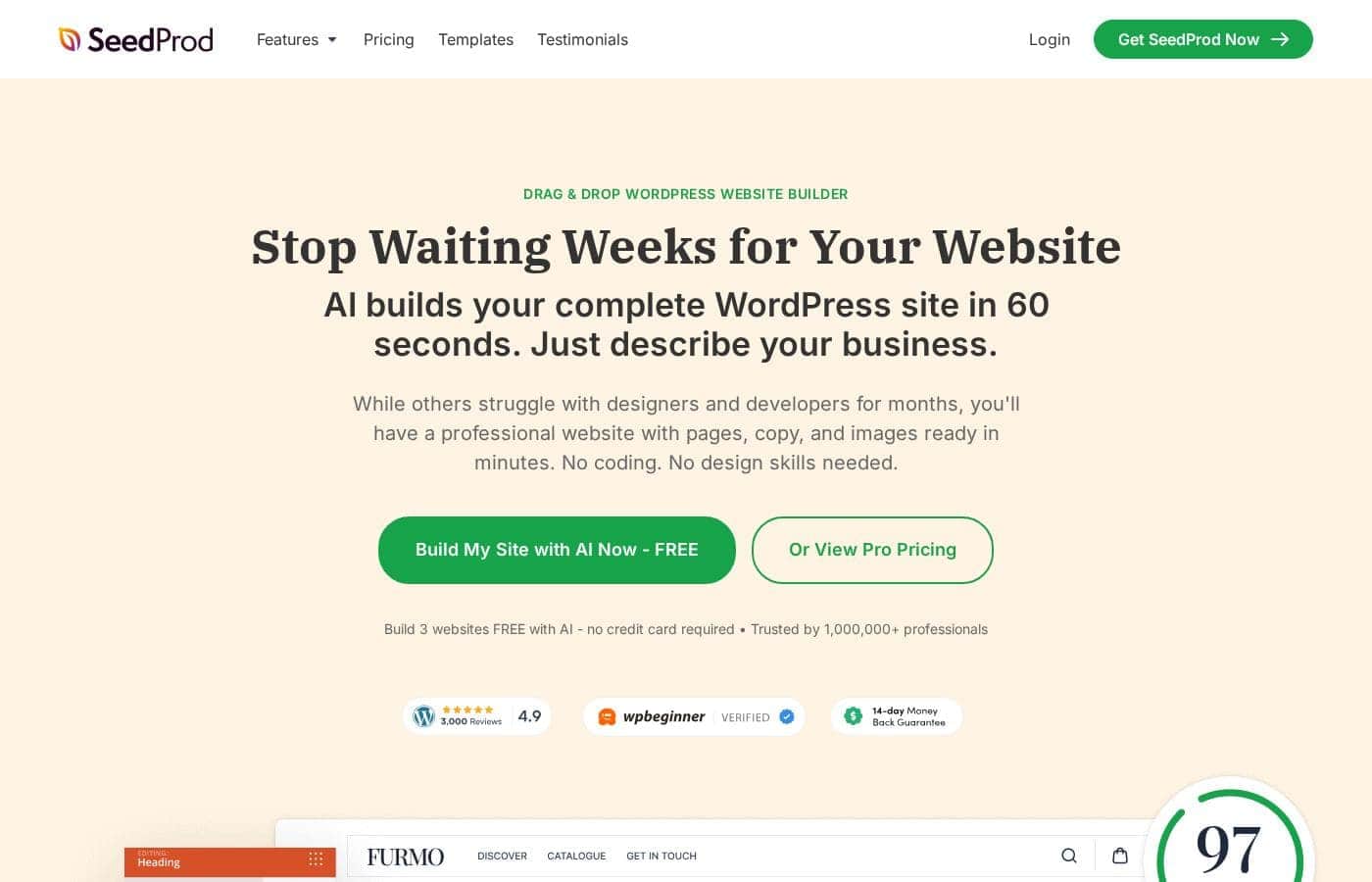
SeedProd homepage screenshot

At a glance

Quick overview for SeedProd: rating, pricing summary, key features, and highlights.
Pricing verified Oct 12, 2026

Ciroapp score

4.1/ 5

SeedProd pairs an AI site builder with a drag-and-drop editor, 200+ templates, and a no-code Theme Builder, all inside a WordPress plugin. Plans run $79–$599 a year, renew at full price, and gate features like email integrations behind higher tiers. Overall, it's a strong pick for self-hosted WordPress users who want a professional site fast without touching code.

Pros

  • Pros:AI site builder turns a short business description into a complete WordPress site—pages, copy, and images—in about 60 seconds, and you can test it on three sites free with no credit card required.
  • Pros:The no-code Theme Builder goes beyond landing pages — it covers headers, footers, posts, archives, sidebars, and WooCommerce pages, giving you full site editing in one visual tool.
  • Pros:More than 200 professionally designed themes, page templates, and section layouts come with pre-made color schemes and font pairings, so pages look polished without design skills.

Cons

  • Cons:SeedProd is a plugin for self-hosted WordPress only—it won't work on other website platforms or non-self-hosted WordPress setups.
  • Cons:Key capabilities are gated behind higher tiers — email marketing integrations and the theme builder require Plus, while WooCommerce support, Easy Digital Downloads, and domain mapping are Elite-only at $599.
  • Cons:Freelancers managing multiple client sites face an awkward jump in licensing—3 sites on Plus, 5 on Pro, then 100 on Elite—or must buy a separate license for each client site in between.
Best for
  • Small business owners who need a website without hiring a designer or developer
  • Bloggers and marketers building opt-in, sales, or webinar landing pages
  • WordPress users who want coming soon, maintenance, or 404 pages that capture leads
Money-back guarantee
Yes — 14 days
This section is a summary. Detailed sections about features, use cases, pricing, and reviews follow below.

What is SeedProd?

Building a WordPress site often means wrestling with themes, designers, or code. SeedProd aims to fix that. Its AI drafts a complete site from a short business description, and a drag-and-drop editor means you don't need design or coding skills.

You can even start free—three AI-built websites, no credit card.

SeedProd is a WordPress plugin for building pages, landing pages, and full themes without code. It's aimed at business owners, bloggers, marketers, designers, and developers who want professional-looking sites fast. You can create sales, opt-in, coming soon, maintenance, webinar, login, and thank-you pages, or use the theme builder for headers, footers, and WooCommerce pages.

It requires a self-hosted WordPress site.

Should you choose SeedProd?

Quick buyer guidance before you compare plans or click through.

Choose it if

  • People on self-hosted WordPress who want drag-and-drop building with no coding
  • Users who'd rather pick from 200+ templates, color schemes, and font pairings than design from scratch
  • Anyone collecting emails through MailChimp, ActiveCampaign, ConvertKit, Constant Contact, or Zapier
  • Store owners who want to customize WooCommerce pages without a developer
  • Advanced users who still want blocks and design controls for custom layouts

Skip it if

  • Anyone not running a self-hosted WordPress site—SeedProd is a plugin, so it won't work on other platforms
  • Freelancers managing many client sites on a tight budget—the site points to an Elite license or a separate license per client site
  • People expecting a fully hands-off website; the AI draft still needs your review, and email collection depends on connecting a third-party provider

Next steps before buying

  1. 1Confirm you have a self-hosted WordPress site, since SeedProd only works as a WordPress plugin.
  2. 2Try the free tier first—the site offers three AI-built websites with no credit card required.
  3. 3Check that your email marketing provider (MailChimp, ActiveCampaign, ConvertKit, Constant Contact, Zapier, and others) is supported before building opt-in pages.
  4. 4If you build sites for clients, review the licensing options: an Elite license or a per-client license.

Ease of use

SeedProd leans hard on simplicity: no coding, no design skills, a getting-started video, and drag-and-drop editing. WordPress.org user reviews on the site repeatedly call it quick to install and easy to set up. One reviewer notes that knowing a little HTML and CSS helps, but it isn't required.

SeedProd Key Features

⚡ AI Drafts Your Whole Site

Describe your business in a few words, and SeedProd's AI builds a complete WordPress site in about 60 seconds. You get pages, copy, and images ready to review. You can try it free on three sites, and the drag-and-drop editor takes over once the draft is done.

✨ Drag-and-Drop Editing, No Code

The page builder works by moving blocks into place, so you don't touch code. Blocks handle both static and dynamic content, and advanced users get design controls to fine-tune anything. Use it when you want a custom layout fast, and you'll have a polished page in minutes.

✨ Full Site Editing with the Theme Builder

Landing pages are just the start. The no-code Theme Builder lets you design headers, footers, posts, archives, sidebars, and WooCommerce pages too. That means your whole site stays consistent, and store owners can customize shop pages without a developer.

It's full site editing, done visually.

✨ Design Help Baked In

You don't need a designer. SeedProd includes over 200 professionally built themes, page templates, section layouts, and block templates, plus pre-made color schemes and font pairings. Pick a starting point, swap in your content, and your page looks polished right away.

New templates are added regularly.

🎯 Capture and Protect Leads

Built-in tools keep working after launch. Turn lost visitors into subscribers, limit access during a redesign, and filter out spam with ReCaptcha. Email connections cover MailChimp, ActiveCampaign, ConvertKit, Constant Contact, Zapier, and more.

Handy options: - Coming soon and maintenance mode pages - Custom 404 pages that capture lost leads - Branded login pages

Use Cases

🚀 Launch Your First Site Without a Designer

You run a small business and need a site this week. Describe your business, and AI drafts pages, copy, and images. Drag and drop to fine-tune.

Expected outcome: a professional site with no coding. > Tip: Start free—three AI-built sites, no credit card.

✉️ Turn Traffic Into Email Subscribers

You're a blogger or marketer building a list. Pick an opt-in template, connect MailChimp, ActiveCampaign, ConvertKit, or Zapier, and publish. ReCaptcha filters spam so leads stay clean.

Expected outcome: lead pages live in minutes. > Tip: Confirm your email provider is supported before you build.

🔧 Keep Working While Your Site's Under Construction

You're redesigning or launching a store. Turn on Coming Soon or Maintenance mode to limit access while you build. Then make a custom 404 page that captures lost visitors.

Expected outcome: even error traffic can become leads. > Tip: Use maintenance mode during big updates.

💼 Build Client Sites Faster

You're a freelancer or agency juggling client work. Use pre-built themes and the theme builder to create headers, footers, and WooCommerce pages without a developer. Elite covers 100 sites, or license each client site.

Expected outcome: polished client sites, less back-and-forth. > Tip: Review licensing before you quote.

SeedProd pricing

From$6.58/mo

  • 4 plans

Prices checked on Oct 12, 2026 from SeedProd's pricing page

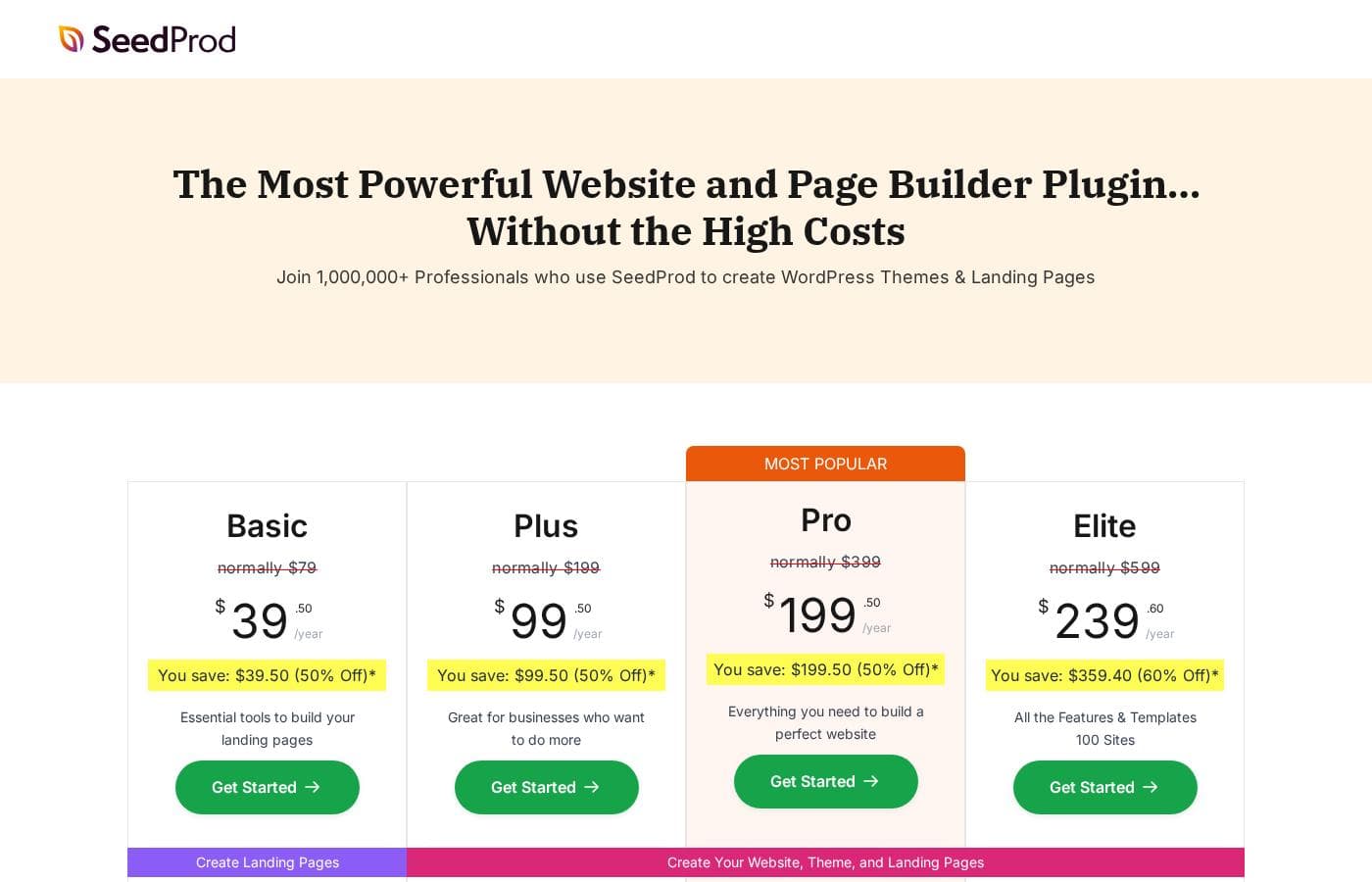
SeedProd pricing page screenshotView pricing page screenshot
PlanBilled monthlyBilled annuallyIncludes
Basic
—
$6.58/mo
$79 per year
1 site
  • 1 site license
  • 50 PRO templates
  • 90+ PRO page blocks
  • Drag & drop page builder
  • Subscriber management
  • +2
Plus
—
$16.58/mo
$199 per year
3 sites
  • 3 site licenses
  • Full website kits
  • Theme builder
  • 100 PRO templates
  • 100+ PRO section templates
  • +7
Pro
—
$33.25/mo
$399 per year
5 sites (Most Popular plan)
  • 5 site licenses
  • Full website kits
  • Theme builder
  • 300+ PRO templates
  • 100+ PRO section templates
  • +9
Elite
—
$49.92/mo
$599 per year
100 sites
  • 100 site licenses
  • Full website kits
  • Theme builder
  • 300+ PRO templates
  • 100+ PRO section templates
  • +12

Price history

Tracking prices since Sep 7, 2026. No price change detected yet.

Pricing types: Free plan, Yearly subscription

Pricing notes

SeedProd offers four paid plans — Basic ($79), Plus ($199), Pro ($399), and Elite ($599). These are the regular prices; introductory discounts apply at checkout, and all plans renew at full price.

SeedProd has four paid plans: Basic, Plus, Pro, and Elite. Regular prices run from $79 to $599 — $79, $199, $399, and $599 respectively — and every plan renews at full price after the introductory discount.

Here's a quick look at what each tier includes.

Basic

Price: Normally $79 Websites Supported: 1 site Best For: Anyone who needs solid landing pages on a single WordPress site Refund Policy: 14-day money-back guarantee Other Features:

  • 50 PRO templates and 90+ PRO page blocks
  • Drag & drop page builder
  • Subscriber management and access controls
  • Standard support

Basic is the simplest way in. If you're launching a coming soon page, an opt-in form, or a sales page on one site, it covers the essentials without paying for extras you won't use.

Plus

Price: Normally $199 Websites Supported: 3 sites Best For: Small businesses that want full websites, not just landing pages Refund Policy: 14-day money-back guarantee Other Features:

  • Full website kits and theme builder
  • 100 PRO templates and 100+ section templates
  • Email marketing integrations
  • Free bonus: 2 million stock photos ($99 value)

Plus steps things up. You get the theme builder for headers, footers, and full site editing, plus connections to email services like Mailchimp and ActiveCampaign. It's a sensible middle ground if you manage a couple of sites.

Pro

Price: Normally $399 Websites Supported: 5 sites Best For: Growing businesses and freelancers who need advanced tools Refund Policy: 14-day money-back guarantee Other Features:

  • 300+ PRO templates
  • Priority support
  • Dynamic text
  • 3,000+ Zapier integrations
  • Free bonus: 2 million stock photos ($99 value)

Pro is flagged as the most popular plan, and it's easy to see why. You unlock the full template library, priority support when you get stuck, and Zapier connections that link SeedProd to thousands of other apps.

Elite

Price: Normally $599 Websites Supported: 100 sites Best For: Agencies and developers building sites for clients Refund Policy: 14-day money-back guarantee Other Features:

  • Everything in Pro
  • WooCommerce support and Easy Digital Downloads
  • Domain mapping
  • Priority support

Elite is built for volume. With 100 site licenses plus WooCommerce and Easy Digital Downloads support, it fits agencies and freelancers who create sites for others. If you only run one or two sites, this tier is more than you need.

One tip before you buy: because the page displays "normally" prices next to savings labels, double-check the live introductory price and billing period at checkout.

A few other facts worth knowing. All pricing is in USD, you can change plans or cancel at any time, and renewals happen at the full, undiscounted rate. There's also a no-cost way to start: SeedProd advertises building 3 websites free with its AI builder, no credit card required. And if a paid plan isn't the right fit, the 14-day money-back guarantee lets you request a full refund — co-founder John Turner says they'll happily return 100% of your money. 💰
Cost calculator

Estimate what SeedProd costs for your team.

Billing

Basic has no published price for this billing cycle.

Basic has a flat price: the number of seats does not change the total. Estimate based on published list prices, before taxes, add-ons and discounts.

How to pay less for SeedProd

  • 14-day money-back guarantee if it does not fit.
  • Cheaper tools in this category start at $4.92/mo.
Visit SeedProd

Email me when SeedProd changes price

One email when we detect a price change on the vendor's pricing page. No newsletter, no deals. Unsubscribe in one click.

User Reviews

No reviews yet.

Write a Review

Write a Review for SeedProd
0/100 characters
0/2000 characters

Why use SeedProd?

Most page builders promise speed but hand you a learning curve. SeedProd's approach is simpler: describe your business, and AI builds a complete site with pages, copy, and images in minutes. From there, a drag-and-drop editor handles the rest.

  • Skip the blank page. The AI site builder creates a full WordPress website from your description, and you can build three sites free with no credit card.
  • Look professional without a designer. Over 200 pre-built themes, templates, sections, color schemes, and font pairings make pages look polished out of the box.
  • Go beyond landing pages. The no-code theme builder covers headers, footers, posts, archives, sidebars, and WooCommerce pages—full site editing, not just one-off pages.
  • Turn lost visitors into leads. Built-in coming soon, maintenance mode, and custom 404 pages keep working for you, and ReCaptcha helps block spam and bots.
  • Connect your marketing stack. Collect emails through MailChimp, ActiveCampaign, ConvertKit, Constant Contact, Zapier, and other third-party providers.
  • Stay fast and findable. Pages are built to load quickly, with SEO-optimized code and editable header tags for your on-page structure.

SeedProd alternatives

Other tools in the Page builder for WordPress category

View all Page builder for WordPress tools
WPBakery

WPBakery

Page builder for WordPress3.9/5From $4.92/mo

WPBakery is the trusted #1 Page Builder Plugin for WordPress, chosen by over 5,800,000 websites globally. It's an award-winning tool that lets you manage and build sophisticated content easily. You can design stunning pages using responsive, mobile-ready layouts that work seamlessly. The best part? It integrates perfectly with any WordPress theme you choose. 💡 This solution is ideal for anyone looking for powerful design control without needing programming knowledge.

Beaver Builder

Beaver Builder

Page builder for WordPress4.1/5

Beaver Builder is a trusted, powerful website builder designed to simplify WordPress development. Since 2014, it has helped users build professional websites easily, often in minutes instead of months. It serves a wide audience, including agencies needing stability, freelancers aiming for speed, and entrepreneurs who require easy updates without knowing how to code. This visual building method allows you to instantly see changes happen live on the front end of your site. You can start with pre-designed templates or build from scratch, creating any type of site, including blogs, eCommerce stores, and membership portals.

Droip

Droip

Page builder for WordPress4/5From $4.92/mo

Droip is a dynamic, visual tool designed to help you create stunning, responsive websites. It’s built for designers who demand unmatched accuracy and finesse in their work. Instead of battling restrictive interfaces, you gain specialized tools for complex layout structuring. You can experience pure creative freedom while speeding up your overall workflow.

Bricks

Bricks

Page builder for WordPress4.2/5

Bricks is an innovative, community-driven, visual site builder theme specifically for your self-hosted WordPress website. It provides unparalleled customization, flexibility, and maintainability. You can craft your website from header to footer, leveraging powerful features like CSS grid and flexbox layouts. This platform is designed to help you create truly unique web design experiences.

Elementor

Elementor

Page builder for WordPress4.3/5
Otter Blocks

Otter Blocks

Page builder for WordPress4.1/5

Otter Blocks is an effective collection of advanced, dynamic page building blocks designed specifically for the WordPress block editor, Gutenberg. It acts like a powerful upgrade, making the native editor much more flexible and capable. This collection is ideal for anyone looking to achieve impressive layouts quickly and professionally. It is built to be lightweight and simple, ensuring your site remains fast while you gain advanced customization options.

Breakdance

Breakdance

Page builder for WordPress4.1/5

Breakdance is a WordPress visual website builder designed for WooCommerce stores. It offers AI-assisted content, an Advanced Form Builder, and a Built-In Popup Creator, plus Dynamic Data support for anything in the WordPress database. It also includes Element Studio, the world's first built-in element development IDE for WordPress, making it easy to craft custom builder elements. For users coming from Elementor, Breakdance provides a smooth upgrade path and a modern editing experience.

Spectra Pro

Spectra Pro

Page builder for WordPress4.1/5

Spectra Pro is a powerful web design toolkit built specifically for the native WordPress editor. It offers a new, advanced way to build websites that are both stunning and super fast. It focuses heavily on performance, boasting zero bloat and security through clean code written to the latest standards. ✅ Because it works directly inside the familiar WordPress editor, it is instantly easy to learn and use. It’s perfect for creators who want professional results without the complexity of heavy external dependencies or frustrating code.

Cheapest Page builder for WordPress software for 1 to 25 users

SeedProd FAQ

How much does SeedProd cost?

SeedProd's cheapest paid plan, Basic, costs $6.58 per month. Paid plans range from $6.58 to $49.92 per month. Prices checked on Oct 12, 2026 from the vendor's pricing page.

Does SeedProd offer a free trial or a money-back guarantee?

It has a 14-day money-back guarantee.

Has SeedProd's price changed recently?

No. We have not detected a price change since we started tracking on Sep 7, 2026.

Which email marketing services does SeedProd integrate with?

Email marketing integrations start with Plus. Supported services include Mailchimp, ActiveCampaign, ConvertKit, Constant Contact, AWeber, Drip, GetResponse, MailerLite, Sendinblue, Campaign Monitor, iContact, Mad Mimi, and Sendy. Pro and Elite add 3,000+ Zapier connections.

Can I use SeedProd on client sites?

Yes, two ways. Buy the Elite license for 100 sites, or purchase a separate license for each client site. You can also refer clients and earn 20% commission through SeedProd's affiliate program.

Does SeedProd protect my forms from spam and bots?

SeedProd builds in ReCaptcha to block spam, bots, and fraudulent submissions on your landing pages. That helps keep your subscriber list clean and your leads qualified.

Is there a cap on how many pages I can build?

No. Every paid plan allows unlimited pages. Plans differ by site licenses — one on Basic up to 100 on Elite — plus template counts, support level, and premium features.

Ready to try SeedProd? Check out the official site or pricing.

Are you SeedProd? Claim this listing · Get the badge