Otter Blocks

Otter Blocks

A Better Page Building Experience for the WordPress Block Editor.

#2 dans Page builder for WordPress
2 min read Β· Updated 11/17/2025
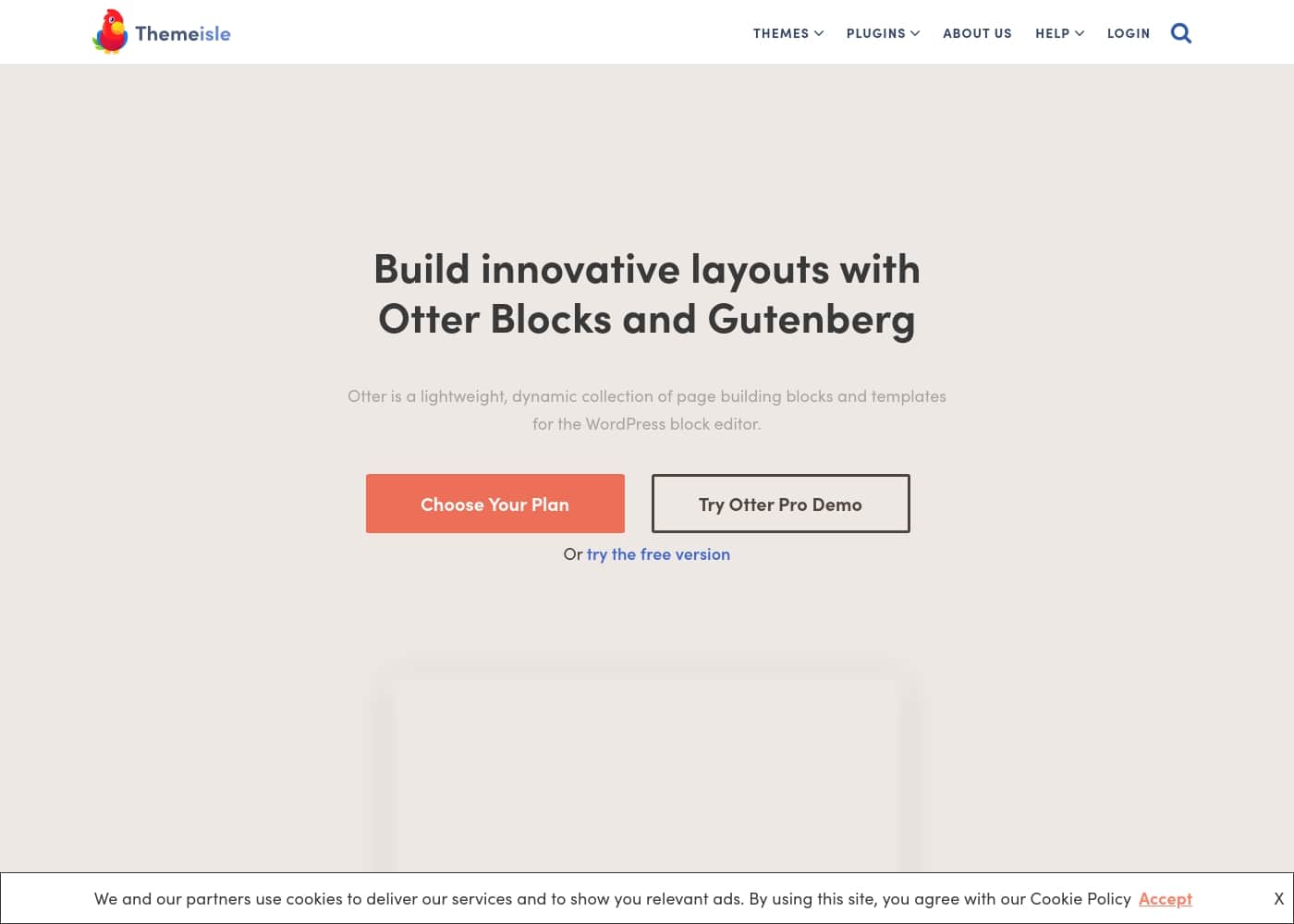
Otter Blocks homepage screenshot

At a glance

Quick overview for Otter Blocks: rating, pricing summary, key features, and highlights.

Ciroapp review

4.6
Essential block collection with expert support.

Otter Blocks significantly improves the native WordPress editor with powerful dynamic controls and integrated AI tools, making site building faster for all users. We found the core product reliable, and its universally praised customer support ensures a strong user experience. Overall, it’s a necessary upgrade for anyone building with Gutenberg.

Pros

  • Pro:Lightweight design enhances Gutenberg without slowing performance.
  • Pro:Access to dynamic visibility conditions for content control.
  • Pro:Built-in AI tool speeds up content generation and layout design.
  • Pro:Offers over 55 motion effects for deep customization.

Cons

  • Con:Renewal pricing is significantly higher than introductory rates.
  • Con:Advanced features like WooCommerce blocks require a paid plan.
  • Con:Priority Live Chat support is often restricted to the Agency tier.
Money-back guarantee
Yes β€” 30 days
Range: $69–$149/yearFree plan, Yearly subscription
This section is a summary. Detailed sections about features, use cases, pricing, and reviews follow below.

Otter Blocks review, pricing, features, pros & cons

Are you tired of feeling limited by WordPress's basic block editor? Creating custom, expressive layouts can often feel slow and frustrating. The good news is that Otter Blocks is here to help!

✨ It’s a dynamic, lightweight collection that transforms your current setup. Otter delivers the control you need to build stunning pages in seconds, whether it's a simple blog or a complex e-commerce site.

What is Otter Blocks?

Otter is a powerful but lightweight addition to the WordPress editor. It offers a dynamic collection of page building blocks and templates. This plugin significantly enhances the basic Gutenberg experience.

It’s designed to bring truly innovative blocks into the new WordPress era. The goal is simple: offer a better, faster, and more controlled page building solution for everyone. πŸ’‘

Otter Blocks Key Features

✨ Unrivaled Control Over Page Layouts

Otter Blocks provides innovative tools that transform how you structure your pages. These powerful building blocks allow you to create complex layouts quickly. You can use the Section block to build responsive areas that support up to six columns. The variety of structural elements ensures you never feel limited by the standard editor.

Organizing large amounts of content is simple and clean. Use the Tabs block for horizontally stacked information that switches visibility with a click. For vertical organization, the Accordion block lets users expand or collapse sections, keeping your pages neat and fast.

✨ Deep Customization and Styling Options

You don't need external plugins or complex stylesheets to fine-tune your design. Otter lets you customize the appearance of every single block with Custom CSS. You can access an easy-to-follow area right within the editor to make changes.

This control is powerful because you can add media queries for responsive design. You can also quickly change colors or apply borders to any element on the page. This feature eliminates the need to switch tools just to perfect how a block looks.

πŸ’‘ Dynamic and Selective Content Visibility

Gain precise control over who sees which content by using Visibility Conditions. This dynamic feature allows you to set specific requirements that blocks must meet before they display on the page. You can ensure that your visitors only see relevant information, improving website personalization.

Visibility can be controlled using several criteria. This includes a user's logged-in status or their designated User Role. It's also possible to show or hide content based on specific Date Ranges or recurring events. This makes blocks incredibly flexible for marketing campaigns or membership sites.

✨ Enhancing Engagement with Animation Effects

Adding eye-catching movement to your site is easy and engaging. Otter includes a feature that lets you apply animations to any block on your page. This instantly enhances the visual appeal of different sections and elements for your visitors.

You have access to over 55+ motion effects to choose from and apply. These effects cover a wide range of styles to fit your design needs.

✨ AI-Powered Productivity and Workflow Tools

The built-in AI Block dramatically speeds up your content creation process. Simply write down your requirements, and the AI works its magic to deliver immediate results. The AI can generate full design layouts, craft engaging text content, and seamlessly design sophisticated forms.

The convenience continues with the powerful AI toolbar. With just a button click, you can create new headings, summarize long passages of existing text, or quickly adjust the tone of your writing. This integration streamlines your editing workflow significantly.

✨ Specialized E-commerce Tools (PRO)

If you run an online shop, the PRO version provides essential WooCommerce Builder Blocks. These tools are specifically designed to help you create custom Single Product Pages. Building better product pages aims to maximize your potential conversion rates.

Beyond specialized page builders, the PRO version offers advanced utility blocks. These include the Add to Cart block, the Business Hours block, and the Review Comparison block. These additions provide the powerful functionality a growing e-commerce site needs.

Use Cases

🎯 Creating Dynamic, Targeted Content

Need to show different content based on who is viewing your site? Otter’s Visibility Conditions feature makes this simple. You can define specific rules for block display. Use this to hide a download link from logged-out users or show a welcome message only to subscribers.

This feature supports criteria like User Roles, Logged In status, Date Ranges, or even WooCommerce Products currently placed in the cart. This level of control means you tailor the user experience instantly. You can personalize your site without requiring complex custom coding.

⏱️ Launching Scheduled Sales and Events

Planning a temporary promotion or an event countdown can be tricky to manage manually. Start by adding the powerful Countdown Block to your product page or landing page. This creates urgency and clearly displays the time remaining.

Use Visibility Conditions to manage the entire campaign lifecycle automatically. Set the introductory sale banner to appear precisely when the date range starts. You can schedule the Countdown Block to disappear completely when the event ends. This ensures your site is updated on time, every time.

πŸ›’ Supercharging E-commerce Design (PRO)

The standard WooCommerce product layouts often limit conversion potential. With the PRO version, you can utilize dedicated WooCommerce Builder Blocks. These are specifically designed for maximal impact on your shop.

Approach: Build a completely custom Single Product Page using these specialized blocks. Integrate the Product Review Block to add instant social proof and enhance trust right where users buy. This focused approach brings more improvements and helps maximize your conversion rates.

✨ Boosting Design Appeal with Animation

Making your site stand out means adding appeal beyond static images and text. You can easily apply movement and flair to any block using Otter features. The plugin includes over 55+ motion effects for immediate use.

Approach: Apply a Sliding or Fading effect to your main call-to-action section. For a more dramatic entrance, try Bouncing or Zooming on key headings. This helps enhance the appeal of your page blocks for better user engagement.

πŸ’» Achieving Precise Design Control

Sometimes built-in editor settings aren't enough to achieve a perfect look. The Custom CSS feature is available for every block you use. You no longer need external plugins simply for advanced styling.

Action: Use the Custom CSS area to add specific styling rules. You can quickly add media queries to ensure proper scaling on all devices. Easily change border colors or adjust padding details right within the familiar WordPress editor area. This gives you deep customization without external files.

🧠 Accelerating Content Workflow Using AI

Writing and refining content often slows down the overall website building process. The integrated AI Block helps speed up your productivity dramatically. You just input your requirements, and the tool handles the heavy lifting instantly.

Step 1: Write down basic requirements to generate layouts, complex content, or professional forms. Step 2: If the text needs refinement, use the AI toolbar provided with the block. Step 3: Effortlessly summarize text, craft new headings, or adjust the tone of the written section to better match your brand voice.

Expected outcome: High-quality, tailored content generated in seconds, not hours.

Pricing Overview for Otter Blocks

Pricing range
$69–$149/year
Pricing types
Free plan, Yearly subscription
Money-back guarantee
Yes β€” 30 days

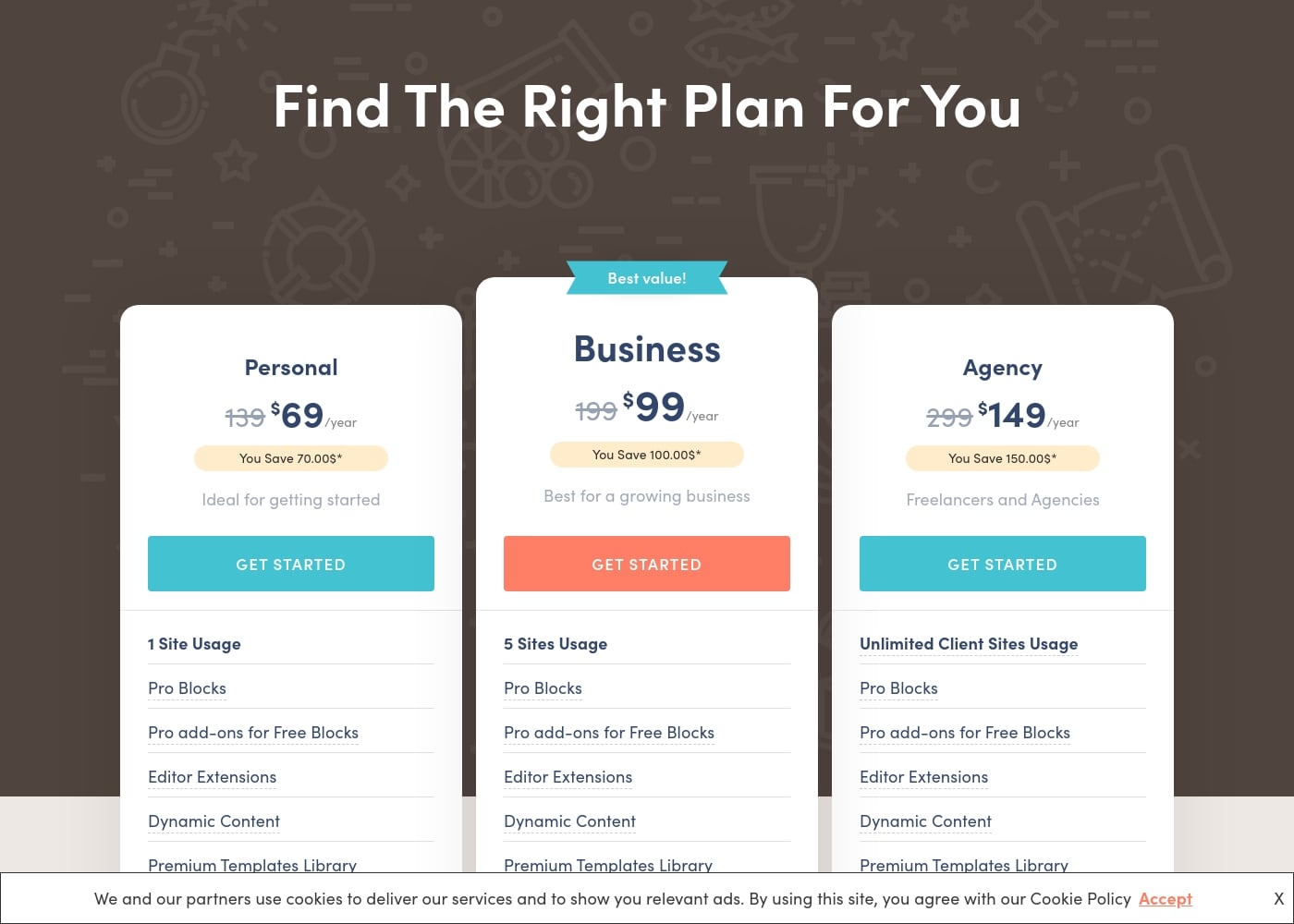
Otter Blocks pricing is based on annual subscription plans and the number of sites supported. Introductory pricing ranges from $69/year for a single site up to $149/year for unlimited client sites.

Plans & Pricing

Personal

Yearly$69 (Introductory)
1 site usage. Renewal price is $139/year.
  • 1 Site Usage
  • Pro Blocks
  • Pro add-ons for Free Blocks
  • Editor Extensions
  • Dynamic Content
  • Premium Templates Library

Business

Yearly$99 (Introductory)
5 sites usage. Renewal price is $199/year.
  • 5 Sites Usage
  • Pro Blocks
  • Pro add-ons for Free Blocks
  • Editor Extensions
  • Dynamic Content
  • Premium Templates Library
  • Priority Support

Agency

Yearly$149 (Introductory)
Unlimited client sites usage. Renewal price is $299/year.
  • Unlimited Client Sites Usage
  • Pro Blocks
  • Pro add-ons for Free Blocks
  • Editor Extensions
  • Dynamic Content
  • Premium Templates Library
  • Live Chat & Priority Support
  • Templates Cloud (worth $49)

Otter Blocks costs between $69 and $149 per year with 3 plans: Personal at $69, Business at $99, and Agency at $149.

These annual plans offer powerful tools for enhancing the Gutenberg editor. Please note that the prices listed are a special introductory rate, and all renewals will occur at the full, standard pricing.

Personal

Price: $69/year (Introductory rate; renewals at $139/year) Websites Supported: 1 Site Usage Best For: Ideal for getting started Refund Policy: 30-day money-back guarantee Other Features:

  • Pro Blocks (e.g., Add to Cart Block, Business Hours Block)
  • Pro add-ons for Free Blocks
  • Editor Extensions (e.g., Visibility Conditions, Custom CSS)
  • Dynamic Content
  • Premium Templates Library

The Personal plan is perfect for individuals building their first site or running a single project. You get the full suite of Pro features needed to design beautiful pages without breaking the budget.

Business

Price: $99/year (Best value! Introductory rate; renewals at $199/year) Websites Supported: 5 Sites Usage Best For: Best for a growing business Refund Policy: 30-day money-back guarantee Other Features:

  • All features from Personal plan
  • Priority Support

If you manage multiple websites or your business is expanding, the Business plan offers fantastic value. With coverage for up to five sites and access to Priority Support, you can ensure all your projects run smoothly.

Agency

Price: $149/year (Introductory rate; renewals at $299/year) Websites Supported: Unlimited Client Sites Usage Best For: Freelancers and Agencies Refund Policy: 30-day money-back guarantee Other Features:

  • All features from Business plan
  • Live Chat & Priority Support
  • Templates Cloud (worth $49)

The Agency plan is the top choice for professionals who build sites for clients. It provides unlimited site usage and premium support features like Live Chat, along with the Templates Cloud for easy reuse of designs across projects.

Otter Blocks offers a free version of the plugin for those who want to try it out first. For paid plans, you can purchase with confidence knowing there is a 30-day no-questions-asked money-back guarantee. You are free to cancel or change your plan at any time.
User Reviews

The aggregated external feedback, sourced primarily from Trustpilot (where the developer Themeisle holds an impressive 4.8 rating over 500+ reviews), focuses heavily on the exceptional quality of customer support. Users frequently describe the team as professional, friendly, and patient, often resolving complex technical issues within hours or less than 24 hours.

Reviewers noted this quick response time as crucial, especially for new users or those grappling with tricky plugin configurations. Beyond the responsive assistance, users praise the products themselves, including the broader family of themes and plugins, for their overall effectiveness and ease of use.

Several reviewers stated that the products were among the best available for WordPress. Furthermore, the company maintains high integrity regarding pricing and value; users who required a refund confirmed they received their money back quickly and without any hassle, upholding the 30-day guarantee promise.

This combination of reliable tools and outstanding care leads to a highly satisfying user experience, frequently summarized as 'best support possible' and 'great product' πŸ‘.

What users say elsewhere

B. K.
Β· Trustpilot
5.0 / 5

I had issues with one of their plugins, so I reached out to support immediately. They responded within hours, provided multiple suggestions, and solved the problem perfectly. I could not be happier with this kind of fast, efficient resolution.

Pablo M.
Β· Trustpilot
5.0 / 5

I am 73 and accidentally deleted the plugin while working on my site. The assistant, Rodica, was professional, patient, and very fast. Her clear, effective support truly reignited my motivation for web building.

No reviews yet.

Write a Review

Write a Review for Otter Blocks
0/100 characters
0/2000 characters

Why use Otter Blocks?

Choosing Otter means unlocking serious design and functionality power without added complexity. This tool helps you move beyond basic designs and create impressive websites quickly. It's trusted by more than 300K happy users for its reliability and speed, earning a high 4.8 rating.

βœ… Here are key benefits that make Otter stand out:

  • Unrivaled Layout Control: You'll find innovative blocks for almost everything, from Tabs and Accordions to advanced Section blocks supporting up to six columns. You can use great tools like the Product Review block to turn your posts into smart review pages.
  • Deep Customization and Styling: You don't need external plugins for styling. Otter lets you customize every block with Custom CSS directly. You can easily add media queries, change colors, or apply borders right in the editor.
  • Create Dynamic Content: Otter's Visibility Conditions feature is incredibly useful. You can set specific requirements for when blocks should appear. This includes criteria like User Roles, Logged In status, Date Range conditions, or even whether particular WooCommerce products are in the cart.
  • Enhance Appeal with Animation: Adding movement to your site is simple. Otter includes over 55+ motion effects, such as Sliding, Fading, and Bouncing, that you can apply to any block for better engagement.
  • Integrated AI Productivity: The built-in AI Block helps speed up content creation dramatically. Just input your requirements and watch the magic happen! The AI can generate layouts, craft content, design forms, summarize text, or adjust the tone seamlessly.
  • Advanced E-commerce Tools (PRO): If you're building an online shop, the PRO version offers WooCommerce Builder Blocks. These are specifically designed to help you build custom Single Product Pages, aiming to maximize your conversion rates.

Ready to transform your workflow with Otter Blocks?

Frequently Asked Questions

How does Otter Blocks define site usage limits for the plans?

Licensing is based on the number of website installations. The Personal plan is for one site, Business covers five sites, and the Agency plan allows unlimited client site usage.

How much will my yearly subscription cost after the introductory rate expires?

The initial prices are special introductory rates. Renewals will be billed at the full standard price. For example, the Personal plan renews at $139/year instead of the introductory $69/year.

Does Otter Blocks offer a free trial for the Pro version features?

There is a free version of the plugin you can use indefinitely. If you want to test the paid Pro features, you can try them on a one-click Pro Demo Test Site.

What happens if I need to cancel my subscription?

You are free to cancel or change your plan at any time. If you decide the plugin doesn't fit your needs, you can claim a full, no-questions-asked refund within 30 days of purchase.

Can I use the Agency license for client websites I build?

Yes, the Agency license is specifically designed for this purpose. It allows you to use Otter Pro on your customers' websites, provided you are not offering hosting services.

What specific third-party integrations does the Pro version support?

Otter Blocks supports several key integrations. You can use Dynamic Content with Advanced Custom Fields (ACF). Also, the Contact Form Block optionally integrates with Sendinblue or Mailchimp.

How do my support options change depending on the plan I choose?

The Business plan includes Priority Support for faster issue resolution. If you choose the Agency plan, you receive premium support via both Live Chat and Priority Support.

Which plan should I choose if I manage multiple sites for my small business?

The Business plan is called the best value option and covers up to five websites. This is ideal if your business is expanding and needs coverage for several projects.

What kind of data can the Dynamic Content feature pull into my blocks?

The Dynamic Content feature lets you connect text, images, and links to live data from your site's database. This includes specific support for custom fields and ACF data.

Do I need the Pro version to utilize WooCommerce features?

Yes. Advanced features, including the WooCommerce Builder Blocks for custom single product pages and features like the Add to Cart block, are exclusive to the paid Pro plans.

Are there tutorials or documentation to help me learn how to use the plugin?

Yes, there is an extensive documentation library dedicated to helping users. It includes over 20 tutorials to help you officially get started with the plugin and its features.

Does Otter Blocks offer support for multiple languages or specific regions?

Not explicitly stated on the official site. The product is developed by Themeisle, which is a global remote team, suggesting broad focus but specific language support isn't detailed.

Ready to try Otter Blocks? Check out the official site or pricing.