Otter Blocks vs Spectra Pro
Otter Blocks and Spectra Pro both supercharge Gutenberg, but they take different paths to power. Otter Blocks favors specialized visibility logic and deep e-commerce blocks. Spectra Pro focuses relentlessly on site speed and conversion-focused dynamic elements. Choosing between them depends entirely on your project's performance versus precision needs.
Best for: Marketers requiring hyper-specific content visibility based on WooCommerce cart or user roles., Web designers prioritizing deep block-level Custom CSS control.
Best for: Agencies seeking a predictable lifetime payment option for multiple client sites., Developers who need guaranteed 100% Core Web Vitals performance scores.
Essential block collection with expert support.
Otter Blocks significantly improves the native WordPress editor with powerful dynamic controls and integrated AI tools, making site building faster for all users. We found the core product reliable, and its universally praised customer support ensures a strong user experience. Overall, it’s a necessary upgrade for anyone building with Gutenberg.
Pros
- Lightweight design enhances Gutenberg without slowing performance.
- Access to dynamic visibility conditions for content control.
- Built-in AI tool speeds up content generation and layout design.
- Offers over 55 motion effects for deep customization.
Cons
- Renewal pricing is significantly higher than introductory rates.
- Advanced features like WooCommerce blocks require a paid plan.
- Priority Live Chat support is often restricted to the Agency tier.
Pros
Cons
AboutOtter Blocks
Otter is a powerful but lightweight addition to the WordPress editor. It offers a dynamic collection of page building blocks and templates. This plugin significantly enhances the basic Gutenberg experience. It’s designed to bring truly innovative blocks into the new WordPress era. The goal is simple: offer a better, faster, and more controlled page building solution for everyone. 💡
AboutSpectra Pro
Spectra Pro is a premium web design toolkit that works seamlessly inside the native WordPress editor. It's designed for website creators—from beginners to professionals—who want to build stunning, high-performance sites without complex code dependencies. It delivers a suite of powerful blocks, templates, and smart design tools to elevate your workflow. 💡
Highlights
Feature Comparison
Features Overview
We highlight the main differences and pick a winner for each feature.
Performance & Speed
Spectra Pro focuses heavily on maximum speed and explicit Core Web Vitals goals. Otter Blocks is optimized but emphasizes dynamic design over explicit performance metrics.
Spectra Pro is built for peak efficiency within the native editor environment. Its just-in-time compiler only loads assets when they are truly needed. This disciplined approach means Spectra Pro sites can achieve reliable 100% scores in Core Web Vitals. Otter Blocks is also lightweight and built for speed, actively preventing site bloat. However, Otter Blocks doesn't guarantee the 100% Core Web Vitals score. If ultimate speed is your non-negotiable requirement, Spectra Pro offers the clearest technical assurance. Both provide clean integration with the default WordPress experience.
Conditional Targeting
Otter Blocks provides superior, granular control over block visibility and specific targeting criteria. Spectra Pro focuses more on behavioral conversion triggers.
Otter Blocks excels with its granular Visibility Conditions for precise content delivery. You can easily target blocks based on login status or specific user roles. It even supports complex logic like products currently residing in a WooCommerce cart. Spectra Pro utilizes conversion-focused tools like Popup Builder with triggers. These powerful triggers include things like exit intent or precise scroll position. Otter Blocks offers more depth in *who* sees the block based on backend data. Spectra Pro focuses on *behavioral display* to convert users immediately.
Dynamic Data Integration
Spectra Pro provides a robust Loop Builder for complex data queries and supports more data sources. Otter Blocks focuses primarily on ACF linking for dynamic elements.
Spectra Pro excels with its powerful Loop Builder integrated with Query Loop blocks. It seamlessly integrates complex data from ACF, PODS, and Meta Box. This makes building sophisticated, content-driven listing pages incredibly simple with Spectra Pro. Otter Blocks features Dynamic Content that links content instantly to live database data. Otter Blocks reliably supports custom content fetching, particularly leveraging ACF data sets. If your projects rely heavily on complex custom queries and diverse field sources, Spectra Pro is the stronger choice.
E-commerce Blocks
Otter Blocks offers specialized WooCommerce Builder Blocks for customized designs. Spectra Pro integrates generally but focuses mainly on conversion tools.
Otter Blocks Pro includes specialized WooCommerce Builder Blocks for visual design control. Users can design completely customized Single Product Pages easily with Otter Blocks. You get advanced blocks like specialized Add to Cart buttons for enhanced branding. Spectra Pro integrates extensively with WooCommerce and supports general conversion elements. However, Spectra Pro's focus is less on product page layout design. For deep, visual customization of product templates, Otter Blocks offers a clear product advantage.
Pricing Flexibility
Spectra Pro provides a lifetime deal option and a free version; Otter Blocks relies only on annual subscriptions that renew at higher rates.
Spectra Pro provides excellent pricing flexibility with annual subscriptions and a one-time lifetime deal. This is ideal for avoiding high recurring costs over time. Otter Blocks is sold exclusively as an annual subscription package. Notably, Otter Blocks renewals jump significantly higher than the initial introductory pricing. Otter Blocks does offer a more generous 30-day money-back guarantee. Spectra Pro only offers a 14-day refund window. For users seeking long-term predictable costs, Spectra Pro's lifetime deal is compelling.
Agency Tooling
Spectra Pro bundles essential client collaboration and business tools. Otter Blocks focuses on flexible unlimited site licensing and design features.
The Business Toolkit for Spectra Pro includes valuable extras like the SureFeedback collaboration tool. This package also bundles software like Astra Pro and ZipWP Pro for maximized value. Otter Blocks' Agency plan is focused on raw licensing capacity for professionals. The Otter Blocks Agency plan provides unlimited client site usage and a Templates Cloud feature. For streamlining client review workflows, Spectra Pro offers more dedicated resources. Both tools offer unlimited site tiers for large operations.
Customer Support
Otter Blocks receives outstanding external reviews focusing on professional and patient support staff. Spectra Pro offers VIP support only on its highest plan.
Otter Blocks users frequently praise their customer support team in public testimonials. They are often noted for being highly patient and effective, especially with beginners. Spectra Pro includes Premium Support with all plans, ensuring assistance when bugs arise. The Spectra Pro Business Toolkit unlocks dedicated 24/7 VIP Support for priority access. While Spectra Pro promises expert help, Otter Blocks has established a documented track record for service excellence. Both tools scale support quality with higher payment tiers.
Integrated AI
Both tools include integrated AI features that handle content generation and layout assistance. Otter Blocks has a specific AI Block feature.
Otter Blocks features a dedicated AI Block that generates full layouts and content drafts quickly. Its AI toolbar assists with summarizing text and adjusting the content tone automatically. Spectra AI also acts as a smart assistant, efficiently generating compelling copy and custom web pages. Spectra Pro leverages AI to personalize and customize existing block patterns easily. The AI integrations in both Otter Blocks and Spectra Pro are designed to significantly accelerate the initial design and writing workflow. They are functionally very similar in application.
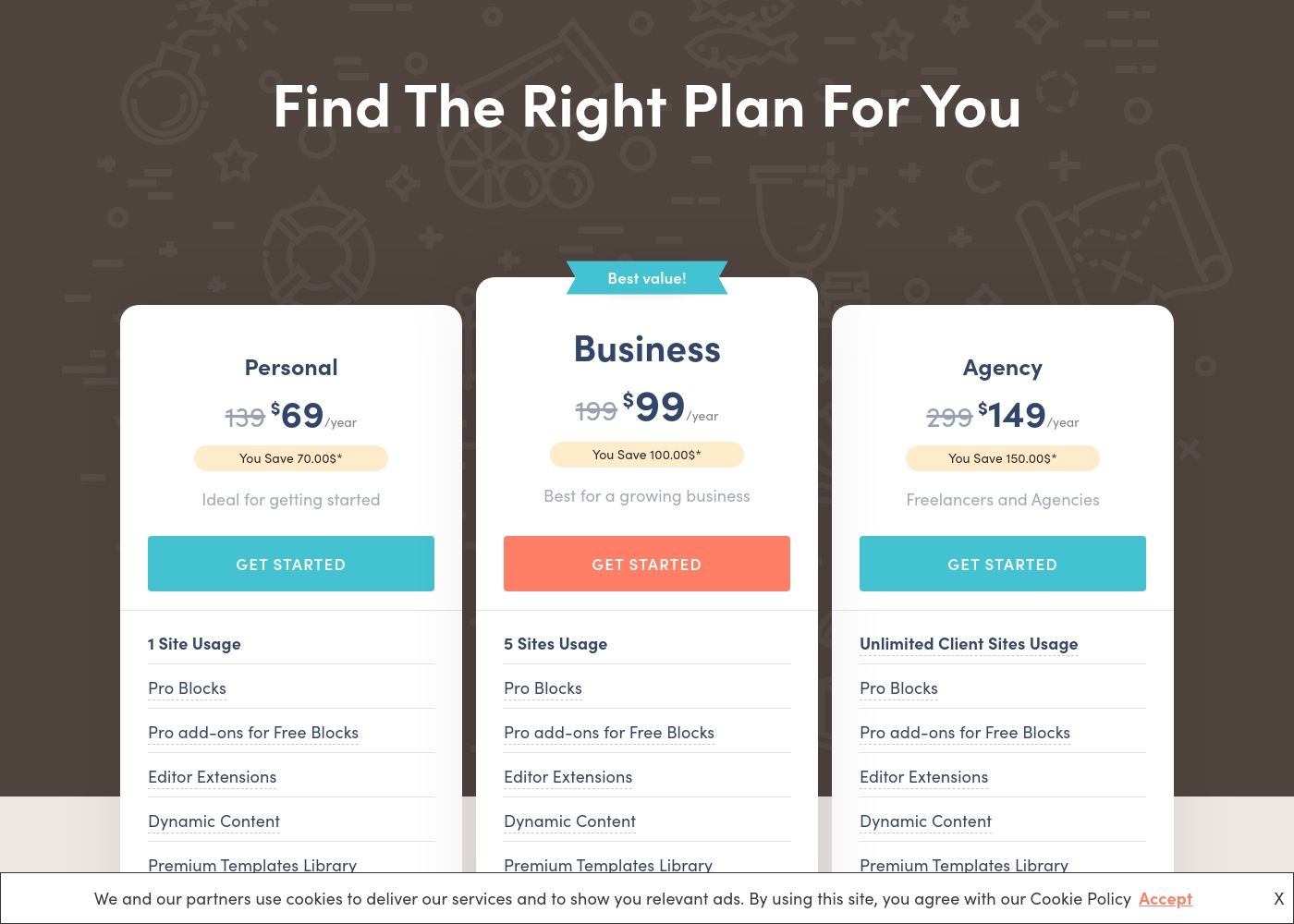
Otter Blocks costs between $69 and $149 per year with 3 plans: Personal at $69, Business at $99, and Agency at $149.
These annual plans offer powerful tools for enhancing the Gutenberg editor. Please note that the prices listed are a special introductory rate, and all renewals will occur at the full, standard pricing.
Personal
Price: $69/year (Introductory rate; renewals at $139/year) Websites Supported: 1 Site Usage Best For: Ideal for getting started Refund Policy: 30-day money-back guarantee Other Features:
- Pro Blocks (e.g., Add to Cart Block, Business Hours Block)
- Pro add-ons for Free Blocks
- Editor Extensions (e.g., Visibility Conditions, Custom CSS)
- Dynamic Content
- Premium Templates Library
- 1 Site Usage
- Pro Blocks
- Pro add-ons for Free Blocks
- Editor Extensions
- Dynamic Content
- 5 Sites Usage
- Pro Blocks
- Pro add-ons for Free Blocks
- Editor Extensions
- Dynamic Content
- Unlimited Client Sites Usage
- Pro Blocks
- Pro add-ons for Free Blocks
- Editor Extensions
- Dynamic Content
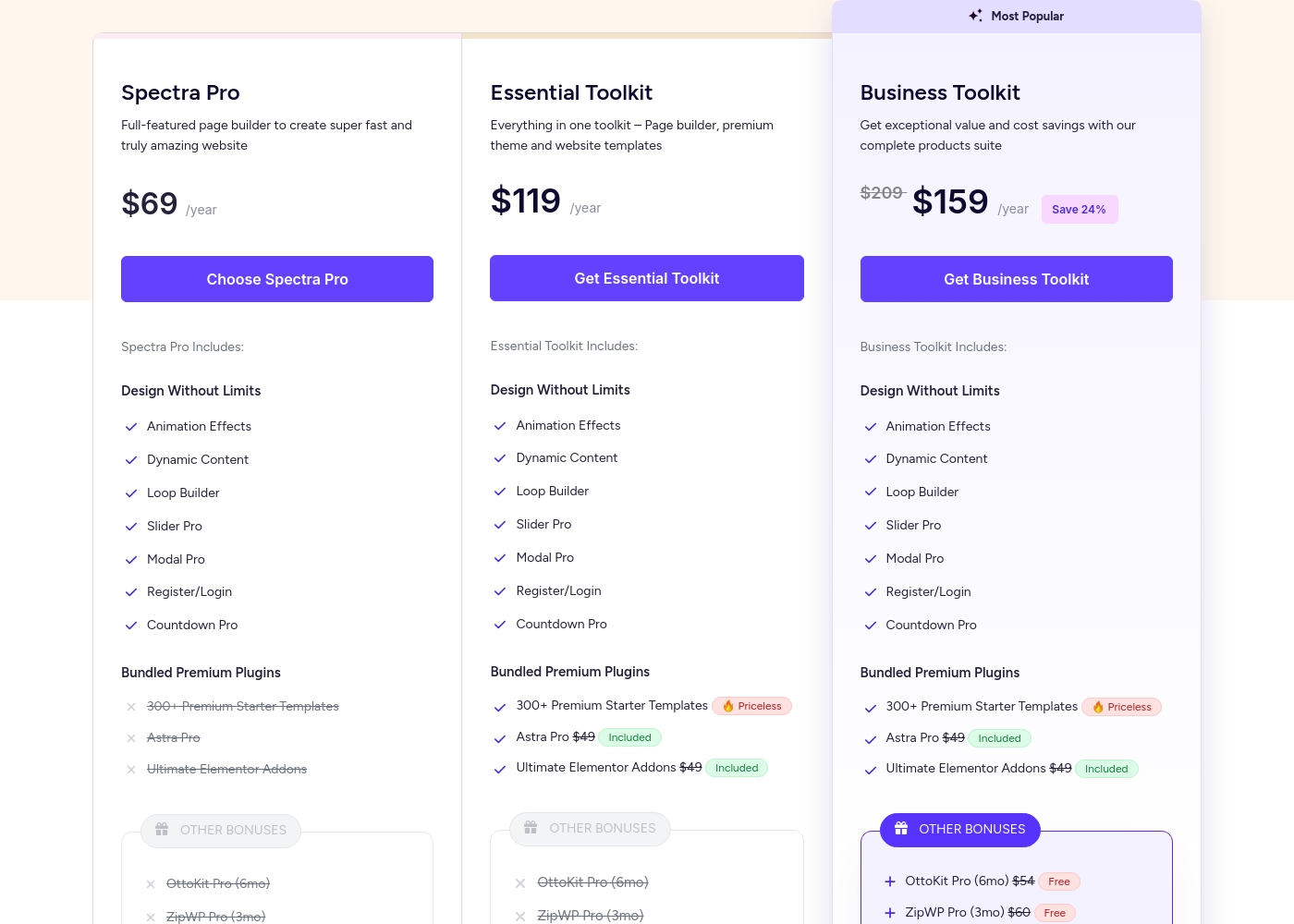
Spectra Pro pricing: Spectra Pro offers flexible subscription plans starting at $69/year for use on up to 3 websites. Users can choose between annual subscriptions or one-time lifetime payments across three distinct product tiers: Spectra Pro, Essential Toolkit, and Business Toolkit.
All plans are backed by a 14-day 100% money-back guarantee for peace of mind. Note that free version of Spectra is also available for those who want to try the basics first before upgrading to a paid plan.
Check out the current pricing below to find the best fit for your needs and budget. For those looking for the best value, the Business Toolkit includes a comprehensive suite of tools for web agencies and professionals.
Pricing Notes
- Otter Blocks renewals jump significantly higher than the introductory rate (e.g., Personal plan renews at $139/year instead of $69/year).
- Spectra Pro offers a lifetime deal option, which Otter Blocks does not, providing predictable long-term costs.
- Spectra Pro has a free base plugin, allowing extensive testing before commitment.
- The Spectra Pro Business Toolkit bundles several valuable tools like Astra Pro and SureFeedback, increasing its perceived value for agencies.
- Otter Blocks offers a 30-day money-back guarantee, twice the duration of Spectra Pro's 14-day guarantee.
Pricing Head-to-Head
User Reviews
The aggregated external feedback, sourced primarily from Trustpilot (where the developer Themeisle holds an impressive 4.8 rating over 500+ reviews), focuses heavily on the exceptional quality of customer support. Users frequently describe the team as professional, friendly, and patient, often resolving complex technical issues within hours or less than 24 hours.
Reviewers noted this quick response time as crucial, especially for new users or those grappling with tricky plugin configurations. Beyond the responsive assistance, users praise the products themselves, including the broader family of themes and plugins, for their overall effectiveness and ease of use.
I had issues with one of their plugins, so I reached out to support immediately. They responded within hours, provided multiple suggestions, and solved the problem perfectly. I could not be happier with this kind of fast, efficient resolution.
Our Verdict
Choosing between Otter Blocks and Spectra Pro often boils down to performance versus precision. Both tools significantly upgrade the standard WordPress Gutenberg block editor. If you prioritize maximum site speed and robust dynamic data handling, Spectra Pro is your winner. If you need fine-grained control over element visibility and e-commerce design, choose Otter Blocks. Otter Blocks’ superpower lies in its granular control and specialized blocks. Its Visibility Conditions feature lets you target content based on cart status or user roles easily. Furthermore, Otter Blocks provides dedicated WooCommerce Builder Blocks for perfect product page customization. Reviewers consistently praise Otter Blocks for its exceptionally patient support team. Spectra Pro’s greatest strength is its relentless focus on speed and performance guarantees. It is built to achieve 100% Core Web Vitals scores using a dynamic just-in-time compiler. Spectra Pro offers excellent long-term value with bundled services and the highly desirable lifetime payment option. It also provides advanced data looping for complex content display. The deciding factor is cost and technical priority. Spectra Pro offers lifetime deals, avoiding high renewal costs common with Otter Blocks. Spectra Pro is best for performance-focused sites using complex query loops. Otter Blocks excels for personalized e-commerce and designers needing deep CSS control. **Final takeaway:** If speed and predictable pricing matter most, pick Spectra Pro. If advanced targeting, e-commerce control, and stellar support are critical, go with Otter Blocks.
Frequently Asked Questions
Which is better for website speed: Otter Blocks or Spectra Pro?
Spectra Pro promises superior speed due to its design focus on achieving 100% Core Web Vitals scores. It uses a just-in-time compiler to load assets only when needed. Otter Blocks is very lightweight but does not make the same absolute performance guarantee.
Does Otter Blocks offer a lifetime license like Spectra Pro?
No, Otter Blocks is sold exclusively through annual subscriptions. Spectra Pro offers an appealing one-time lifetime deal. This makes Spectra Pro cheaper in the long run by avoiding recurring renewal fees.
Which is better for custom e-commerce product pages?
Otter Blocks is superior for e-commerce design due to its dedicated WooCommerce Builder Blocks. These blocks allow true customization of Single Product Page layouts. Spectra Pro focuses more on general conversion elements like popups and timers.
How do the renewal prices compare between Otter Blocks and Spectra Pro?
Both use introductory pricing, but Otter Blocks renewals jump significantly higher. Spectra Pro offers predictability with its lifetime purchase option. You must budget carefully for the high renewal rates of Otter Blocks.
Which tool provides better collaboration features for agencies?
Spectra Pro’s Business Toolkit includes specialized tools like SureFeedback for client collaboration. While Otter Blocks provides unlimited site licenses, it lacks dedicated collaboration software bundles.
Does Spectra Pro support detailed block visibility like Otter Blocks?
Otter Blocks offers superior, granular Visibility Conditions based on users, roles, or cart contents. Spectra Pro focuses visibility mostly on behavioral triggers like exit intent or scroll depth.
Ready to Choose?
Both tools have their strengths. Choose based on your specific needs.