Bricks

Bricks review

A code-free visual builder for self-hosted WordPress, from first page to full site.

Bricks costs from $6.58/mo · 4 plans

By Ciroapp Editorial Team · Updated Sep 9, 2026

Commission may apply at no extra cost

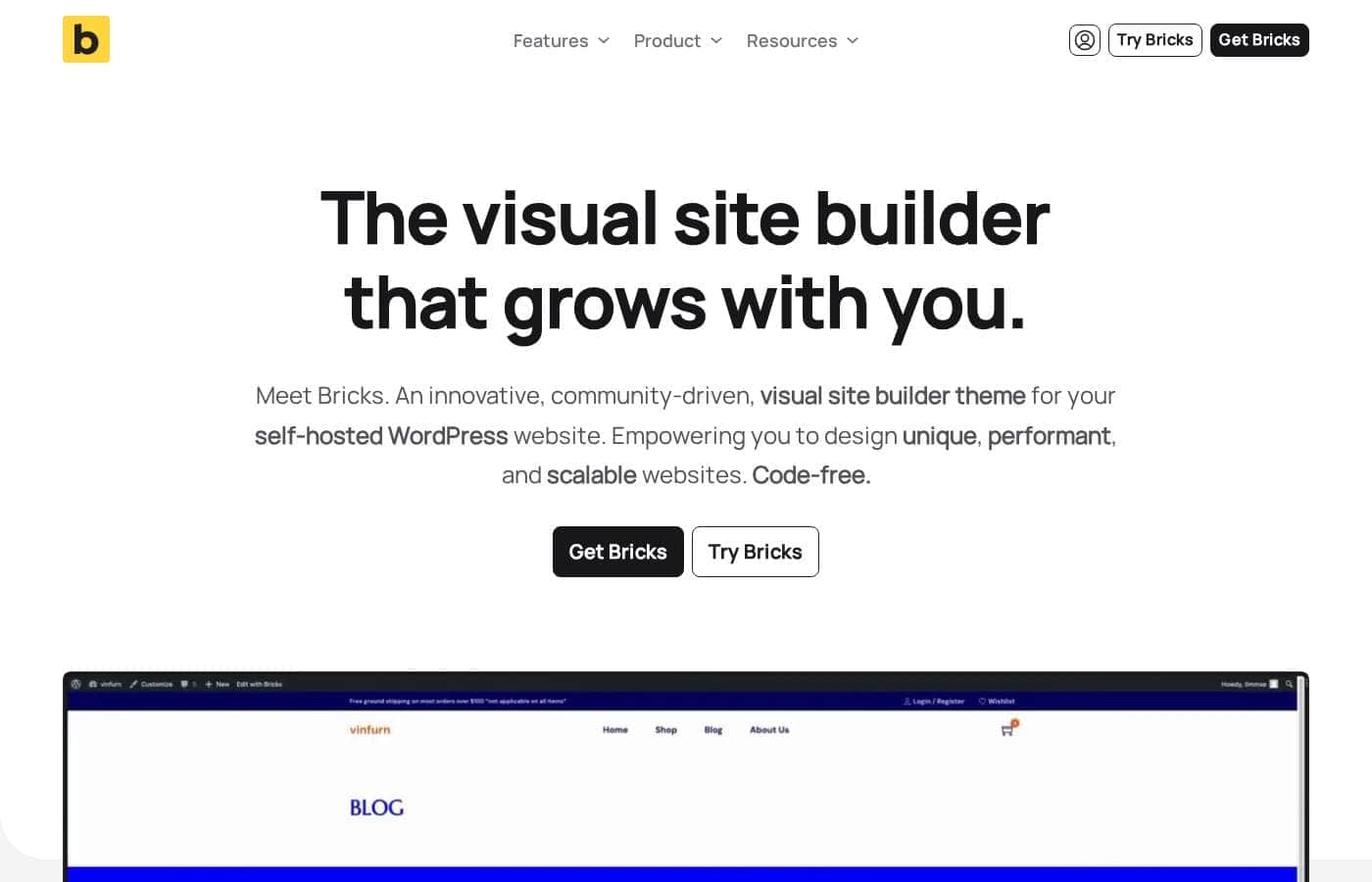
Bricks homepage screenshot

At a glance

Quick overview for Bricks: rating, pricing summary, key features, and highlights.
Vendor page checked Oct 26, 2026

Ciroapp score

4.2/ 5

Bricks packs full-site editing, query loops, WooCommerce design, and custom breakpoints into one visual builder, and every plan includes the entire feature set. The trade-offs are real but manageable: it's self-hosted WordPress only, there's no free plan for live sites, and beginners face a learning curve. Overall, it's a strong pick for freelancers and agencies who want speed and control.

Pros

  • Full site editing in one builder — headers, footers, pages, and templates are all crafted with drag-and-drop, nestable elements, so you don't stitch together separate tools like a theme customizer plus a page plugin.
  • Built-in design system controls — your own CSS class system, global colors, global styles, and typography — let you rebrand a whole site by updating globals instead of hunting through every page.
  • Unlimited custom breakpoints with both desktop- and mobile-first editing, viewable and editable directly in the builder, so what you design matches what visitors actually see on tablets and phones.

Cons

  • Bricks works only on self-hosted WordPress, so it isn't an option for other website platforms, and if you depend on a specific page-builder plugin ecosystem you'll need to verify compatibility first.
  • There's no free plan — the free playground is for testing only, and publishing a live site requires a paid license, with taxes added at checkout and subscriptions renewing yearly until canceled.
  • Beginners may hit a learning curve with custom breakpoints, query loops, and class-based styling compared to simpler drag-and-drop builders.
Best for
  • Freelancers and agencies building client websites on self-hosted WordPress
  • Store owners who want to design every WooCommerce page visually
  • Designers who want visual building plus control over CSS and custom code
Free trial
Yes
Money-back guarantee
Yes — 60 days
This section is a summary. Detailed sections about features, use cases, pricing, and reviews follow below.

What is Bricks?

Many visual builders leave you with slow pages and bloated code. Bricks flips that. It's a code-free visual theme builder for self-hosted WordPress, built for speed and flexibility.

You can even try the whole builder free in its online playground before spending a cent.

Bricks is a visual site builder theme for self-hosted WordPress websites. You design entire sites — headers, footers, pages, and shop layouts — by dragging and dropping elements, no code required. It's aimed at freelancers, agencies, and site owners who want unique, fast, scalable websites.

You can shape everything visually, from flexbox and CSS grid layouts to WooCommerce pages, and add your own HTML, CSS, JS, or PHP when you want more control.

Should you choose Bricks?

Quick buyer guidance before you compare plans or click through.

Choose it if

  • You already run a self-hosted WordPress site and want to redesign it yourself
  • You want header-to-footer editing in one visual tool
  • Consistent branding matters, so you want global colors, styles, and a class system
  • You like test-driving software first — Bricks offers a free playground
  • You want ready-made templates and design sets included in every plan

Skip it if

  • It only works on self-hosted WordPress, so it's not an option for other website platforms
  • No free plan is mentioned — just a free playground — so you'll need a paid plan to publish a live site
  • Beginners may hit a learning curve with breakpoints, query loops, and class systems
  • If you rely on a specific page-builder plugin ecosystem, verify it works alongside Bricks first

Next steps before buying

  1. 1Confirm your site runs on self-hosted WordPress — that's a hard requirement
  2. 2Spend time in the free playground to see if the builder clicks for you
  3. 3Check the official pricing page for current plan costs and license terms, since they're not listed here
  4. 4Browse the pre-made templates and design sets to gauge how much you'd actually reuse
  5. 5Compare Bricks with a builder you already know, and review any refund or trial terms before buying

Ease of use

The site presents Bricks as code-free, and the drag-and-drop builder, free playground, and included templates point to an approachable start. That said, its depth — custom breakpoints, query loops, and conditional logic — suggests a learning curve if you're new to WordPress design concepts. A forum, Facebook group, and academy docs are there when you get stuck.

Bricks Key Features

✨ Design your entire site in one place

Bricks gives you full site editing without code. Drag elements onto the page, nest them inside each other, and adjust spacing visually. Headers, footers, pages — everything lives in the same builder.

That means you're not stitching together separate tools, and your whole site stays consistent from first screen to last.

✨ Keep your design system under control

You're not stuck restyling every element by hand. Set up your own CSS class system, global colors, global styles, and typography once, then reuse them everywhere. Build layouts with flexbox or CSS grid in seconds.

When a client wants a rebrand, you update the globals instead of hunting through every page.

✨ Query your content without writing queries

The Query Loop Builder lets you pull content from your database visually — latest posts, users, media, categories, and more. If you're comfortable with code, you can write your own PHP query instead. Display options include load more buttons, infinite scroll, and AJAX pagination, so long content lists stay easy to browse.

✨ Design for every screen, your way

Bricks supports unlimited custom breakpoints and takes a desktop and mobile-first approach — the only builder that does both, according to the site. You can view and edit any breakpoint directly in the builder, so what you see matches what visitors get. No guessing how your layout behaves on a tablet or phone.

⚙️ Add logic, motion, and code when you need it

Some pages need more than static layouts. Bricks covers that inside the builder: Conditions show or hide content based on fully customizable rules. Interactions pair triggers like click and hover with actions.

Custom code slots your own HTML, CSS, JS, and PHP into the header, footer, or any page.

Use Cases

🚀 Build Client Sites Faster

You're a freelancer or agency launching sites on self-hosted WordPress. Design headers, footers, and pages in one visual tool, starting from ready-made templates. Expected outcome: Projects ship faster, and you can respond flexibly to client requests.

Tip: Test ideas first in the free playground — it costs nothing.

🛒 Design Your Whole Store

You run a WooCommerce shop and want every page to match your brand. Style the shop, product, cart, checkout, and account screens visually — no code required. Expected outcome: A store that feels consistent from first browse to final checkout.

🔄 Show the Right Content Automatically

You manage a blog or content-heavy site. Query your database visually with the Query Loop Builder, then add load more buttons or infinite scroll. Use conditions to show or hide content.

Expected outcome: Dynamic pages that update themselves as you publish.

🎨 Keep Your Brand Consistent

You want colors, fonts, and spacing to look the same everywhere. Set global colors, global styles, and your own CSS class system once. Then reuse them across the whole site.

Expected outcome: A cohesive site that's simpler to maintain and update.

Bricks pricing

From$6.58/mo

  • 4 plans

Vendor page checked on Oct 26, 2026; confirm current prices on Bricks's pricing page

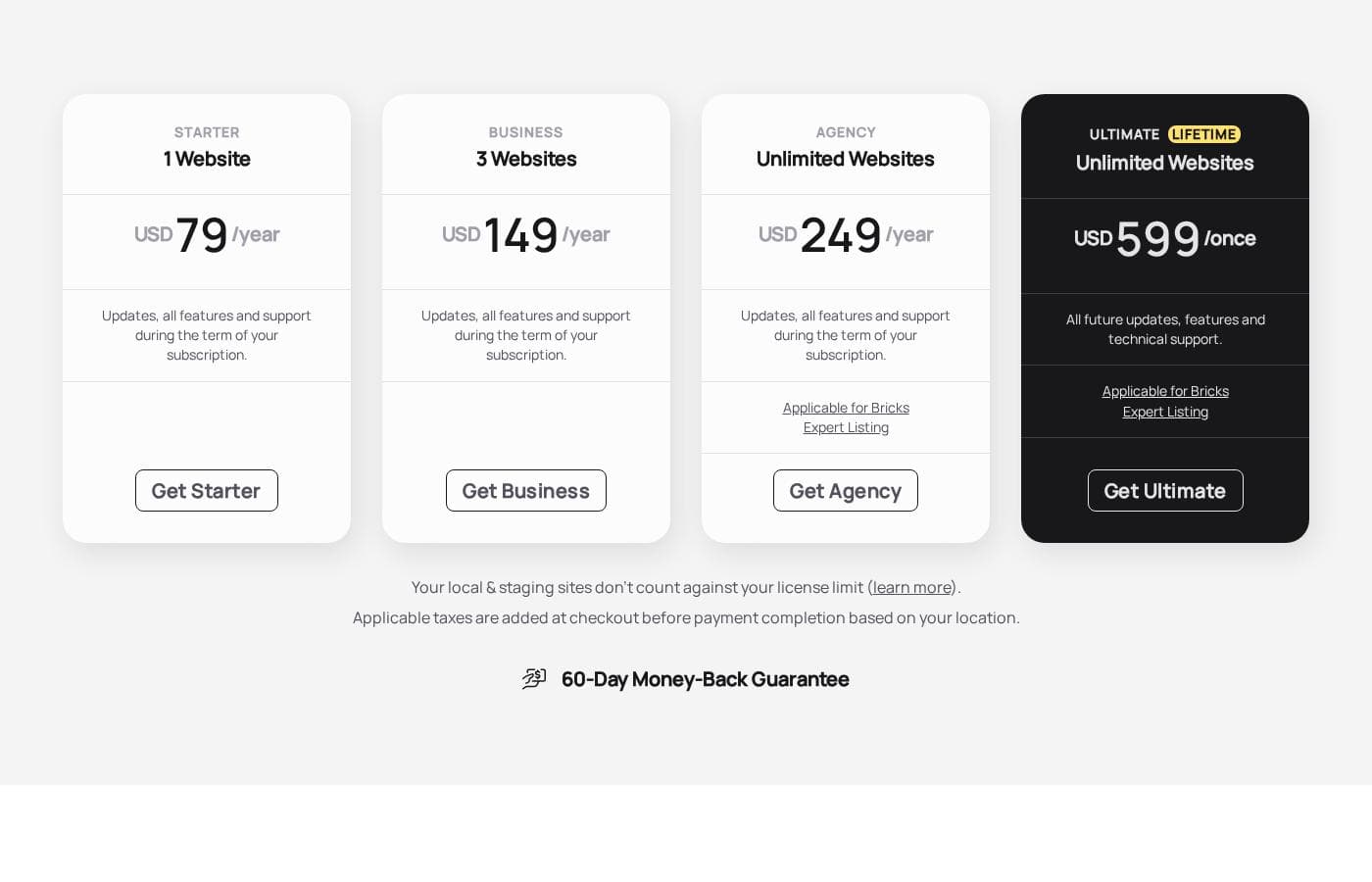
Bricks pricing page screenshotView pricing page screenshot
PlanBilled monthlyBilled annuallyIncludes
Starter
—
$6.58/mo
$79 per year
1 website; updates, all features and support during the subscription term.
Business
—
$12.42/mo
$149 per year
3 websites; updates, all features and support during the subscription term.
Agency
—
$20.75/mo
$249 per year
Unlimited websites; updates, all features and support during the subscription term.
Ultimate Lifetime
$599
—
Unlimited websites; all future updates, features and technical support.

Price history

Tracking prices since Sep 8, 2026. No price change detected yet.

Pricing types: Free trial, Yearly subscription, One-time payment, Lifetime deal

Pricing notes

Bricks offers yearly subscriptions (Starter $79, Business $149, Agency $249) plus a one-time Ultimate lifetime plan at $599. All plans include the full feature set, updates, and support, with a 60-day money-back guarantee.

Bricks costs between $79 and $599 with four plans: Starter at $79/year, Business at $149/year, Agency at $249/year, and Ultimate Lifetime at $599 once.

Every plan unlocks the full feature set — the only difference is how many websites you can activate.

Starter

Price: $79/year Websites Supported: 1 Best For: A single live site, whether it's your own or one client project Refund Policy: 60-day money-back guarantee Other Features:

  • All features, updates, and email/forum support while subscribed
  • Local and staging sites don't count against your license limit

Starter is the simple choice if you're building one website. Nothing is held back — you get every feature Bricks offers. Just remember your subscription renews yearly until you cancel it.

Business

Price: $149/year Websites Supported: 3 Best For: Freelancers juggling a few live sites Refund Policy: 60-day money-back guarantee Other Features:

  • Full feature set, updates, and support during your subscription term
  • Local and staging copies stay free of your license limit

Business fits freelancers and small studios running two or three client sites. You can use your license on your own and your client's websites. Reselling the license itself isn't allowed, though.

Agency

Price: $249/year Websites Supported: Unlimited Best For: Agencies and teams launching sites at scale Refund Policy: 60-day money-back guarantee Other Features:

  • Unlimited website activations
  • Updates, all features, and support during the term
  • Qualifies you for the Bricks Expert Listing

Agency makes sense if you build sites for many clients. Each multisite subsite needs its own license unless it's local or staging — that's worth confirming before you buy.

Ultimate Lifetime

Price: $599 once Websites Supported: Unlimited Best For: Long-term users who'd rather skip yearly renewals Refund Policy: 60-day money-back guarantee Other Features:

  • All future updates, features, and technical support
  • Unlimited website activations
  • Qualifies for the Bricks Expert Listing

Ultimate Lifetime is one payment, and it's truly lifetime. You keep receiving updates and support forever, with no renewals. It's the pick for anyone committed to Bricks for the long haul.

A few final details. Taxes are added at checkout based on your location. You can upgrade or downgrade anytime, and plan changes are prorated. There's no downloadable free version, but you can try the latest Bricks for free in the online playground at try.bricksbuilder.io. Every purchase is also covered by a 60-day money-back guarantee.

Cost calculator

Estimate what Bricks costs for your team.

Billing

Starter has no published price for this billing cycle.

Starter has a flat price: the number of seats does not change the total. Estimate based on published list prices, before taxes, add-ons and discounts.

How to pay less for Bricks

  • A free trial is available: test it before you pay.
  • 60-day money-back guarantee if it does not fit.
  • Cheaper tools in this category start at $4.92/mo.
Start free trial

Email me when Bricks changes price

One email when we detect a price change on the vendor's pricing page. No newsletter, no deals. Unsubscribe in one click.

User Reviews

No reviews yet.

Write a Review

Write a Review for Bricks
0/100 characters
0/2000 characters

Why use Bricks?

Most builders ask you to choose: easy design or clean, fast code. Bricks is built so you don't have to pick — and you can judge for yourself in its free playground before buying anything.

  • Design the whole site visually. Build headers, footers, pages, and everything in between with drag-and-drop editing and nestable elements.
  • Keep your design consistent. Set up your own CSS class system, global colors, global styles, and typography once, then reuse them everywhere.
  • Fine-tune every screen size. Unlimited custom breakpoints and a desktop and mobile-first approach let you view and edit any breakpoint directly in the builder.
  • Handle dynamic content. The Query Loop Builder queries your database visually — or with your own PHP — with load more buttons, infinite scroll, and AJAX pagination.
  • Design your whole store. Craft every WooCommerce page visually, from shop and product pages to cart, checkout, and account screens.
  • Help steer the product. Feature ideas go to a public idea board, and the roadmap updates in real time, so you can see what's coming next.

Bricks alternatives

Other tools in the Page builder for WordPress category

View all Page builder for WordPress tools
WPBakery

WPBakery

Page builder for WordPress3.9/5From $4.92/mo

WPBakery is the trusted #1 Page Builder Plugin for WordPress, chosen by over 5,800,000 websites globally. It's an award-winning tool that lets you manage and build sophisticated content easily. You can design stunning pages using responsive, mobile-ready layouts that work seamlessly. The best part? It integrates perfectly with any WordPress theme you choose. 💡 This solution is ideal for anyone looking for powerful design control without needing programming knowledge.

Beaver Builder

Beaver Builder

Page builder for WordPress4.1/5

Beaver Builder is a trusted, powerful website builder designed to simplify WordPress development. Since 2014, it has helped users build professional websites easily, often in minutes instead of months. It serves a wide audience, including agencies needing stability, freelancers aiming for speed, and entrepreneurs who require easy updates without knowing how to code. This visual building method allows you to instantly see changes happen live on the front end of your site. You can start with pre-designed templates or build from scratch, creating any type of site, including blogs, eCommerce stores, and membership portals.

Otter Blocks

Otter Blocks

Page builder for WordPress4.1/5From $5.75/mo

Otter Blocks is an effective collection of advanced, dynamic page building blocks designed specifically for the WordPress block editor, Gutenberg. It acts like a powerful upgrade, making the native editor much more flexible and capable. This collection is ideal for anyone looking to achieve impressive layouts quickly and professionally. It is built to be lightweight and simple, ensuring your site remains fast while you gain advanced customization options.

SeedProd

SeedProd

Page builder for WordPress4.1/5

SeedProd is a powerful, yet easy-to-use, drag and drop page builder for WordPress. It’s built for anyone who wants to create beautiful themes, pages, and layouts rapidly. You don't need to be a designer, thanks to the professionally designed pre-built themes. 💡 The builder helps you get your site up and running in minutes.

Droip

Droip

Page builder for WordPress4/5From $4.92/mo

Droip is a dynamic, visual tool designed to help you create stunning, responsive websites. It’s built for designers who demand unmatched accuracy and finesse in their work. Instead of battling restrictive interfaces, you gain specialized tools for complex layout structuring. You can experience pure creative freedom while speeding up your overall workflow.

Elementor

Elementor

Page builder for WordPress4.3/5
Spectra Pro

Spectra Pro

Page builder for WordPress4.1/5

Spectra Pro is a powerful web design toolkit built specifically for the native WordPress editor. It offers a new, advanced way to build websites that are both stunning and super fast. It focuses heavily on performance, boasting zero bloat and security through clean code written to the latest standards. ✅ Because it works directly inside the familiar WordPress editor, it is instantly easy to learn and use. It’s perfect for creators who want professional results without the complexity of heavy external dependencies or frustrating code.

Breakdance

Breakdance

Page builder for WordPress4.1/5

Breakdance is a WordPress visual website builder designed for WooCommerce stores. It offers AI-assisted content, an Advanced Form Builder, and a Built-In Popup Creator, plus Dynamic Data support for anything in the WordPress database. It also includes Element Studio, the world's first built-in element development IDE for WordPress, making it easy to craft custom builder elements. For users coming from Elementor, Breakdance provides a smooth upgrade path and a modern editing experience.

Cheapest Page builder for WordPress software for 1 to 25 users

Bricks FAQ

How much does Bricks cost?

Bricks's cheapest paid plan, Starter, costs $6.58 per month. Paid plans range from $6.58 to $20.75 per month.

Does Bricks offer a free trial or a money-back guarantee?

Bricks offers a free trial. It has a 60-day money-back guarantee.

Has Bricks's price changed recently?

No. We have not detected a price change since we started tracking on Sep 8, 2026.

Can I try Bricks before buying?

There's no downloadable free version. You can test the full, latest builder free in the online playground at try.bricksbuilder.io — just create an account. To publish a live site, you'll need a paid plan.

What happens to my sites if I cancel?

Your license stays active until the end of your current billing period. After that, you can still edit your sites, but you'll lose access to updates, support, and community templates.

Can I switch from a subscription to the lifetime plan?

Yes. Purchase the Ultimate license, activate it on your sites, then cancel your subscription in your Bricks account. You can get a refund within the 60-day window, or the remaining value before renewal.

Does one license cover a WordPress multisite?

Each multisite subsite needs its own license activation unless it's local or staging. Local and staging installs don't count against your limit. Deactivating a site or removing it frees up a slot.

Ready to try Bricks? Check out the official site or pricing.

Are you Bricks? Claim this listing · Get the badge