Vista Social

Vista Social review

A social media management platform that helps your team move faster from one shared hub.

Vista Social costs from $64/mo · 4 plans

By Ciroapp Editorial Team · Updated Sep 17, 2026

Commission may apply at no extra cost

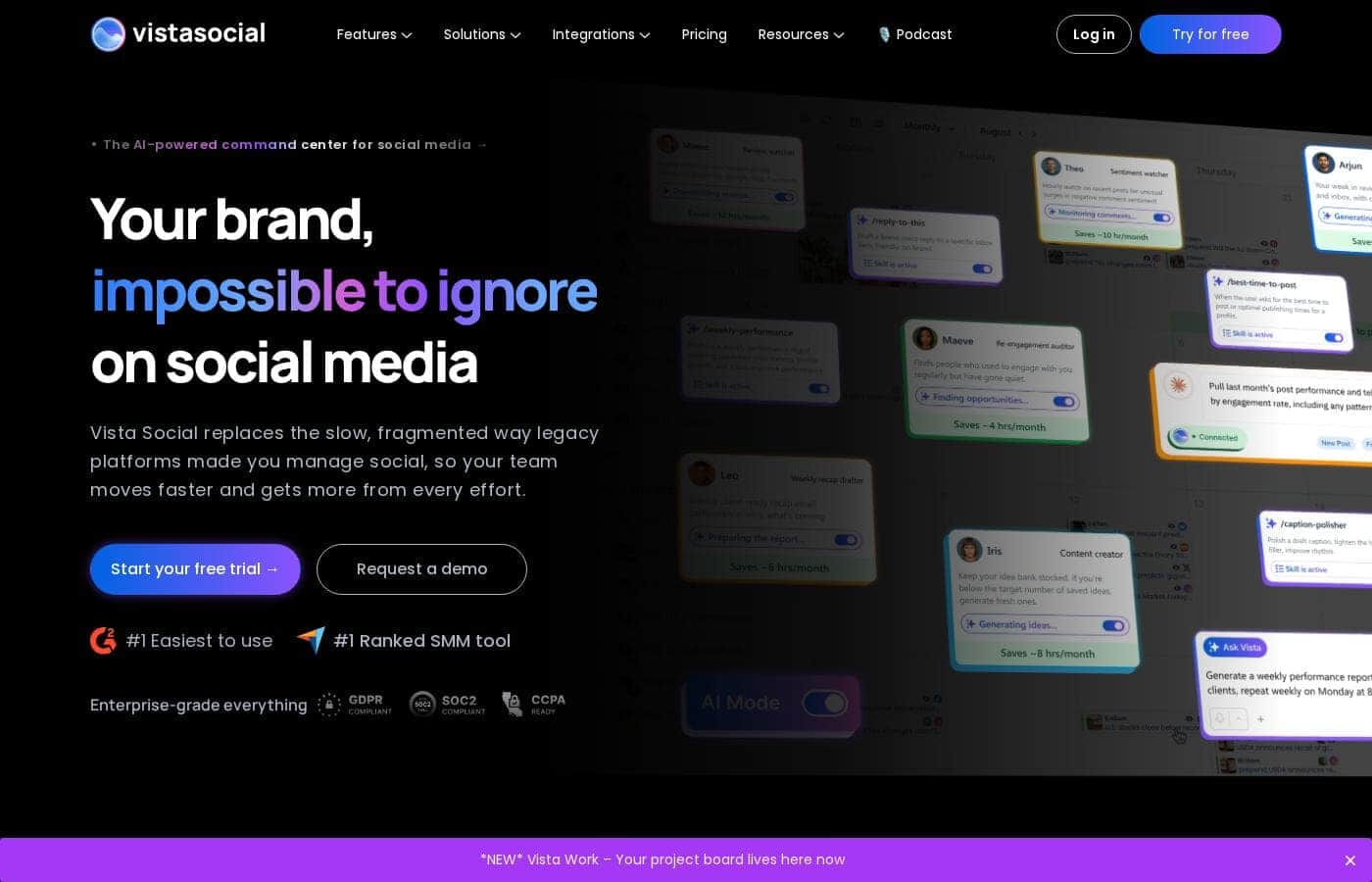
Vista Social homepage screenshot

At a glance

Quick overview for Vista Social: rating, pricing summary, key features, and highlights.
Vendor page checked Oct 13, 2026

Ciroapp score

4.0/ 5

Vista Social pulls planning, publishing, engagement, and reporting into one AI-powered hub, with DM automations and white label reports built in. Plans start at $64 per month on annual billing, but there's no free plan and extras like social listening cost more. Overall, it's a solid choice for teams and agencies that want AI and consolidation in one place.

Pros

  • Pros:Agency-friendly features on higher tiers, including white label reports and dashboards, client profile connect, and approval workflows with custom fields for multi-brand management.
  • Pros:DM automations go beyond canned replies, with advanced flows on the Advanced plan that can capture leads and up to 100,000 automation contacts on Scale.
  • Pros:Vista Work project management and the Vista Page link in bio tool are included in the base plan, reducing the need for separate tools.

Cons

  • Cons:Key capabilities cost extra — full social listening starts at $75/month, Employee Advocacy starts at $199/month for 25 employees, and X (Twitter) is only available as a paid add-on.
  • Cons:Refund terms aren't detailed on the site, so annual billing (one upfront payment) carries some risk if the platform doesn't work out.
  • Cons:Enterprise features like Single Sign-On (SAML 2.0) and historical data migration are only available as add-ons on the custom-priced Enterprise plan, locking out smaller teams that need them.
Best for
  • Marketing teams managing a brand's social media from one platform
  • Larger organizations that want enterprise-grade social media management
  • Teams replacing slow or fragmented legacy social tools
Free trial
Yes — 14 days
This section is a summary. Detailed sections about features, use cases, pricing, and reviews follow below.

What is Vista Social?

Jumping between tabs and tools to run your brand's social media slows everything down. Vista Social puts social media management in one place, so your team moves faster. It's an AI-powered platform built to replace fragmented legacy tools, and it's trusted by teams at brands like ClickUp, NVIDIA, and Zillow.

Vista Social is a social media management platform built for teams. It's positioned as enterprise-grade, and its customer list includes brands like ClickUp, Oracle, Chick-fil-A, Kia, and the University of Cambridge. Based on the site, it's aimed at marketing teams who want to manage their social presence from one place and get more from every effort.

Should you choose Vista Social?

Quick buyer guidance before you compare plans or click through.

Choose it if

  • Teams that feel held back by slow, fragmented social media tools
  • Marketing teams that want AI built into their social media management
  • Organizations that prefer enterprise-grade software for social media
  • Teams looking to scale their marketing efforts, the way ClickUp describes doing with Vista Social
  • Brands that value strong social proof from well-known customers like NVIDIA and the University of Cambridge

Skip it if

  • Solo users or very small operations: the site positions Vista Social for teams, so confirm a smaller plan fits before signing up.
  • Shoppers comparing many options: the homepage offers limited public detail, so plan to review integrations, solutions, and resources before deciding.

Next steps before buying

  1. 1Visit the Integrations page to verify Vista Social supports every social network your team manages.
  2. 2Watch the ClickUp case study to see how a real marketing team scales with the platform.
  3. 3Browse the Solutions and Resources sections to see how the platform maps to your team's needs.
  4. 4Review any free trial or refund terms before you commit, and compare Vista Social with other tools on your shortlist.

Ease of use

The vendor emphasizes speed and consolidation, claiming the platform replaces slow, fragmented workflows so teams move faster. That points to a focus on simple, unified workflows. A demo or trial is the best way to judge day-to-day fit.

Vista Social Key Features

⚡ One hub instead of scattered tabs

Vista Social brings planning, publishing, engagement, and reporting into one AI-powered command center. Your team stops hopping between tools and works from a single shared view. If your current setup feels slow and disconnected, that's exactly what it's built to fix.

The result: faster work and more from every effort.

✨ AI at the core, not bolted on

Ask Vista works as your AI command center, and MCP support connects the AI tools you already use. With AI Training & Knowledge, you can train Vista to handle messages and comments on autopilot. It's most useful when replies repeat and your team needs hours back.

✨ Plan and publish without the scramble

Content stays on schedule with planning and publishing tools built for volume. When you need more control, you also get:

  • Bulk scheduling to queue posts in batches
  • Approval workflows and custom fields for reviews
  • Smart scheduling to help time your posts

💬 Engage faster with DM automations

Messages, comments, and reviews all land in one place, so nothing slips by. DM automations take over repetitive replies, and advanced versions can capture leads. Use this when response volume grows faster than your team can handle.

The payoff: quicker replies and more conversations moved forward.

✨ Reporting and extras for teams and agencies

Scheduled and custom reports keep stakeholders in the loop without manual work. Agencies can white label reports and dashboards and use client profile connect to manage multiple brands. Add the Vista Page link in bio tool and Vista Work project management, and your day-to-day stays in one place.

Use Cases

🚀 Marketing teams ditching tab overload

Your team stops juggling tabs. Plan, schedule, and publish posts from one hub, then answer messages, comments, and reviews without switching tools. Vista Work keeps projects moving.

Expected outcome: faster days and one shared view of every channel. > Tip: Start with bulk scheduling to clear your backlog.

🏢 Agencies managing multiple clients

You handle several client brands at once. Connect client profiles, run posts through approval workflows, and share white label reports with your branding. Expected outcome: cleaner handoffs and reports that look like yours.

Tip: The Scale plan covers up to 70 profiles.

🤖 Social teams putting AI to work

Your team wants AI in the daily routine. Use Ask Vista as your command center, train AI to handle comments on autopilot, and set DM automations that capture leads. Expected outcome: quicker replies and fewer repetitive tasks for everyone.

🛡️ Enterprises that need control

You run social for a large organization. Add sentiment detection, premium analytics with industry benchmarking, and brand safety tools. A dedicated account manager handles onboarding and training.

Expected outcome: workflows your leadership and compliance teams can trust.

Vista Social pricing

From$64/mo

  • 4 plans
  • Save up to 1% with annual billing

Vendor page checked on Oct 13, 2026; confirm current prices on Vista Social's pricing page

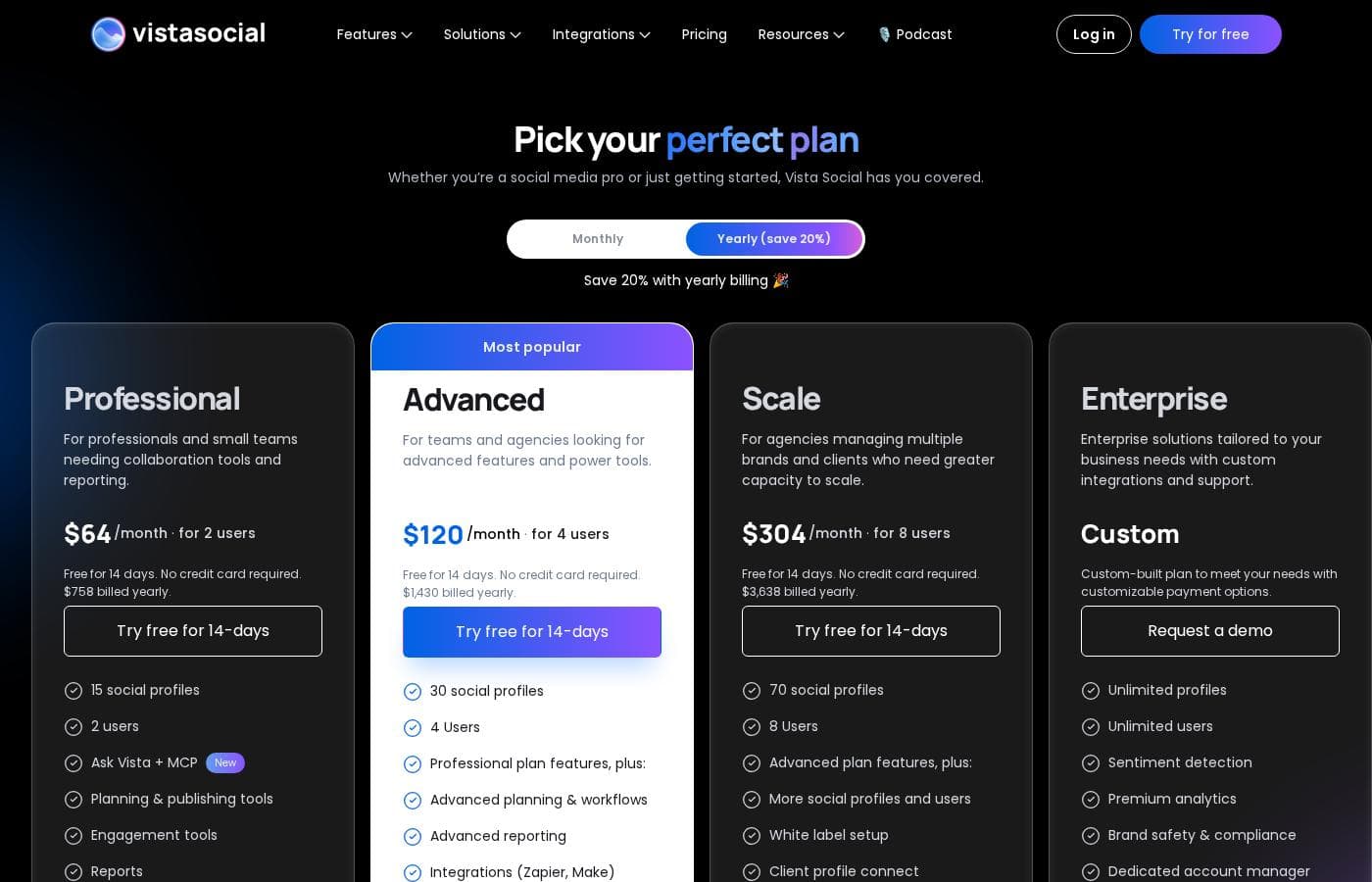
Vista Social pricing page screenshotView pricing page screenshot
PlanBilled monthlyBilled annuallyIncludes
Professional
$64/mo
$63.17/mo
$758 per year
Save up to 1% with annual billing
15 social profiles, 2 users
  • 15 social profiles
  • 2 users with custom roles and permissions
  • Ask Vista AI command center + MCP
  • Planning and publishing tools with bulk scheduling
  • Engagement tools for messages, comments, and reviews
  • +4
Advanced
$120/mo
$119.17/mo
$1,430 per year
Save up to 1% with annual billing
30 social profiles, 4 users
  • 30 social profiles
  • 4 users with custom roles and permissions
  • Everything in Professional
  • Advanced planning, custom fields, and smart scheduling
  • Custom reports and advanced reporting
  • +4
Scale
$304/mo
$303.17/mo
$3,638 per year
70 social profiles, 8 users, 100,000 DM automation contacts
  • 70 social profiles with add-ons in increments of 10
  • 8 users
  • Everything in Advanced
  • White label reports and dashboard
  • Client profile connect
  • +3
Enterprise
See vendor page
See vendor page
Unlimited profiles and users
  • Unlimited social profiles
  • Unlimited users
  • Sentiment detection
  • Premium analytics with industry benchmarking
  • Brand safety and compliance tools
  • +3

Price history

Tracking prices since Oct 1, 2026. No price change detected yet.

Pricing types: Free trial, Monthly subscription, Yearly subscription

Pricing notes

Vista Social offers four plans: Professional at $64/month, Advanced at $120/month, Scale at $304/month, and Enterprise with custom pricing. Displayed prices reflect yearly billing (a 20% discount), and every plan starts with a 14-day free trial—no credit card required.

Vista Social costs between $64 and $304 per month with 4 plans: Professional at $64, Advanced at $120, Scale at $304, and Enterprise at custom pricing.

Those prices are per month with yearly billing, which saves you 20% compared to paying month to month. Every paid plan starts with a 14-day free trial, and no credit card is required.

Professional

Price: $64/month ($758 billed yearly), for 2 users Best For: Professionals and small teams needing collaboration tools and reporting Other Features:

  • 15 social profiles
  • Planning, publishing, and engagement tools
  • Reports and listening on your social profiles
  • Vista Page link in bio tool
  • DM automations and Vista Work project management

This plan fits solo social media managers and small teams getting serious about scheduling and reporting. You also get Ask Vista, the AI command center, plus MCP support to connect your favorite AI tools.

Advanced

Price: $120/month ($1,430 billed yearly), for 4 users Best For: Teams and agencies looking for advanced features and power tools Other Features:

  • 30 social profiles
  • Everything in Professional
  • Advanced planning, approval workflows, and custom reporting
  • Zapier and Make integrations
  • Advanced DM automations for lead capture

It's flagged as the most popular plan, and it's easy to see why. Agencies juggling a few client accounts get room to grow without jumping to the top tier. AI Training & Knowledge also lets you train Vista to handle messages and comments on autopilot.

Scale

Price: $304/month ($3,638 billed yearly), for 8 users Best For: Agencies managing multiple brands and clients who need greater capacity Other Features:

  • 70 social profiles, with more available in increments of 10
  • White label reports and dashboard
  • Client profile connect
  • Up to 100,000 contacts for DM automations
  • Premium AI Training & Knowledge with Zendesk integration

Pick Scale if you're running social for lots of brands and need white labeling to keep reports on-brand for clients. One budgeting tip: add-ons like full social listening start at $75/month, and Employee Advocacy starts at $199/month for 25 employees.

Enterprise

Price: Custom pricing with customizable payment options Best For: Organizations needing tailored solutions, custom integrations, and support Other Features:

  • Unlimited profiles and users
  • Sentiment detection and premium analytics with industry benchmarking
  • Brand safety and compliance tools
  • Dedicated account manager, onboarding, and training
  • Custom integrations and quarterly account reviews

Enterprise is built for large teams with complex needs. If you need Single Sign-On or historical data migration, those are available as add-ons on this plan.

Free plan or trial? There's no free plan, but every plan includes a 14-day free trial with no credit card required, and you can switch between plans at any time. Nonprofit organizations in the US qualify for special pricing on Professional and Advanced. Monthly billing costs more per month but keeps commitments short, so yearly billing is the better value if you're in it for the long haul.
Cost calculator

Estimate what Vista Social costs for your team.

Billing

Professional allows up to 2 users: pick a larger plan for 5 users.

Estimate based on published list prices, before taxes, add-ons and discounts.

How to pay less for Vista Social

  • Pay annually: saves up to 1% compared with monthly billing.
  • Use the 14-day free trial before you pay.
  • Cheaper tools in this category start at $5/mo.
Start free trial

Email me when Vista Social changes price

One email when we detect a price change on the vendor's pricing page. No newsletter, no deals. Unsubscribe in one click.

User Reviews

No reviews yet.

Write a Review

Write a Review for Vista Social
0/100 characters
0/2000 characters

Why use Vista Social?

Why teams choose Vista Social

If your current setup feels slow and disconnected, that's the exact problem Vista Social was built to fix. Here's what stands out from the company's own positioning:

  • Built for speed. The platform is designed to replace slow, fragmented legacy workflows. The goal is simple: your team moves faster and gets more from every effort.
  • AI at the core. AI isn't a bolt-on here. Vista Social leads with it, which signals a focus on smarter, more efficient social media work.
  • Enterprise-grade foundation. The company describes the product as "enterprise-grade everything," which suggests it's built to handle demanding, larger-scale operations.
  • Proven by big names. ClickUp, NVIDIA, Zillow, Oracle, Chick-fil-A, Kia, Change.org, and the University of Cambridge all appear on the customer list.
  • See it in action first. ClickUp shares how its team scales marketing with Vista Social, so you can study a real example before you buy.

If your team is ready to stop fighting clunky tools, Vista Social deserves a close look.

Vista Social alternatives

Other tools in the Social Media Management category

View all Social Media Management tools
Squirrly Social

Squirrly Social

Social Media Management3.9/5From $14.99/mo

Squirrly Social is a market-proven digital marketing tool built on over 10 years of innovation. They currently serve over 25,000 premium clients, showing significant trust in the platform. Setting up the system is refreshingly easy. You can be ready to go in just 3 minutes and receive 14 full days of pre-planned content immediately. 💡 The service ensures you’re never alone. Human support is included with all plans, and they promise a quick response within 24 to 48 hours via email.

SocialBee

SocialBee

Social Media Management4.3/5From $29/mo

SocialBee is an all-in-one social media management platform from WebPros. It covers AI content creation, scheduling, engagement, analytics, and team collaboration across ten networks, including Facebook, Instagram, LinkedIn, TikTok, and Pinterest. Based on the site's customer examples, it serves solopreneurs, small businesses, and agencies — plus nonprofits, schools, and churches. Plans run from $29 to $449 per month, with a 14-day free trial that needs no credit card.

NapoleonCat

NapoleonCat

Social Media Management4.2/5

NapoleonCat is a social media customer service platform that unifies the Social Inbox to handle messages, comments, and reviews across multiple networks. It blends publishing, analytics, and reporting with AI-powered automation, collaboration tools, and a contact-aware Social CRM, so teams can respond quickly and consistently. The tool supports Facebook Page, Instagram, TikTok, LinkedIn, YouTube, Google My Business, and more, and offers auto-moderation to remove spam and toxic content, plus private messages and team workflows to scale service.

SocialPilot

SocialPilot

Social Media Management4.1/5From $30/mo

SocialPilot is a top-tier social media management and scheduling tool. It’s built with enterprise-grade capabilities perfect for helping you drive scalable growth. This platform offers an intuitive interface with virtually zero learning curve. It makes onboarding team members and managing client approvals completely hassle-free. SocialPilot is the ideal choice for scaling marketing agencies, large teams, and independent professionals who need robust capabilities in one central place.

Social Champ

Social Champ

Social Media Management4.1/5From $5/mo

Social Champ is an AI-powered social media management tool built for modern teams and growing businesses. It lets you handle scheduling, analysis, social listening, and competitor tracking all in one centralized place. It focuses on making complex publishing and multi-platform collaboration simple and highly efficient. The intuitive design helps teams connect many popular social platforms, making content creation much faster and more streamlined.

Juphy

Juphy

Social Media Management3.9/5

Juphy is designed specifically for e-commerce entrepreneurs running Shopify Stores. It functions as a powerful 24/7 AI Sales Agent, offering immediate sales support around the clock. This smart system acts like your best salesperson, available constantly to assist customers and drive conversions.

Influencer Hero

Influencer Hero

Influencer Marketing Platform3.4/5

ALL-IN-ONE Influencer Marketing Platform. Helping brands drive ROI through influencers. Leveraging big data, automation, and AI to increase conversions, lower CAC, and collect high-quality UGC for brands worldwide.

Volza

Volza

WordPress Plugins4/5

Volza is a global trade-intelligence platform providing verified international trade information and actionable market insights. With over 30 years of expertise in trade analytics, we support thousands of businesses and leading consultancies around the world.

Cheapest Social Media Management software for 1 to 25 users

Vista Social FAQ

How much does Vista Social cost?

Vista Social's cheapest paid plan, Professional, costs $64 per month. Paid plans range from $64 to $304 per month.

Does Vista Social offer a free trial or a money-back guarantee?

Vista Social offers a 14-day free trial.

How much do you save with annual billing on Vista Social?

Paying annually saves up to 1% compared with monthly billing, based on Vista Social's list prices.

Has Vista Social's price changed recently?

No. We have not detected a price change since we started tracking on Oct 1, 2026.

Which third-party integrations are included?

Advanced plans include Zapier and Make.com. Scale adds Zendesk integration for premium AI Training, and Enterprise offers custom integrations with your systems. X (Twitter) is available as an optional add-on. Verify your must-have tools before committing.

Does Vista Social support Single Sign-On or data migration?

Yes—both are available as add-ons on the Enterprise plan. Single Sign-On uses SAML 2.0, and data migration covers historical analytics from external sources. Enterprise also includes a dedicated account manager, onboarding, and training.

Can I change or cancel my plan later?

Vista Social says you can switch between plans at any time. Monthly billing keeps commitments short, while annual billing requires one upfront payment for the term. Refund terms aren't detailed, so review them before choosing yearly billing.

Ready to try Vista Social? Check out the official site or pricing.

Are you Vista Social? Claim this listing · Get the badge