Squirrly Social

Squirrly Social review

AI-powered social scheduling that keeps your feeds full from one dashboard.

Squirrly Social costs from $14.99/mo · 5 plans · Free plan available

By Ciroapp Editorial Team · Updated Sep 17, 2026

Commission may apply at no extra cost

Squirrly Social homepage screenshot

At a glance

Quick overview for Squirrly Social: rating, pricing summary, key features, and highlights.
Vendor page checked Nov 21, 2026

Ciroapp score

3.9/ 5

Squirrly Social pairs AI content curation and OpenAI-powered evergreen rewriting with one-click scheduling across seven networks, priced from free to $114.99 a month. Email-only support, Business-only Instagram, and the absence of independent reviews temper the appeal. Overall, it's a solid pick for solo marketers and small teams who want AI to keep their feeds active.

Pros

  • AI Social Media Assistant curates trending posts for your niche automatically, with the vendor claiming 3 minutes of setup can fill 14 days of content
  • EverGreen 2.0 uses OpenAI to rewrite older posts so platforms accept republished evergreen content instead of blocking it as duplicate
  • One-click publishing to seven networks (TikTok, Facebook Pages, Instagram Business, LinkedIn, X, and YouTube) from a single visual calendar

Cons

  • Support is email-only with 24-48 hour response times and no live chat, which slows down urgent troubleshooting
  • Instagram support is limited to Business Pages, so personal Instagram accounts cannot be connected
  • The Blog to Social Media workflow depends on credits from a separate product (Next Level Marketing AI), adding indirect costs
Best for
  • Solo marketers who want consistent posting without daily effort
  • Small businesses managing one brand across several networks
  • Agencies handling multiple client brands from one dashboard
Money-back guarantee
Yes — 30 days
This section is a summary. Detailed sections about features, use cases, pricing, and reviews follow below.

What is Squirrly Social?

Keeping every social feed active eats hours you don't have. Squirrly Social tackles that with AI content curation, evergreen posts rewritten by AI so platforms accept them again, and one-click publishing to seven networks from a single dashboard. Based on the company's site, it's built to keep your brand visible without the daily scramble.

Squirrly Social is a social media management platform from AISQ (Squirrly Limited), a company reporting 25,000+ paying clients. It combines AI content curation, scheduling, and automation in one dashboard. You connect TikTok, Facebook Pages, Instagram Business, LinkedIn (Pages and personal), X, and YouTube, then plan and publish from a visual calendar.

It suits solo marketers, small teams, and agencies juggling several brands.

Should you choose Squirrly Social?

Quick buyer guidance before you compare plans or click through.

Choose it if

  • You publish on TikTok, Facebook, Instagram Business, LinkedIn, X, or YouTube
  • You want AI to curate and rewrite content, not just schedule it
  • You manage several brands and need separate workspaces per client
  • You need unlimited scheduled posts and content categories on a flat monthly price
  • You prefer to try a free plan before committing to a subscription

Skip it if

  • Blog-to-social publishing depends on credits from a separate product, Next Level Marketing AI, so budget extra if you need that workflow
  • Support is email-based with 24-48 hour response times; no live chat is advertised
  • Instagram support covers Business Pages only, so personal Instagram accounts won't connect
  • The Agency plan runs $114.99 per month, which may be steep if you manage a single brand
  • Details like annual billing options aren't shown on the page, so confirm pricing terms before you commit

Next steps before buying

  1. 1Review the three paid tiers ($14.99, $34.99, and $114.99 per month) and match profile and brand limits to your needs
  2. 2Confirm your networks are supported, especially whether your Instagram account qualifies as a Business Page
  3. 3Start with the free plan (3 profiles, 10 posts per month) to test the workflow before paying
  4. 4Read the 30-day money-back guarantee terms so you know your refund window
  5. 5Compare with alternatives if you depend on networks or integrations not listed on the page

Ease of use

Setup looks light. The site claims 3 minutes of work can fill 14 days of content, and the visual calendar plus one-click publishing keep daily tasks simple. A free plan with no credit card lowers the barrier to trying it. If you get stuck, human email support responds within 24-48 hours on all plans.

Squirrly Social Key Features

✨ Stay in the know without searching

Stay active without daily searching. The AI Social Media Assistant curates the best posts in your niche and sends them to your profiles, so you look in the know. Squirrly says 3 minutes of setup can fill 14 days of content.

It suits anyone who wants full feeds but has no research time.

🔄 Create once, publish forever

Revive older posts instead of letting them sit. Platforms used to block repeated content, but EverGreen 2.0 rewrites your posts with OpenAI so they're fresh, unique, and on-brand again. Use it to recycle your best work year-round.

You create each post once, then republish it in a way platforms accept.

📅 Seven networks, one dashboard

Publish everywhere from one place. Connect TikTok, Facebook Pages, Instagram Business, LinkedIn Pages and personal profiles, X, and YouTube. Plan it all on a visual calendar, then publish to all profiles with one click.

It's a simple way to keep your brand consistent across accounts.

✨ Post Groups keep your cadence steady

Keep a steady rhythm without daily effort. Set up your content categories once, and Post Groups handle the distribution. They're built for a consistent 3x weekly schedule across platforms, so your feeds never go quiet. The pipeline covers:

  • Automated distribution
  • Year-round coverage
  • Consistent engagement

✨ From AI draft to scheduled post

Turn AI credits into scheduled posts. Use Next Level Marketing AI to draft content, and Squirrly Social queues it in your Post Groups, where EverGreen 2.0 can republish it later. If you write blogs with NLM, Squirrly Social can promote your latest articles to social.

This workflow requires NLM credits.

Use Cases

⚡ Fill Two Weeks of Content in Minutes

You're a solo marketer with no time to hunt for posts. The AI Social Media Assistant curates trending content for your niche, and 3 minutes of setup can fill 14 days. Publish to all profiles with one click.

Expected outcome: steady posting without the daily scramble.

🔄 Revive Older Posts, Safely

You've built a library of evergreen posts, but platforms reject repeats. EverGreen 2.0 uses AI to rewrite them, so networks accept them again. Create once, publish forever.

Tip: Set content categories in Post Groups to keep a 3x weekly cadence running year-round.

🏢 Run Client Accounts Without Password Sharing

You're an agency juggling several brands. Keep each client in its own workspace, route posts through approval workflows, and give clients access without handing over passwords. Publish to every profile with one click.

Expected outcome: smoother reviews and one dashboard for all clients.

🆓 Test It Before You Pay

You want proof before committing. Start free with 3 profiles and 10 posts a month—no credit card. Try the visual calendar and approvals, then upgrade knowing there's a 30-day refund.

Tip: Confirm your Instagram is a Business Page first.

Squirrly Social pricing

From$14.99/mo

  • 5 plans
  • Free plan available

Vendor page checked on Nov 21, 2026; confirm current prices on Squirrly Social's pricing page

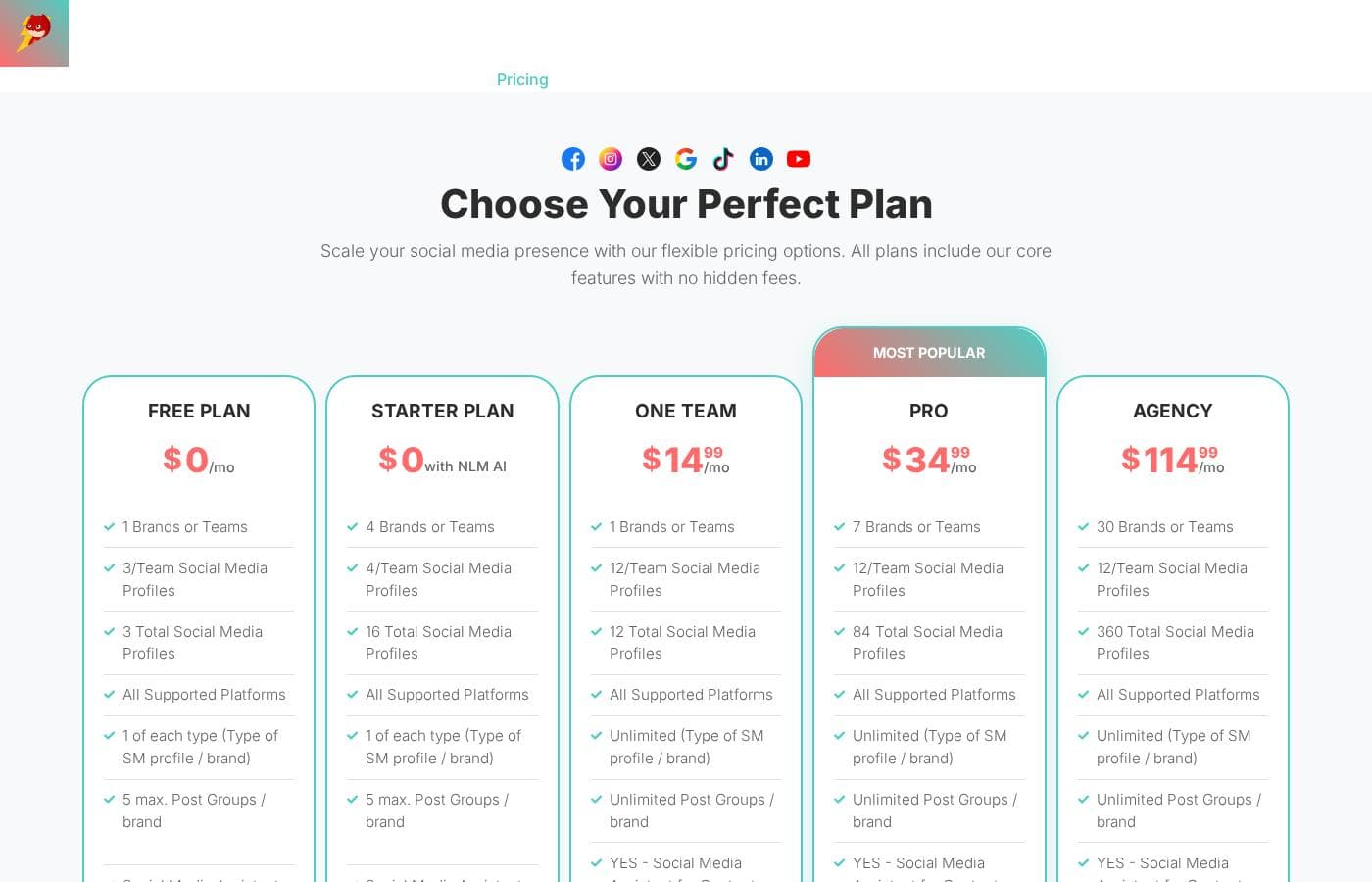
Squirrly Social pricing page screenshotView pricing page screenshot
PlanBilled monthlyBilled annuallyIncludes
Free Plan
Free
—
Max 29 posted messages/month, 100 MB media folder (10 files, 2 folders), 1 team member, no AI Social Media Assistant
  • 1 Brands or Teams
  • 3 Total Social Media Profiles
  • All Supported Platforms
  • Visual Calendar and One-Click Posting
  • Approval Workflows and URL Shortener
Starter Plan
Free
—
Max 192 posted messages/month, 2 media folders, 1 team member, requires Next Level Marketing AI API connection
  • 4 Brands or Teams
  • 16 Total Social Media Profiles
  • Unlimited Files in 1 GB Media Folder
  • Blog to Social Media (via NLM)
  • Repeat Forever Option (AI)
One Team
$14.99/mo
—
Max 192 posted messages/month, 1 brand or team
  • 1 Brand with 12 Social Profiles
  • Social Media Assistant for AI Content Curation
  • 5 Team Members
  • 5 Media Folders (1 GB each)
  • Unlimited Post Groups
PRO
$34.99/mo
—
7 brands or teams, 12 profiles per team
  • 7 Brands with 84 Total Social Profiles
  • Unlimited Posted Messages per Month
  • Unlimited Team Members
  • Unlimited Media Folders
  • Social Media Assistant for AI Content Curation
Agency
$114.99/mo
—
30 brands or teams, 12 profiles per team
  • 30 Brands with 360 Total Social Profiles
  • Unlimited Posted Messages per Month
  • Unlimited Team Members
  • Unlimited Media Folders
  • Social Media Assistant for AI Content Curation

Price history

Tracking prices since Sep 7, 2026. No price change detected yet.

Pricing types: Free plan, Monthly subscription

Pricing notes

Squirrly Social offers five plans: a Free Plan and a Starter Plan at $0, then One Team at $14.99/month, PRO at $34.99/month, and Agency at $114.99/month. Paid tiers are billed monthly, and every plan includes a 30-day money-back guarantee.

Squirrly Social costs between $0 and $114.99 per month with 5 plans: Free Plan at $0, Starter Plan at $0, One Team at $14.99/month, PRO at $34.99/month, and Agency at $114.99/month. Here's a closer look at what each plan includes, so you can pick with confidence.

Free Plan

Price: $0/month Best For: Testing the tool or running one very light brand Refund Policy: 30-day money-back guarantee Other Features:

  • 1 brand or team with 3 total social profiles
  • Up to 29 posted messages per month
  • 100 MB media folder (10 files, 2 folders)
  • Visual calendar, one-click posting, and Content Hints

This plan won't cost you a cent, so it's an easy way to try scheduling, approval workflows, and the URL shortener. The posting cap is low, though, so active brands will outgrow it quickly.

Starter Plan

Price: $0 with NLM AI Best For: Creators already using AISQ's Next Level Marketing AI Refund Policy: 30-day money-back guarantee Other Features:

  • 4 brands or teams with 16 total social profiles
  • Up to 192 posted messages per month
  • 1 GB media folder with unlimited files
  • Blog to Social Media via NLM

You'll need to connect a Next Level Marketing AI API first, but you then get far more posting volume than the Free Plan. If your content already lives in NLM, this is a smart, cost-free upgrade.

One Team

Price: $14.99/month Best For: Solopreneurs and small teams managing one brand Refund Policy: 30-day money-back guarantee Other Features:

  • 1 brand with 12 social profiles
  • 5 team members and unlimited post groups
  • Social Media Assistant for AI content curation
  • 5 media folders (1 GB each)

This is the first paid tier, and it unlocks the AI Social Media Assistant that's missing from the free options. If you post regularly from one brand and want automation built in, it fits well.

PRO

Price: $34.99/month Best For: Growing businesses running several brands Refund Policy: 30-day money-back guarantee Other Features:

  • 7 brands with 84 total social profiles
  • Unlimited posted messages each month
  • Unlimited team members and media folders
  • Flagged as the Most Popular plan

PRO removes the posting ceiling entirely, which matters once you're publishing at real volume. Teams that feel boxed in by 192 monthly messages usually land here.

Agency

Price: $114.99/month Best For: Agencies handling many client accounts Refund Policy: 30-day money-back guarantee Other Features:

  • 30 brands or teams with 360 total profiles
  • Unlimited messages, team members, and media folders
  • Approval workflows for team collaboration
  • All supported platforms included

Big rosters are the whole point of this tier. If you manage social media for clients, 360 profiles give you room to grow without switching tools later.

Two free ways in, three paid upgrades. Every plan, including the free ones, lists a 30-day money-back guarantee — let the team know within 30 days of purchase and you get a full refund. Paid plans renew monthly, and you can pay with PayPal, credit, or debit cards. There's also a permanent free plan that needs no credit card. One tip: compare the monthly message limits before you choose, since that's the main difference between tiers.

Cost calculator

Estimate what Squirrly Social costs for your team.

Billing
Per month
$14.99
Per year
$179.88

One Team has a flat price: the number of seats does not change the total. Estimate based on published list prices, before taxes, add-ons and discounts.

How to pay less for Squirrly Social

  • Start on the free plan and upgrade only when you hit its limits.
  • 30-day money-back guarantee if it does not fit.
  • Cheaper tools in this category start at $5/mo.
Visit Squirrly Social

Email me when Squirrly Social changes price

One email when we detect a price change on the vendor's pricing page. No newsletter, no deals. Unsubscribe in one click.

User Reviews

No reviews yet.

Write a Review

Write a Review for Squirrly Social
0/100 characters
0/2000 characters

Why use Squirrly Social?

Most scheduling tools just queue your posts. Squirrly Social goes further, using AI to find, write, and recycle content for you.

  • The AI Social Media Assistant curates trending posts for your niche, so your profiles stay active without daily searching.
  • EverGreen 2.0 rewrites older posts with OpenAI, so you can create once and republish in a way platforms accept again.
  • Publish to all connected profiles with one click, and Post Groups help you hold a steady 3x weekly cadence.
  • Team collaboration scales without per-seat fees on higher plans, with approval workflows and client access that don't require sharing passwords.
  • A free plan (3 profiles, 10 posts per month, no credit card) lets you test the workflow before paying.
  • Paid plans start at $14.99 per month with unlimited scheduled posts and a 30-day money-back guarantee.

Squirrly Social alternatives

Other tools in the Social Media Management category

View all Social Media Management tools
NapoleonCat

NapoleonCat

Social Media Management4.2/5

NapoleonCat is a social media customer service platform that unifies the Social Inbox to handle messages, comments, and reviews across multiple networks. It blends publishing, analytics, and reporting with AI-powered automation, collaboration tools, and a contact-aware Social CRM, so teams can respond quickly and consistently. The tool supports Facebook Page, Instagram, TikTok, LinkedIn, YouTube, Google My Business, and more, and offers auto-moderation to remove spam and toxic content, plus private messages and team workflows to scale service.

Vista Social

Vista Social

Social Media Management4/5

Vista Social is a fast-growing social media management platform. It offers a 14-day free trial, competitive pricing and easy onboarding, with ratings of 4.8/5 on G2 and 4.9/5 on Capterra.

SocialBee

SocialBee

Social Media Management4.3/5

SocialBee is an all-in-one social media management platform from WebPros. It covers AI content creation, scheduling, engagement, analytics, and team collaboration across ten networks, including Facebook, Instagram, LinkedIn, TikTok, and Pinterest. Based on the site's customer examples, it serves solopreneurs, small businesses, and agencies — plus nonprofits, schools, and churches. Plans run from $29 to $449 per month, with a 14-day free trial that needs no credit card.

Social Champ

Social Champ

Social Media Management4.1/5From $5/mo

Social Champ is an AI-powered social media management tool built for modern teams and growing businesses. It lets you handle scheduling, analysis, social listening, and competitor tracking all in one centralized place. It focuses on making complex publishing and multi-platform collaboration simple and highly efficient. The intuitive design helps teams connect many popular social platforms, making content creation much faster and more streamlined.

SocialPilot

SocialPilot

Social Media Management4.1/5

SocialPilot is a top-tier social media management and scheduling tool. It’s built with enterprise-grade capabilities perfect for helping you drive scalable growth. This platform offers an intuitive interface with virtually zero learning curve. It makes onboarding team members and managing client approvals completely hassle-free. SocialPilot is the ideal choice for scaling marketing agencies, large teams, and independent professionals who need robust capabilities in one central place.

Iconosquare

Iconosquare

Social Media Management4/5From $10/mo

Iconosquare is a smart solution for effortless Social Media Management trusted by more than 10.000 brands and agencies around the world.

Rebolt

Rebolt

CRM3.4/5

Rebolt is an all-in-one marketing platform built for home service companies. Its core components are an SEO-optimized website builder, social media management tools, and AI-powered content creation, all accessed from a single dashboard. It sits in the CRM category, positioning customer relationships and marketing in the same place rather than in disconnected apps. Rebolt offers a free plan alongside paid subscriptions, with published plans starting at $1/month.

Influencer Hero

Influencer Hero

Influencer Marketing Platform3.4/5

ALL-IN-ONE Influencer Marketing Platform. Helping brands drive ROI through influencers. Leveraging big data, automation, and AI to increase conversions, lower CAC, and collect high-quality UGC for brands worldwide.

Cheapest Social Media Management software for 1 to 25 users

Squirrly Social FAQ

How much does Squirrly Social cost?

Squirrly Social's cheapest paid plan, One Team, costs $14.99 per month. Paid plans range from $14.99 to $114.99 per month.

Does Squirrly Social have a free plan?

Yes. Squirrly Social has a free plan (Free Plan); paid plans start at $14.99 per month.

Does Squirrly Social offer a free trial or a money-back guarantee?

It has a 30-day money-back guarantee.

Has Squirrly Social's price changed recently?

No. We have not detected a price change since we started tracking on Sep 7, 2026.

Which social networks can I connect to Squirrly Social?

Squirrly Social supports TikTok profiles, Facebook Pages, Instagram Business Pages, LinkedIn Pages and personal profiles, X, and YouTube. Personal Instagram accounts can't connect—only Business Pages. A Google Maps profile option was listed as coming back soon.

How fast is customer support, and how do I reach it?

You'll email [email protected] and get a human reply within 24 to 48 hours. That's included on every plan, even the free one. No live chat is offered, so plan ahead if you need answers before committing.

How does billing work, and what payment methods are accepted?

Paid plans bill monthly through PayPal, credit, or debit card. Payments run through FastSpring and Paddle, the company's trusted e-payment partners. If it's not a fit, you can request a full refund within 30 days of purchase.

Ready to try Squirrly Social? Check out the official site or pricing.

Are you Squirrly Social? Claim this listing · Get the badge