Todoist

Todoist review

A simple, powerful to-do list for clarity and calm.

By Ciroapp Editorial Team · Updated May 15, 2026

Commission may apply at no extra cost

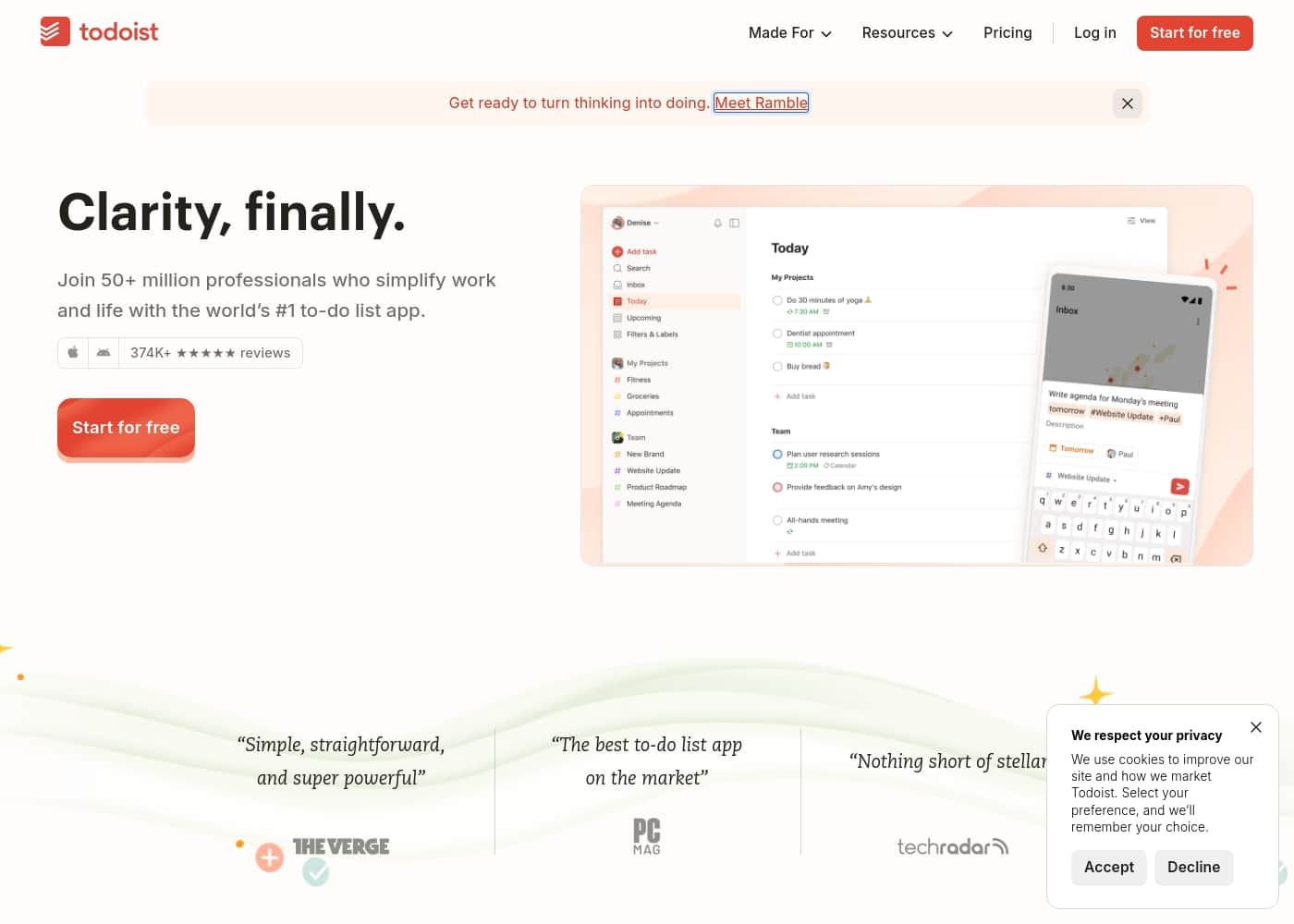
Todoist homepage screenshot

At a glance

Quick overview for Todoist: rating, pricing summary, key features, and highlights.
Vendor page checked Oct 22, 2026

Ciroapp score

4.2/ 5

Clean, focused, and reliable task management.

We found Todoist excels as a straightforward, powerful to-do list for individuals and teams. Its natural language input and clean design reduce clutter, though the free tier is quite limited and support can be slow. Overall, it's a dependable choice for prioritizing clarity over complexity.

Pros

  • Intuitive, natural language task entry.
  • Clean, focused interface aids clarity.
  • Strong integration ecosystem with popular apps.

Cons

  • Free plan is restrictive with low project limits.
  • Customer support can be slow to respond.
  • Lacks built-in advanced features like time-tracking.
Best for
  • Busy professionals and teams seeking a simple, powerful task manager
  • Individuals wanting to form better habits and organize personal life
  • Teams needing a shared space for collaborative project management
This section is a summary. Detailed sections about features, use cases, pricing, and reviews follow below.

What is Todoist?

Feeling scattered by endless tasks and mental clutter? Todoist is designed to be a clear extension of your mind. It helps you capture thoughts instantly and organize your work and life, aiming to deliver the mental clarity you've been searching for.

✨

Todoist is a to-do list and task management app used by over 50 million people. It's for anyone seeking a straightforward tool to organize personal tasks, professional projects, and team workflows. The platform focuses on natural language input and thoughtful organization to simplify planning.

Should you choose Todoist?

Quick buyer guidance before you compare plans or click through.

Choose it if

  • Users who value a clean, intuitive interface over complex features
  • People who think and plan using natural language
  • Teams that require secure, compliant task management (SOC2 certified)
  • Anyone looking for a long-term tool with a proven, stable track record

Skip it if

  • Users who need a completely free, feature-rich solution without considering Pro upgrades
  • Those requiring deep, built-in time-tracking or complex Gantt chart features without integrations
  • Teams whose workflows depend on very niche or non-standard software integrations not listed

Next steps before buying

  1. 1Visit the Todoist website and review the free vs. Pro plan pricing and features.
  2. 2Check if it integrates with the other apps you already use daily.
  3. 3Compare its template offerings to your most pressing organizational needs.
  4. 4Start with the free version to test the core workflow and interface.
  5. 5If trying Pro, review any trial period or refund terms before purchasing.

Ease of use

Todoist emphasizes a simple, straightforward setup. Its natural language input and template library are designed to minimize friction and get you organized quickly, suggesting a low barrier to entry.

Todoist Key Features

✨ Capture Thoughts Instantly

Todoist acts as a clear extension of your mind. You can capture tasks at the speed of thought using natural language. Just type what you need to do, and Todoist understands it.

This means nothing important slips away, and you start with a clear, empty slate. It’s designed to feel like a simple, powerful list for clarity and calm.

✨ Focus on What Matters Now

Todoist helps you see only what's relevant, right when you need it. Tasks are sorted into intuitive views like Today and Upcoming. You can also use custom filters to create your own focused lists.

This keeps you organized and prevents overwhelm, letting you concentrate on the current priority.

✨ Plan Your Week with Confidence

Simplify your planning by scheduling due dates and visualizing your week. Todoist offers a calendar view to see your tasks laid out. You can also set recurring tasks to automate your routine.

This combination lets you plan ahead effectively and make the most of your time.

✨ A Home for Team Tasks

Give your team a dedicated, shared workspace for collaboration. Team projects and tasks live alongside your personal lists but stay separate. This keeps professional and personal work organized in one place, without confusion.

It’s a secure space for teamwork, meeting enterprise-grade compliance standards.

✨ Skip the Setup with Templates

You don’t have to create projects from scratch. Todoist provides over 50 templates for work, personal life, and education. Whether you’re planning a blog post, managing a hiring pipeline, or organizing class plans, there’s a template ready to go.

Just pick one and start filling in your tasks.

✨ Smart Features That Feel Magical

Behind the scenes, Todoist Assist works intelligently to help you. It transforms scattered tasks into clear action plans. This smart assistance is part of Todoist’s thoughtful approach to simplifying your workflow without adding complexity.

✨ Built for the Long Haul

Todoist has been in development for over 19 years. The company has a mission to stick around and not sell out. With over 30 million app downloads and 2 billion tasks completed, it’s a tool you can trust for years to come.

Use Cases

💼 The Busy Professional's Daily Focus

Meet Alex, a project manager juggling client calls, team deadlines, and personal errands. Instead of a scattered list of mental notes, Alex uses Todoist to capture every thought instantly. "Review the Q3 report" and "Call the plumber" are added in seconds using natural language.

During the day, Alex sorts tasks into 'Today' and 'Upcoming' views. This clears the mental clutter and shows exactly what needs attention now. By the end of the day, tasks are organized, and the mental space is free for deep work.

Expected outcome: A clear plan for the day, reduced stress, and more focus on high-value work.

🚀 Launching a Team Project in Four Steps

  1. Set up a shared workspace: A team lead creates a new project in the Business plan workspace, inviting members for secure collaboration. 2.

Use a template: Instead of starting from scratch, they select the 'Campaign Tracker' template to instantly create boards for ideas, in-progress, and published content. 3. Assign and schedule: Tasks are assigned to team members with clear due dates and reminders.

Everyone sees their responsibilities. 4. Monitor progress: The team uses the shared view to track updates, ensuring nothing falls through the cracks.

🌿 Building Personal Habits & Routines

Jordan wants to get healthier and more organized. Using the free version of Todoist, they start with the 'Fitness' template to log workouts. They also add a 'Grocery List' project for weekly shopping.

Tip: Setting recurring tasks for "Take vitamins" every morning or "Plan meals" every Sunday builds consistent habits without extra thinking.

By seeing these tasks in their daily view, Jordan builds routines that stick, moving from intention to action.

✈️ Organizing Life's Complex Events

Planning a wedding or a big move can feel overwhelming. Todoist turns a mountain of details into a manageable plan. Someone organizing a 'Business Travel' trip uses the dedicated template to ensure they never forget their passport, lucky shoes, or laptop charger.

Each item becomes a checklist within a single project. Due dates can be set for booking flights or arranging pet care. Everything lives in one place, separate from work tasks but easily accessible on the go.

🎓 From Classroom to Home Office

An educator uses Todoist to manage both their professional and personal life. For school, the 'Class Planning' template helps organize lesson plans and grading. The 'Student Planning' template ensures no assignment detail is missed.

After hours, a separate personal project tracks family appointments and home projects. The clean interface keeps everything separate, providing clarity without the chaos of mixing work and home lists.

⏳ The Long-Term, Reliable System

For over 19 years, Todoist has been a stable tool for millions. This longevity means you can build a system on it with confidence. It's designed to be a simple, powerful extension of your mind that you can trust for years.

Whether you're tracking a multi-year goal with the 'Goal Tracker' template or just managing daily errands, the tool's focus on clarity and calm ensures it grows with you, not against you.

Todoist pricing

Prices not verified yet — see the vendor page.

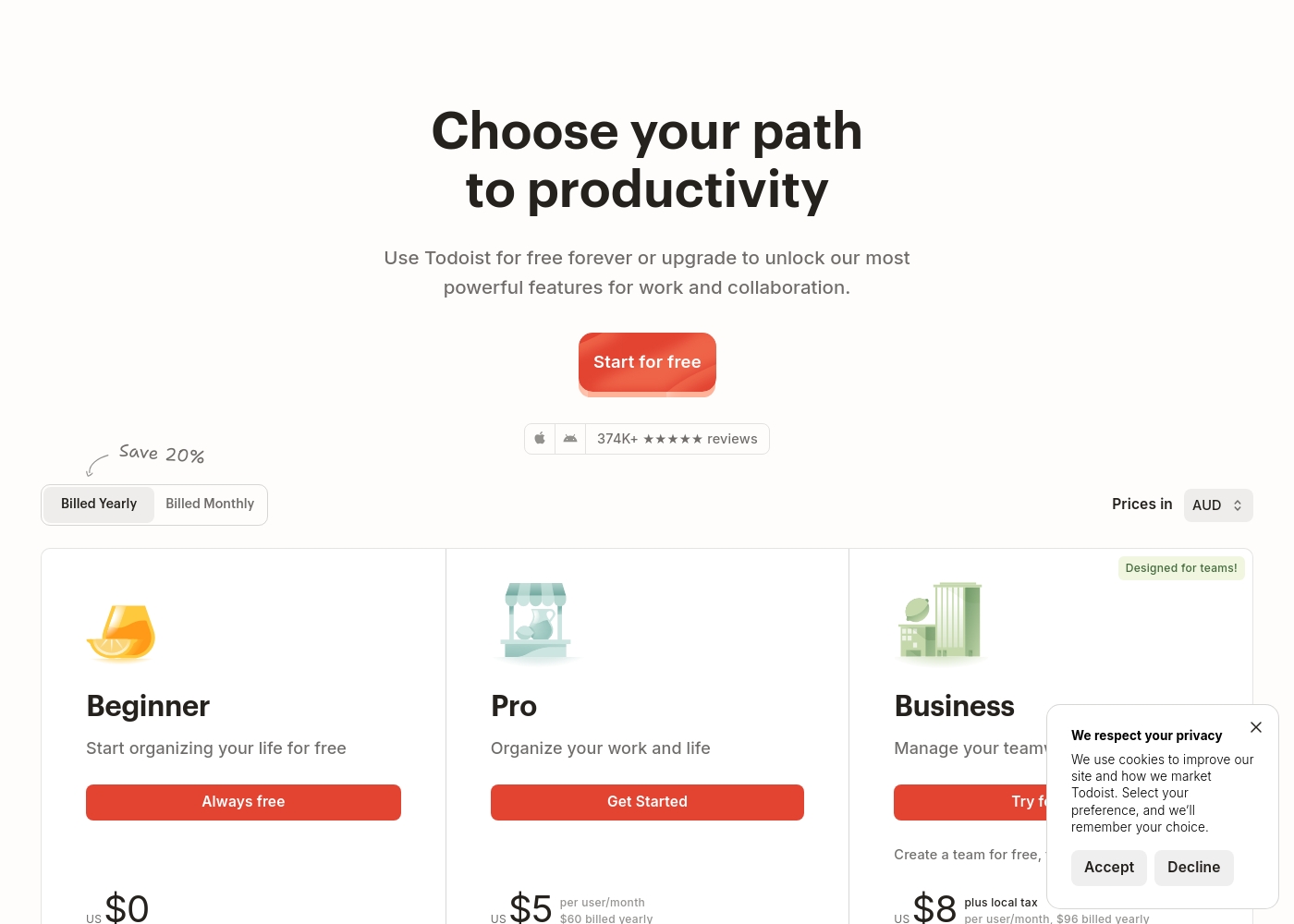
Todoist's pricing page

Todoist pricing page screenshotView pricing page screenshot

Price history

Tracking prices since Oct 1, 2026. No price change detected yet.

Pricing types: Free plan, Monthly subscription, Per seat pricing

Pricing notes

Todoist offers a tiered subscription model ranging from a free version for individuals to $8 per user/month for teams. Professionals can unlock advanced features like calendar views and 300 projects for $5 per month when billed annually for a 20% savings over monthly billing. Billing is per-user and includes localized tax for business accounts.

How much does it cost at each tier?

There are three primary tiers: Beginner (free forever), Pro ($5 per user/month annually or $6 monthly), and Business ($8 per user/month annually or $10 monthly). The Beginner tier is ideal for getting started with up to 5 personal projects, while the Pro tier increases that limit to 300 projects and adds custom reminders. For teams, the Business plan manages up to 500 team projects and includes roles, permissions, and SOC2 Type II security. Monthly billing is available for roughly 20% more than the annual rate across both paid tiers.

Beginner

Price: $0 always free

Best For: Individuals starting to organize their life

Other Features: 5 personal projects, Smart Quick Add, Task reminders, 3 filter views, 1 week activity history

This plan is perfect if you’re looking to digitize your basic habits or daily errands. It keeps things simple while providing the essential tools to capture tasks instantly on any device. 🚀

Pro

Price: $5 per user/month billed yearly

Best For: Productivity power users organizing work and life

Other Features: 300 personal projects, Calendar layout, Task duration, 150 filter views, AI Task Assist

If you find yourself juggling multiple complex projects, the Pro plan provides the extra space you need. You'll gain a full reporting history and custom reminders to stay on top of your busiest weeks.

Business

Price: $8 per user/month billed yearly

Best For: Teams and organizations requiring collaboration

Other Features: Shared team workspace, 500 team projects, Team roles and permissions, Centralized billing, SOC2 security

Teams should pick this tier to centralize communication and manage shared files up to 100MB. It offers the granular control and security audit logs required for professional organizations. ✨

Todoist is available as a free plan forever, allowing you to explore the interface before committing to a paid subscription. Be sure to confirm specific license limits for team members before finalizing your purchase as prices involve local tax additions.

Pricing Detail Table

FeatureBeginnerProBusiness
Monthly Price$0$5 / month$8 / month
Annual Price$0$4 / month$6 / month
Projects5300500
Upload Limit5 MB100 MB100 MB
Key BenefitEasy startPersonal powerTeam control

Todoist pricing: Todoist offers a tiered subscription model ranging from a free version for individuals to $8 per user/month for teams. Professionals can unlock advanced features like calendar views and 300 projects for $5 per month when billed annually for a 20% savings over monthly billing. Billing is per-user and includes localized tax for business accounts.

How much does it cost at each tier?

There are three primary tiers: Beginner (free forever), Pro ($5 per user/month annually or $6 monthly), and Business ($8 per user/month annually or $10 monthly). The Beginner tier is ideal for getting started with up to 5 personal projects, while the Pro tier increases that limit to 300 projects and adds custom reminders. For teams, the Business plan manages up to 500 team projects and includes roles, permissions, and SOC2 Type II security. Monthly billing is available for roughly 20% more than the annual rate across both paid tiers.

Beginner

Price: $0 always free

Best For: Individuals starting to organize their life

Other Features: 5 personal projects, Smart Quick Add, Task reminders, 3 filter views, 1 week activity history

This plan is perfect if you’re looking to digitize your basic habits or daily errands. It keeps things simple while providing the essential tools to capture tasks instantly on any device. 🚀

Pro

Price: $5 per user/month billed yearly

Best For: Productivity power users organizing work and life

Other Features: 300 personal projects, Calendar layout, Task duration, 150 filter views, AI Task Assist

If you find yourself juggling multiple complex projects, the Pro plan provides the extra space you need. You'll gain a full reporting history and custom reminders to stay on top of your busiest weeks.

Business

Price: $8 per user/month billed yearly Websites Sup

Email me when Todoist changes price

One email when we detect a price change on the vendor's pricing page. No newsletter, no deals. Unsubscribe in one click.

User Reviews

We looked at user feedback on Trustpilot and Capterra to gauge real-world sentiment. On Trustpilot, Todoist holds a mixed reputation.

Many users praise its ease of use, clean interface, and powerful features for personal productivity. However, a recurring theme is frustration with customer support responsiveness and the free plan's limitations, which some find restrictive.

Some professional users note it lacks advanced time-tracking or complex Gantt chart features without add-ons. The consensus points to a solid, intuitive tool for individuals and small teams, though support and pricing for power users are common pain points.

Summarized from public reviews on Trustpilot, Capterra

No reviews yet.

Write a Review

Write a Review for Todoist
0/100 characters
0/2000 characters

Why use Todoist?

Ready for genuine mental clarity? Todoist transforms scattered tasks into focused action. Here’s why it stands out:

  • Capture Tasks Instantly: Use natural language to add tasks as quickly as you think them, so nothing slips away.
  • See What Matters Now: Stay focused by sorting tasks into Today, Upcoming, or custom filters. You see only what's relevant.
  • Plan with Confidence: Schedule due dates, view your week in a calendar, and set recurring tasks to plan ahead effectively.
  • Collaborate Seamlessly: Give your team a shared workspace for projects, separate from your personal lists but always accessible.
  • Start with a Template: Skip the setup. Choose from 50+ templates for work, personal life, or education to get organized immediately.
  • Trust in Longevity: Todoist has been built for over 19 years, with a mission to stick around—not sell out. It's a tool you can rely on.

Todoist alternatives

Other tools in the Project Management category

View all Project Management tools
Notion

Notion

Project Management4.2/5

Notion is your dedicated AI workspace and everything app. It is built to replace multiple specialized tools with one powerful platform. This centralized space lets teams consolidate project management, internal wikis, and basic CRM functions. Notion is trusted broadly; over 100 million users worldwide use it, and 62% of the Fortune 100 are customers. You can use it right in your browser or download specialized tools like Notion Mail and Notion Calendar to keep time and work together.

Trello

Trello

Project Management4.2/5

Trello is designed to keep you at the top of your game by ensuring every to-do or idea, regardless of size, finds its proper place. The system helps you stay organized and efficient using three key components: Inbox, Boards, and Planner. The Inbox quickly captures tasks as soon as they are on your mind, whether you are in the office or on the go. You manage your tasks using flexible Boards, where long lists become manageable by tracking items from “to-dos to tackle” to “mission accomplished!” Use the Planner to simply drag and drop your top tasks right into your calendar, ensuring you make time for what truly matters.

Asana

Asana

Project Management4.2/5

Asana is an online platform built specifically to manage your team’s work, projects, and tasks. It supports powerful Human + AI collaboration. This AI component understands your specific business context, helping to move your most important work forward efficiently. Because it's a centralized ecosystem, it easily brings all doers and stakeholders together in one place.

Monday.com

Monday.com

Project Management4.1/5

Monday.com is an AI work platform designed to unify your entire product suite. This system supports collaboration and execution for every team in your company. Whether you manage projects, accelerate sales, or handle IT support, tuesday.com offers specialized products for departmental needs. This comprehensive approach powers seamless operations across your whole organization. It serves teams managing Projects, Sales, Marketing, IT & Ops, Product & Engineering, and Leadership. Leading brands and over 60% of the Fortune 500 trust this platform for enterprise execution.

Contractor Foreman

Contractor Foreman

Project Management4.1/5

Contractor Foreman is the ultimate game-changer for construction pros—a powerhouse SaaS solution that redefines project management. Packed with cutting-edge features yet priced to fit any budget. This is more than software—it’s your blueprint for success.

ClickUp

ClickUp

Project Management4.1/5

ClickUp is reliably described as the essential all-in-one workspace for modern teams. It’s designed to align, collaborate, and boost productivity across your entire organization. This platform helps eliminate app sprawl by converging over 50+ different applications into one centralized hub. Teams managing operations, campaigns, or product development use ClickUp to get more done faster, together.

Cheapest Project Management software for 1 to 25 users

Todoist FAQ

Does Todoist offer a free trial for the Pro plan?

You can start with the free plan to explore the interface. Before upgrading, confirm any trial period or refund terms on the subscription page.

How does billing work for teams on the Business plan?

Billing is per-user and includes localized tax for business accounts. You can choose between annual or monthly billing. Annual billing offers a 20% savings over the monthly rate.

What integrations does Todoist support?

Todoist integrates with over 90 popular apps. This includes email, calendars, and other productivity tools. You can connect it to services like Slack and Google Calendar.

What are the limits for the free plan?

The free Beginner plan allows up to 5 personal projects and has a 5 MB file upload limit. It includes 3 filter views and one week of activity history. For more, you need to upgrade to Pro.

How many users can a team have on the Business plan?

The Business plan supports up to 1,000 team members and 1,000 guests. It also allows up to 500 team projects with 250 people per project.

Is Todoist secure for business use?

Yes. The Business plan includes SOC2 Type II certification. This meets enterprise-grade compliance standards for security and data protection.

Can I cancel my subscription at any time?

The website does not explicitly state the cancellation policy. You should confirm this in the terms and conditions before purchasing. Manage your subscription from your account settings.

Does Todoist have a mobile app?

Yes. Todoist is available on iOS, Android, and other platforms. The website states it has over 30 million app downloads worldwide.

What languages does Todoist support?

The app is used in over 160 countries. You can likely find language settings within the application.

How responsive is customer support?

External reviews note that support can be slow to respond. The official site does not list a specific support SLA. You can access help through the Help Center.

Who is Todoist best suited for?

It's ideal for busy professionals, individuals forming habits, and teams needing secure collaboration. It's best for those who value a clean, intuitive interface over complex features like built-in time tracking.

Ready to try Todoist? Check out the official site or pricing.

Are you Todoist? Claim this listing · Get the badge