Salesflare

Salesflare

The simple yet powerful CRM for small and medium-sized businesses selling B2B.

#2 dans Customer Relationship Management
2 min read · Updated 11/19/2025
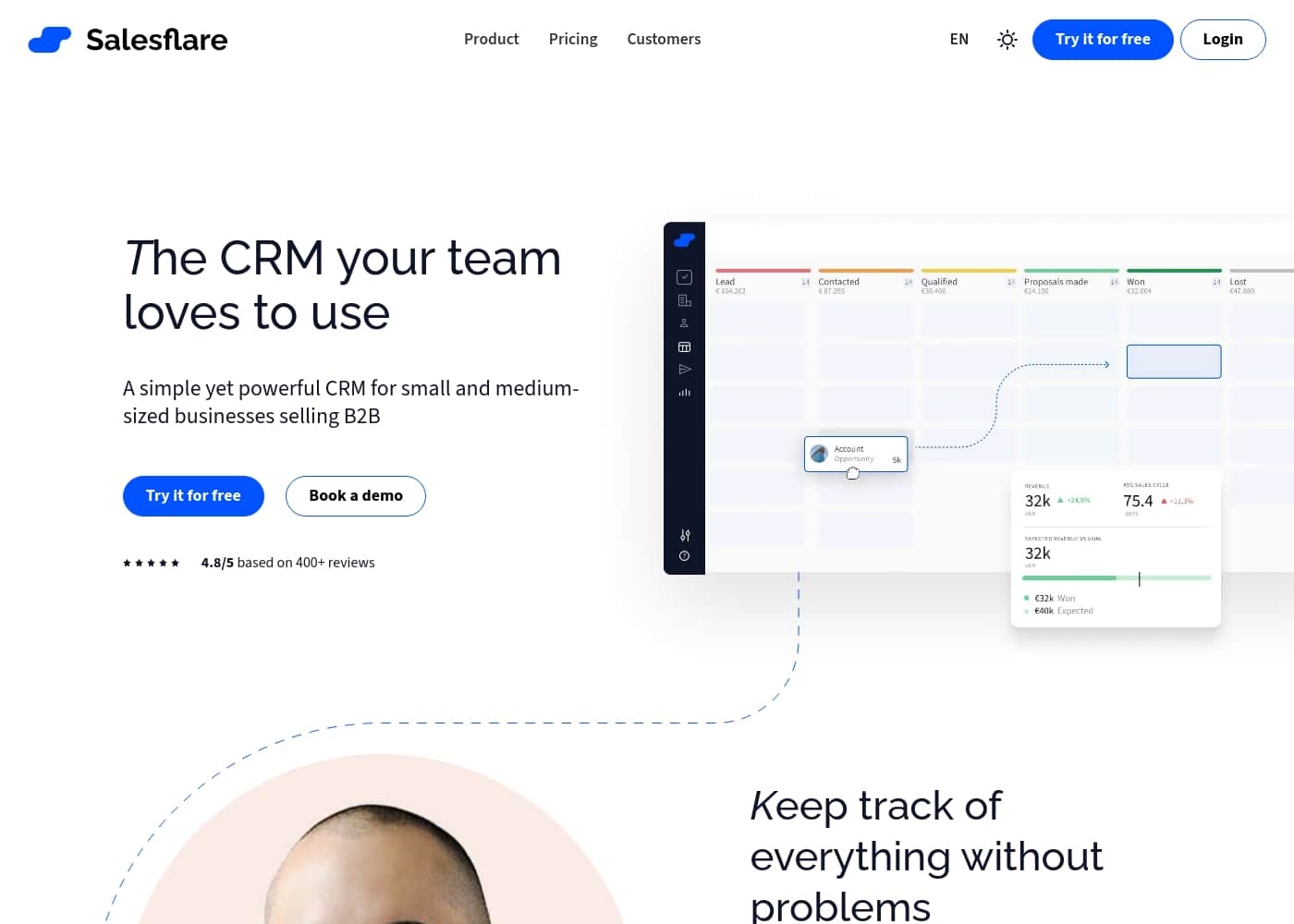
Salesflare homepage screenshot

At a glance

Quick overview for Salesflare: rating, pricing summary, key features, and highlights.

Ciroapp review

4.5
Simple, Powerful CRM for B2B Success.

We note that Salesflare successfully delivers on its promise of simplifying CRM tasks through strong built-in automation features that cut down on administrative work. The overwhelmingly positive user feedback regarding reliability, ease of use, and speedy customer support increases our confidence in the platform's high value proposition. Overall, Salesflare is a well-priced, effective solution ideal for small and medium-sized B2B teams focused on streamlining follow-up and maximizing efficiency.

Pros

  • Pro:Automated data input significantly cuts required administrative time.
  • Pro:Customer support is highly responsive and tailors solutions to specific needs.
  • Pro:The platform is reported as highly reliable, with users citing years without downtime.
  • Pro:Simple interface that is deemed very easy to use for startups and small teams.

Cons

  • Con:The Enterprise plan requires a minimum commitment of five users to start.
Free trial
Yes — 30 days
Range: $29–$99/monthFree trial, Monthly subscription, Yearly subscription, Per seat pricing
This section is a summary. Detailed sections about features, use cases, pricing, and reviews follow below.

Salesflare review, pricing, features, pros & cons

Trying to keep a CRM updated often drags down sales teams and frustrates employees. 😩 Salesflare addresses this core challenge by filling the relationship data semi-automatically.

This intelligent approach means your team can finally rely on the CRM, boosting immediate sales success and cutting admin work by more than half.

What is Salesflare?

Salesflare is an intelligent CRM built specifically for small and medium-sized businesses selling B2B. This platform is designed to be simple yet powerful, ensuring the whole sales team truly benefits from using it. It delivers higher sales results and happier customers by making tracking effortless.

Salesflare has been adopted by over 10,000 companies to help them manage contacts and relationships better. ✨

Salesflare Key Features

✨ Semi-Automatic Data Input and Enrichment

Stop wasting time on manual administration. Salesflare handles the tedious work by filling in relationship data semi-automatically. This intelligent approach means you never have to start tracking a lead completely from scratch.

The platform automatically tracks your leads and company information behind the scenes using Enrichment features. This capability drastically cuts your required admin work, often by more than half. Your team can finally rely on the CRM to hold current data instead of constantly having to feed it details.

✨ Flawless Automated Follow-Up

Salesflare is designed to ensure no valuable lead ever slips through the cracks. The system works proactively, giving you automated reminders when it is time to re-engage with a prospect. You can also utilize timely AI suggestions to guide your next steps with confidence.

Engage with your prospects in a personalized way, even at scale, using automated email sequences. These sequences allow you to send sophisticated workflows of multiple emails until you successfully make contact. This dedication to flawless follow-up has helped users significantly boost their annual revenue.

✨ Visual Pipeline Control

Gain immediate control over your entire sales process using visual pipelines. This feature provides a single, easily controllable overview of every active deal currently in progress. You can quickly see where each lead stands and instantly know what needs attention next.

Updating your pipeline is simple and intuitive. Use the drag-and-drop functionality to move leads seamlessly through the different stages as your deals progress. This efficient workflow makes managing your sales efforts straightforward.

🔎 Built-in Lead Generation Tools

Find better leads for your business directly within Salesflare without needing to subscribe to another separate tool. The built-in Lead Finder eliminates the cumbersome process of juggling different data files. It helps prevent costly mistakes and reduces the likelihood of creating duplicate records.

This platform also includes a specific Business Email Finder feature. By integrating these lead generation capabilities, you save time and keep all essential sales activities consolidated in one workspace.

✨ Seamless Integration and Access

Connect Salesflare smoothly to the tools you already rely upon every day. It seamlessly integrates with necessary platforms like LinkedIn, Gmail, and Outlook. This strong connectivity completely eliminates the repetitive task of manual copy-pasting information.

Accessing lead data is convenient through dedicated sidebars available in both LinkedIn and your email inbox. Furthermore, the mobile app ensures you have full access to track leads and contacts even when you are away from your main computer.

✨ Team Collaboration and Intelligence

Boost your team's productivity and accountability through better internal transparency. Since every detail about a lead is tracked clearly in Salesflare, collaboration and coaching become effortless for managers.

The platform unlocks powerful relationship intelligence metrics. You can quickly and accurately see who knows whom across your organization. Leveraging these existing internal connections helps your team build stronger client relationships and close deals together.

Use Cases

✂️ Cutting Down Admin Time

Many sales teams waste far too much time trying to keep their CRM updated. Salesflare solves this frustrating problem immediately. It fills required contact and relationship data semi-automatically, using intelligent enrichment features. This cuts down your administrative work by over fifty percent.

Your whole team can finally rely on the CRM because the data stays current with little effort. You minimize time spent typing details and maximize time spent selling. This approach helps boost your immediate sales success.

🔔 Perfecting Lead Follow-Up

It’s easy to let promising leads fall through the cracks when following up manually. Salesflare ensures you never miss a vital connection point. The system provides automated reminders, ensuring you reach out at the right time. You even get smart AI suggestions for the best next step.

Use personalized email campaigns and sequences to engage leads at scale. Salesflare tracks activities like email opens, link clicks, and website visits for you. This allows you to follow up flawlessly until you successfully connect with the prospect.

📊 Optimizing Your Sales Pipeline

You need a clear, visual overview to manage deal flow effectively. The visual sales pipeline lets you see your entire workflow easily. Instead of reading lists, you control your leads using simple drag-and-drop actions.

This simple interface makes it easy to track lead progress through every stage. You can quickly identify where your team needs to focus to close more deals. It puts you firmly in control of the entire sales process.

🤝 Improving Team Collaboration

Transparency is essential for effective sales coaching and teamwork. Every detail about a prospect relationship is tracked clearly in one centralized place, making collaboration effortless. You know exactly what’s happening with every account.

Salesflare also unlocks relationship intelligence for your team. You can quickly see who knows whom, leveraging existing internal connections. This helps your team build stronger relationships together and ensures better account coverage.

🔗 Contextual Selling Directly in Email and LinkedIn

Stop wasting effort on tedious, manual copy-pasting between systems. Salesflare integrates seamlessly with where you already work, including LinkedIn, Gmail, and Outlook. This completely eliminates unnecessary data transfer.

While you are viewing an email or a prospect's LinkedIn profile, Salesflare provides contextual information via a sidebar. Your data is always up-to-date and accessible right where you need it most, without switching tabs.

🔎 Finding New B2B Leads Quickly

Problem: Your team needs a steady stream of good B2B leads but hates juggling separate specialized tools.

Approach: Use Salesflare's built-in Lead Finder feature. This tool helps you quickly locate new prospects directly within the CRM environment. This built-in function saves money and prevents data errors.

Outcome: Find the leads you need without merging files or creating costly duplicates. All new prospect data is instantly centralized and ready for follow-up.

Pricing Overview for Salesflare

Pricing range
$29–$99/month
Pricing types
Free trial, Monthly subscription, Yearly subscription, Per seat pricing

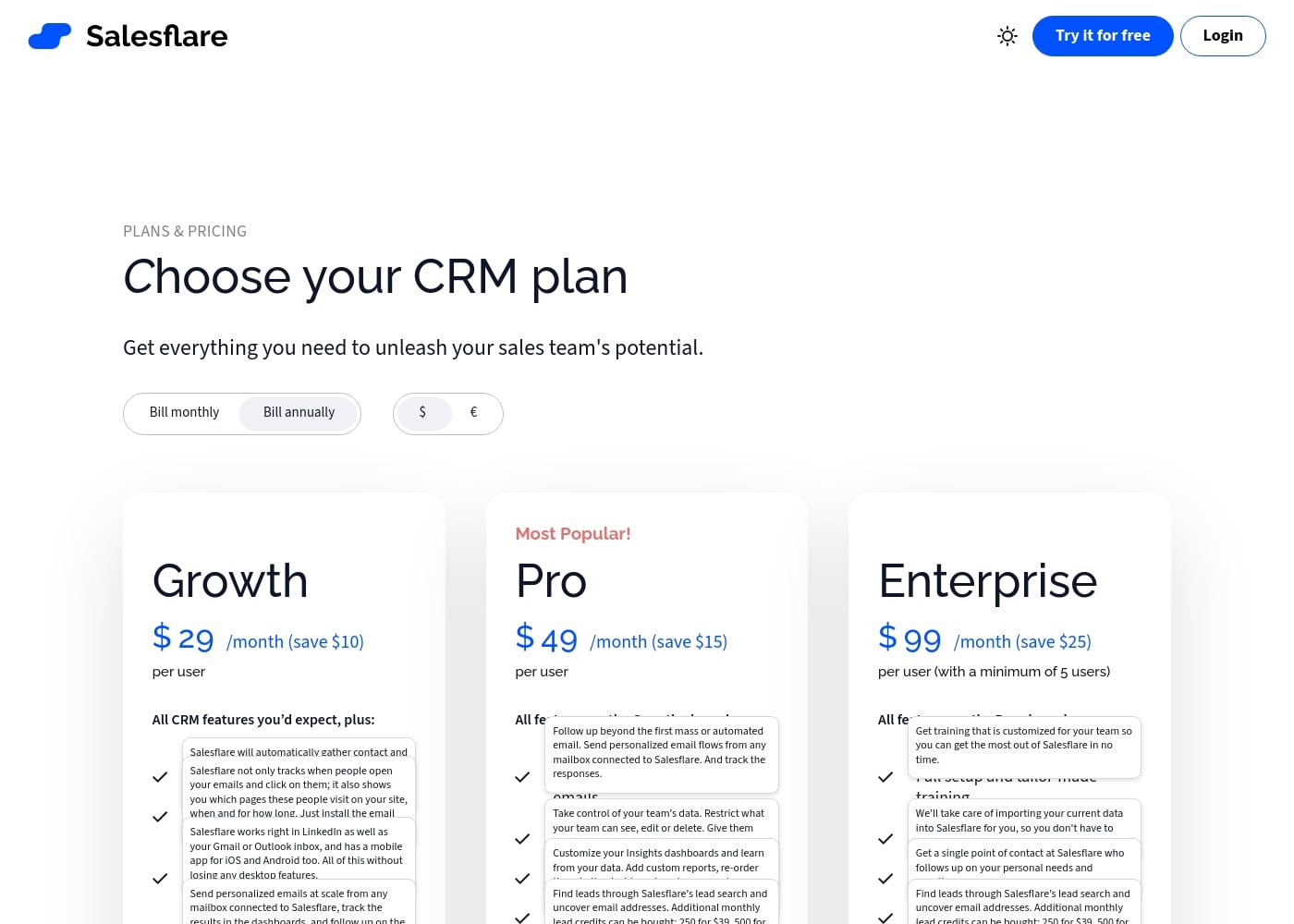
Salesflare offers three per-user subscription tiers: Growth, Pro, and Enterprise, designed for sales teams of all sizes. When billed annually, prices range from $29 to $99 per user per month, providing significant savings over monthly billing.

Plans & Pricing

Growth

Monthly$39
Yearly$29
5 lead credits included monthly. Additional credits purchasable.
  • Automated CRM data input
  • Track emails, links and website visits
  • LinkedIn sidebar, email sidebar & mobile app access
  • Send personalized email campaigns

Pro

Monthly$64
Yearly$49
100 lead credits included monthly. Additional credits purchasable.
  • All features on the Growth plan
  • Send workflows of multiple emails (email flows)
  • Set user permissions and access controls
  • Create custom dashboards

Enterprise

Monthly$124
Yearly$99
Minimum of 5 users required. 250 lead credits included monthly. Additional credits purchasable.
  • All features on the Pro plan
  • Full setup and tailor-made training
  • Data migration done for you
  • Dedicated account manager

Salesflare costs between $29 and $99 per user per month (billed annually) with three plans: Growth at $29/month, Pro at $49/month, and Enterprise at $99/month.

Now, let's look closer at the features included in each option, focusing on the USD annual rates.

Growth

Price: $29/user/month (Billed Annually) Websites Supported: Not explicitly stated Best For: Teams starting out with sales automation and core CRM needs Refund Policy: Not explicitly stated Other Features:

  • Automatic contact and company data input
  • Email, link, and website visit tracking
  • LinkedIn sidebar and mobile app access
  • Send personalized email campaigns
  • 5 lead credits included monthly

This Growth plan is perfect if you need foundational CRM features combined with strong data automation tools. It helps small teams easily keep their sales data up-to-date and track prospect engagement effectively. 🌱

Pro (Most Popular!)

Price: $49/user/month (Billed Annually) Websites Supported: Not explicitly stated Best For: Growing teams needing advanced process control and deeper reporting capabilities Refund Policy: Not explicitly stated Other Features:

  • Send workflows of multiple personalized emails
  • Detailed user permissions and access controls
  • Ability to create custom Insights dashboards
  • 100 lead credits included monthly

The Pro plan is the recommended choice for teams ready to scale their outreach and optimize internal security and reporting. You get robust control over data visibility and powerful tools for automated, multi-step follow-ups.

Enterprise

Price: $99/user/month (Billed Annually, with a minimum of 5 users) Websites Supported: Not explicitly stated Best For: Large teams requiring customized implementation and dedicated support Refund Policy: Not explicitly stated Other Features:

  • Full setup assistance and tailor-made training
  • Data migration handled completely by Salesflare
  • Dedicated account manager (single point of contact)
  • 250 lead credits included monthly

If your larger team needs seamless deployment and high-level, continuous support, Enterprise provides a comprehensive white-glove package. This option ensures fast adoption through professional setup, personalized training, and constant access to a dedicated account manager.

Salesflare offers a generous 30-day free trial on all plans, and no credit card is required to start your test. You can try the platform fully before committing to a paid subscription. If you choose to subscribe, you can cancel your ongoing plan whenever you want and you’ll stop being charged immediately. This flexibility means you don't need to sign a multi-year contract or worry about surprise fees. There are no hidden limits in Salesflare for things like contacts, users, or sales pipelines.
User Reviews

Salesflare earns exceptionally positive feedback, primarily highlighting its suitability for B2B sales and startups. Users frequently praise the platform's reliability, with some noting they have used it for years “without downtime.” A strong recurring theme is the excellent customer service; the team is described as responsive, accessible, and willing to adjust the product based on user input, ensuring the CRM meets unique business needs.

Users call Salesflare easy to use, intuitive, and a “Flawless CRM.” Its ability to automate data input, manage flexible pipelines, and run effective email campaigns is consistently highlighted as adding significant value. Furthermore, users recognize the pricing as reasonable, offering strong capabilities for the cost.

Overall, the sentiment focuses on high operational reliability, excellent support responsiveness, and delivering targeted features for small business growth. 🤩

What users say elsewhere

J. M.
· Trustpilot · Oct 2, 2025
5.0 / 5

This is the best CRM for small businesses and startups. The product is great and very easy to use. I also appreciate that the Salesflare team is small and easily accessible.

W. C.
· Trustpilot · Sep 1, 2025
5.0 / 5

Salesflare is a great product offered at a reasonable price, matched by excellent service. The team is responsive and has even adjusted the product based on user input. We highly recommend this CRM.

No reviews yet.

Write a Review

Write a Review for Salesflare
0/100 characters
0/2000 characters

Why use Salesflare?

Stop wasting time on endless administrative tasks and start focusing on closing deals. Salesflare works automatically behind the scenes to empower your entire sales team and ensure flawless follow-up.

Here is why Salesflare helps teams keep better track:

  • Automated Data Input: You don't have to start from scratch because Salesflare fills the CRM semi-automatically. This approach cuts your required admin work by more than fifty percent.
  • Flawless Follow-Up: Get automated reminders, email sequences, and AI suggestions. Salesflare pro-actively reminds you to follow up, a factor that has helped some users increase revenue significantly.
  • Seamless Integration: Integrate Salesflare directly with your existing tools like LinkedIn, Gmail, and Outlook. This completely eliminates the need for tedious manual copy pasting.
  • Better Team Collaboration: Every detail is tracked clearly in one place, making transparency and coaching effortless. Unlock relationship intelligence to see quickly who knows whom within your team.
  • Visual Pipeline Control: Easily manage your sales workflow with visual pipelines. You can simply drag and drop your leads through the stages in one easily controllable overview.
  • Built-in Lead Finder: Find better leads for your business without purchasing another separate sales tool. This saves you from juggling data files, preventing costly mistakes and duplicates. ✅

Ready to transform your workflow with Salesflare?

Frequently Asked Questions

Who is Salesflare designed to help the most?

Salesflare is built specifically for small and medium-sized businesses focused on B2B sales. It targets teams needing to cut administrative time and needing stronger tools for flawless follow-up. It is ideal for teams that value automation and organized relationship tracking.

What happens to my data after the 30-day free trial ends?

You will be notified via email before your 30-day trial concludes. If you choose to subscribe, you can keep working in your current account. All data you added during the trial period remains secure and accessible in your new paid plan.

Does Salesflare charge based on the amount of contacts or data stored?

No, the pricing is strictly per user, not per usage. You will not face any unexpected financial surprises or hidden limits related to the amount of contacts, users, pipelines, or custom fields you use.

How does the included lead credit system work, and how can I buy more?

Lead credits let you search for leads and uncover email addresses using Salesflare’s built-in tool. Monthly credits vary by plan, from 5 on Growth to 250 on Enterprise. If you need more, you can purchase additional bundles, such as 250 credits for $39.

Can I cancel my subscription easily, and are there any penalty fees?

Yes, you can cancel your ongoing plan whenever you are ready. You will stop being charged immediately upon cancellation, and you are not required to sign a long-term or multi-year contract.

What level of data migration assistance does Salesflare provide for new users?

For basic setup, Salesflare offers free, personalized training and onboarding assistance for all customers. If you choose the Enterprise plan, the Salesflare team will completely handle the migrating of your current CRM data for you.

Which third-party applications does Salesflare connect with directly?

Salesflare fully supports integrations with your email platforms, including Gmail and Outlook. It also features a sidebar for use within LinkedIn and offers mobile apps for both iOS and Android devices.

Are there features for setting user access controls or security permissions?

User permissions start with the Pro plan. These features let managers restrict what team members can view, edit, or delete. You can also assign managers to specific user groups and limit access to certain pipelines.

Is there a guaranteed response time or service level agreement for support?

Not explicitly stated on the official site. However, user reviews frequently praise the support team for being exceptionally responsive, fast, and helpful when users have questions.

Do I need to pay extra for implementation or training during startup?

No, getting onboarded properly is completely free of charge. Salesflare will organize customized, one-on-one training sessions for your entire team to ensure you get started quickly and efficiently.

Are there any hidden costs besides the monthly per-user subscription price?

Salesflare states that the pricing plans are exactly as listed on the site. They commit not to suddenly charge customers extra fees for features already listed within their chosen plan.

Does Salesflare offer a money-back guarantee on paid plans?

The official pricing information does not explicitly state that a money-back guarantee or formal refund policy is available for ongoing subscriptions.

Does the Enterprise plan require a commitment to a minimum team size?

Yes, accessing the Enterprise tier, which includes the dedicated account manager and data migration service, requires a commitment to a minimum of five users.

What primary currencies and regions are served by Salesflare?

Salesflare displays pricing options in both US Dollars ($) and Euros (€). Availability in other specific regions or languages is not explicitly detailed in the provided content.

Ready to try Salesflare? Check out the official site or pricing.