Riverside.fm

Riverside.fm

Riverside.fm review, pricing, features, pros & cons

Studio-quality recording and AI-powered editing, from take to publish.

By Ciroapp Editorial Team · 2 min read · Updated Sep 16, 2026
From $0/mo — see plans

Commission may apply at no extra cost

Riverside.fm homepage screenshot

At a glance

Quick overview for Riverside.fm: rating, pricing summary, key features, and highlights.
Best for
Podcasters recording remote interviews who want clean, separate audio and video tracksSolo creators and YouTubers repurposing long recordings into social clipsMarketing teams running webinars and live events with lead captureHosts who want recording, editing, hosting, and publishing in one placeBrands producing consistent, on-logo content at scale with a team
Ease of use
The site signals an approachable tool. You can start free from your browser, edit by changing the transcript like a doc, and apply branding with one click. AI handles filler words, eye contact fixes, and layouts automatically, so beginners can get clean results. Deeper support, like 24/7 priority help, appears reserved for business plans.
Free trial
Yes — 14 days
Range: $0–$99/monthFree plan, Free trial, Monthly subscription, Yearly subscription
This section is a summary. Detailed sections about features, use cases, pricing, and reviews follow below.

Pricing Overview for Riverside.fm

Pricing range
$0–$99/month
Pricing types
Free plan, Free trial, Monthly subscription, Yearly subscription

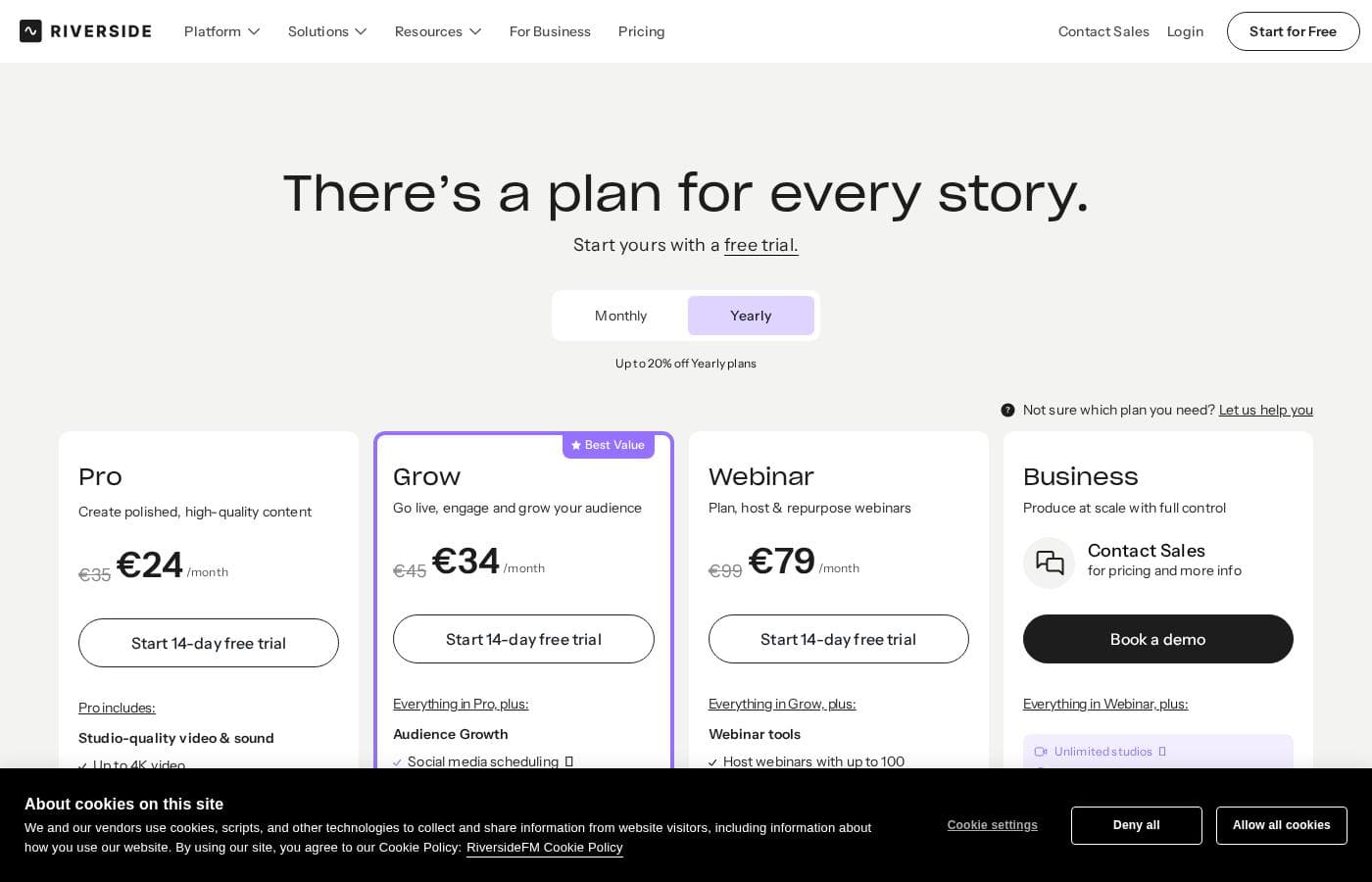
Riverside.fm has 5 plans: Free at $0, Pro from $24/month, Grow from $34/month, and Webinar from $79/month with annual billing (monthly rates are $29, $39, and $99), plus a custom-priced Business plan. Paid plans include a 14-day free trial.

Plans & Pricing

Free

Monthly$0/month
Yearly$0/month (billed annually)
Riverside watermark on all exports; 2-hour multi-track recording cap; up to 720p video
  • 2 hours of multi-track recordings (separate audio and video tracks)
  • Up to 720p video quality
  • 44.1 kHz audio quality
  • Unlimited single-track recording and editing
  • Magic Clips and unlimited video calls

Pro

Monthly$29/month
Yearly$24/month (billed $288 annually)
1 studio; 15 hrs/month separate track downloads; 10 people per recording session
  • Up to 4K video and 48 kHz audio with no watermark
  • Unlimited text-based editing and transcriptions (100+ languages)
  • AI editing: Magic Clips, show notes, silence and filler-word removal
  • Podcast hosting and analytics for 1 show
  • 1 studio and 15 hours/month of separate track downloads

Grow

Monthly$39/month
Yearly$34/month (billed $408 annually)
2 studios; 20 hrs/month separate track downloads; streaming quality up to 1080p
  • Everything in Pro, plus 2 studios
  • Full HD 1080p live streaming and multistreaming to unlimited destinations
  • Social media scheduling, newsletter, and creator website
  • Podcast hosting for 2 shows and video hosting
  • AI thumbnails and Riverside MCP

Webinar

Monthly$99/month
Yearly$79/month (billed annually)
3 studios; 25 hrs/month separate track downloads; up to 100 webinar registrants
  • Everything in Grow, plus 3 studios
  • Webinars with up to 100 registrants
  • Q&A, live call-ins, polls, and branded email reminders
  • Lead capture, custom registration forms, and HubSpot integration
  • Pre-record and stream sessions as live with recurring webinars

Business

Contact for pricing
Custom seats and pricing via sales; unlimited track downloads
  • Unlimited studios, video storage, and separate track downloads
  • Up to 10,000 webinar registrants and private podcast hosting
  • Producer mode, custom roles, and collaborative editing
  • SSO (Okta, Azure), SOC2 and ISO27001 compliance, API access
  • Dedicated CSM and 24/7 live priority chat support
Pricing Screenshot
Pricing

Riverside.fm costs between $0 and $79 per month with 5 plans: Free at $0, Pro at $24/month, Grow at $34/month, and Webinar at $79/month (paid plans are billed annually), plus Business with custom pricing through sales.

Paying yearly saves up to 20% compared to monthly rates. Here's what each plan offers.

Free

Price: $0/month Best For: Trying Riverside before you spend anything Other Features:

  • 2 hours of multi-track recording (separate audio and video tracks)
  • Up to 720p video and 44.1 kHz audio
  • Full suite of editing tools and Magic Clips
  • Unlimited single-track recording and video calls
  • Riverside watermark on everything you make

The Free plan is a real plan, not a demo. You can record, edit, and publish without a card. The watermark and 720p cap are the main reasons creators eventually upgrade. 🎙️

Pro

Price: $29/month, or $24/month billed $288 annually Best For: Creating polished, high-quality content Other Features:

  • Up to 4K video, 48 kHz audio, and no watermark
  • Unlimited text-based editing and transcriptions in 100+ languages
  • AI tools like Magic Clips, show notes, and filler-word removal
  • Podcast hosting and analytics for 1 show
  • 15 hours/month of separate track downloads

Pro is the core plan for most podcasters and solo creators. It bundles studio-quality recording, AI editing, and publishing in one place. Every paid plan starts with a 14-day free trial, so you can test it first.

Grow

Price: $39/month, or $34/month billed $408 annually Best For: Going live, engaging, and growing your audience Other Features:

  • Everything in Pro, plus 2 studios
  • Full HD 1080p live streaming and multistreaming to unlimited destinations
  • Social media scheduling, newsletter, and creator website
  • Podcast hosting for 2 shows and video hosting
  • 20 hours/month of separate track downloads

Pick Grow if you stream live or want built-in growth tools. It adds marketing features like scheduling and a creator website. Creators running two shows get a second studio here too.

Webinar

Price: $99/month, or $79/month billed annually Best For: Planning, hosting, and repurposing webinars Other Features:

  • Everything in Grow, plus 3 studios
  • Webinars with up to 100 registrants
  • Q&A, live call-ins, polls, and branded email reminders
  • Lead capture forms and HubSpot CRM sync
  • Pre-record sessions and stream them as live

Webinar is the plan for lead-generation events. Registration, polls, reminders, and analytics only unlock on this tier. The page flags it as Best Value, and it carries the highest download cap outside Business.

Business

Price: Custom — contact sales Best For: Producing at scale with full control Other Features:

  • Unlimited studios, storage, and separate track downloads
  • Up to 10,000 webinar registrants and private podcast hosting
  • Producer mode, custom roles, and collaborative editing
  • SSO, SOC2 and ISO27001 compliance, and API access
  • Dedicated CSM and 24/7 priority chat support

Business is aimed at media teams and B2B companies, not solo creators. You'll need it for SSO, compliance, Salesforce, or more than 100 webinar registrants. Book a demo to get a quote.

Riverside offers a genuinely free plan, so you can start without spending anything. Pro, Grow, and Webinar each include a 14-day free trial. One thing to check before you buy: recording is unlimited on every plan, but separate track downloads are capped (15–25 hours per month on paid tiers), so match that limit to your workflow.

Riverside.fm overview

Recording a great episode is hard enough. Getting clean audio, editing for hours, and juggling separate tools makes it worse. Riverside handles the whole flow: it records in local 4K quality, lets AI cut the editing time, and publishes straight to major platforms.

What is Riverside.fm?

Riverside is an AI-powered platform for recording, editing, and publishing podcasts, interviews, webinars, and live streams. It captures up to 4K video and uncompressed audio on each participant's device, so a shaky internet connection doesn't ruin the take. From there, AI helps you edit, generate clips and show notes, and publish to Spotify, Apple, and YouTube.

It's built for solo creators, podcasters, marketers, and production teams who want studio-level output without a studio.

Compare Riverside.fm with similar tools and browse the full category before choosing.

View all Podcast tools

Should you choose Riverside.fm?

Quick buyer guidance before you compare plans or click through.

Choose it if

  • Creators with spotty internet — local recording protects quality even when connections drop
  • People who dread editing — the text-based editor and AI cleanup cut hours down
  • Shows publishing to Spotify, Apple, and YouTube — hosting and metadata are built in
  • Marketers who need promo assets fast — AI generates clips, thumbnails, and headlines per channel
  • Global brands — AI translation and dubbing covers 30+ languages

Skip it if

  • Budget shoppers who want to compare plans upfront — the homepage doesn't show pricing, so you'll need to check the site or sign up first
  • Purist editors who want full manual control — the workflow leans heavily on AI for cuts, captions, and layouts
  • Live-event marketers relying on CRM sync — registrant syncing depends on a HubSpot connection
  • Teams that need guaranteed priority help — 24/7 priority support is tied to the business offering, not every plan

Next steps before buying

  1. 1Check current pricing and plan limits on Riverside's site — tiers aren't listed on the homepage
  2. 2Start with the free option and test recording quality with your own mic and internet setup
  3. 3Confirm the integrations you need, such as HubSpot for webinar leads or your publishing targets
  4. 4Compare Riverside against one or two alternatives before committing to a paid plan
  5. 5Review any trial and refund terms before paying, since they aren't spelled out on the homepage

Ease of use

The site signals an approachable tool. You can start free from your browser, edit by changing the transcript like a doc, and apply branding with one click. AI handles filler words, eye contact fixes, and layouts automatically, so beginners can get clean results. Deeper support, like 24/7 priority help, appears reserved for business plans.

Riverside.fm Key Features

✨ Studio-quality recording, no studio needed

Your internet connection won't decide how good you sound. Riverside records up to 4K video and uncompressed audio directly on each participant's device, in separate tracks. So if Wi-Fi drops mid-interview, your take stays sharp.

It's ideal for remote recordings where clean, isolated audio and video matter most.

✨ Editing that takes seconds, not hours

Edit like a doc. Search, cut, copy, and paste right in the transcript to change your video. AI removes filler words and silences in one click, syncs your voice and lips when you fix a line, and can even fix eye contact. Use it whenever you want polished cuts without touching a timeline.

🎬 One recording, weeks of content

The AI Co-Creator turns each session into a full set of promotional assets, optimized for each channel. From one recording you get:

  • Clips sized for social platforms
  • Thumbnails and headlines
  • Show notes and posts

Share them as is, or tweak things further before publishing.

✨ Stream live and run webinars like a pro

Go live in full HD to LinkedIn, YouTube, Instagram, Twitch, and more, all at once. Take audience call-ins, host Q&As, and manage chats in one place. For webinars, built-in registration with automated email reminders helps boost attendance, and HubSpot sync captures leads automatically.

Everything records in high quality for clips and summaries afterward.

✨ Publish straight from one place

Podcast hosting is built in. In a few clicks, you can get listed on Spotify, Apple, YouTube, and more. Riverside auto-generates transcriptions, titles, descriptions, chapters, and takeaways packed with keywords.

Built-in analytics show episode success and audience behavior, and your logo, colors, intro, and outro apply with one click.

Use Cases

🎙️ Remote podcast interviews

You're in New York; your guest is in London. Riverside records locally on each device, so shaky Wi-Fi doesn't ruin the take. You get separate 4K video and audio tracks, then fix flubs by editing the transcript like a doc.

Expected outcome: A clean, studio-quality take — no reshoots needed.

✂️ One recording, weeks of clips

Recorded a long interview? Let AI Co-Creator spin it into short clips, thumbnails, headlines, and posts sized for each channel. Add animated captions in one click for TikTok and Reels.

Expected outcome: A full promo kit from a single session — no extra editing time.

📣 Webinars that capture leads

Set up registration, send automated email reminders, and go live in HD to LinkedIn, YouTube, and more. Run Q&As, polls, and call-ins while registrant details sync to HubSpot.

Expected outcome: One webinar becomes clips, summaries, and new leads in your CRM.

🏢 Brand content at scale

Marketing and production teams: save your logo, colors, and intros once, then apply them with a click. Producer mode, custom roles, and collaborative editing keep everyone moving. Business plans add SSO, compliance certs, and 24/7 support.

Expected outcome: Consistent, on-brand content across the whole team.

User Reviews

No reviews yet.

Write a Review

Write a Review for Riverside.fm
0/100 characters
0/2000 characters

Why use Riverside.fm?

Your internet connection shouldn't decide how good your podcast sounds. Riverside records locally on every participant's device, then uses AI to handle the heavy lifting after you hit stop. Shows like The Tim Ferriss Podcast and The Official Marvel Podcast are made with it — here's what you get:

  • Studio quality without a studio. Local recording captures up to 4K video and uncompressed audio on separate tracks, so bad Wi-Fi can't wreck a take.
  • Editing that takes seconds, not hours. Edit like a doc, remove filler words in one click, and let AI sync your voice and lips when you fix a line in the transcript.
  • One recording, weeks of content. The AI Co-Creator turns sessions into clips, thumbnails, headlines, and posts sized for each channel.
  • Everything under one roof. Keep your logo, colors, and intros consistent, then publish straight to Spotify, Apple, and YouTube with built-in hosting and analytics.
  • Go live with confidence. Stream in full HD to LinkedIn, YouTube, Instagram, Twitch, and more, with call-ins, Q&As, and HubSpot lead syncing for webinars.
  • Backed at scale. A 4.8 rating on G2 from 1,582 reviews, SOC certification, and 30+ language translation and dubbing round it out.

Ready to transform your workflow with Riverside.fm?

Riverside.fm alternatives

View all Podcast tools

Other tools in the Podcast category

Popular comparisons

SquadCast
Riverside.fm vs SquadCast
Podcast
Descript
Descript vs Riverside.fm
Podcast

Similar tools

Podbean
Podbean
Podcast0/5

Podbean is an all-in-one hosting and monetizing platform designed to support successful podcasting endeavors. It’s built to be both powerful for seasoned creators and easy for newcomers to use. The platform focuses on security and scalability, currently supporting over **147,525 active podcasts** globally. This stability is crucial whether you are expanding your audience or preparing to earn income from your content.

Podcastle
Podcastle
Podcast0/5

Podcastle is designed as an enhanced content creation suite for producing high-quality sound. It serves diverse audiences, including those focused on **Podcasting**, **Education**, **Communications**, and **Audiobooks**. You can easily use the platform to develop professional content, whether you manage a single project or need collaborative solutions for **Teams** and large **Business** organizations.

SquadCast
SquadCast
Podcast0/5

SquadCast is the cloud recording studio tailored for creators, guests, producers, and YouTubers. It offers premium, studio-quality audio and video using in-browser software. This platform helps you rapidly create excellent content without the hassle of robotic-sounding interviews or complex setups. It’s designed to be intuitive and easy to edit, making post-production simpler than ever. ✨

Alitu
Alitu
Podcast0/5

Alitu is recognized as the most user-friendly podcast tool available, period. It was designed specifically for creators who need a simple process to produce their show. The streamlined interface makes it easy to handle recording, editing, and publishing tasks. Even if you are a total beginner, Alitu eliminates the need for prior audio software experience. If you ever get stuck, a friendly support team is ready to help guide you. ✨

Frequently Asked Questions

Which integrations does Riverside offer, and which plans unlock them?

Paid plans publish to YouTube, Spotify, Apple, Instagram, and LinkedIn. HubSpot lead sync starts on the Webinar plan; Salesforce and Marketo are Business-only. Grow and above include Riverside MCP, which connects AI assistants like Claude to your content.

Can Riverside meet security and compliance requirements?

Business is the plan with SOC2 and ISO27001 certification, SSO via Okta or Azure, security and legal review, and a master service agreement. If your organization needs those controls, plan for Business. All plans include automatic cloud backups.

Do I pay per person, and what are AI Credits?

Plans include one seat; extra editors are a paid add-on. AI Credits power translation, B-roll, and animated clips — paid plans start with 2,000, Business with 12,000, and you can buy more. Magic Clips don't use credits.

Is there a money-back guarantee if it's not a fit?

Paid plans start with a 14-day free trial, so you can test before paying. Riverside doesn't advertise a money-back guarantee, and annual plans bill upfront (Pro is $288/year). Check the terms before committing to a yearly plan.

Ready to try Riverside.fm? Check out the official site or pricing.