Descript vs Riverside.fm
Descript and Riverside.fm are leaders in AI-powered media creation. Descript focuses on rapid text-based editing and advanced AI video features. Riverside.fm excels at pristine multi-track remote recording quality. Your choice depends on whether you prioritize editing speed or source file quality.
Best for: Solo creators prioritizing editing speed and AI polish, Marketing teams needing fast internal videos or quick B-roll generation
Best for: Podcasters running frequent remote interviews with high quality demands, Professional streamers needing 1080p HD multistreaming capabilities
AI Editing That Redefines Workflow
We found Descript provides unparalleled speed and efficiency by innovating the editing process into a simple, text-based workflow, making advanced tools accessible to everyone. Overall, this is a powerful, modern solution ideal for creators and businesses looking to drastically increase content output quality and volume efficiently.
Pros
- Text-based editing is highly innovative and drastically reduces editing time.
- Powerful integrated AI toolset (Studio Sound, Eye Contact, filler removal) achieving professional polish.
- Transcription is fast, highly accurate, and a key 'game-changer' feature.
- Easy onboarding allows technical novices to start creating quickly.
Cons
- Constant, major application updates cause workflow disruption and user frustration.
- Users report that the AI co-editor (Underlord) can sometimes be slow to respond.
- Some subscription users wish they could purchase additional AI processing hours (like dubbing) separately.
- Quality-of-life issues exist, such as difficulties with voiceover recording workflow.
Quality content made simple with AI.
We find Riverside.fm excels by simplifying the otherwise complex remote recording process, ensuring high-quality, individual tracks regardless of connection speed. Its powerful suite of AI tools drastically speeds up editing and content repurposing, offering exceptional value for both novices and seasoned producers. Overall, we confidently recommend Riverside for any creator prioritizing studio-quality results and efficiency.
Pros
- Local recording ensures high-quality audio and video regardless of poor internet connection.
- Powerful AI features (transcription, text-based editing, Magic Clips) dramatically reduce post-production time.
- User-friendly interface makes it intuitive for beginners to use and simple for guests to join sessions.
- Exceptional value proposition, replacing multiple separate tools needed for content creation.
Cons
- Some users report that customer support occasionally relies on generic responses.
- The interface and setup can feel complicated when attempting strictly in-person recordings.
AboutDescript
Descript is a complete video and podcast editor that uniquely combines a full set of professional editing tools with powerful artificial intelligence. This setup makes sophisticated video creation accessible to everyone.
The platform allows you to use your own intuitive tools or direct your AI co-editor, named Underlord, to handle complex tasks for you. It’s ideal for creators making everything from YouTube videos to podcasts, and for businesses needing high-quality internal training or customer support videos.
AboutRiverside.fm
Riverside.fm is your comprehensive digital content studio. It is designed to help you create, edit, and go live with professional media quickly.
The platform supports advanced production controls and seamless collaboration, which is ideal for individual creators and business teams alike. It’s trusted by top names like Tim Cook and Mark Zuckerberg for essential high-stakes recording. This system helps you move from recording right to publishing with maximum impact. ✅
Highlights
Feature Comparison
Features Overview
We highlight the main differences and pick a winner for each feature.
Source Quality & Tracks
Riverside.fm guarantees high-quality, local files regardless of internet stability.
Riverside.fm records separate audio and video tracks locally, achieving pristine 4K quality. This essential feature prevents quality loss due to bad internet connections. Riverside.fm offers multi-track control over volume and composition during editing. Descript primarily acts as an editor and transcriber for imported footage. Descript's built-in recording is less featured than Riverside.fm's robust remote studio. Choose Riverside.fm if getting perfect source files from remote guests is your main concern.
AI Video Polish
Descript offers unique visual AI tools like Eye Contact and the Underlord co-editor.
Descript uses Eye Contact to ensure you always appear to face the camera. Its Studio Sound feature removes noise and instantly enhances poor audio quality. Descript's Underlord AI co-editor can handle tasks like designing B-roll or scripting. Riverside.fm focuses AI on audio tuning (Magic Audio) and editing efficiency. Riverside.fm does not offer the Eye Contact or advanced B-roll design tools of Descript. Descript gives creators more control over advanced visual and design polish.
Live Streaming & Webinars
Riverside.fm is a dedicated live studio; Descript is purely for post-production.
Riverside.fm offers dedicated Live and Webinar plans for broadcasting. It supports multistreaming to unlimited destinations in 1080p HD. Riverside.fm includes tools like live call-ins and advanced audience engagement. Descript does not include any live streaming or webinar hosting capabilities. If you need to broadcast, stream, or host large events, Riverside.fm is the only choice.
Content Repurposing
Riverside.fm offers two dedicated tools for fast content distribution.
Riverside.fm automatically generates ready-to-share social clips using Magic Clips. AI Show Notes auto-create titles, chapters, and keywords for easy publishing. Descript can also generate clips but requires more configuration than Riverside.fm's automated tools. Descript's strength lies in editing the *core* content, not the peripheral publishing assets. If quick distribution and SEO metadata are important, Riverside.fm saves much more time.
Pricing Structure
Descript prices per user/seat; Riverside.fm prices by total recording hours.
Descript's paid plans are billed per person, starting at $16/month annually. Pricing scales based on media hours processed and AI credits used per seat. Riverside.fm pricing is based on the total multi-track recording hours used per month. The $24 Pro plan allows 15 hours of recording across the account, not per person. Large teams needing unlimited collaboration should compare Descript's per-seat cost against Riverside.fm's usage-based pricing.
Error Correction
Both use sophisticated AI to fix mistakes simply by typing corrections into the script.
Descript uses its Regenerate tool, which clones your voice and subtly adjusts mouth movements. You simply type the right word into the transcript to fix audio mistakes. Riverside.fm offers AI Voice and the VideoDub feature for performing the same type of fix. VideoDub seamlessly syncs the corrected audio to your lips on screen. Both Descript and Riverside.fm virtually eliminate the need for costly re-recording sessions.
Editing Efficiency
Descript offers slightly faster workflows using AI co-editors and batch editing.
Descript is praised for its innovative text-based editing and one-click filler word removal. The Underlord AI handles complex design and editing for hands-off efficiency. Riverside.fm offers robust text-based editing to simplify many post-production tasks. It also features automated clean-up of silences and filler words. Descript wins narrowly because its integrated AI co-editor, Underlord, can automate entire creative steps.
Team Collaboration
Riverside.fm enables unlimited multi-track recording on its top-tier plan.
Descript's Business plan scales to five users, focusing on Brand Studio and translation features. Descript charges per seat, limiting large teams needing constant access. Riverside.fm's Business plan offers unlimited multi-track recording hours and production workspaces. Riverside.fm offers better scalability for high-volume content operations and large organizations.
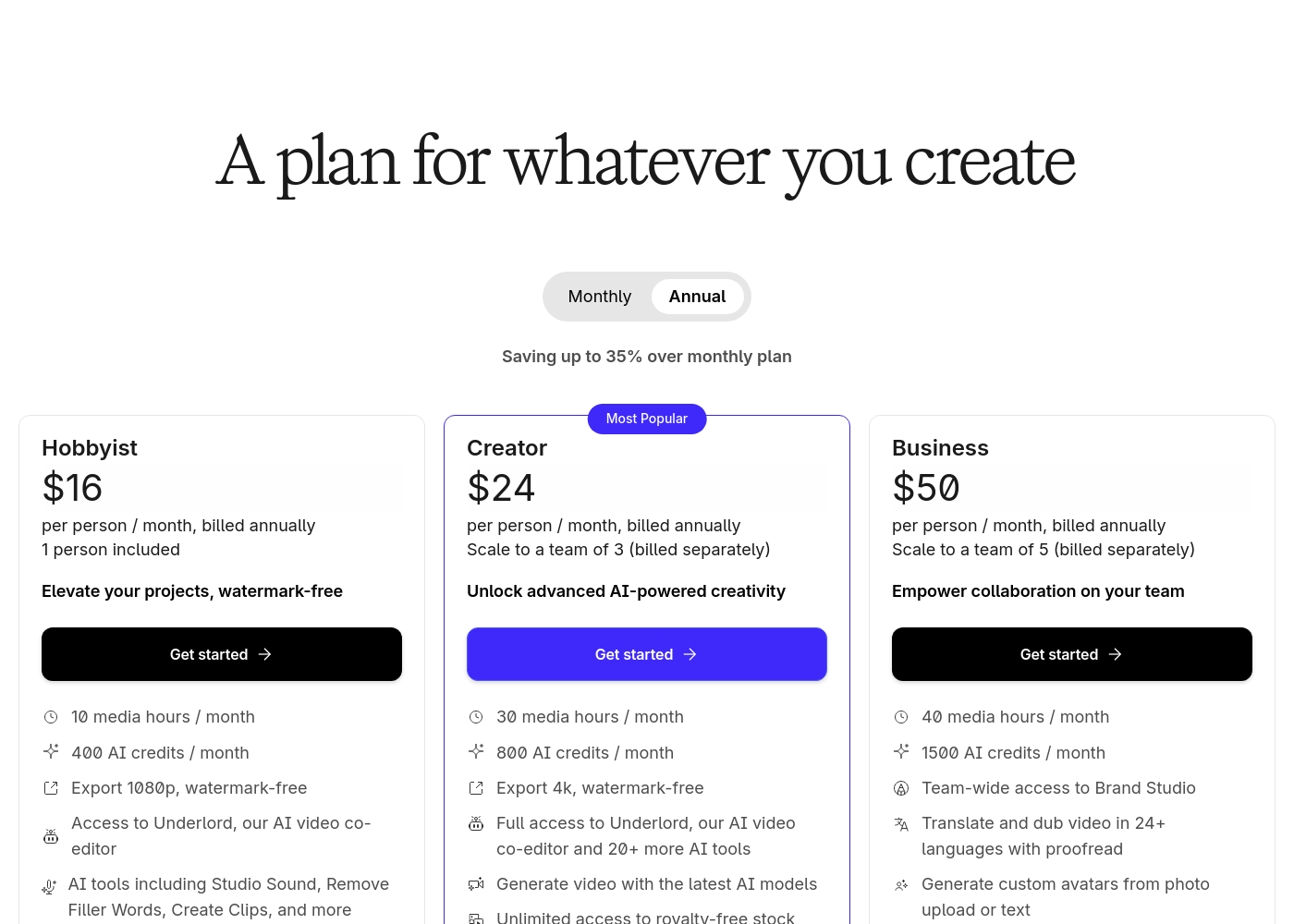
Descript offers five plans starting free and scaling up to $50 per person per month when billed annually. The paid plans are Hobbyist ($16), Creator ($24), Business ($50), and Enterprise (contact sales).
Let's explore the features and capabilities of each plan in detail, starting with the free option.
Free
Price: $0 per person / month, billed annually Best For: Starting your journey, or trying text-based editing Other Features:
- 1 media hour / month
- 100 AI credits at signup
- Limited use of Underlord AI co-editor
- Start your journey with text-based editing
- Limited use of Underlord AI co-editor
- Limited trial of AI Speech
- Elevate your projects, watermark-free
- Access to Underlord AI video co-editor
- AI tools including Studio Sound, Remove Filler Words, Create Clips, and more
- AI Speech with custom voice clones and video regenerate
- Unlock advanced AI-powered creativity
- Full access to Underlord and 20+ more AI tools
- Generate video with the latest AI models
- Unlimited access to royalty-free stock media library
- Advanced export options (timeline, batch files)
- Empower collaboration on your team
- Team-wide access to Brand Studio
- Translate and dub video in 24+ languages with proofread
- Generate custom avatars from photo upload or text
Riverside.fm costs between $0 and $99 per month with five main plans: Free at $0/month, Pro at $24/month (annual), Live at $34/month (annual), Webinar at $79/month (annual), and Business (Contact Sales).
The platform offers great flexibility. Here is a detailed breakdown of what you get for your investment.
Free
Price: $0 per month Best For: New creators starting their journey Refund Policy: Not applicable Other Features:
- Try 2 hours of multi-track recordings
- Up to 720p video quality
- Riverside watermark on all output
- Unlimited single track recording and editing
- Try 2 hours of multi-track recordings
- Includes full suite of editing tools
- Up to 720p video quality
- Riverside watermark on all things
- Unlimited single track recording and editing
- Studio-quality video & sound
- Up to 4K video quality
- No watermark
- AI tools (Magic Audio, unlimited transcriptions, remove silences & filler words)
- Content repurposing (Magic clips & show notes)
- Everything in Pro, plus live features
- Studio-quality streaming (1080p HD)
- Multistreaming to unlimited destinations
- Audience engagement tools (Omnichat, live call-ins)
- Custom branding and remote control
- Everything in Live, plus webinar features
- Webinar hosting (up to 100 registrants)
- Unlimited scheduled sessions
- Registration & follow up (lead capture tool)
- Webinar analytics and Hubspot integration

Pricing Notes
- Descript's paid plans are strictly per-seat, meaning costs increase with every team member invited.
- Riverside.fm's pricing is primarily driven by the total multi-track recording hours used by the entire team.
- Riverside.fm offers a high-end Business plan with unlimited recording, which Descript does not explicitly offer.
- Both Descript and Riverside.fm offer permanent, functional Free plans for new users to test core features.
Pricing Head-to-Head
User Reviews
Users consistently praise Descript for revolutionizing audio and video editing, primarily through its game-changing text-based workflow. The software is seen as highly intuitive, simplifying complex edits like trims and filler word removal, saving substantial time for creators and educators.
The speed and accuracy of the transcription feature are frequently highlighted, making sophisticated video creation vastly more accessible, even for technical novices. AI features like Studio Sound and eye contact correction are celebrated for adding professional polish effortlessly.
Descript is a game changer for video editing. I love editing my videos directly from the transcript, which lets me fix small glitches and even correct speech quality quickly.
Reviewers overwhelmingly find Riverside.fm to be a powerful and user-friendly platform, evidenced by its Excellent 4.3/5 Trustpilot rating. Users frequently highlight the system’s ability to capture high-quality, professional video and audio, even when recording remotely or dealing with slow internet speeds, thanks to the critical local file backup feature.
The platform’s accessibility is a major selling point: guests find it simple to join, and beginners find it easy to navigate and learn. A huge benefit cited is the array of cutting-edge AI features—such as text-based editing, accurate transcription, and Magic Clips—which significantly reduce post-production time.
Absolutely love Riverside! The video recording quality for both the host and customers remains high even when my own internet lags behind. The platform ensured that guests logged in easily, and the output was reliably professional every time.
Our Verdict
Choosing between Descript and Riverside.fm boils down to where you need the most help. If editing complex video efficiently is your bottleneck, Descript is likely your new best friend. If securing perfect source quality from remote guests is critical, you must choose Riverside.fm. Descript’s superpower is making sophisticated editing feel simple and fast. Its text-based interface and tools like Studio Sound and Eye Contact polish video effortlessly. Descript is an all-in-one AI editing ecosystem built to maximize your content output. Riverside.fm’s superpower is capturing pristine audio and video for remote collaboration. It guarantees 4K local files for every participant, ensuring broadcast-ready source material. Riverside.fm also excels at live streaming and automated publishing with Magic Clips and AI Show Notes. If you run remote interviews or need live broadcast tools, Riverside.fm is the necessary, specialized tool. If you create video content solo and want AI to automate polish and design steps, Descript provides the most efficiency. Evaluate your workflow: high-quality recording or rapid AI editing?
Frequently Asked Questions
Which software is better for remote podcast interviews: Descript or Riverside.fm?
Riverside.fm is specifically designed for remote interviews and secures local high-quality tracks. It records separated 4K audio and video tracks from every guest. While Descript can record, Riverside.fm provides superior source file quality assurance for this use case.
Does Descript offer the same live streaming capabilities as Riverside.fm?
No, Descript does not include any live streaming or webinar hosting features. Riverside.fm offers dedicated Live and Webinar plans. Use Riverside.fm if you need to multistream in HD or interact with a live audience.
How does Descript's pricing model differ from Riverside.fm’s structure?
Descript prices its plans on a per-person (per-seat) basis, charging for each team member. Riverside.fm's pricing is primarily based on the total multi-track recording hours used by the account. Descript charges for collaborators; Riverside.fm charges for usage.
Can I use AI to fix verbal mistakes without re-recording in both tools?
Yes, both Descript (Regenerate) and Riverside.fm (AI Voice/VideoDub) offer this feature. They both clone your voice and use AI to correct mistakes by simply typing the fix. This capability saves significant time in post-production.
Which tool provides better AI features for visual creators?
Descript provides more advanced visual AI features. Tools like Eye Contact, Studio Sound, and the Underlord AI co-editor optimize video appearance. Riverside.fm’s AI is geared more towards audio quality and content repurposing.
Ready to Choose?
Both tools have their strengths. Choose based on your specific needs.