Descript

Descript

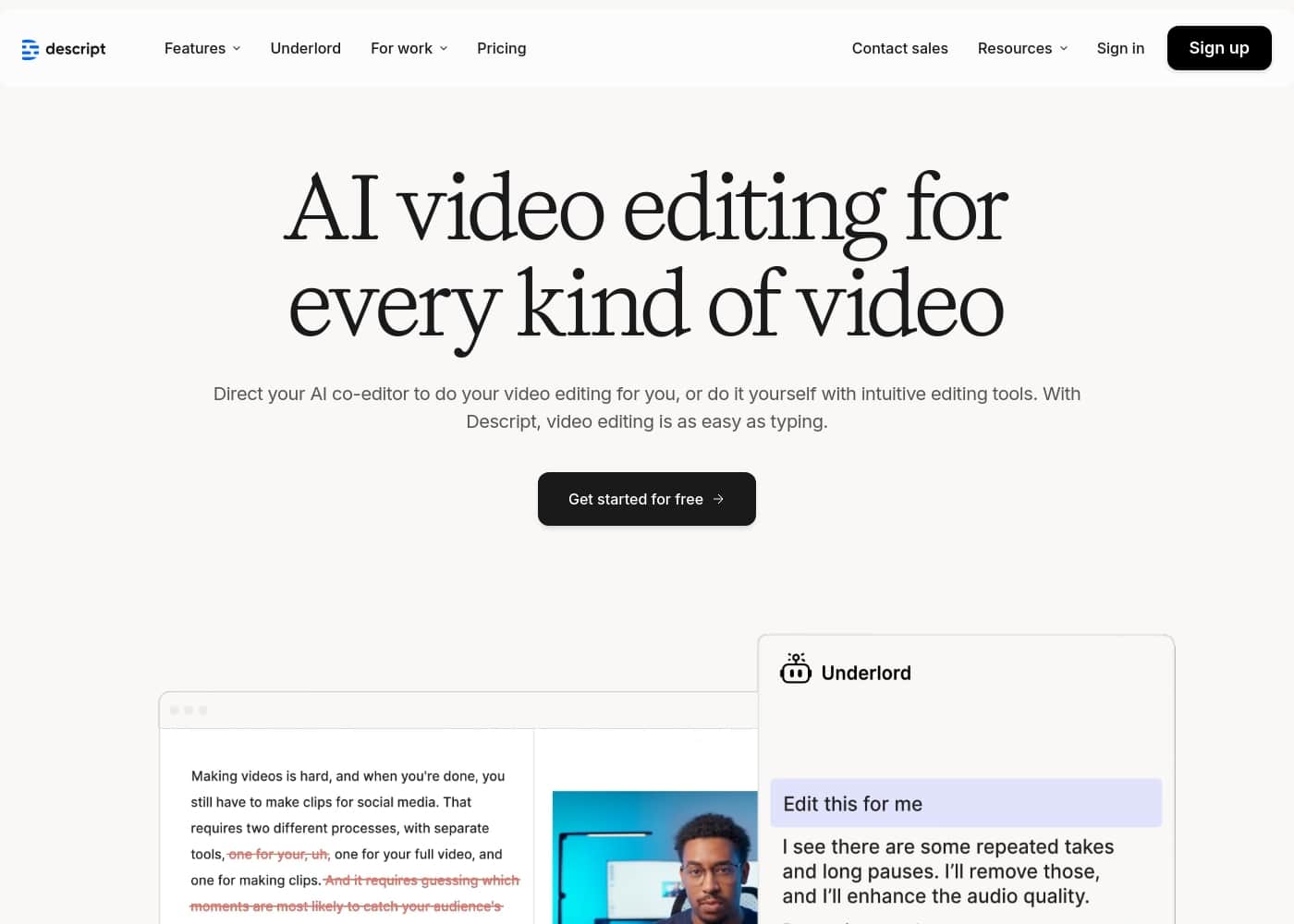
AI video editing made as simple as typing.

#5 dans Podcast
2 min read · Updated 10/5/2025
Descript homepage screenshot

At a glance

Quick overview for Descript: rating, pricing summary, key features, and highlights.

Ciroapp review

4.4
AI Editing That Redefines Workflow

We found Descript provides unparalleled speed and efficiency by innovating the editing process into a simple, text-based workflow, making advanced tools accessible to everyone. Overall, this is a powerful, modern solution ideal for creators and businesses looking to drastically increase content output quality and volume efficiently.

Pros

  • Pro:Text-based editing is highly innovative and drastically reduces editing time.
  • Pro:Powerful integrated AI toolset (Studio Sound, Eye Contact, filler removal) achieving professional polish.
  • Pro:Transcription is fast, highly accurate, and a key 'game-changer' feature.
  • Pro:Easy onboarding allows technical novices to start creating quickly.

Cons

  • Con:Constant, major application updates cause workflow disruption and user frustration.
  • Con:Users report that the AI co-editor (Underlord) can sometimes be slow to respond.
  • Con:Some subscription users wish they could purchase additional AI processing hours (like dubbing) separately.
  • Con:Quality-of-life issues exist, such as difficulties with voiceover recording workflow.
Free trial
Yes
Range: $0–$50/person/month (billed annually)Free plan, Monthly subscription, Yearly subscription, Per seat pricing
This section is a summary. Detailed sections about features, use cases, pricing, and reviews follow below.

Descript review, pricing, features, pros & cons

Are you tired of complex video software that slows down your creativity? Editing video doesn't have to be hard. Descript immediately speeds things up by treating video editing like typing. ✨

This intuitive approach helps you gain efficiency, leading to less work and a more seamless, creative flow.

What is Descript?

Descript is a complete video and podcast editor that uniquely combines a full set of professional editing tools with powerful artificial intelligence. This setup makes sophisticated video creation accessible to everyone.

The platform allows you to use your own intuitive tools or direct your AI co-editor, named Underlord, to handle complex tasks for you. It’s ideal for creators making everything from YouTube videos to podcasts, and for businesses needing high-quality internal training or customer support videos.

Descript Key Features

✨ Edit Video Like Typing

Editing video doesn't have to be hard or confusing. Descript turns your recordings into an instant transcript, making video editing as easy as managing a document. You simply edit the text to automatically cut the corresponding video or audio footage.

This intuitive approach helps you gain immediate efficiency when cleaning up your projects. If you need fine-grained control, Descript still provides professional precision tools. You can use the timeline editor to adjust timing, remove cross-talk, or correct color, ensuring your video goes from good to perfect.

🤖 Your AI Co-Editor: Underlord 🤖

Descript gives you the option to direct an AI to handle complex tasks for you. Underlord is your powerful AI co-editor, ready to speed up nearly every part of your workflow. You can just describe what you want the final video to look like, and let Underlord handle the design or editing process automatically.

Underlord can also help you start fresh with content creation. You can ask the AI for feedback on a script you wrote, or tell it your topic and have it generate a brand new script for you. This dramatically streamlines the creative flow and reduces manual effort.

✨ Achieve Instant Professional Polish

You don’t need pricey mics or soundproofing to get clean audio. The powerful Studio Sound feature uses generative AI to remove background noise and significantly enhance voices. You can achieve professional sound quality immediately, regardless of your recording environment.

Descript also eliminates verbal distractions in one click. The Remove Filler Words tool instantly cuts all your "ums," "uhs," "likes," and "you knows." This automatic process saves hours of manual editing while making you sound smarter and more articulate.

✨ Perfect Your Visual Presence

Ensure you maintain a strong visual connection with your audience, even when reading a script. The Eye Contact tool automatically adjusts your gaze so it appears as if you were looking directly at the camera the entire time. If your recording location is messy, the Green Screen feature quickly scrubs out your background.

This allows you to pick a new background without needing to physically straighten up your setting. If you want to stay off camera completely, you can utilize the Avatars feature. Write your script, and let an avatar do the talking for you.

✨ Rapid Design and B-roll Automation

Make your video look elegant with automated design tools. You can apply professionally designed layouts from dozens of options created by video professionals, or customize and save your own branded layout packs.

The Quick Design feature saves time by automatically formatting your video and adding relevant B-roll footage with just one click. Smart Transitions also manage elements like fades and animations between scenes automatically.

For unique media, you can use AI image generation to create B-roll or custom visuals tailored exactly to your content. You can write your own prompt for something nobody has ever seen before, or draw from Descript’s extensive stock library of GIFs, music, B-roll, and images.

✨ Global Reach and Error Correction

Expending your reach worldwide is simple with automated translation features. You can localize your content for audiences globally without having to leave your seat. Furthermore, you can instantly add captions and accessibility features with just a couple of clicks, adding branding and boosting views.

If you make a small mistake while recording, the Regenerate tool helps you fix it easily. Just type the correct word you want, and Regenerate will clone your voice. It subtly changes the mouth movement on screen to match the correction, allowing you to fix audio flaws mid-sentence without re-recording.

Use Cases

🎙️ Producing Professional Podcasts Fast

Podcasters can easily handle both audio and video episodes within Descript. You simply drag in your recording, and an instant transcript appears for immediate editing. Instead of fiddling with complex audio waveforms, you just delete the text that corresponds to unwanted sections. This text-based approach radically speeds up the post-production workflow.

Use Studio Sound to instantly clean up poor audio taken outside a studio environment. You can also ask the AI to generate promotional clips that are most likely to go viral. Descript provides everything you need to record, edit, extract clips, and publish your entire podcast.

Tip: Save hours by automatically removing all verbal filler words like “ums” and “uhs” in one click.

🛠️ Fixing Mistakes Without Re-recording

A content creator is polishing a financial tutorial but realizes they mispronounced a crucial term. Re-recording the entire segment is costly and time-consuming. Descript’s Regenerate tool is the perfect fix for this common editing headache.

Step 1: Locate the incorrect word in the automatic transcript. Step 2: Simply type the correct word directly into the script editor. Step 3: The AI uses your cloned voice to generate the fixed audio and subtly adjusts the speaker's mouth movements on screen to match.

Expected outcome: The mistake is corrected seamlessly without requiring you to step back in front of the camera.

🌍 Creating Accessible & Global Videos

Businesses often need to distribute essential videos, like customer support deep dives or product demos, to a global audience. Descript helps you maximize reach and accessibility effortlessly. Start by adding custom captions and accessibility features with just a couple of clicks.

If you have the Business plan, you can instantly translate and dub your video content into over 24 languages. The integrated proofreading feature helps ensure high quality and accuracy for international distribution. This automation helps you expand your brand’s reach worldwide without needing a specialized localization team.

✨ Quick Design for Marketing Teams

Video marketing needs constant output, but not every team has a full-time video designer. Marketing teams can use Descript to create high-quality content efficiently. You can apply professionally designed layouts and smart transitions quickly from the template library.

Alternatively, you can just tell Underlord, the AI co-editor, what visual style you want. Ask it to generate specific B-roll footage or a custom image for something unique. The Quick Design function can automatically format your screen recordings and add context-relevant visuals, turning drafts into polished content instantly.

🧠 Automating Internal Training Videos

Learning and Development (L&D) departments need engaging videos that teach teams specific skills. Creating these requires consistency and fast turnaround. L&D uses screen recording features to capture process steps and then uses text-based editing to tighten the narrative quickly.

They can eliminate distracting backgrounds using the Green Screen tool and use the Eye Contact feature to ensure the presenter appears focused on the audience while reading a script. The ability to use branded layout packs ensures every training video looks professional and recognizable across the entire organization.

🤖 Generating Video Without Being On Camera

Some creators or business leaders prefer to stay off camera but still require polished video communications. Descript allows you to use AI avatars for this purpose. You can choose an avatar from the gallery or generate a custom one based on a photo or text prompt.

Once the avatar is ready, simply write your script—or ask Underlord to write it for you. The avatar will read the script aloud, delivering your message in high-quality video format. This enables continuous video content creation without your physical presence.

Pricing Overview for Descript

Pricing range
$0–$50/person/month (billed annually)
Pricing types
Free plan, Monthly subscription, Yearly subscription, Per seat pricing

Descript offers plans starting with a powerful free option for individuals. Paid subscription tiers begin at $16 per person per month when billed annually.

Pricing scales primarily based on included media processing hours and access to advanced AI collaboration features.

Plans & Pricing

Free

Monthly0
Yearly0
1 media hour / month; 100 AI credits at signup; Export 720p, with watermarks
  • Start your journey with text-based editing
  • Limited use of Underlord AI co-editor
  • Limited trial of AI Speech

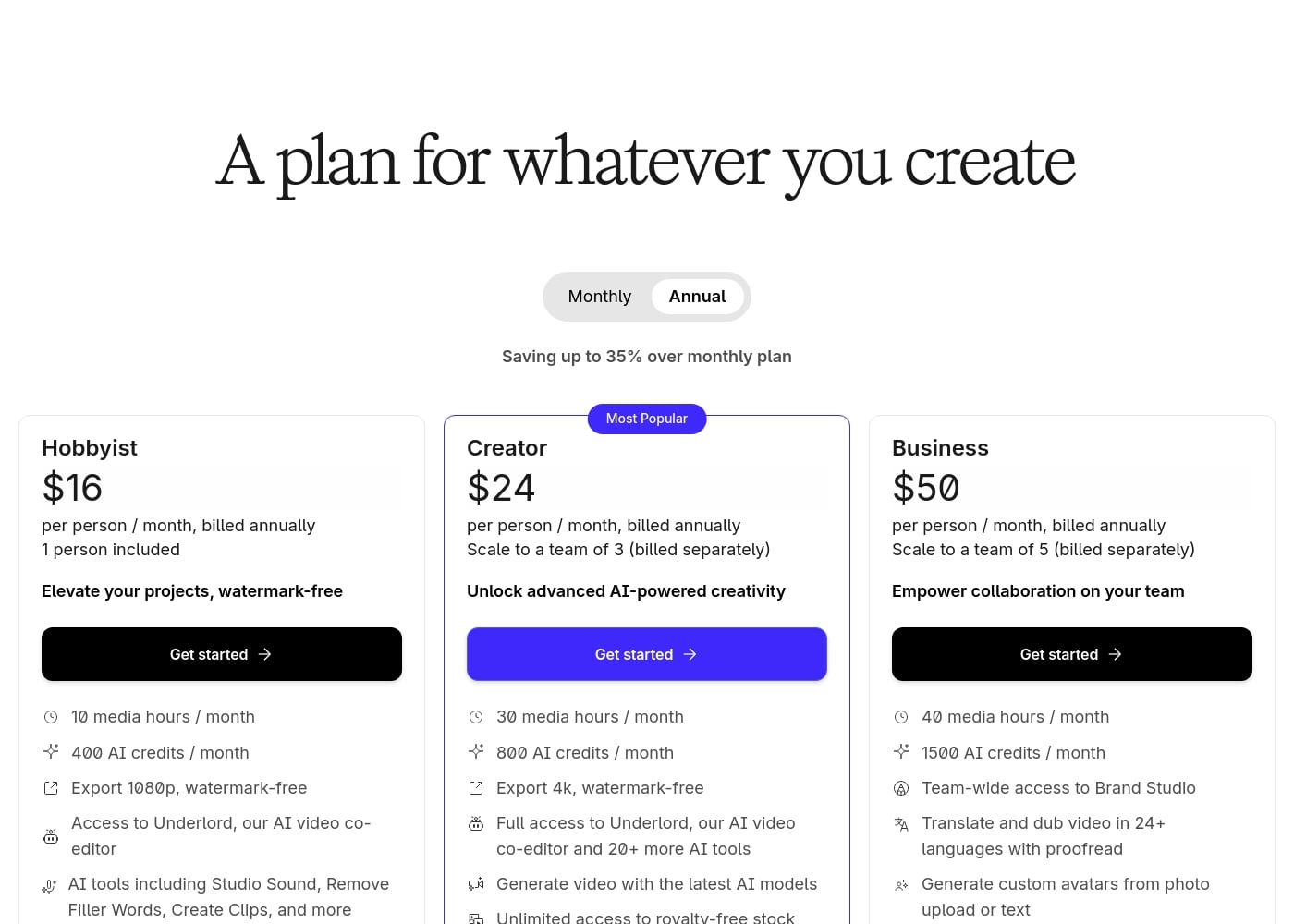
Hobbyist

Yearly16
1 person included; 10 media hours / month; 400 AI credits / month; Export 1080p
  • Elevate your projects, watermark-free
  • Access to Underlord AI video co-editor
  • AI tools including Studio Sound, Remove Filler Words, Create Clips, and more
  • AI Speech with custom voice clones and video regenerate

Creator

Yearly24
Scale to a team of 3 (billed separately); 30 media hours / month; 800 AI credits / month; Export 4k
  • Unlock advanced AI-powered creativity
  • Full access to Underlord and 20+ more AI tools
  • Generate video with the latest AI models
  • Unlimited access to royalty-free stock media library
  • Advanced export options (timeline, batch files)
  • Save reusable custom layouts

Business

Yearly50
Scale to a team of 5 (billed separately); 40 media hours / month; 1500 AI credits / month
  • Empower collaboration on your team
  • Team-wide access to Brand Studio
  • Translate and dub video in 24+ languages with proofread
  • Generate custom avatars from photo upload or text

Enterprise

Contact for pricing
Not explicitly stated
  • Customize your plan for large organizations

Descript offers five plans starting free and scaling up to $50 per person per month when billed annually. The paid plans are Hobbyist ($16), Creator ($24), Business ($50), and Enterprise (contact sales).

Let's explore the features and capabilities of each plan in detail, starting with the free option.

Free

Price: $0 per person / month, billed annually Websites Supported: Not explicitly stated Best For: Starting your journey, or trying text-based editing Refund Policy: Not explicitly stated Other Features:

  • 1 media hour / month
  • 100 AI credits at signup
  • Limited use of Underlord AI co-editor

This plan is perfect if you are just getting started and want to try out Descript’s core text-based editing and AI tools. You can test features with limited use and export your work at 720p, though it will have a watermark.

Hobbyist

Price: $16 per person / month, billed annually Websites Supported: Not explicitly stated Best For: Elevating projects, watermark-free Refund Policy: Not explicitly stated Other Features:

  • 10 media hours / month
  • 400 AI credits / month
  • Export 1080p, watermark-free
  • AI tools including Studio Sound and Remove Filler Words

The Hobbyist plan is a great step up for dedicated individuals who need quality output without watermarks. It gives you more media hours and unlocks important AI tools, including advanced speech regeneration and custom voice clones. 🤩

Creator

Price: $24 per person / month, billed annually Websites Supported: Not explicitly stated Best For: Advanced AI-powered creativity, professional creators Refund Policy: Not explicitly stated Other Features:

  • 30 media hours / month
  • 800 AI credits / month
  • Export 4k, watermark-free
  • Unlimited access to the royalty-free stock media library
  • Generate video with the latest AI models

This is the most popular plan and strongly recommended for professional content creation or small teams up to three. You gain full access to the Underlord AI co-editor and advanced export options, giving you powerful creative control and efficiency.

Business

Price: $50 per person / month, billed annually Websites Supported: Not explicitly stated Best For: Empowering collaboration on your team Refund Policy: Not explicitly stated Other Features:

  • 40 media hours / month
  • 1500 AI credits / month
  • Team-wide access to Brand Studio
  • Translate and dub video in 24+ languages with proofread

The Business plan is designed for teams that need seamless collaboration and localization features. It supports teams up to five and offers high-level tools like custom avatar generation and translation proofreading for global content distribution.

Enterprise

Price: Not explicitly stated Websites Supported: Not explicitly stated Best For: Large organizations needing custom features Refund Policy: Not explicitly stated Other Features: Not explicitly stated

The Enterprise tier is available for organizations requiring solutions beyond the standard Business plan. You will need to contact the sales team directly for specific pricing and customized feature sets.

Descript offers a permanent Free plan, which is a great way to start experiencing text-based editing and essential AI features before committing to a paid tier. All paid plans are priced based on an annual billing commitment.
User Reviews

Users consistently praise Descript for revolutionizing audio and video editing, primarily through its game-changing text-based workflow. The software is seen as highly intuitive, simplifying complex edits like trims and filler word removal, saving substantial time for creators and educators.

The speed and accuracy of the transcription feature are frequently highlighted, making sophisticated video creation vastly more accessible, even for technical novices. AI features like Studio Sound and eye contact correction are celebrated for adding professional polish effortlessly.

However, the platform is not without its pain points. A recurring complaint concerns the constant, major updates and modifications, which occasionally disrupt user stability and cause frustration.

Pricing received mixed feedback; while some appreciate the powerful free tier and transparent upgrades, others wish for more flexible options to purchase additional specialized AI hours, such as for dubbing. Overall, the consensus is that Descript is an incredibly powerful and innovative tool, significantly speeding up production despite reliability hiccups stemming from its rapid development cycle.

🚀

What users say elsewhere

Alex R.
· Trustpilot
5.0 / 5

Descript is a game changer for video editing. I love editing my videos directly from the transcript, which lets me fix small glitches and even correct speech quality quickly.

Ben M.
· Trustpilot
5.0 / 5

Descript was intuitive and helped me launch my first podcast. It saved me a lot of time and headache during the editing process. I plan to continue using it as I grow my podcast journey.

No reviews yet.

Write a Review

Write a Review for Descript
0/100 characters
0/2000 characters

Why use Descript?

Stop struggling with complicated timelines and technical fixes. Choose Descript to transform your workflow from slow and frustrating to surprisingly efficient and high-quality.

Here’s how Descript simplifies creation and maximizes your output:

  • Text-Based Editing: Start with an instant transcript of your recording. Editing your video is then as easy as editing the text—simply delete words to remove a section or correct a mistake.
  • Wildly Useful AI Tools: Achieve professional polish without technical skill. Use Studio Sound to remove background noise and enhance voices, or utilize Eye Contact so you always appear to be looking right at the camera.
  • 💡 Design Automation: Apply professionally designed layouts and smart transitions in a single click. You can also tell Underlord to generate a custom image, B-roll, or handle the entire video design process automatically.
  • ⏱️ Save Hours Instantly: Immediately cut all common verbal filler words, like “ums” and “uhs.” Furthermore, the Regenerate tool allows you to correct a word just by typing, cloning your voice and subtly adjusting the mouth movements on screen to match.
  • 🌍 Expand Your Reach: Instantly add captions and accessibility features. You can also translate your content to audiences worldwide without additional effort.

Ready to transform your workflow with Descript?

Frequently Asked Questions

How are the monthly media hours and AI credits used and measured?

Media hours track the duration of imported or recorded content Descript processes per editor each month. AI credits are a separate quota used for advanced AI operations, such as generating images or using the Underlord co-editor.

What happens if I go over my monthly limits for AI Speech generation?

If you exceed the specified quota for text-to-speech generation, the system substitutes your generated voice output with 'jibber jabber.' This indicates that you've used up your current allowance.

What are the limits on team size for the paid subscription plans?

Paid plans are priced per person, or seat. The Creator plan allows scaling up to three users, and the Business plan scales up to five users. Each additional team member is billed separately for their seat.

Does Descript support file exports for professional desktop editing software?

Yes, Descript offers advanced export options that create files compatible with industry-standard editors. These include Adobe Premiere, Final Cut Pro, Pro Tools, Logic, and Adobe Audition.

What languages are available for video translation and dubbing?

Descript supports translation and dubbing into 24 languages, including Turkish, Spanish, French, German, and Chinese. The Business plan also provides translation proofreading capabilities.

What support channels and hours are available from the customer service team?

All users have access to email support and a self-serve knowledge base. In-app live chat support is available Monday through Friday from 5:00 a.m. to 5:00 p.m. Pacific Time.

Is there priority technical support available with guaranteed response times?

Yes, dedicated support with a Service Level Agreement (SLA) is offered on higher-level plans. This feature ensures you receive prompt response times from a dedicated customer support team.

Can I define custom spellings or brand names for better transcription accuracy?

You can create a Transcription Glossary to help Descript accurately transcribe specialized terms or proper names. Higher-level team plans also offer a 'Do not translate' list to protect brand terminology.

Can I upload advanced media files like Apple ProRes and QuickTime RLE?

Yes, for users on a supporting paid plan, Descript allows the upload of advanced media formats. These include Apple ProRes and QuickTime RLE files.

Is Descript only for individual creators, or does it serve business teams too?

It serves specific business functions like Marketing, Sales Enablement, and Learning & Development teams. Descript makes it easier for non-video professionals to create high-quality internal and external content.

How long does the Free plan last, and what are its notable limitations?

The Free plan is permanent and does not expire. Its key limitations include only 1 media hour per month, 100 one-time AI credits, and all exports are watermarked and limited to 720p resolution.

Does Descript offer refunds or money-back guarantees if I cancel my subscription?

The official Descript website does not explicitly state its policy regarding refunds, money-back guarantees, or cancellation fees. You should review their detailed terms before purchasing a plan.

Ready to try Descript? Check out the official site or pricing.