Podcastle

Podcastle review

Chat-based AI editing for video and audio, from Podcastle's studio, now branded Async.

By Ciroapp Editorial Team · Updated Sep 16, 2026

Commission may apply at no extra cost

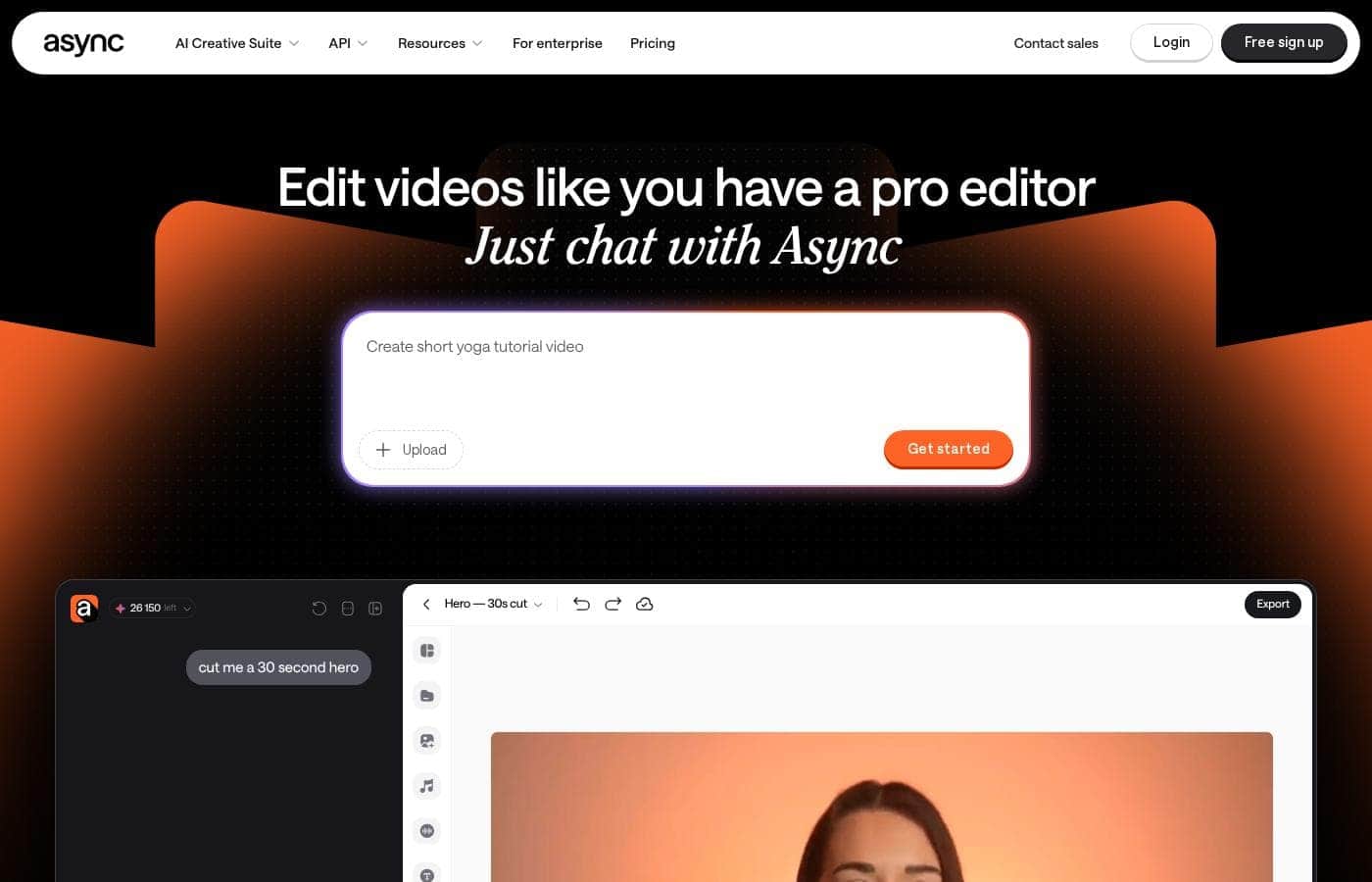
Podcastle homepage screenshot

At a glance

Quick overview for Podcastle: rating, pricing summary, key features, and highlights.
Vendor page checked Oct 13, 2026

Ciroapp score

4.0/ 5

Podcastle's studio, now branded Async, swaps timeline scrubbing for chat-based editing, one-pass audio cleanup, and built-in clip generation, though credit costs and a watermarked 720p entry plan sting. Overall, it's a strong pick for creators who'd rather describe edits than scrub them.

Pros

  • Pros:Chat-based editing lets you type requests like 'cut a 30-second hero' or 'add subtitles' and the AI reads your project and applies the changes, so you can finish cuts without scrubbing a timeline.
  • Pros:Magic Dust cleans rough recordings in one pass by stripping background noise and sharpening voices, while the chat editor removes fillers, pauses, repeats, and bad takes automatically.
  • Pros:You can generate B-roll, visuals, music, and voiceovers inside the editor using 100+ AI models, including Kling 3.0 and Veo 3, without switching between apps.

Cons

  • Cons:AI features run on credits, and the Basic plan includes only 10 lifetime credits; heavy use of video generation, avatars, dubbing, or thumbnails may require top-up packs or higher tiers.
  • Cons:The Basic tier caps video exports at 720p with a watermark and a 1-file export limit, so polished video work effectively requires the Storyteller or Pro plan.
  • Cons:Chat-based editing is the core workflow, so frame-by-frame manual control is limited, and the site itself warns that AI can make mistakes, meaning edits need review before publishing.
Best for
  • Podcasters who record long episodes and need clean audio, captions, and short clips
  • Solo creators and vloggers posting regularly to TikTok, Reels, and Shorts
  • Marketers producing ads, explainers, and social videos without an editing team
Free trial
Yes
This section is a summary. Detailed sections about features, use cases, pricing, and reviews follow below.

What is Podcastle?

Editing eats hours you'd rather spend creating. Podcastle's platform, now branded Async, tackles that with chat-based editing: type what you want cut and it handles pacing and polish. Magic Dust cleans rough audio, and long recordings turn into short social clips without you touching a timeline.

Podcastle's site now presents the product as Async, an AI creative studio for video and audio. You can generate video, images, voices, and music, then edit by chatting with AI instead of scrubbing timelines. It covers recording, hosting, subtitles, dubbing, and clip-making too.

The tool targets creators and teams who want finished content fast, including beginners with no editing background. An iOS app and a developer Voice API round it out.

Should you choose Podcastle?

Quick buyer guidance before you compare plans or click through.

Choose it if

  • People who'd rather describe edits in chat than scrub a timeline
  • Creators with rough recordings who need noise removal and voice cleanup
  • Anyone turning webinars, interviews, or podcasts into short-form social clips
  • Projects that need subtitles, dubbing, and translation for global audiences
  • Users who want generation and editing in one place, with access to 100+ AI models

Skip it if

  • If you need full frame-by-frame manual control, note that chat-based AI editing is the core workflow, and the site itself warns that AI can make mistakes, so edits need review
  • Edits consume credits; the interface shows per-task estimates, so heavy output depends on your plan's credit balance
  • Only an iOS app appears on the site, so Android-only creators lack a mobile option
  • The Podcastle-to-Async rebrand may cause confusion for teams relying on older Podcastle docs or integrations

Next steps before buying

  1. 1Open the pricing page and confirm what the free sign-up includes, including any credit limits
  2. 2Run one real test: upload raw footage, ask for a 30-second cut, and note the credit estimate it quotes
  3. 3Verify the specific tools you need, such as dubbing languages, hosting, or API access, on their product pages
  4. 4Compare credit costs against one or two alternatives based on your typical monthly output

Ease of use

Signals point to a gentle learning curve. The FAQ says you don't need editing experience, and the main workflow is typing requests in chat. A help center, blog, and glossary back you up. The trade-off: AI output still needs your review, and credit estimates mean you'll want to track usage as you go.

Podcastle Key Features

✂️ Edit by chat, not by timeline

Skip the scrubbing. Type what you want—"cut a 30-second hero" or "add subtitles"—and Async reads your project, then makes the edit for you. It picks the moments, places captions on the beat, and shows what changed.

Use it whenever editing feels slow, and you'll get finished cuts without touching the timeline.

✨ Fix rough takes and rough audio

Raw footage rarely comes clean. Ask Async to remove fillers, pauses, repeats, and bad takes, and it works through the timeline for you. Magic Dust handles audio, stripping background noise so voices sound clearer.

You can also sync your edit to a music track, letting it adjust pacing, cuts, and scene order around the beat.

✨ Generate assets without switching apps

Need a missing shot or a soundtrack? Ask in chat and Async generates B-roll, visuals, scenes, music, or voiceovers right inside the edit. It runs on top models like Kling 3.0 and Veo 3, with 100+ available.

That means fewer app switches and assets that already match your project's format.

✨ Turn long recordings into ready-to-post content

Upload a podcast, interview, or webinar, and Async finds the strongest moments for you. It handles the repackaging steps too:

✨ Teach it your style with skills

If you edit the same way every time, save those preferences as a skill. Then reuse it whenever you need, so new videos match your look from the start. It's a simple way to keep a consistent style across a series or a whole team's output.

Use Cases

🎙️ Podcast episodes without the cleanup grind

You record a long episode with remote guests. Ask Async to cut fillers, pauses, and bad takes, then run Magic Dust to strip background noise. Add captions while you're at it.

Expected outcome: a clean, publish-ready episode plus short clips for social, without touching a timeline.

✂️ Repurpose long content into social clips

You've got a podcast, webinar, or interview sitting in your files. Ask Async to find the strongest moments and cut them into clips for TikTok, Reels, and Shorts, captions included. > Tip: Review clip picks before exporting—the site notes AI can make mistakes.

📣 Ads and explainers without an editing team

No editor on staff? Type what you want cut, then add generated B-roll, music, or a voiceover in chat, with pacing synced to your track. Expected outcome: ad and explainer drafts ready to review faster, with credit estimates shown per task as you go.

🤝 Teams keeping every video on brand

Save your editing style as a reusable skill so every video your team ships matches your look. Collaborative workflows keep production moving, and dubbing plus subtitles help content reach global audiences. > Tip: The Podcastle-to-Async rebrand means older docs may not match current help articles.

Podcastle pricing

  • 3 plans

Prices not verified yet — see the vendor page.

Podcastle's pricing page

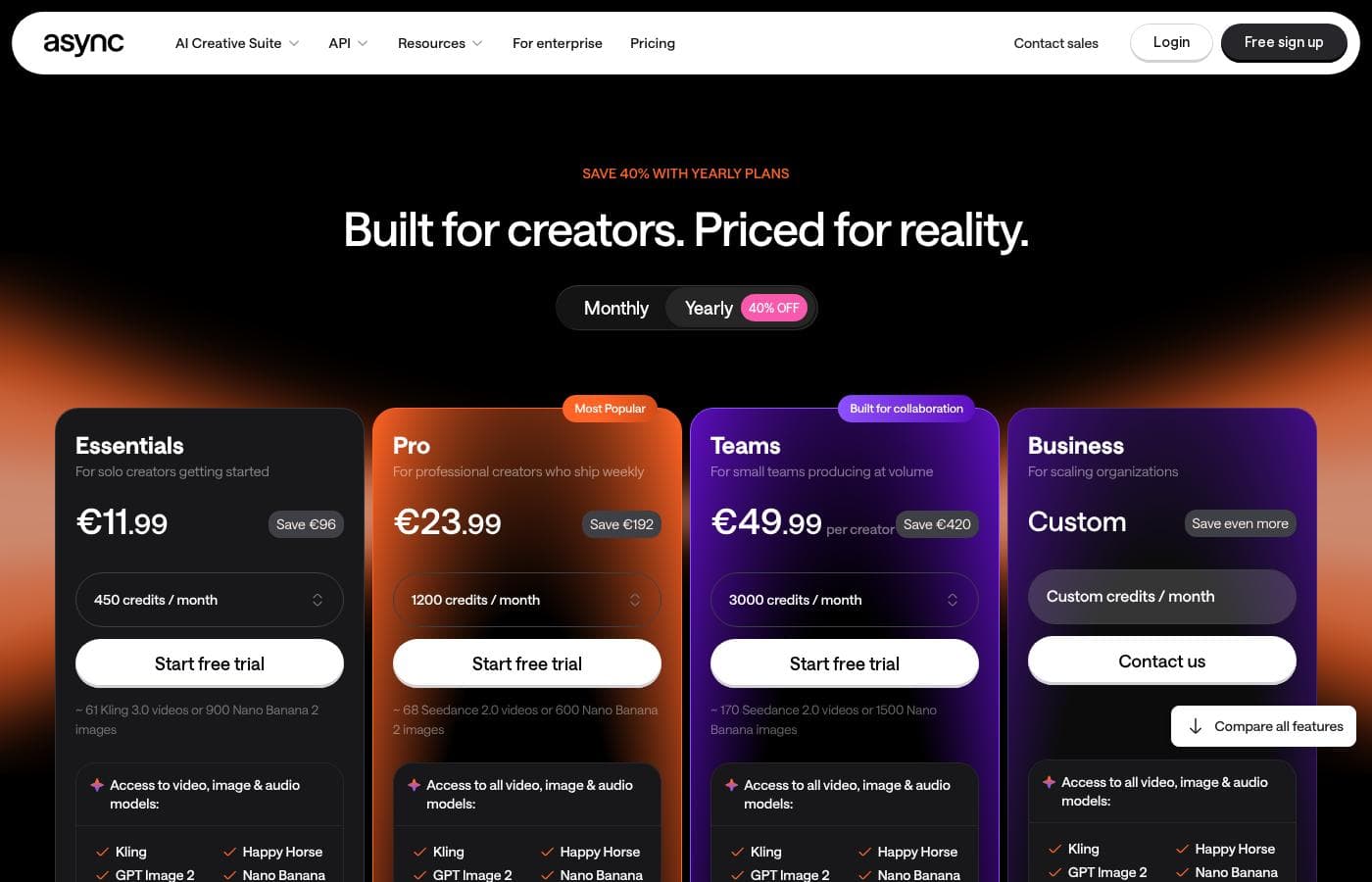
Podcastle pricing page screenshotView pricing page screenshot
PlanBilled monthlyBilled annuallyIncludes
Basic
See vendor page
See vendor page
Watermarked 720p video, 1 file export limit, limited royalty-free music, 1 lifetime hour of remote multitrack recording
  • Unlimited audio recording
  • 3 hours video recording
  • Up to 720p export with watermark
  • 1 hour transcription
  • 10 lifetime AI credits
  • +2
Storyteller
See vendor page
See vendor page
No voice cloning or filler word detection; 20 hours remote multitrack recording
  • Unlimited audio recording
  • 8 hours video recording
  • 4K export, no watermark
  • 10 hours transcription
  • 450 AI credits/month
  • +3
Pro
See vendor page
See vendor page
AI features still consume credits; heavy usage may require top-up packs
  • 20 hours video recording
  • 25 hours transcription
  • 1,200 AI credits/month
  • Revoice voice cloning
  • Filler word detection
  • +4

Price history

Tracking prices since Oct 1, 2026. No price change detected yet.

Pricing range: Varies by plan — free tier available; paid plans include Basic, Storyteller, and Pro (Custom/Enterprise also offered)

Pricing types: Free plan, Free trial, Monthly subscription, Usage-based pricing

Pricing notes

Podcastle (Async) offers a free tier plus paid plans — Basic, Storyteller, and Pro — with a credit-based AI system. Paid plans include generous AI credits, transcription hours, and cloud storage, with a Custom/Enterprise option for heavy users.

Podcastle offers a free way to start creating, with paid plans across three tiers: Basic, Storyteller, and Pro. Each tier unlocks more recording time, higher quality exports, and a bigger pool of AI credits. There's also a Custom option for teams and heavy users.

Here's what each plan includes.

Basic

Other Features: 2GB cloud storage, up to 10 remote participants, unlimited audio recording, 3 hours of video recording, up to 720p video export with a watermark, transcription up to 1 hour, 10 lifetime AI credits, 1 file export limit.

Basic is a solid starting point if you're testing the waters. You can record unlimited audio, publish podcasts, and try core editing tools. Just know the 720p cap and watermark mean it's best for audio-first creators rather than polished video work.

Storyteller

Other Features: Unlimited audio recording, 8 hours of video recording, 320kbps MP3 or 1411kbps WAV audio export, up to 4K video export with no watermark, 10 hours of transcription, 450 AI credits per month, unlimited royalty-free music, silence removal and auto leveling, 20GB cloud storage, unlimited exports.

Storyteller fits serious podcasters and solo creators who publish regularly. You get clean, watermark-free 4K video, much better audio quality, and enough AI credits for real production work. If you're hitting Basic's limits, this is the natural next step.

Pro

Other Features: Everything in Storyteller plus 20 hours of video recording, 25 hours of transcription, 1,200 AI credits per month, Revoice voice cloning, filler word detection, AI episode summaries, text-to-speech up to 1M characters, 1TB cloud storage, unlimited recording studios, live chat support.

Pro is built for high-volume creators and small teams. The big wins are voice cloning, far larger AI credit allowances, and a full terabyte of storage. Choose this tier only if you'll actually use the AI-heavy features — otherwise Storyteller covers most needs at a lower cost.

A few things worth noting. AI tools like video generation, image generation, avatars, dubbing, and thumbnails all run on credits, so heavier usage means you may want top-up packs or the Custom tier. Paid plans come with a trial period — credits fully activate after trial payment, with 50 credits available beforehand. If you expect very large transcription or video needs (100+ hours), the Custom/Enterprise tier offers custom limits and dedicated support.

You can start creating for free, which makes it easy to try the platform before committing to a paid plan.
How to pay less for Podcastle

  • A free trial is available: test it before you pay.
Start free trial

Email me when Podcastle changes price

One email when we detect a price change on the vendor's pricing page. No newsletter, no deals. Unsubscribe in one click.

User Reviews

No reviews yet.

Write a Review

Write a Review for Podcastle
0/100 characters
0/2000 characters

Why use Podcastle?

Most AI tools add steps to your workflow. Async, Podcastle's studio, is built to remove them by taking over the edit work that usually eats your week:

  • Edit by chat. Ask it to cut a 30-second hero or add subtitles, and it reads the project and makes the changes for you.
  • Fix rough cuts fast. It removes fillers, pauses, repeats, and bad takes, then syncs pacing and cuts to your music track.
  • Clean audio in one pass. Magic Dust strips background noise and sharpens voices, so rough recordings sound ready to publish.
  • Generate without switching apps. Create B-roll, visuals, music, or voiceovers from top models like Kling 3.0 and Veo 3 right inside the edit.
  • Repurpose long content. Turn podcasts, interviews, and webinars into clips for TikTok, Reels, and Shorts, with captions and dubbing built in.
  • Keep your style. Save your editing preferences as a reusable skill so every video matches your look.

Podcastle alternatives

Other tools in the Podcast category

View all Podcast tools
Riverside.com

Riverside.com

Podcast4.4/5

Riverside is your comprehensive digital content studio. It is designed to help you create, edit, and go live with professional media quickly. The platform supports advanced production controls and seamless collaboration, which is ideal for individual creators and business teams alike. It’s trusted by top names like Tim Cook and Mark Zuckerberg for essential high-stakes recording. This system helps you move from recording right to publishing with maximum impact.

Alitu

Alitu

Podcast4.1/5

Alitu is recognized as the most user-friendly podcast tool available, period. It was designed specifically for creators who need a simple process to produce their show. The streamlined interface makes it easy to handle recording, editing, and publishing tasks. Even if you are a total beginner, Alitu eliminates the need for prior audio software experience. If you ever get stuck, a friendly support team is ready to help guide you.

SquadCast

SquadCast

Podcast4.1/5

SquadCast is the cloud recording studio tailored for creators, guests, producers, and YouTubers. It offers premium, studio-quality audio and video using in-browser software. This platform helps you rapidly create excellent content without the hassle of robotic-sounding interviews or complex setups. It’s designed to be intuitive and easy to edit, making post-production simpler than ever.

Descript

Descript

Podcast4.1/5

Descript is a complete video and podcast editor that uniquely combines a full set of professional editing tools with powerful artificial intelligence. This setup makes sophisticated video creation accessible to everyone. The platform allows you to use your own intuitive tools or direct your AI co-editor, named Underlord, to handle complex tasks for you. It’s ideal for creators making everything from YouTube videos to podcasts, and for businesses needing high-quality internal training or customer support videos.

Buzzsprout

Buzzsprout

Podcast4/5

Buzzsprout is an excellent podcast host, emphasizing ease of use above all else. This service is specifically designed to be the simplest way to get your podcast online. It takes the hassle out of distribution, ensuring your content reaches your listeners easily.

Podbean

Podbean

Podcast3.8/5

Podbean is an all-in-one hosting and monetizing platform designed to support successful podcasting endeavors. It’s built to be both powerful for seasoned creators and easy for newcomers to use. The platform focuses on security and scalability, currently supporting over 147,525 active podcasts globally. This stability is crucial whether you are expanding your audience or preparing to earn income from your content.

Cheapest Podcast software for 1 to 25 users

Podcastle FAQ

How does Podcastle protect my data?

Podcastle is GDPR compliant and SOC2 certified. Your files get encryption at rest and in transit, and the platform runs advanced vulnerability checks. That's solid coverage if you're handling client or team work.

What languages can I work in?

Transcription supports English, Spanish, French, German, and Italian. You can translate subtitles into over 70 languages, and the AI voices cover 15+ languages, so localizing content is fairly simple.

How do the free trial and AI credits work?

You'll get 50 credits to explore before paying. Your plan's full credit balance unlocks after you complete the trial payment, so test a real project first to gauge your usage.

What kind of support do paid plans include?

It depends on your tier. Pro adds live chat support, while Custom plans include a customer happiness manager, custom onboarding, and a dedicated Slack channel for your team.

Ready to try Podcastle? Check out the official site or pricing.

Are you Podcastle? Claim this listing · Get the badge