SquadCast

SquadCast

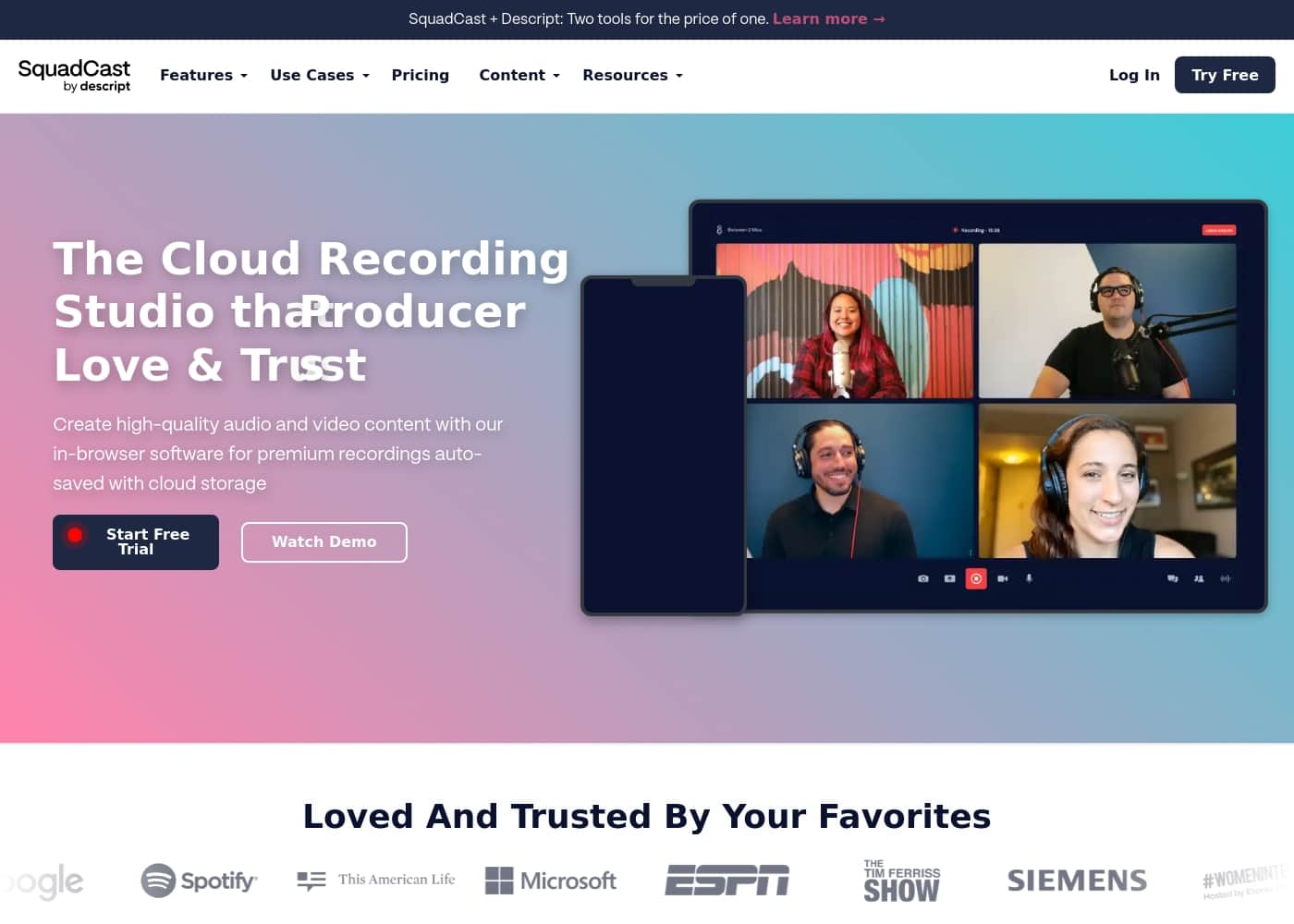
The Cloud Recording Studio that Creators Love and Trust

#7 dans Podcast
2 min read · Updated 10/5/2025
SquadCast homepage screenshot

At a glance

Quick overview for SquadCast: rating, pricing summary, key features, and highlights.

Ciroapp review

3.2
Robust tool, but stability is concerning.

We assessed SquadCast based on its marketed reliability and competitive pricing structure, which includes a robust Free plan. While the core technology, like Progressive Uploads and local file capture, promises studio-quality results, external feedback highlights concerning issues regarding long-term reliability and support responsiveness. Overall, SquadCast presents powerful recording tools, but users must weigh the risk of reported stability shortcomings against the clear feature set.

Pros

  • Pro:Source capture prevents recording loss (Progressive Uploads feature).
  • Pro:Flexible pricing model includes a permanent Free plan.
  • Pro:Records separate, synchronized audio and video files locally.
  • Pro:Offers tiered AI features and transcription services across plans.

Cons

  • Con:Customers report declining service reliability and audio errors over time.
  • Con:Customer support is reported to ignore refund and billing requests.
  • Con:Users have switched to competitors due to recurring stability failures.
  • Con:Specific negative feedback regarding automatic renewal charges.
Free trial
Yes
Range: $0–$50/monthFree plan, Monthly subscription, Per seat pricing
This section is a summary. Detailed sections about features, use cases, pricing, and reviews follow below.

SquadCast review, pricing, features, pros & cons

Ever worry about losing a great interview due to a bad internet connection? Connectivity issues and drift can quickly destroy your hard work. SquadCast offers a solution with Progressive Uploads that auto-save while you record.

This ensures content is captured right at the source, offering you peace of mind. ✅

What is SquadCast?

SquadCast is the cloud recording studio tailored for creators, guests, producers, and YouTubers. It offers premium, studio-quality audio and video using in-browser software. This platform helps you rapidly create excellent content without the hassle of robotic-sounding interviews or complex setups.

It’s designed to be intuitive and easy to edit, making post-production simpler than ever. ✨

SquadCast Key Features

✅ Unmatched Recording Reliability with Progressive Uploads

Connectivity issues or sudden failures should never destroy your content. We solve this problem using our signature feature: Progressive Uploads. This technology continuously auto-saves your recordings right at the source.

This ensures that content is captured instantly, offering total peace of mind. Even if you experience major technical failures or a complete power loss, your hard work remains securely recorded.

SquadCast also offers robust cloud backup protection. This support retains your captured files. It ensures the content is available, even if your primary local recording is somehow lost or inaccessible.

✨ Achieve Crystal Clear Studio Quality

It's time to deliver content that sounds premium, not robotic. Unlike common internet conference calls (like Zoom), SquadCast records audio and video at the source, not over a fluctuating internet connection. This focused approach eliminates the compressed sound that leads to listener fatigue.

You receive superior results because we provide raw, uncompressed audio files. This maximum quality capture ensures your finished product sounds professional, giving you the best possible starting point for editing.

For growing professionals, higher-tier plans include Master Audio with Dolby Voice. This technology further enhances your recordings, ensuring your sound quality always stands out.

✨ Eliminate Synchronization Headaches

Syncing problems are a major time sink in post-production. SquadCast handles this automatically by recording separate, locally saved audio and video files for every participant. This method prevents audio drift and guarantees perfect synchronization.

This streamlined workflow means you spend less time manually aligning tracks. Instead, you can easily integrate SquadCast tracks with your favorite editing software. This simplifies the entire post-production process.

Once in your editor, you have maximum control. You can adjust sections of each individual track to clean them, mute unnecessary parts, or correct volume levels quickly and efficiently.

💡 Flexible Workflow Automation and Integration

Automate your remote recording tasks rather than managing them manually. SquadCast provides robust integrations and APIs designed to simplify your workflow. You can easily connect the platform with your existing suite of tools.

We offer a Public API that lets you customize your studio experience. Use these tools to organize, schedule, and instantly share your recordings across platforms.

Accelerate how you create content. This powerful automation ensures you maintain predictable workflows, which is essential for professional creators and producers.

Use Cases

🔒 Securing High-Stakes Remote Interviews 🔒

When interviewing important remote guests, dropped internet connections can quickly destroy hours of work. Connectivity issues often lead to lost content and frustrating re-takes. SquadCast’s Progressive Uploads solve this problem by capturing content right at the source, continuously auto-saving files. Even if the internet fails completely, the raw and uncompressed recording is already 100% saved and secure. You record confidently knowing your guest’s content is retained.

Tip: This feature protects against both power loss and connectivity hiccups, ensuring maximal content recovery.

🎙️ Producing Broadcast-Ready Audio 🎙️

Your finished product must sound professional, unlike a typical conference call where audio quality suffers badly. SquadCast ensures studio-quality results by prioritizing source capture over temporary internet connection quality. It records premium audio and video, giving you raw uncompressed files for every participant.

This superior method eliminates the 'robotic' sound that causes listener fatigue and ensures excellent results right from the start.

⏱️ Eliminating Post-Production Sync Headaches ⏱️

Audio and video synchronizations frequently drift apart in lengthy recordings, making editing difficult and slow. SquadCast eliminates this common issue by saving separate, local audio and video files for each person. These tracks are inherently synchronized, removing the need for manual alignment.

  • Record separate audio/video tracks for all speakers.
  • Receive perfectly synchronized raw files.
  • Easily integrate these clean tracks into your preferred editing software.
  • Adjust volume levels or mute parts without complex timeline shifts.

💡 Recovering Content After Technical Failure 💡

Imagine recording a perfect segment only to face a sudden crash, browser freeze, or complete power loss. This type of failure usually means the content is gone forever. SquadCast’s Progressive Uploads feature is built specifically for reliability. It continuously uploads captured content to the cloud while saving a local copy.

Expected outcome: Your content is protected by robust redundancy; the cloud backups retain the captured files instantly, even if the primary recording is lost or inaccessible.

⚙️ Automating Your Recording Logistics ⚙️

Creators and producers need seamless workflows to manage multiple shows and guests. SquadCast is designed to integrate smoothly with your existing tools. You can use available APIs and integrations to automate your remote recording logistics.

This allows you to easily organize, schedule, and instantly manage remote recording tasks, freeing up time to focus on the creative process.

Pricing Overview for SquadCast

Pricing range
$0–$50/month
Pricing types
Free plan, Monthly subscription, Per seat pricing

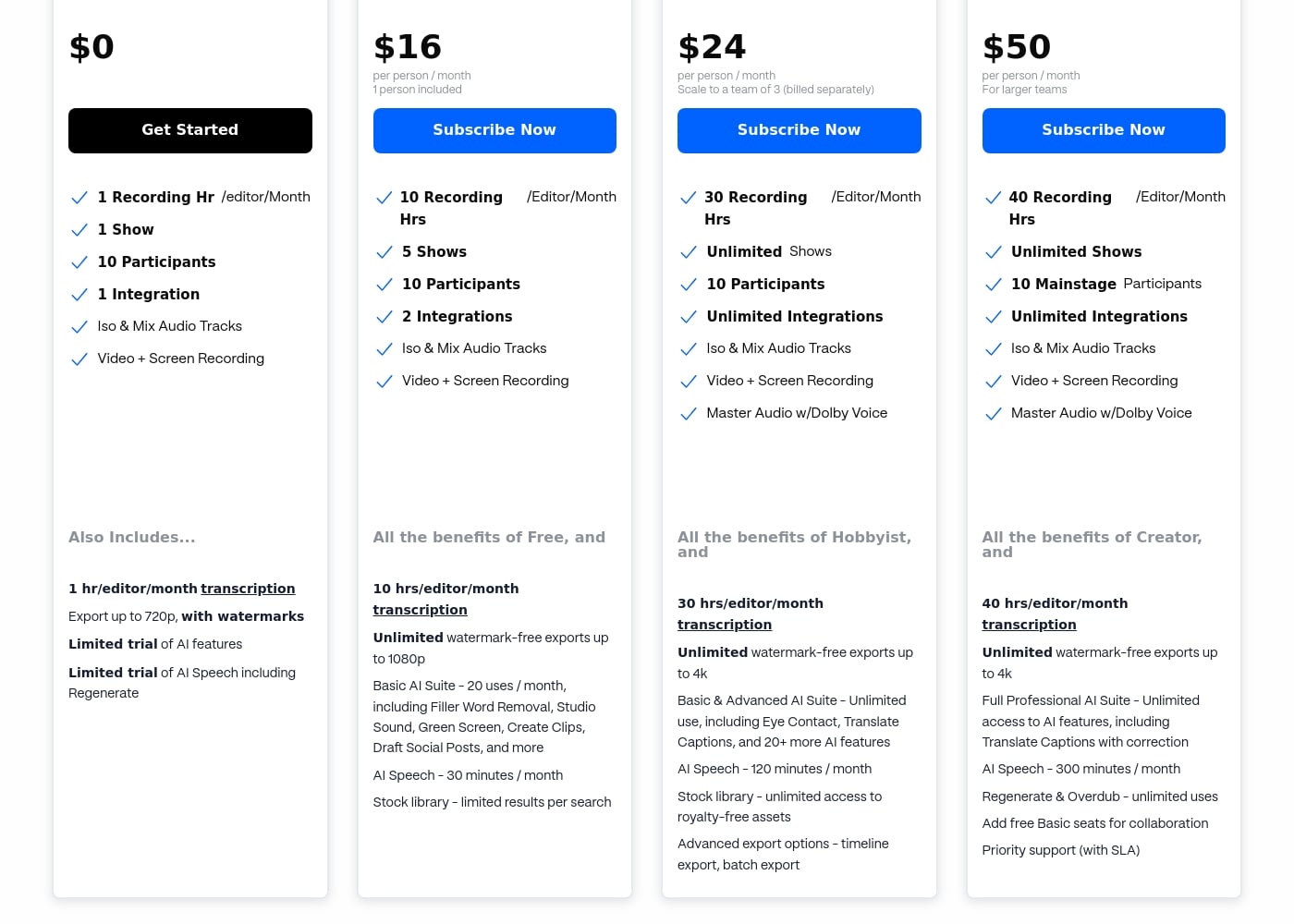
SquadCast offers a permanent Free plan and tiered subscription options starting at $16 per person/month. Pricing scales primarily based on the number of recording hours, transcription needs, and the complexity of included AI tools.

Plans & Pricing

Free

Monthly$0
  • 1 Recording Hour/editor/Month
  • 1 Show
  • 10 Participants
  • Iso & Mix Audio Tracks
  • Video + Screen Recording
  • 1 hr/editor/month transcription
  • Export up to 720p (with watermarks)
  • Limited trial of AI features

Hobbyist

Monthly$16
Per person / month (1 person included)
  • 10 Recording Hrs/editor/Month
  • 5 Shows
  • 2 Integrations
  • 10 hrs/editor/month transcription
  • Unlimited watermark-free exports up to 1080p
  • Basic AI Suite (20 uses / month)
  • AI Speech (30 minutes / month)
  • Stock library (limited results per search)

Creator

Monthly$24
Per person / month (Scale to a team of 3, billed separately)
  • 30 Recording Hrs/editor/Month
  • Unlimited Shows
  • Unlimited Integrations
  • Master Audio w/Dolby Voice
  • 30 hrs/editor/month transcription
  • Basic & Advanced AI Suite (Unlimited use)
  • AI Speech (120 minutes / month)
  • Stock library (unlimited access)
  • + 1 more features

Professional

Monthly$50
Per person / month (For larger teams)
  • 40 Recording Hrs/editor/Month
  • Unlimited Shows
  • Unlimited Integrations
  • Master Audio w/Dolby Voice
  • 40 hrs/editor/month transcription
  • Full Professional AI Suite (Unlimited access)
  • AI Speech (300 minutes / month)
  • Regenerate & Overdub (unlimited uses)
  • + 1 more features

SquadCast costs between $0 and $50 per person/month with four plans: Free at $0, Hobbyist at $16, Creator at $24, and Professional at $50.

We offer flexible, per-person pricing that grows with your team and your content needs.

Free

Price: $0 Websites Supported: Not explicitly stated Best For: Not explicitly stated Refund Policy: Not explicitly stated Other Features:

  • 1 Recording Hr/editor/Month
  • 1 Show
  • 10 Participants
  • Limited trial of AI features

This plan is perfect if you are just starting out or want to test the platform's core recording functionality before committing to a paid subscription. You receive basic features like 1 hour of recording and transcription with watermarked exports.

Hobbyist

Price: $16 per person/month (1 person included) Websites Supported: Not explicitly stated Best For: Not explicitly stated Refund Policy: Not explicitly stated Other Features:

  • 10 Recording Hrs/editor/Month
  • 5 Shows, 2 Integrations
  • Unlimited watermark-free exports up to 1080p
  • Basic AI Suite (20 uses/month)

If you are a solo creator or a serious hobbyist producing consistent content, the Hobbyist plan gives you a significant boost in recording time and unlocks better export qualities and basic AI tools. It is a great step up for higher volume creators.

Creator

Price: $24 per person/month (Scale to a team of 3, billed separately) Websites Supported: Not explicitly stated Best For: Not explicitly stated Refund Policy: Not explicitly stated Other Features:

  • 30 Recording Hrs/editor/Month
  • Unlimited Shows and Integrations
  • Master Audio w/Dolby Voice
  • Basic & Advanced AI Suite (Unlimited use)

The Creator plan is designed for growing professionals and small teams who need robust recording features and higher-tier AI capabilities. You get unlimited shows and significant increases in both recording and AI speech minutes, plus advanced export options.

Professional

Price: $50 per person/month (For larger teams) Websites Supported: Not explicitly stated Best For: Not explicitly stated Refund Policy: Not explicitly stated Other Features:

  • 40 Recording Hrs/editor/Month
  • Full Professional AI Suite (Unlimited access)
  • AI Speech: 300 minutes/month
  • Priority support (with SLA)

This top-tier option suits larger organizations, agencies, or teams prioritizing performance and dedicated support. It includes the most comprehensive set of AI features and collaboration tools, ensuring highly productive workflows.

SquadCast's foundation begins with the full-featured $0 'Free' plan, ideal for testing the waters. If your recording time runs low on any plan, you can purchase more time right within the app at $5 per additional hour, and unused hours roll over automatically.
User Reviews

User feedback across external platforms presents a mixed, though concerning, picture, contrasting sharply with the company's core value proposition. While the platform promises extreme reliability through features like Progressive Uploads, recent users have reported significant issues with service stability.

Several reviewers noted that reliability declined over time, eventually leading them to switch due to "unbearable" errors and poor audio quality. On the administrative side, there are serious complaints regarding customer support and billing practices, specifically automatic renewals and failure to process refund requests promptly.

😟 Conversely, one positive review praised the platform’s ease of setup, competitive pricing, and effective workflow management for tasks like setting up rotations and notification policies. Overall, the current sentiment suggests that while the base features and pricing structure are appealing (starting from $0), the execution, especially surrounding long-term dependability and support responsiveness, needs serious attention.

These operational concerns weigh heavily against the platform's focus on pristine quality and never losing a recording. (145 words)

What users say elsewhere

Alex D.
· Trustpilot · Nov 9, 2024
1.0 / 5

I relied on SquadCast for several years to record our podcast. However, it became more and more unreliable over time, and the audio issues grew unbearable. I ultimately switched platforms due to these critical stability problems.

Jamie S.
· Trustpilot · Jul 2, 2024
5.0 / 5

This platform is great for managing our schedules and workflows. I found it very easy to set up rotations and notification policies right away. It's truly a great asset and competitively priced for the features provided.

No reviews yet.

Write a Review

Write a Review for SquadCast
0/100 characters
0/2000 characters

Why use SquadCast?

Choosing the right studio ensures your finished product sounds professional. SquadCast guarantees studio-quality recordings by focusing on source capture and reliability, not just connectivity. It’s built for creators who demand excellent sound and predictable workflows.

Here’s why creators trust SquadCast:

  • Never Lose a Recording: The signature Progressive Uploads feature auto-saves content continuously. Even a complete power loss won’t cause issues, because recordings are captured right at the source.
  • Crystal Clear Quality: Unlike internet-based conference calls that sound robotic, SquadCast focuses on premium audio and video. You receive raw, uncompressed audio files for superior results.
  • Eliminate Sync Headaches: Say goodbye to audio drift. SquadCast solves this by recording separate, locally saved audio and video files, ensuring perfect synchronization.
  • Simplified Editing Flow: Integrate SquadCast with your favorite editing software. You can easily adjust sections to clean tracks, mute parts, or correct volume levels during post-production.
  • Robust Backup Protection: You record confidently knowing that cloud backups support your content. This redundancy retains captured files, even if the primary local recording is somehow lost or inaccessible. 💡
  • Automate Your Workflow: Use the available integrations and APIs to connect with existing tools. This helps you organize, schedule, and instantly automate remote recording tasks.

Ready to transform your workflow with SquadCast?

Frequently Asked Questions

How does SquadCast structure its pricing: per user seat or based on usage time?

SquadCast uses per-person pricing that scales with your team size. However, the core limit is tied to usage, measured by the total recording hours per editor per month. You are essentially paying per seat for an allotment of usage time.

What happens if I exceed my included monthly recording hours?

If your recording time runs low, the app will prompt you for a top-up but won't interrupt the session. You can purchase additional hours right within the app for a flat rate of $5 per hour. Unused hours will roll over automatically to the following month.

If multiple participants co-record, how is the total recording time calculated?

The number of participants in a session does not impact your recording time quota. For instance, if you record one hour with ten people, only one hour is deducted from your monthly allowance. The calculation is based on session duration, not headcount.

Do I, or my remote guests, need an account or software downloads to join a session?

No, guests do not need to create an account or download any specific programs to participate in a session. SquadCast is browser-based, and the intuitive interface makes it easy for invited guests to join immediately.

Which internet browsers are officially supported by SquadCast?

SquadCast supports the latest versions of several popular browsers. You can use Chrome, Firefox, Opera, Brave, or Edge for your recording sessions. They recommend a network speed of 5 to 10 mbps up and down.

Is the $0 Free plan a limited-time trial, or is it permanent?

The Free plan is a permanent, full-featured tier designed for testing the core functionality. It provides one hour of recording time monthly and basic features like ISO audio tracks and screen recording.

How are raw recordings secured, and where are my files stored?

Recordings are captured right at the source locally, using Progressive Uploads to auto-save files continuously. Additionally, cloud backups support your content, ensuring you don't lose files even if the local recording is inaccessible.

What is the maximum number of participants allowed in a single recording session?

A session can accommodate a total of 10 people in the main session (1 Host plus 9 Guests). You can also add up to 10 participants into a separate Backstage area who are not mic'ed or on camera.

How do integrations and API access differ across the paid plans?

The Free plan includes one integration, and Hobbyist includes two. Starting with the Creator and Professional plans, you gain access to unlimited integrations and the Public API to automate your recording workflows.

What user roles are available for managing teams and shows within an organization?

SquadCast uses several roles to manage permissions: Owner, Org Admin, Show Manager, Show Talent, and File Manager. These roles control access to organization management, session details, and file retrieval.

Is there an official money-back guarantee or refund policy listed on the site?

The official policy regarding refunds or a money-back guarantee is not explicitly stated on the official site. We advise customers to inquire with the SquadCast team directly about cancellation and billing terms.

What communication features are available for participants during a recording?

Participants can message each other using the chat function, either as a group or in individual one-on-one messages. These chat logs remain after the session ends but are not included in the final recording.

Do all plans include the same level of customer support?

No, the level of support varies. Only the top-tier Professional plan guarantees Priority support and a defined Service Level Agreement (SLA). Specific support responsiveness for lower plans is not explicitly guaranteed.

Is SquadCast available in different languages or optimized for specific regions?

Language or regional optimization details are not explicitly stated on the official site. The platform focuses on reliable core recording technology accessed via major internet browsers globally.

Ready to try SquadCast? Check out the official site or pricing.