Podcastle vs SquadCast
Podcastle and SquadCast both offer powerful remote recording solutions for creators. Podcastle focuses heavily on post-production AI tools and built-in editing capabilities. SquadCast prioritizes securing the raw recording quality with guaranteed source capture. Your choice depends on whether you value powerful editing or maximum recording reliability first.
Best for: Creators focused on AI-driven audio cleanup and post-production., Teams needing massive transcription and cloud storage limits.
Best for: Producers who prioritize the highest possible raw audio quality., Recording remote guests where internet stability is often poor.
Intuitive editing with powerful AI.
We find Podcastle offers a highly intuitive and powerful content suite, excelling in AI-driven audio enhancement and workflow simplification for both novices and intermediate users. Overall, technical performance is strong, but serious user reports concerning inconsistent customer service and unauthorized billing issues necessitate caution.
Pros
- Extremely easy to use and intuitive UI, praised as friendly for beginners.
- Powerful AI features for noise reduction and sound professionalization.
- High transcription accuracy, even useful for detailed academic research.
- Integrated platform handles recording, editing, hosting, and distribution.
Cons
- Recurrent significant complaints about unexpected charges after trial cancellation.
- Customer support responsiveness and helpfulness can be inconsistent.
- The free Basic plan imposes strict lifetime usage caps and a one-project limit.
Robust tool, but stability is concerning.
We assessed SquadCast based on its marketed reliability and competitive pricing structure, which includes a robust Free plan. While the core technology, like Progressive Uploads and local file capture, promises studio-quality results, external feedback highlights concerning issues regarding long-term reliability and support responsiveness. Overall, SquadCast presents powerful recording tools, but users must weigh the risk of reported stability shortcomings against the clear feature set.
Pros
- Source capture prevents recording loss (Progressive Uploads feature).
- Flexible pricing model includes a permanent Free plan.
- Records separate, synchronized audio and video files locally.
- Offers tiered AI features and transcription services across plans.
Cons
- Customers report declining service reliability and audio errors over time.
- Customer support is reported to ignore refund and billing requests.
- Users have switched to competitors due to recurring stability failures.
- Specific negative feedback regarding automatic renewal charges.
AboutPodcastle
Podcastle is designed as an enhanced content creation suite for producing high-quality sound. It serves diverse audiences, including those focused on Podcasting, Education, Communications, and Audiobooks. You can easily use the platform to develop professional content, whether you manage a single project or need collaborative solutions for Teams and large Business organizations.
AboutSquadCast
SquadCast is the cloud recording studio tailored for creators, guests, producers, and YouTubers. It offers premium, studio-quality audio and video using in-browser software. This platform helps you rapidly create excellent content without the hassle of robotic-sounding interviews or complex setups. It’s designed to be intuitive and easy to edit, making post-production simpler than ever. ✨
Highlights
Feature Comparison
Features Overview
We highlight the main differences and pick a winner for each feature.
Recording Reliability
SquadCast provides crucial Progressive Uploads guaranteeing captured content security. Podcastle relies more on strong internet connections during recording.
Losing an interview file due to internet dropouts is a creator’s worst nightmare. SquadCast eliminates this risk with its signature Progressive Uploads feature. Content is continuously auto-saved right at the source as you record. Podcastle’s focus is on fixing the audio after the fact using powerful AI tools. While it records multi-track locally, there is no mention of continuous source-capture backup during the session. SquadCast's redundancy means total peace of mind for high-stakes remote interviews. It protects your raw content against power loss or full network failure. Podcastle is a better choice if you have a stable network and prioritize fast, automated post-production cleanup.
AI Editing Suite
Podcastle offers a deeper suite of AI tools for post-production manipulation. SquadCast limits its AI features primarily to transcription and basic speech analysis.
Podcastle excels with advanced creative AI features that boost production efficiency. This includes specialized dedicated features like Background Noise Removal and Silence Removal. Podcastle also offers powerful AI Voice Cloning for content continuity and quick fixes. Users on Pro and Business plans get intuitive text-based audio editing. SquadCast offers a tiered AI Suite for transcription and speech, but the focus is less on manipulation. Its primary task is recording, not heavy post-production editing. For creators wanting to polish, fix, and transform content within one platform, Podcastle has the superior feature set.
High-Volume Limits
Podcastle offers superior capacity for storage, video, and transcription volume. SquadCast has lower limits, focusing instead on recording purity and stability.
Podcastle's Business plan provides massive capacity, including 1 TB of cloud storage. This plan also includes a very generous 100 hours of automatic transcription per month. SquadCast's Professional plan focuses on high-quality output but caps transcription at 40 hours/month. Storage is less emphasized, as files are raw and meant for immediate export. If your team produces dozens of hours of transcripts or needs huge storage capacity, Podcastle easily wins. Podcastle is explicitly designed to handle high-volume organizational needs. SquadCast requires users to manage raw files quickly but provides flexibility with overages for additional recording time.
Free Plan Restrictions
Podcastle severely limits basic users to one project for its lifetime. SquadCast offers a permanent free plan with a limited one-hour recording quota.
The Podcastle Basic (Free) plan is highly restrictive for serious creators. You are limited to a strict, lifetime cap of only one single project for all time. Podcastle’s free plan also enforces lifetime caps on recording capacity (1 hour) and transcription (1 hour). This is best for testing the UI, not for regular production runs. SquadCast's Free plan offers one recording hour per month, but crucially, it allows unlimited projects. This is much better for consistently testing or producing minimal content. If you need to manage multiple, short recordings without paying, SquadCast is more practical. Podcastle forces an upgrade faster if you plan second project.
Video Quality Export
Podcastle provides significantly higher resolution export options for video creators. SquadCast limits its watermark-free exports to standard 1080p resolution.
Podcastle supports professional video requirements on its higher-tier plans. Users on the Pro and Business plans can export finished videos in stunning 4K resolution. SquadCast offers video recording but limits the quality of watermark-free exports to 1080p. Its focus remains primarily on audio capture purity, less on ultra-high video fidelity. If your content is video-first and requires maximum visual quality, Podcastle is the definitive choice. Podcastle also includes a useful Video Trimmer tool for quick adjustments. SquadCast’s video features are supportive but clearly secondary to its mastering-grade audio recording capabilities.
Transparency and Pricing
SquadCast has transparent, published pricing with flexible usage overages. Podcastle does not state the specific monthly costs for its three paid plans.
SquadCast provides visible pricing tiers from $0 to $50 per person/month. Users know exactly what they will pay for the Hobbyist or Professional plans. SquadCast also addresses usage limits with clear pay-as-you-go overages at $5 per extra hour. Unused hours roll over automatically, offering budget flexibility. Podcastle hides the specific dollar cost of its Essentials, Pro, and Business plans. This lack of transparency makes direct feature-to-price comparison difficult. Understanding costs immediately is crucial when scaling a venture. SquadCast makes budget planning far simpler than Podcastle.
Below, we compare the features and limits included with each available plan.
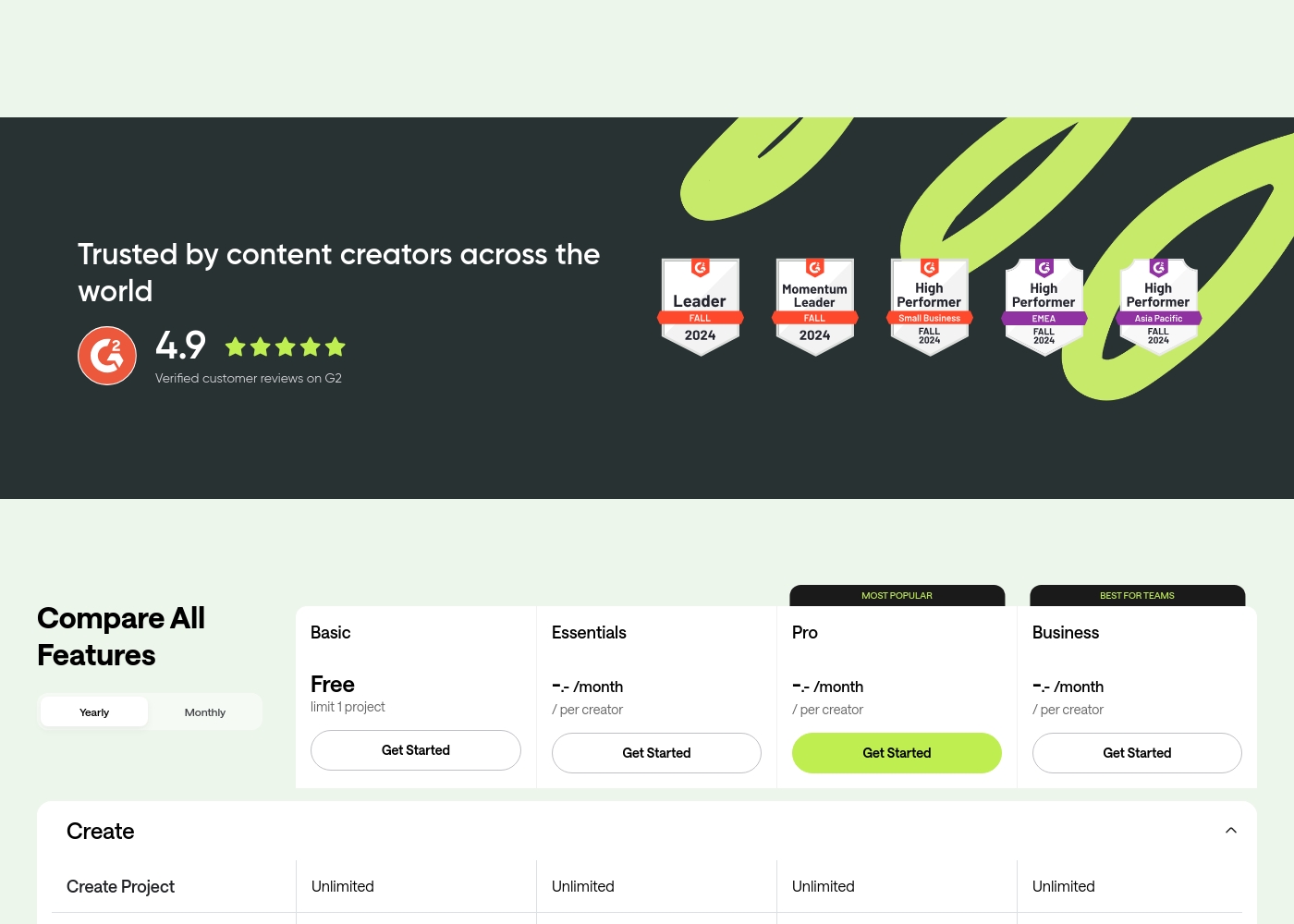
Basic (Free)
Price: Free Best For: The occasional content creator with basic production needs. Refund Policy: Not applicable (Free plan) Other Features:
- Limit of 1 project
- 1 hour of lifetime video and audio recording capacity
- Up to 160kbps MP3 audio download quality
- 2 GB Cloud Storage
- 1 hour of lifetime automatic transcription
This plan is perfect for beginners and hobbyists who want to try Podcastle’s core functions without any financial commitment. Just remember the strict one-project limit and the lifetime usage caps on recording.
- Limit 1 project
- Up to 10 remote participants
- Up to 720p video download quality
- 2 GB Cloud Storage
- 1 hour lifetime automatic transcription
- Unlimited projects and audio recording
- No watermark on video outputs
- Unlimited multi-track audio editing
- 10 hours automatic transcription
- 40 GB Cloud Storage
- Unlimited projects and audio recording
- Unlimited multi-track audio editing
- 320kbps MP3 or 1411kbps WAV audio quality
- Video up to 4K
- 120 GB Cloud Storage
- Best for Teams: Multi-host Access and Producer Mode
- Unlimited projects and audio editing with text
- 1 TB Cloud Storage
- 100 hours automatic transcription
- 2 million Text-to-Speech characters
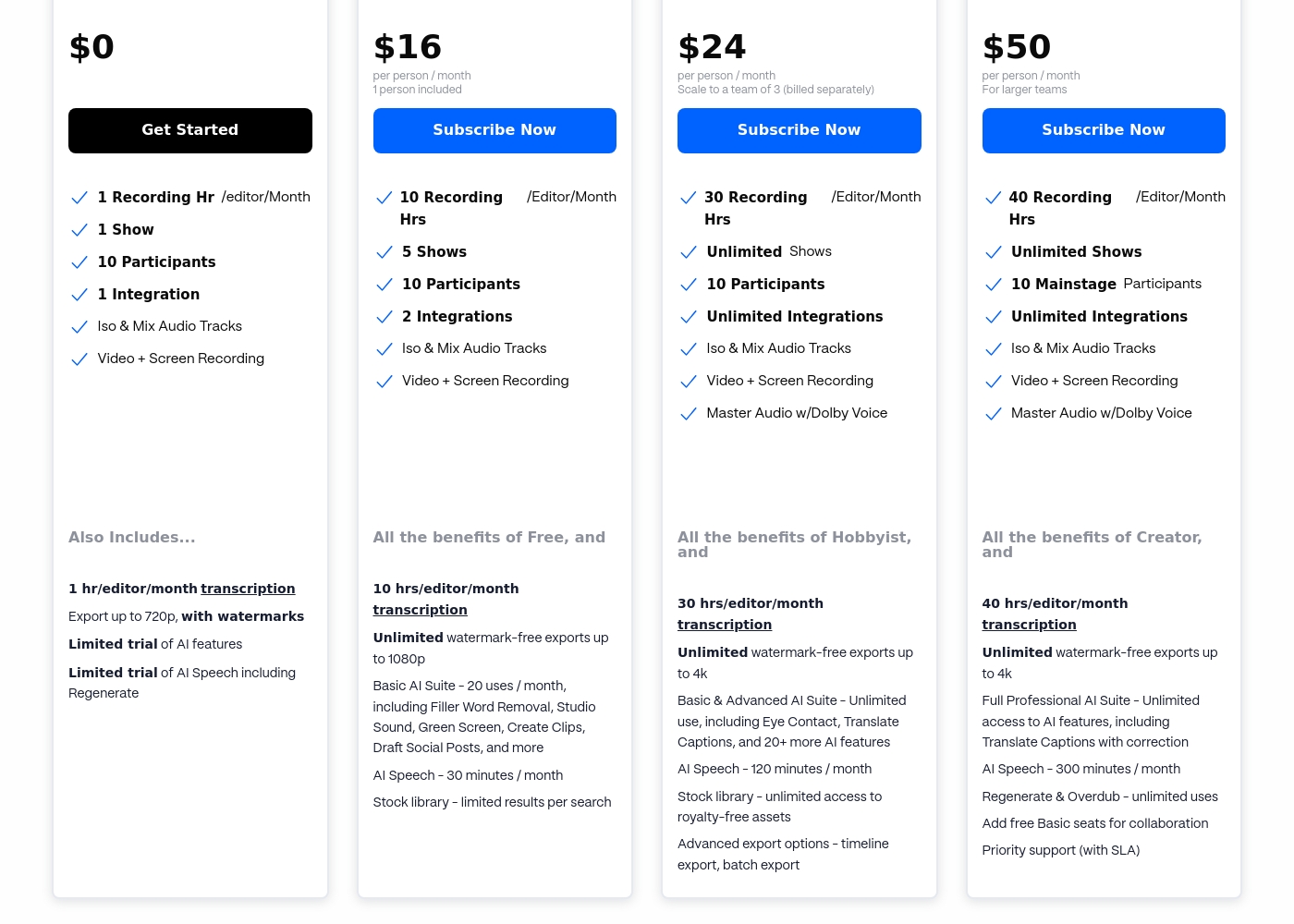
SquadCast costs between $0 and $50 per person/month with four plans: Free at $0, Hobbyist at $16, Creator at $24, and Professional at $50.
We offer flexible, per-person pricing that grows with your team and your content needs.
Free
Price: $0 Other Features:
- 1 Recording Hr/editor/Month
- 1 Show
- 10 Participants
- Limited trial of AI features
- 1 Recording Hour/editor/Month
- 1 Show
- 10 Participants
- Iso & Mix Audio Tracks
- Video + Screen Recording
- 10 Recording Hrs/editor/Month
- 5 Shows
- 2 Integrations
- 10 hrs/editor/month transcription
- Unlimited watermark-free exports up to 1080p
- 30 Recording Hrs/editor/Month
- Unlimited Shows
- Unlimited Integrations
- Master Audio w/Dolby Voice
- 30 hrs/editor/month transcription
- 40 Recording Hrs/editor/Month
- Unlimited Shows
- Unlimited Integrations
- Master Audio w/Dolby Voice
- 40 hrs/editor/month transcription
Pricing Notes
- Podcastle does not explicitly state the monthly prices for its Essentials, Pro, or Business plans.
- SquadCast clearly details its pricing, ranging from a $0 Free plan to $50/person/month for Professional.
- Podcastle’s pricing is entirely per creator, while SquadCast adds a usage limit (recording hours) to its per-person pricing model.
- SquadCast is more flexible with budgeting, offering $5/hour overage purchases for extra recording time that rolls over.
- Podcastle users report recurring issues with unexpected charges and difficulty canceling free trials or subscriptions, requiring caution.
Pricing Head-to-Head
User Reviews
Podcastle generally receives praise for its intuitive design and user-friendliness, making it an excellent choice for beginners entering the podcasting world 🚀. Users consistently highlight the platform's robust AI features, especially the audio enhancement and noise reduction tools, which deliver crisp, professional sound quality without needing sophisticated equipment.
The ease of setup, editing, and distributing content across major platforms is a significant pro. However, feedback regarding customer support is notably mixed; while many reviewers commend the team for fast and personalized help resolving technical problems—from lost files to login issues—a subset of users report slow response times and unhelpful support interactions.
This is perfect for new users. Podcastle helps you all the way from novice to experienced podcaster. It made starting my key marketing objective easy and quick while representing my business.
User feedback across external platforms presents a mixed, though concerning, picture, contrasting sharply with the company's core value proposition. While the platform promises extreme reliability through features like Progressive Uploads, recent users have reported significant issues with service stability.
Several reviewers noted that reliability declined over time, eventually leading them to switch due to "unbearable" errors and poor audio quality. On the administrative side, there are serious complaints regarding customer support and billing practices, specifically automatic renewals and failure to process refund requests promptly.
I relied on SquadCast for several years to record our podcast. However, it became more and more unreliable over time, and the audio issues grew unbearable. I ultimately switched platforms due to these critical stability problems.
Our Verdict
Choosing between Podcastle and SquadCast means prioritizing your workflow's biggest pain point. Podcastle is the clear winner for most people seeking a comprehensive production ecosystem. SquadCast reigns supreme if maximum recording security for remote guests is non-negotiable. Podcastle’s superpower is its powerful, integrated AI editing and post-production capabilities. Features like AI Voice Cloning and dedicated noise removal streamline cleanup dramatically. Podcastle also offers massive scaling for teams, including 1 TB of cloud storage and 100 hours of transcription. SquadCast’s superpower, conversely, lies entirely in securing the capture process itself. Its Progressive Uploads guarantee content is captured locally, preventing file loss from internet failure. SquadCast delivers raw, uncompressed files and supports Dolby Voice, ensuring the purest starting material. The deciding factor is your personal risk assessment regarding stability versus editing power. If you operate on shaky internet and dread losing a guest, SquadCast protects your work reliably. If you need powerful 4K video exports and text-based audio fixes, Podcastle is better equipped. Ultimately, choose Podcastle if you want the ultimate AI-driven, easy-to-use post-production studio. Pick SquadCast if you are a professional producer demanding uncompromised source-capture quality and guaranteed file security.
Frequently Asked Questions
Which software offers better security against lost recordings?
SquadCast provides superior recording security using its Progressive Uploads feature. This technology continuously auto-saves content right at the source as you record and protects against internet droputs. Podcastle offers no mention of this critical, proactive safeguard.
Is SquadCast worth the extra cost over Podcastle?
SquadCast's costs are transparent, with monthly fees publically listed. Podcastle’s specific paid plan prices are hidden, complicating value comparisons. SquadCast is worth the money if you prioritize recording security and raw audio purity.
Which software has better limits for high-volume transcription?
Podcastle offers much higher transcription volume on its top tier, allowing 100 hours/month. SquadCast's highest plan limits transcription to 40 hours/month. High-volume creators should choose Podcastle for superior capacity.
Can I get 4K video export quality from Podcastle or SquadCast?
You can get 4K video exports from Podcastle if you subscribe to their Pro or Business plans. SquadCast limits its watermark-free video exports to a maximum of 1080p resolution. Podcastle is better for video-focused creators.
Which is better for small teams: Podcastle or SquadCast?
Podcastle's Business plan focuses on teams with collaboration features like Multi-host Access. SquadCast also supports teams using roles and show management features. Podcastle's 1TB storage makes it better for collaborative media projects.
Does Podcastle have AI Voice Cloning like SquadCast?
Podcastle provides advanced AI Voice Cloning features for creators to ensure voice continuity. SquadCast does not explicitly state that it offers a comparable AI Voice Cloning tool. Podcastle clearly leads in creative AI features.
Ready to Choose?
Both tools have their strengths. Choose based on your specific needs.