Quickbooks

Quickbooks

Your Partner for Accuracy and Growth

#6 dans Accounting
1 min read · Updated 10/6/2025
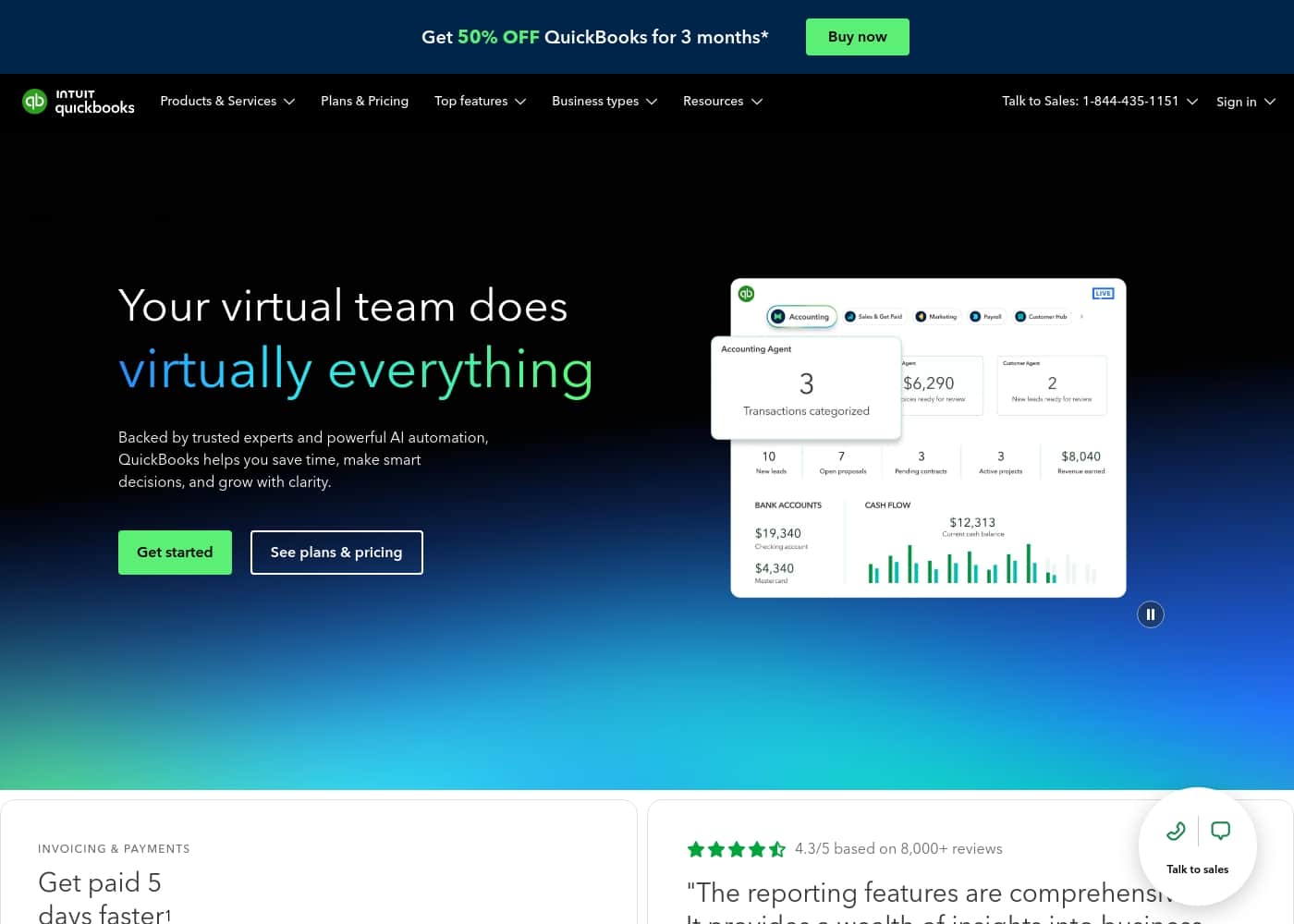
Quickbooks homepage screenshot

At a glance

Quick overview for Quickbooks: rating, pricing summary, key features, and highlights.

Ciroapp review

2.3
Power, Precision, and Painful Support.

We observe that QuickBooks offers market-leading feature depth and scalability, catering strongly to diverse business needs and growth stages with its tiered plans and AI tools. Overall, however, the severe and repeated reports of poor customer support and reliability issues necessitate caution, significantly hindering its operational effectiveness for many users.

Pros

  • Pro:Scalable plans supporting solo operations up to 25 users.
  • Pro:Customized experience based on specific business size and needs.
  • Pro:Integration of advanced AI tools like Intuit Assist and Accounting Agents.
  • Pro:Includes a 30-day free trial period for risk-free testing.

Cons

  • Con:Customer service is consistently reported as inefficient and unhelpful.
  • Con:Aggressive and frequent increases in subscription pricing.
  • Con:Software is frequently unstable, unreliable, and prone to accounting errors.
  • Con:Constant, unplanned user interface updates frustrate long-time users.
Free trial
Yes — 30 days
Range: $38–$275/monthFree trial, Monthly subscription
This section is a summary. Detailed sections about features, use cases, pricing, and reviews follow below.

Quickbooks review, pricing, features, pros & cons

It's sometimes hard running a business when the tools feel generic and overwhelming. You need software focused on your unique journey.

QuickBooks helps customize your experience right away. This ensures you get features that actively help you Count on accuracy and Surface more leads. ✨

What is Quickbooks?

QuickBooks is a system designed to support modern businesses, regardless of their size. It’s built to personalize the site experience using simple criteria, like how many employees you have. ✨

Whether you are running a large team or operate as "Just me," the system aims to tailor features specifically to your needs. This focus on customization helps pave the way for successful business growth.

Quickbooks Key Features

✨ Tailored Onboarding for Maximum Relevance

It’s frustrating when business tools feel generic and overwhelming. QuickBooks solves this by offering a highly customized site experience right from the start. You simply answer a few introductory questions about your operation’s size.

This simple criteria, like specifying if your business is "Just me" or a larger team, instantly personalizes your features. This focus ensures you receive features that are maximally relevant to your needs. This tailored approach sets a clear path for sustained business growth.

✨ Achieve Core Accuracy and Organization

QuickBooks helps you confidently rely on the assured accuracy of your essential business tasks. The system provides tools for smart expense organization and supports efficient transaction review. This comprehensive foundation helps you maintain control over your finances.

By efficiently organizing transactions and monitoring expenses, you build reliable financial records. This allows you to truly Count on accuracy in your daily management.

🤖 Streamlining Tasks with Intelligent Agents 🤖

The platform boosts efficiency by utilizing advanced artificial intelligence and specialized agents. Every user benefits from the core capabilities of Intuit Assist, which simplifies common processes. As your business grows, you gain access to powerful new automation tools.

These specialized agents help streamline crucial financial tasks:

  • Accounting Agent: Allows you to post transactions with impressive speed.
  • Payments Agent: Smoothly manages and handles incoming and outgoing payments.

These intelligent features save significant time, helping you focus more on business development.

📈 Scaling with Clarity and Advanced Insight

For businesses focused on scaling, QuickBooks offers deep analytical tools and advanced financial insight. You gain greater clarity needed to manage complexity as you grow. The Plus plan, a customer favorite, includes access to AI-powered reconciliation, currently in BETA. This function helps you quickly identify potential accounting issues and receive suggested solutions immediately.

Top-tier plans also feature the Finance Agent, which supports high-level financial planning. This agent provides essential KPI analysis, giving you the detailed views needed to boost profitability and strategic growth.

✨ Built for Teams and Professional Support

QuickBooks structures its plans to support businesses of varying sizes, from solo operations to large teams. User access scales flexibly, accommodating up to 25 users on the largest plan. This flexibility ensures the system grows alongside your personnel.

Furthermore, every single subscription plan includes dedicated access for your accountant. This seamless integration ensures your financial professional can easily support your accuracy goals. For complex operations, a dedicated Project Management Agent is available to help track and analyze project costing effectively.

Use Cases

✨ Building a Strong Financial Foundation

If you are running a solo operation or just starting out, you need foundational tools without unnecessary complexity. Selecting the Simple Start plan customizes your experience right away. It focuses on smart expense organization and transaction review to boost your efficiency immediately.

You get the precise tools needed to confidently count on accuracy from day one.

🚀 Automating Daily Transactions with AI Agents

Growing businesses often struggle to keep up with manual transaction entry and payment processing. The Essentials plan provides powerful new agents designed to streamline these crucial tasks. The Accounting Agent quickly posts routine transactions, freeing up valuable staff time. Meanwhile, the Payments Agent efficiently manages incoming and outgoing funds, helping your team focus on growth.

Tip: This automation helps eliminate manual office tasks, allowing you to surface more leads.

📈 Scaling with AI-Powered Financial Clarity

As your company gains complexity, you need assurance that your books are perfectly accurate. The popular Plus plan offers AI-powered reconciliation, currently in BETA, to instantly improve financial control. This feature helps identify potential accounting issues and suggests clear solutions quickly.

You gain the control necessary to confidently scale your business and manage up to five users effectively.

💼 Achieving High-Level Financial Insight

When managing a large team of up to 25 users, deep insight is critical for improving overall profitability. The Advanced plan provides sophisticated, high-level agents for executive decision-making. The Finance Agent delivers specialized KPI analysis and essential financial planning.

Additionally, the Project Management Agent tracks project costs and streamlines workflows across the large team, boosting overall organizational efficiency.

💡 Tailoring Software to Your Business Size

QuickBooks ensures you never feel overwhelmed by generic software that doesn’t fit your needs. During setup, the system asks simple criteria, like how many employees you have, including the option for "Just me." This immediate customization personalizes your site experience. It ensures maximum relevance, giving you only the features that truly matter for your unique size and stage of growth.

🤝 Seamless Collaboration with Your Accountant

It’s vital to have your financial data ready for tax season and professional review. Every QuickBooks plan includes direct access for your accountant. This secure access ensures they can review transactions, pull reports, and provide timely advice immediately.

This feature lets you confidently count on accuracy by keeping your professional advisors in the loop.

Pricing Overview for Quickbooks

Pricing range
$38–$275/month
Pricing types
Free trial, Monthly subscription

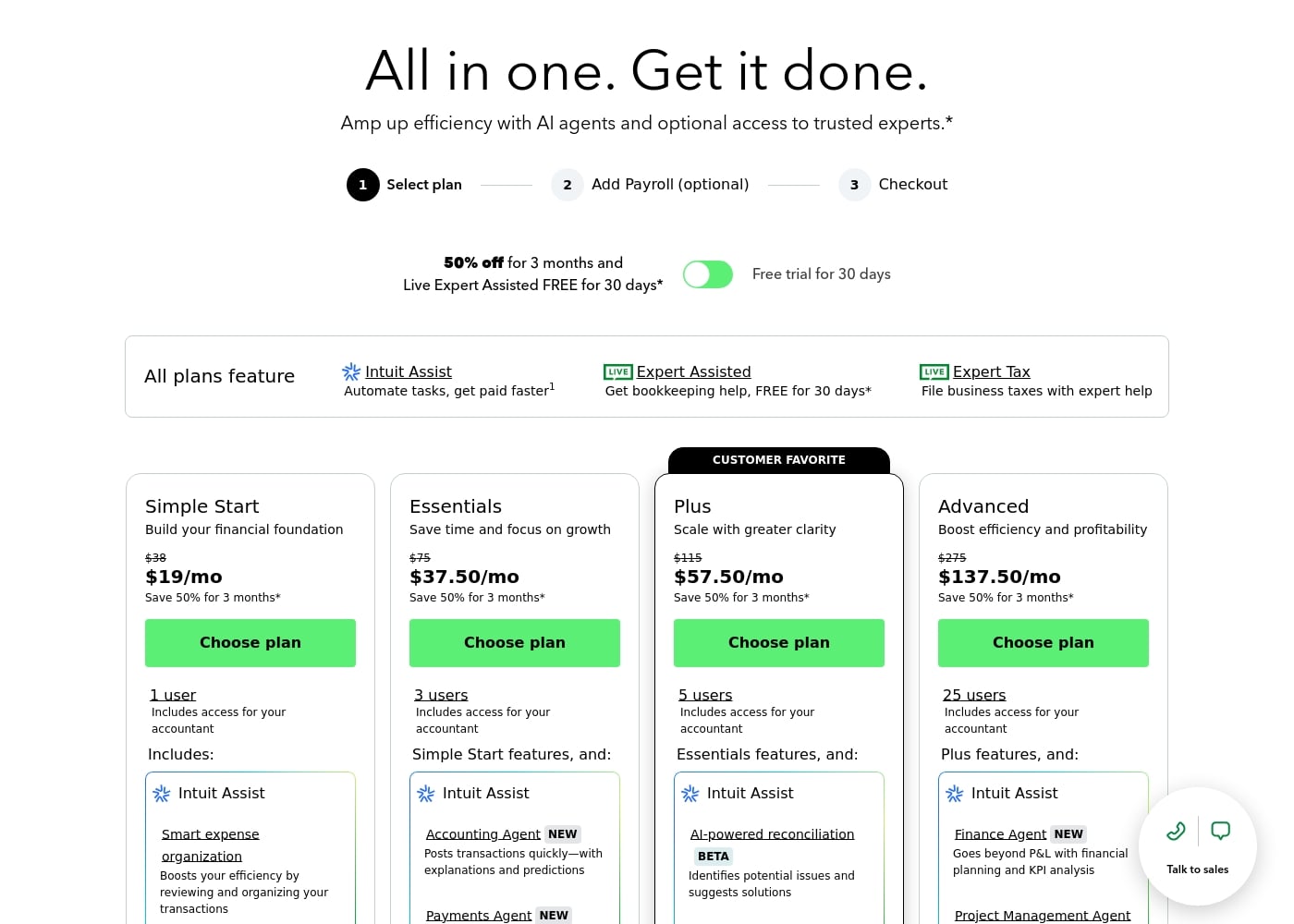
QuickBooks offers four subscription tiers designed to support businesses from solo operations to large teams. Standard pricing ranges from $38 to $275 per month, and new customers can currently save 50% for the first three months on any plan.

Plans & Pricing

Simple Start

Monthly$38
1 user
  • 1 user access
  • Includes access for your accountant
  • Intuit Assist
  • Smart expense organization

Essentials

Monthly$75
3 users
  • 3 users access
  • Simple Start features included
  • Accounting Agent NEW
  • Payments Agent NEW

Plus

Monthly$115
5 users
  • 5 users access
  • Essentials features included
  • AI-powered reconciliation (BETA)

Advanced

Monthly$275
25 users
  • 25 users access
  • Plus features included
  • Finance Agent NEW (Financial planning and KPI analysis)
  • Project Management Agent

QuickBooks costs between $38 and $275 per month with 4 plans: Simple Start at $38, Essentials at $75, Plus at $115, and Advanced at $275.

Here’s a closer look at what features and capacity are included with each plan.

Simple Start

Price: $38/month (or $19/month for 3 months) Websites Supported: Not explicitly stated Best For: Building your financial foundation Refund Policy: Not explicitly stated Other Features:

  • 1 user access
  • Includes access for your accountant
  • Intuit Assist
  • Smart expense organization

This plan is perfect if you’re just starting out or running a solo operation. It gives you the core tools needed for smart expense organization and transaction review to boost your efficiency.

Essentials

Price: $75/month (or $37.50/month for 3 months) Websites Supported: Not explicitly stated Best For: Saving time and focusing on growth Refund Policy: Not explicitly stated Other Features:

  • 3 users access
  • Simple Start features included
  • Accounting Agent NEW (posts transactions quickly)
  • Payments Agent NEW

If your business is growing and you need to manage a small team, Essentials is a great choice. You get more user access and powerful new agents to handle transactions and payments, allowing you to streamline office tasks.

Plus (Customer Favorite)

Price: $115/month (or $57.50/month for 3 months) Websites Supported: Not explicitly stated Best For: Scaling with greater clarity Refund Policy: Not explicitly stated Other Features:

  • 5 users access
  • Essentials features included
  • AI-powered reconciliation (BETA)

The Plus plan is the most popular option for businesses seeking increased control and clarity. With five users and AI tools like reconciliation, you can easily identify potential accounting issues and get suggested solutions quickly. 📈

Advanced

Price: $275/month (or $137.50/month for 3 months) Websites Supported: Not explicitly stated Best For: Boosting efficiency and profitability Refund Policy: Not explicitly stated Other Features:

  • 25 users access
  • Plus features included
  • Finance Agent NEW (KPI analysis and financial planning)
  • Project Management Agent

Choose the Advanced plan when your company needs maximum capacity and deep financial insight. This tier supports larger teams with 25 users and provides high-level agents for project costing and comprehensive financial planning.

QuickBooks Online is a subscription service, but you have the flexibility to manage your commitment. Every plan offers a free trial for 30 days, which does not auto-renew, allowing you to test the service risk-free. You are also free to switch between QuickBooks Online plans or cancel your subscription whenever you need to.
User Reviews

User sentiment collected primarily from Trustpilot is overwhelmingly negative, frequently contrasting with the platform’s marketing promises of accuracy and seamless growth. While QuickBooks offers feature depth and personalized experiences, the recurring themes of frustration are significant among users.

Customers consistently report atrocious and unhelpful customer service, often involving extremely long holding times, multiple transfers, and conflicting information without resolution. Reliability is a major concern; users describe the software as unstable, prone to costly accounting errors, and sometimes necessitating external accountant intervention.

Furthermore, many small businesses feel the value diminishes quickly, noting constant, aggressive price increases post-trial period. Customers also complain that frequent, unwanted user interface updates make the platform clunky and difficult to navigate.

The difficulty in cancelling subscriptions is another widely cited grievance, often described as an endless, frustrating process. Many long-term users are actively seeking alternatives due to poor support and rising costs.

📉

What users say elsewhere

Terry S.
· Trustpilot
1.0 / 5

I spent almost three months migrating from the Desktop to the Online version. The transition was supposed to be easy, but I had constant issues. Customer support was unknowledgeable and unable to assist me thoroughly.

Marcus F.
· Trustpilot
1.0 / 5

The subscription price keeps increasing aggressively. It’s too expensive for my small business's basic record keeping needs. This cost went up over 40% in three years, making it poor value for money.

No reviews yet.

Write a Review

Write a Review for Quickbooks
0/100 characters
0/2000 characters

Why use Quickbooks?

Why settle for generic software when you can start growing with confidence right now? QuickBooks focuses on giving you the precise tools you need to succeed.

Personalized Features: Receive a customized experience simply by answering a few introductory questions during setup. ✅ Assured Accuracy: You can rely on the system to confidently help you Count on accuracy in your essential business tasks. ✅ Lead Generation: The platform actively supports your efforts to Surface more leads quickly and efficiently. ✅ Growth Focused: Achieve sustained business success and Grow with confidence over time. ✅ Maximum Relevance: Get features that truly matter most to businesses prioritizing smart, tailored management. 💡

Ready to transform your workflow with Quickbooks?

Frequently Asked Questions

Does the 30-day free trial require a credit card, and does it auto-renew?

The free trial does not require a commitment and will not automatically renew into a paid subscription. You can test the service risk-free for 30 days without worrying about unexpected charges.

Can I cancel my QuickBooks Online subscription at any time?

Yes, QuickBooks Online provides flexibility, allowing you to switch plans or cancel your subscription whenever the need arises.

Who is the Simple Start plan best suited for?

The Simple Start plan is ideal for individuals running a solo operation or businesses just starting out. It provides core tools like smart expense organization for financial tracking.

How are the user caps determined across the different price tiers?

The pricing structure uses fixed user limits for each tier. Simple Start supports 1 user, Essentials allows 3, Plus includes 5, and the Advanced plan can accommodate up to 25 users.

Is Live Expert customer support included, or is there an extra charge for help?

Phone support is free during your 30-day trial and is included with your paid QuickBooks Online subscription, provided your account remains current.

Does QuickBooks offer a money-back guarantee after I begin a paid subscription?

Not explicitly stated on the official site. Review the current terms of service before subscribing if a post-purchase money-back guarantee is necessary for your decision.

How can I share my financial data with my external accountant?

You can invite your accountant to access your books for free with any QuickBooks Online plan. You can control their access levels and remove them anytime you wish.

If my business grows, can I easily switch to a higher-tiered plan?

Yes, you have the option to upgrade your service between the Simple Start, Essentials, and Plus plans as your business scales and needs evolve.

Are there transaction fees, or is the subscription the only cost?

While most services are covered by the subscription, you may incur a fee of $0.50 per standard ACH transaction if you exceed your specific monthly allotment.

Does QuickBooks integrate with other business applications?

Yes, QuickBooks Online is designed for connectivity and can seamlessly connect to over 300 apps you currently use, simplifying data flow.

Which plans offer access to the advanced AI financial planning tools?

The Essentials plan adds the Accounting Agent and Payments Agent. The top-tier Advanced plan includes the specialized Finance Agent and Project Management Agent.

How long does it take for a new user to set up QuickBooks Online?

Initial setup is very quick. You can be up and running in about five minutes once you successfully sync your credit card or bank transactions to QuickBooks Online.

Do I have to pay to use the mobile application?

No, the QuickBooks Online subscription includes a free mobile app. This allows you to manage your business and access your data securely from a smartphone or tablet.

Is yearly billing available for a potential discount over monthly payments?

Not explicitly stated on the official site. The pricing provided shows only monthly costs, though current promotions include 50% off for the first three months.

Ready to try Quickbooks? Check out the official site or pricing.