Freshbooks vs Quickbooks
Freshbooks and Quickbooks are often the top choice for small business financing needs. Quickbooks offers deep, complex accounting tools built for scaling teams and high complexity. Freshbooks focuses on easy invoicing, superior support, and a streamlined experience for service professionals.
Best for: Solo entrepreneurs and freelancers who prioritize simplicity, Service-based businesses needing professional, fast invoicing
Best for: Businesses requiring 5-25 user seats for collaboration, Companies needing specialized financial planning and KPI analysis
Top-Tier Invoicing with Exceptional Support.
We found Freshbooks to be an excellent solution focused on streamlining invoicing and expense tracking for small businesses and freelancers. Its intuitive interface simplifies daily accounting tasks, while the highly rated support staff stands ready to assist if technical issues arise. Overall, we recommend Freshbooks strongly for users prioritizing ease of use and professional support over deeply complex accounting machinery.
Pros
- Intuitive design makes setup and daily navigation simple.
- Creates quick, professional, and pleasant-looking invoices.
- Customer support is consistently rated as excellent, fast, and knowledgeable.
- Effective tracking of time and expenses (aided by the mobile app).
Cons
- Value perception is low for some long-term users as pricing has increased.
- Lacks direct functionality for features like printing checks without third-party apps.
- Users report occasional difficulties processing certain digital payments.
- Some functionality is considered basic (e.g., struggles to download bank income/deposits automatically).
Power, Precision, and Painful Support.
We observe that QuickBooks offers market-leading feature depth and scalability, catering strongly to diverse business needs and growth stages with its tiered plans and AI tools. Overall, however, the severe and repeated reports of poor customer support and reliability issues necessitate caution, significantly hindering its operational effectiveness for many users.
Pros
- Scalable plans supporting solo operations up to 25 users.
- Customized experience based on specific business size and needs.
- Integration of advanced AI tools like Intuit Assist and Accounting Agents.
- Includes a 30-day free trial period for risk-free testing.
Cons
- Customer service is consistently reported as inefficient and unhelpful.
- Aggressive and frequent increases in subscription pricing.
- Software is frequently unstable, unreliable, and prone to accounting errors.
- Constant, unplanned user interface updates frustrate long-time users.
AboutFreshbooks
FreshBooks is powerful accounting software designed to respect your time. It’s built to automate routine tasks like expense tracking and professional client invoicing. This tool is valuable for various stages of growth, whether you are a freelancer just starting out or a business managing contractors and employees. It organizes your finances so you always know where you stand in real time. 💡
AboutQuickbooks
QuickBooks is a system designed to support modern businesses, regardless of their size. It’s built to personalize the site experience using simple criteria, like how many employees you have. ✨
Whether you are running a large team or operate as "Just me," the system aims to tailor features specifically to your needs. This focus on customization helps pave the way for successful business growth.
Highlights
Feature Comparison
Features Overview
We highlight the main differences and pick a winner for each feature.
Ease of Use
Freshbooks offers a simple, intuitive interface; Quickbooks is famously complex.
Freshbooks focuses on simplicity and is intuitive for daily navigation and setup. Users switching from more complicated systems prefer Freshbooks for its ease of use. Quickbooks is a full accounting engine but has a much steeper learning curve. Constant, unplanned UI updates frustrate long-time Quickbooks users. Freshbooks makes quick invoicing and tracking time remarkably simple for service professionals. Quickbooks requires specialized knowledge to navigate its complex reporting and advanced features, adding administrative overhead.
Scalability & Users
Quickbooks handles large teams; Freshbooks is designed for client volume, not user seats.
Freshbooks primarily structures its costs around your number of billable clients. Team members are expensive add-ons at $11 monthly per user in Freshbooks. Quickbooks is engineered for rapid scaling, supporting 5 users on the Plus plan. The Advanced Quickbooks plan accommodates up to 25 users efficiently. Quickbooks is the definitive choice for growing businesses needing many internal user seats and permissions. If you only need 1-2 users but invoice unlimited clients, Freshbooks Premium is perfect for that niche.
Customer Support
Freshbooks support is excellent; Quickbooks support is widely reported as abysmal.
Freshbooks support is consistently rated as excellent, fast, and knowledgeable by thousands of users. They staff over 100 support members and promise zero call transfers. Quickbooks users frequently report unhelpful, unknowledgeable support that leaves accounting issues unresolved. Cancellation of Quickbooks subscriptions is also notoriously difficult. This huge difference in customer service often leads Quickbooks users to switch to Freshbooks. If reliable help is critical to your operation, Freshbooks offers vastly superior peace of mind.
Core Invoicing
Freshbooks is superior for professional, fast client billing and retainer management.
Freshbooks is purpose-built for efficient, professional client invoicing with customization options. It includes features like client retainers and automated late payment reminders. Quickbooks handles invoicing functionally, integrating it into its complex general ledger system. Its focus is accuracy over speed or design aesthetics. Freshbooks helps you get paid quicker by making the process simple for your clients to navigate. If your business success hinges on sending many clean, high-quality invoices, Freshbooks is far ahead.
Advanced Features
Quickbooks offers AI agents and deep financial planning; Freshbooks focuses on profitability checks.
Quickbooks provides highly advanced integrated AI agents like the Finance Agent. This agent supports high-level financial planning and KPI analysis. Freshbooks offers double-entry accounting and strong reporting, but lacks specialized AI tools for complex analysis. It does check project profitability on higher plans. Quickbooks includes AI-powered reconciliation (BETA) to instantly solve potential accounting errors and suggest solutions. If you need deep analytical tools for forecasting and complex team management, Quickbooks is the superior option.
Pricing Structure
Quickbooks is expensive and unstable; Freshbooks bases cost primarily on client volume.
Quickbooks starts higher at $38 monthly and scales aggressively up to $275 per month. Users consistently report high, frequent price increases. Freshbooks Lite starts at $10.50 (promotional) and Premium is $32.50 (promotional). Its price scales based on billable clients, from 5 to unlimited. Quickbooks's reported price volatility diminishes its overall value for most small businesses. Freshbooks also offers an explicit 30-day money-back guarantee, providing less purchasing risk.
Time & Expense Tracking
Both track expenses well; Freshbooks has built-in unlimited time tracking features.
Freshbooks offers strong real-time expense tracking via bank imports and mobile scanning. Premium plans include unlimited time tracking for projects. Quickbooks provides robust smart expense organization and transaction review for accurate records. Its mobile app handles receipt scanning efficiently. Quickbooks requires a separate add-on tool for integrated unlimited time tracking for projects. Freshbooks seamlessly links time tracking data directly into the final client invoice for easier billing.
Integration Ecosystem
Quickbooks connects to three times as many apps as Freshbooks.
Freshbooks connects seamlessly with over 100 external applications via its AppStore. This ecosystem is usually sufficient for freelancers and small firms. Quickbooks offers vastly superior connectivity, linking with over 300 different business applications. This flexibility supports complex tech stacks. If your workflow relies on connecting to niche or industry-specific tools, Quickbooks is more likely to sync. Freshbooks provides core integrations, but Quickbooks opens the door to a much wider business automation landscape.
Freshbooks costs between $10.50 and Custom per month (promotional pricing) with 4 plans: Lite at $10.50/month, Plus at $19.00/month, Premium at $32.50/month, and Select (Custom Pricing).
Details of these subscription levels are below, covering key features and target users.
Lite
Price: $10.50 USD/mo (Promotional. Was $21.00 USD/mo) Best For: Freelancers Refund Policy: 30-Day Money Back Guarantee Other Features:
- Send invoices to 5 clients
- Track expenses in real time
- Get paid via credit cards and bank transfers (ACH)
- Create and send estimates
- Send invoices to 5 clients
- Track expenses in real time
- Create and send estimates
- Get paid via credit cards and bank transfers (ACH)
- Generate tax-time reports
- Send invoices to 50 clients
- Create estimates, proposals, and client retainers
- Run financial and accounting reports
- Expense receipt scanning
- Give your accountant access
- Send invoices to unlimited clients
- Bill receipt scanning with the ability to add line items
- Check project profitability
- Customize your email templates
- Double-Entry Accounting Reports
- Send invoices to unlimited clients
- Access lower credit card transaction fees and capped ACH fees
- Import your data via Easy Switch
- Gain access to dedicated phone support
- 2 Team Member accounts included

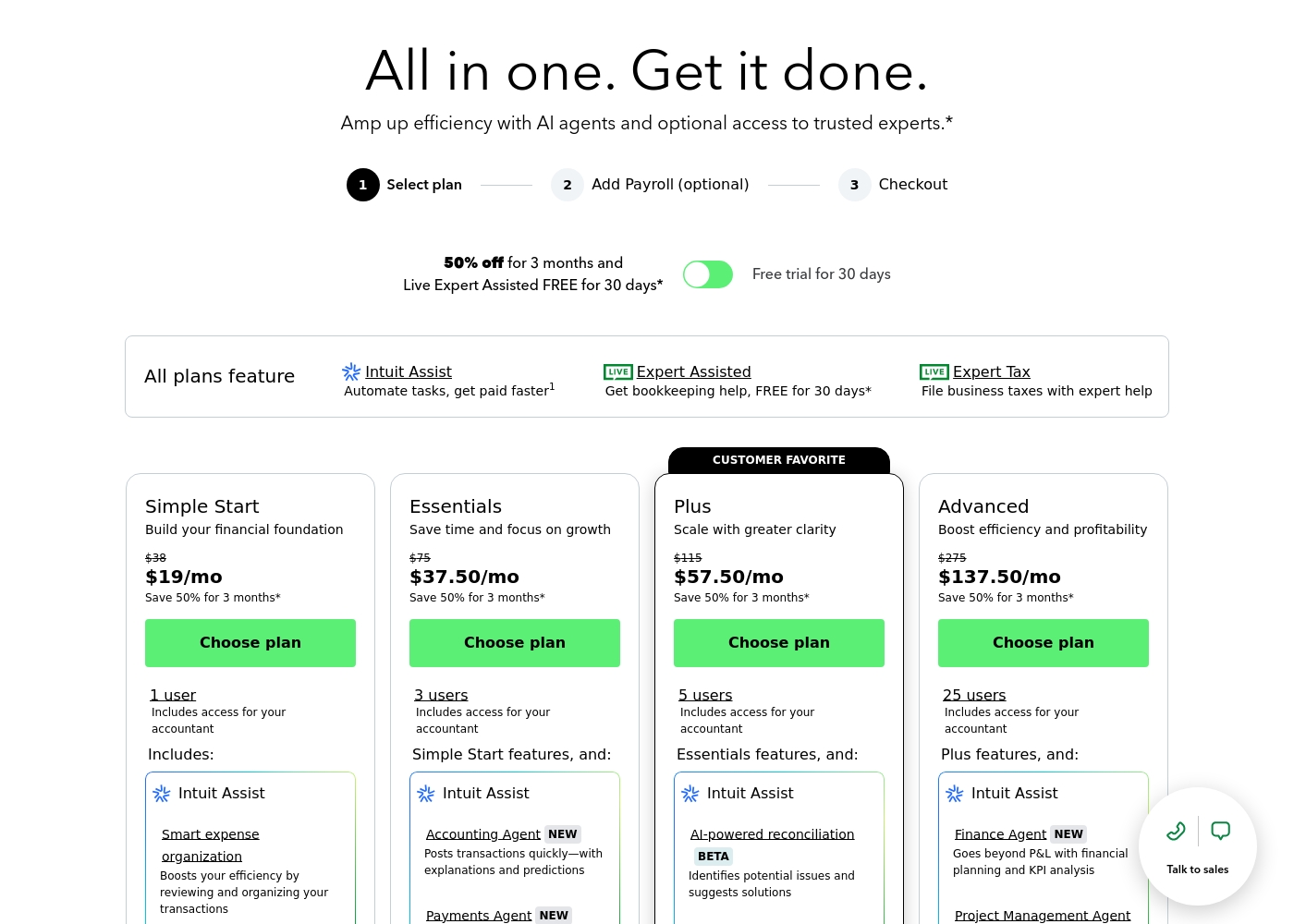
QuickBooks costs between $38 and $275 per month with 4 plans: Simple Start at $38, Essentials at $75, Plus at $115, and Advanced at $275.
Here’s a closer look at what features and capacity are included with each plan.
Simple Start
Price: $38/month (or $19/month for 3 months) Best For: Building your financial foundation Other Features:
- 1 user access
- Includes access for your accountant
- Intuit Assist
- Smart expense organization
- 1 user access
- Includes access for your accountant
- Intuit Assist
- Smart expense organization
- 3 users access
- Simple Start features included
- Accounting Agent NEW
- Payments Agent NEW
- 5 users access
- Essentials features included
- AI-powered reconciliation (BETA)
- 25 users access
- Plus features included
- Finance Agent NEW (Financial planning and KPI analysis)
- Project Management Agent
Pricing Notes
- Quickbooks charges are significantly higher, starting at $38 monthly standard pricing.
- Freshbooks offers a strong 50% discount for the first six months and an extra 10% off for annual prepayment.
- Quickbooks users frequently report aggressive, frequent price hikes after the initial promotional period ends.
- Freshbooks pricing scales based on billable clients (5 to Unlimited), while Quickbooks limits access by user seats (1 to 25 users).
- Freshbooks offers an explicit 30-day money-back guarantee, assuring a risk-free start.
Pricing Head-to-Head
User Reviews
Freshbooks generally receives positive feedback, particularly regarding its intuitive design and minimal setup. Users frequently mention how simple the software is, making basic tasks like tracking time and creating professional invoices fast and efficient.
Many reviewers who switched from competitors appreciate that Freshbooks is far less complex and easy to navigate. Customer support is a significant strength and repeatedly praised.
Migrated over from Quickbooks. Quickbooks was an expensive nightmare. Freshbooks is so simple and easy to use. Their customer support is reachable and helpful.
User sentiment collected primarily from Trustpilot is overwhelmingly negative, frequently contrasting with the platform’s marketing promises of accuracy and seamless growth. While QuickBooks offers feature depth and personalized experiences, the recurring themes of frustration are significant among users.
Customers consistently report atrocious and unhelpful customer service, often involving extremely long holding times, multiple transfers, and conflicting information without resolution. Reliability is a major concern; users describe the software as unstable, prone to costly accounting errors, and sometimes necessitating external accountant intervention.
I spent almost three months migrating from the Desktop to the Online version. The transition was supposed to be easy, but I had constant issues. Customer support was unknowledgeable and unable to assist me thoroughly.
Our Verdict
Ultimately, the choice between Freshbooks and Quickbooks is a battle between simplicity and complexity. Quickbooks offers massive feature depth, but Freshbooks wins easily on ease of use and support quality. Freshbooks excels in elegant invoicing, client management, and unmatched customer support. It helps service providers send beautiful invoices in minutes and offers transparent pricing based on billable clients. Freelancers and small firms love Freshbooks because it streamlines daily bookkeeping without the steep learning curve. Quickbooks offers exceptional scalability, supporting up to 25 users on its Advanced plan. It provides the necessary complex accounting machinery, full agent-based AI tools, and deep financial reporting. Features like the Finance Agent provide high-level KPI insight that smaller systems like Freshbooks simply don't match. The deciding factor should be your team size and tolerance for complexity versus pricing stability. If your business needs 5+ users and specialized AI tools, Quickbooks is the functional necessity. If you are a solo operator or a smaller team and demand top-notch customer support and simple billing, Freshbooks is superior. Choose Freshbooks if you value sanity, ease of use, and expert support over maximum feature depth. Pick Quickbooks only if you absolutely require its enormous scale and advanced analytical tools, and are prepared for the associated cost and customer service headaches.
Frequently Asked Questions
Which is easier to set up and use, Freshbooks or Quickbooks?
Freshbooks is significantly easier to set up and use and is preferred by non-accountants. Quickbooks is a powerful accounting engine with complex menus and a much steeper learning curve. Freshbooks is designed to make daily tasks like invoicing simple.
Which is better for small teams: Freshbooks or Quickbooks?
If your small team needs 1-3 users, Freshbooks is often better due to its simplicity and support ecosystem. Quickbooks is better if your team size exceeds five users or requires extensive collaboration features. Quickbooks is built to manage up to 25 users effectively.
Does Freshbooks have specialized AI features like Quickbooks?
No, Freshbooks focuses on automating core tasks like expense tracking and invoicing, not AI agents. Quickbooks offers specialized AI tools, including the Accounting Agent and the Finance Agent for high-level analysis. These advanced features are only available in specific Quickbooks tiers.
Which software accommodates a larger team and more employees?
Quickbooks accommodates a much larger team, supporting up to 25 users on its Advanced plan. Freshbooks charges $11 per user per month as an add-on and is primarily limited by billable clients. Quickbooks is the superior choice for scaling personnel.
Which has better customer support: Freshbooks or Quickbooks?
Freshbooks possesses vastly superior customer support, consistently rated 4.8 out of 5.0 by users. Quickbooks is notorious for having poor, unhelpful, and inefficient customer service. Quickbooks users frequently cite support issues as a reason for switching to Freshbooks.
Is Quickbooks worth the extra cost over Freshbooks?
Quickbooks costs significantly more and is only worth it if you absolutely need its advanced features. If your business doesn't need 5+ users or specialized AI financial agents, Freshbooks offers better value. Quickbooks users also report poor value due to aggressive price increases.
Ready to Choose?
Both tools have their strengths. Choose based on your specific needs.