Freshbooks

Freshbooks review

Invoicing, expenses, and payroll in one app for small businesses

Freshbooks costs from $23/mo · 4 plans

By Ciroapp Editorial Team · Updated Oct 12, 2026

Commission may apply at no extra cost

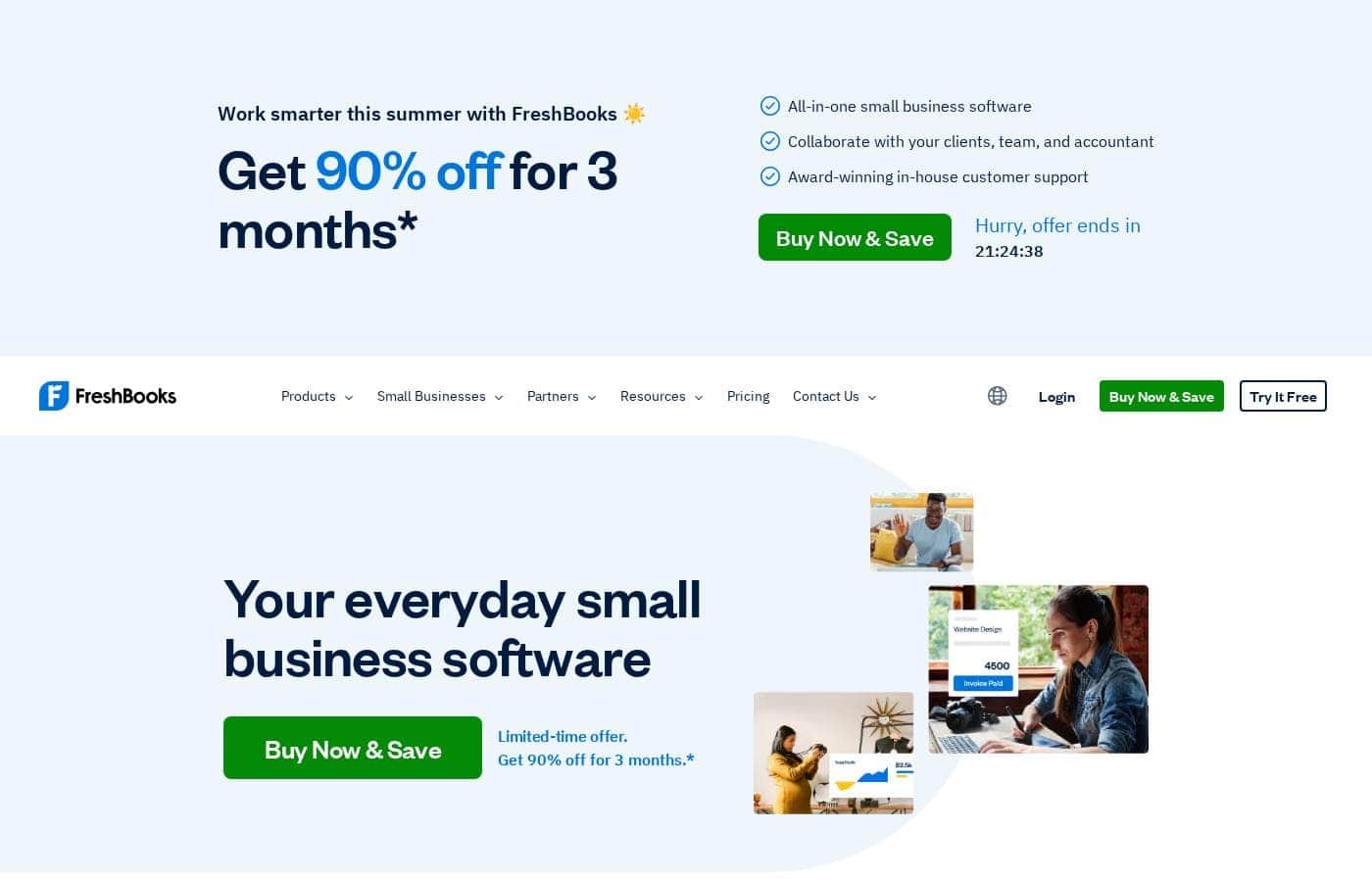
Freshbooks homepage screenshot

At a glance

Quick overview for Freshbooks: rating, pricing summary, key features, and highlights.
Vendor page checked Oct 12, 2026

Ciroapp score

4.2/ 5

FreshBooks bundles invoicing, expenses, and payroll with automation that keeps billing fast and cash flow steady. Third-party reviewers rate it 4.4 to 4.5 out of 5, though client caps on lower plans and a steep post-promo price jump deserve a closer look. Overall, it's a strong pick for freelancers and small service businesses that bill by time or project.

Pros

  • Pros:Tracked time and expenses flow into invoices automatically, with taxes calculated for you — billing hourly or per project takes minutes instead of an evening of manual typing.
  • Pros:Automated recurring invoices plus built-in payment reminders handle the awkward follow-up for late payers, keeping cash flow predictable without you chasing anyone.
  • Pros:Expenses stay current with three low-effort inputs — phone-based receipt scanning, bank transaction imports, and automatic categorization.

Cons

  • Cons:Billable-client caps bite early — Lite allows just 5 clients and Plus 50, so a growing roster forces you onto Premium at the full $70/month standard rate.
  • Cons:There's no free plan — only a 30-day trial — and the advertised 90%-off promo applies to just the first 3 months, after which prices jump tenfold ($2.30 becomes $23, $4.30 becomes $43, $7 becomes $70).
  • Cons:The Select plan has no listed price at all; you have to contact sales for a custom quote, which makes budgeting for high-volume billing impossible upfront.
Best for
  • Freelancers who bill clients for time and expenses
  • Solopreneurs who want bookkeeping handled without hiring help
  • Small businesses with employees that need accounting plus payroll
Free trial
Yes — 30 days
Money-back guarantee
Yes — 30 days
This section is a summary. Detailed sections about features, use cases, pricing, and reviews follow below.

What is Freshbooks?

Chasing late payments and sorting receipts steals hours you'd rather spend on real work. FreshBooks pulls invoicing, expenses, and payments into one place, automates the busywork, and backs it with in-house support — so your books stay tidy without eating your week.

FreshBooks is all-in-one accounting and invoicing software for small businesses. It covers invoicing, billing and payments, expenses, payroll, reporting, proposals, estimates, and time tracking. The site targets freelancers, solopreneurs, and businesses with employees or contractors, and says over 30 million small businesses have used it.

You can work from desktop or mobile and collaborate with clients, your team, and your accountant.

Should you choose Freshbooks?

Quick buyer guidance before you compare plans or click through.

Choose it if

  • You want invoicing, expenses, and payments in one tool instead of several
  • You bill hourly and want tracked time added to invoices automatically
  • You need to share access with your team, clients, or accountant
  • Late payments hurt your cash flow and automatic reminders would help
  • Human support matters — the site lists 100+ staff across North America with 4.8/5 approval

Skip it if

  • Anyone expecting a permanent free plan — the site advertises a 30-day free trial, not a free tier
  • Teams that depend on niche software — confirm your tools are among the 100+ AppStore integrations before switching
  • Larger companies needing advanced controls — the site positions FreshBooks as everyday small business software, not enterprise accounting

Next steps before buying

  1. 1Open the pricing page and note what plans cost once the 90%-off intro period ends
  2. 2Check the AppStore to confirm your must-have integrations, like your bank feed, Gusto, Zapier, or Square
  3. 3Start the 30-day free trial and run one real invoice and one real expense through it
  4. 4Ask the support team how data transfer from your current tool works before you commit
  5. 5Shortlist one or two alternatives so you compare fit, not just price

Ease of use

Everything on the site points to a low-friction setup: invoices in minutes, phone-based receipt scanning, bank imports, and automatic expense categorization. There's a 30-day free trial, help moving your data, support webinars, and a Help Center. Mobile apps cover iOS and Android.

Freshbooks Key Features

✨ Invoices in Minutes, Not Evenings

Build a professional invoice in minutes. FreshBooks adds your tracked time and expenses automatically, calculates taxes for you, and lets you customize payment options. It's a natural fit when you bill hourly or per project.

The result: accurate invoices that go out fast, with far less manual typing.

✨ Getting Paid Without the Chase

Late payments hurt. FreshBooks automates recurring invoices and billing, accepts secure online payments, and sends built-in reminders for you. That keeps cash flow predictable without the awkward follow-up emails.

Set it up once and let the system handle the chasing, so you can focus on the actual work.

✨ Expense Tracking on Autopilot

Expense tracking shouldn't eat your evening. FreshBooks gives you three easy ways to stay on top of spending:

  • Scan receipts from your phone
  • Import bank account transactions
  • Let the software categorize expenses automatically

Together, they keep your books tidy with barely any typing.

✨ Payroll Under One Roof

If you pay yourself or a team, FreshBooks runs payroll right alongside your accounting. You can pay people, track expenses, and calculate taxes without juggling separate tools. That keeps everything in one place, which means fewer logins, fewer spreadsheets, and less chance something slips through the cracks.

💙 The Extras That Tie It Together

FreshBooks covers more than the basics. You'll also find accounting, reporting, proposals, estimates, time tracking, and mileage tracking — plus mobile apps for iOS and Android. You can collaborate with clients, your team, and your accountant.

Need more? Over 100 apps connect through the AppStore, including Zapier, Gusto, and Square.

Use Cases

⏱️ Freelancers who bill by the hour

You track time as you work, and FreshBooks adds it straight to your invoice. Create professional invoices in minutes, calculate taxes automatically, and offer the payment options clients prefer. Expected outcome: faster billing with less admin.

💸 Small businesses tired of chasing payments

Set up automated recurring invoices and let built-in reminders nudge clients for you. Secure online payments make it easy for customers to pay on the spot, so cash flow stays predictable. Tip: turn on reminders the day you send your first invoice.

👥 Owners with a team to pay

Run payroll without juggling separate tools. Pay yourself and your team, calculate taxes, and track expenses in the same app where you invoice. Share access with your accountant so tax season runs smoother.

🤝 Businesses working with contractors

Keep everyone you work with on the same page. Stay organized about daily operations, log contractor time and expenses, and let bank imports and mobile receipt scanning fill your books in automatically.

Freshbooks pricing

From$23/mo

  • 4 plans

Vendor page checked on Oct 12, 2026; confirm current prices on Freshbooks's pricing page

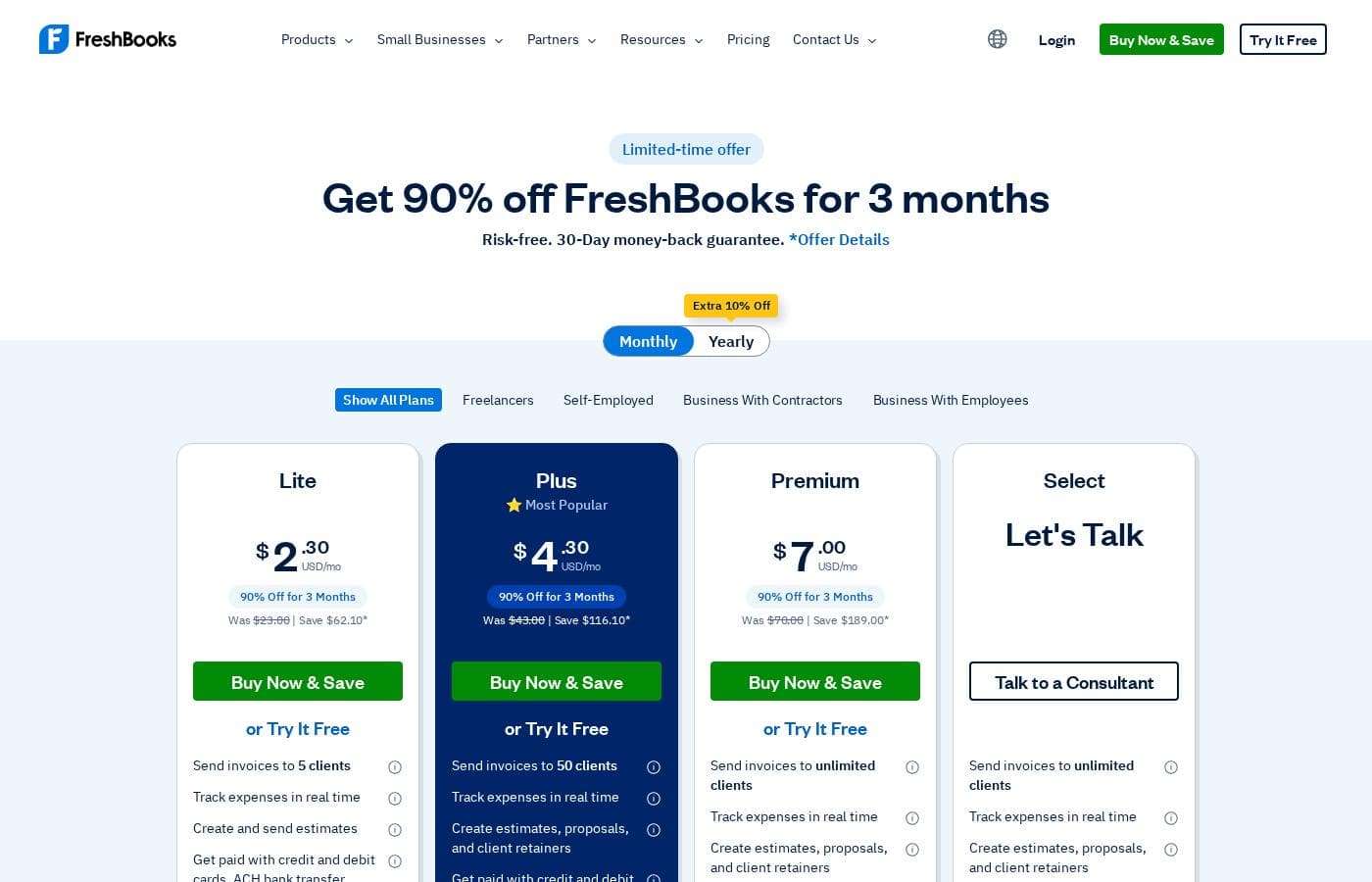
Freshbooks pricing page screenshotView pricing page screenshot
PlanBilled monthlyBilled annuallyIncludes
Lite
Intro offer $2.30/mo; list price shown
$23/mo
—
5 billable clients
  • 5 billable clients
  • Automated recurring invoices
  • Optional add-ons available ($20/mo, $11/mo, $40/mo plus $6/mo per user)
Plus
Intro offer $4.30/mo; list price shown
$43/mo
—
50 billable clients
  • 50 billable clients
  • Automated recurring invoices
  • Email receipts right to your account
  • Optional add-ons available
Premium
Intro offer $7/mo; list price shown
$70/mo
—
  • Unlimited billable clients
  • Automated recurring invoices
  • Email receipts right to your account
  • Optional add-ons available
Select
See vendor page
See vendor page
Custom pricing — contact FreshBooks for a quote
  • Unlimited billable clients
  • $20/month add-on included at no extra cost
  • Additional add-ons available ($11/mo; $40/mo plus $6/mo per user)

Price history

Tracking prices since Oct 1, 2026. No price change detected yet.

Pricing types: Free trial, Monthly subscription

Pricing notes

FreshBooks offers three self-serve monthly plans — Lite, Plus, and Premium — currently 90% off for the first 3 months ($2.30–$7.00/month), then $23–$70/month. A custom-priced Select plan is available for high-volume billing businesses, and every plan starts with a 30-day free trial.

FreshBooks costs between $2.30 and $70 per month right now, with three self-serve plans: Lite at $2.30/month (regularly $23), Plus at $4.30/month (regularly $43), and Premium at $7/month (regularly $70), plus a custom-priced Select plan.

Those low rates come from a limited-time offer of 90% off your first 3 months. After that, standard monthly pricing applies. Here's how each plan breaks down.

Lite

Price: $2.30/month for the first 3 months, then $23.00/month Best For: freelancers and solo business owners with a short client list Refund Policy: 30-day money-back guarantee Other Features:

  • 5 billable clients
  • Automated recurring invoices
  • Optional add-ons ($20/mo, $11/mo, and $40/mo plus $6/mo per user)

Lite is the simple starting point. It handles invoicing for a handful of clients without making you pay for extras you won't touch. If you're just getting organized, this plan covers the basics at the lowest cost.

Plus

Price: $4.30/month for the first 3 months, then $43.00/month Best For: growing businesses with a longer client roster Other Features:

  • 50 billable clients
  • Email receipts right to your account
  • Automated recurring invoices
  • Optional add-ons available

Plus gives you ten times the client capacity and sends email receipts straight to your account. If you're landing new clients regularly, that extra headroom matters. Many small teams find this is the sweet spot.

Premium

Price: $7.00/month for the first 3 months, then $70.00/month Best For: established businesses that don't want client limits Other Features:

  • Unlimited billable clients
  • Email receipts right to your account
  • Automated recurring invoices
  • Same add-ons available

Premium removes the client cap entirely, so you never have to think about upgrading again. Skip it if you're early-stage — the smaller plans will save you money while you grow.

Select

Best For: high-volume billing businesses with bigger needs Other Features:

  • Unlimited billable clients
  • The $20/mo add-on included at no extra cost
  • Additional add-ons available ($11/mo; $40/mo plus $6/mo per user)

Select is FreshBooks' custom plan for high-volume billing, and its price isn't listed on the page — reach out to the company for a quote before committing. Everyone else can stick with the three self-serve options above.

Every plan starts with a 30-day free trial, so you can try before you buy. FreshBooks also backs purchases with a 30-day money-back guarantee: if you're not satisfied, contact them within the first 30 days after purchase for a full refund. Just remember the 90% discount only lasts 3 months — after that, standard monthly rates apply to whichever plan you choose.
Cost calculator

Estimate what Freshbooks costs for your team.

Billing
Per month
$67
Per year
$804

Lite includes 1 user, then $11/month per extra user: 4 extra for 5 users. Estimate based on published list prices, before taxes, add-ons and discounts.

How to pay less for Freshbooks

  • Use the 30-day free trial before you pay.
  • 30-day money-back guarantee if it does not fit.
  • Cheaper tools in this category start at $19/mo.
Start free trial

Email me when Freshbooks changes price

One email when we detect a price change on the vendor's pricing page. No newsletter, no deals. Unsubscribe in one click.

User Reviews

No reviews yet.

Write a Review

Write a Review for Freshbooks
0/100 characters
0/2000 characters

Why use Freshbooks?

If your books live in spreadsheets and your evenings go to chasing payments, FreshBooks is built to fix exactly that — and third-party reviewers agree it's onto something. PCMag, G2, and Capterra all rate it 4.4–4.5 out of 5.

  • Invoices in minutes. Tracked time and expenses flow in automatically, taxes get calculated for you, and payment options are customizable.
  • Getting paid without the chase. Automated invoicing, secure online payments, and built-in reminders keep cash flow predictable.
  • Expense tracking on autopilot. Scan receipts from your phone, import bank transactions, and let the software categorize them.
  • Payroll under one roof. Pay yourself and your team and calculate taxes without juggling separate tools.
  • Support that sticks with you. The team holds a 4.8/5 rating across 120,000+ reviews and says it never transfers you between departments.
  • Room to grow. Over 100 apps connect through the AppStore, including Gusto, Zapier, and Square.

FreshBooks reports users save up to 553 hours and $7,000 in billable hours a year — vendor numbers, but they hint at the time you could reclaim. The 30-day free trial lets you verify that yourself before paying anything.

Freshbooks alternatives

Other tools in the Accounting category

View all Accounting tools
Wave

Wave

Accounting4.1/5From $19/mo

Wave is an all-in-one platform built specifically for small business owners and solopreneurs. It helps you manage your money like a boss. You can easily handle invoicing, accounting, and secure online payments in one cohesive spot. Unlike software built strictly for accountants, Wave is designed for you to use. It's affordable, small business friendly, and aims to make bookkeeping truly painless. Wave helps you be the wiz of your biz.

Xero

Xero

Accounting3.7/5

Xero is cloud accounting software for everyday businesses. It helps you manage finances, cash flow, and integrate with apps, with safe and secure, paperless record keeping. Automated features save you time—from reconciling bank transactions to sending invoice reminders—and Hubdoc pulls bills and receipts into Xero. It supports ongoing 24/7 online support and offers plans to suit different business types, including construction, real estate, and retail.

Datarails

Datarails

Accounting4.1/5

Datarails is an AI-powered FinanceOS that automates FP&A while letting teams stay in Excel. We bridge the gap between manual spreadsheets and rigid ERPs. Whether you have a portfolio of clients or a growing community of finance pros, our program is designed to reward you for sharing a tool that eliminates manual busywork. Join us to help your network unlock strategic AI insights and real-time reporting in the environment they already use and love

Finaloop

Finaloop

Accounting4/5

Finaloop is real-time accounting software designed for ecommerce businesses. It automatically pulls transactions from platforms like Shopify, Amazon, and payment gateways, categorizes them, and reconciles your books continuously rather than monthly. A core differentiator is its automated inventory and cost-of-goods-sold (COGS) tracking, which is handled automatically rather than through manual journal entries. The service combines its software with human CPA-reviewed bookkeeping, and customers can add on tax return filing handled by Finaloop experts.

Zoho Books

Zoho Books

Accounting4/5

Zoho Books is a comprehensive, cloud-based accounting solution designed for growing businesses and solopreneurs. It brings together invoicing, inventory, expenses, and core financials in one place, with web and mobile access to manage finances from anywhere.

NetSuite

NetSuite

Accounting4/5

NetSuite is clearly positioned as an AI-powered business management suite. It's known widely as the #1 AI Cloud ERP. This powerful suite is designed to connect key functional areas of your enterprise. It expertly handles everything from ERP/Financials to CRM and ecommerce data. Over 43,000 customers rely on these integrated products to help fuel their essential growth.

Heard

Heard

Bookkeeping4.1/5

Heard is the only accounting platform built for mental health and wellness providers, combining bookkeeping, taxes, and payroll in one place. Providers using Heard save an average of 60 hours a year and $5,000 in taxes. We handle monthly bookkeeping, deliver clear financial reports, estimate quarterly taxes, file personal and business returns, support S Corp setup, and respond to questions within one business day.

Cheapest Accounting software for 1 to 25 users

Freshbooks FAQ

How much does Freshbooks cost?

Freshbooks's cheapest paid plan, Lite, costs $23 per month. Paid plans range from $23 to $70 per month.

Does Freshbooks offer a free trial or a money-back guarantee?

Freshbooks offers a 30-day free trial. It has a 30-day money-back guarantee.

Has Freshbooks's price changed recently?

No. We have not detected a price change since we started tracking on Oct 1, 2026.

Does FreshBooks connect with other apps I use?

Yes. The FreshBooks AppStore has 100+ integrations, including Gusto, Zapier, and Square. There's also an API if you want to build your own connection. Check the AppStore for your must-have tools before you switch.

How does FreshBooks protect my data?

FreshBooks uses industry-standard SSL and encryption. That covers your personal info and your clients' info. There's also a Security Safeguards policy page if you want details before signing up.

How many clients can I bill on each plan?

Lite covers 5 billable clients and Plus covers 50. Premium and Select lift the cap entirely, so you can bill unlimited clients. You can start on Lite and upgrade as your client list grows.

What happens if I'm not happy after I pay?

Every purchase comes with a 30-day money-back guarantee. Contact FreshBooks within the first 30 days after purchase and you'll get a full refund. There's also a 30-day free trial if you'd rather test first.

Ready to try Freshbooks? Check out the official site or pricing.

Are you Freshbooks? Claim this listing · Get the badge