Freshbooks vs Zoho Books
Freshbooks and Zoho Books both tackle small business accounting, but they serve different users. Freshbooks is the king of invoicing and simplicity with world-class support. Zoho Books is a full-featured, comprehensive ecosystem play with better scalability. It all comes down to whether you sell time or sell products.
Best for: Freelancers, Self-employed professionals
Best for: Businesses needing comprehensive end-to-end accounting, E-commerce or inventory-focused businesses
Top-Tier Invoicing with Exceptional Support.
We found Freshbooks to be an excellent solution focused on streamlining invoicing and expense tracking for small businesses and freelancers. Its intuitive interface simplifies daily accounting tasks, while the highly rated support staff stands ready to assist if technical issues arise. Overall, we recommend Freshbooks strongly for users prioritizing ease of use and professional support over deeply complex accounting machinery.
Pros
- Intuitive design makes setup and daily navigation simple.
- Creates quick, professional, and pleasant-looking invoices.
- Customer support is consistently rated as excellent, fast, and knowledgeable.
- Effective tracking of time and expenses (aided by the mobile app).
Cons
- Value perception is low for some long-term users as pricing has increased.
- Lacks direct functionality for features like printing checks without third-party apps.
- Users report occasional difficulties processing certain digital payments.
- Some functionality is considered basic (e.g., struggles to download bank income/deposits automatically).
Scalable Accounting with Clear Value.
We find that Zoho Books provides a comprehensive and budget-friendly alternative to complex accounting systems. The scalability, permanent free tier, and full financial management capabilities are major strengths. Overall, this is a top recommendation for growing businesses needing feature-rich accounting without high legacy costs.
Pros
- Permanent Free plan available for micro-businesses.
- Highly scalable pricing structure with competitive annual rates.
- Cloud-based, comprehensive solution covering invoicing, inventory, and expenses.
- User-friendly interface simplifies daily financial tasks.
Cons
- Severe MFA reset issues reported across the Zoho suite can lock users out of accounts.
- Mixed reports regarding customer service responsiveness.
- All plans impose explicit annual limits on invoices and expenses.
- External accounting-specific feedback on accuracy and reliability is limited.
AboutFreshbooks
FreshBooks is powerful accounting software designed to respect your time. It’s built to automate routine tasks like expense tracking and professional client invoicing. This tool is valuable for various stages of growth, whether you are a freelancer just starting out or a business managing contractors and employees. It organizes your finances so you always know where you stand in real time. 💡
AboutZoho Books
Zoho Books is comprehensive, cloud-based accounting software built specifically for growing businesses. It helps you manage your entire financial workflow seamlessly, integrating key functions into one place. You can handle everything from tracking expenses to controlling inventory and processing invoices. Because it’s available through mobile apps for iOS and Android, you can easily manage your books on the go. ✅
Highlights
Feature Comparison
Features Overview
We highlight the main differences and pick a winner for each feature.
Ease of Use
Freshbooks simplifies daily tasks and invoicing workflows. Zoho Books is powerful but has a slightly higher complexity.
Freshbooks is renowned for its intuitive design and incredibly fast setup. Users consistently praise Freshbooks for being easier to navigate. This simple approach reduces the learning curve significantly for most users. Zoho Books is comprehensive, offering many features in one place. Its wider range of integrated modules means it requires slightly more initial setup time. It can feel overwhelming if you only need very basic functionality. If your primary need is time tracking and client billing, Freshbooks is lightning fast. Zoho Books offers broader functionality, but Freshbooks delivers immediate simplicity. For freelancers focused solely on billing clients, Freshbooks provides maximum efficiency and minimal distraction.
Customer Support
Freshbooks offers industry-leading, highly praised support. Zoho Books support can be less personal.
Freshbooks promises expert, knowledgeable staff who will never transfer your call. Their support approval rating is an impressive 4.8 out of 5.0. They have over 100 dedicated team members helping customers constantly. Zoho Books provides email, voice, and chat support on higher plans. User reviews occasionally cite slow response times or less responsive support from Zoho Books. The overall service focus seems less specialized. Freshbooks clearly invests heavily in the customer support experience. For reliable, human help when you need it most, Freshbooks has a massive reputation advantage. If premium, reliable support is essential to your business operations, Freshbooks is the undisputed choice.
Ecosystem & Integration
Zoho Books shines with deep, seamless internal integrations. Freshbooks focuses on external third-party tools.
Freshbooks is designed to connect outward to other platforms via its AppStore. It supports over 100 external integrations that nicely fill necessary feature gaps. Zoho Books lives inside the massive Zoho ecosystem, integrating seamlessly with applications like Zoho CRM. This creates an end-to-end platform for all business needs. If you currently use or plan to use other Zoho applications, the integrated workflow of Zoho Books is unmatched. It minimizes data fragmentation and sync issues. Freshbooks is great for connecting specialized apps, while Zoho Books offers powerful, ready-made internal synchronization.
Inventory & Products
Zoho Books includes full native inventory management. Freshbooks is designed for service businesses.
Freshbooks is primarily designed for service businesses relying on time and expense tracking. It does not natively include any inventory management functionality. Zoho Books offers full inventory control functionality in its single dashboard. This includes real-time stock updates and automated reorder alerts for products. If your business sells physical goods, Freshbooks will severely limit your operations structure. Zoho Books provides an all-in-one solution for product and service companies. Zoho Books is better suited for e-commerce and retail operations due to its native inventory tracking tools.
User Costs
Zoho Books is dramatically cheaper for adding team members. Freshbooks user add-ons are expensive.
Freshbooks charges $11 per user per month if you need to add team members on lower tiers. The cost for a small team of five users adds up quickly. Zoho Books charges a significantly lower add-on rate of $3 per user per month. This allows businesses to add staff for collaboration much more economically. If you have 5+ team members requiring account access, the cost difference is substantial. Zoho Books is highly budget-friendly per seat. For growing small businesses focused on team collaboration, Zoho Books reduces overhead expenses significantly.
Client Limits
Freshbooks uses client capacity to gate features. Zoho Books uses invoice volume limits.
The Freshbooks Lite plan limits you to only 5 billable clients total. Pricing scales clearly based on these client count limits (5, 50, Unlimited). Zoho Books scales based on annual invoices and expenses (5,000, 10,000, etc.). Clients themselves are generally unlimited on most plans. Freshbooks forces an upgrade sooner if you have many small or one-off clients. Zoho Books is better if you have high client volume but low invoice volume. If you deal with unlimited contractors or one-time clients, the Freshbooks Premium plan offers clear, unlimited client capacity.
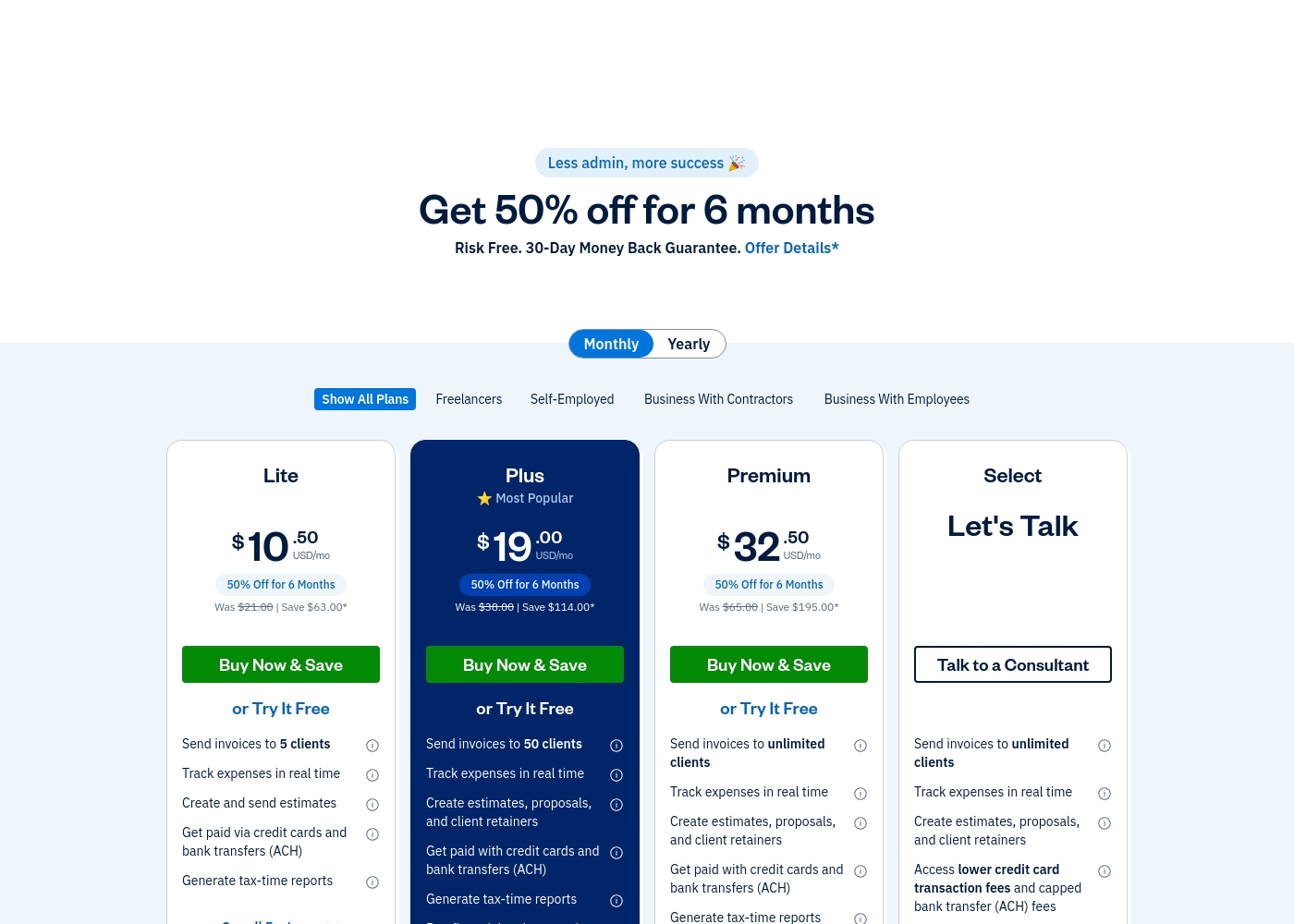
Freshbooks costs between $10.50 and Custom per month (promotional pricing) with 4 plans: Lite at $10.50/month, Plus at $19.00/month, Premium at $32.50/month, and Select (Custom Pricing).
Details of these subscription levels are below, covering key features and target users.
Lite
Price: $10.50 USD/mo (Promotional. Was $21.00 USD/mo) Best For: Freelancers Refund Policy: 30-Day Money Back Guarantee Other Features:
- Send invoices to 5 clients
- Track expenses in real time
- Get paid via credit cards and bank transfers (ACH)
- Create and send estimates
- Send invoices to 5 clients
- Track expenses in real time
- Create and send estimates
- Get paid via credit cards and bank transfers (ACH)
- Generate tax-time reports
- Send invoices to 50 clients
- Create estimates, proposals, and client retainers
- Run financial and accounting reports
- Expense receipt scanning
- Give your accountant access
- Send invoices to unlimited clients
- Bill receipt scanning with the ability to add line items
- Check project profitability
- Customize your email templates
- Double-Entry Accounting Reports
- Send invoices to unlimited clients
- Access lower credit card transaction fees and capped ACH fees
- Import your data via Easy Switch
- Gain access to dedicated phone support
- 2 Team Member accounts included
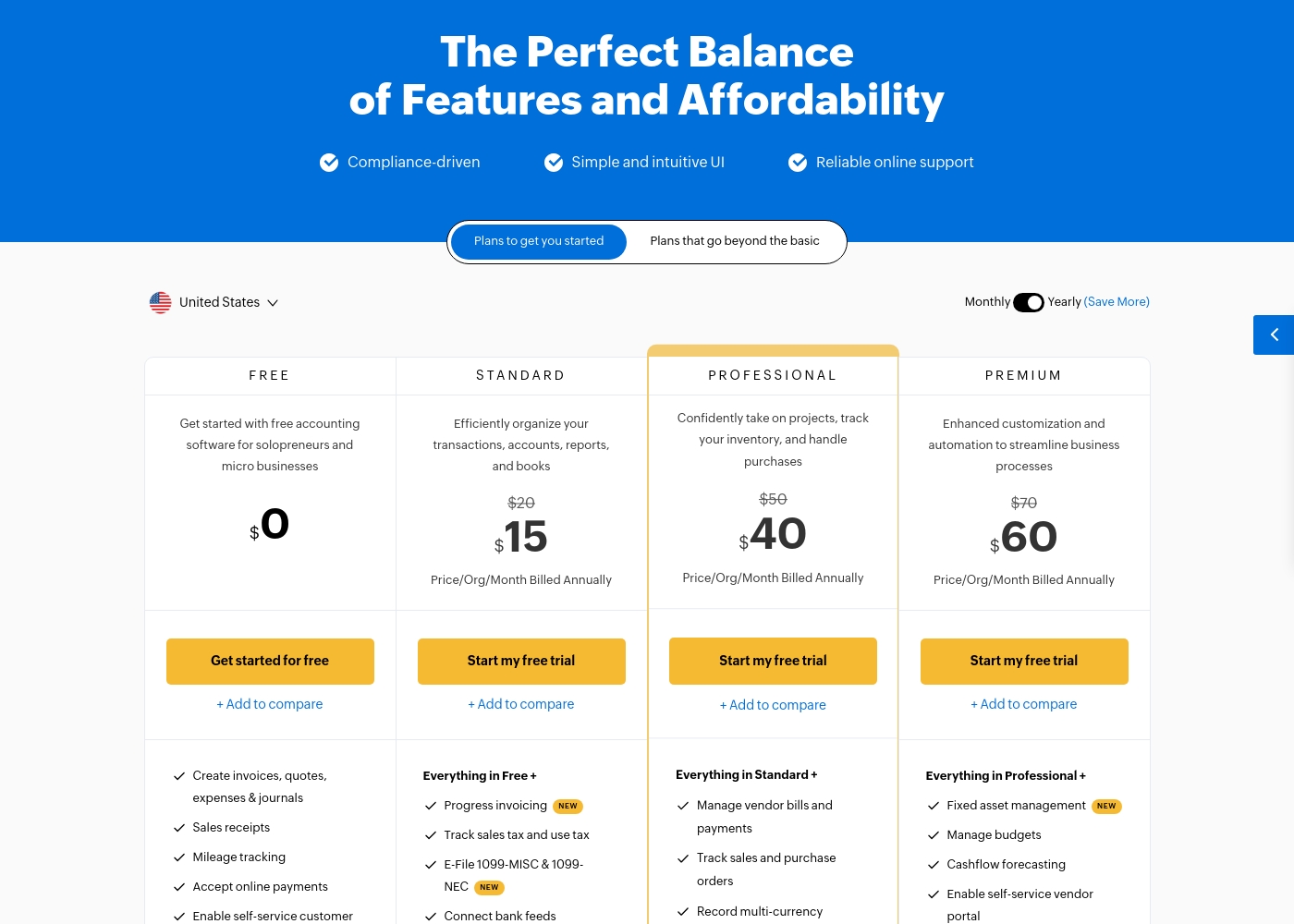
Zoho Books costs between $0 and $240 per month (billed annually) with six plans: FREE at $0, STANDARD at $15, PROFESSIONAL at $40, PREMIUM at $60, ELITE at $120, and ULTIMATE at $240.
Zoho Books offers plans built to grow with your company, from sole proprietors to large teams. Let's look closely at what is included in each option.
FREE
Price: $0.00 Best For: Solopreneurs and micro businesses (up to $50K annual revenue) Other Features:
- Create invoices, quotes, expenses, and journals
- Process sales receipts and track mileage
- Enable self-service customer portal
- Email Support (1 User + 1 Accountant)
- Create invoices, quotes, expenses & journals
- Sales receipts
- Mileage tracking
- Accept online payments
- Enable self-service customer portal
- Progress invoicing
- Track sales tax and use tax
- E-File 1099-MISC & 1099-NEC
- Connect bank feeds
- Generate divisional reports with reporting tags
- Manage vendor bills and payments
- Track sales and purchase orders
- Record multi-currency transactions
- Bill timesheets
- Project profitability
- Fixed asset management
- Manage budgets
- Cashflow forecasting
- Enable self-service vendor portal
- Set up custom domain
Pricing Notes
- Zoho Books offers a completely Free plan, providing a great starting point for new businesses, which Freshbooks does not.
- The pricing displayed for Freshbooks is a promotional rate (50% off for 6 months); standard prices are significantly higher.
- Zoho Books offers a much cheaper cost per added user ($3/user/mo) compared to Freshbooks ($11/user/mo).
- Freshbooks pricing scales primarily based on the number of billable clients (5 to unlimited).
- Zoho Books pricing scales primarily based on the volume of annual invoices and expenses.
Pricing Head-to-Head
User Reviews
Freshbooks generally receives positive feedback, particularly regarding its intuitive design and minimal setup. Users frequently mention how simple the software is, making basic tasks like tracking time and creating professional invoices fast and efficient.
Many reviewers who switched from competitors appreciate that Freshbooks is far less complex and easy to navigate. Customer support is a significant strength and repeatedly praised.
Migrated over from Quickbooks. Quickbooks was an expensive nightmare. Freshbooks is so simple and easy to use. Their customer support is reachable and helpful.
While Zoho maintains an overall positive rating of 4.1/5 across thousands of reviews, most specific feedback provided recently centers on the Zoho Social tool, not the Books accounting software. Regardless, the consensus affirms Zoho’s commitment to excellent ease of use and high functional value.
Users consistently praise the platform for its intuitive interface, which streamlines workflows and simplifies multi-account management. Many appreciate that Zoho provides advanced functionality for a fraction of the cost of competitors, representing significant value for startups and small teams.
This platform offers huge functionality without the huge price tag. I used managers that cost ten times more, but Zoho offers the same key features and is incredibly user-friendly. It’s excellent value.
Our Verdict
Choosing between Freshbooks and Zoho Books depends entirely on your business structure. Neither software is universally better, just better for *your* specific needs. Freshbooks wins for simple service-based work and top-tier user support. Zoho Books wins for complex, product-based businesses needing comprehensive features. Freshbooks is the master of efficient client management and billing workflow. It excels at time tracking and turning billable hours into professional invoices instantly. If you are a freelancer or agency, you will love the simple interface of Freshbooks. Freshbooks’ consistently award-winning support is there whenever you need immediate help. Zoho Books offers a true end-to-end accounting solution in one seamless place. It includes native inventory management, which Freshbooks entirely lacks by design, a critical difference. For global businesses, Zoho Books provides reliable multi-currency support with real-time exchange rates. Plus, Zoho Books is significantly cheaper when adding multiple employees to the system. The critical decision rests on feature breadth versus specialized ease of use. Freshbooks sacrifices feature breadth for unparalleled simplicity and support quality. Zoho Books offers a full accounting suite built for complexity and scaling needs. If you sell physical products or need deep system integration, choose Zoho Books. Pick Freshbooks if you hate bookkeeping and prioritize an effortless path to getting paid quickly. Choose Zoho Books if you need comprehensive features like inventory and want highly affordable team access. Both Freshbooks and Zoho Books offer excellent bookkeeping foundations for growing small businesses.
Frequently Asked Questions
Which is better for freelancers and service providers: Freshbooks or Zoho Books?
Freshbooks is generally better for freelancers due to its hyper-focus on time tracking and invoicing simplicity. The Freshbooks interface is highly intuitive and makes getting paid fast. Zoho Books provides more comprehensive accounting but can be overkill for solo service providers.
Does Freshbooks have a free plan like Zoho Books?
No, Freshbooks does not offer a permanent free plan like Zoho Books. Freshbooks provides an ethical, risk-free 30-day trial for its paid tiers. Zoho Books provides a permanent Free plan with limits on annual invoices.
Which is more expensive for adding team members: Freshbooks or Zoho Books?
Freshbooks is significantly more expensive for adding users at lower tiers, charging $11 per user per month. Zoho Books is highly affordable, charging only $3 per user per month. Zoho Books wins if your team collaboration requirements are high.
Does Freshbooks include inventory management like Zoho Books?
Freshbooks does not include native inventory management as it focuses on service businesses. Zoho Books includes full, built-in inventory tracking with stock alerts. If you sell physical goods, Zoho Books is the superior choice.
Which software has better customer support: Freshbooks or Zoho Books?
Freshbooks consistently receives higher praise and ratings for its customer support. Freshbooks promises knowledgeable staff that offer fast, reliable help. While Zoho Books offers multiple support channels, users sometimes report slower response times.
Can I bill international clients easily using Freshbooks or Zoho Books?
Zoho Books has a clear advantage for international billing. Zoho Books includes native multi-currency support using real-time exchange rates. Freshbooks is less geared toward global transactions, focusing mainly on North American service billing.
Ready to Choose?
Both tools have their strengths. Choose based on your specific needs.