Freshbooks vs Quicken
Freshbooks and Quicken both manage finances but target sharply different needs. Freshbooks is a modern, simple accounting tool focused on service businesses. Quicken provides unmatched depth for integrated personal finance, investing, and business tracking. Choose based on whether simplicity or comprehensive complexity is your priority.
Best for: Solo entrepreneurs, freelancers, and consultants, Service-based businesses requiring accurate time tracking
Best for: Experienced investors needing deep portfolio analysis, Users managing complex personal and business finances together
Top-Tier Invoicing with Exceptional Support.
We found Freshbooks to be an excellent solution focused on streamlining invoicing and expense tracking for small businesses and freelancers. Its intuitive interface simplifies daily accounting tasks, while the highly rated support staff stands ready to assist if technical issues arise. Overall, we recommend Freshbooks strongly for users prioritizing ease of use and professional support over deeply complex accounting machinery.
Pros
- Intuitive design makes setup and daily navigation simple.
- Creates quick, professional, and pleasant-looking invoices.
- Customer support is consistently rated as excellent, fast, and knowledgeable.
- Effective tracking of time and expenses (aided by the mobile app).
Cons
- Value perception is low for some long-term users as pricing has increased.
- Lacks direct functionality for features like printing checks without third-party apps.
- Users report occasional difficulties processing certain digital payments.
- Some functionality is considered basic (e.g., struggles to download bank income/deposits automatically).
Unrivaled depth matched with modern friction.
We find Quicken remains an incredibly powerful, detailed solution suitable for complex personal finance tracking, investment analysis, and integrated business needs. While the functional depth is unmatched for traditional desktop users, we noted widespread concerns regarding software stability, problematic bank data feeds, and challenges related to the mandatory subscription pivot. Overall, the persistent performance issues prevent us from providing a top reliability score.
Pros
- Unmatched functional depth for complex personal finances, investing, and business.
- Reliable tracking and analysis for budgets, historical expenses, and investments.
- Offers comprehensive reporting, including built-in tax schedules (C, E, F).
- Ability to securely track loans, credit cards, and multiple accounts in one place.
Cons
- The mandatory subscription model is a point of frustration for long-time users.
- Frequent reports of unreliable bank and broker data feeds (missing or incorrect transactions).
- Users report software instability, glitchiness, and slow performance on updates.
- Customer support is frequently cited as being unhelpful or unresponsive.
AboutFreshbooks
FreshBooks is powerful accounting software designed to respect your time. It’s built to automate routine tasks like expense tracking and professional client invoicing. This tool is valuable for various stages of growth, whether you are a freelancer just starting out or a business managing contractors and employees. It organizes your finances so you always know where you stand in real time. 💡
AboutQuicken
Quicken is a trusted, comprehensive platform designed to integrate all your financial information into one secure place. For over 40 years, this #1 best-selling finance app has helped millions gain clarity over their budgets, investments, and business cash flow. You can select the specific solution that meets your needs, whether you are focused on simple savings and budgeting (Quicken Simplifi), or require specialized tools for invoicing and tax preparation (Quicken Business & Personal). 💡
If organizing essential documents like birth certificates and estate plans is your priority, Quicken LifeHub provides step-by-step guidance. Consumers looking for the classic desktop experience can still choose Quicken Classic, available on Windows and Mac, which stores your data locally.
Highlights
Feature Comparison
Features Overview
We highlight the main differences and pick a winner for each feature.
Core Focus & Interface
Freshbooks is designed for invoicing simplicity; Quicken is built for financial complexity.
Freshbooks is known for its intuitive design and easy setup for freelancers and service providers. It simplifies daily accounting tasks into clean, professional workflows and steps. Quicken offers deep, decades-long functionality often centered around the traditional desktop experience. Its interface can feel legacy and complex, especially when integrating different account types. If you want modern cloud-first simplicity that automates billing, choose Freshbooks. If you need maximum depth and integrated financial views, prepare for Quicken's complexity. New users often find Freshbooks much easier to learn and adopt quickly. Quicken is better suited for experienced users wanting maximum control.
Invoicing & Payments
Freshbooks makes client billing central and automated; Quicken includes it as an add-on.
Freshbooks excels at converting time and expenses directly into polished client invoices quickly. You can automate recurring invoices and set up gentle late payment reminders. Quicken includes necessary invoicing features in its Business and Personal plans to facilitate billing clients. This functionality is more incidental to its core financial tracking. Freshbooks provides a better client payment experience with options for credit cards and ACH bank transfers. Billing efficiency is a primary focus for Freshbooks. If getting paid fast and professionally is your #1 priority, the dedicated systems in Freshbooks are superior.
Investment Tracking
Quicken provides best-in-class investment analysis; Freshbooks lacks this feature entirely.
Quicken offers advanced tools for investors, including portfolio analysis and capital gains estimation. The Classic Premier plan is specifically designed for serious investors. Freshbooks strictly focuses on small business operations, profit, and loss reporting. It does not offer any functionality for tracking stock portfolios or mutual funds. If you need to analyze your investments alongside your business cash flow, Quicken is the only viable option. Quicken can connect to over 14,000 financial institutions for comprehensive data. Users with complex investment lives rely on Quicken to model future scenarios and track performance accurately.
Customer Support
Freshbooks has award-winning support; Quicken users frequently report unhelpful service.
Freshbooks promises dependable, knowledgeable support staff who focus on solving issues immediately. Their impressive support approval rating is 4.8 out of 5.0 across over 120,000 reviews. Quicken users often cite poor customer support as a major drawback since the switch to a subscription model. Responses are sometimes slow or fail to resolve core technical issues. For reliability when problems arise, Freshbooks is the safer bet for critical accounting needs. They have over 100 dedicated support team members ready to assist. If you value being able to quickly call an expert who will resolve your issue, Freshbooks wins easily over Quicken.
Tax Preparation Tools
Quicken includes built-in tax schedules; Freshbooks provides general reports for accountants.
Quicken simplifies tax compliance with built-in reports for Schedules C (self-employment) and E (rental income). This feature is invaluable for complex individual filers. Freshbooks generates essential financial reports needed for tax time, like P&Ls and expense summaries. You typically grant an external accountant secure platform access. Quicken provides tools that actively structure your data for tax compliance internally. Freshbooks focuses on providing the raw data cleanly to a third-party accountant. For users wanting to streamline complex personal and business tax filing, Quicken handles more of the heavy lifting.
Data Stability & Feeds
Freshbooks offers stable performance; Quicken users complain heavily about unreliable performance.
Freshbooks provides reliable performance and smooth, unbroken workflows for daily tasks. Users report the system is intuitive with minimal technical trouble. Quicken reviews frequently mention software instability, glitches, and frustratingly unreliable bank data feeds. Users often must manually correct missing transactions. While Quicken connects to thousands of institutions, the reliability of those feeds is questionable for many users. Freshbooks prioritizes stable import functionality over sheer connection volume. Constant technical issues reported in Quicken can negate the value of its deep features, costing users time and frustration.
Time & Project Tracking
Freshbooks offers integrated, unlimited time tracking; Quicken lacks dedicated project tools.
Freshbooks includes unlimited time tracking, which is essential for professional services businesses. Tracked time flows directly and automatically onto client invoices. Premium Freshbooks users can also check detailed project profitability to optimize their workflow and pricing. This provides critical business insight. Quicken does not have specialized project management or integrated time tracking capabilities. Its focus is on general cash flow and financial categories. For any business that bills based on hourly rates or project milestones, Freshbooks is far more effective and dedicated to that workflow.
Data Management
Quicken offers local desktop data storage; Freshbooks is exclusively cloud-based.
The Quicken Classic desktop version allows users to store sensitive financial data locally. This provides enhanced security and control for privacy-conscious users. Freshbooks operates entirely in the cloud, offering easy mobile access and continuous syncing across devices. This guarantees fast, secure access anywhere. For users wary of cloud-only storage storing all their financial history, Quicken's Classic desktop stands out. Freshbooks relies solely on industry-standard encryption protocols. The choice hinges on preference: absolute data control (Quicken) or universal accessibility (Freshbooks).
Freshbooks costs between $10.50 and Custom per month (promotional pricing) with 4 plans: Lite at $10.50/month, Plus at $19.00/month, Premium at $32.50/month, and Select (Custom Pricing).
Details of these subscription levels are below, covering key features and target users.
Lite
Price: $10.50 USD/mo (Promotional. Was $21.00 USD/mo) Best For: Freelancers Refund Policy: 30-Day Money Back Guarantee Other Features:
- Send invoices to 5 clients
- Track expenses in real time
- Get paid via credit cards and bank transfers (ACH)
- Create and send estimates
- Send invoices to 5 clients
- Track expenses in real time
- Create and send estimates
- Get paid via credit cards and bank transfers (ACH)
- Generate tax-time reports
- Send invoices to 50 clients
- Create estimates, proposals, and client retainers
- Run financial and accounting reports
- Expense receipt scanning
- Give your accountant access
- Send invoices to unlimited clients
- Bill receipt scanning with the ability to add line items
- Check project profitability
- Customize your email templates
- Double-Entry Accounting Reports
- Send invoices to unlimited clients
- Access lower credit card transaction fees and capped ACH fees
- Import your data via Easy Switch
- Gain access to dedicated phone support
- 2 Team Member accounts included

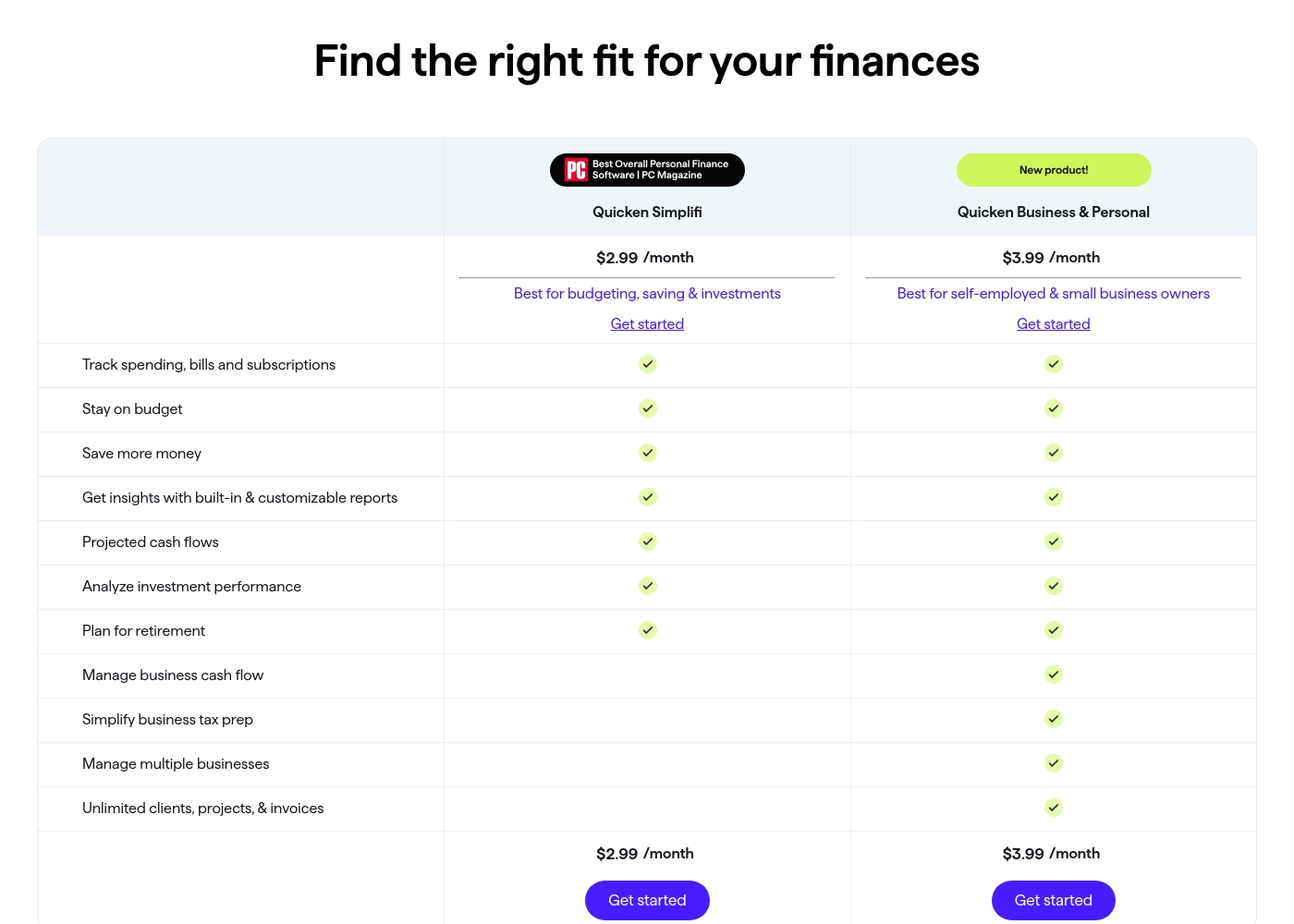
Quicken costs between $2.99 and $5.99 per month (billed annually) with five main plans: Quicken Simplifi at $2.99/month, Classic Deluxe at $2.99/month, Quicken Business & Personal at $3.99/month, Classic Premier at $4.19/month, and Classic Business & Personal at $5.99/month.
Let's look closely at the different subscription options available to help you choose the best fit for your financial goals.
Quicken Simplifi (Mobile Web)
Price: $2.99/month (Billed annually; standard $5.99/month) Best For: Budgeting, saving & investments Refund Policy: 30-day money-back guarantee Other Features:
- Always know what you have left to spend or save
- Get better insights with reports & real-time alerts
- Make informed decisions about your investment portfolio
- Plan for the future with projected cash flows
- Budgeting, saving & investments
- Track spending, bills, and subscriptions
- Projected cash flows
- Analyze investment performance
- Plan for retirement
- Create multiple budgets
- Manage & reduce debt
- Simplify tax time
- Create a secure retirement
- Desktop software with companion apps
- All Simplifi features included
- Manage business cash flow
- Simplify business tax prep (Schedules C, E & F)
- Manage multiple businesses
- Unlimited clients, projects, & invoices
- Best-in-class investing tools
- Built-in tax reports
- Reconcile to the penny
- Track & pay bills in Quicken
- Set budgets, manage debt, create a retirement plan
Pricing Notes
- Freshbooks pricing reflects a steep promotional discount (up to 50%) for the first six months; standard rates are substantially higher ($21-$65/month).
- Quicken's low advertised price range requires paying for the entire year upfront to secure the best rate.
- Freshbooks pricing tiers primarily limit the number of billable clients (5, 50, Unlimited).
- Quicken is generally more affordable than Freshbooks for an annual commitment, particularly at the entry level.
- Both Freshbooks and Quicken offer a 30-day money-back guarantee for risk-free testing.
Pricing Head-to-Head
User Reviews
Freshbooks generally receives positive feedback, particularly regarding its intuitive design and minimal setup. Users frequently mention how simple the software is, making basic tasks like tracking time and creating professional invoices fast and efficient.
Many reviewers who switched from competitors appreciate that Freshbooks is far less complex and easy to navigate. Customer support is a significant strength and repeatedly praised.
Migrated over from Quickbooks. Quickbooks was an expensive nightmare. Freshbooks is so simple and easy to use. Their customer support is reachable and helpful.
Quicken maintains a devoted user base, with many customers reporting continuous use for over 20 or 30 years. Reviewers across both Trustpilot and Capterra consistently praise Quicken’s ability to serve as a comprehensive hub for managing budgets, investments, and tracking historical data.
Many find it indispensable for reconciling accounts and managing complex personal or small business finances. Users appreciate having all their critical information in one accessible place.
I’ve been using Quicken since the late 1980s, and it’s become essential for managing my complex finances. It’s a great product that continues to fulfill its purpose. I rely on it to keep my portfolio organized and accessible.
Our Verdict
Freshbooks versus Quicken is a battle between seamless service accounting and financial depth. For most growing small businesses, Freshbooks is the clear, reliable winner. Quicken primarily wins only if your investment needs are complex. Freshbooks' superpower is its focused ability to streamline client billing and expense tracking. Its clean interface and automated features save freelancers hundreds of billable hours per year. Crucially, Freshbooks provides highly rated, dependable customer support with an impressive 4.8 out of 5.0 approval score. Quicken’s superpower is its integrated, comprehensive financial management, including deep investment tools. It handles complex financial lives, managing rental properties and providing built-in tax schedules (C/E/F). Quicken Classic also offers the unique benefit of local data storage for maximum security. The deciding factor is stability and ease of use in your daily workflow. If you frequently invoice clients and prioritize simplicity, choose Freshbooks immediately. If you need powerful control over stock analysis, you must accept Quicken’s reported instability and unreliable data feeds. Final verdict: Freelancers and service businesses demanding reliability should pick Freshbooks. Serious investors and users with complex, integrated personal and business needs should choose Quicken for its unrivaled financial depth.
Frequently Asked Questions
Which is easier to use: Freshbooks or Quicken?
Freshbooks has an intuitive design and simplified accounting workflows, making it very easy to start. Quicken is much deeper but often reported as overly complex and glitchy by long-time users.
Does Quicken handle invoicing like Freshbooks?
Quicken Business & Personal includes invoicing tools, but it is not its primary focus. Freshbooks offers a more streamlined, feature-rich process for client billing and automated reminders.
Can Freshbooks track my investments?
No, Freshbooks focuses strictly on business accounting, expenses, and invoicing. Quicken offers powerful, best-in-class tools for analyzing and tracking investment portfolios.
Is Freshbooks customer support better than Quicken?
Yes, Freshbooks receives stellar reviews for support, scoring 4.8/5.0 approval. Quicken users frequently cite slow and unhelpful support as a major pain point and frustration.
Is Quicken cheaper than Freshbooks?
Quicken’s required annual subscription translates to a lower advertised monthly rate ($2.99/mo). Freshbooks’ standard monthly prices are significantly higher ($21-$65), making Quicken generally cheaper.
Which tool is better for tax preparation (Schedule C)?
Quicken is superior here, offering built-in reports tailored for Schedules C, E, and F. While Freshbooks provides necessary reports, Quicken streamlines the integration for complex taxes.
Ready to Choose?
Both tools have their strengths. Choose based on your specific needs.