Quicken

Quicken review

Budgets, investments, and business cash flow in one place β€” with a desktop edition that keeps your data local.

By Ciroapp Editorial Team Β· Updated Sep 16, 2026

Commission may apply at no extra cost

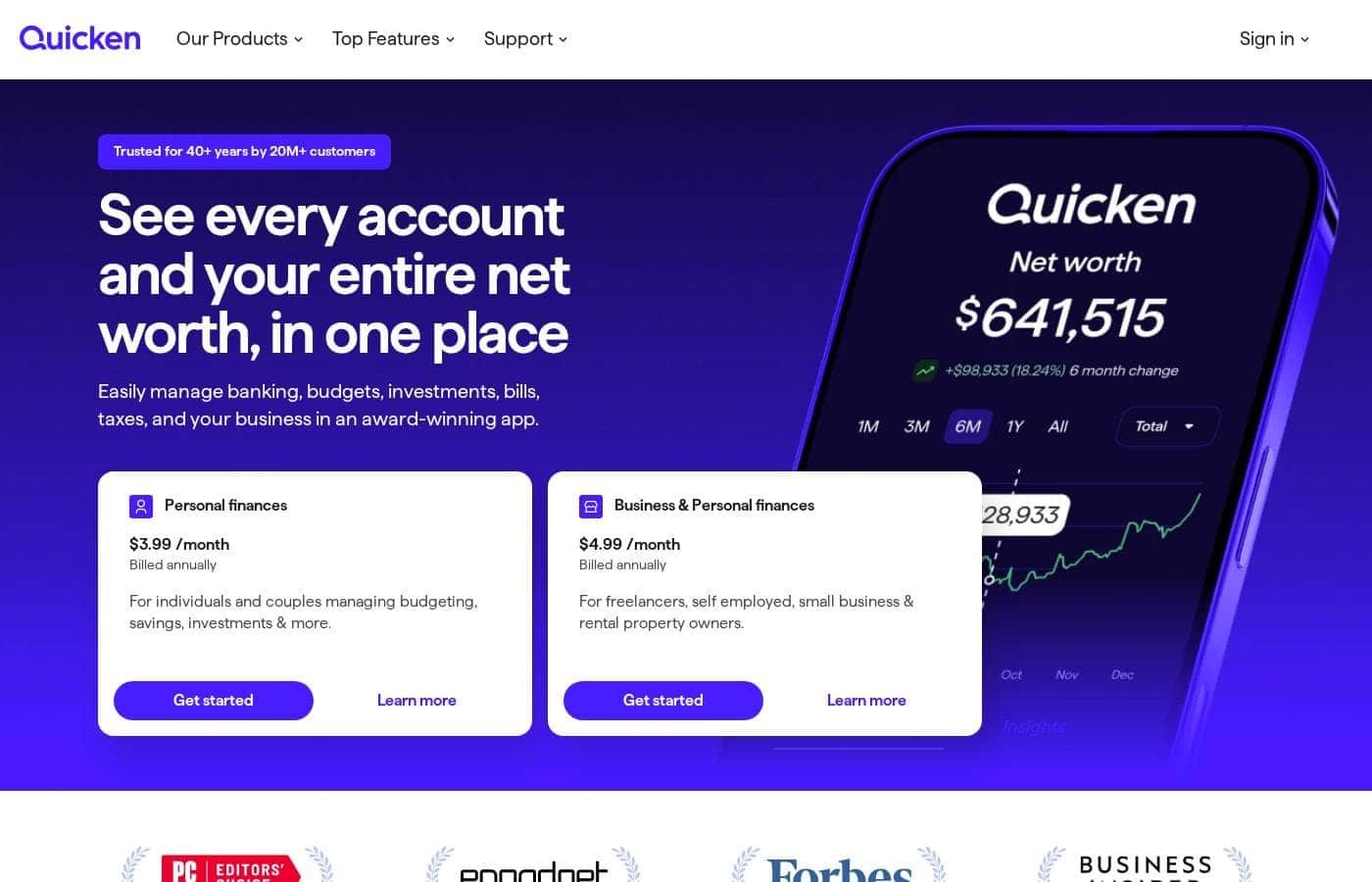
Quicken homepage screenshot

At a glance

Quick overview for Quicken: rating, pricing summary, key features, and highlights.
Vendor page checked Oct 13, 2026

Ciroapp score

3.8/ 5

Quicken brings four decades of polish to budgets, investments, and even business cash flow, with a desktop edition that keeps your data local. The trade-offs are subscription-only pricing with renewal rates that can change and four product lines that take some comparing. Overall, it's a strong pick if you want depth and a permanent home for your finances.

Pros

  • Pros:Four decades of continuous development β€” Quicken has shipped personal finance software since the 1980s and remains a best-seller, so the feature set is mature and battle-tested rather than experimental.
  • Pros:The product family maps to distinct jobs β€” Simplifi for budgeting and savings, Business & Personal for invoicing and tax prep, LifeHub for vital documents, and Classic for desktop use β€” instead of one app stretched thin.
  • Pros:Quicken Classic stores your data locally on Windows or Mac, a genuine differentiator if you don't want decades of financial records living only in the cloud.

Cons

  • Cons:Every edition is subscription-only β€” there's no permanent free tier, and renewal rates can differ from your sign-up rate, so the year-two price may sting if you don't check it first.
  • Cons:The lineup is fragmented β€” choosing between Simplifi, Classic, Business & Personal, and LifeHub takes real comparison work, and tier limits on accounts or devices aren't always obvious until you dig into the pricing page.
  • Cons:The classic desktop experience requires installed Windows or Mac software, so there's no browser-only path to local data storage.
Best for
  • Households that want a single long-term home for every account, with budgets and investment tracking in the same tool rather than spread across apps.
  • Freelancers and sole proprietors who need personal budgeting plus invoicing, tax preparation, and business cash-flow tracking β€” Quicken Business & Personal is built for exactly that mix.
  • Privacy-minded users who prefer installed desktop software and locally stored financial data, which Quicken Classic provides on Windows and Mac.
This section is a summary. Detailed sections about features, use cases, pricing, and reviews follow below.

What is Quicken?

Quicken has been in the personal finance business for over 40 years, and that longevity shows in how much ground its product family covers. Today the name spans distinct offerings: Quicken Simplifi for straightforward budgeting and savings, Quicken Business & Personal for invoicing and tax preparation, Quicken LifeHub for organizing vital documents, and Quicken Classic β€” the installed Windows and Mac software that stores your data locally. This review walks through what each piece does, who each one fits, and the trade-offs, chiefly subscription cost and a lineup that takes some comparing, before you commit to a tier.

Quicken is a personal finance platform that pulls your financial life β€” accounts, budgets, investments, and on some editions business cash flow β€” into one place. Rather than a single app, it's a family: Simplifi handles everyday budgets and savings, Business & Personal adds invoicing and tax prep for the self-employed, LifeHub guides you through organizing documents like birth certificates and estate plans, and Classic delivers the traditional desktop experience on Windows and Mac with data stored on your machine. All editions run on paid subscriptions, with pricing that varies by tier and billing term.
Should you choose Quicken?

Quick buyer guidance before you compare plans or click through.

Choose it if

  • Households that want a single long-term home for every account, with budgets and investment tracking in the same tool rather than spread across apps.
  • Freelancers and sole proprietors who need personal budgeting plus invoicing, tax preparation, and business cash-flow tracking β€” Quicken Business & Personal is built for exactly that mix.
  • Privacy-minded users who prefer installed desktop software and locally stored financial data, which Quicken Classic provides on Windows and Mac.
  • Families getting their affairs in order who want step-by-step help organizing birth certificates, estate plans, and other essential documents through Quicken LifeHub.

Skip it if

  • Anyone who needs a genuinely free money app β€” every Quicken product runs on a paid subscription, so a zero-dollar budget means looking elsewhere.
  • Buyers who want one obvious product at one obvious price β€” with four product lines, tiered plans, and renewal rates that can change, Quicken demands more comparison shopping than simpler tools.
  • People who only need to split a few shared expenses with a partner or roommates β€” lightweight free tools handle that without a subscription.

Next steps before buying

  1. 1Match the product to the job first: Simplifi for everyday budgeting and savings, Business & Personal if you invoice clients or prep taxes, LifeHub for vital-document organization, or Classic for installed Windows/Mac software with local data.
  2. 2Compare tiers on Quicken's pricing page across four points: price, billing term, included tools, and any account or device caps.
  3. 3Check the renewal rate, not just the sign-up rate, and note the deadline for any trial or money-back window on the day you subscribe.
  4. 4Once subscribed, connect your bank and card accounts, clean up transaction categories, and set your first month's budget targets.
  5. 5Schedule a recurring five-minute weekly check-in to review new transactions so your records stay current instead of piling up at month's end.

Quicken Key Features

✨ All your accounts in one dashboard

Quicken's foundational promise is consolidation: connect your bank and card accounts so balances and transactions land in a single view. That ends the routine of logging into multiple banking sites just to see where you stand. One practical caveat β€” account and device caps vary by tier, so confirm the plan you're buying supports the number of accounts you actually have.

✨ Budgets grounded in real spending

Imported transactions get sorted into categories, and those categories become the backbone of your budget. You set spending targets, then watch progress as the month rolls on. Because targets come from what you actually spend rather than optimistic guesses, the budget is one you can realistically keep β€” especially if you pair it with a short weekly review to fix miscategorized items.

✨ Investments next to everyday spending

Quicken covers budgets, investments, and cash flow on one platform, so long-term holdings sit beside this month's groceries instead of living in a separate app. If your definition of 'my finances' includes a brokerage or retirement account, that combined picture is a strong reason to pick Quicken over bare-bones budgeting tools. Verify that your chosen tier includes the investment tools you expect.

✨ Business & Personal for self-employed money

The Business & Personal edition adds what consumer budgeting apps skip: invoicing clients, tracking business cash flow, and getting organized for tax preparation. For a freelancer or sole proprietor, that can replace a second subscription. If you have no business income, this edition is more than you need β€” Simplifi is the leaner pick.

✨ Quicken Classic: desktop software, local data

Classic is the original Quicken experience β€” installed software for Windows or Mac that stores your data on your own machine rather than solely in the cloud. If you're uncomfortable keeping decades of financial records entirely online, that local storage is the whole point. The trade-off is that it's installed software, with the updates and machine-specific setup that come with it.

✨ LifeHub for life's paperwork

LifeHub steps beyond money tracking into document organization, offering step-by-step guidance for filing essentials like birth certificates and estate plans. It targets people who want critical household paperwork findable in an emergency rather than scattered across drawers and inboxes. It's an optional piece of the lineup, so skip it if document organization isn't a pain point for you.

Use Cases

πŸ’° Build a budget that matches real life

You want to know where your money actually goes. Sort your transactions into categories, set spending targets, and check progress as the month rolls on. When the numbers are in front of you, it's easier to spot habits worth changing.

Expected outcome: A budget you can stick with.

🏦 See every account in one place

Your money lives at more than one bank, and that's normal. Quicken brings your accounts together in a single view, so checking balances doesn't mean logging into five sites. One note: confirm your plan supports the number of accounts you have.

πŸ“‹ Pick the right plan before you buy

You're comparing tiers, and each one bundles different money tools. Start with the jobs you need done, then match features to them. Before checkout, check account and device limits β€” and the renewal price, not just the first-year rate.

⏱️ Do quick, regular money check-ins

Good money habits come from small, steady reviews. Open Quicken once a week to clear new transactions, fix categories, and see how the month is tracking. Five minutes now beats a big cleanup at month's end.

Quicken pricing

Prices not verified yet β€” see the vendor page.

Quicken's pricing page

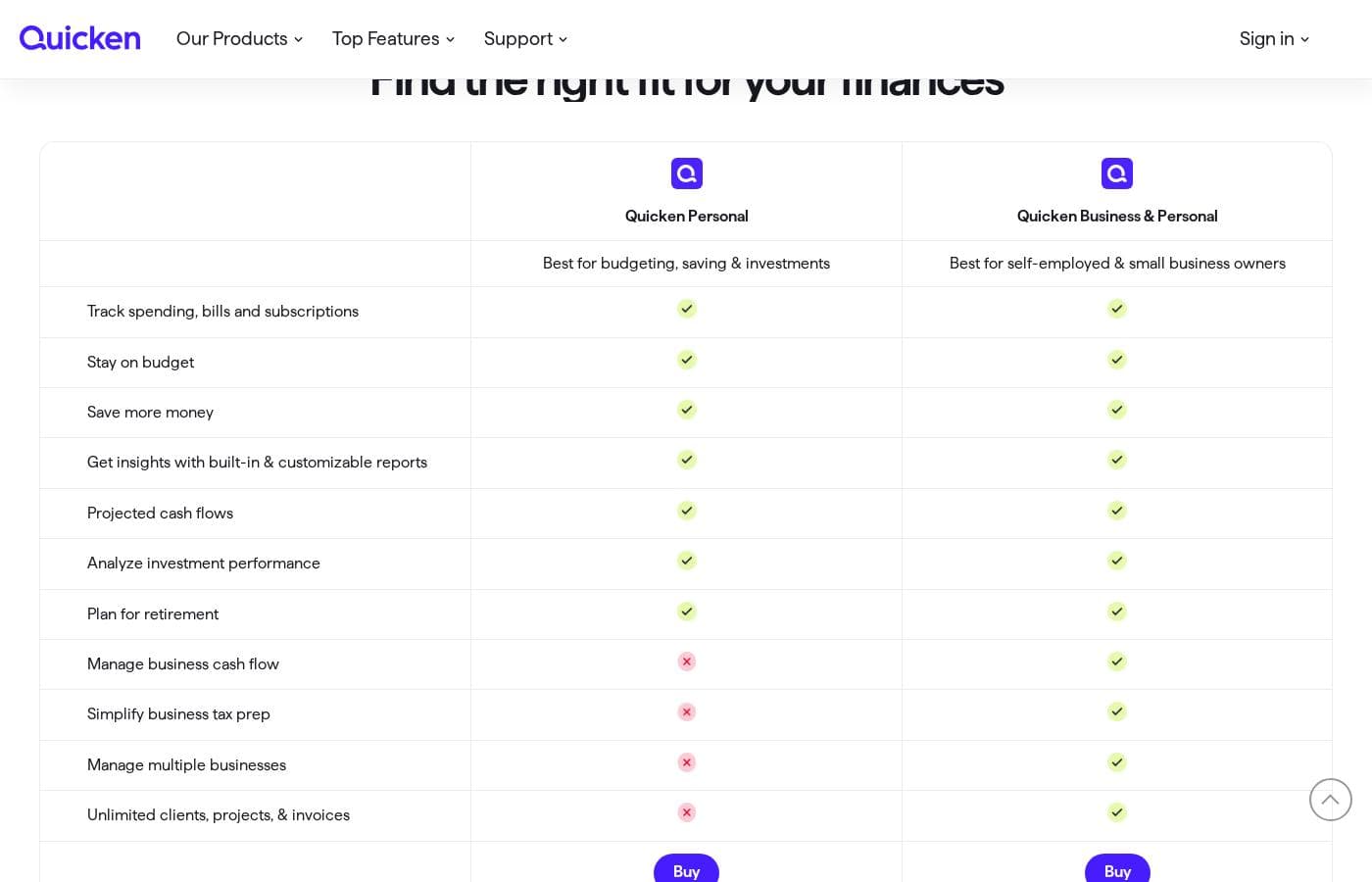
Quicken pricing page screenshotView pricing page screenshot

Price history

Tracking prices since Oct 1, 2026. No price change detected yet.

Pricing range: Varies by plan

Pricing notes

Quicken sells its personal finance software through paid subscription plans, with pricing that varies by tier and billing term. For current plan prices, renewal rates, and any trial or refund offers, check Quicken's official pricing page.

Quicken charges for its personal finance software through paid subscription plans, and your price depends on the tier and billing term you choose.

The pricing snapshot sits just below β€” here's a quick guide to reading it well.

One honest note first: the detailed plan table didn't come through in this capture, so think of this section as a field guide rather than a rate card. Quicken's official pricing page holds the full, current lineup, and that's where you should confirm exact numbers.

How to compare Quicken's plans

When you size up each tier, look for the same few details on every card:

  • The price and the billing period it covers β€” monthly, yearly, or a first-year deal.
  • What the tier includes, from everyday budgeting to any advanced money tools.
  • Any limits that come with the license, such as account or device caps.
  • Whether a free trial or money-back window applies, and for how many days.

Billing basics worth checking

Most subscription software renews automatically, and renewal rates can differ from the rate you saw at sign-up. Before you pay, confirm what you'll owe in year two, not just year one. If you'd rather stay flexible, compare the monthly rate against the annual rate to see what long-term commitment actually saves you.

Before you buy

Plan names, prices, and promo terms can change during the year. So check today's lineup on Quicken's official pricing page before you check out, and confirm any license limits while you're there. If a trial or refund offer is listed, jot down the deadline the day you subscribe. That small step keeps surprises off your budget β€” which is exactly what a finance app is for. πŸ’°

Email me when Quicken changes price

One email when we detect a price change on the vendor's pricing page. No newsletter, no deals. Unsubscribe in one click.

User Reviews

No reviews yet.

Write a Review

Write a Review for Quicken
0/100 characters
0/2000 characters

Why use Quicken?

The main reason to choose Quicken is consolidation with depth. Your accounts sit in one dashboard, so a money check-in doesn't mean logging into five bank sites, and your budget is built from actual transaction history rather than estimates.

Few tools holding your financial records have been maintained for four decades, and few modern budgeting apps offer any alternative to the cloud β€” Quicken Classic's local storage on your own Windows or Mac machine is a genuine option if that matters to you.

Quicken alternatives

Other tools in the Accounting category

View all Accounting tools
Freshbooks

Freshbooks

Accounting4.2/5

FreshBooks is powerful accounting software designed to respect your time. It’s built to automate routine tasks like expense tracking and professional client invoicing. This tool is valuable for various stages of growth, whether you are a freelancer just starting out or a business managing contractors and employees. It organizes your finances so you always know where you stand in real time.

Wave

Wave

Accounting4.1/5

Wave is an all-in-one platform built specifically for small business owners and solopreneurs. It helps you manage your money like a boss. You can easily handle invoicing, accounting, and secure online payments in one cohesive spot. Unlike software built strictly for accountants, Wave is designed for you to use. It's affordable, small business friendly, and aims to make bookkeeping truly painless. Wave helps you be the wiz of your biz.

Datarails

Datarails

Accounting4.1/5

Datarails is an AI-powered FinanceOS that automates FP&A while letting teams stay in Excel. We bridge the gap between manual spreadsheets and rigid ERPs. Whether you have a portfolio of clients or a growing community of finance pros, our program is designed to reward you for sharing a tool that eliminates manual busywork. Join us to help your network unlock strategic AI insights and real-time reporting in the environment they already use and love

NetSuite

NetSuite

Accounting4/5

NetSuite is clearly positioned as an AI-powered business management suite. It's known widely as the #1 AI Cloud ERP. This powerful suite is designed to connect key functional areas of your enterprise. It expertly handles everything from ERP/Financials to CRM and ecommerce data. Over 43,000 customers rely on these integrated products to help fuel their essential growth.

Finaloop

Finaloop

Accounting4/5

Finaloop is real-time accounting software designed for ecommerce businesses. It automatically pulls transactions from platforms like Shopify, Amazon, and payment gateways, categorizes them, and reconciles your books continuously rather than monthly. A core differentiator is its automated inventory and cost-of-goods-sold (COGS) tracking, which is handled automatically rather than through manual journal entries. The service combines its software with human CPA-reviewed bookkeeping, and customers can add on tax return filing handled by Finaloop experts.

Cheapest Accounting software for 1 to 25 users

Quicken FAQ

How much does Quicken cost?

Quicken runs on paid subscription plans. Your price depends on the tier you choose and whether you pay monthly or annually, so check Quicken's official pricing page for today's exact rates.

Will my Quicken price change when it renews?

Renewal rates can differ from your sign-up rate. Before checkout, confirm what you'll owe in year two β€” not just year one β€” so the renewal doesn't strain your budget.

How do I pick the right Quicken plan?

Match each tier to the money jobs you need done. On the pricing page, compare price, billing period, included tools, and any license limits such as account or device caps.

Does Quicken come with a free trial or money-back guarantee?

If a trial or money-back window is offered, you'll find it on Quicken's pricing page. Jot down the deadline the day you subscribe so you don't miss it.

Ready to try Quicken? Check out the official site or pricing.

Are you Quicken? Claim this listing Β· Get the badge