Quicken vs Wave
Quicken and Wave solve very different money management problems. Quicken is the detailed powerhouse for comprehensive personal finance and complex investing. Wave is built specifically for small business owners who need easy, free accounting and invoicing. Your core needs determine the clear winner here.
Best for: Experienced investors needing best-in-class portfolio analysis, Individuals managing rental properties or complex personal finances
Best for: Solopreneurs and freelancers starting their first business, Businesses needing unlimited professional invoicing and estimates
Unrivaled depth matched with modern friction.
We find Quicken remains an incredibly powerful, detailed solution suitable for complex personal finance tracking, investment analysis, and integrated business needs. While the functional depth is unmatched for traditional desktop users, we noted widespread concerns regarding software stability, problematic bank data feeds, and challenges related to the mandatory subscription pivot. Overall, the persistent performance issues prevent us from providing a top reliability score.
Pros
- Unmatched functional depth for complex personal finances, investing, and business.
- Reliable tracking and analysis for budgets, historical expenses, and investments.
- Offers comprehensive reporting, including built-in tax schedules (C, E, F).
- Ability to securely track loans, credit cards, and multiple accounts in one place.
Cons
- The mandatory subscription model is a point of frustration for long-time users.
- Frequent reports of unreliable bank and broker data feeds (missing or incorrect transactions).
- Users report software instability, glitchiness, and slow performance on updates.
- Customer support is frequently cited as being unhelpful or unresponsive.
Free basic tools; costly support risks.
When evaluating Wave, we recognize the immediate value of its free tier for basic invoicing and core bookkeeping functions. However, recent critical failures concerning payroll accuracy and payment processing, combined with nearly non-existent customer support channels, introduce significant operational risk. Overall, we cannot recommend Wave for businesses that rely on the system for payroll until its reliability and customer response dramatically improve.
Pros
- Fully featured free STARTER plan for basic invoicing and bookkeeping.
- Effective automated bank transaction import in the PRO plan.
- Low cost of entry makes it accessible for solopreneurs.
- Historically reliable for simple invoicing before system changes.
Cons
- Customer service is extremely poor, often relying only on ineffective chatbots.
- No direct phone support is available for urgent or complex issues.
- Recent payroll partner switch caused failures, missed deposits, and tax errors.
- Wait times for support replies often extend for weeks or even two months.
AboutQuicken
Quicken is a trusted, comprehensive platform designed to integrate all your financial information into one secure place. For over 40 years, this #1 best-selling finance app has helped millions gain clarity over their budgets, investments, and business cash flow. You can select the specific solution that meets your needs, whether you are focused on simple savings and budgeting (Quicken Simplifi), or require specialized tools for invoicing and tax preparation (Quicken Business & Personal). 💡
If organizing essential documents like birth certificates and estate plans is your priority, Quicken LifeHub provides step-by-step guidance. Consumers looking for the classic desktop experience can still choose Quicken Classic, available on Windows and Mac, which stores your data locally.
AboutWave
Wave is built specifically for small business owners and solopreneurs at every stage, not accountants. It is a comprehensive web-based system designed to make money management simple. You can create beautiful, professional invoices and estimates quickly for your clients. It conveniently handles secure online payments and makes accounting easy, helping you track income and expenses. The mobile app lets you manage your money even when you are on the go! ✅
Highlights
Feature Comparison
Features Overview
We highlight the main differences and pick a winner for each feature.
Core Audience Focus
Quicken targets personal finance; Wave is strictly for small business accounting.
Quicken is optimized for detailed budgeting, investing analysis, and long-term financial planning. Quicken Classic Premier offers best-in-class investment tracking for serious investors. Wave focuses entirely on small business operations like invoicing, expenses, and cash flow management. Wave's free STARTER Plan includes unlimited bookkeeping records and invoices. If your primary need is robust portfolio management, Quicken is the clear choice. If you are a solopreneur who needs to bill clients professionally, Wave works best. Quicken helps you plan your retirement using projected cash flows. Wave helps you get paid faster by offering clients multiple digital payment methods.
Pricing Model & Free Tier
Wave has a free STARTER plan; Quicken requires an annual subscription upfront.
Quicken runs on an annual subscription model with five tiers, starting at $2.99/month (billed yearly). All Quicken plans require payment upfront but guarantee a 30-day refund. Wave offers a generous STARTER Plan that includes unlimited bookkeeping and invoicing for free. Wave's paid PRO Plan unlocks essential automation features for $19 USD/month. Wave is perfect for new businesses needing zero startup cost for accounting records. Quicken’s mandatory subscription funds its detailed, comprehensive feature set. Users can manage their entire small business bookkeeping using Wave for free indefinitely. Quicken users pay for depth and advanced features like tax schedule reports from day one.
Invoicing & Payments
Wave excels at integrated invoicing; Quicken's focus is limited to internal tracking.
Quicken Business & Personal plans include basic invoicing tools and client project tracking. Its primary function is internal finance management, not comprehensive client billing. Wave excels at invoicing, allowing unlimited professional estimates and invoices. Wave integrates payment processing for credit card and Apple Pay acceptance. Wave is essential for businesses generating revenue through client billing needing integrated payments. Quicken uses invoicing mainly to track revenue against category spending. Wave also offers automated late payment reminders (PRO Plan) to improve collections. Quicken focuses on simplifying tax prep by categorizing business specifics.
Data Storage Options
Quicken offers local desktop storage; Wave is exclusively cloud-based.
Users can choose Quicken Classic versions (Windows/Mac) to store financial data locally. This offers high security and user control over sensitive information. Wave is purely web-based, requiring only a browser, making it accessible from anywhere. Wave protects data in the cloud using 256-bit SSL encryption. Users needing local data storage for security or tradition must select Quicken Classic. Wave offers mobile accessibility and easy syncing by being fully cloud-native. If bank connectivity issues occur, local data storage in Quicken Classic provides reliability. Wave’s cloud structure facilitates automatic updates and consistent access.
Small Business Tax Prep
Quicken integrates specific tax reports; Wave requires more manual organization for taxes.
Quicken Business & Personal plans simplify tax time with built-in reports for Schedules C, E, and F. This functionality is crucial for optimizing annual tax compliance. Wave’s core accounting provides standard reports like Profit & Loss necessary for taxes. However, Wave does not automatically generate specific IRS tax schedules like Quicken does. Quicken is designed to generate required tax forms instantly from your categorized data. Wave requires the user to consolidate P&L reports for tax preparation, or hire an expert. Complex filers, or those with rental income, benefit significantly from Quicken’s integrated schedules. Solopreneurs with basic tax needs might be able to manage with Wave.
Investment Management
Quicken offers world-class investing; Wave has no dedicated investment features.
Quicken provides robust tools to manage and analyze your extensive investment portfolio. Classic Premier includes best-in-class investing analysis and a capital gains estimator. Wave lacks specific tools for investment tracking, focusing exclusively on business transactions. Wave users would need a separate platform to manage their personal investment assets. Serious investors require the depth and portfolio modeling found only in Quicken. Quicken is designed to connect to 14,000+ financial institutions for comprehensive data feeds. Quicken enables robust “what if” analyses to model future scenarios successfully. Wave cannot perform any complex personal or investment planning.
Customer Support
Quicken provides defined support; Wave users report support is non-existent.
Quicken includes free phone and chat support across most plans for quick access. Premium Quicken plans access priority support channels with more responsive help. Wave users report pervasive issues with support, often relegated to chatbots or emails. Wave's only assured support is via its paid Wave Advisors service ($199/month). Handling money requires reliable escalation channels when things go wrong unexpectedly. Quicken provides this structure for paying subscribers. Wave's reported lack of responsive live support is a major cash flow risk for small businesses relying on payments.
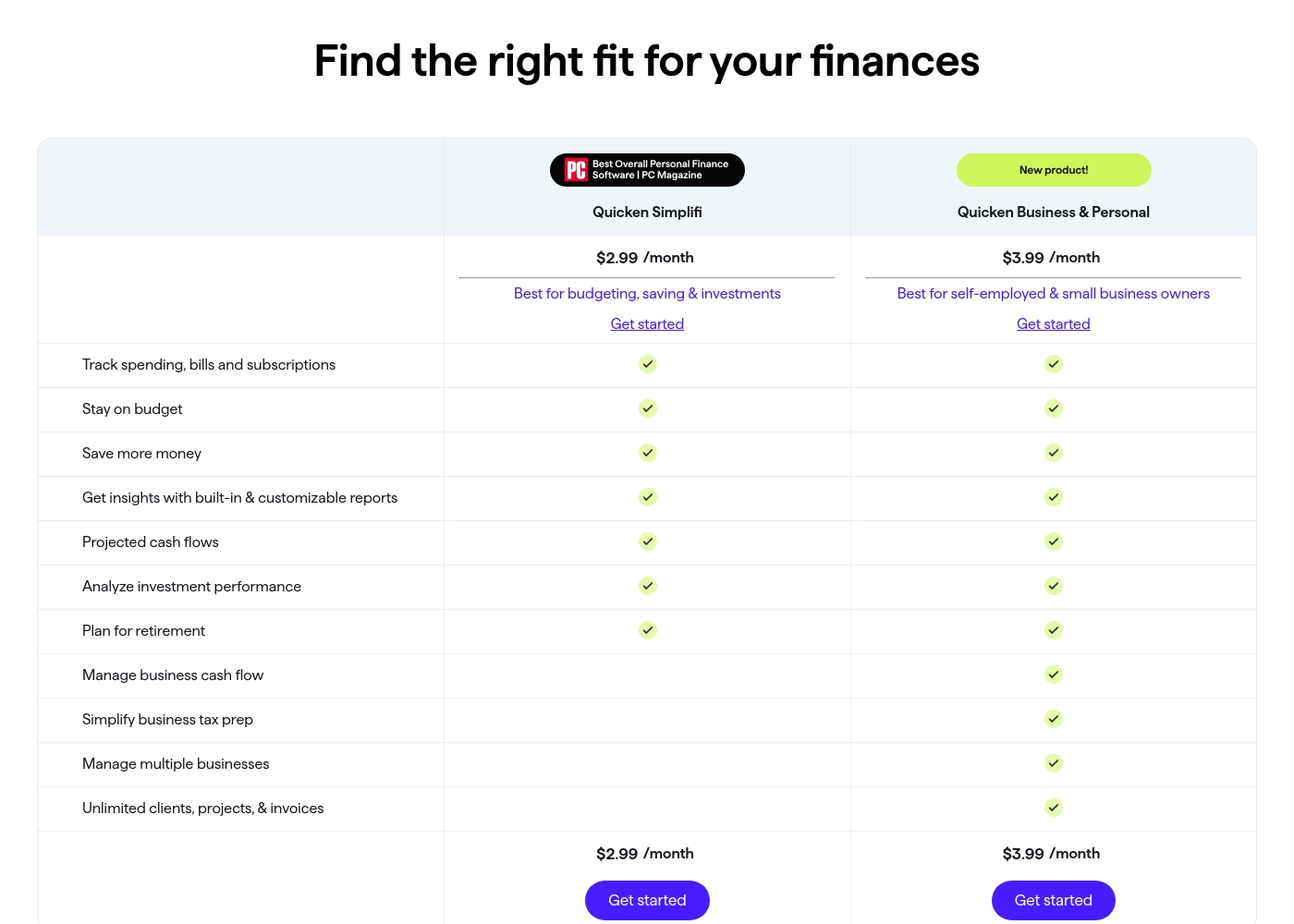
Quicken costs between $2.99 and $5.99 per month (billed annually) with five main plans: Quicken Simplifi at $2.99/month, Classic Deluxe at $2.99/month, Quicken Business & Personal at $3.99/month, Classic Premier at $4.19/month, and Classic Business & Personal at $5.99/month.
Let's look closely at the different subscription options available to help you choose the best fit for your financial goals.
Quicken Simplifi (Mobile Web)
Price: $2.99/month (Billed annually; standard $5.99/month) Best For: Budgeting, saving & investments Refund Policy: 30-day money-back guarantee Other Features:
- Always know what you have left to spend or save
- Get better insights with reports & real-time alerts
- Make informed decisions about your investment portfolio
- Plan for the future with projected cash flows
- Budgeting, saving & investments
- Track spending, bills, and subscriptions
- Projected cash flows
- Analyze investment performance
- Plan for retirement
- Create multiple budgets
- Manage & reduce debt
- Simplify tax time
- Create a secure retirement
- Desktop software with companion apps
- All Simplifi features included
- Manage business cash flow
- Simplify business tax prep (Schedules C, E & F)
- Manage multiple businesses
- Unlimited clients, projects, & invoices
- Best-in-class investing tools
- Built-in tax reports
- Reconcile to the penny
- Track & pay bills in Quicken
- Set budgets, manage debt, create a retirement plan
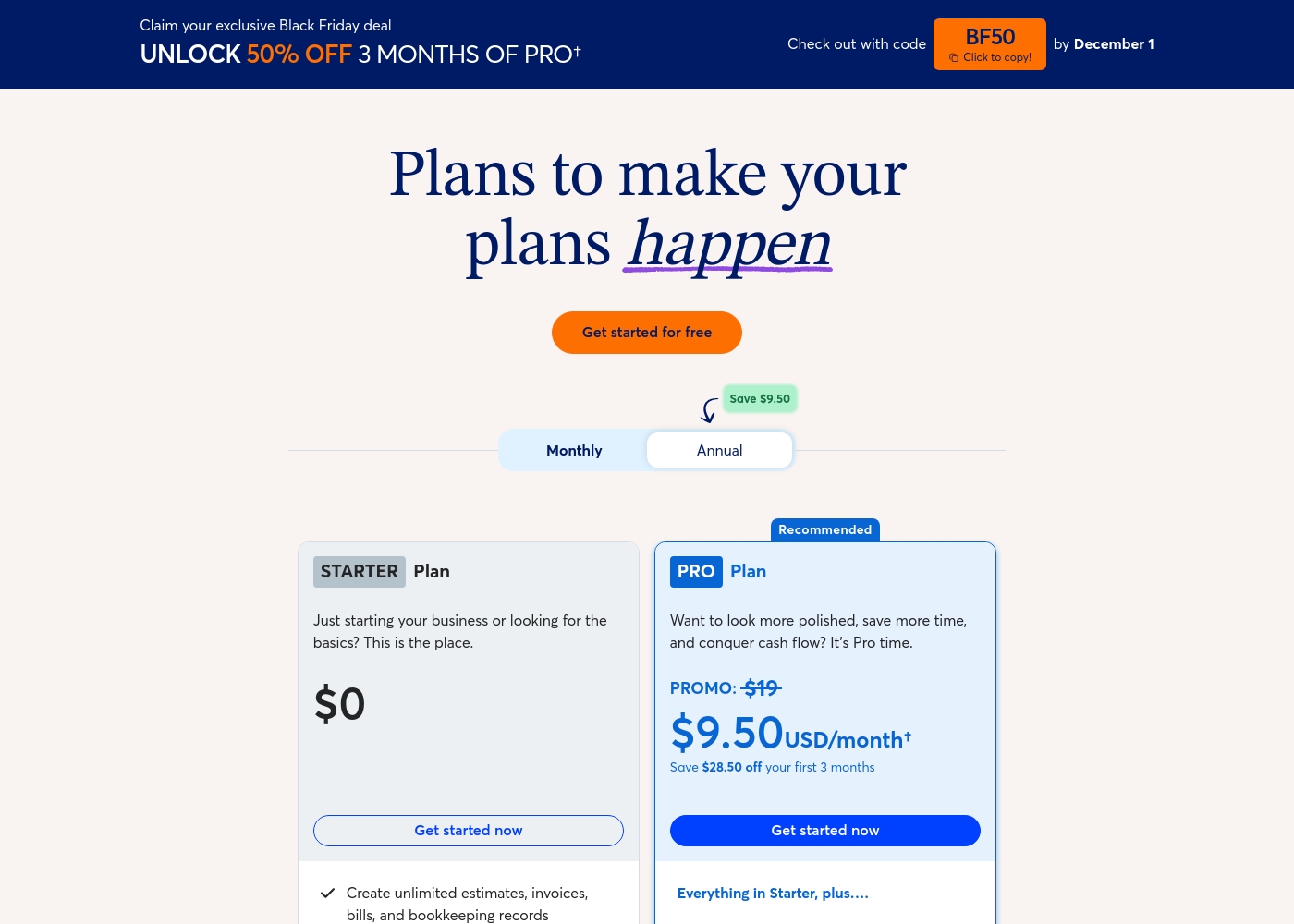
Wave costs between $0 and $190 per year (for core software) or starting at $199 per month (for advisory services) with three main options: STARTER at $0, PRO Plan at $190/year, and Wave Advisors starting at $199/month.
Here’s a breakdown of the three main options available to help you choose the best fit for your business needs.
STARTER Plan
Price: $0 Best For: Businesses just starting out or needing basic bookkeeping and invoicing tools. Refund Policy: Not applicable (Free plan) Other Features:
- Create unlimited estimates, invoices, and bills.
- Full bookkeeping records.
- Invoice on-the-go with the mobile app.
- Manage cash flow and customers in one dashboard.
- Create unlimited estimates, invoices, bills, and bookkeeping records
- Invoice on-the-go with the mobile app
- Manage cash flow and customers in one dashboard
- Option to accept online payments (with standard transaction fees)
- Everything in Starter, plus discounted online payments (2.9% + $0 for first 10 transactions/mo)
- Auto-import and auto-categorize bank transactions
- Digitally capture unlimited receipts and track expenses
- Automate late payment reminders
- Includes Pro Plan features
- Dedicated bookkeeper and monthly financial statements
- Expert support to answer bookkeeping questions
- Be ready for tax time with clean, organized books
- Onboarding when switching from other accounting software
Pricing Notes
- Quicken requires an annual commitment but includes a 30-day money-back guarantee for risk-free testing.
- Wave offers a robust, indefinitely free STARTER Plan for core bookkeeping and invoicing.
- Wave's PRO Plan costs $19 USD/month or $190 USD annually, adding automation features.
- Quicken's pricing scales based on feature depth, from budgeting to complex investing and business management.
Pricing Head-to-Head
User Reviews
Quicken maintains a devoted user base, with many customers reporting continuous use for over 20 or 30 years. Reviewers across both Trustpilot and Capterra consistently praise Quicken’s ability to serve as a comprehensive hub for managing budgets, investments, and tracking historical data.
Many find it indispensable for reconciling accounts and managing complex personal or small business finances. Users appreciate having all their critical information in one accessible place.
I’ve been using Quicken since the late 1980s, and it’s become essential for managing my complex finances. It’s a great product that continues to fulfill its purpose. I rely on it to keep my portfolio organized and accessible.
Wave’s external reviews paint a picture of severe recent decline, reflected in its “Bad” 1.1 Trustpilot rating. Users report that while the platform was historically good for simple, inexpensive invoicing and bookkeeping, its reliability has collapsed following recent structural changes, particularly the transition to a new payroll service provider.
This switch has caused major operational failures, including delayed or failed direct deposits, broken functionality for multiple pay periods, and critical tax withholding errors leading to financial penalties. Complaints overwhelmingly centralize on the abysmal customer support infrastructure: users state there is no direct phone number, the chatbot is ineffective, and support tickets often remain unanswered for weeks or months.
Wave messed up my payroll and the tax payments, which resulted in a large state penalty. I had to pay the amount and the penalty myself because support never resolved the issue. This uncertainty causes an unnecessary nightmare for small businesses.
Our Verdict
This comparison isn’t really Quicken vs. Wave; it’s a decision of personal finance vs. business needs. If you need complex tools for managing your budget, investments, or personal taxes, Quicken is the clear choice. Quicken provides the functional depth and analytical tools serious investors require. It also offers integrated tax reports for Schedules C, E, and F. You pay for Quicken's power via a mandatory annual subscription, but the feature depth is simply unmatched. Wave is designed to help small business owners handle invoicing, expenses, and basic bookkeeping—often for free. Wave's superpower is its powerful, unlimited, and professional invoicing solution. Wave allows you to bill clients and accept payments instantly through credit cards or bank transfers. If collecting income from clients is your primary financial task, Wave is built for you. The critical deciding factor between Quicken and Wave is the risk profile. Wave’s free tools look great, but user reports of frozen funds and absent support are serious business risks. Quicken offers system stability and defined support channels for paying customers. Choose Quicken if you have complex finances or demand reliable support for your money management. Select Wave only if you need free basic accounting and are willing to accept the high reported payment processing risk.
Frequently Asked Questions
Which is better for small business owners: Quicken or Wave?
Wave offers superior, free core accounting features and robust client invoicing. Quicken’s business plans focus more on integrated personal and complex tax reporting. Wave streamlines getting paid by clients quickly and professionally. They cater to different business complexity levels.
Does Wave have advanced investment tracking like Quicken?
No, Wave does not have dedicated investment tracking tools like Quicken. Quicken Classic Premier offers best-in-class analysis and capital gains estimation features. Wave is only concerned with basic expense and income tracking for business profit/loss.
Is Wave cheaper than Quicken?
Yes, Wave is much cheaper because it has a powerful, free STARTER accounting plan. Quicken requires a minimum annual subscription, starting around $2.99/month. Wave's core value is zero-cost bookkeeping for solopreneurs.
Can I store my data locally using Wave?
No, Wave is a modern, fully cloud-based solution and keeps all data on its servers. Quicken offers the Classic desktop versions that allow users to store their financial data locally. This local storage option is a unique benefit of Quicken.
Which software has better customer support?
Quicken has clearly defined chat and phone support for its subscribers across all plans. Wave receives widespread user complaints about inaccessible support, often relying on non-responsive chatbots. Rely on Quicken if responsive help is critical to your cash flow needs.
Who should choose Quicken Classic Business over Wave?
Choose Quicken Classic Business & Personal if you need to manage multiple rental properties or have complex tax situations. Quicken provides built-in reports for Schedules C, E, and F. Wave is better suited for simpler service-based businesses.
Ready to Choose?
Both tools have their strengths. Choose based on your specific needs.