Wave

Wave review

Small business accounting that doesn't demand an accounting degree.

Wave costs from $19/mo · 3 plans · Free plan available · prices checked Oct 12, 2026

By Ciroapp Editorial Team · Updated Sep 16, 2026

Commission may apply at no extra cost

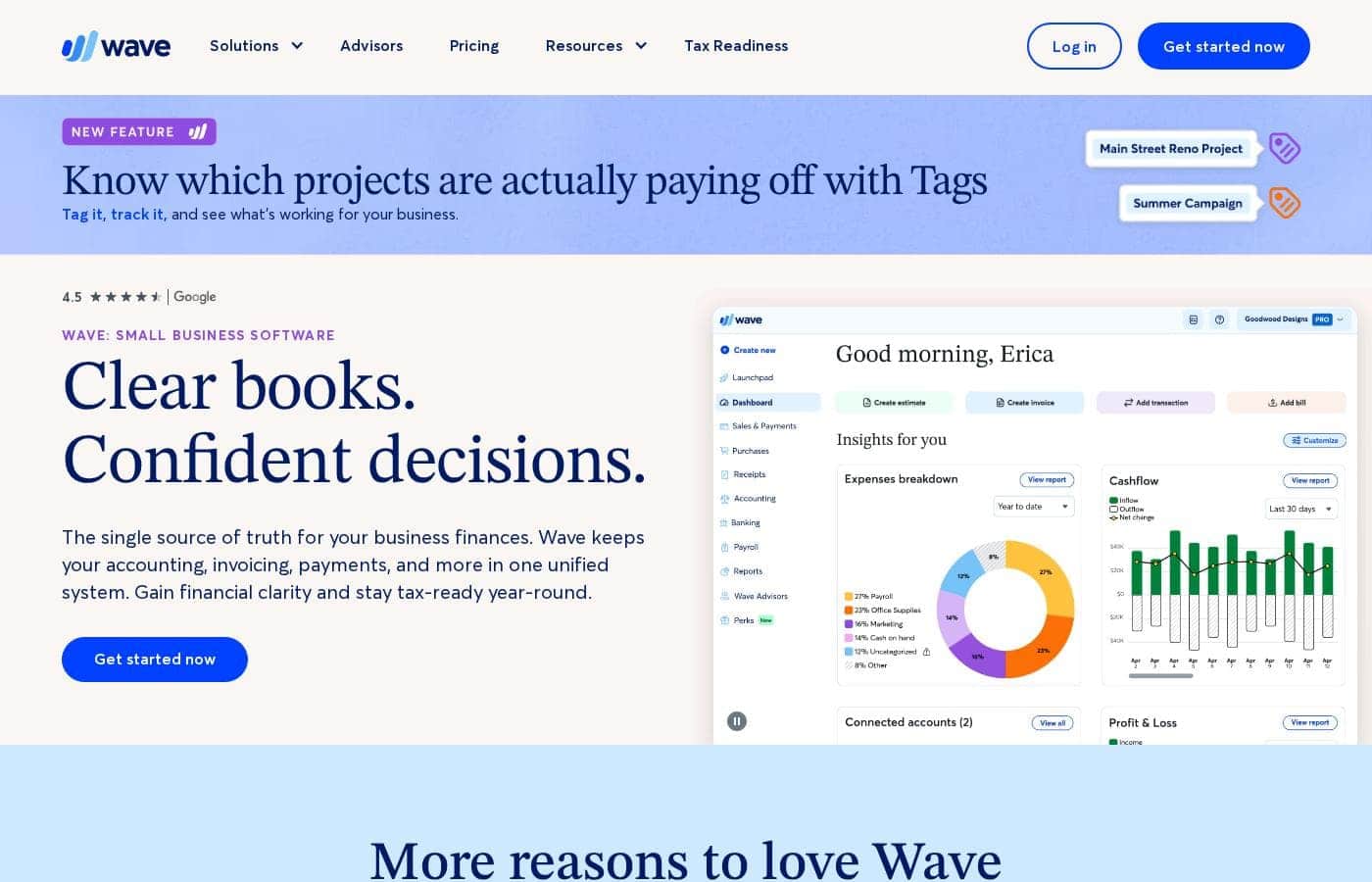
Wave homepage screenshot

At a glance

Quick overview for Wave: rating, pricing summary, key features, and highlights.
Pricing verified Oct 12, 2026

Ciroapp score

4.1/ 5

Wave bundles accounting, invoicing, and payments in one place, backed by a genuinely free Starter plan and clearly published pricing. Card fees on every payment, Plaid-dependent bank imports, and weekday-only support are the main trade-offs. Overall, it's a solid, recommendable pick for freelancers and solopreneurs who want tidy books without a big monthly bill.

Pros

  • Pros:The Starter plan is free indefinitely, not a time-limited trial, and still includes unlimited invoices, estimates, bills, and bookkeeping records
  • Pros:Pro automates the tedious parts of bookkeeping — bank transactions are imported, merged, and categorized via Plaid, and receipts are captured digitally without limits
  • Pros:Wave Advisors puts a dedicated bookkeeper on your account who prepares monthly financial statements and handles onboarding from software like FreshBooks

Cons

  • Cons:Every card payment carries a processing fee—2.9% + $0.60 on Starter (3.4% + $0.60 for Amex)—which adds up for businesses with high card volume
  • Cons:Bank auto-import runs through Plaid, and not every financial institution is supported, so a working connection isn't guaranteed
  • Cons:The Pro subscription fee is per business, not per owner, so running a second business means paying for a second subscription
Best for
  • Freelancers who want to pay themselves and any staff with confidence
  • Solopreneurs who want tidy books going into tax time
  • Contractors who need to send professional invoices and estimates in minutes
This section is a summary. Detailed sections about features, use cases, pricing, and reviews follow below.

What is Wave?

Staring at spreadsheets and juggling separate tools for invoices, payments, and taxes gets old fast. Wave puts your accounting, invoicing, and payments in one place, so your books stay tidy and tax-ready. You can start free, track cash flow from your phone, and even get 1:1 help from real bookkeeping experts when you need it.

Wave is all-in-one small business software that combines accounting, invoicing, payments, and payroll in a single system. It's built for people who didn't train as accountants—freelancers, solopreneurs, contractors, and consultants. You can manage your books, send professional invoices, accept payments, and check reports from a desktop or mobile app.

More than 350,000 small businesses use Wave, and it holds a 4.5-star Google rating.

Should you choose Wave?

Quick buyer guidance before you compare plans or click through.

Choose it if

  • Owners who want one system instead of separate tools for books, invoices, and payments
  • Non-accountants who want software designed for beginners and seasoned pros alike
  • People who want to check cash flow and reports on the go via a mobile app
  • Businesses that value optional 1:1 coaching or done-for-you help from Wave Advisors
  • Budget-conscious starters who want to begin for free

Skip it if

  • Buyers who need full pricing upfront—the homepage promotes a free start but doesn't list costs for payments, payroll, or advisor services, so confirm fees before committing
  • Teams hoping to run everything from a phone—the mobile app is described as a companion to the desktop experience, so expect to do setup and deeper bookkeeping on a computer
  • Larger companies with complex needs—Wave's messaging centers on small businesses and solopreneurs, not enterprise accounting teams
  • Shoppers who want side-by-side comparisons—the homepage mentions comparisons and FAQs, but the details aren't spelled out, so you'll need to dig deeper or evaluate alternatives yourself

Next steps before buying

  1. 1Create a free Wave account to explore the core accounting and invoicing tools firsthand
  2. 2Before relying on it, check what payments, payroll, and advisor services actually cost—a free start doesn't mean every feature is free
  3. 3Test your main workflow early, like creating and sending an invoice or estimate to a real client
  4. 4Confirm the mobile app covers what you need on the go versus the desktop experience
  5. 5Compare Wave with at least one alternative, such as QuickBooks, to make sure the fit suits how you work

Ease of use

Wave leans hard into simplicity for non-accountants, and its own positioning says it's built for small business owners rather than bookkeeping pros. Customer quotes back that up: one reviewer found QuickBooks more complicated and slower to set up. Features are designed to work together, which cuts down on tool-juggling, and Wave Advisors are available for coaching or hands-on help if you get stuck.

Wave Key Features

✨ Invoicing and Estimates Without Limits

Wave lets you create unlimited estimates, invoices, bills, and bookkeeping records on every plan, including the free Starter tier. Invoices go out from the desktop dashboard or the mobile app, and clients can pay online directly from the invoice. Pro adds reusable templates, custom logos, brand colors, and the option to remove Wave branding entirely.

✨ Automated Bank Transaction Import (Pro)

The Pro plan connects to your bank through Plaid to auto-import transactions, then auto-merges and categorizes them to cut down on manual entry. Coverage depends on your financial institution, since Plaid doesn't support every bank, so it's worth testing your connection before relying on it. The free Starter plan doesn't include this automation.

✨ Built-In Payment Processing

Wave processes card payments itself: 2.9% + $0.60 per transaction (3.4% + $0.60 for Amex) on Starter. Pro drops that to 2.9% + $0 for your first 10 card transactions each month, then standard rates apply. The discount is per business, not per owner, so a second business means a second subscription.

✨ Receipt Capture and Expense Tracking (Pro)

Pro includes digital receipt capture with unlimited storage, so you can track expenses without paper piles. A standalone receipt-capture add-on is also available at $11/month or $96/year if you're on Starter. One gap to note: Wave Advisors plans don't include mobile receipts.

✨ Automated Late Payment Reminders (Pro)

Pro automates reminders for overdue invoices, nudging slow-paying clients without awkward follow-up emails from you. This pairs with recurring invoices for repeat clients, so both billing and chasing run on autopilot.

✨ Custom Branding and User Roles (Pro)

Pro unlocks custom logos and brand colors, reusable templates, and additional user roles, so documents look like your business rather than a stock template. Removing Wave branding from invoices is also reserved for this tier.

✨ Done-For-You Bookkeeping with Wave Advisors

Starting at $149–$199/month, Wave Advisors bundles everything in Pro with a dedicated bookkeeper who keeps your records accurate and current. Monthly financial statements are prepared for you, expert support for bookkeeping questions is available anytime, and onboarding help covers migrations from software like FreshBooks. Optional one-on-one coaching packages are available on top.

✨ Mobile App for On-the-Go Money Checks

The mobile app lets you check cash flow, see who owes you, pull reports, and send invoices from anywhere. It's positioned as a companion to the desktop experience, so expect to handle setup and deeper bookkeeping on a computer.

✨ Optional Payroll Add-On

Payroll is available as an add-on starting at $25/month, letting you pay yourself and any staff from within the same system you use for books and invoicing. It's not included in the core plans, so budget for it separately if you need it.

Use Cases

🧾 Freelancers: pay yourself with confidence

You're a freelancer juggling client work and money chores. Wave keeps your books organized, so paying yourself (and any staff) stays simple. When tax season hits, your records are already in order.

Expected outcome: Tidy, tax-ready books without the spreadsheet scramble.

🔨 Contractors: invoice and estimate in minutes

Just wrapped up a job? Create a professional invoice or estimate and send it before you leave the site. Clients can pay online, so money comes in without extra chasing.

Expected outcome: Polished invoices out the door fast, with online payments built in.

Tip: Invoice from the mobile app while the job's still fresh.

🔁 Consultants: put repeat billing on autopilot

Billing the same clients every month? Set up recurring invoices and payments once, then let Wave take over. Pro's automated late payment reminders nudge slow payers so you don't have to.

Expected outcome: Steady, on-time payments without manual follow-up.

🤝 Busy owners: hand off the books

Too swamped for bookkeeping? Wave's in-house experts can coach you 1:1 or do the work for you. Advisors plans include a dedicated bookkeeper and monthly financial statements.

Expected outcome: Accurate books and real human answers, without doing it all yourself.

Wave pricing

From$19/mo

  • 3 plans
  • Free plan available
  • Save up to 17% with annual billing

Prices checked on Oct 12, 2026 from Wave's pricing page

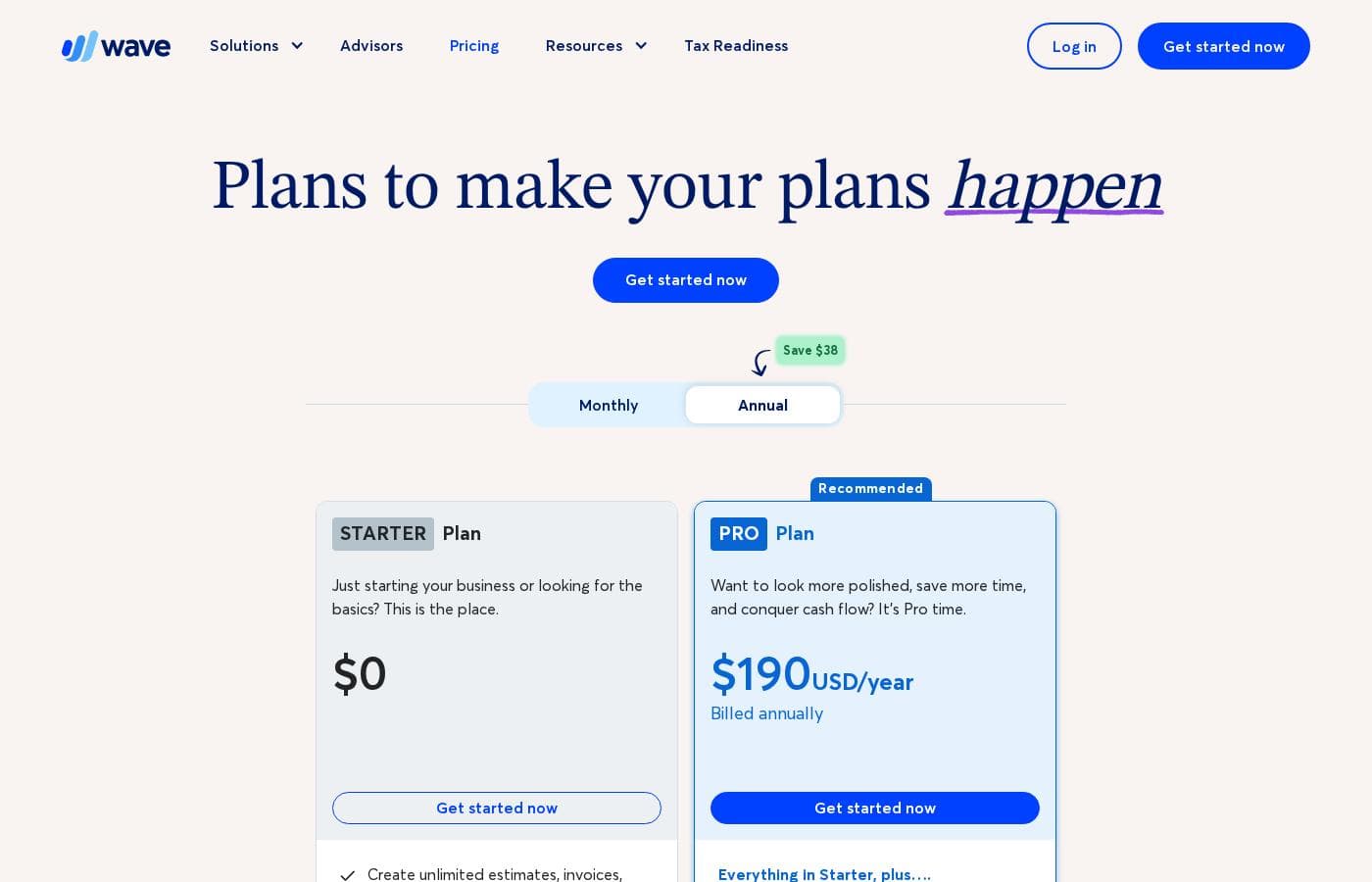
Wave pricing page screenshotView pricing page screenshot
PlanBilled monthlyBilled annuallyIncludes
Starter Plan
Free
—
2.9% + $0.60 per credit card transaction; 3.4% + $0.60 per Amex transaction
  • Create unlimited estimates, invoices, bills, and bookkeeping records
  • Option to accept online payments
  • Invoice on-the-go with the mobile app
  • Manage cash flow and customers in one dashboard
Pro Plan
Intro offer $9.50/mo; list price shown
$19/mo
$15.83/mo
$190 per year
Save up to 17% with annual billing
2.9% + $0 processing applies to first 10 card transactions/month, then 2.9% + $0.60 (3.4% + $0.60 Amex); fee is per business, not per owner; listed price applies to new subscriptions
  • Everything in Starter, plus discounted online payment processing
  • Auto-import, auto-merge, and categorize bank transactions
  • Digitally capture unlimited receipts and track expenses
  • Automate late payment reminders
  • Custom logo and brand colors, remove Wave branding, reusable templates, and additional user roles
Wave Advisors
$149/mo
—
Mobile receipts not included
  • Includes Pro Plan features
  • Dedicated bookkeeper keeps books accurate and up to date
  • Monthly financial statements prepared for you
  • Expert support for bookkeeping questions, anytime
  • Onboarding when switching from other software, plus optional one-on-one coaching packages

Price history

Tracking prices since Oct 1, 2026. No price change detected yet.

Pricing types: Free plan, Monthly subscription, Yearly subscription, Usage-based pricing

Pricing notes

Wave offers a genuinely free Starter plan, with Pro at $19 USD/month (or $190 USD/year) and Wave Advisors bookkeeping starting at $149–$199/month. Optional add-ons like payroll (from $25/month) and receipt capture ($11/month) let you pay only for what you actually use.

Wave costs between $0 and $199+ per month with three plans: Starter at $0, Pro at $19 USD/month (or $190 USD/year), and Wave Advisors starting at $149–$199/month.

Here's a closer look at what each plan covers.

Starter Plan

Price: $0 Best For: Businesses just starting out or looking for the basics Other Features:

  • Unlimited estimates, invoices, bills, and bookkeeping records
  • Option to accept online payments
  • Invoice on-the-go with the mobile app
  • Manage cash flow and customers in one dashboard

Starter is free forever, and it covers the basics well. It's built for people just launching a business who don't need automation yet. When you accept card payments, you'll pay per-transaction fees: 2.9% + $0.60 for most cards, or 3.4% + $0.60 for Amex.

Pro Plan

Price: $19 USD/month billed monthly, or $190 USD/year billed annually Best For: Owners who want a more polished look and to save time Other Features:

  • Everything in Starter, plus discounted payment processing
  • Auto-import, merge, and categorize bank transactions
  • Digitally capture unlimited receipts and track expenses
  • Automate late payment reminders
  • Custom branding, reusable templates, and extra user roles

Pro is the plan for owners who want to look polished and cut down on admin work. 💡 New monthly subscribers get a promo rate of $9.50/month for the first 3 months — a $28.50 saving. Card processing is cheaper too, at 2.9% + $0 for your first 10 transactions each month (then standard rates apply). Keep in mind the fee is per business, not per owner, so a second business means a second subscription.

Wave Advisors

Price: Starting at $149/month (up to $199/month) Best For: Owners who want hands-off bookkeeping with expert guidance Other Features:

  • Everything in Pro, plus a dedicated bookkeeper
  • Monthly financial statements prepared for you
  • Expert support for your bookkeeping questions, anytime
  • Onboarding when switching from other software, like FreshBooks
  • Optional one-on-one accounting coaching packages

Advisors suits hands-off owners who'd rather have a professional handle the books. Your bookkeeper keeps records accurate, prepares statements, and gets you ready for tax time. One catch: mobile receipts aren't included in this tier.

There's no free trial advertised, but you don't really need one — Starter is free for as long as you like, so you can test the core tools before paying a cent. There's no money-back guarantee mentioned either. What Wave does offer is flexibility: you can cancel anytime, change plans easily, and your subscription runs until the end of the billing period you've paid for. All plans auto-renew, and prices exclude tax. If you're unsure where you fit, start on Starter and upgrade only when you hit a wall.
Cost calculator

Estimate what Wave costs for your team.

Billing
Per month
$19
Per year
$228

Pro Plan states no user limit: shown as one price for the whole account. Check the price for 5 users with the vendor. Estimate based on published list prices, before taxes, add-ons and discounts.

How to pay less for Wave

  • Pay annually: saves up to 17% compared with monthly billing.
  • Start on the free plan and upgrade only when you hit its limits.
Visit Wave

Email me when Wave changes price

One email when we detect a price change on the vendor's pricing page. No newsletter, no deals. Unsubscribe in one click.

User Reviews

No reviews yet.

Write a Review

Write a Review for Wave
0/100 characters
0/2000 characters

Why use Wave?

Most accounting tools feel like they were built for accountants. Wave took the opposite approach, and that shows up in how you'll actually work day to day.

  • One home for your money. Accounting, invoicing, payments, and payroll live in a single unified system, so features work together instead of against you.
  • Start for free. Wave invites you to get started at no cost, which makes it easy to test before you commit to anything.
  • Built for owners, not bookkeepers. The site says it plainly: Wave is made for small business owners and solopreneurs at every stage, not accountants, so it's easier to use.
  • Stay tax-ready year-round. With organized books and everything in one place, tax season stops being a scramble.
  • Real humans when you want them. Wave's in-house team of bookkeeping, accounting, and payroll experts can coach you 1:1—or do the work for you.
  • Take it on the go. The mobile app lets you check cash flow, see who owes you, and pull reports from anywhere.

Wave alternatives

Other tools in the Accounting category

View all Accounting tools
Freshbooks

Freshbooks

Accounting4.2/5

FreshBooks is powerful accounting software designed to respect your time. It’s built to automate routine tasks like expense tracking and professional client invoicing. This tool is valuable for various stages of growth, whether you are a freelancer just starting out or a business managing contractors and employees. It organizes your finances so you always know where you stand in real time.

Xero

Xero

Accounting3.7/5

Xero is cloud accounting software for everyday businesses. It helps you manage finances, cash flow, and integrate with apps, with safe and secure, paperless record keeping. Automated features save you time—from reconciling bank transactions to sending invoice reminders—and Hubdoc pulls bills and receipts into Xero. It supports ongoing 24/7 online support and offers plans to suit different business types, including construction, real estate, and retail.

Datarails

Datarails

Accounting4.1/5

Datarails is an AI-powered FinanceOS that automates FP&A while letting teams stay in Excel. We bridge the gap between manual spreadsheets and rigid ERPs. Whether you have a portfolio of clients or a growing community of finance pros, our program is designed to reward you for sharing a tool that eliminates manual busywork. Join us to help your network unlock strategic AI insights and real-time reporting in the environment they already use and love

Finaloop

Finaloop

Accounting4/5

Finaloop is real-time accounting software designed for ecommerce businesses. It automatically pulls transactions from platforms like Shopify, Amazon, and payment gateways, categorizes them, and reconciles your books continuously rather than monthly. A core differentiator is its automated inventory and cost-of-goods-sold (COGS) tracking, which is handled automatically rather than through manual journal entries. The service combines its software with human CPA-reviewed bookkeeping, and customers can add on tax return filing handled by Finaloop experts.

Zoho Books

Zoho Books

Accounting4/5

Zoho Books is a comprehensive, cloud-based accounting solution designed for growing businesses and solopreneurs. It brings together invoicing, inventory, expenses, and core financials in one place, with web and mobile access to manage finances from anywhere.

NetSuite

NetSuite

Accounting4/5

NetSuite is clearly positioned as an AI-powered business management suite. It's known widely as the #1 AI Cloud ERP. This powerful suite is designed to connect key functional areas of your enterprise. It expertly handles everything from ERP/Financials to CRM and ecommerce data. Over 43,000 customers rely on these integrated products to help fuel their essential growth.

Heard

Heard

Bookkeeping4.1/5

Heard is the only accounting platform built for mental health and wellness providers, combining bookkeeping, taxes, and payroll in one place. Providers using Heard save an average of 60 hours a year and $5,000 in taxes. We handle monthly bookkeeping, deliver clear financial reports, estimate quarterly taxes, file personal and business returns, support S Corp setup, and respond to questions within one business day.

Cheapest Accounting software for 1 to 25 users

Wave FAQ

How much does Wave cost?

Wave's cheapest paid plan, Pro Plan, costs $19 per month. Paid plans range from $19 to $149 per month. Prices checked on Oct 12, 2026 from the vendor's pricing page.

Does Wave have a free plan?

Yes. Wave has a free plan (Starter Plan); paid plans start at $19 per month.

How much do you save with annual billing on Wave?

Paying annually saves up to 17% compared with monthly billing, based on Wave's list prices.

Has Wave's price changed recently?

No. We have not detected a price change since we started tracking on Oct 1, 2026.

Can I cancel Wave at any time?

Yes. You can unsubscribe whenever you like, and cancellation takes effect at the end of the billing period you've already paid for. All plans auto-renew, so cancel before your renewal date if you're done.

How do I reach a real person if I get stuck?

Wave offers live-person chat and email support, staffed Monday to Friday from 9 AM to 4:45 PM Eastern. That access is listed with any optional add-on, and there's no published response-time guarantee.

Will Wave connect to my bank account?

Often, yes. Wave uses Plaid to auto-import transactions on Pro, but not every financial institution is supported, so a connection isn't guaranteed. Check Plaid's troubleshooting guide before counting on auto-import.

Can Wave help me switch from software like FreshBooks?

Yes. Wave Advisors includes onboarding when you're moving from other accounting software, such as FreshBooks. That plan also adds a dedicated bookkeeper, monthly statements, and optional one-on-one coaching packages.

Ready to try Wave? Check out the official site or pricing.

Are you Wave? Claim this listing · Get the badge