Quickbooks vs Wave
Quickbooks and Wave offer very different approaches to business accounting. Quickbooks is the scalable powerhouse, but it comes at a higher cost. Wave provides strong basic features for free, focusing on solopreneurs and freelancers. Decide if advanced AI tools or zero monthly fees suit your business best.
Best for: Growing teams needing up to 25 licensed users, Businesses requiring detailed project costing analysis
Best for: Solo entrepreneurs and freelancers on a strict budget, Businesses prioritizing free core bookkeeping and invoicing
Power, Precision, and Painful Support.
We observe that QuickBooks offers market-leading feature depth and scalability, catering strongly to diverse business needs and growth stages with its tiered plans and AI tools. Overall, however, the severe and repeated reports of poor customer support and reliability issues necessitate caution, significantly hindering its operational effectiveness for many users.
Pros
- Scalable plans supporting solo operations up to 25 users.
- Customized experience based on specific business size and needs.
- Integration of advanced AI tools like Intuit Assist and Accounting Agents.
- Includes a 30-day free trial period for risk-free testing.
Cons
- Customer service is consistently reported as inefficient and unhelpful.
- Aggressive and frequent increases in subscription pricing.
- Software is frequently unstable, unreliable, and prone to accounting errors.
- Constant, unplanned user interface updates frustrate long-time users.
Free basic tools; costly support risks.
When evaluating Wave, we recognize the immediate value of its free tier for basic invoicing and core bookkeeping functions. However, recent critical failures concerning payroll accuracy and payment processing, combined with nearly non-existent customer support channels, introduce significant operational risk. Overall, we cannot recommend Wave for businesses that rely on the system for payroll until its reliability and customer response dramatically improve.
Pros
- Fully featured free STARTER plan for basic invoicing and bookkeeping.
- Effective automated bank transaction import in the PRO plan.
- Low cost of entry makes it accessible for solopreneurs.
- Historically reliable for simple invoicing before system changes.
Cons
- Customer service is extremely poor, often relying only on ineffective chatbots.
- No direct phone support is available for urgent or complex issues.
- Recent payroll partner switch caused failures, missed deposits, and tax errors.
- Wait times for support replies often extend for weeks or even two months.
AboutQuickbooks
QuickBooks is a system designed to support modern businesses, regardless of their size. It’s built to personalize the site experience using simple criteria, like how many employees you have. ✨
Whether you are running a large team or operate as "Just me," the system aims to tailor features specifically to your needs. This focus on customization helps pave the way for successful business growth.
AboutWave
Wave is built specifically for small business owners and solopreneurs at every stage, not accountants. It is a comprehensive web-based system designed to make money management simple. You can create beautiful, professional invoices and estimates quickly for your clients. It conveniently handles secure online payments and makes accounting easy, helping you track income and expenses. The mobile app lets you manage your money even when you are on the go! ✅
Highlights
Feature Comparison
Features Overview
We highlight the main differences and pick a winner for each feature.
Pricing & Starter Cost
Wave is vastly cheaper with a powerful free plan; Quickbooks relies on high-cost subscriptions.
Wave offers its STARTER plan for free, including full bookkeeping and invoicing. This zero-cost entry point is revolutionary for new businesses on a tight budget. Quickbooks starts at $38 per month for the basic Simple Start subscription plan. This higher barrier quickly scales up to $275 monthly for the Advanced plan features. Quickbooks often offers deep initial discounts for the first three months. However, the price aggressively jumps to the standard rate afterward. Wave’s low-cost PRO plan is only $19 monthly, offering exceptional value for features like automation. Wave makes basic accounting accessible to everyone using its free tier indefinitely. Quickbooks forces users into a paid subscription after a 30-day free trial expires. Wave wins the category for sheer affordability and value for money. This cost difference means Wave is perfect for cautious freelancers starting out. Quickbooks is an investment, best suited for businesses with established revenue streams.
Scalability & Users
Quickbooks supports growth up to 25 users; Wave is mainly designed for single owners.
Quickbooks offers tiered plans supporting 1, 3, 5, or up to 25 licensed users. This structure ensures Quickbooks scales seamlessly as staff and complexity increase. Businesses can easily switch between Quickbooks plans as they expand their team. Wave's model is priced per business account, effectively supporting solopreneurs best. Wave allows unlimited editors or viewers, which is good for sharing with partners or accountants. However, Wave lacks the dedicated user management for large teams. Quickbooks features specific Agents for project management and finance for larger teams. Wave focuses less on internal team collaboration tools for bigger administrative teams. This makes Quickbooks the clear choice for businesses with clear hiring plans. If you plan to scale past five employees, the user capacity of Quickbooks becomes essential. Wave remains excellent for businesses focused on single-owner operations.
Integration & AI Tools
Quickbooks offers specialized AI Agents; Wave focuses on core automation features.
All Quickbooks plans include Intuit Assist for simplified accounting processes. Higher Quickbooks tiers unlock specialized tools like the Accounting Agent and Payments Agent. The Advanced plan includes a Finance Agent for KPI analysis and financial planning. Wave's automation features are centered on bank connectivity and receipt capture in the PRO Plan. Wave will auto-import and auto-merge bank transactions effectively to save time. It also automates late payment reminders, a great time saver. Quickbooks provides an ecosystem of tools designed to reduce manual effort across management and finance. Wave's automation is primarily focused on making bookkeeping easier for the solo user. Quickbooks provides deeper, more customized intelligence. For businesses requiring advanced forecasting and complex expense review, Quickbooks's AI is powerful. Wave offers simpler, practical automation focused on streamlining daily data entry tasks.
Reliability & Payments
Quickbooks offers more dependable payment processing; Wave users report catastrophic fund holding.
Quickbooks generally maintains high reliability regarding integrated payment processing and fund transfers. While support is disliked, the core collection service is functional and trustworthy. This reliability is critical for maintaining healthy cash flow. Wave users report multiple instances of accounts being shut down, often after the first successful payment. Wave has been known to hold client funds for 60+ days, claiming high risk. This lack of reliability damages trust for crucial financial functions. User reviews suggest that attempting to use Wave for integrated payment acceptance carries significant risk. Businesses rely on Quickbooks for dependable transaction handling, justifying the cost. If instant, reliable access to your client payments is paramount, Quickbooks is the safer choice. Wave's free bookkeeping means little if its payment feature jeopardizes your working capital.
Customer Support Quality
Both tools have severely poor public support ratings; Quickbooks at least offers phone access.
User reviews for Quickbooks consistently highlight customer support as frustrating and unhelpful. Calls often involve long hold times and multiple transfers without problem resolution. However, phone support is free and included with all Quickbooks plans. Wave's customer support is widely criticized for being nearly non-existent outside of chatbots and email. Live support (chat/email only) is restricted to PRO plan subscribers or add-on purchasers. This limitation leaves STARTER users stranded. Since both Quickbooks and Wave have overwhelming negative sentiment regarding support, they tie in quality. Quickbooks offers more channels but frequently fails to resolve issues. Wave does offer premium expert coaching and outsourced bookkeeping via Advisors. This paid service ensures guaranteed clean books and dedicated expert help for a steep fee.
Expense Management
Quickbooks includes smart expense organization; Wave requires a paid plan or add-on for digital receipts.
Quickbooks includes smart expense organization across all its subscription tiers. This means users start organizing transactions effectively from the $38 Simple Start plan. Quickbooks focuses on transactional accuracy from day one. Wave requires users to purchase the PRO Plan or an $11/month add-on for digital receipt tracking. The free STARTER plan lacks this essential feature for effortless expense tracking. Manual receipt tracking is time-consuming. Quickbooks integrates expense capture tightly into its user interface, making it foundational to accuracy. Wave treats automated receipt capture as an upsell feature. Businesses generating many receipts will find Quickbooks's immediate inclusion helpful and cost-effective. Wave's free users must rely on external solutions or manual tracking.
Interface & User Focus
Wave is simple and polished for non-accountants; Quickbooks is feature-dense and complex.
Wave is explicitly built for small business owners and solopreneurs lacking accounting experience. The interface is clean, professional, and easy to navigate for core tasks. You can create polished invoices in just a few clicks easily. Quickbooks is designed to manage high complexity and integrate deep accounting rules. Long-term users frequently complain about confusing, unannounced changes to the clunky interface. It often feels built for accountants instead of business owners. Wave prioritizes making bookkeeping painless and easy for the average user. Quickbooks prioritizes financial depth and reporting complexity for analysis. Wave has a lower learning curve than Quickbooks. If you value speed and simplicity over feature depth, the Wave interface will feel less overwhelming. Quickbooks demands more time investment to master all its capabilities.
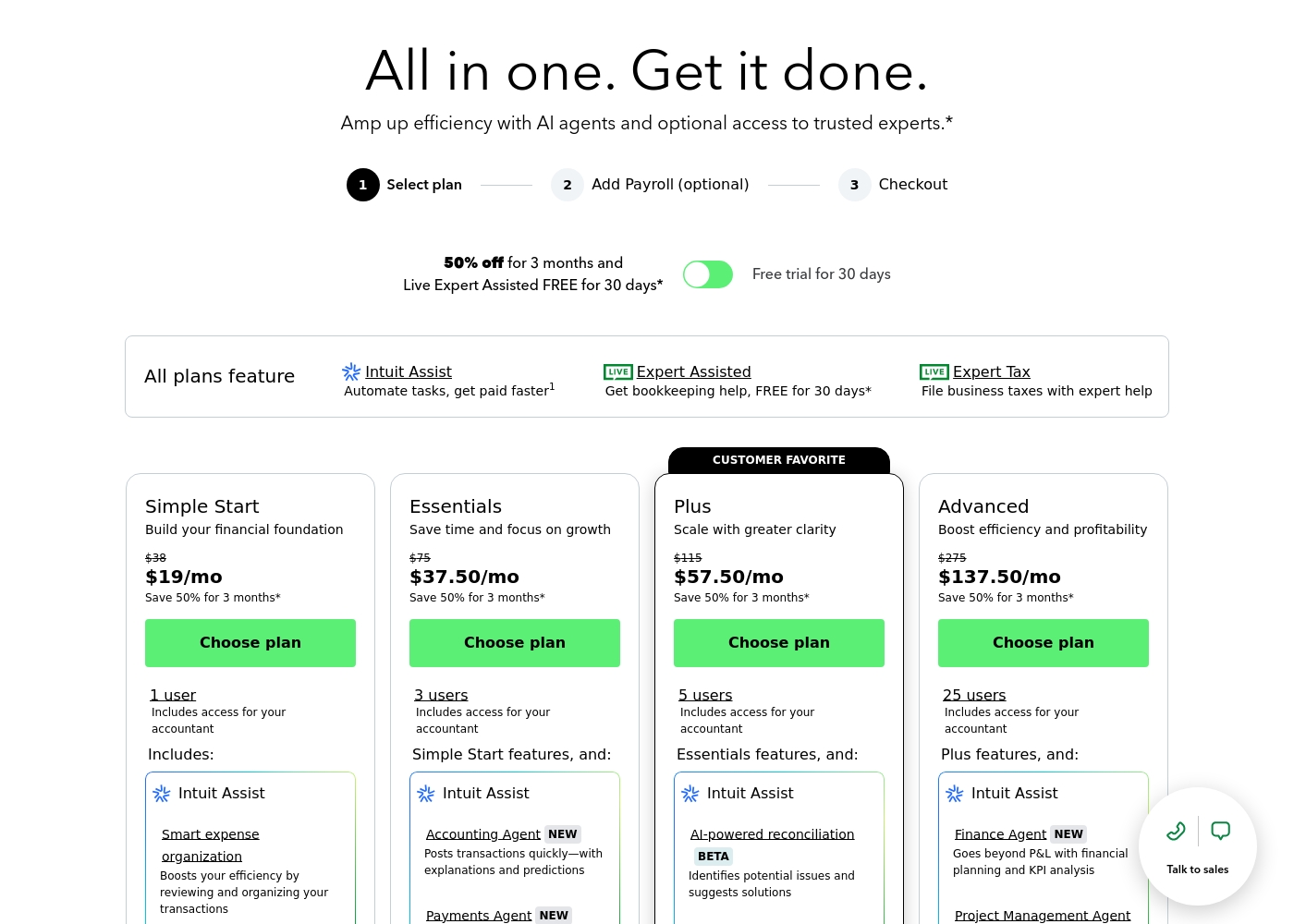
QuickBooks costs between $38 and $275 per month with 4 plans: Simple Start at $38, Essentials at $75, Plus at $115, and Advanced at $275.
Here’s a closer look at what features and capacity are included with each plan.
Simple Start
Price: $38/month (or $19/month for 3 months) Best For: Building your financial foundation Other Features:
- 1 user access
- Includes access for your accountant
- Intuit Assist
- Smart expense organization
- 1 user access
- Includes access for your accountant
- Intuit Assist
- Smart expense organization
- 3 users access
- Simple Start features included
- Accounting Agent NEW
- Payments Agent NEW
- 5 users access
- Essentials features included
- AI-powered reconciliation (BETA)
- 25 users access
- Plus features included
- Finance Agent NEW (Financial planning and KPI analysis)
- Project Management Agent
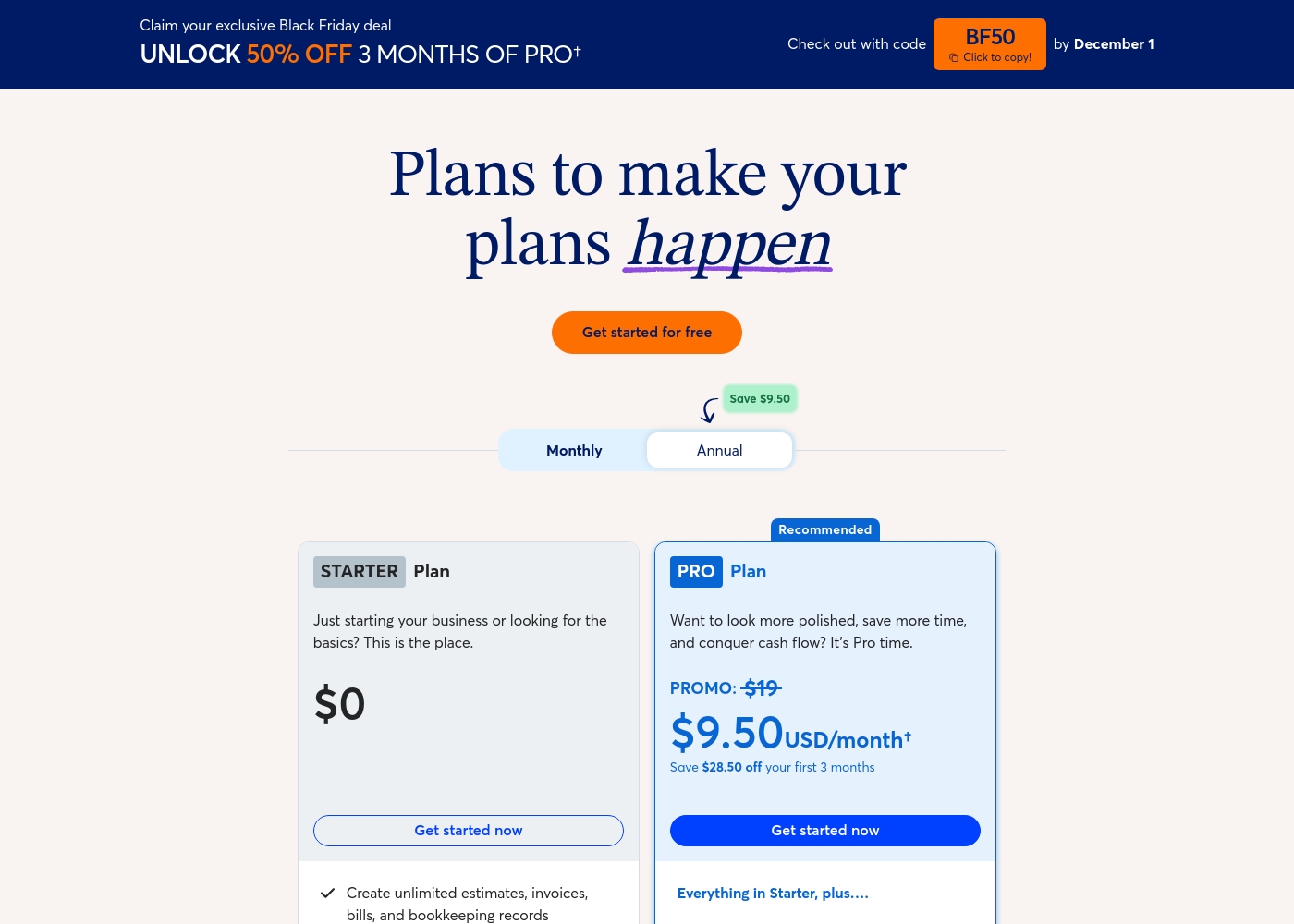
Wave costs between $0 and $190 per year (for core software) or starting at $199 per month (for advisory services) with three main options: STARTER at $0, PRO Plan at $190/year, and Wave Advisors starting at $199/month.
Here’s a breakdown of the three main options available to help you choose the best fit for your business needs.
STARTER Plan
Price: $0 Best For: Businesses just starting out or needing basic bookkeeping and invoicing tools. Refund Policy: Not applicable (Free plan) Other Features:
- Create unlimited estimates, invoices, and bills.
- Full bookkeeping records.
- Invoice on-the-go with the mobile app.
- Manage cash flow and customers in one dashboard.
- Create unlimited estimates, invoices, bills, and bookkeeping records
- Invoice on-the-go with the mobile app
- Manage cash flow and customers in one dashboard
- Option to accept online payments (with standard transaction fees)
- Everything in Starter, plus discounted online payments (2.9% + $0 for first 10 transactions/mo)
- Auto-import and auto-categorize bank transactions
- Digitally capture unlimited receipts and track expenses
- Automate late payment reminders
- Includes Pro Plan features
- Dedicated bookkeeper and monthly financial statements
- Expert support to answer bookkeeping questions
- Be ready for tax time with clean, organized books
- Onboarding when switching from other accounting software
Pricing Notes
- Quickbooks costs range from $38 to $275 monthly depending on the plan chosen.
- Wave’s core bookkeeping software is completely free via the STARTER plan indefinitely.
- Wave’s premium PRO plan is cheap at $19 monthly or $190 annually, including automation features.
- Quickbooks offers steep initial discounts but the standard price increases aggressively afterward.
- Wave offers specialized advisory services starting at $199 per month for outsourced expert help.
- Quickbooks includes phone support in the subscription; Wave only offers chat/email support in paid plans.
Pricing Head-to-Head
User Reviews
User sentiment collected primarily from Trustpilot is overwhelmingly negative, frequently contrasting with the platform’s marketing promises of accuracy and seamless growth. While QuickBooks offers feature depth and personalized experiences, the recurring themes of frustration are significant among users.
Customers consistently report atrocious and unhelpful customer service, often involving extremely long holding times, multiple transfers, and conflicting information without resolution. Reliability is a major concern; users describe the software as unstable, prone to costly accounting errors, and sometimes necessitating external accountant intervention.
I spent almost three months migrating from the Desktop to the Online version. The transition was supposed to be easy, but I had constant issues. Customer support was unknowledgeable and unable to assist me thoroughly.
Wave’s external reviews paint a picture of severe recent decline, reflected in its “Bad” 1.1 Trustpilot rating. Users report that while the platform was historically good for simple, inexpensive invoicing and bookkeeping, its reliability has collapsed following recent structural changes, particularly the transition to a new payroll service provider.
This switch has caused major operational failures, including delayed or failed direct deposits, broken functionality for multiple pay periods, and critical tax withholding errors leading to financial penalties. Complaints overwhelmingly centralize on the abysmal customer support infrastructure: users state there is no direct phone number, the chatbot is ineffective, and support tickets often remain unanswered for weeks or months.
Wave messed up my payroll and the tax payments, which resulted in a large state penalty. I had to pay the amount and the penalty myself because support never resolved the issue. This uncertainty causes an unnecessary nightmare for small businesses.
Our Verdict
The choice between Quickbooks and Wave is really about budget versus future complexity. Quickbooks serves businesses ready to invest for serious growth, despite the cost. Wave is the champion for solopreneurs needing free, basic bookkeeping. Both tools have serious, widely reported customer service challenges. Quickbooks’ superpower is detailed automation and deep scalability for teams. Quickbooks tailors the experience using specialized AI agents for finance and payments. You can scale comfortably up to 25 licensed users with Quickbooks. Quickbooks is built to handle complex payroll and project costing effectively. Wave’s superpower is its unbeatable zero-cost STARTER plan features. Wave offers free, professional invoicing and excellent core bookkeeping tools. This makes Wave perfect for freelancers just starting their business journey. Wave only asks for money if you want automation or dedicated expert help. However, reliability is the major deciding factor when funds are involved. Quickbooks is more dependable for integrated payment processing and transferring client money. Relying on Wave’s integrated payment system carries a non-zero risk of funds being frozen. Choose Quickbooks if you need advanced features and anticipate hiring a team soon. Select Wave today if absolute cost savings and dead-simple bookkeeping are your top priorities. If you use Wave, perhaps rely on a third-party gateway for accepting major client payments.
Frequently Asked Questions
Which software is better for a brand new solo entrepreneur: Quickbooks or Wave?
Wave is vastly superior for solopreneurs just starting out. Wave offers free, professional invoicing and core bookkeeping indefinitely. Quickbooks starts at an immediate cost of $38 monthly. Wave provides immediate value without any financial commitment.
Can I use Quickbooks for free, like Wave's STARTER plan?
No, Quickbooks does not offer a free version of its accounting software. Quickbooks does provide a 30-day free trial period for the paid tiers. After the trial, you must subscribe, starting at $38 per month.
Which tool offers better automation for daily accounting tasks?
Quickbooks offers deeper AI and specialized Agents for tasks like reconciliation and project costing. Wave’s PRO Plan focuses on simpler automation like auto-importing bank transactions. Quickbooks provides more intelligent, specialized financial assistance.
If my business grows to 15 employees, which software is more practical?
Quickbooks is designed for growth and supports up to 25 licensed users. Wave is better for single owners and freelancers. Quickbooks’ tiered plans and user limits make it the only practical choice for a growing team.
Which software has better customer support: Wave or Quickbooks?
Neither software is known for good support, as both receive poor reviews. Quickbooks offers phone support, though users find it unhelpful. Wave only provides support via slow chat and email for paid plans.
Is Quickbooks payment processing more reliable than Wave?
Yes, user feedback strongly indicates Quickbooks is more reliable for cash flow. Wave users frequently report funds being held for weeks, creating major cash flow problems. Quickbooks systems are more stable for payment collection.
Ready to Choose?
Both tools have their strengths. Choose based on your specific needs.