Quickbooks vs Quicken
Quickbooks and Quicken often confuse new users, but their core goals are vastly different. Quickbooks is accounting software built for managing business growth and scaling teams. Quicken is a powerful personal finance and investment management hub. Decide based on whether you need robust business features or comprehensive financial insight.
Best for: Small businesses with 3-25 employees needing structured team accounting, Companies prioritizing AI-powered transaction automation and KPI analysis
Best for: Individuals or families with complex personal finances and strict budgeting goals, Serious investors requiring advanced portfolio analysis and planning
Power, Precision, and Painful Support.
We observe that QuickBooks offers market-leading feature depth and scalability, catering strongly to diverse business needs and growth stages with its tiered plans and AI tools. Overall, however, the severe and repeated reports of poor customer support and reliability issues necessitate caution, significantly hindering its operational effectiveness for many users.
Pros
- Scalable plans supporting solo operations up to 25 users.
- Customized experience based on specific business size and needs.
- Integration of advanced AI tools like Intuit Assist and Accounting Agents.
- Includes a 30-day free trial period for risk-free testing.
Cons
- Customer service is consistently reported as inefficient and unhelpful.
- Aggressive and frequent increases in subscription pricing.
- Software is frequently unstable, unreliable, and prone to accounting errors.
- Constant, unplanned user interface updates frustrate long-time users.
Unrivaled depth matched with modern friction.
We find Quicken remains an incredibly powerful, detailed solution suitable for complex personal finance tracking, investment analysis, and integrated business needs. While the functional depth is unmatched for traditional desktop users, we noted widespread concerns regarding software stability, problematic bank data feeds, and challenges related to the mandatory subscription pivot. Overall, the persistent performance issues prevent us from providing a top reliability score.
Pros
- Unmatched functional depth for complex personal finances, investing, and business.
- Reliable tracking and analysis for budgets, historical expenses, and investments.
- Offers comprehensive reporting, including built-in tax schedules (C, E, F).
- Ability to securely track loans, credit cards, and multiple accounts in one place.
Cons
- The mandatory subscription model is a point of frustration for long-time users.
- Frequent reports of unreliable bank and broker data feeds (missing or incorrect transactions).
- Users report software instability, glitchiness, and slow performance on updates.
- Customer support is frequently cited as being unhelpful or unresponsive.
AboutQuickbooks
QuickBooks is a system designed to support modern businesses, regardless of their size. It’s built to personalize the site experience using simple criteria, like how many employees you have. ✨
Whether you are running a large team or operate as "Just me," the system aims to tailor features specifically to your needs. This focus on customization helps pave the way for successful business growth.
AboutQuicken
Quicken is a trusted, comprehensive platform designed to integrate all your financial information into one secure place. For over 40 years, this #1 best-selling finance app has helped millions gain clarity over their budgets, investments, and business cash flow. You can select the specific solution that meets your needs, whether you are focused on simple savings and budgeting (Quicken Simplifi), or require specialized tools for invoicing and tax preparation (Quicken Business & Personal). 💡
If organizing essential documents like birth certificates and estate plans is your priority, Quicken LifeHub provides step-by-step guidance. Consumers looking for the classic desktop experience can still choose Quicken Classic, available on Windows and Mac, which stores your data locally.
Highlights
Feature Comparison
Features Overview
We highlight the main differences and pick a winner for each feature.
Target Audience
Quickbooks focuses entirely on business accounting needs and scalability. Quicken manages complex personal finances and integrated sole proprietor business needs.
Quickbooks is built for scalable teams, supporting dedicated accountant access and multiple employees. It manages general ledger and business transactions accurately. Quicken provides comprehensive personal finance management, covering budgets, debt, and long-term investment planning. Quicken’s business plans integrate personal and self-employed finances seamlessly in one program. Quickbooks is mandatory if you need formalized business accounting structure quickly. If you are a solo user tracking investments and tax schedules, Quicken is the better solution.
Scalability & Teams
Quickbooks handles team scaling and multiple users up to 25 accounts. Quicken is largely single-user focused, even its business management plans.
Quickbooks plans are structured around user limits: 1, 3, 5, or 25 members for growing businesses. Every Quickbooks subscription provides free, dedicated access for your external accountant. Quicken is designed as a single-user tool focused on the primary owner's financial life. If you have employees or dedicated accounting staff, Quickbooks provides the necessary structure and collaboration tools. If team access is essential for your finance workflow, you must select Quickbooks.
Investment Tracking
Quicken offers best-in-class investment analysis and performance tracking. Quickbooks lacks specific tools for serious portfolio management.
Quicken Classic Premier is designed for serious investors with tools like capital gains estimators and Morningstar analysis reports. Users can utilize “what if” analysis for future planning within Quicken. Quickbooks is purely accounting software and does not focus on individual investment performance or asset growth. If your portfolio requires high-level analysis and comprehensive tracking, Quicken is the superior choice. Quickbooks will only track business assets, not personal investment metrics.
Pricing & Value
Quicken is vastly cheaper with annual subscriptions under $6/month. Quickbooks costs scale up to $275/month immediately.
Quickbooks ranges from $38 to $275 per month, reflecting user limits and required advanced AI agent functions. It targets much larger business budgets. Quicken ranges only from $2.99 to $5.99 per month when billed annually, offering deep functionality for a low cost. Quicken also provides a 30-day money-back guarantee on all subscription plans. If cost effectiveness for comprehensive personal finance is key, Quicken provides unmatched value. Quickbooks costs quickly become prohibitive for solo users.
Artificial Intelligence
Quickbooks heavily integrates AI tools for automation and efficiency. Quicken relies on traditional reporting methods with no listed AI features.
Quickbooks uses an Accounting Agent for quick transaction posting and a Finance Agent for high-level KPI analysis. Intuit Assist is standard across all Quickbooks subscriptions, simplifying many common business processes. Quicken relies on traditional reporting and user input for analysis and budgeting. It offers no advertised modern AI agents or specialized automation capabilities. Quickbooks is the future-forward option for automating your monthly accounting tasks.
Tax Preparation
Quicken provides built-in reports for specific Schedules (C, E, F) to simplify tax filing. Quickbooks offers standard business reports like P&L.
Quicken Business & Personal plans generate reports vital for self-employed tax filing directly from the software. Classic Premier also includes Schedule A and D reports for investment tax needs. Quickbooks helps you prepare accurate financial reports necessary for tax filing but does not specialize in generating personal tax schedules. Quicken is much better suited for the self-employed needing integrated personal and business tax data. This direct tax schedule support is a major time saver at year-end.
Data Storage
Quickbooks is cloud-only, offering flexible access for teams. Quicken Classic allows users to store data locally on their desktop computer.
All Quickbooks data lives online, perfect for remote access and real-time collaboration among authorized business users. Quicken Classic versions store data locally, preferred by users who want control over their historical financial data. Quicken also offers cloud versions (Simplifi, Business & Personal) for users who prefer mobile access. If maintaining local control over historical sensitive data is critical, Quicken Classic is the required choice.
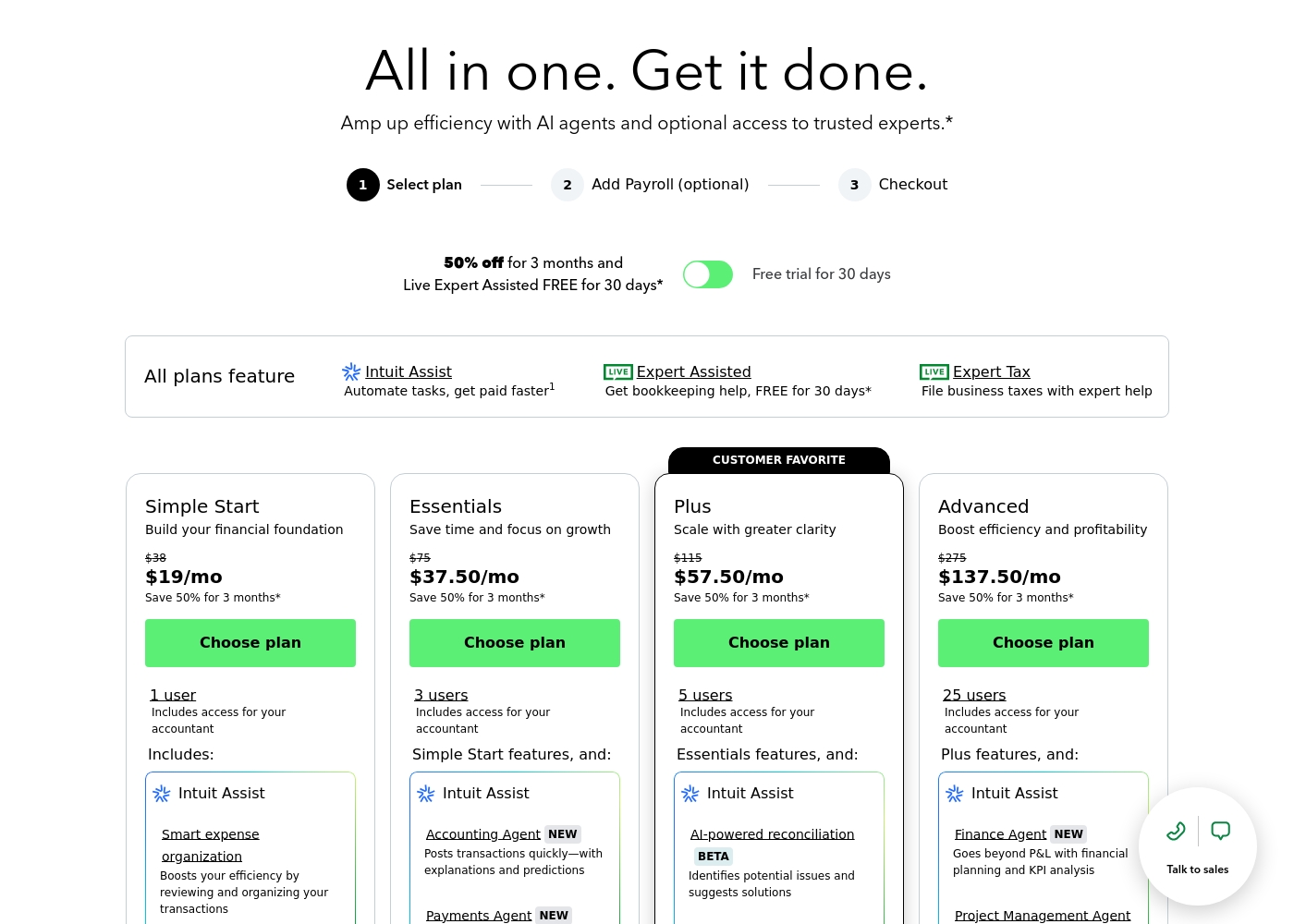
QuickBooks costs between $38 and $275 per month with 4 plans: Simple Start at $38, Essentials at $75, Plus at $115, and Advanced at $275.
Here’s a closer look at what features and capacity are included with each plan.
Simple Start
Price: $38/month (or $19/month for 3 months) Best For: Building your financial foundation Other Features:
- 1 user access
- Includes access for your accountant
- Intuit Assist
- Smart expense organization
- 1 user access
- Includes access for your accountant
- Intuit Assist
- Smart expense organization
- 3 users access
- Simple Start features included
- Accounting Agent NEW
- Payments Agent NEW
- 5 users access
- Essentials features included
- AI-powered reconciliation (BETA)
- 25 users access
- Plus features included
- Finance Agent NEW (Financial planning and KPI analysis)
- Project Management Agent
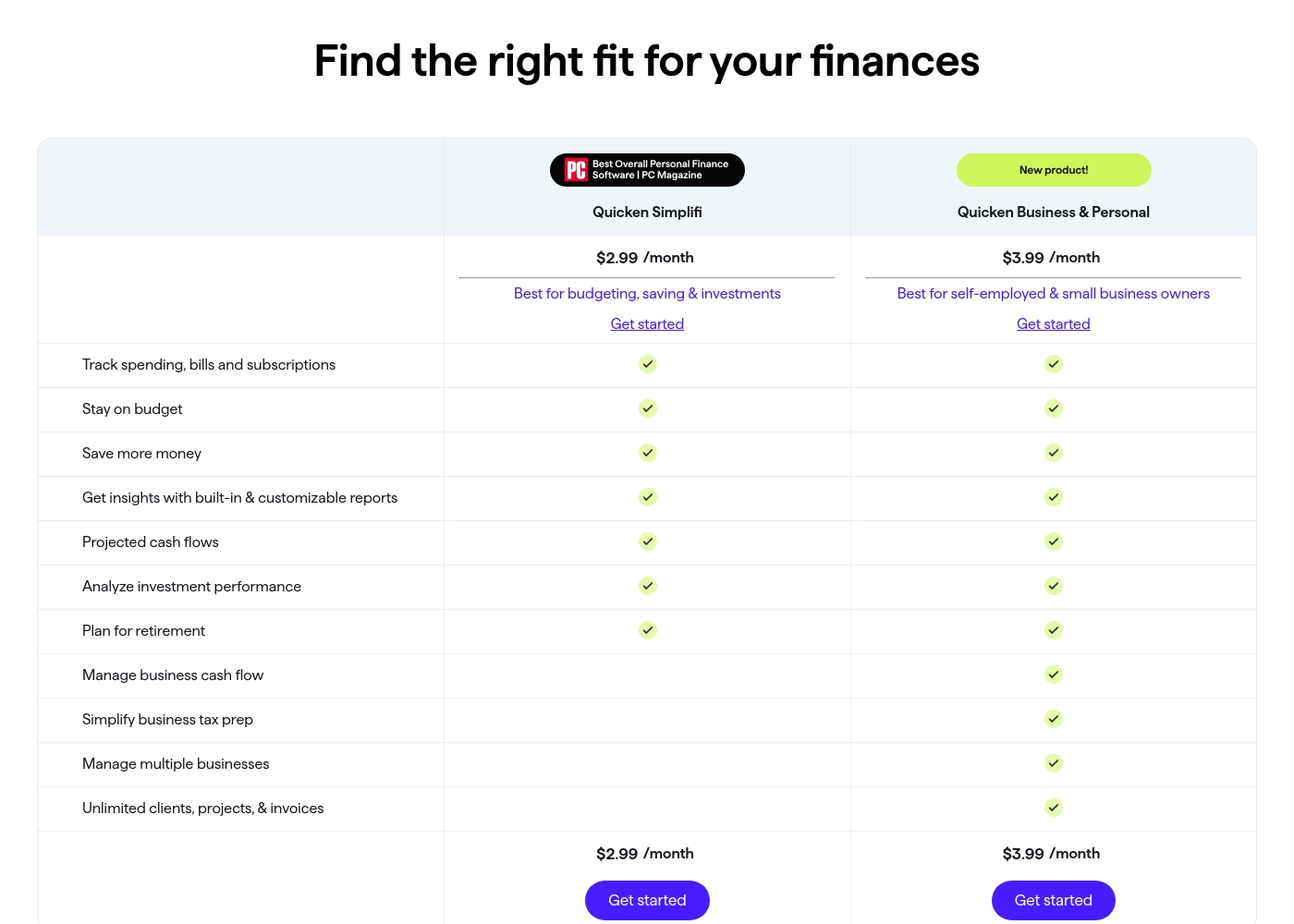
Quicken costs between $2.99 and $5.99 per month (billed annually) with five main plans: Quicken Simplifi at $2.99/month, Classic Deluxe at $2.99/month, Quicken Business & Personal at $3.99/month, Classic Premier at $4.19/month, and Classic Business & Personal at $5.99/month.
Let's look closely at the different subscription options available to help you choose the best fit for your financial goals.
Quicken Simplifi (Mobile Web)
Price: $2.99/month (Billed annually; standard $5.99/month) Best For: Budgeting, saving & investments Refund Policy: 30-day money-back guarantee Other Features:
- Always know what you have left to spend or save
- Get better insights with reports & real-time alerts
- Make informed decisions about your investment portfolio
- Plan for the future with projected cash flows
- Budgeting, saving & investments
- Track spending, bills, and subscriptions
- Projected cash flows
- Analyze investment performance
- Plan for retirement
- Create multiple budgets
- Manage & reduce debt
- Simplify tax time
- Create a secure retirement
- Desktop software with companion apps
- All Simplifi features included
- Manage business cash flow
- Simplify business tax prep (Schedules C, E & F)
- Manage multiple businesses
- Unlimited clients, projects, & invoices
- Best-in-class investing tools
- Built-in tax reports
- Reconcile to the penny
- Track & pay bills in Quicken
- Set budgets, manage debt, create a retirement plan
Pricing Notes
- Quickbooks pricing scales aggressively based on user limits ranging from 1 to 25 users, making it expensive.
- Quicken's low advertised price range requires users to commit to and pay for the annual subscription upfront.
- Quicken explicitly includes a 30-day money-back guarantee, which Quickbooks does not formally state.
- Quickbooks has potential extra costs for ACH transactions if specific monthly allotments are exceeded.
- Quicken is significantly cheaper than Quickbooks for equivalent solo or small business functionality.
Pricing Head-to-Head
User Reviews
User sentiment collected primarily from Trustpilot is overwhelmingly negative, frequently contrasting with the platform’s marketing promises of accuracy and seamless growth. While QuickBooks offers feature depth and personalized experiences, the recurring themes of frustration are significant among users.
Customers consistently report atrocious and unhelpful customer service, often involving extremely long holding times, multiple transfers, and conflicting information without resolution. Reliability is a major concern; users describe the software as unstable, prone to costly accounting errors, and sometimes necessitating external accountant intervention.
I spent almost three months migrating from the Desktop to the Online version. The transition was supposed to be easy, but I had constant issues. Customer support was unknowledgeable and unable to assist me thoroughly.
Quicken maintains a devoted user base, with many customers reporting continuous use for over 20 or 30 years. Reviewers across both Trustpilot and Capterra consistently praise Quicken’s ability to serve as a comprehensive hub for managing budgets, investments, and tracking historical data.
Many find it indispensable for reconciling accounts and managing complex personal or small business finances. Users appreciate having all their critical information in one accessible place.
I’ve been using Quicken since the late 1980s, and it’s become essential for managing my complex finances. It’s a great product that continues to fulfill its purpose. I rely on it to keep my portfolio organized and accessible.
Our Verdict
Quickbooks and Quicken serve completely different masters, so choosing is quite simple. The key deciding factor is whether you need dedicated business accounting or complex personal finance management. Quickbooks is built for teams and scalable business growth. Quicken is engineered for personal wealth centralization and deep spending analysis. Quickbooks’ superpower is business scalability and powerful transactional automation. The software supports teams up to 25 users instantly. Quickbooks integrates advanced AI agents to post transactions quickly and analyze crucial KPIs. If you run a growing business with employees, Quickbooks provides the structured accounting you need. Quicken excels at managing complex financial lives, investments, and linked business tracking. Quicken offers unparalleled depth for personal budgeting and advanced investment reporting tools. Importantly, Quicken is far more affordable, starting under $6 per month when billed annually. If your primary goal involves professional accounting, payroll, and scaling staff access, choose Quickbooks. If you are a solo entrepreneur or individual needing deep investment analysis and integrated tax preparation (Schedules C, E), Quicken is your clear pick. Don't use Quickbooks for simple household budgets; it is usually unnecessary and too expensive. Both Quickbooks and Quicken suffer from notorious customer support issues according to independent user reviews. However, Quicken provides better value and reliability for personal finance users. For professional business bookkeeping and team growth, Quickbooks is the expensive industry standard you will eventually need.
Frequently Asked Questions
Which is better for small business accounting: Quickbooks or Quicken?
For dedicated team accounting, payroll, and scalability, Quickbooks is the industry standard. Quicken Business & Personal is better suited for solo entrepreneurs needing basic invoicing and integrated tax form support. Quickbooks is required if you plan to hire staff or accountants.
Does Quickbooks offer investment tracking like Quicken?
No. Quicken Classic Premier offers best-in-class investment analysis, capital gains estimators, and Morningstar reports. Quickbooks is purely an accounting tool and does not provide detailed personal investment tracking.
Why is Quickbooks so much more expensive than Quicken?
Quickbooks pricing is scaled to support team collaboration up to 25 users and proprietary AI features. Quicken is designed as a single-user tool primarily focused on personal finance budgeting. Quicken’s highest plan is still only $5.99/month.
Can I store my data locally using Quickbooks or Quicken?
Quicken offers 'Classic' desktop versions that allow you to store your data locally on your computer. Quickbooks is an entirely cloud-based product, meaning all your sensitive financial data is stored online.
Which software provides better tax preparation tools?
Quicken’s Business and Premier plans include built-in reports for specific tax schedules like C, E, F, A, and D. While Quickbooks assists with P&L reports, Quicken simplifies integrated personal and business tax filing much better.
Do both Quickbooks and Quicken offer a free trial period?
Yes. Quickbooks offers a 30-day free trial for its tiered subscription plans. Quicken offers a 30-day money-back guarantee, allowing you risk-free testing for a full month.
Ready to Choose?
Both tools have their strengths. Choose based on your specific needs.