NetSuite vs Quicken
NetSuite and Quicken address fundamentally different financial audiences and needs. Quicken manages personal budgets and essential small business cash flow. NetSuite is a massive AI-driven enterprise resource planning system. Your current business size will be the key factor in this comparison.
Best for: Enterprise organizations with 500+ employees, Companies focused on unified AI Cloud ERP deployment
Best for: Solo entrepreneurs needing integrated personal and business finance, Experienced investors requiring detailed performance Morningstar analysis
Powerful ERP, Difficult Implementation, High Cost.
We recognize NetSuite’s position as a dominant AI Cloud ERP, capable of handling complex integrations and large-scale data requirements for over 43,000 customers. Overall, the significant costs, mandatory reliance on outside consultants, and consistent reports of poor customer support and outdated usability prevent us from recommending this solution without major reservations.
Pros
- Comprehensive AI Cloud ERP designed for scalable, complex enterprises.
- Provides a single source of truth across ERP, CRM, and ecommerce data.
- Proven market adoption with over 43,000 current customers.
- Powered by a robust and powerful Oracle database backend.
Cons
- Extremely high costs and aggressive, unpredictable annual renewal price hikes.
- Outdated, bulky, and unintuitive user interface (UI).
- Customer support is frequently non-existent, unresponsive, or rude.
- Difficult integration API throws frequent, non-specific errors.
Unrivaled depth matched with modern friction.
We find Quicken remains an incredibly powerful, detailed solution suitable for complex personal finance tracking, investment analysis, and integrated business needs. While the functional depth is unmatched for traditional desktop users, we noted widespread concerns regarding software stability, problematic bank data feeds, and challenges related to the mandatory subscription pivot. Overall, the persistent performance issues prevent us from providing a top reliability score.
Pros
- Unmatched functional depth for complex personal finances, investing, and business.
- Reliable tracking and analysis for budgets, historical expenses, and investments.
- Offers comprehensive reporting, including built-in tax schedules (C, E, F).
- Ability to securely track loans, credit cards, and multiple accounts in one place.
Cons
- The mandatory subscription model is a point of frustration for long-time users.
- Frequent reports of unreliable bank and broker data feeds (missing or incorrect transactions).
- Users report software instability, glitchiness, and slow performance on updates.
- Customer support is frequently cited as being unhelpful or unresponsive.
AboutNetSuite
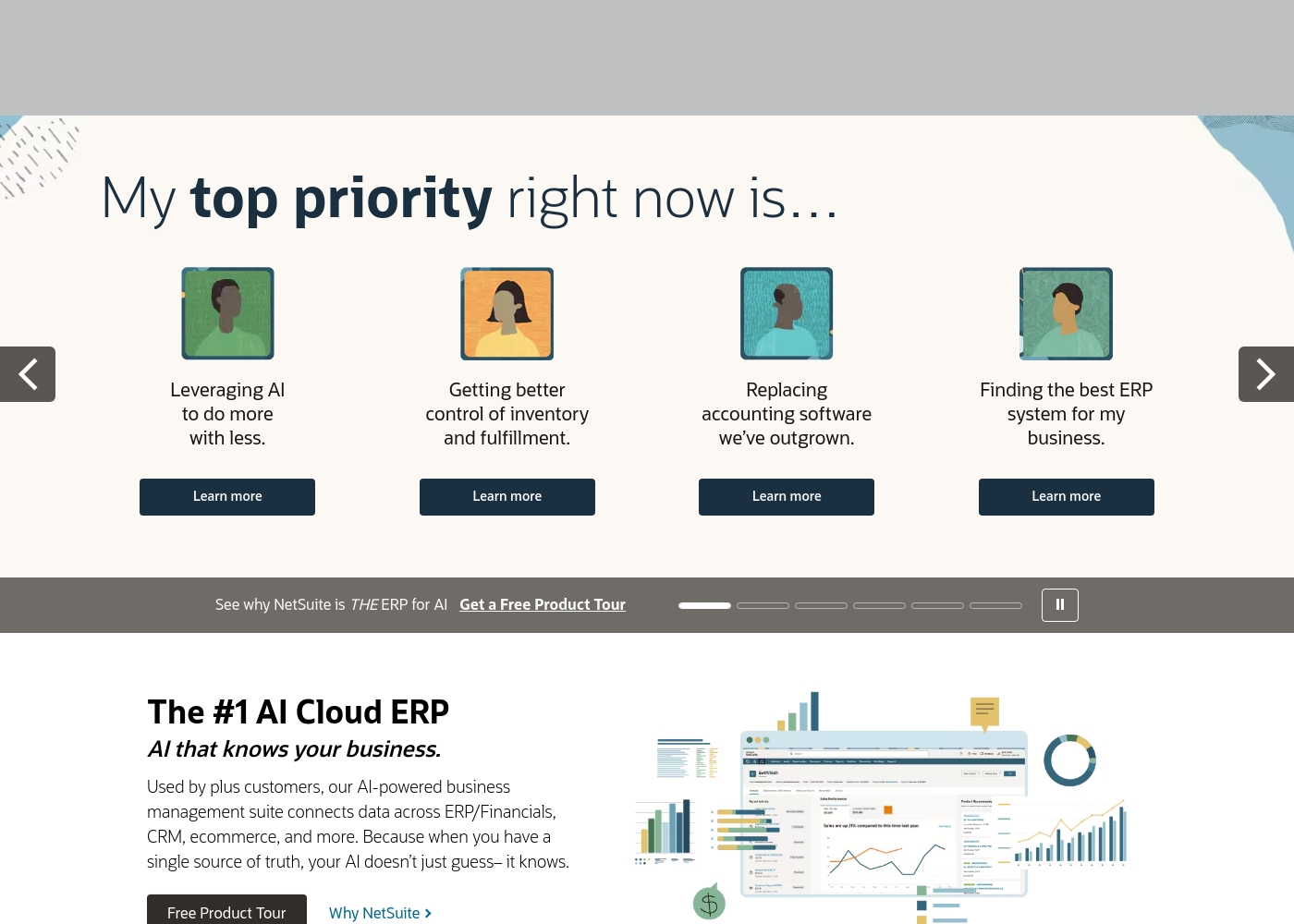
NetSuite is clearly positioned as an AI-powered business management suite. It's known widely as the #1 AI Cloud ERP. This powerful suite is designed to connect key functional areas of your enterprise.
It expertly handles everything from ERP/Financials to CRM and ecommerce data. Over 43,000 customers rely on these integrated products to help fuel their essential growth. 💡
AboutQuicken
Quicken is a trusted, comprehensive platform designed to integrate all your financial information into one secure place. For over 40 years, this #1 best-selling finance app has helped millions gain clarity over their budgets, investments, and business cash flow. You can select the specific solution that meets your needs, whether you are focused on simple savings and budgeting (Quicken Simplifi), or require specialized tools for invoicing and tax preparation (Quicken Business & Personal). 💡
If organizing essential documents like birth certificates and estate plans is your priority, Quicken LifeHub provides step-by-step guidance. Consumers looking for the classic desktop experience can still choose Quicken Classic, available on Windows and Mac, which stores your data locally.
Highlights
Feature Comparison
Features Overview
We highlight the main differences and pick a winner for each feature.
Scale & Scope
NetSuite handles enterprise complexity; Quicken focuses on personal wallets.
NetSuite is the #1 AI Cloud ERP for global enterprise management. It handles unified data across all major business functions seamlessly. Quicken focuses on individuals and small businesses up to 10 entities. The scale disparity is huge; NetSuite serves massive organizations. Millions of people trust Quicken for daily personal financial tracking.
Pricing Model
Quicken uses low, transparent subscriptions; NetSuite requires custom, expensive quotes.
NetSuite pricing is complex, undisclosed, and requires a tailored enterprise quote. It is known for extremely high costs and aggressive renewal practices. Quicken is transparent, costing only $2.99 to $5.99 per month annually. Quicken offers a clear 30-day money-back guarantee for risk-free testing. NetSuite only offers a Free Product Tour instead of a trial.
Core Functionality
NetSuite integrates business ERP, CRM, and Ecommerce; Quicken focuses on budget and investment analysis.
NetSuite creates a single source of truth for all enterprise data points. This unified system fuels its smart, informed AI recommendations. Quicken excels at connecting to over 14,000 banks for real-time tracking. Quicken provides detailed personal budgeting tools and sophisticated investment analysis. NetSuite does not offer these specific consumer-grade financial tracking functions.
AI Integration
NetSuite uses deep AI for optimization; Quicken uses data for simple cash flow tracking.
NetSuite utilizes advanced AI that 'knows your business' intimately. This intelligence is based on unified ERP and CRM data. NetSuite's AI aims to help large companies 'do more with less' and reach efficiency goals. Quicken manages data to track cash flow and calculate budgets for individuals. Quicken delivers simpler projections like 'what if' scenarios for future planning.
Small Business Tools
Quicken offers ready-made tax and invoicing tools; NetSuite requires custom ERP setup for business functions.
Quicken Business & Personal plans include invoicing and tax reports like Schedule C, E, and F. You can manage up to 10 business entities easily with Quicken. NetSuite focuses on large-scale financial management and heavy process automation. NetSuite's massive feature set is significant overkill for a small business or freelancer. Quicken is the clear choice for sole proprietors needing integrated finance tracking.
User Experience
NetSuite's UI is widely criticized as outdated and bulky; Quicken is functional and more modern.
User reviews consistently criticize NetSuite's interface as unintuitive and slow. The UI reportedly feels decades outdated and complex to navigate. Quicken's modern Simplifi app is designed for easy navigation and mobile use. However, Quicken desktop users complain about glitches and slow performance issues. Quicken's setup is generally smoother and less consultant-dependent than NetSuite’s.
Customer Support
Both applications receive heavily negative reviews for low quality support.
NetSuite users report support is frequently non-existent or aggressively rude, despite high costs. Urgent issues often go unanswered at NetSuite, harming operations significantly. Quicken users report support is unhelpful, slow, and focused only on known technical glitches. For the steep enterprise price, NetSuite’s poor support reputation is a major liability. Quicken offers standard support included in its low-cost plans.
Data Reliability
NetSuite relies on strong internal data integrity; Quicken often struggles with external bank feed consistency.
NetSuite's core benefit is establishing a single source of trustworthy internal data. This ensures high-quality decision-making for enterprise reporting. Quicken users frequently report unreliable bank and broker data feeds. Transactions are often missing or categorized incorrectly in Quicken. This instability forces Quicken users to perform repetitive manual corrections often.
NetSuite operates primarily on a customized enterprise model. Because it is a powerful AI Cloud ERP solution, you won't find standard, predefined pricing tiers. Pricing requires a direct quote based on your specific business size and needs.
Custom ERP Implementation
Best For: Businesses needing a scalable, integrated ERP solution or replacing outgrown accounting software Other Features:
- Connects data across ERP/Financials, CRM, and ecommerce
- AI-powered business management suite
- Used by 43,000+ customers
- Provides a single source of truth
This is the right choice if you need a comprehensive system that leverages AI to connect all your data. It's designed to help growing companies move past disparate systems and gain better control over operations like inventory and fulfillment.
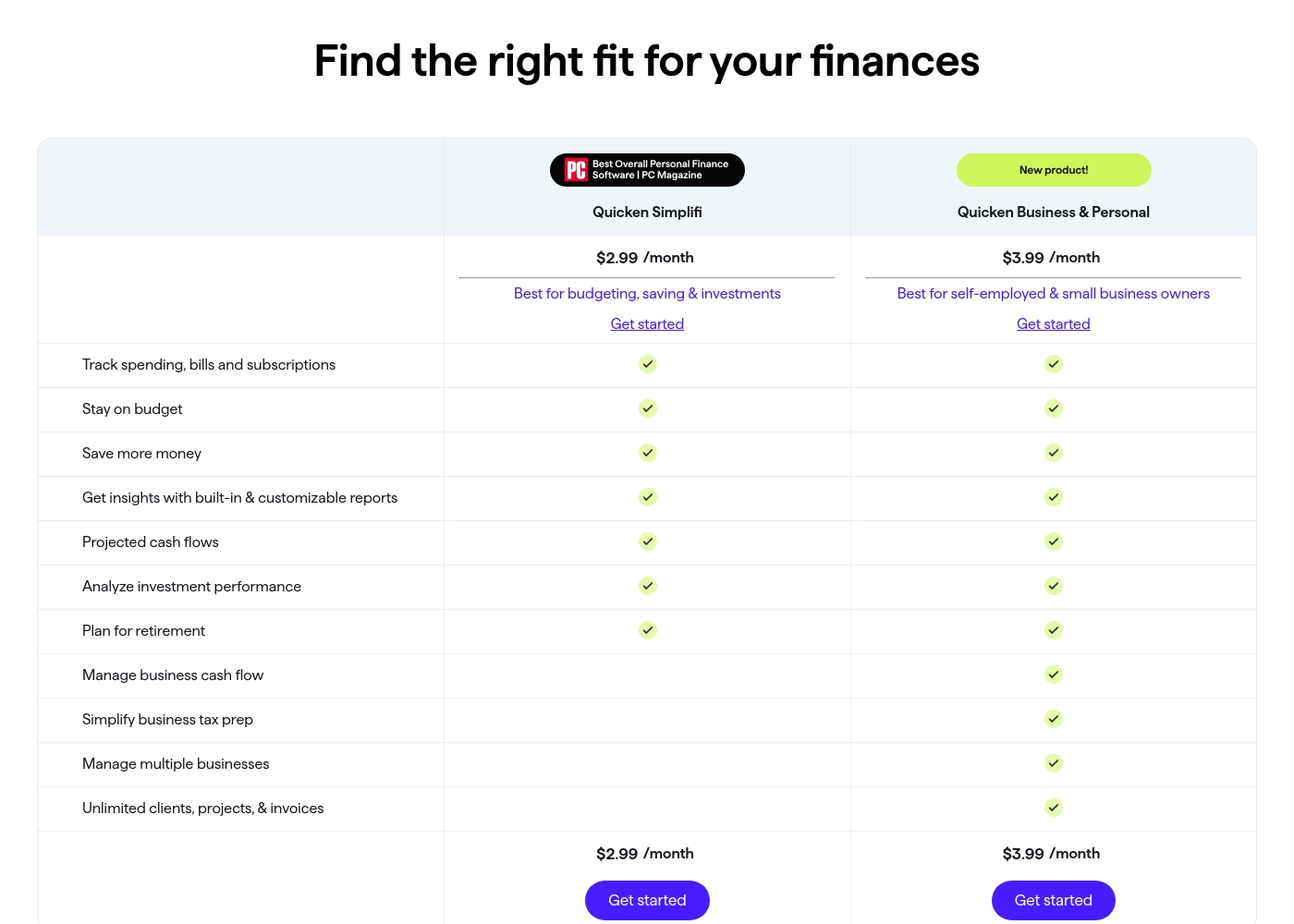
Quicken costs between $2.99 and $5.99 per month (billed annually) with five main plans: Quicken Simplifi at $2.99/month, Classic Deluxe at $2.99/month, Quicken Business & Personal at $3.99/month, Classic Premier at $4.19/month, and Classic Business & Personal at $5.99/month.
Let's look closely at the different subscription options available to help you choose the best fit for your financial goals.
Quicken Simplifi (Mobile Web)
Price: $2.99/month (Billed annually; standard $5.99/month) Best For: Budgeting, saving & investments Refund Policy: 30-day money-back guarantee Other Features:
- Always know what you have left to spend or save
- Get better insights with reports & real-time alerts
- Make informed decisions about your investment portfolio
- Plan for the future with projected cash flows
- Budgeting, saving & investments
- Track spending, bills, and subscriptions
- Projected cash flows
- Analyze investment performance
- Plan for retirement
- Create multiple budgets
- Manage & reduce debt
- Simplify tax time
- Create a secure retirement
- Desktop software with companion apps
- All Simplifi features included
- Manage business cash flow
- Simplify business tax prep (Schedules C, E & F)
- Manage multiple businesses
- Unlimited clients, projects, & invoices
- Best-in-class investing tools
- Built-in tax reports
- Reconcile to the penny
- Track & pay bills in Quicken
- Set budgets, manage debt, create a retirement plan
Pricing Notes
- NetSuite uses a highly customized enterprise subscription; pricing requires contacting sales directly.
- NetSuite is known for having extremely high overall costs and aggressive annual renewal price hikes.
- Quicken utilizes a low-cost, fixed subscription model based on annual billing.
- Quicken offers a strong 30-day money-back guarantee for risk-free evaluation.
- Quicken offers clear public pricing, while NetSuite pricing is completely hidden from the public.
Pricing Head-to-Head
User Reviews
User reviews for NetSuite present a stark contrast to its marketed position, frequently highlighting issues with pricing, support, and usability. Many users describe the system as unintuitive, bulky, and slow, noting that the interface feels decades outdated; one reviewer suggested the UI looks like it is from the 1980s.
This complexity often necessitates hiring expensive consultants, even for routine tasks. Pricing is a major pain point; users report that the software is significantly more expensive than competitors, with costs frequently reaching tens or hundreds of thousands annually, and aggressive price increases during renewals are common.
I wasted thirty minutes getting the runaround about pricing. When they finally gave a quote, the rep was extremely rude and said my business wasn't a 'good fit' due to the high starting price. Poor customer service is unacceptable for an enterprise product like this.
Quicken maintains a devoted user base, with many customers reporting continuous use for over 20 or 30 years. Reviewers across both Trustpilot and Capterra consistently praise Quicken’s ability to serve as a comprehensive hub for managing budgets, investments, and tracking historical data.
Many find it indispensable for reconciling accounts and managing complex personal or small business finances. Users appreciate having all their critical information in one accessible place.
I’ve been using Quicken since the late 1980s, and it’s become essential for managing my complex finances. It’s a great product that continues to fulfill its purpose. I rely on it to keep my portfolio organized and accessible.
Our Verdict
This comparison is unusual as these tools solve completely different problems. NetSuite is for massive corporations; Quicken is for consumers and small business owners. Don't waste time comparing them unless you are on the cusp of enterprise growth. Your company size and budget instantly make the decision for you. NetSuite’s superpower is its deep, integrated AI Cloud ERP functionality. It creates a critical, unified single source of truth for critical business data. NetSuite is designed for extreme scalability and comprehensive multi-functional management. However, NetSuite pricing is extremely high, and users consistently report unresponsive, abrasive customer support. Quicken excels at offering incredibly detailed financial oversight for a very low subscription cost. It connects robustly to 14,000+ banks for automatic transaction tracking. Quicken's business plans simplify tax time using built-in Schedule C reports. This software is unparalleled for personal finance depth, appreciated by 20 million users. The budget is the key deciding factor between NetSuite and Quicken. If you are a freelancer or a family, Quicken is perfect and costs under $6 per month. If you run a multi-national corporation, NetSuite is the only comprehensive and scalable choice for ERP. Choose NetSuite if your business needs a massive, custom AI Cloud ERP platform. Choose Quicken if you need to manage your personal finances, investments, or run a small side business for a low monthly fee.
Frequently Asked Questions
Which software is better for small business owners: NetSuite or Quicken?
Quicken is vastly better for small business owners and freelancers. Quicken Business & Personal plans include invoicing tools and built-in tax reports. NetSuite's complex ERP features are massive overkill for small operations. You can manage up to 10 entities easily with Quicken.
How do the pricing structures of NetSuite and Quicken compare?
Quicken uses low, transparent subscription pricing, ranging from $2.99 to $5.99 monthly. NetSuite uses a customized enterprise model that is extremely expensive. NetSuite requires a direct quote, and users report aggressive annual price increases.
Does NetSuite offer personal budgeting like Quicken?
No, NetSuite is an enterprise resource planning software platform. It does not offer personal budgeting tools, debt reduction trackers, or investment analysis like Quicken. Quicken is specifically designed for comprehensive personal financial management.
Can Quicken handle the needs of an enterprise organization?
No, Quicken is not designed for enterprise-level resource planning. It lacks core needs like deep CRM, supply chain management, and Ecommerce integration. Only NetSuite has the scalability required for a national or global enterprise.
Which tool has better customer support when issues arise?
User reviews indicate both platforms receive heavy criticism for support quality. NetSuite users describe support as rude and unresponsive despite the high cost. Quicken support is also slow, but it is available free via phone and chat on all plans.
Where can I store my sensitive financial data in Quicken versus NetSuite?
NetSuite stores all data securely in the cloud under its enterprise architecture. Quicken Classic desktop plans allow you to store your financial data locally on your computer. Quicken Simplifi is a cloud-based application.
Ready to Choose?
Both tools have their strengths. Choose based on your specific needs.