Quickbooks vs Zoho Books
Quickbooks and Zoho Books are the two giants of small business accounting, but they serve different users. Quickbooks emphasizes deep financial automation and proprietary AI prowess. Zoho Books focuses on affordability, reliability, and powerful integration within its ecosystem. Your final choice depends entirely on your need for specialized features versus simple, stable value.
Best for: Growing teams needing specialized AI agents for finance and project costing, Organizations prioritizing advanced KPI analysis and budgeting tools
Best for: Solo entrepreneurs and small teams requiring a free entry point, Businesses already operating within or planning to use the broader Zoho ecosystem
Power, Precision, and Painful Support.
We observe that QuickBooks offers market-leading feature depth and scalability, catering strongly to diverse business needs and growth stages with its tiered plans and AI tools. Overall, however, the severe and repeated reports of poor customer support and reliability issues necessitate caution, significantly hindering its operational effectiveness for many users.
Pros
- Scalable plans supporting solo operations up to 25 users.
- Customized experience based on specific business size and needs.
- Integration of advanced AI tools like Intuit Assist and Accounting Agents.
- Includes a 30-day free trial period for risk-free testing.
Cons
- Customer service is consistently reported as inefficient and unhelpful.
- Aggressive and frequent increases in subscription pricing.
- Software is frequently unstable, unreliable, and prone to accounting errors.
- Constant, unplanned user interface updates frustrate long-time users.
Scalable Accounting with Clear Value.
We find that Zoho Books provides a comprehensive and budget-friendly alternative to complex accounting systems. The scalability, permanent free tier, and full financial management capabilities are major strengths. Overall, this is a top recommendation for growing businesses needing feature-rich accounting without high legacy costs.
Pros
- Permanent Free plan available for micro-businesses.
- Highly scalable pricing structure with competitive annual rates.
- Cloud-based, comprehensive solution covering invoicing, inventory, and expenses.
- User-friendly interface simplifies daily financial tasks.
Cons
- Severe MFA reset issues reported across the Zoho suite can lock users out of accounts.
- Mixed reports regarding customer service responsiveness.
- All plans impose explicit annual limits on invoices and expenses.
- External accounting-specific feedback on accuracy and reliability is limited.
AboutQuickbooks
QuickBooks is a system designed to support modern businesses, regardless of their size. It’s built to personalize the site experience using simple criteria, like how many employees you have. ✨
Whether you are running a large team or operate as "Just me," the system aims to tailor features specifically to your needs. This focus on customization helps pave the way for successful business growth.
AboutZoho Books
Zoho Books is comprehensive, cloud-based accounting software built specifically for growing businesses. It helps you manage your entire financial workflow seamlessly, integrating key functions into one place. You can handle everything from tracking expenses to controlling inventory and processing invoices. Because it’s available through mobile apps for iOS and Android, you can easily manage your books on the go. ✅
Highlights
Feature Comparison
Features Overview
We highlight the main differences and pick a winner for each feature.
Pricing & Value
Zoho Books offers superior value, especially with its free plan entry point. Quickbooks is consistently more expensive.
Quickbooks starts high at $38/month and aggressively scales to $275/month for the top tier. User reports highlight aggressive, frequent price increases, diminishing the value of Quickbooks over time. Zoho Books offers a robust Free plan, perfect for solo operations on a budget. Paid tiers scale affordably and predictably through inexpensive user add-ons. Zoho Books is clearly the budget champion, providing rich features without the heavy cost burden. This makes Zoho Books the better long-term financial decision for most scaling businesses.
Scalability & User Limits
Zoho Books allows unlimited users affordably; Quickbooks caps users at 25 seats.
Quickbooks pricing is structured around strict user limits, ranging from 1 user (Simple Start) up to only 25 users (Advanced). Scaling within Quickbooks requires expensive jumps between fixed tiers. Zoho Books is priced per organization, allowing you to add extra user seats for a low fee of $3 per month. For businesses planning to grow their internal finance team, Zoho Books provides much more cost-effective scalability. Quickbooks’ user caps can become a restrictive barrier for large, complex organizations.
Advanced AI/Automation
Quickbooks leads with powerful, specialized proprietary AI; Zoho Books focuses on standard workflows.
Quickbooks utilizes specialized AI agents, including the new Finance Agent for high-level KPI analysis. All Quickbooks users benefit from baseline Intuit Assist features as standard tools. The popular Quickbooks Plus plan also includes AI-powered reconciliation in its current beta release. Zoho Books offers general automation settings like customized workflows, emails, and alerts. Quickbooks offers deeper, specialized financial intelligence that Zoho Books does not currently match, especially for complex analysis.
Ecosystem Integration
Zoho Books integrates natively and deeply within its own comprehensive suite. Quickbooks offers broad third-party connections.
Zoho Books is designed to work seamlessly within the wider Zoho suite, including powerful CRM integration. This provides a unified data environment that promotes team consistency and reduces duplicated efforts. Quickbooks integrates with a massive library of over 300 third-party applications. If you rely on the Zoho platform, the native connection with Zoho Books gives you massive workflow advantages already in place. If your business is locked into the Zoho ecosystem, Zoho Books is the undisputed champion.
Customer Support Quality
Zoho Books offers good support; Quickbooks users consistently report atrocious, unhelpful customer service.
Quickbooks user reviews consistently cite atrocious and unhelpful customer service across multiple platforms. Reports mention extremely long hold times and unknowledgeable staff resulting in unresolved issues. Zoho Books generally receives positive feedback, although some users note that support responses can occasionally be slow. The difficulty of canceling a Quickbooks subscription is also widely cited as a major frustration. Zoho Books seems reliable when things go wrong, whereas Quickbooks often fails its users during critical moments.
Inventory & Projects
Zoho Books offers integrated inventory and comprehensive budgeting; Quickbooks focuses primarily on project accounting costs.
Zoho Books provides comprehensive inventory control, including stock updates and automatic reorder alerts. It also manages project budgets, task allocation, client billing, and real-time profitability clearly. Quickbooks offers the Project Management Agent only in its top-tier plan for cost tracking. For operations needing full physical inventory tracking or detailed job profitability insights, Zoho Books is clearly the more complete solution. Zoho Books provides end-to-end functionality in a single place.
Multi-Currency Management
Zoho Books explicitly supports global transactions, offering multi-currency features. Quickbooks does not list these features.
Zoho Books explicitly supports multi-currency transactions with real-time exchange rates for global workflows. This feature is crucial for businesses with international customers or suppliers using multiple currencies. The Quickbooks provided data does not explicitly state its multi-currency capabilities. Zoho Books is clearly the safer choice for businesses operating across international borders and dealing in different currencies. Quickbooks focuses more on deep US-centric financial control and reporting.
Onboarding & Migration
Quickbooks tailors the UI experience; Zoho Books offers free, seamless migration assistance.
Quickbooks provides tailored onboarding by customizing the UI experience based on your business size during setup. You can be fully operational in Quickbooks within minutes after syncing transactions. Zoho Books supports seamless migration from other software solutions, including free migration assistance. If you are switching from an older system, Zoho Books makes the data transition easier and less risky. Both tools ensure quick initial progress, but they solve different startup problems.
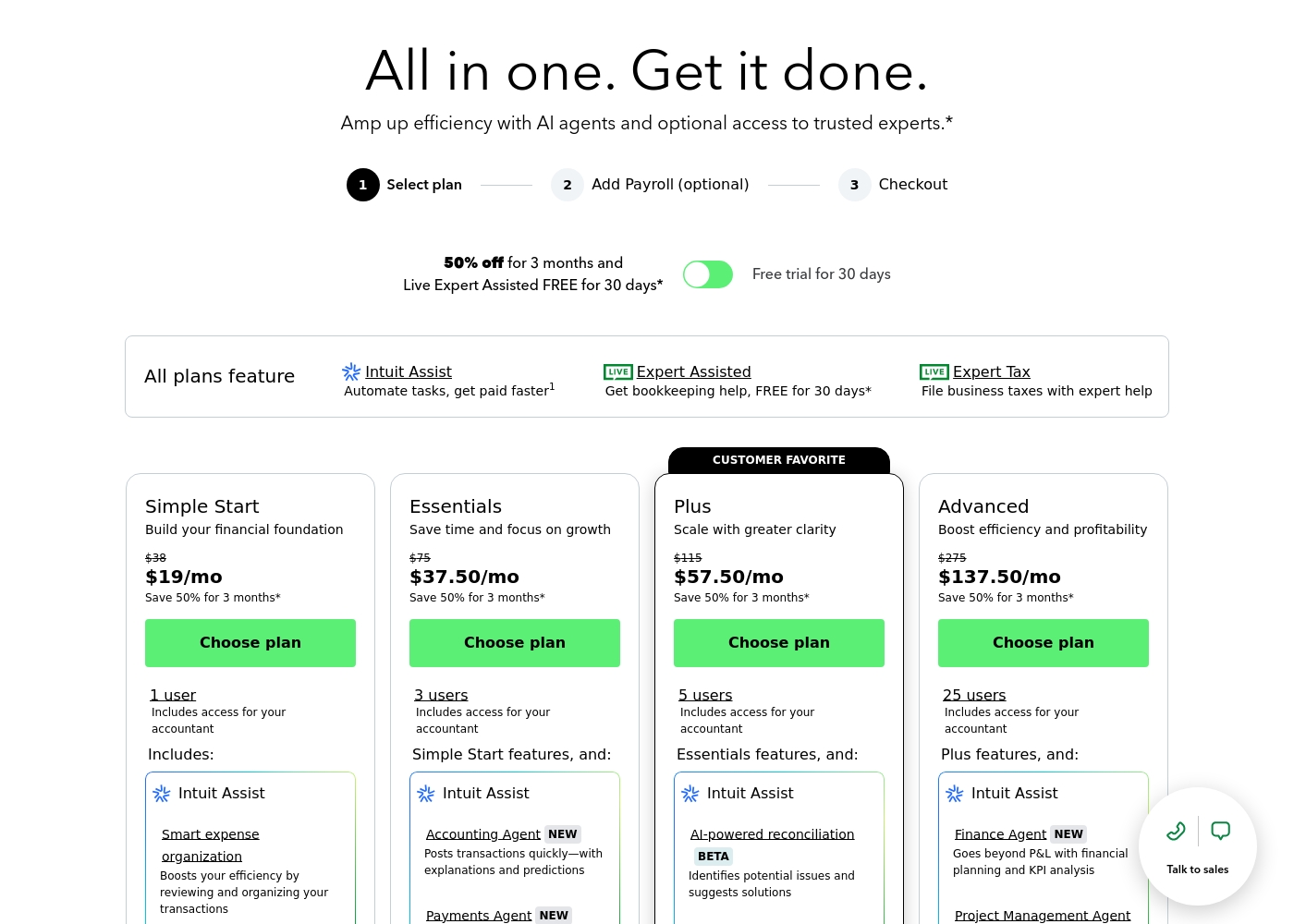
QuickBooks costs between $38 and $275 per month with 4 plans: Simple Start at $38, Essentials at $75, Plus at $115, and Advanced at $275.
Here’s a closer look at what features and capacity are included with each plan.
Simple Start
Price: $38/month (or $19/month for 3 months) Best For: Building your financial foundation Other Features:
- 1 user access
- Includes access for your accountant
- Intuit Assist
- Smart expense organization
- 1 user access
- Includes access for your accountant
- Intuit Assist
- Smart expense organization
- 3 users access
- Simple Start features included
- Accounting Agent NEW
- Payments Agent NEW
- 5 users access
- Essentials features included
- AI-powered reconciliation (BETA)
- 25 users access
- Plus features included
- Finance Agent NEW (Financial planning and KPI analysis)
- Project Management Agent
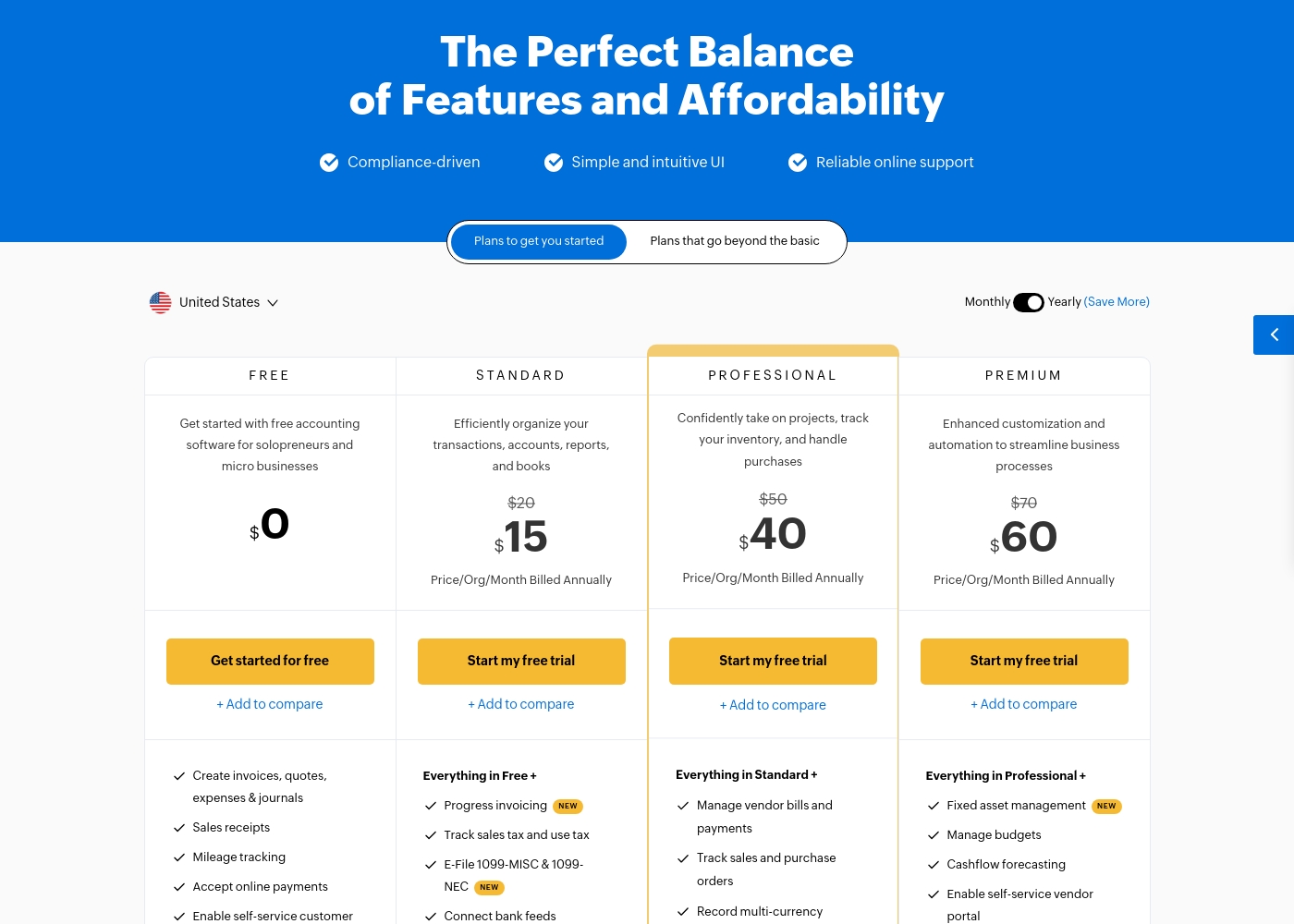
Zoho Books costs between $0 and $240 per month (billed annually) with six plans: FREE at $0, STANDARD at $15, PROFESSIONAL at $40, PREMIUM at $60, ELITE at $120, and ULTIMATE at $240.
Zoho Books offers plans built to grow with your company, from sole proprietors to large teams. Let's look closely at what is included in each option.
FREE
Price: $0.00 Best For: Solopreneurs and micro businesses (up to $50K annual revenue) Other Features:
- Create invoices, quotes, expenses, and journals
- Process sales receipts and track mileage
- Enable self-service customer portal
- Email Support (1 User + 1 Accountant)
- Create invoices, quotes, expenses & journals
- Sales receipts
- Mileage tracking
- Accept online payments
- Enable self-service customer portal
- Progress invoicing
- Track sales tax and use tax
- E-File 1099-MISC & 1099-NEC
- Connect bank feeds
- Generate divisional reports with reporting tags
- Manage vendor bills and payments
- Track sales and purchase orders
- Record multi-currency transactions
- Bill timesheets
- Project profitability
- Fixed asset management
- Manage budgets
- Cashflow forecasting
- Enable self-service vendor portal
- Set up custom domain
Pricing Notes
- Zoho Books provides a genuinely free, functional plan for beginners, a feature Quickbooks lacks entirely.
- Quickbooks pricing increases aggressively, leading to user complaints about poor value for money and unexpected hikes.
- Zoho Books scales affordably by offering user add-ons for only $3 per user per month.
- Quickbooks maxes out at 25 users; Zoho Books offers virtually unlimited user scalability using add-ons.
- The Quickbooks free trial is 30 days, while the Zoho Books trial is 14 days.
Pricing Head-to-Head
User Reviews
User sentiment collected primarily from Trustpilot is overwhelmingly negative, frequently contrasting with the platform’s marketing promises of accuracy and seamless growth. While QuickBooks offers feature depth and personalized experiences, the recurring themes of frustration are significant among users.
Customers consistently report atrocious and unhelpful customer service, often involving extremely long holding times, multiple transfers, and conflicting information without resolution. Reliability is a major concern; users describe the software as unstable, prone to costly accounting errors, and sometimes necessitating external accountant intervention.
I spent almost three months migrating from the Desktop to the Online version. The transition was supposed to be easy, but I had constant issues. Customer support was unknowledgeable and unable to assist me thoroughly.
While Zoho maintains an overall positive rating of 4.1/5 across thousands of reviews, most specific feedback provided recently centers on the Zoho Social tool, not the Books accounting software. Regardless, the consensus affirms Zoho’s commitment to excellent ease of use and high functional value.
Users consistently praise the platform for its intuitive interface, which streamlines workflows and simplifies multi-account management. Many appreciate that Zoho provides advanced functionality for a fraction of the cost of competitors, representing significant value for startups and small teams.
This platform offers huge functionality without the huge price tag. I used managers that cost ten times more, but Zoho offers the same key features and is incredibly user-friendly. It’s excellent value.
Our Verdict
This comparison is a clear clash between overwhelming features and real-world execution. Quickbooks offers specific, high-tech tools but delivers poor user satisfaction. Zoho Books is the clear market winner for reliability and overall tangible value. For most small businesses seeking stability, Zoho Books is the smarter, less stressful financial option. Quickbooks excels at providing specialized, high-end financial control and automation. Its proprietary AI agents deliver deep analysis for KPIs and complex project profitability insights. If your business desperately needs these specialized tools and can tolerate the high price and service problems, Quickbooks delivers. Zoho Books’ strength is its accessibility, integration, and user-centric affordability. It offers a free plan, cheap user scaling, and native inventory features, providing better peace of mind. Zoho Books integrates perfectly if you already use other Zoho applications, ensuring unified data across the organization. The deciding factor for Quickbooks versus Zoho Books is whether you prioritize specialized, costly features or guaranteed seamless execution and support. Choose Zoho Books if you are budget-conscious, manage multiple entities, or just require broad stability and superior customer reliability. Quickbooks is only advisable if your business critically needs its specific Finance or Project Management AI Agents and no other tool will suffice.
Frequently Asked Questions
Which is better for small teams: Quickbooks or Zoho Books?
Zoho Books offers much better value and scaling for small teams. The Zoho Books Free plan is ideal for solo users, with extra users only costing $3/month. Quickbooks' entry-level plan starts at $38/month and limits you to one user.
Does Zoho Books have features that Quickbooks lacks?
Yes, Zoho Books explicitly provides multi-currency support with real-time exchange rates, crucial for global businesses. It also features integrated inventory management and free migration assistance. Quickbooks does not explicitly list these features in its core offering.
Is Quickbooks' high price justified by its features?
Quickbooks offers unique, specialized AI tools like the Finance Agent for high-level analysis. However, its high price causes many Quickbooks users to complain about poor value, especially given the notoriously bad customer service and software instability.
Can I manage multi-currency transactions with both Quickbooks and Zoho Books?
Zoho Books explicitly supports multi-currency and real-time exchange rates, making international transactions easy. Quickbooks’ basic plans do not explicitly guarantee this crucial capability needed by global companies.
Which software has better customer support?
Zoho Books has generally reliable customer support based on positive user sentiment. Quickbooks is widely criticized in reviews for having atrocious, unhelpful, and difficult-to-reach customer service staff.
Which tool is better for expanding teams?
Zoho Books is better for expanding teams because you add users for a low fixed cost of $3 per month. Quickbooks forces you into expensive plan upgrades when you need more than 5 or 25 users.
Ready to Choose?
Both tools have their strengths. Choose based on your specific needs.