NetSuite vs Quickbooks
NetSuite and Quickbooks handle business financial management very differently. They target dramatically different stages of business growth and complexity. NetSuite is built for massive, established enterprises; Quickbooks is perfect for startups and scaling SMBs.
Best for: Enterprise organizations with 50+ users and complex global operations., Companies needing to unify ERP, CRM, and Ecommerce data into one system.
Best for: Solo entrepreneurs and start-ups needing basic financial tracking and organization., Small to mid-sized businesses focused purely on cloud accounting (up to 25 staff).
Powerful ERP, Difficult Implementation, High Cost.
We recognize NetSuite’s position as a dominant AI Cloud ERP, capable of handling complex integrations and large-scale data requirements for over 43,000 customers. Overall, the significant costs, mandatory reliance on outside consultants, and consistent reports of poor customer support and outdated usability prevent us from recommending this solution without major reservations.
Pros
- Comprehensive AI Cloud ERP designed for scalable, complex enterprises.
- Provides a single source of truth across ERP, CRM, and ecommerce data.
- Proven market adoption with over 43,000 current customers.
- Powered by a robust and powerful Oracle database backend.
Cons
- Extremely high costs and aggressive, unpredictable annual renewal price hikes.
- Outdated, bulky, and unintuitive user interface (UI).
- Customer support is frequently non-existent, unresponsive, or rude.
- Difficult integration API throws frequent, non-specific errors.
Power, Precision, and Painful Support.
We observe that QuickBooks offers market-leading feature depth and scalability, catering strongly to diverse business needs and growth stages with its tiered plans and AI tools. Overall, however, the severe and repeated reports of poor customer support and reliability issues necessitate caution, significantly hindering its operational effectiveness for many users.
Pros
- Scalable plans supporting solo operations up to 25 users.
- Customized experience based on specific business size and needs.
- Integration of advanced AI tools like Intuit Assist and Accounting Agents.
- Includes a 30-day free trial period for risk-free testing.
Cons
- Customer service is consistently reported as inefficient and unhelpful.
- Aggressive and frequent increases in subscription pricing.
- Software is frequently unstable, unreliable, and prone to accounting errors.
- Constant, unplanned user interface updates frustrate long-time users.
AboutNetSuite
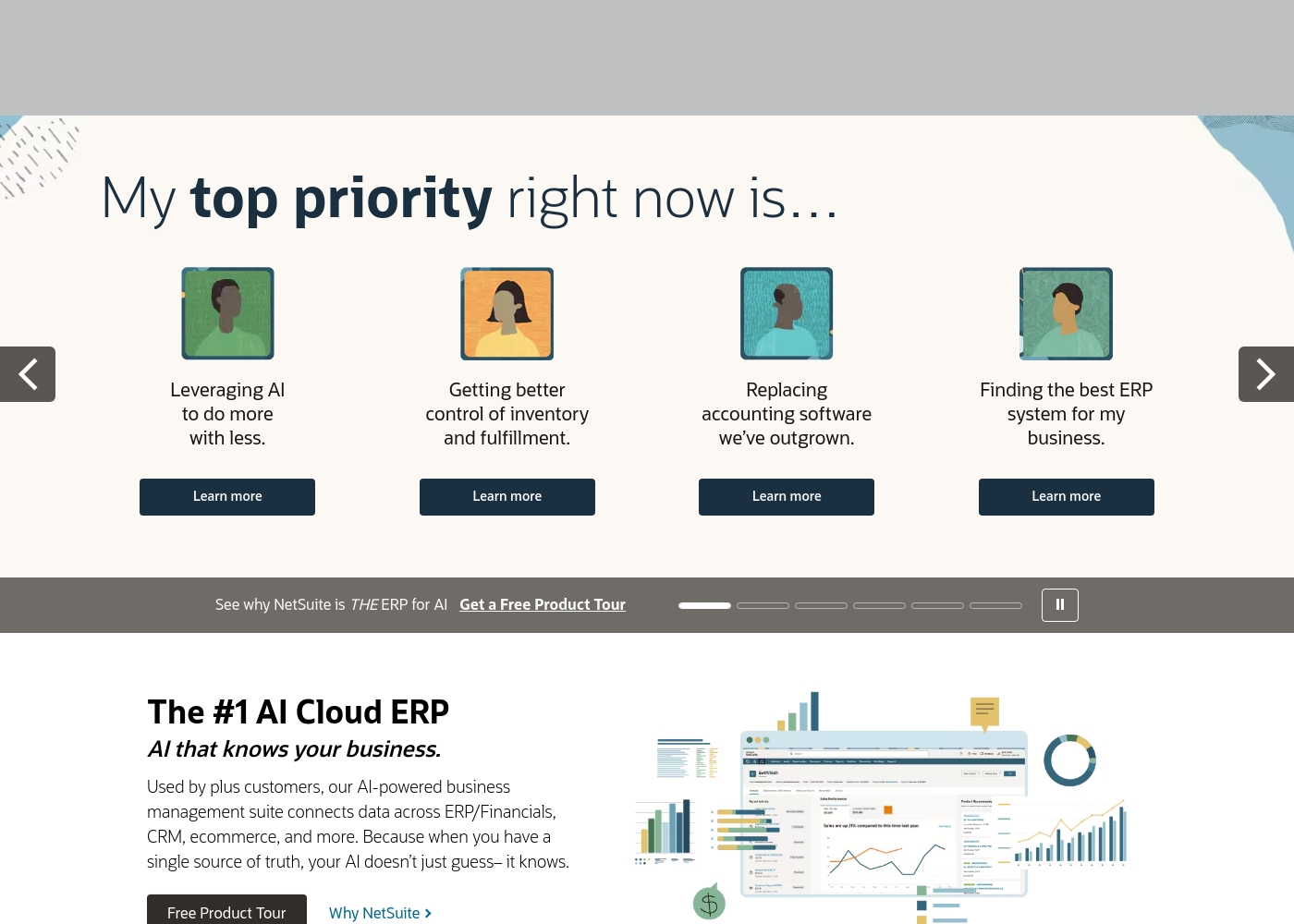
NetSuite is clearly positioned as an AI-powered business management suite. It's known widely as the #1 AI Cloud ERP. This powerful suite is designed to connect key functional areas of your enterprise.
It expertly handles everything from ERP/Financials to CRM and ecommerce data. Over 43,000 customers rely on these integrated products to help fuel their essential growth. 💡
AboutQuickbooks
QuickBooks is a system designed to support modern businesses, regardless of their size. It’s built to personalize the site experience using simple criteria, like how many employees you have. ✨
Whether you are running a large team or operate as "Just me," the system aims to tailor features specifically to your needs. This focus on customization helps pave the way for successful business growth.
Highlights
Feature Comparison
Features Overview
We highlight the main differences and pick a winner for each feature.
Pricing Model
Quickbooks offers transparent pricing; NetSuite only provides custom, undisclosed quotes.
NetSuite utilizes an enterprise subscription model that is highly customized by modules. Costs are opaque and require lengthy negotiations with the sales team. Prices are often reported to increase aggressively during renewal cycles. Quickbooks offers four fixed monthly plans ranging from $38 to $275 per month. You know exactly what features and user limits you receive immediately. New users currently save 50% for the first three months. Quickbooks gives necessary cost certainty for budgeting SMBs right away. NetSuite's cost opacity is a massive barrier for smaller operations. NetSuite is significantly more expensive than Quickbooks. Choose Quickbooks if predictable monthly cost is your highest priority. NetSuite is only viable for companies with massive contract budgets.
Scalability & Audience
NetSuite handles unlimited scale; Quickbooks hits a hard wall at 25 users.
NetSuite is built for companies needing global reach and unlimited scale, supporting 43,000+ customers. It supports growth by expanding modules like CRM or Ecommerce. NetSuite is the true enterprise ERP solution. Quickbooks is ideal for solo operations up to 25 total staff on its Advanced plan. It is highly flexible for scaling small teams. Once you exceed 25 users, you must migrate away from Quickbooks entirely. The size of your future team is the critical deciding factor between these two systems. NetSuite offers horizontal, functional scalability necessary for enterprise. Quickbooks limits vertical user growth. If you anticipate needing 50+ users soon, starting with NetSuite saves a painful, complex future migration.
Data Architecture
NetSuite unifies all business data; Quickbooks focuses primarily on finance and accounting.
NetSuite’s core strength is creating a "single source of truth" for the entire enterprise. It seamlessly connects ERP, CRM, and ecommerce data. This unification ensures AI recommendations are highly informed. Quickbooks focuses on core financial accounting, transaction organization, and specialized financial agents. It requires integration with other apps to cover CRM or extensive inventory management. Quickbooks data scope is narrower. NetSuite provides necessary holistic insight for strategic, executive decision-making. Quickbooks ensures accurate accounting records for taxes and basic operations. The scope of NetSuite's data is vastly superior. This unification allows NetSuite's AI to 'know your business' intimately, reducing the guesswork in critical processes.
Initial Setup
Quickbooks sets up in minutes; NetSuite requires mandatory, complex consulting.
NetSuite requires a highly specialized, customized ERP implementation process. This lengthy process necessitates expensive external consultant assistance. The learning curve is notoriously steep. Quickbooks is designed for fast adoption and ease of use for small business owners. Users can sync bank transactions and be running in about five minutes. Setup is intuitive and streamlined. NetSuite’s complexity is a significant initial barrier that often costs resources and months of implementation time. Quickbooks is effectively plug-and-play finance management. If your IT resources are limited, Quickbooks provides a dramatically easier starting experience.
AI Capabilities
NetSuite uses AI for holistic ERP insight; Quickbooks uses specialized agents for automation.
NetSuite leverages its unified data architecture for smart, reliable business recommendations across departments. The AI informs strategic decisions based on everything from sales to inventory. Quickbooks offers focused, specialized AI agents like the Payments Agent and the Accounting Agent. These agents automate and streamline specific routine financial tasks effectively. Intuit Assist is standard across all tiers. NetSuite aims for organizational efficiency and strategic clarity using AI. Quickbooks aims for speed and automation of daily financial routines. Both approaches are valid based on business scale. Quickbooks' Finance Agent provides key KPI analysis, similar to high-level NetSuite reporting, but only in the most expensive plan.
Customer Support
Users report atrocious customer support for both NetSuite and Quickbooks alike.
NetSuite users report support is non-existent, unresponsive, or sometimes openly rude. Account managers are often impossible to reach for urgent, complex issues. This is a severe recurring complaint. Quickbooks also receives consistent and severe criticism for its customer service quality. Users report unhelpful staff, long waits, and difficulty resolving crucial accounting errors. Neither platform currently earns high marks for customer support quality among its user base. For both NetSuite and Quickbooks, poor support severely impacts operational effectiveness. If reactive support is a core need, neither NetSuite nor Quickbooks is guaranteed to meet expectations based on available review data.
Compliance & Security
NetSuite is built on Oracle for robust enterprise security; Quickbooks provides standard cloud security.
NetSuite is powered by a robust and powerful Oracle database backend. This provides a strong foundation for enterprise-level data compliance and security protocols. It is designed to handle high transaction volume securely. Quickbooks provides standard cloud security appropriate for SMB transactional data protection. Reliability is occasionally questioned; users report data errors that impact P&L summaries. NetSuite’s enterprise architecture provides superior reliability and security for highly complex, regulated industries. Quickbooks' main focus is core accounting accuracy, not multi-faceted compliance. For highly sensitive or global operations, NetSuite offers the inherently more robust and proven foundational back-end support.
External Accountant Access
Quickbooks offers free accountant access; NetSuite requires buying more user seats.
NetSuite does not advertise a specialized feature for external accountant access. Accountants must typically consume a full, high-cost user seat to access the system. This increases the total cost significantly. Quickbooks includes free, dedicated access for your external accountant in every single plan tier. This allows them to monitor, review, and pull reports easily. Quickbooks prioritizes seamless collaboration with financial professionals and trusted advisors. NetSuite focuses purely on internal licensed users and control. If you rely heavily on an external CPA or firm, Quickbooks saves you money and streamlines professional workflow immediately.
NetSuite operates primarily on a customized enterprise model. Because it is a powerful AI Cloud ERP solution, you won't find standard, predefined pricing tiers. Pricing requires a direct quote based on your specific business size and needs.
Custom ERP Implementation
Best For: Businesses needing a scalable, integrated ERP solution or replacing outgrown accounting software Other Features:
- Connects data across ERP/Financials, CRM, and ecommerce
- AI-powered business management suite
- Used by 43,000+ customers
- Provides a single source of truth
This is the right choice if you need a comprehensive system that leverages AI to connect all your data. It's designed to help growing companies move past disparate systems and gain better control over operations like inventory and fulfillment.
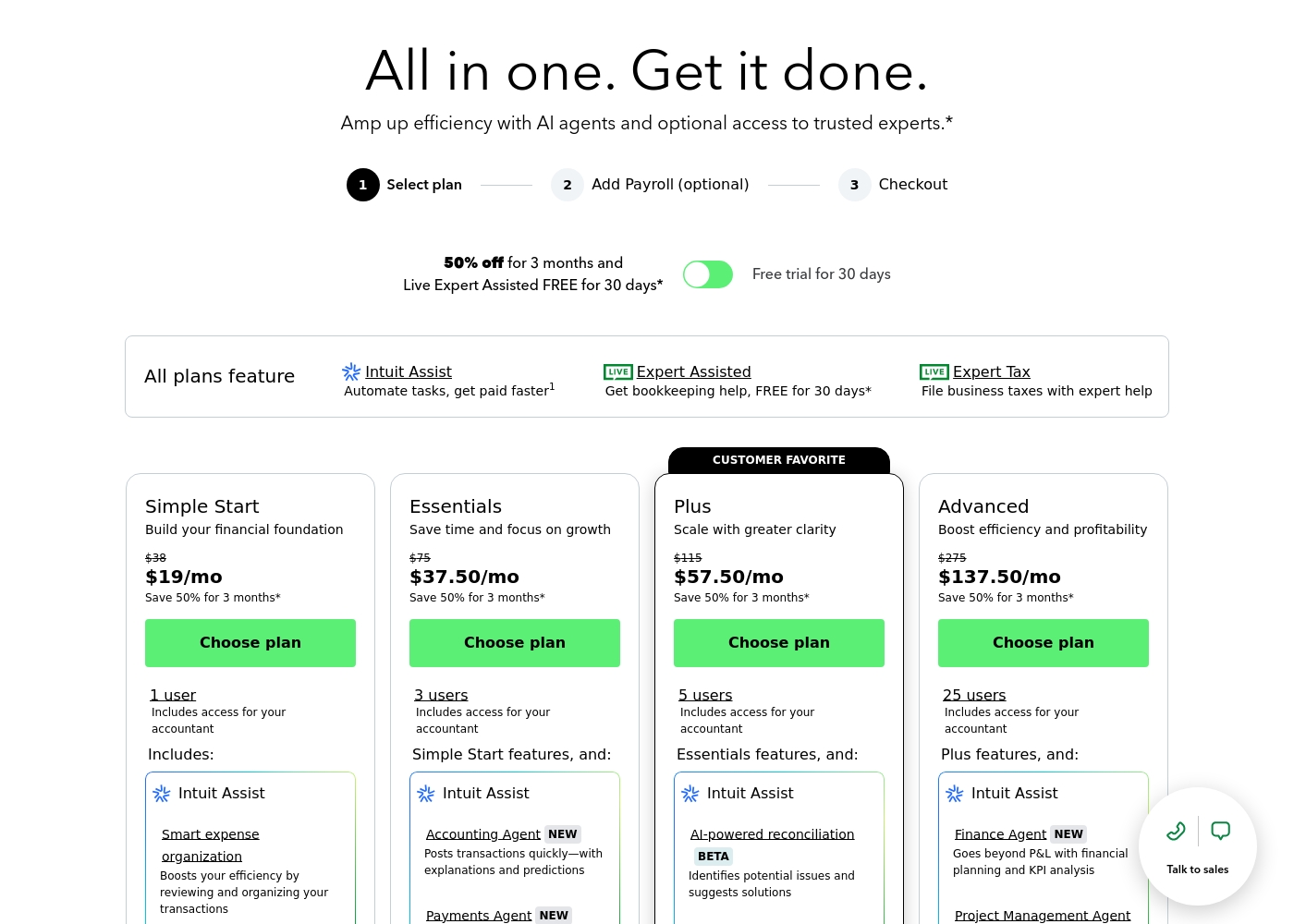
QuickBooks costs between $38 and $275 per month with 4 plans: Simple Start at $38, Essentials at $75, Plus at $115, and Advanced at $275.
Here’s a closer look at what features and capacity are included with each plan.
Simple Start
Price: $38/month (or $19/month for 3 months) Best For: Building your financial foundation Other Features:
- 1 user access
- Includes access for your accountant
- Intuit Assist
- Smart expense organization
- 1 user access
- Includes access for your accountant
- Intuit Assist
- Smart expense organization
- 3 users access
- Simple Start features included
- Accounting Agent NEW
- Payments Agent NEW
- 5 users access
- Essentials features included
- AI-powered reconciliation (BETA)
- 25 users access
- Plus features included
- Finance Agent NEW (Financial planning and KPI analysis)
- Project Management Agent
Pricing Notes
- NetSuite pricing is complex, highly customized, and requires direct negotiation with sales representatives.
- NetSuite users frequently report aggressive pricing hikes and opaque costs during annual renewal cycles.
- Quickbooks offers clear, publicly available tiered pricing based on user limits and features.
- Quickbooks currently offers 50% off for the first three months of service on all plans.
- NetSuite is orders of magnitude more expensive than Quickbooks, targeting large enterprise budgets solely.
Pricing Head-to-Head
User Reviews
User reviews for NetSuite present a stark contrast to its marketed position, frequently highlighting issues with pricing, support, and usability. Many users describe the system as unintuitive, bulky, and slow, noting that the interface feels decades outdated; one reviewer suggested the UI looks like it is from the 1980s.
This complexity often necessitates hiring expensive consultants, even for routine tasks. Pricing is a major pain point; users report that the software is significantly more expensive than competitors, with costs frequently reaching tens or hundreds of thousands annually, and aggressive price increases during renewals are common.
I wasted thirty minutes getting the runaround about pricing. When they finally gave a quote, the rep was extremely rude and said my business wasn't a 'good fit' due to the high starting price. Poor customer service is unacceptable for an enterprise product like this.
User sentiment collected primarily from Trustpilot is overwhelmingly negative, frequently contrasting with the platform’s marketing promises of accuracy and seamless growth. While QuickBooks offers feature depth and personalized experiences, the recurring themes of frustration are significant among users.
Customers consistently report atrocious and unhelpful customer service, often involving extremely long holding times, multiple transfers, and conflicting information without resolution. Reliability is a major concern; users describe the software as unstable, prone to costly accounting errors, and sometimes necessitating external accountant intervention.
I spent almost three months migrating from the Desktop to the Online version. The transition was supposed to be easy, but I had constant issues. Customer support was unknowledgeable and unable to assist me thoroughly.
Our Verdict
The decision between NetSuite and Quickbooks is fundamentally about scale, not just features. You should view them as different levels of progression, not direct competitors. NetSuite's superpower is its enterprise-grade unification and infinite scalability. It creates one powerful "single source of truth" across your entire business. This powerful AI Cloud ERP handles complex functions across CRM, ERP, and Ecommerce. Quickbooks' superpower is agile usability and cost transparency for scaling teams. You know the exact monthly fee, unlike NetSuite’s highly customized negotiation model. Quickbooks offers specialized AI Agents that automate specific financial routines for maximum speed. The deciding factor is your current user count and financial complexity requirements. If you require 50+ users and deep, customized ERP integration, NetSuite is the necessary, costly solution. If you are starting out or need robust accounting functionality but fewer than 25 users, Quickbooks is the affordable choice. For 90% of small to mid-sized businesses, Quickbooks delivers the functional needs at a predictable price. NetSuite is typically reserved only for large enterprises needing customized orchestration and global complexity.
Frequently Asked Questions
Which is better for a small business: NetSuite or Quickbooks?
Quickbooks is definitively better for a small business or startup. Quickbooks provides predictable monthly pricing and a fast setup time of around five minutes. NetSuite involves high, customized enterprise costs and requires complex implementation by consultants.
Why is NetSuite so much more expensive than Quickbooks?
NetSuite is a full AI Cloud ERP designed for global, large-scale enterprise complexity. It replaces many systems and unifies all business data. Quickbooks is primarily a strong, specialized accounting solution for smaller teams.
Does Quickbooks offer the same unified data view as NetSuite?
No, Quickbooks does not create a "single source of truth" across all enterprise functions. NetSuite unifies financial, CRM, and ecommerce data natively. Quickbooks focuses mainly on transactional accounting data.
Which software is easier to implement and use?
Quickbooks is significantly easier to implement; you can be online in minutes. NetSuite is highly complex, mandatory requiring expensive consultant assistance for setup. Its user interface is also widely reported as bulky and outdated.
Can I easily migrate from Quickbooks to NetSuite if my business grows?
Migration is possible but will be complex and time-consuming. You must move from Quickbooks' transactional model to NetSuite's full ERP architecture. This migration usually requires deep technical planning and consulting.
Does NetSuite support external accountant collaboration like Quickbooks?
Not directly. Quickbooks includes free, dedicated access for your external accountant in all plans. NetSuite typically requires purchasing an additional, costly user seat for external access.
Ready to Choose?
Both tools have their strengths. Choose based on your specific needs.