Ludus

Ludus review

The collaborative presentation tool that combines creativity with simplicity.

By Ciroapp Editorial Team · Updated Sep 17, 2026

Commission may apply at no extra cost

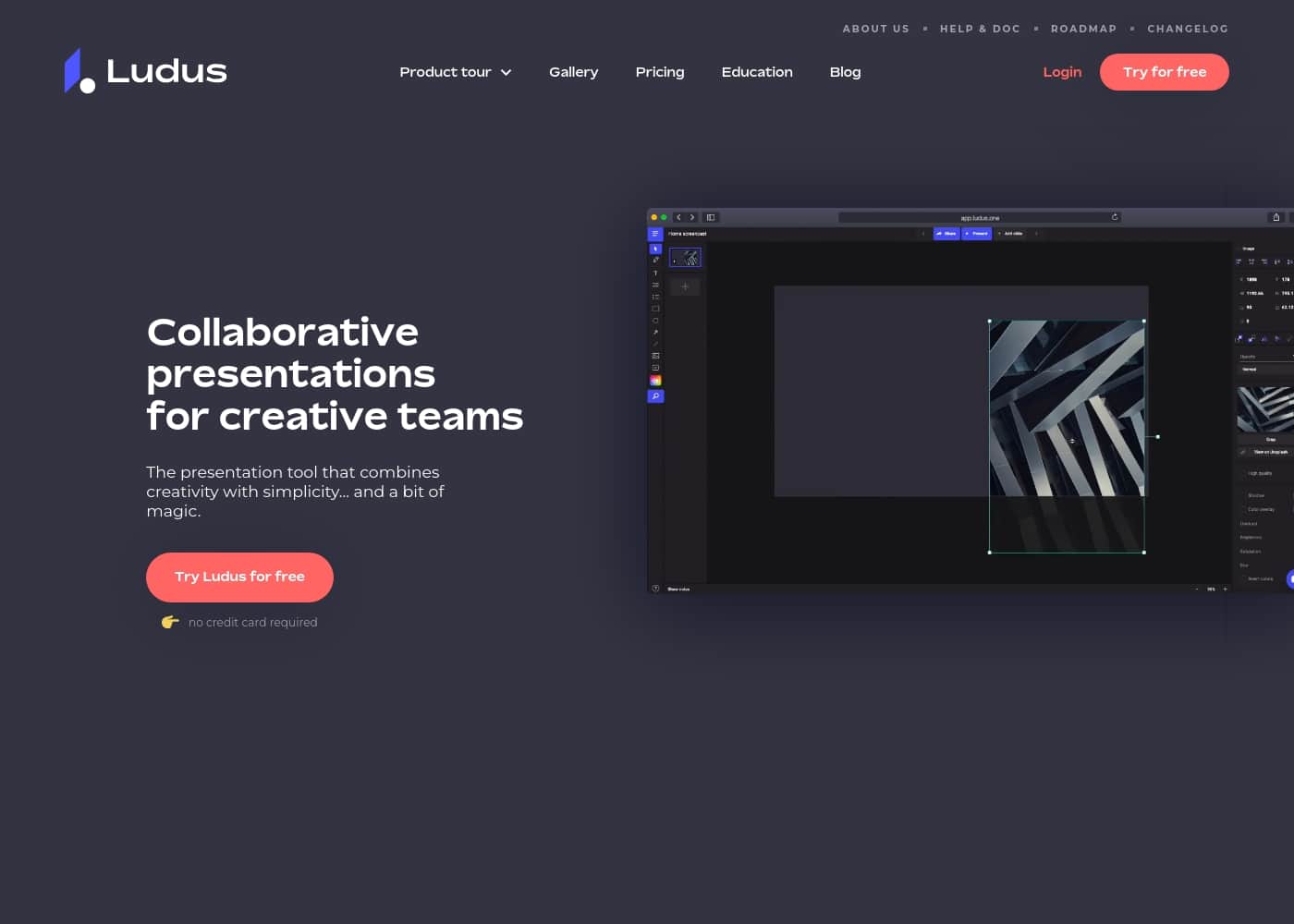
Ludus homepage screenshot

At a glance

Quick overview for Ludus: rating, pricing summary, key features, and highlights.

Ciroapp score

2.8/ 5

Promising AI, but credit-heavy and inconsistent.

We found Ludus Engine to be a bold attempt to assist with Unreal Engine blueprints, but our review indicates a significant gap between its promises and user experience. Overall, its AI can offer real help for specific tasks, yet the credit-based model and reliability issues create major friction for many users.

Pros

  • Pros:Can accelerate Blueprint generation and debugging for experienced users.
  • Pros:Some report it saves significant time on complex tasks and offers accurate guidance.
  • Pros:Provides a structured, step-by-step approach for UE work in some cases.

Cons

  • Cons:Credit system is widely criticized as expensive, unfair, and sometimes unpredictable.
  • Cons:AI can give inaccurate or hallucinated information, leading to broken projects.
  • Cons:Customer support is reported as slow or non-responsive by several users.
Best for
  • Design agencies and creative studios that need pixel-level control (custom fonts, blending modes, GIFs, video) in collaborative pitch decks
  • Brand and marketing teams building reusable Smart Block libraries so every deck stays visually consistent across projects
  • Trainers and educators producing e-learning content with pre-recorded voiceover via Ludus Vox
This section is a summary. Detailed sections about features, use cases, pricing, and reviews follow below.

What is Ludus?

If you've ever felt frustrated by clunky, uninspiring presentation software, Ludus aims to fix that. It's built for creative teams who want to work together in real-time and design slides without limits. ✨

Ludus is a web-based presentation tool designed specifically for creative teams and designers. It moves beyond basic slides, offering a familiar design environment where you can collaborate, organize workflows, and tell compelling stories with any kind of content. 💡

Should you choose Ludus?

Quick buyer guidance before you compare plans or click through.

Choose it if

  • Design agencies and creative studios that need pixel-level control (custom fonts, blending modes, GIFs, video) in collaborative pitch decks
  • Brand and marketing teams building reusable Smart Block libraries so every deck stays visually consistent across projects
  • Trainers and educators producing e-learning content with pre-recorded voiceover via Ludus Vox
  • Small to mid-size creative teams working in real time on shared presentations with defined roles and channels

Skip it if

  • Corporate users who mainly need standard bullet-point slides and fast template turnaround — Ludus's block-based, design-first workflow adds overhead
  • Teams that rely on importing existing PowerPoint or Keynote files, since no built-in migration path is documented
  • Buyers who need enterprise guarantees like documented SLAs, security certifications, or guaranteed support response times — none are published on the site
  • Solo users on a tight budget who won't take advantage of per-seat collaboration features

Next steps before buying

  1. 1Sign up for the 30-day free trial at ludus.one — no credit card is required, so you can test the full feature set risk-free
  2. 2Connect your content sources (Unsplash, GIPHY, Dropbox, Google Drive) early so blocks from your existing libraries are ready to drag into slides
  3. 3Build two or three Smart Blocks for recurring elements like logos, headers, or chart templates before starting a full deck
  4. 4Invite your teammates to a shared channel and assign roles so the real-time collaboration workflow is in place from your first project
  5. 5If you're a student or educator, check Ludus's education page for discounted pricing before subscribing

Ludus Key Features

✨ Real-Time Collaboration for Creative Teams

Ludus lets your entire team work on the same presentation at the same time. This means designers, writers, and project leads can all contribute without waiting for others to finish. You can organize your workflow with shared channels and define roles for everyone.

This keeps everyone focused on what they do best. The result is a smoother, faster process where ideas flow freely.

✨ A Designer-Friendly Environment

The tool feels familiar to anyone who uses design software. You can use your favorite fonts, crop images, and work with GIFs and videos. It even supports blending modes.

You aren't stuck with a limited set of tools. This makes it a natural fit for designers who want full creative control. They can build polished, visually rich slides without compromise.

✨ Flexible Content with Blocks

In Ludus, every piece of content is a "block." These blocks can come from many sources. You can pull in content from Unsplash, GIPHY, Dropbox, or Google Drive. You can also create your own reusable "Smart Blocks" for your team.

Building a story becomes about assembling the right blocks together. It's a flexible way to add any kind of content to your slides.

😊 A Joyful User Experience

Users consistently describe Ludus as a "joy to use." It's a refreshing change from traditional, clunky presentation software. The tool aims to combine creativity with simplicity. It's built for speed and seamless teamwork.

This focus on a positive user experience helps teams feel more inspired and productive.

✨ Trusted by Creative Companies

Ludus is used by brands known for their design and creativity. Companies like ZDF digital, Dogstudio, and Fresh rely on it. This shows its appeal in design-focused environments.

It's a tool built for teams that value high-quality, engaging presentations. The platform is designed to meet the standards of these creative professionals.

✨ Pre-Recording for Presentations

Ludus offers a feature called Ludus Vox. This allows you to pre-record yourself presenting your slides. It creates new possibilities for e-learning and client presentations.

You can share a recorded version of your talk. It's a powerful way to add a personal touch to your work. This feature extends the tool's usefulness beyond live meetings.

Use Cases

🎨 Design Team Brainstorming & Pitching

A design agency needs to create a compelling pitch deck for a new client. The team uses Ludus to collaborate in real-time. The lead designer sets up a shared channel and invites the team.

Everyone contributes their best ideas—images, GIFs, and text blocks—from their favorite tools. They assemble the story by dragging and dropping content from Unsplash or their own Smart Blocks. The final presentation is polished and ready to share, all without version conflicts.

📚 Creating a Reusable Brand Library

A marketing team wants consistent visuals across all company presentations. They use Ludus to build a library of Smart Blocks. These blocks can include a branded header, a chart template, or an image grid.

When a new presentation is needed, the team simply pulls these pre-made blocks from their library. This saves time and ensures every slide looks professional and on-brand.

🎤 E-learning & Client Presentations with Voiceover

A trainer needs to create an engaging e-learning module. They use Ludus to design the slides, then use the Ludus Vox feature to pre-record themselves presenting. The audio is synced with the visuals.

Clients or learners can watch the presentation at their own pace, hearing the explanation alongside the visuals. This makes complex topics easier to understand and share.

🧩 Collaborative Storytelling with Mixed Media

A team wants to tell a story that goes beyond text and bullet points. They use Ludus to add any content they can imagine. Each piece is a block: a video from Dropbox, a chart from Google Drive, or an image from Unsplash.

They arrange these blocks freely, applying blending modes and cropping. The result is a rich, visual narrative that feels more like a website than a traditional slide deck.

👥 Organizing Workflows for Creative Teams

A creative studio has multiple projects running at once. They use Ludus to keep everything organized. Shared channels let the team work on different presentations in parallel.

Roles are defined, so everyone knows their part—designers can focus on visuals, while writers handle the text. This clarity helps the team move faster and avoid confusion.

✨ Switching from Traditional Tools for Joy & Speed

A team is tired of clunky presentation software. They switch to Ludus for its intuitive, designer-friendly environment. They can use their favorite fonts and work with GIFs and videos easily.

The tool feels fast and simple, making the process of building slides more enjoyable. Testimonials highlight how Ludus feels like a 'joy to use' compared to older tools.

📈 Problem → Approach → Outcome: Client Pitch Overhaul

Problem: A marketing team's client pitches felt outdated and lacked visual punch. They needed a tool that matched their brand's creativity.

Approach: They adopted Ludus to build presentations. The team used the block system to pull in high-quality images and videos from external sources. They collaborated in real-time to refine the story.

Outcome: The new presentations were visually stunning and told a more compelling story. The team received positive feedback from clients, and the process became faster and more enjoyable.

Tip: Start by creating a few Smart Blocks for your most common elements, like logos or charts. This will save time on future projects.

🧱 Assembling Slides with Flexible Content Blocks

A designer needs to quickly put together a presentation with various media types. They use Ludus to add content as blocks from different sources. Each block is a piece of content—like an image from Unsplash or a GIF from GIPHY. They simply drag and drop these blocks onto slides, arranging them as needed. This flexible approach lets them tell a story with any kind of content, without limitations.

Expected outcome: A polished, multi-media presentation created efficiently.

Ludus pricing

Prices not verified yet — see the vendor page.

Ludus's pricing page

Ludus pricing page screenshotView pricing page screenshot

Pricing types: Free plan, Per seat pricing, Usage-based pricing

Pricing notes

Ludus offers simple, collaborative subscription plans starting at $14.90 per user/month billed annually. You get a fully-featured experience regardless of your team size, with extra design freedom and seamless integrations built in from day one limit-free.

Ludus pricing: Ludus offers simple, collaborative subscription plans starting at $14.90 per user/month billed annually. Billing options: Free plan, Per seat pricing, Usage-based pricing

Email me when Ludus changes price

One email when we detect a price change on the vendor's pricing page. No newsletter, no deals. Unsubscribe in one click.

User Reviews

Based on the available Trustpilot snippets (Capterra was inaccessible due to a security page), user sentiment for Ludus Engine is highly mixed, with an average rating of 3.1/5. 😕 Positive reviews praise its powerful AI for Unreal Engine Blueprint generation, with some users noting it saves significant time on complex tasks and guides them effectively.

However, a strong recurring theme is frustration with the credit system, which many find unfair or predatory, alongside complaints about inaccurate AI outputs, high credit consumption, and unresponsive support. Several users report the tool fails to execute commands as promised or breaks existing work, leading to wasted money and effort.

We see a split between those who find it a valuable assistant and others who see it as unreliable and costly, with onboarding and reliability being key pain points.

Summarized from public reviews on Trustpilot, Capterra

No reviews yet.

Write a Review

Write a Review for Ludus
0/100 characters
0/2000 characters

Why use Ludus?

If your team is tired of presentation tools that feel restrictive and uninspiring, Ludus offers a refreshing alternative. It's built for speed, creativity, and seamless teamwork.

Here’s why it stands out:

  • Designed for Creators 🎨: It provides a designer-friendly environment where you can use your favorite fonts, crop images, apply blending modes, and work with GIFs and videos.
  • Real-Time Collaboration 👥: Teams can work together simultaneously on any presentation, with shared channels and roles to keep everything organized.
  • Unlimited Content Integration 🧩: It uses a flexible 'block' system, letting you pull content from anywhere—Unsplash, GIPHY, Dropbox, Google Drive—and create reusable 'Smart Blocks' for your team.
  • Simplicity with Power ✨: It aims to combine creativity with simplicity, promising an intuitive experience that makes building stories feel effortless.
  • Trusted by Creative Companies 🏢: It's used by brands like ZDF digital, Dogstudio, and Fresh, signaling its appeal in design-focused environments.
  • Joyful User Experience 😊: User testimonials highlight it as a 'joy to use' and a refreshing change from traditional tools like Keynote.

Ludus alternatives

Other tools in the Presentation category

View all Presentation tools
Microsoft PowerPoint

Microsoft PowerPoint

Presentation4.3/5

Microsoft PowerPoint is the essential tool for building dynamic and captivating presentations from any device. It's designed to help you evoke engagement whether you're working alone or with a team. You can easily share your work and collaborate in real time with anyone, even without needing a subscription. PowerPoint is available across PCs, Macs, tablets, and phones, meaning you can always access your slides.

Google Slides

Google Slides

Presentation4.1/5

Google Slides is a powerful tool designed to help you create and deliver polished presentations. It operates right in your browser, letting you work from anywhere without needing special software installs. This flexibility extends to mobile devices, as you can view, present, or collaborate on slides using your phone or tablet. Anyone with a Google Account can start creating today. The platform comes packed with high-quality, pre-designed templates, including different layouts, colors, and fonts. For organizations, it offers premium features like domain templates to ensure consistency across the whole company. You can easily liven up your work with videos, smooth transitions, and even playful GIFs and stickers.

Prezi

Prezi

Presentation4/5

Prezi is a dynamic platform designed specifically for visual storytelling. It has been a trusted presentation partner for over 15 years, relied upon by users in 180+ countries. Currently, Prezi is taking this proven approach and redefining the future of presenting with powerful AI assistance. 💡 It moves beyond sequential slides using a unique open canvas and dynamic movement. This method is effective for various settings, whether you need presentations tailored for business, university, or school audiences. The unique design combined with smart assistance makes creating impressive visuals easier than ever before.

Beautiful.ai

Beautiful.ai

Presentation3.9/5

Beautiful.ai is an intelligent creative partner designed for professionals and teams. It allows you to build great presentations in half the time. The platform uses unique Smart Slides that handle the design, layout, and spacing automatically. 💡 As you add or edit content, the slides adapt instantly. This means you skip the formatting work and stay focused entirely on the story and message. It’s perfect for streamlining workflow and ensuring teams stay aligned.

Visme

Visme

Presentation3.8/5

Visme is an interactive design platform that acts as a comprehensive, all-in-one solution for your business content needs. It helps you design, manage, and publish highly engaging, professional materials. This tool is built for professionals everywhere, including marketing managers and business owners. Whether you need to create a simple branded visual or fully interactive content, Visme is here to make your work life easier. You can start your first project in minutes, even with no prior design experience at all.

Keynote

Keynote

Presentation3.7/5

Keynote is a versatile presentation tool designed by Apple. It helps you quickly set up a professional presentation. You can start by choosing a theme and adding new slides right away. It's built for users across Mac, iPhone, and iPad, giving you flexibility. Keynote also extends its reach to users on Windows or those preferring a web interface through Keynote for iCloud. It provides essential tools for crafting and sharing visual stories.

Ludus FAQ

How does Ludus handle integrations with other tools like Google Drive or Dropbox?

Ludus uses a 'block' system to connect content from various sources. You can pull in files directly from services like Unsplash, GIPHY, Dropbox, and Google Drive. This lets you tell a richer story by assembling different content types on your slides.

What are the limits on presentations or storage?

Ludus offers unlimited presentations, storage, and team members on all plans. You won't hit a wall when creating or sharing your work. The focus is on giving you the space to create without restrictions.

What's included in the free trial, and how long does it last?

You get a 30-day free trial to test Ludus. You can sign up without providing a credit card. It's a full-featured experience, letting you explore all the tools before you decide to subscribe.

Is pricing per user or per usage?

Ludus uses a per-user subscription model. The price is based on the number of people on your team, not how much they use the tool. You pay a flat rate per user each month, billed annually.

How does the annual billing work?

When you pay annually, you get a discount. The pricing is based on a 9-month equivalent for a full year. This saves you money compared to paying month-to-month.

What happens when I need to cancel my subscription?

The website doesn't specify the exact cancellation process. You'll want to check the terms and conditions or contact their support team directly to understand the steps and any potential refund policies.

Are there special pricing options for students or educators?

Yes, Ludus has dedicated education pricing for students and teachers. It's designed to make the tool more accessible for learning environments. You can find the specific details on their education page.

How does Ludus support different languages or regions?

It's best to confirm this directly with Ludus, especially if you need the interface in a language other than English.

What kind of support can I expect if I run into issues?

Ludus offers help through documentation and a contact option. However, the site doesn't outline specific response times or service level agreements (SLAs). You should check their support channels for more details on responsiveness.

Who is the ideal user or team for Ludus?

Ludus is built for creative teams and designers who want a collaborative, visually rich tool. It's perfect if you need to create engaging, high-quality presentations and want to work together in real-time. It's a great fit for brands and agencies that value design.

What are the key data security and privacy features?

The website doesn't specify the technical details of its security measures. For important decisions, you should review the privacy policy and terms of service. These documents outline how your data is handled.

Can I migrate my existing presentations from another tool into Ludus?

You'll need to check if manual import options are available or if there's a workaround.

Is there an onboarding process or training for new users?

The site highlights a 'joyful user experience' and an intuitive design. However, it doesn't detail a formal onboarding program or training resources. The best way to learn is likely through their documentation or the trial period.

Ready to try Ludus? Check out the official site or pricing.

Are you Ludus? Claim this listing · Get the badge