Beautiful.ai

Beautiful.ai

Prompt to presentation: Create impactful decks faster.

#5 dans Presentation
2 min read · Updated 10/5/2025
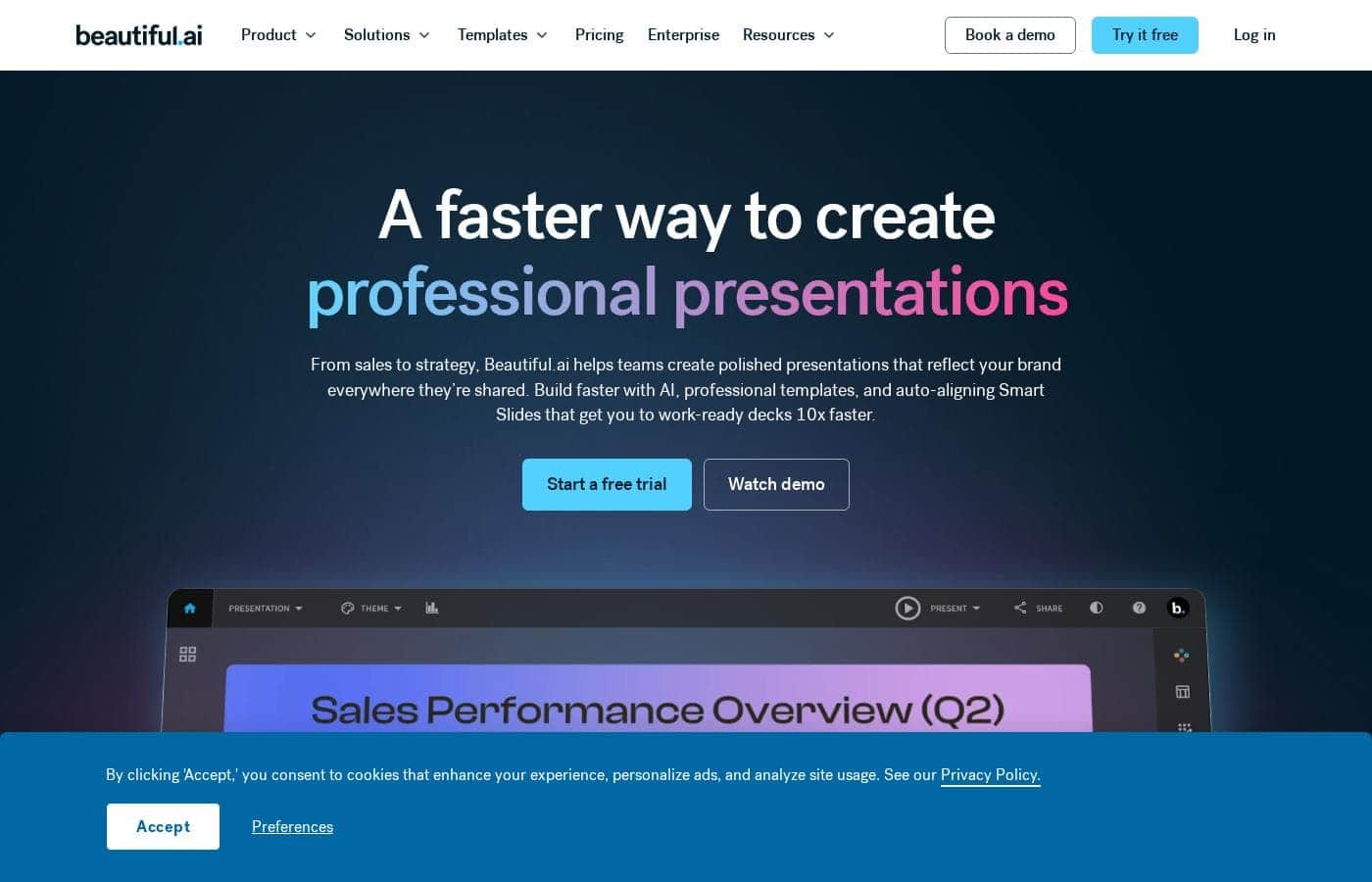
Beautiful.ai homepage screenshot

At a glance

Quick overview for Beautiful.ai: rating, pricing summary, key features, and highlights.

Ciroapp review

3.8
Polished presentations made lightning-fast.

Beautiful.ai excels at automating design complexity, allowing users to create visually stunning and professional decks with minimal effort. The core AI functionality is excellent, producing high-impact visuals and significantly boosting productivity for professionals and teams. We must note, however, that the recurring complaints regarding billing practices, especially unwanted annual charges after trial cancellation, truly detract from the overall user experience. Overall, it's a powerful tool for visual quality, provided you manage your subscription carefully.

Pros

  • Pro:AI generation quickly creates comprehensive presentation drafts from text prompts.
  • Pro:Smart Slides automatically handle complex design, formatting, and spacing.
  • Pro:Users report drastically reduced presentation creation time, often calling it a game-changer.
  • Pro:Output produces high-quality, professional, and visually impressive slides.

Cons

  • Con:Recurring problems with unexpected annual billing charges after trial cancellations.
  • Con:Support responsiveness is inconsistent, especially when resolving billing disputes.
  • Con:Templates and slide formatting can sometimes feel uniform or too limited for advanced customization.
  • Con:Users report difficulty copying and pasting images or elements between slides.
Free trial
Yes — 14 days
Money-back guarantee
Yes — 1 days
Range: $12–$50/monthFree trial, Monthly subscription, Yearly subscription, One-time payment, Per seat pricing
This section is a summary. Detailed sections about features, use cases, pricing, and reviews follow below.

Beautiful.ai review, pricing, features, pros & cons

Worrying about formatting and spacing often takes focus away from your message. Dealing with design details means losing valuable time that you need for content and strategy. Beautiful.ai eliminates this frustration. ✨

It helps you skip the hardest part—getting started—by generating a full presentation draft quickly. You'll create polished, on-brand decks and present your ideas with real impact.

What is Beautiful.ai?

Beautiful.ai is an intelligent creative partner designed for professionals and teams. It allows you to build great presentations in half the time. The platform uses unique Smart Slides that handle the design, layout, and spacing automatically. 💡

As you add or edit content, the slides adapt instantly. This means you skip the formatting work and stay focused entirely on the story and message. It’s perfect for streamlining workflow and ensuring teams stay aligned.

Beautiful.ai Key Features

✨ AI: Kickstart Your Content Generation

It’s hard to start a new deck from scratch. Beautiful.ai acts as your intelligent creative partner, helping you bypass this challenge fast. You can generate a full presentation draft in mere seconds using a single prompt.

This feature instantly gives you a strong foundation to build upon. We also offer a custom GPT specifically for ideation when you need fresh ideas. Plus, utilize the AI writing assistant and AI image generation tools to refine your content quickly and efficiently.

✨ Smart Slides: Design Automation

Stop worrying about aligning text or managing complex spacing. Our unique Smart Slides handle the tedious design work for you. They have the rules of good design built directly into their layouts.

As you add, edit, or remove content, the slides adapt instantly. This ensures your presentation always looks professional and polished, even without design expertise. You can choose from over 300 layouts designed for nearly any business use case, including dynamic data visualizations.

✨ Workflow Integration with Essential Tools

Beautiful.ai integrates seamlessly with the software you already rely on every day. This creates a more streamlined workflow and reduces app hopping. You can export content easily because Beautiful.ai is designed to work with tools like PowerPoint and Google Slides.

Our system connects directly to enhance team productivity and efficiency. You can import branded images and logos from Dropbox quickly. Use Salesforce to share decks and track audience engagement insights. Get real-time updates on progress sent directly to Slack.

✨ Maintaining Brand and Consistency

Ensure every presentation is consistently polished and on-brand. You can apply your custom styling, including colors, background styles, text, and icons.

We offer an effective feature called Locked Slides for enterprise control. These slides protect key organizational information from unapproved changes. Only approved librarians can edit this content, and updates roll out everywhere instantly to maintain serious brand integrity.

✨ Amplify Your Team Collaboration

Beautiful.ai helps teams work together seamlessly within one unified platform. This is crucial when multiple departments, like Marketing and Sales, need to stay aligned on messaging. Teams benefit from real-time, live collaborative editing.

Centralized libraries manage all your slides and templates. You also gain crucial features like version control. For management reporting, viewer and slide analytics provide actionable insights into audience engagement after sharing.

✨ Flexible Sharing and Delivery

Deliver your powerful message wherever your audience is located. You can present your deck directly from a web browser or even a smartphone. For situations without internet access, our desktop player allows you to present downloaded files offline.

We maximize compatibility by offering multiple export formats. You can export your completed presentation to JPEG, PDF, or PowerPoint (PPT and PPTX). This ensures your work fits into any existing client or company system you need.

Use Cases

✨ Kickstarting Presentation Drafts with AI

When facing a tight deadline, you often spend too long just setting up the basic structure. Beautiful.ai helps skip the hardest part—getting started—by generating a complete deck immediately.

Type a single concept prompt into the custom GPT. The platform then provides a full presentation draft in seconds. You can quickly generate AI images and use the writing assistant to refine the content, moving instantly to strategy instead of layout.

🔒 Maintaining Strict Brand and Messaging Consistency

Your organization needs every slide to look polished and stay on brand, regardless of who is creating it. Beautiful.ai makes it easy to apply customizable text, colors, and backgrounds organization-wide.

For critical information, use the exclusive Locked Slides feature. Approved librarians can update key content once, and the change automatically applies everywhere. This ensures legal phrasing and brand assets are always accurate across all team presentations.

🤝 Streamlining Cross-Departmental Collaboration

Marketing needs to verify messaging, Sales needs updated data, and Legal requires final approval. Beautiful.ai facilitates seamless collaboration, helping these teams stay aligned within a single platform.

Use the centralized slide and template library to ensure everyone is working from approved assets. Real-time, live collaborative editing helps remote teams refine content efficiently without version control issues.

📈 Enhancing Sales Pitch Tracking and Insights

Sales teams need fast, effective decks and the ability to track prospect engagement after the pitch. Beautiful.ai integrates directly into the tools you use for a streamlined cycle.

💡 Automating Design for Maximum Efficiency

Design flaws and formatting worries distract from your core message. Smart Slides instantly eliminate this frustration by handling layout, spacing, and design rules automatically.

As you add or edit content, the slides adapt instantly to maintain a professional look. This drastically reduces creation time; users often report being up to 80% more efficient. Your focus remains entirely on the story you are telling.

🔗 Working Seamlessly Across Existing Tools

You shouldn't have to switch platforms just to integrate your design work. Beautiful.ai connects directly with essential business tools to streamline your workflow.

Pricing Overview for Beautiful.ai

Pricing range
$12–$50/month
Pricing types
Free trial, Monthly subscription, Yearly subscription, One-time payment, Per seat pricing
Money-back guarantee
Yes — 1 days

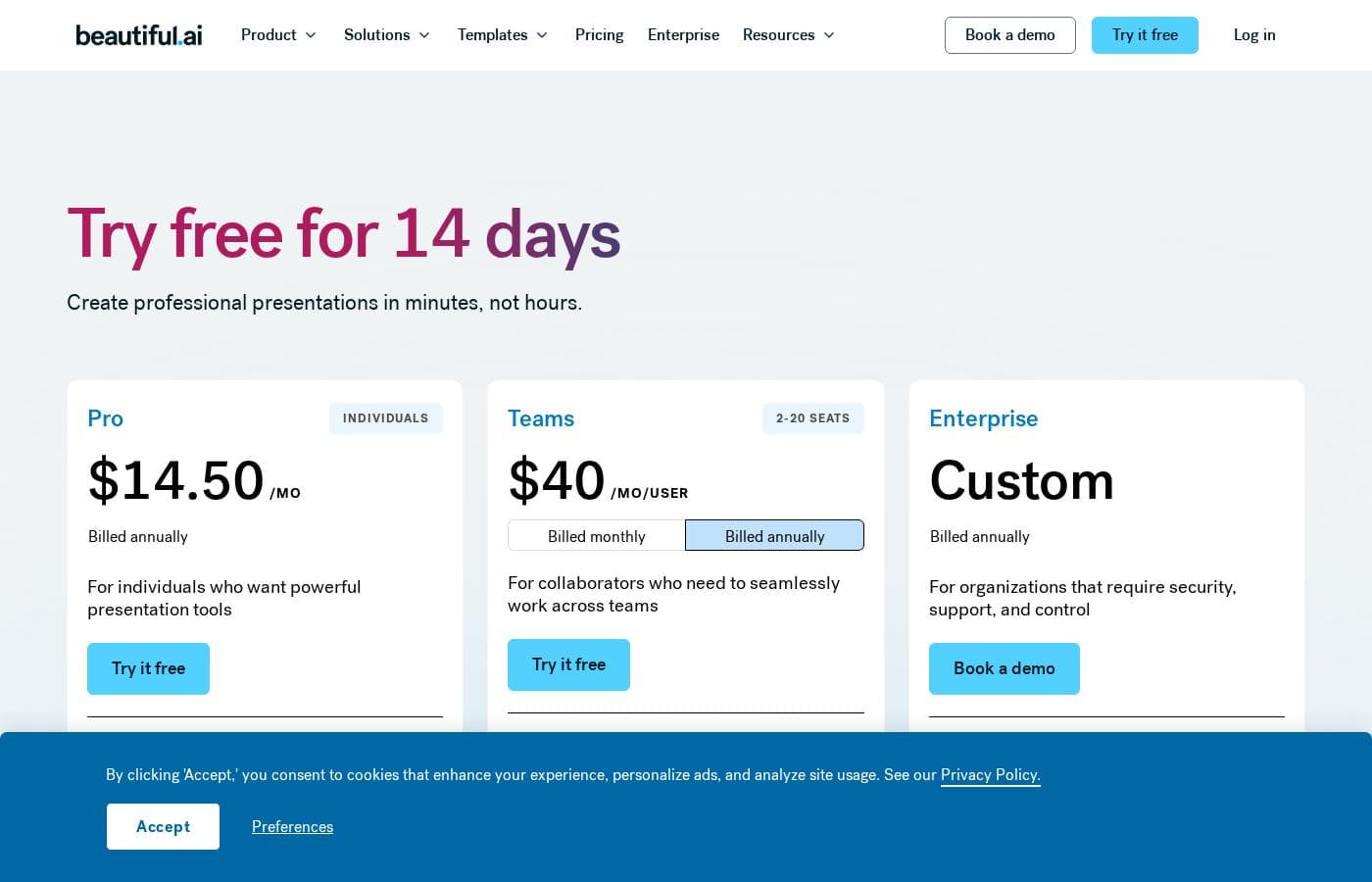
Beautiful.ai offers flexible subscription plans designed for individuals and teams, starting at $12 per month when billed annually. You can choose yearly billing for the best value, or opt for a higher-priced month-to-month commitment, perfect for short-term needs.

Plans & Pricing

Pro (Individual)

Monthly$45
Yearly$12/month (Billed annually)
  • Unlimited AI content generation
  • Apply your custom brand styling
  • AI image generation
  • AI writing assistant
  • Over 300 Smart Slide layouts
  • Custom branding & styling

Team

Monthly$50/user
Yearly$40/user/month (Billed annually)
2-20 Seats
  • Everything in Pro, plus:
  • Real-time, live collaborative editing
  • Centralized slide & template library
  • Version control & locked slides
  • Viewer and slide analytics
  • Multi-language & market specific presentations

Enterprise

MonthlyCustom
YearlyCustom
20+ Seats
  • Everything in Team, plus:
  • Dedicated onboarding & team training
  • Top-tier security (SOC 2 Type II, CCPA, GDPR certified)
  • Secure single sign-on (SSO)
  • Priority level support
  • User provisioning (SCIM)
  • Configurable brand guardrails

Beautiful.ai costs between $12/month and $50/user/month with three main plans: Pro at $12/month (billed annually), Team at $40/user/month (billed annually), and Enterprise (Custom Pricing).

If you're ready to create polished presentations fast, you'll find a plan to fit your needs, whether you're working solo or collaborating across a large organization.

Pro (Individual)

Price: $12/month (billed annually, or $45/month billed monthly) Websites Supported: Not explicitly stated Best For: Individuals who want powerful presentation tools Refund Policy: Partial refund possible within 24 hours of initial annual purchase or renewal. Monthly subscriptions are non-refundable. Other Features:

  • Unlimited AI content generation
  • Apply your custom brand styling
  • AI image generation and writing assistant
  • Over 300 Smart Slide layouts
  • Dynamic data visualizations

This tier is perfect for freelancers, consultants, or anyone needing top-notch presentation design without the commitment of a team plan. The Pro plan gives you all the essential AI tools to work smarter and faster.

Team

Price: $40/user/month (billed annually, or $50/user/month billed monthly) Websites Supported: Not explicitly stated Best For: Collaborators who need to seamlessly work across teams Refund Policy: Partial refund possible within 24 hours of initial annual purchase or renewal. Monthly subscriptions are non-refundable. Other Features:

  • Real-time, live collaborative editing
  • Centralized slide and template library
  • Version control and locked slides
  • Viewer and slide analytics
  • Create presentations in 100+ languages

Choose the Team plan if you work with others and need a shared workspace with centralized assets and crucial collaboration controls for managing your brand integrity. It’s ideal for small to mid-sized groups (2–20 seats).

Enterprise

Price: Custom Contact sales for pricing Websites Supported: Not explicitly stated Best For: Organizations of 20+ people that require security, support, and control Refund Policy: Not explicitly stated Other Features:

  • Dedicated onboarding and team training
  • Top-tier security (CCPA, PCI, SOC 2 Type II, and GDPR certified)
  • Secure single sign-on (SSO)
  • Advanced user permissions and audit logs
  • Configurable brand guardrails

The Enterprise plan provides the absolute highest level of security and support for large corporations. If you have a widespread team and strict compliance needs, this custom solution ensures you have full organizational control and priority service.

Ready to dive in? Beautiful.ai offers a 14-day free trial for both the Pro and Team plans, letting you explore all the features before committing. Note that the trial requires a credit card and you’ll be automatically charged if you don’t cancel before the two weeks are up. Annual subscriptions have a limited 24-hour window for a potential partial refund, while monthly plans are non-refundable, so choose your billing option wisely.

User Reviews

Beautiful.ai often impresses users by fulfilling its promise: creating polished, professional presentations fast. Many reviewers call the software a "game-changer," noting that the intuitive interface and Smart Slides technology drastically reduce the time spent worrying about design and formatting.

Users particularly praise the AI component, which generates complete decks from just a text prompt, allowing them to focus entirely on their core message. The quality of the visuals and templates is frequently exceptional.

However, user sentiment is significantly lowered by issues related to billing and support responsiveness. We noted recurring complaints about unexpected annual charges after failure to cancel the free trial, which often requires persistent effort to resolve or receive a refund.

This indicates reliability issues in the cancellation and billing process. While the platform is easy to use for quick drafts, deep customization or simple tasks like copying elements across slides can sometimes feel limited.

Overall, users highly value the speed and quality of the output, but the subscription management process needs serious optimization. 🚀

What users say elsewhere

Alex L.
· Trustpilot
5.0 / 5

As a solopreneur, creating decks from scratch was always time-consuming until Beautiful.ai came along. I simply feed it what I need and it quickly creates a gorgeous presentation for me. It's truly been a critical game-changer for my consulting business efficiency.

Sarah W.
· Trustpilot
5.0 / 5

I am constantly wowed by this product's capability and the technology they use truly feels magical. While I sometimes wish there were more advanced features on the slide editing side, the results are always professional and visually pleasing.

No reviews yet.

Write a Review

Write a Review for Beautiful.ai
0/100 characters
0/2000 characters

Why use Beautiful.ai?

Move beyond basic presentation software and gain the power to make high-performing presentations with your whole team. If you need speed and professional quality, Beautiful.ai is designed to deliver immediate value:

  • Maintain Professional Design: Effortlessly maintain a polished look. Smart Slides have the rules of good design built-in, adapting automatically as you change your content.
  • Achieve Maximum Efficiency: Drastically reduce creation time. Users report becoming up to 80% more efficient, helping creative teams focus on more valuable work.
  • Kickstart Content with AI: Generate a complete presentation draft in seconds from a single prompt. Utilize the custom GPT for ideation, along with an AI writing assistant and AI image generation.
  • Ensure Brand Consistency: Easily stay on brand with customizable text, colors, and backgrounds. You can even protect key information using Locked Slides that update everywhere automatically.
  • Amplify Team Collaboration: Work together seamlessly on decks within one platform. Beautiful.ai helps Sales, Marketing, and Legal teams stay aligned on messaging and content.
  • Work Where You Work: Streamline your workflow by integrating directly with essential tools like Microsoft PowerPoint, Dropbox, Salesforce, Slack, and Monday.com.

Try it free for 14 days and start building beautiful presentations today! ✅

Ready to transform your workflow with Beautiful.ai?

Frequently Asked Questions

What key software tools does Beautiful.ai integrate with?

It integrates with necessary professional tools like Microsoft PowerPoint, Dropbox, Slack, Salesforce, Monday.com, and Webex. Users can also access a custom ChatGPT GPT for content planning.

How exactly does the 14-day free trial work, and is a credit card required?

Yes, a credit card is necessary to begin the 14-day Pro or Team trial. You will be automatically charged the full subscription fee if you do not cancel before the trial period concludes.

What is the refund policy for annual versus monthly subscriptions?

Monthly subscriptions are non-refundable once billed. Annual purchases or renewals may qualify for a partial refund only if requested within 24 hours of the transaction.

What compliance standards and security features are available?

The Enterprise plan offers top-tier security features including secure single sign-on (SSO) and certification for CCPA, PCI, SOC 2 Type II, and GDPR compliance.

Can I create presentations for different regions or in multiple languages?

Yes, the Team plan allows users to create presentations in over 100 languages. It also includes an on-demand slide translation feature.

What type of customer support is included with the different pricing plans?

Pro and Team plans include access to a self-serve knowledge base and standard email support. Enterprise clients receive dedicated onboarding and priority-level support.

Is the pricing structured per user account or based on my presentation usage?

Pricing is per seat for both the Team and Enterprise plans. All paid plans include generous benefits such as unlimited AI content generation and unlimited creation of slides.

How many users can I add to the standard Team plan?

The standard Team plan is designed to accommodate collaboration for small to mid-sized groups. It supports between 2 and 20 seats.

Is there an option to buy capacity for just one quick presentation?

Yes, you can purchase a one-off single presentation solution for a flat fee of $45. This is ideal for short-term or single project needs.

How do I cancel my subscription, and when will access end?

You can cancel your subscription in the Billing area of your Profile settings. You retain access to your paid features until the last day of your current billing cycle.

Does the Pro plan include real-time collaboration features?

No. The Pro plan is strictly for individual users. Features like real-time collaborative editing and a centralized slide library only begin with the Team plan.

Can I link my data charts and tables to live external sources?

Live data linking to charts and tables is a feature included starting with the Team plan. This helps ensure your data visualizations remain current.

What is the difference between Smart Slides and Classic Slides?

Smart Slides automatically handle the design and formatting adjustments as you add content. Classic Slides offer a blank approach for users who need more creative freedom.

Is user provisioning (SCIM) or advanced user permissions available?

These advanced administrative controls, including SCIM user provisioning and detailed audit logs, are reserved exclusively for the customized Enterprise plan.

Ready to try Beautiful.ai? Check out the official site or pricing.