Beautiful.ai vs Google Slides
Beautiful.ai is the high-speed design automation expert you never knew you needed. Google Slides is the undisputed king of cloud collaboration and universal access. Choosing between them means deciding if design speed or team co-editing matters most to your workflow. They serve very different needs.
Best for: Creative teams needing to produce professional, finalized content quickly., Organizations requiring strict brand guardrails via features like Locked Slides.
Best for: Teams focused on deep, simultaneous, real-time collaboration across multiple editors., Individuals or small teams operating completely within a zero-budget framework.
Polished presentations made lightning-fast.
Beautiful.ai excels at automating design complexity, allowing users to create visually stunning and professional decks with minimal effort. The core AI functionality is excellent, producing high-impact visuals and significantly boosting productivity for professionals and teams. We must note, however, that the recurring complaints regarding billing practices, especially unwanted annual charges after trial cancellation, truly detract from the overall user experience. Overall, it's a powerful tool for visual quality, provided you manage your subscription carefully.
Pros
- AI generation quickly creates comprehensive presentation drafts from text prompts.
- Smart Slides automatically handle complex design, formatting, and spacing.
- Users report drastically reduced presentation creation time, often calling it a game-changer.
- Output produces high-quality, professional, and visually impressive slides.
Cons
- Recurring problems with unexpected annual billing charges after trial cancellations.
- Support responsiveness is inconsistent, especially when resolving billing disputes.
- Templates and slide formatting can sometimes feel uniform or too limited for advanced customization.
- Users report difficulty copying and pasting images or elements between slides.
Stellar collaboration, challenging ecosystem.
We find Google Slides an exceptional tool for real-time collaboration, offering universal access and effortless integration across devices, making presentation creation highly efficient. However, reports detail that paying for premium features means entering the Google Workspace ecosystem, which is plagued by catastrophic billing complexity, non-existent support, and difficult account management on the administrative side. Overall, it's a stellar free application compromised by frustrating administrative overhead in its paid tiers.
Pros
- Free core access for anyone with a Google Account.
- Seamless, live co-editing makes real-time collaboration highly efficient.
- Works universally across all device types (desktop, mobile, tablet).
- Compatibility allows easy importing of PowerPoint and Canva files.
Cons
- Premium presentation features require a paid Google Workspace subscription.
- Paid Workspace users report severe, recurring billing and double-charging issues.
- Customer support for Workspace is frequently described as useless or non-existent.
- Difficult cancellation processes and high administrative fees for paid plans are reported.
AboutBeautiful.ai
Beautiful.ai is an intelligent creative partner designed for professionals and teams. It allows you to build great presentations in half the time. The platform uses unique Smart Slides that handle the design, layout, and spacing automatically. 💡
As you add or edit content, the slides adapt instantly. This means you skip the formatting work and stay focused entirely on the story and message. It’s perfect for streamlining workflow and ensuring teams stay aligned.
AboutGoogle Slides
Google Slides is a powerful tool designed to help you create and deliver polished presentations. It operates right in your browser, letting you work from anywhere without needing special software installs. This flexibility extends to mobile devices, as you can view, present, or collaborate on slides using your phone or tablet. Anyone with a Google Account can start creating today.
The platform comes packed with high-quality, pre-designed templates, including different layouts, colors, and fonts. For organizations, it offers premium features like domain templates to ensure consistency across the whole company. You can easily liven up your work with videos, smooth transitions, and even playful GIFs and stickers. 💡
Highlights
Feature Comparison
Features Overview
We highlight the main differences and pick a winner for each feature.
Automated Design
Beautiful.ai automates design layout; Google Slides relies on user creation skills.
Beautiful.ai provides over 300 Smart Slide layouts that automatically handle formatting. These intelligent layouts ensure your presentation always looks professional and polished. Users often report reducing creation time by up to 80% using Beautiful.ai. Google Slides offers basic templates but requires often tedious manual arrangement of elements. Users must possess decent design skills to achieve professional quality with Google Slides. The key difference is effort: Beautiful.ai makes professional design unavoidable. Choose Beautiful.ai if design consistency is paramount and time is your most precious resource.
Real-Time Co-editing
Google Slides is built for live co-editing; Beautiful.ai offers it starting only with the Team plan.
Google Slides offers seamless, live co-editing as a central feature for all users, including the free tier. Users can utilize live pointers to follow collaborators instantly while editing documents. Beautiful.ai includes real-time, live collaborative editing starting with its premium Team plan. This plan includes a centralized slide library and version control mechanisms. Google Slides provides collaboration universally and instantly for distributed teams. Beautiful.ai reserves advanced collaboration features behind its higher-priced, paid access tiers. If teams need to jump in and collaborate without friction every day, Google Slides is the obvious and powerful choice.
AI Functionality
Beautiful.ai generates a full presentation draft quickly; Google Slides uses Gemini as a paid add-on.
Beautiful.ai uses AI to generate a complete presentation draft from a single text prompt in seconds. It allows for unlimited AI content generation and custom GPT access for ideation. Google Slides offers Gemini AI features like content summarization and image generation. Access requires a Google Workspace subscription and potentially a paid add-on. Beautiful.ai specializes in instantly generating structure and comprehensive content. Google Slides integrates AI primarily for content enhancement and quick summaries. Teams focused on maximizing speed and automating the initial deck draft should use Beautiful.ai's powerful AI features.
Hard Brand Guardrails
Beautiful.ai offers dedicated Locked Slides; Google Slides uses premium domain templates for consistency.
Beautiful.ai uses exclusive Locked Slides features to protect critical organizational content from changes. Enterprise clients get configurable brand guardrails and protected assets globally. Google Slides offers domain templates, a premium Workspace feature, to apply consistent branding organization-wide. This requires a Business or Enterprise subscription level. Beautiful.ai’s 'Locked Slides' offer a higher degree of centralized protection for mandatory slide content. Google Slides focuses primarily on template distribution. Compliance-heavy industries needing to guarantee legal text accuracy should certainly explore Beautiful.ai Enterprise.
Pricing & Affordability
Google Slides has a robust free tier; Beautiful.ai is a clearly priced, subscription-only product.
Beautiful.ai is entirely subscription-based, ranging from $12/month (Pro, annual) up to $50/user/month (Team, monthly). Pricing is clearly laid out and predictable for business budgeting. Google Slides offers core access and collaboration functions completely free with any Google Account. Premium features require vaguely priced Google Workspace subscriptions. The free entry point of Google Slides makes it universally accessible for individuals and casual teams. Beautiful.ai offers predictable, professional pricing that scales with teams. For tight budgets or individual users, Google Slides offers significantly better value for core presentation creation.
Access & Portability
Google Slides offers true universal access; Beautiful.ai requires a desktop player for offline work.
Google Slides works seamlessly across all devices: desktop, mobile phone, and tablet. You can access, create, and edit files even when you are completely offline. Beautiful.ai is web-based, but offers a desktop player to present files offline. You cannot create or edit entirely offline with Beautiful.ai, unlike with Google Slides. Google Slides is also highly compatible, allowing import of PowerPoint and Canva presentations. If remote work or travel demands full offline productivity, Google Slides is the superior application.
Billing & Support
Both platforms suffer from customer support and billing complexity issues in paid tiers.
Beautiful.ai users report recurring problems with unexpected annual billing charges after free trial cancellation. Customer support responsiveness is inconsistent when trying to resolve these disputes. Google Workspace (Slides’ ecosystem) users report catastrophic billing issues, double-charging, and non-existent support for paid users. Difficult cancellation processes and high administrative fees are often reported for Google Slides Workspace. Users of both tools must aggressively manage their subscriptions. The user experience after purchase is a documented challenge for both Beautiful.ai and Google Slides.
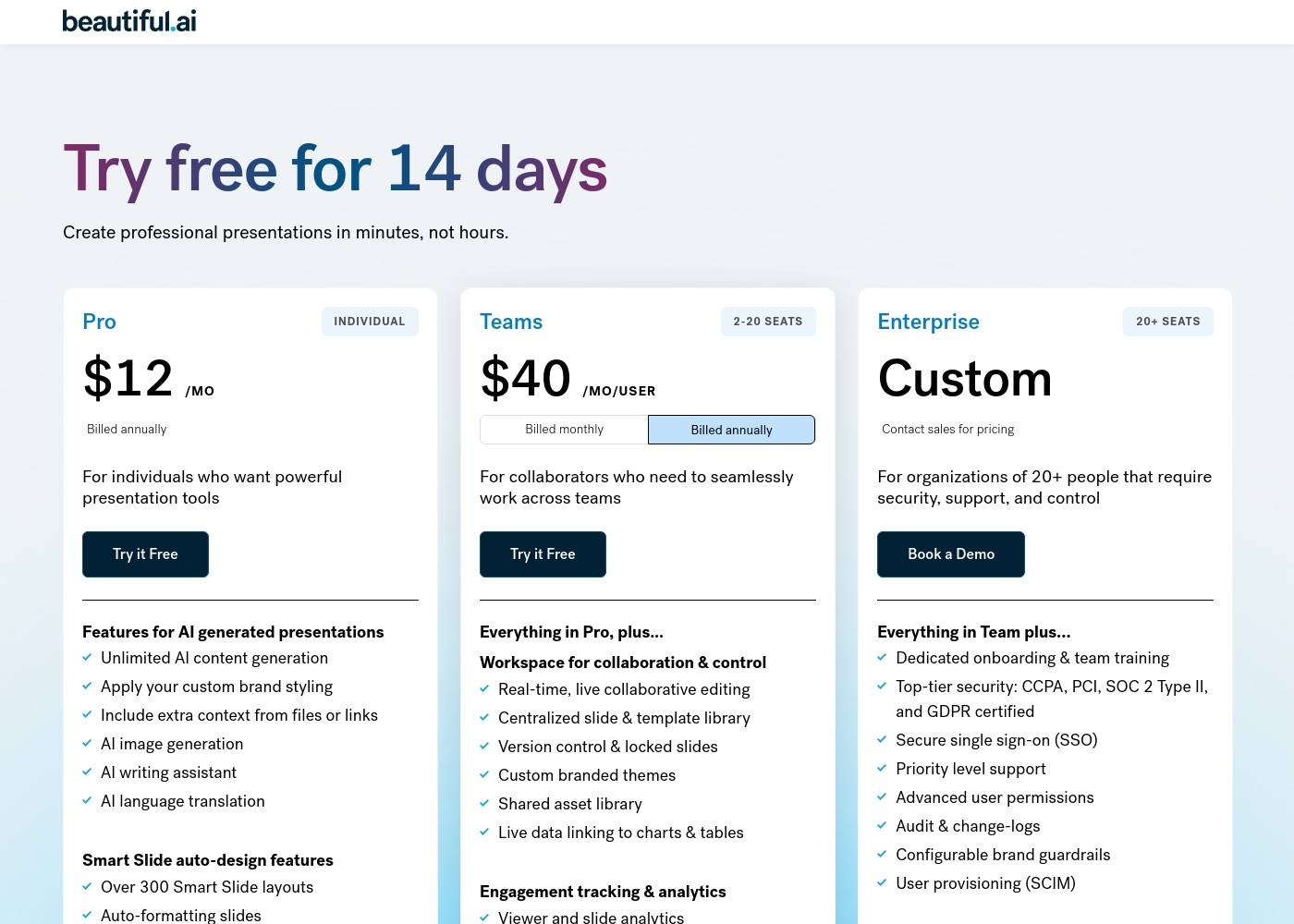
Beautiful.ai costs between $12/month and $50/user/month with three main plans: Pro at $12/month (billed annually), Team at $40/user/month (billed annually), and Enterprise (Custom Pricing).
If you're ready to create polished presentations fast, you'll find a plan to fit your needs, whether you're working solo or collaborating across a large organization.
Pro (Individual)
Price: $12/month (billed annually, or $45/month billed monthly) Best For: Individuals who want powerful presentation tools Refund Policy: Partial refund possible within 24 hours of initial annual purchase or renewal. Monthly subscriptions are non-refundable. Other Features:
- Unlimited AI content generation
- Apply your custom brand styling
- AI image generation and writing assistant
- Over 300 Smart Slide layouts
- Dynamic data visualizations
- Unlimited AI content generation
- Apply your custom brand styling
- AI image generation
- AI writing assistant
- Over 300 Smart Slide layouts
- Everything in Pro, plus:
- Real-time, live collaborative editing
- Centralized slide & template library
- Version control & locked slides
- Viewer and slide analytics
- Everything in Team, plus:
- Dedicated onboarding & team training
- Top-tier security (SOC 2 Type II, CCPA, GDPR certified)
- Secure single sign-on (SSO)
- Priority level support
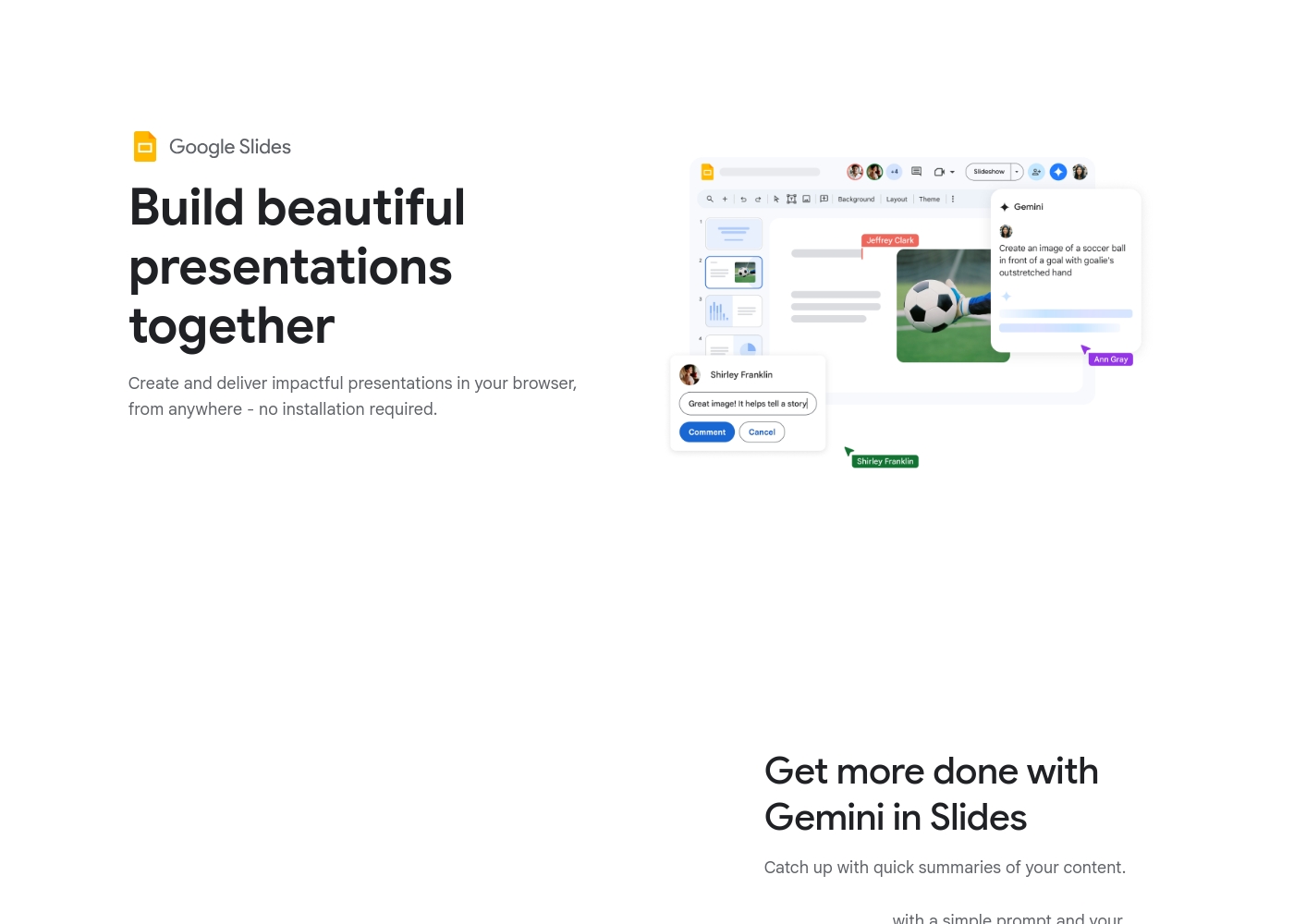
Google Slides is available for free with a Google Account, but premium features require a Google Workspace plan.
While this page doesn't show exact dollar amounts, it clearly outlines three paths for accessing Google Slides features. Let’s explore which option might be the best for you.
Basic Access (via Google Account)
Price: Free with standard Google Account Best For: Individuals and casual collaboration Other Features:
- Create and deliver presentations in your browser
- Flexible collaboration with live editing and comments
- Import Microsoft PowerPoint or Canva presentations
- Co-editing functions
- Offline access on mobile
- Create and deliver impactful presentations
- Flexible collaboration with live editing and comments
- Import Microsoft PowerPoint or Canva presentations
- Co-editing functions
- Offline access via mobile/computer
- Includes core features
- Access to some premium features
- Potential access to Gemini A.I. via add-on
- Business-focused tools
- Includes all features
- Stay on brand with domain templates
- Meet directly in documents
- Present from Google Meet with controls
- Speaker spotlight and easy presentation recording
Pricing Notes
- Google Slides offers core collaboration features completely free with a standard Google Account.
- Beautiful.ai pricing is transparent ($12–$50/user/month) and includes a $45 one-off purchase option.
- Premium features in Google Slides require a paid Google Workspace subscription, for which specific pricing is not listed.
- The 14-day Beautiful.ai trial requires a credit card and auto-renews unless actively canceled.
- Both Beautiful.ai and Google Slides paid plans are associated with serious user complaints regarding billing complexity and unresponsive support.
Pricing Head-to-Head
User Reviews
Beautiful.ai often impresses users by fulfilling its promise: creating polished, professional presentations fast. Many reviewers call the software a "game-changer," noting that the intuitive interface and Smart Slides technology drastically reduce the time spent worrying about design and formatting.
Users particularly praise the AI component, which generates complete decks from just a text prompt, allowing them to focus entirely on their core message. The quality of the visuals and templates is frequently exceptional.
As a solopreneur, creating decks from scratch was always time-consuming until Beautiful.ai came along. I simply feed it what I need and it quickly creates a gorgeous presentation for me. It's truly been a critical game-changer for my consulting business efficiency.
User reviews for the Google Workspace platform, which hosts Google Slides, reveal significant operational concerns, often overshadowing the application's benefits. The dominant theme is the non-existent and unhelpful customer support.
Users repeatedly report hours wasted trying to resolve issues, describing the process as a 'dark web maze' where technicians either fail to read requests or provide circular instructions. A massive source of frustration is the challenging subscription and billing system.
Worst experience ever. It's impossible to cancel your subscription and there is virtually no support available for basic issues. Hands down the most annoying digital ordeal I have ever come across.
Our Verdict
This heavyweight contest is truly about automation versus accessibility for presentation tools. Beautiful.ai and Google Slides address very different user pain points. Beautiful.ai wins if speed and professional, automated design are your top concerns. Google Slides is unbeatable for universal access and frictionless, live team collaboration. If you hate formatting slides, Beautiful.ai is your ideal creative partner. It uses Smart Slides and AI to generate comprehensive, polished drafts instantly. Beautiful.ai users report reducing presentation production time by up to 80% due to automation. Google Slides is the collaboration king because co-editing is foundational to its design. It works everywhere—online, offline, and across every device—and the basic version is free. Its ability to import and edit Microsoft PowerPoint files is also a huge advantage. The deciding factor is usually your budget and administrative tolerance. Beautiful.ai is a professional tool with clear subscription pricing focused on design output. Google Slides is the essential, free default, but the paid Workspace tiers come with reported administrative nightmares. Choose Beautiful.ai if mandatory brand consistency and speed justify the subscription cost. Stick with Google Slides if live co-editing and zero friction are the non-negotiable requirements for your entire team.
Frequently Asked Questions
Which is better for small teams: Beautiful.ai or Google Slides?
Google Slides is better if your team needs simple, live co-editing and requires zero cost. Beautiful.ai (Team plan) offers centralized libraries and strong design control for small paid teams. Choose Beautiful.ai if design automation significantly speeds up your paid team's workflow. The Beautiful.ai Team plan starts at a minimum of 2 seats.
Can I use Beautiful.ai offline like Google Slides?
Google Slides offers offline access for creating and editing on mobile and computer devices. Beautiful.ai provides a desktop player, but only to present downloaded files offline. You cannot edit or create new presentations entirely offline using Beautiful.ai, unlike with Google Slides.
Does Beautiful.ai integrate with Microsoft PowerPoint files?
Beautiful.ai provides robust export options, including conversion to PowerPoint files (.PPTX) for sharing. Google Slides allows you to both import and directly edit existing PowerPoint files seamlessly. If you manipulate old PPT files often, Google Slides is more flexible.
Which tool offers better AI features for content creation?
Beautiful.ai excels at AI generation for core deck creation. It can generate a full presentation draft in seconds from a simple prompt. Google Slides offers Gemini AI features (like summarization) as an integrated paid add-on within Workspace plans. Beautiful.ai focuses AI on speed.
Is the free version of Google Slides sufficient for business use?
The free version of Google Slides provides excellent core collaboration and creation tools. It lacks premium features like domain templates, speaker spotlight, or advanced security controls. Enterprises needing strict brand enforcement should use a paid plan with either Google Slides or Beautiful.ai.
How does brand control compare between Beautiful.ai and Google Slides?
Beautiful.ai offers advanced control using unique features like Locked Slides to protect critical content organization-wide. Google Slides offers domain templates, a premium Workspace feature, for ensuring consistent branding. Beautiful.ai gives design administrators much more rigid control over slide elements.
Ready to Choose?
Both tools have their strengths. Choose based on your specific needs.