Beautiful.ai vs Keynote
Beautiful.ai and Keynote represent two distinct approaches to presentation software today. Beautiful.ai uses powerful AI and Smart Slides to automate design and speed up creation time. Keynote offers deep design control and seamless cross-platform flexibility via Keynote for iCloud. Picking between them depends heavily on whether you prioritize speed or customization.
Best for: Teams needing to produce high-volume, visually polished decks quickly, Sales or Marketing teams requiring Salesforce/Slack integration and slide analytics
Best for: Users deeply embedded in the Apple ecosystem (Mac, iPad, iPhone), Designers requiring limitless creative control and bespoke customization tools
Polished presentations made lightning-fast.
Beautiful.ai excels at automating design complexity, allowing users to create visually stunning and professional decks with minimal effort. The core AI functionality is excellent, producing high-impact visuals and significantly boosting productivity for professionals and teams. We must note, however, that the recurring complaints regarding billing practices, especially unwanted annual charges after trial cancellation, truly detract from the overall user experience. Overall, it's a powerful tool for visual quality, provided you manage your subscription carefully.
Pros
- AI generation quickly creates comprehensive presentation drafts from text prompts.
- Smart Slides automatically handle complex design, formatting, and spacing.
- Users report drastically reduced presentation creation time, often calling it a game-changer.
- Output produces high-quality, professional, and visually impressive slides.
Cons
- Recurring problems with unexpected annual billing charges after trial cancellations.
- Support responsiveness is inconsistent, especially when resolving billing disputes.
- Templates and slide formatting can sometimes feel uniform or too limited for advanced customization.
- Users report difficulty copying and pasting images or elements between slides.
Pros
Cons
AboutBeautiful.ai
Beautiful.ai is an intelligent creative partner designed for professionals and teams. It allows you to build great presentations in half the time. The platform uses unique Smart Slides that handle the design, layout, and spacing automatically. 💡
As you add or edit content, the slides adapt instantly. This means you skip the formatting work and stay focused entirely on the story and message. It’s perfect for streamlining workflow and ensuring teams stay aligned.
AboutKeynote
Highlights
Feature Comparison
Features Overview
We highlight the main differences and pick a winner for each feature.
AI Automation & Speed
Beautiful.ai uses AI to automate design and accelerate deck creation significantly.
Beautiful.ai immediately generates full presentation drafts from a single text prompt. Smart Slides automatically handle design, layout, and spacing adjustments instantly. Users report being up to 80% more efficient creating decks with Beautiful.ai. Keynote starts with professional themes but requires the user to execute the design choices manually. It offers powerful control but lacks the instant AI generation or automatic formatting found in Beautiful.ai. The major trade-off is control versus instantaneous results; Beautiful.ai handles the repetitive design work. Keynote demands more hands-on design but provides greater creative freedom and customization. If you need to produce 5 new, polished decks per week, Beautiful.ai dramatically reduces time sinks. If design ownership and granular control matter more, Keynote is better.
Cross-Platform Access
Keynote works natively on all Apple products and widely via iCloud; Beautiful.ai is cloud-first.
Beautiful.ai operates primarily as a web app, offering flexible access via standard web browsers. It also provides a desktop player for offline presentation delivery when internet is unavailable. Keynote is deeply integrated across Mac, iPad, and iPhone, ensuring true cross-device consistency. Keynote for iCloud allows full access and editing via any compatible web browser, even Windows machines. Keynote offers a true native application experience across Apple devices that Beautiful.ai cannot match. However, both tools allow Windows users to collaborate through a web browser effectively. Keynote is ideal for an all-Apple office that needs browser flexibility for external partners and seamless device handover.
Team Collaboration
Both offer real-time editing, but Beautiful.ai adds centralized assets and crucial analytics.
Beautiful.ai's Team plan includes real-time live editing and a centralized slide and template library. It features version control, plus lockable slides for managing strict brand consistency. Keynote facilitates strong collaborative functionality, allowing seamless editing and sharing across various platforms, including the web browser interface. Beautiful.ai provides advanced features like viewer and slide analytics, which are absent in Keynote's listed features. Keynote's collaboration is built around core document sharing principles. For large teams requiring strong asset control and tracking engagement, Beautiful.ai provides superior management and organizational tools.
Workflow Integrations
Beautiful.ai focuses on business integrations; Keynote focuses heavily on Apple device integration.
Beautiful.ai integrates directly with professional tools like Salesforce, Slack, Dropbox, and Monday.com. This enables streamlined workflows and critical presentation reporting insights. Keynote's strength lies in its deep integration within Apple's ecosystem (Mac, iPad, iPhone). Specific external, non-Apple business software integrations are not listed in its features. Beautiful.ai clearly wins for integrating presentations directly into your sales and marketing tech stack. Keynote offers superior integration with your owned Mac, iPhone, and iPad devices. If tracking slide views, efficacy, and sharing metrics matter, Beautiful.ai's Salesforce integration is critical for sales groups.
Design Control
Beautiful.ai guarantees polish via rules; Keynote gives the user ultimate, manual creative freedom.
Beautiful.ai uses Smart Slides to enforce professional design and brand compliance automatically. While efficient, this rule-based system can feel uniform or too limited for advanced, unique customization. Keynote offers powerful design tools, themes, and controls, allowing users hands-on command over every element. Users can tailor the visual story exactly. Beautiful.ai sacrifices fine-grained control for speed and guaranteed polished output. Keynote sacrifices design speed for virtually limitless creative freedom. If you are a professional designer or require truly bespoke layouts, Keynote gives you the full canvas you need.
Virtual Presenting
Keynote excels in virtual calls with a dedicated presenter view for Mac users.
Keynote, when used on a Mac, includes a dedicated feature to keep presenter notes and slide controls in a separate private window. The audience only views the presentation slides. Beautiful.ai touts flexible sharing and delivery but focuses on content creation and export functions. Specialized features for virtual meeting delivery are not mentioned in its details. Keynote's dedicated feature significantly improves delivery quality during mission-critical virtual conferences. It focuses the presenter on their notes and timing discreetly. If you frequently deliver complex virtual presentations with detailed notes, Keynote offers a unique and distinct organizational advantage.
Pricing Visibility
Beautiful.ai has transparent, tiered pricing; Keynote's costs are not disclosed in the documentation.
Beautiful.ai provides clear pricing tiers for individuals and teams, ranging from $12/month up to custom enterprise quotes. It includes specific feature lists for each level. Keynote's documentation does not explicitly detail costs, subscription packages, or billing cycles for the software. Users must consult external Apple stores for current pricing information. Beautiful.ai allows potential customers to estimate collaboration costs quickly and accurately for budgeting purposes. Keynote requires extra research to determine the final price. Keynote's lack of transparent pricing makes Beautiful.ai a clearer budget choice for teams needing predictable financial accounting.
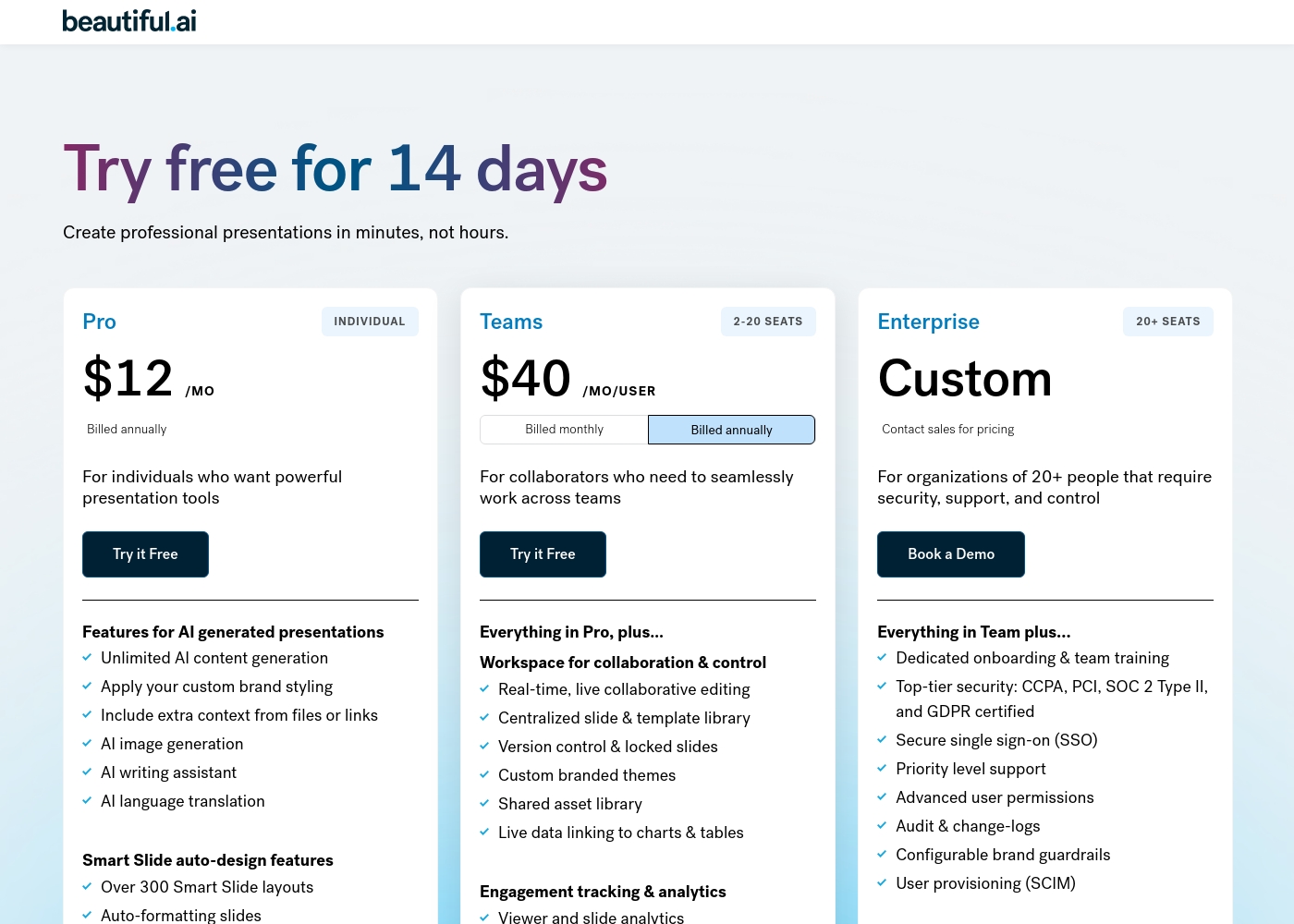
Beautiful.ai costs between $12/month and $50/user/month with three main plans: Pro at $12/month (billed annually), Team at $40/user/month (billed annually), and Enterprise (Custom Pricing).
If you're ready to create polished presentations fast, you'll find a plan to fit your needs, whether you're working solo or collaborating across a large organization.
Pro (Individual)
Price: $12/month (billed annually, or $45/month billed monthly) Best For: Individuals who want powerful presentation tools Refund Policy: Partial refund possible within 24 hours of initial annual purchase or renewal. Monthly subscriptions are non-refundable. Other Features:
- Unlimited AI content generation
- Apply your custom brand styling
- AI image generation and writing assistant
- Over 300 Smart Slide layouts
- Dynamic data visualizations
- Unlimited AI content generation
- Apply your custom brand styling
- AI image generation
- AI writing assistant
- Over 300 Smart Slide layouts
- Everything in Pro, plus:
- Real-time, live collaborative editing
- Centralized slide & template library
- Version control & locked slides
- Viewer and slide analytics
- Everything in Team, plus:
- Dedicated onboarding & team training
- Top-tier security (SOC 2 Type II, CCPA, GDPR certified)
- Secure single sign-on (SSO)
- Priority level support
Pricing Notes
- Beautiful.ai pricing is transparent, starting at $12/month (billed annually) for individuals.
- Keynote's pricing structure is opaque; costs, tiers, and billing cycles are not explicitly detailed in the documentation.
- Beautiful.ai utilizes a per-seat model for Team plans ($40/user/month annually) supporting 2-20 users.
- Beautiful.ai requires a credit card for its 14-day free trial, leading to user complaints about unexpected recurring charges.
- Beautiful.ai offers a unique $45 one-off purchase option for a single quick presentation project.
Pricing Head-to-Head
User Reviews
Beautiful.ai often impresses users by fulfilling its promise: creating polished, professional presentations fast. Many reviewers call the software a "game-changer," noting that the intuitive interface and Smart Slides technology drastically reduce the time spent worrying about design and formatting.
Users particularly praise the AI component, which generates complete decks from just a text prompt, allowing them to focus entirely on their core message. The quality of the visuals and templates is frequently exceptional.
As a solopreneur, creating decks from scratch was always time-consuming until Beautiful.ai came along. I simply feed it what I need and it quickly creates a gorgeous presentation for me. It's truly been a critical game-changer for my consulting business efficiency.
Our Verdict
Beautiful.ai and Keynote are presentation heavyweights built with completely different design philosophies. Beautiful.ai is the clear choice for speed and efficient, automated visual polish. Keynote is best if you demand the highest level of creative control living inside the trusted Apple device ecosystem. Beautiful.ai’s true superpower is making everyone look like a brilliant designer instantly. Its Smart Slides feature automates all formatting, helping you generate comprehensive presentations within seconds using powerful AI. Teams get massive efficiency gains, plus crucial administrative tools like analytics and locked slides for strict brand control. Keynote’s strength lies in its powerful creative canvas and legendary device reliability. Designers love the deep manual control over design elements and professional themes. It works perfectly on your Mac, iPhone, and iPad, letting you edit or present seamlessly on the go. Keynote for iCloud also ensures external Windows users can easily collaborate. The deciding factor is speed versus control. If you need a polished business deck almost instantly, and need to track audience engagement, choose Beautiful.ai. But if your slides require truly bespoke design treatments, and native Mac integration is non-negotiable, Keynote is your superior tool. Choose Beautiful.ai if your team needs to output 50 polished decks a month while strictly enforcing brand consistency. If you value personal creative freedom and use a dedicated Mac for complex virtual presentations, Keynote remains the industry standard choice.
Frequently Asked Questions
Which is easier to use for beginners: Beautiful.ai or Keynote?
Beautiful.ai is generally easier for design beginners due to its Smart Slides feature. Smart Slides automatically handle complex layout and formatting adjustments instantly. Keynote offers powerful tools but requires more manual effort to achieve a polished look.
Does Keynote offer AI content generation like Beautiful.ai?
No, Keynote does not offer AI presentation draft generation from a text prompt. Beautiful.ai can generate a full deck in seconds using its custom GPT and AI writing assistant. Keynote focuses on starting with professional themes and user-directed content.
Which tool is better for enterprise-level brand control?
Beautiful.ai is better for large organizations requiring strict brand control and compliance. Its Team and Enterprise plans include Locked Slides and centralized libraries. Keynote offers design controls but lacks these centralized brand guardrails.
Can Windows users collaborate on Keynote presentations?
Yes, they can. Keynote for iCloud allows Windows users to create, edit, and collaborate on shared presentations easily. Windows users access the document directly through a compatible web browser interface.
How much does Beautiful.ai cost versus Keynote?
Beautiful.ai has transparent pricing, starting at $12/month when billed annually. Keynote's pricing is not disclosed in the documentation; users must rely on Apple's external app stores. Therefore, Beautiful.ai is easier to budget for immediately.
Which software is better for tracking audience engagement?
Beautiful.ai is explicitly better for tracking engagement. Its Team plan includes viewer and slide analytics to track audience interaction. There is no mention of built-in analytics or viewing reports within Keynote's feature set.
Ready to Choose?
Both tools have their strengths. Choose based on your specific needs.