EaseUS

EaseUS

Data Survival and System Optimization Experts

#2 dans Data Recovery
2 min read · Updated 10/5/2025
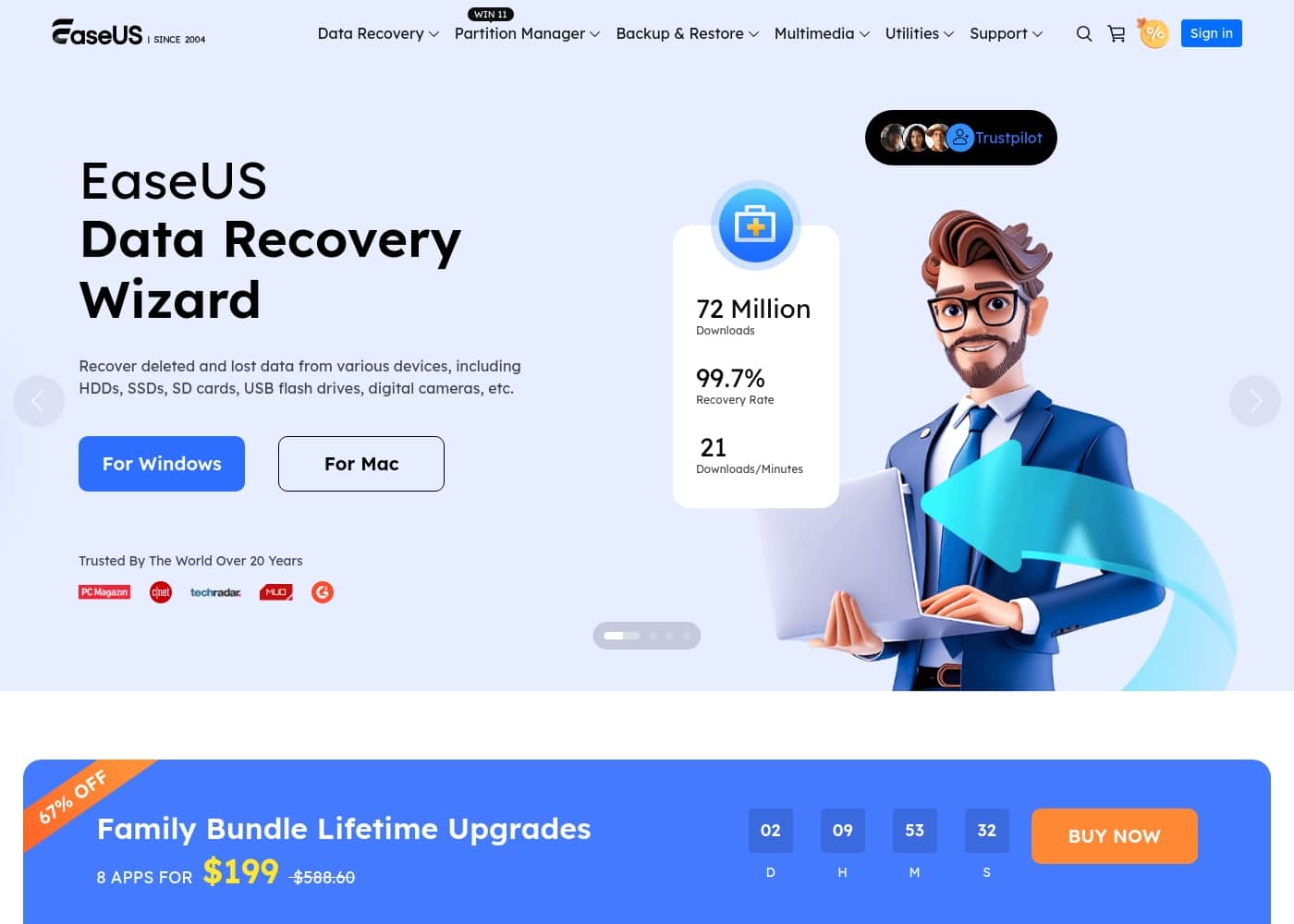
EaseUS homepage screenshot

At a glance

Quick overview for EaseUS: rating, pricing summary, key features, and highlights.

Ciroapp review

4.7
Reliable Tools, Excellent Customer Support

We find that EaseUS offers a robust toolkit for data management and system optimization. Their extensive 20-year history builds confidence among over 530 million users globally. Overall, the system’s effectiveness paired with its exceptional customer support makes it a highly recommended choice.

Pros

  • Pro:Access to a cost-effective Lifetime Upgrade license for $149.95.
  • Pro:Customer support is quick, knowledgeable, professional, and accessible via chat.
  • Pro:Software is highly effective at data recovery and system tasks like partitioning.
  • Pro:Clear 30-day money-back guarantee offered on all individual plans.

Cons

  • Con:The short-term one-month license is priced relatively high at $69.95.
  • Con:Minor activation issues sometimes occur when software is moved to new hardware.
  • Con:One reported instance of deceptive marketing for a 'free' screen recording tool.
Money-back guarantee
Yes — 30 days
Range: $69.95/month – $149.95 (One-Time)Monthly subscription, Yearly subscription, One-time payment
This section is a summary. Detailed sections about features, use cases, pricing, and reviews follow below.

EaseUS review, pricing, features, pros & cons

Losing essential files or dealing with a painfully slow computer is incredibly frustrating. You need quick, reliable data solutions. EaseUS provides professional software designed to prevent data loss and optimize your digital life with power and simplicity.

✨ It’s a comprehensive toolkit for maintaining healthy systems and ensuring data survival.

What is EaseUS?

EaseUS is a prominent global technology corporation focused on creating robust data management solutions. They serve a massive audience, having earned the trust of over 530 million users globally. This platform is built for everyone, from home users managing personal photos to businesses requiring advanced backup and recovery strategies.

EaseUS concentrates on delivering high value through trustworthy, cohesive products. They ensure your sensitive data is always secure and accessible. 🛠️

EaseUS Key Features

🗃️ Comprehensive Data Recovery and File Repair

When essential files disappear, the Data Recovery Wizard stands ready to help. This powerful tool is designed to retrieve data lost from nearly any source. It effectively handles recovery from hard drives, SSDs, USB flash drives, and SD cards, providing reliable results regardless of the device.

It handles many complex data loss scenarios, including accidental deletion and complete system failure. Specialized tools also exist for specific professional recoveries, such as restoring MS SQL databases and Exchange emails. This depth of service ensures your critical business data is always safeguarded.

Beyond simple recovery, EaseUS offers Fixo, which applies AI technology to repair corrupted media. If your video files, photos, or documents are damaged, Fixo can fix them fast. You can also utilize convenient online repair tools for immediate fixes without any software installation.

✨ Smart Disk Management and Optimization

Optimize your PC’s performance and manage storage space effortlessly with EaseUS Partition Master. This essential tool helps keep your Windows or Mac machine running smoothly. It allows you to organize your hard drive and reallocate free space, leading to significant system improvements.

Partition Master lets you safely resize, move, or merge partitions without the risk of data loss. Maintaining organized disk partitions is crucial for keeping your computer fast and healthy. It's the ultimate tool for achieving peak operational efficiency.

If you're upgrading storage, use EaseUS Disk Copy for seamless cloning. This function transfers your entire operating system and all existing data to a new hard drive or SSD. You save valuable time since you don’t have to reinstall your OS or applications upon migration.

✨ Unbreakable Data Backup and Instant Restore

Secure your digital life using Todo Backup, which offers robust safety solutions for everyone. This platform specializes in providing complete data backup and restore capabilities. Whether you're protecting home photos or enterprise servers, there is a tailored program for your needs.

Todo Backup simplifies the process with one-click backup functionality. This ensures you can secure critical files, systems, and partitions quickly and easily. Should your system face failure, instant recovery capabilities let you restore data promptly.

For businesses, Central Management helps implement a centralized and cohesive backup strategy. This ensures every workstation is protected under one umbrella. The reliable, fast recovery feature provides essential peace of mind against unforeseen data disasters.

✨ Seamless PC and Mobile Data Migration

Transferring data between devices is often complicated, but EaseUS transfer tools make it simple. Todo PCTrans serves as a reliable assistant for migrating between Windows computers. It moves more than just files; it migrates applications and user accounts seamlessly.

This application allows you to transfer data, applications, and user accounts between PCs. You can even move full installations to a new drive without the need for time-consuming reinstallation. For specialized mobile needs, MobiMover handles data transfer among iPhones, Android phones, Mac, and PC systems.

  • Todo PCTrans: PC App/Account Migration
  • MobiMover: Cross-Platform Mobile Transfer
  • OS2Go: Create a Windows To Go environment

💡 Advanced AI and Multimedia Creativity

Unleash your creative potential with integrated multimedia and AI-powered tools. EaseUS provides professional software to streamline video editing and content creation. These tools bring powerful, simple features to your desktop.

RecExperts is an excellent screen recorder for capturing your PC screen, audio, and webcam with precision. It's ideal for producing tutorials, video guides, or recording seamless gameplay. You also get easy-to-use video editing software to refine your recorded content.

Explore innovative audio possibilities using AI technology built into the platform. VoiceWave changes your voice in real-time, helping you craft professional audio tracks instantly. Furthermore, the free online Vocal Remover separates vocals and instruments from any song using powerful AI.

✨ Specialized Utilities for System Control

EaseUS offers a wide range of specialized utilities designed to maintain security, manage drivers, and optimize your system. These tools ensure robust control over your computer's health and provide solutions for often tricky maintenance tasks.

For data security, BitWiper ensures sensitive data is permanently erased and unrecoverable before disposal. You can also use LockMyFile to password-protect important documents for maximum privacy. Other tools, like DupFiles Cleaner, quickly find and remove unnecessary duplicate files cluttering your drive.

If you use iOS devices, the MobiXpert toolkit helps manage your devices effectively. MobiUnlock can remove forgotten Apple IDs or screen passcodes from your iPhone. DriverHandy also ensures your system drivers are always up-to-date for peak stability and performance.

Use Cases

💾 Recovering Crucial Files After Accidental Deletion

When important documents or photos vanish, panic often sets in. EaseUS Data Recovery Wizard is designed for these high-stress moments. It quickly and reliably recovers deleted and lost data from almost any device. This includes files lost from hard drives, SSDs, USB sticks, and even digital camera SD cards.

This simple process helps secure your crucial data, restoring files that seemed permanently gone. The goal is bringing back peace of mind quickly when an immediate data recovery need arises.

💻 Migrating Your Entire System to a New Drive or PC

Buying a fast new SSD or upgrading your desktop used to mean hours spent reinstalling Windows and every application. Now, you can skip the hassle. Use Todo PCTrans to migrate existing applications, user accounts, and settings seamlessly between two Windows PCs.

Alternatively, Disk Copy provides a lightning-fast way to clone your entire hard drive. This ensures the safe transfer of your OS and data without losing time. Your new setup will be immediately ready to go, performing perfectly the moment you boot up.

⚙️ Optimizing Disk Health and System Speed

Is your computer starting to feel painfully slow? Often, poor performance relates to how your storage is managed. Use Partition Master to efficiently handle disk space. You can safely manage your partitions, resizing or merging them without any data loss.

This tool helps organize your hard drive and reallocate free space where your system needs it most. By optimizing your disk performance, you improve overall system stability and speed.

Tip: Regular partition checks help identify potential disk issues before they cause data loss.

🛡️ Ensuring Proactive Data Backup for Professionals

Data survival relies on robust backup strategies. Todo Backup offers complete data backup and restore solutions to secure all your crucial data. It’s a tailor-made program that satisfies all kinds of personal and business needs.

We provide one-click backup functionality for easy implementation. If hardware failure or a corrupted file occurs, you have an instant recovery point. This minimizes downtime and ensures that you always have access to your sensitive and essential information.

🎬 Enhancing Multimedia Content Production

Content creators need powerful, yet easy-to-use multimedia tools. RecExperts allows you to capture your PC screen and audio flexibly, ideal for recording tutorials, training videos, or seamless gameplay.

For unique audio elements, the AI tools step in. Use VoiceWave to change voices in real-time, helping craft professional audio tracks for voiceovers. You can also deploy the Vocal Remover to quickly separate vocals and music from any song online, giving you immediate access to raw component tracks for editing.

📱 Regaining Access to Locked Mobile Devices

If you forgot your iPhone passcode or purchased a used device that is locked, regaining control can seem impossible. MobiUnlock is designed to handle these scenarios. It allows you to unlock the device, removing the Apple ID or screen passcode completely.

🔄 Seamlessly Transferring Data Between Mobile Devices

Switching from iOS to Android (or vice-versa) requires moving massive amounts of data. MobiMover simplifies this migration challenge. This free iPhone transfer software transfers data among iPhones, Android phones, Macs, and PCs safely and quickly.

This ensures that essential contacts, photos, and messages follow you to your new device.

Pricing Overview for EaseUS

Pricing range
$69.95/month – $149.95 (One-Time)
Pricing types
Monthly subscription, Yearly subscription, One-time payment
Money-back guarantee
Yes — 30 days

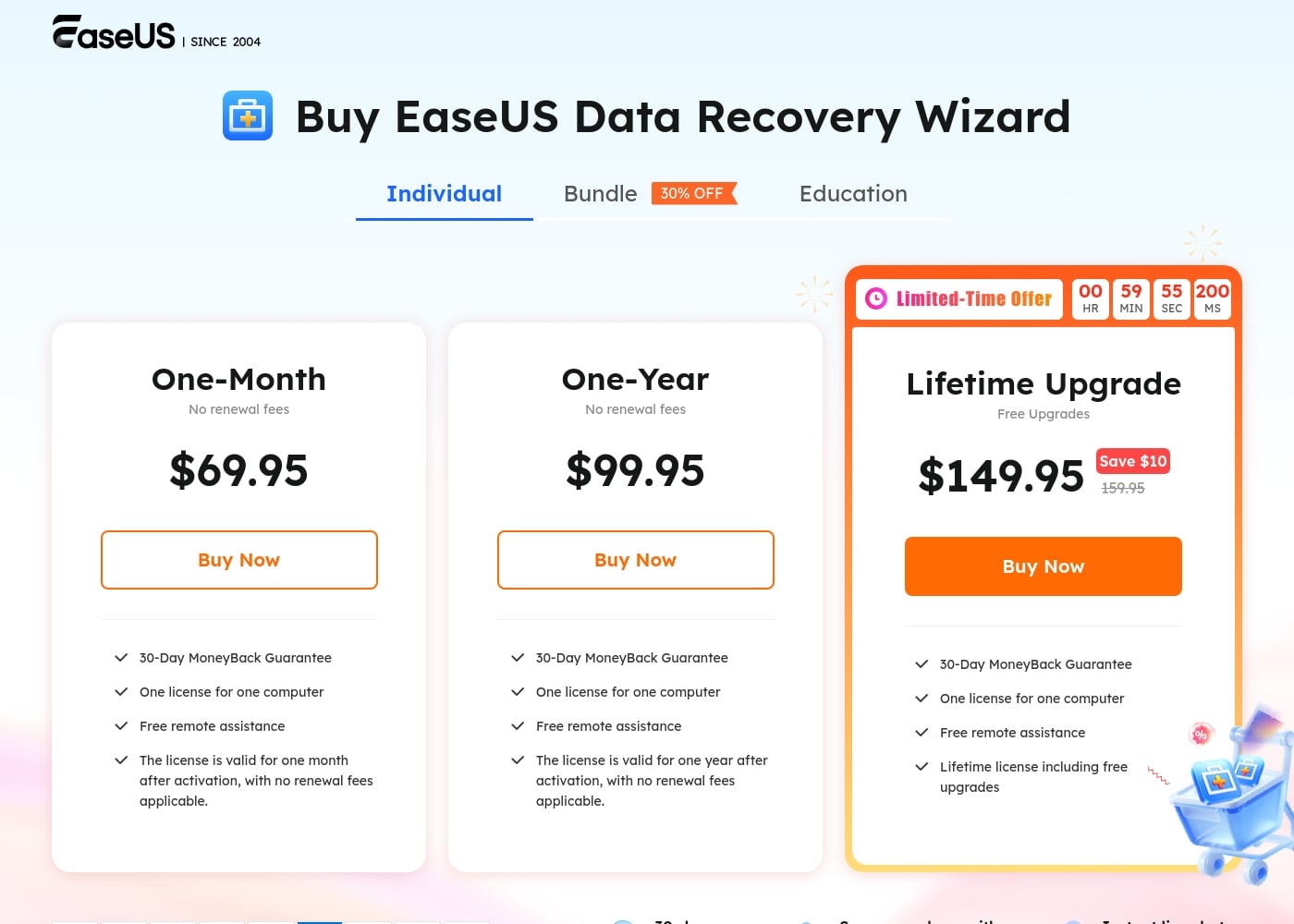
EaseUS Data Recovery Wizard offers three individual license options: One-Month ($69.95), One-Year ($99.95), and a Lifetime Upgrade purchase ($149.95). These are treated as one-time licenses that do not auto-renew, and all include a license for one computer and a 30-day money-back guarantee.

Plans & Pricing

One-Month

Monthly$69.95
License duration: 1 month
  • One license for one computer
  • Free remote assistance
  • License valid for one month
  • No renewal fees applicable

One-Year

Yearly$99.95
License duration: 1 year
  • One license for one computer
  • Free remote assistance
  • License valid for one year
  • No renewal fees applicable

Lifetime Upgrade

Contact for pricing
One-time purchase
  • One license for one computer
  • Free remote assistance
  • Lifetime license including free upgrades

EaseUS Data Recovery Wizard costs between $69.95 per month and $149.95 (one-time purchase) with 3 plans: One-Month at $69.95, One-Year at $99.95, and Lifetime Upgrade at $149.95.

Let's look closer at what's included in the individual licensing options for EaseUS Data Recovery Wizard.

One-Month

Price: $69.95 per month Websites Supported: Not explicitly stated Best For: Individuals with a single, immediate data recovery need Refund Policy: 30-day money-back Other Features:

  • One license for one computer
  • Free remote assistance
  • No renewal fees applicable
  • License valid for one month after activation

This plan is ideal if you have a one-time emergency. If you lost some data and need quick recovery access, the One-Month option gives you the tools you need without a long commitment. It's a focused solution to get your data back fast.

One-Year

Price: $99.95 per year Websites Supported: Not explicitly stated Best For: Individuals who need ongoing annual data protection or recovery access Refund Policy: 30-day money-back Other Features:

  • One license for one computer
  • Free remote assistance
  • No renewal fees applicable
  • License valid for one year after activation

Choosing the Annual plan saves you money compared to subscribing monthly. This license is perfect for maintaining access throughout the year, offering protection against accidental data loss or hardware failure. It's a smart choice for long-term peace of mind. ✨

Lifetime Upgrade

Price: $149.95 (one-time purchase) Websites Supported: Not explicitly stated Best For: Users seeking permanent access and continuous software improvements Refund Policy: 30-day money-back Other Features:

  • One license for one computer
  • Free remote assistance
  • Lifetime license including free upgrades

The Lifetime license is the ultimate investment for heavy users and professionals. You pay once and receive free upgrades forever, ensuring the software remains compatible with new operating systems and recovery technologies. It's the most cost-effective option over time.

Every individual plan comes with a strong 30-day money-back guarantee. This allows you a full month to ensure the software works for your specific recovery needs. Keep in mind that specialized Education plans are also available, offering a significant 40% discount for eligible students.
User Reviews

External feedback for EaseUS is overwhelmingly positive, particularly on Trustpilot, where the platform holds an excellent 4.8-star rating across tens of thousands of reviews. Users consistently praise the highly responsive and expert customer support provided by named staff members like Claire and Warren.

Reviewers noted that complex issues, especially those related to license activation following hardware changes or system migrations, were frequently resolved in minutes via live chat, emphasizing the quick and professional response times. The software itself is widely regarded for its proven efficiency and ease of use in core functions like data recovery and partition management.

For instance, many users successfully recovered valuable lost content, demonstrating the tools' reliability. The combination of easy-to-use, high-quality software with outstanding customer response is a major factor in driving customer loyalty among users.

While one criticism noted a potentially deceptive free trial practice with a screen recording tool, the consensus points to outstanding value and support overall. ✨

What users say elsewhere

M J.
· Trustpilot
5.0 / 5

I was having a licensing issue even though I purchased the "Lifetime Upgrades." I contacted support on the chat, and Warren had the problem fixed in a matter of seconds. This is truly fantastic service.

Duke S.
· Trustpilot
5.0 / 5

I thought my important video content was gone forever, but EaseUS located all of my lost files within just one hour. The recovery felt like magic restoring my data. Duke is also an awesome customer support agent.

No reviews yet.

Write a Review

Write a Review for EaseUS
0/100 characters
0/2000 characters

Why use EaseUS?

Why should EaseUS be your go-to for digital maintenance? The commitment to reliable service runs deep, built on decades of industry knowledge. When you need comprehensive control over your system, EaseUS delivers more than just single-purpose tools. They focus on delivering efficiency, safety, and empowerment across all your devices.

Here’s why users choose EaseUS:

  • Trusted Experience: Benefit from over 20 years of dedicated industry experience and stability. This long track record inspires confidence from millions of users worldwide.
  • Comprehensive Solutions: EaseUS offers a unique breadth of integrated tools, covering everything from data recovery and disk partitioning to backup and migration. You get a complete digital toolkit in one place.
  • Guaranteed Data Safety: Tools like the Data Recovery Wizard and Todo Backup are designed to secure your crucial data, helping you instantly recover or restore files lost from various devices, like SSDs and SD cards.
  • Seamless System Transfers: Effortlessly migrate operating systems, applications, and accounts between PCs using Todo PCTrans. You can upgrade hard drives safely without reinstalling anything.
  • Empower Your Creativity: Beyond core management, enhance your content creation with multimedia tools. These include AI-powered solutions for screen recording, video editing, and voice manipulation. 💡

Ready to transform your workflow with EaseUS?

Frequently Asked Questions

Are the individual Data Recovery Wizard licenses recurring subscriptions?

No, the individual One-Month, One-Year, and Lifetime Upgrade plans are handled as flexible one-time purchases. They do not have confusing auto-renewal fees and simply expire after their purchased term.

What happens if I upgrade my computer or change my hardware after purchasing a license?

You do not need to repurchase the software. If you change computers, simply contact EaseUS customer support via live chat or email, and they will assist you in resetting your license code for your new device.

Is there a limit on how much data I can recover with the paid software?

The official site specifies that paid licenses are strictly for use on one computer. However, the pricing documentation does not state any specific limit or quota on the volume of data you are allowed to recover.

Is there a free trial available for the Data Recovery Wizard professional versions?

The main paid plans (One-Month, One-Year, Lifetime) do not list a traditional free trial period before purchase. A free version called 'Data Recovery Free' is offered elsewhere on the site, which likely has limitations.

How quickly can I expect help if I need technical support?

Every plan includes free remote assistance. Customer support is noted for being highly responsive through instant live chat, often resolving license issues and technical problems within minutes.

What is included with the Lifetime Upgrade option, besides permanent access?

The Lifetime Upgrade plan is a single purchase that includes all future software upgrades for the Data Recovery Wizard for free. This ensures your software remains compatible with new operating systems and features.

What payment methods are supported when buying the software?

EaseUS accepts common payment methods. You can pay for your recovery software using Credit Cards, PayPal, or Wire Transfer, though Credit Card is highly recommended for fastest activation.

Do I qualify for a discount if I am a student?

Yes, EaseUS offers a significant 40% discount for eligible students. You must verify your student status to access the reduced pricing on the One-Month, One-Year, and Lifetime plans.

Does EaseUS offer solutions packaged with other tools?

Yes, several bundles are available that group the Data Recovery Wizard with different programs. Common bundles include packages with Todo Backup or the Mac version of the Data Recovery Wizard.

How do I claim a refund if the software doesn't work for my specific recovery need?

All individual plans come with a 30-day money-back guarantee. If the software is unable to successfully help you recover your lost data, you may request a full refund within that 30-day period.

How can I apply for VAT Exemption on my purchase?

If you are obligated to pay VAT but are exempt, you can use your VAT Exemption ID. You should enter this ID during the checkout process when completing your order.

Who is the One-Month license plan best suited for?

The One-Month license is ideal for individuals who are facing an urgent, one-time data recovery emergency. This option provides full recovery access without requiring a long-term financial commitment.

What data security measures does EaseUS use with recovered files?

Not explicitly stated on the official site. Specific details regarding data security protocols, encryption methods, or how your sensitive recovered data is handled are not provided in the purchasing information.”

What languages does the Data Recovery Wizard software support for users globally?

The official site shows an option to change the site language to English. However, the specific list of languages the Data Recovery Wizard software itself supports is not explicitly stated in the provided materials.

Ready to try EaseUS? Check out the official site or pricing.