EaseUS vs PhoneRescue
EaseUS and PhoneRescue both combat data loss but focus on different platforms. EaseUS provides a full PC management toolkit alongside recovery features. PhoneRescue specializes fiercely in iOS and Android retrieval mastery. It's truly the choice between a comprehensive PC suite and a dedicated mobile recovery expert.
Best for: Users requiring disk partitioning and system health optimization, IT professionals managing client PC health and system migration
Best for: Individuals needing affordable, one-time mobile data recovery access, Users requiring recovery of specific iOS/Android files (messages, photos)
Reliable Tools, Excellent Customer Support
We find that EaseUS offers a robust toolkit for data management and system optimization. Their extensive 20-year history builds confidence among over 530 million users globally. Overall, the system’s effectiveness paired with its exceptional customer support makes it a highly recommended choice.
Pros
- Access to a cost-effective Lifetime Upgrade license for $149.95.
- Customer support is quick, knowledgeable, professional, and accessible via chat.
- Software is highly effective at data recovery and system tasks like partitioning.
- Clear 30-day money-back guarantee offered on all individual plans.
Cons
- The short-term one-month license is priced relatively high at $69.95.
- Minor activation issues sometimes occur when software is moved to new hardware.
- One reported instance of deceptive marketing for a 'free' screen recording tool.
Reliable recovery backed by stellar support.
We note PhoneRescue’s high claims regarding success rates and file coverage, positioning it as a powerful tool for major operating systems. External feedback verifies the platform's straightforward operation and consistently praises the excellent, responsive customer support team. Overall, this product offers strong peace of mind due to its user-friendly interface and commitment to risk reduction through professional refunds and guarantees.
Pros
- Prompt, professional, and patient customer support staff.
- High claimed success rate covering up to 31 types of lost files.
- User-friendly interface requiring zero technical knowledge.
- Flexible, one-time Lifetime license purchase options available.
Cons
- Software occasionally fails to fix highly complex mobile issues.
- Specific specialized functions may not always work perfectly for every user (e.g., text exports).
- Backup processes can sometimes take longer than expected.
AboutEaseUS
EaseUS is a prominent global technology corporation focused on creating robust data management solutions. They serve a massive audience, having earned the trust of over 530 million users globally. This platform is built for everyone, from home users managing personal photos to businesses requiring advanced backup and recovery strategies. EaseUS concentrates on delivering high value through trustworthy, cohesive products. They ensure your sensitive data is always secure and accessible. 🛠️
AboutPhoneRescue
PhoneRescue is a comprehensive, all-around data recovery solution for both iOS and Android devices. It’s built for anyone who has experienced unexpected data loss. This software ensures you never lose a single byte ever again. ✅
The operation is completely straightforward, using an intuitive UI and step-by-step wizard. PhoneRescue asks for no technical knowledge at all. Even your grandparents can easily get back what was lost entirely by themselves, making complicated recovery simple.
Highlights
Feature Comparison
Features Overview
We highlight the main differences and pick a winner for each feature.
Core Ecosystem
EaseUS offers a full data management suite; PhoneRescue focuses purely on recovery.
EaseUS is a comprehensive system toolkit for PC management, backups, and recovery. Users get access to partitioning tools and PC migration apps like Todo PCTrans. The Data Recovery Wizard is just one specialized part of the wider EaseUS offering. PhoneRescue is hyper-focused on saving data from iOS and Android devices efficiently. It aims to be a best-in-class recovery tool for mobile users only. PhoneRescue explicitly does not include complex computer optimization features. EaseUS is strong for users maintaining their PC health long-term consistently. PhoneRescue is best for immediate, targeted mobile data emergencies only. Choose EaseUS for a complete desktop solution; choose PhoneRescue if specialized, affordable mobile recovery is your only need.
Mobile Recovery Depth
PhoneRescue specializes in 31 specific mobile file types, a depth EaseUS can't match.
EaseUS handles PC storage types like HDD, SSD, and SD cards effectively, which may include mobile data. Mobile data transfer requires separate utility apps like MobiUnlock or MobiMover from the EaseUS suite. The core Data Recovery Wizard is primarily PC-focused. PhoneRescue specifically claims to be the only software recovering up to 31 unique file types. It offers a dedicated mobile solution for iOS and Android with maximum success rates. PhoneRescue prioritizes quick retrieval of messages, photos, and critical mobile data. PhoneRescue easily wins on depth and file type coverage for mobile devices. EaseUS provides a general recovery approach; PhoneRescue offers specialized, targeted recovery only. If recovering deleted WhatsApp chats or specific mobile files is critical, PhoneRescue is the superior choice.
Pricing & Lifetime Value
PhoneRescue offers significantly more affordable lifetime licenses than EaseUS.
EaseUS's Lifetime Upgrade plan is a great value, costing $149.95 for perpetual access and future updates. Its short-term license is costly, priced at $69.95 for just one month. EaseUS licenses are single-duration purchases that do not auto-renew. PhoneRescue’s Lifetime Personal license is only $29.99, an impressively low one-time cost. Even their Family Lifetime Plan covering five computers costs only $39.99 total. PhoneRescue annual plans start at just $19.99. If lifetime value is your priority, PhoneRescue offers unparalleled affordability and cost-effectiveness. EaseUS is costly for short-term use; PhoneRescue is cheap to own forever. PhoneRescue also backs its annual/lifetime plans with a generous 60-day money-back guarantee.
System Optimization
EaseUS has robust disk partitioning and system backup tools; PhoneRescue has none.
EaseUS includes Partition Master, allowing safe movement, resizing, and merging of disk partitions. It also offers Todo Backup for comprehensive system backups and instant restores. EaseUS provides useful tools for maintaining everyday PC health and performance. PhoneRescue is solely built for data recovery and securing lost files from iOS and Android. It does not offer any adjacent system maintenance or PC optimization tools whatsoever. PhoneRescue’s feature scope is narrow and highly specialized. For maximizing PC performance and managing hard drive storage, EaseUS is the clear choice. PhoneRescue stays focused purely on mobile device recovery. If juggling partitions and creating reliable system images is important, EaseUS delivers the necessary tools.
User Simplicity
PhoneRescue is designed for maximum simplicity; EaseUS caters to a professional utility user.
EaseUS offers an intuitive interface, but its broader feature set targets a slightly more knowledgeable user base. The focus is on functionality across many sophisticated data tasks like system migration. EaseUS customers rely on professional remote assistance for help. PhoneRescue strongly promotes its straightforward, step-by-step wizard design and intuitive UI. It states recovery requires "zero technical knowledge" to complete successfully. PhoneRescue is built for simplicity in high-stress mobile recovery situations. If extreme ease-of-use is paramount, PhoneRescue is the better recommendation. EaseUS offers comprehensive tools, which naturally adds feature complexity. PhoneRescue is easier for those who rarely use recovery tools and need immediate guidance.
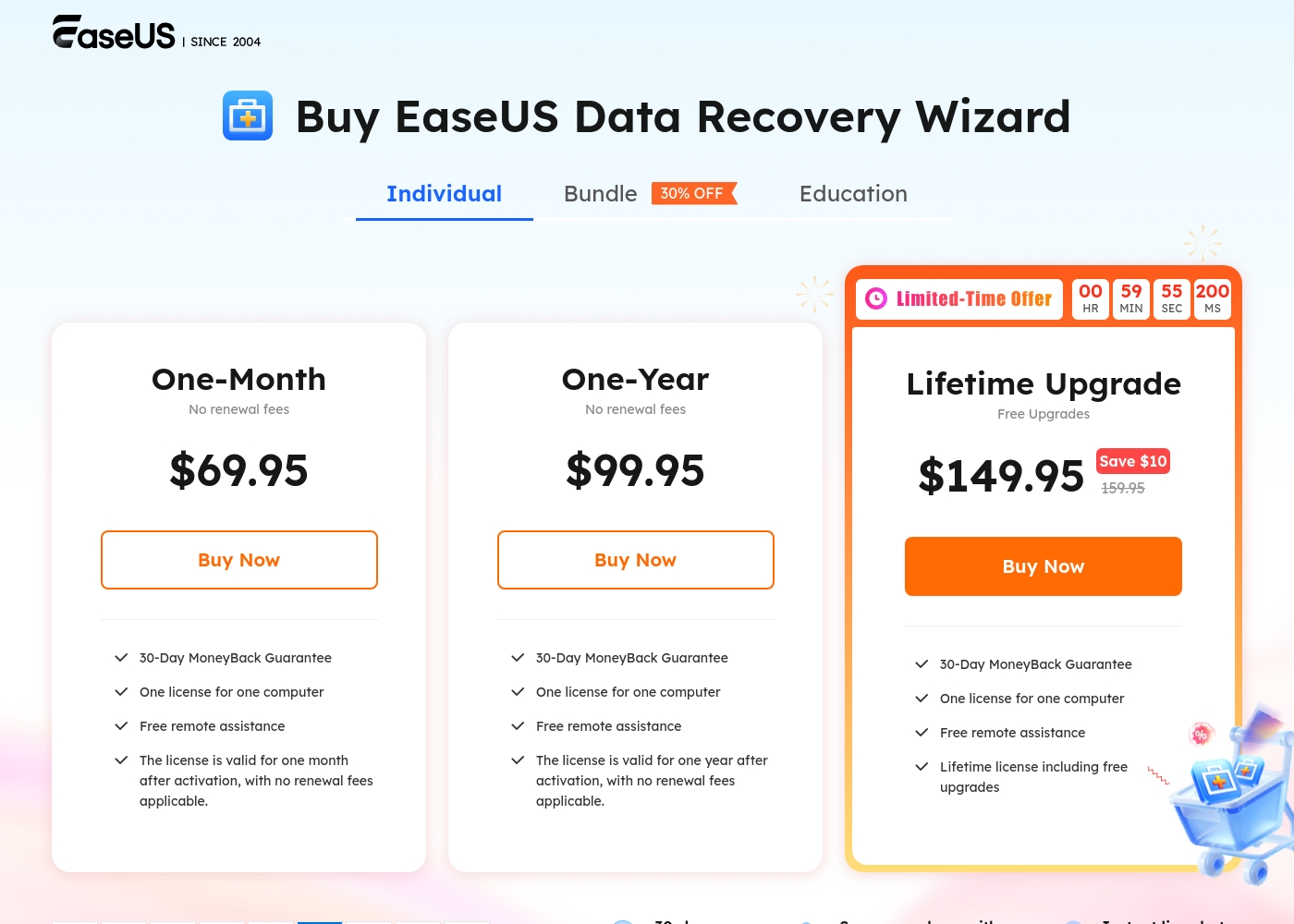
EaseUS Data Recovery Wizard costs between $69.95 per month and $149.95 (one-time purchase) with 3 plans: One-Month at $69.95, One-Year at $99.95, and Lifetime Upgrade at $149.95.
Let's look closer at what's included in the individual licensing options for EaseUS Data Recovery Wizard.
One-Month
Price: $69.95 per month Best For: Individuals with a single, immediate data recovery need Refund Policy: 30-day money-back Other Features:
- One license for one computer
- Free remote assistance
- No renewal fees applicable
- License valid for one month after activation
- One license for one computer
- Free remote assistance
- License valid for one month
- No renewal fees applicable
- One license for one computer
- Free remote assistance
- License valid for one year
- No renewal fees applicable
- One license for one computer
- Free remote assistance
- Lifetime license including free upgrades
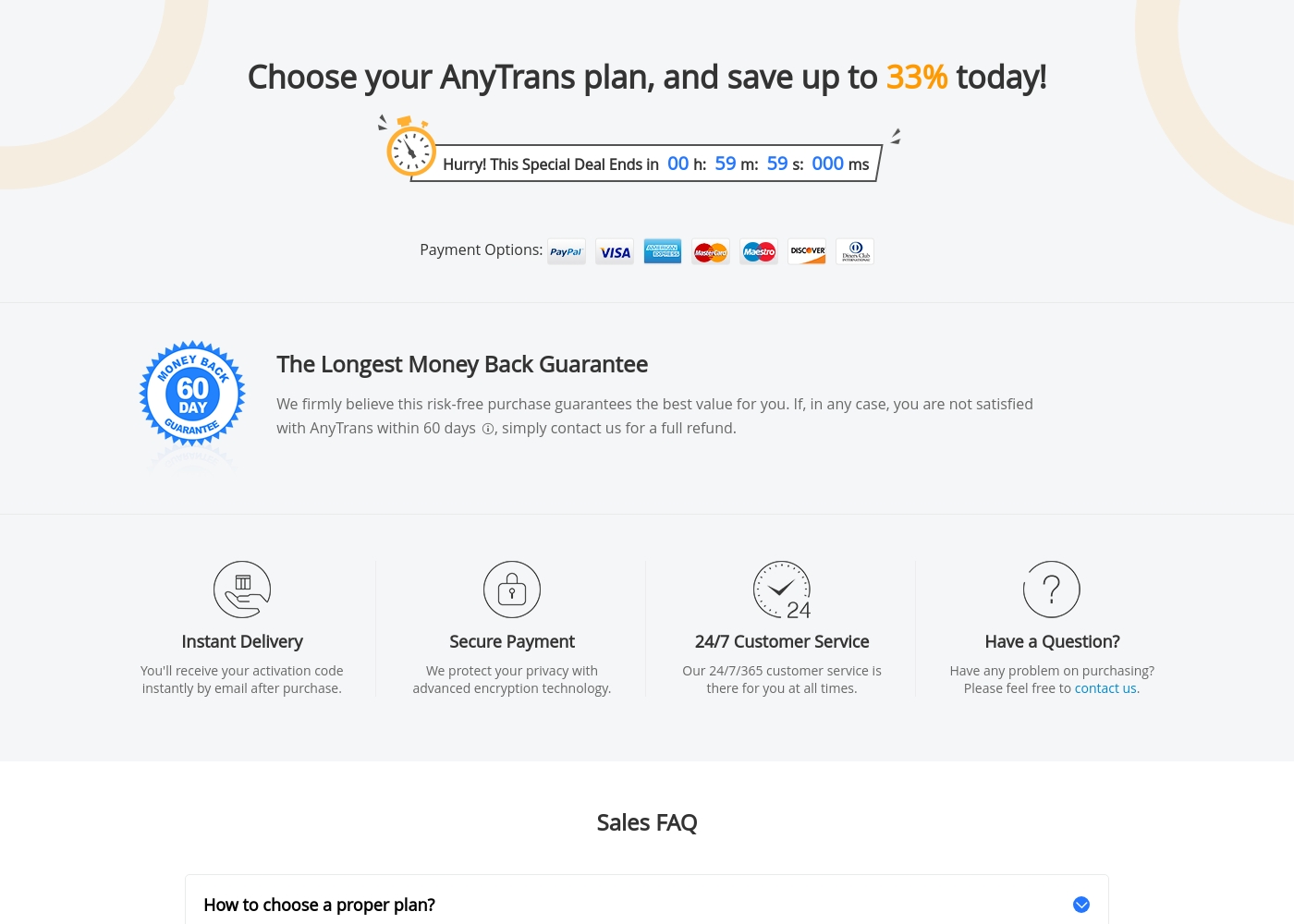
PhoneRescue costs between $19.99 per year and $79.99 for a high-tier one-time purchase with three primary named plan types: Personal (1 Year) at $19.99, Personal (Lifetime) at $29.99, and Family (Lifetime) at $39.99. Review the specific options below to find the perfect fit for your recovery needs.
Personal License (1 Year)
Price: $19.99 per year (Incl. Sales Tax) Websites Supported: Licensed for 1 computer Best For: Individual users who prefer an annual subscription Refund Policy: 60-day money back guarantee Other Features:
- Subscription automatically renews yearly
- Cancel subscription anytime
This annual subscription is a budget-friendly option for individual users who only need to recover data on one computer. Since it auto-renews, you're always covered for recovery. You can easily cancel the subscription whenever you like.
- Licensed for 1 computer
- Includes sales tax
- Automatic yearly renewal
- Licensed for 1 computer
- One-time purchase
- Lifetime free updates
- Licensed for 5 computers
- One-time purchase
- Lifetime free updates
Pricing Notes
- PhoneRescue's Lifetime Personal license ($29.99) is drastically cheaper than EaseUS’s Lifetime plan ($149.95).
- EaseUS licenses are specific-duration purchases that do not include automatic annual renewal fees.
- PhoneRescue provides extremely high value with a Family License covering 5 computers for $39.99.
- EaseUS offers a standard 30-day money-back guarantee, while PhoneRescue provides 60 days on its best plans.
- PhoneRescue offers low-cost annual plans starting at $19.99, far undercutting the EaseUS annual price of $99.95.
Pricing Head-to-Head
User Reviews
External feedback for EaseUS is overwhelmingly positive, particularly on Trustpilot, where the platform holds an excellent 4.8-star rating across tens of thousands of reviews. Users consistently praise the highly responsive and expert customer support provided by named staff members like Claire and Warren.
Reviewers noted that complex issues, especially those related to license activation following hardware changes or system migrations, were frequently resolved in minutes via live chat, emphasizing the quick and professional response times. The software itself is widely regarded for its proven efficiency and ease of use in core functions like data recovery and partition management.
I was having a licensing issue even though I purchased the "Lifetime Upgrades." I contacted support on the chat, and Warren had the problem fixed in a matter of seconds. This is truly fantastic service.
Users are generally satisfied with the breadth and user-friendliness of the iMobie software suite, which includes PhoneRescue. Recurring praise centers heavily on the professional quality of customer support.
Reviewers frequently describe the service team as prompt, patient, and highly effective, often resolving complex transfer issues or providing customized solutions. Many customers highlight the ease of transferring and backing up iOS data, often finding the software superior to native Apple methods.
The tool didn’t work for my specific tablet issue, but the service team was extremely polite and answered all my questions completely. They provided a useful solution for my problem even though the software was refunded.
Our Verdict
The decision between EaseUS and PhoneRescue hinges on PC management versus mobile mastery. EaseUS is the complete toolbox for system health; PhoneRescue is a targeted mobile specialist. Both EaseUS and PhoneRescue offer reliable recovery, but their utility differs greatly. EaseUS wins by providing a full data management ecosystem, not just recovery services. You get powerful Partition Master and system backup tools built into the core offering. EaseUS is great for long-term health and maintenance of your Windows PC or Mac. PhoneRescue is unrivaled for specialized mobile recovery at an extremely low cost. Its $29.99 lifetime license is an incredible deal compared to EaseUS pricing. PhoneRescue boasts a world-class success rate for over 30 types of iOS/Android data. If you need to manage partition space, optimize your PC speed, or perform system backups, choose EaseUS. If your only mission is recovering lost photos or messages from your phone cheaply, PhoneRescue is the easy winner. Pick EaseUS for a full PC utility stack and powerful optimization features. Go with PhoneRescue for specialized mobile data recovery, unmatched affordability, and excellent user-friendly simplicity.
Frequently Asked Questions
Which is better for dedicated iPhone and Android data recovery: EaseUS or PhoneRescue?
PhoneRescue is exclusively built for dedicated mobile recovery and covers up to 31 file types. EaseUS focuses more on PC system recovery, requiring separate tools for mobile. Choose PhoneRescue for maximum success rates on phones and tablets.
Can I manage disk partitions and system backups with PhoneRescue?
No, PhoneRescue is purely a utility for data recovery from mobile devices. You must select EaseUS if you require disk partitioning tools like Partition Master. EaseUS provides essential features for comprehensive PC maintenance.
Is PhoneRescue worth the extra cost over EaseUS?
PhoneRescue is actually far cheaper, offering a lifetime individual license for $29.99. EaseUS’s lifetime license costs $149.95, making PhoneRescue the significantly more affordable long-term option. PhoneRescue is excellent value for mobile needs.
Do I need technical skills to use EaseUS or PhoneRescue?
PhoneRescue emphasizes that its wizard requires zero technical knowledge for recovery. EaseUS is also user-friendly but deals with complex system tasks like partitioning. PhoneRescue is designed to be the simplest for basic users.
Which tool has the better free trial or money-back guarantee?
PhoneRescue offers a highly visible free download to scan and preview recoverable data. Crucially, PhoneRescue provides a generous 60-day money-back guarantee. EaseUS offers a 30-day money-back window.
Which software offers cheaper license coverage for my whole family?
PhoneRescue offers a Family Lifetime License covering five different computers for only $39.99. The core EaseUS Data Recovery Wizard is generally licensed for only one computer. PhoneRescue is clearly better for households.
Ready to Choose?
Both tools have their strengths. Choose based on your specific needs.