Dr.Fone

Dr.Fone review

Unlock, repair, recover, and transfer your iPhone or Android data β€” one Wondershare toolkit, or just the module you need.

Dr.Fone costs from $4.97/mo Β· 9 plans Β· prices checked Oct 17, 2026

By Ciroapp Editorial Team Β· Updated Oct 17, 2026

Commission may apply at no extra cost

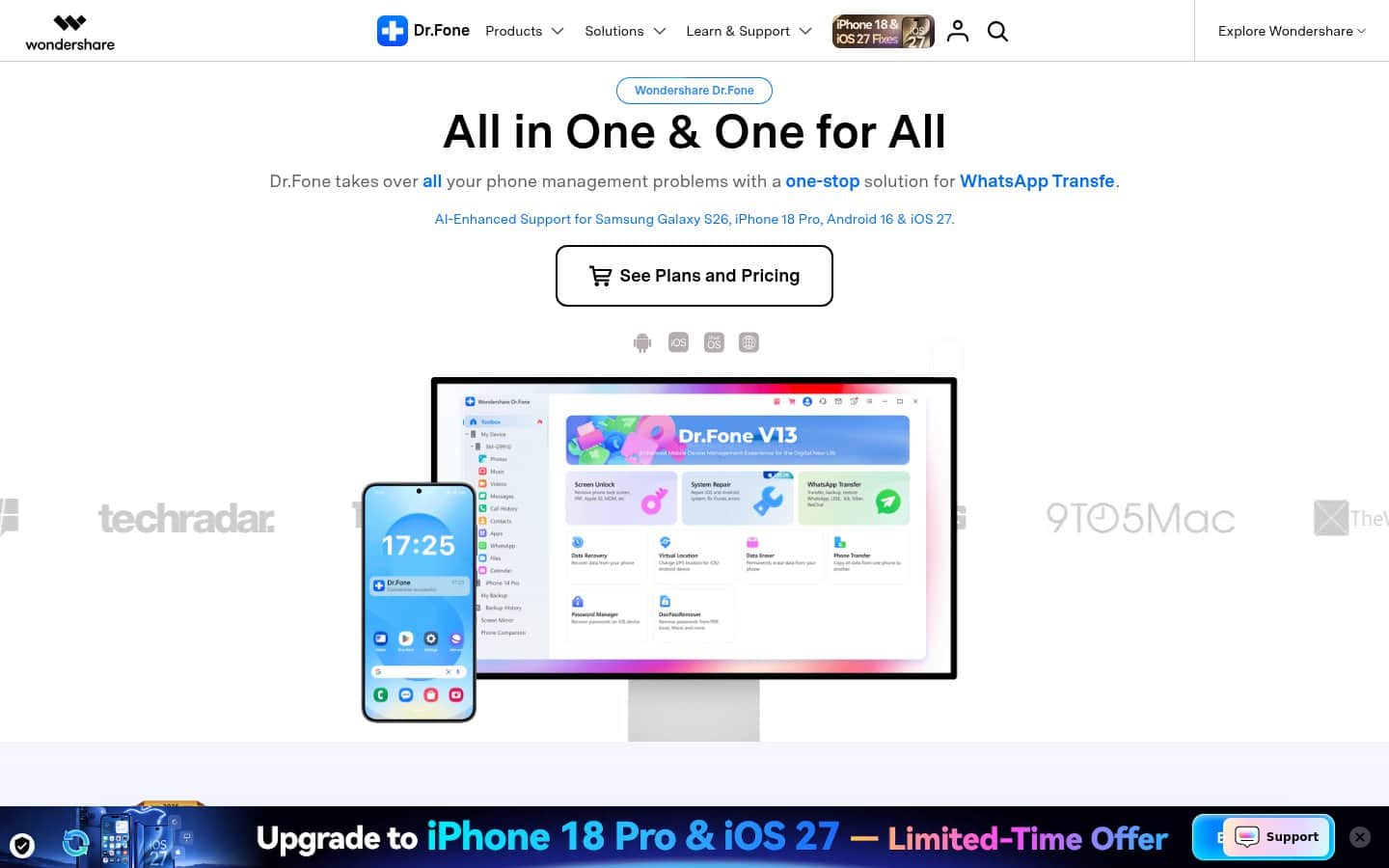
Dr.Fone homepage screenshot

At a glance

Quick overview for Dr.Fone: rating, pricing summary, key features, and highlights.
Pricing verified Oct 17, 2026

Ciroapp score

4.0/ 5

Dr.Fone bundles screen unlock, system repair, data recovery, WhatsApp and phone transfer, data erasure, and GPS tools for iOS and Android in one Wondershare desktop app. It's broad and flexible, but pricing is complex, modules are split by platform, and the money-back window is only 7 days. Overall, it's a strong pick if you buy the right module β€” or the annual or perpetual Full Toolkit if you need several tools.

Pros

  • Covers a wide range of phone jobs in one app β€” screen unlock, system repair, data recovery, WhatsApp transfer, phone transfer, data erasure, and virtual location.
  • Works with both iOS and Android, with vendor-listed support for Samsung Galaxy S26, iPhone 18 Pro, Android 16, and iOS 27.
  • Every module can be bought on its own, starting at $4.97/month for Virtual Location, so you don't pay for tools you won't use.

Cons

  • Pricing is complex β€” the Full Toolkit, Dr.Fone Basic, and more than a dozen separate modules each come in monthly, annual, and perpetual versions.
  • Monthly plans are poor value next to annual ones β€” the Full Toolkit is $79.95/month versus $99.95/year.
  • Most modules are split by platform (Android or iOS), so buying the wrong edition for your device means a second purchase.
Best for
  • iPhone or Android owners locked out of their own device by a forgotten PIN, pattern, passcode, or FRP lock
  • People recovering deleted photos, files, or WhatsApp data from Android or iPhone, including broken Android phones
  • Users fixing a frozen, stuck, or failed-update phone, or rolling back an iOS version
Money-back guarantee
7-day money-back guarantee if the product does not perform as intended, subject to Wondershare's refund policy.
This section is a summary. Detailed sections about features, use cases, pricing, and reviews follow below.

What is Dr.Fone?

Locked out of your phone, stuck on a failed update, or missing a WhatsApp history after switching devices? Wondershare Dr.Fone is a desktop toolkit for iOS and Android that bundles screen unlock, system repair, data recovery, and transfer tools in one place. You can buy the Full Toolkit or just one module, with monthly, annual, or perpetual licenses.

This review covers what it does, what it costs, and who should pay for it.

Dr.Fone is a mobile device management toolkit from Wondershare that runs on a Windows PC or Mac. You connect an iPhone, iPad, or Android phone and pick a tool: Screen Unlock, System Repair, Data Recovery, WhatsApp Transfer, Phone Transfer, Data Eraser, Virtual Location, or Password Manager. A Dr.Fone Basic edition covers device management, backup and restore, and screen mirroring.

Wondershare also offers online services, including Dr.Fone Online Unlock and Dr.Fone Air for file transfer and screen mirroring.
Should you choose Dr.Fone?

Quick buyer guidance before you compare plans or click through.

Choose it if

  • You want one desktop app that handles unlocking, repair, recovery, and transfer for both iOS and Android
  • You prefer a perpetual license over an ongoing subscription
  • You only need one job done and want to buy a single module
  • You value vendor-stated security measures like AES-256 encryption and GDPR compliance
  • You want live chat and email support with a 24-hour response guarantee

Skip it if

  • Buyers who want simple pricing β€” the Full Toolkit, Basic, and many separate modules each have three billing terms
  • Anyone wanting a long evaluation window; the money-back guarantee lasts 7 days and is subject to the refund policy
  • People who need a one-off fix but forget to cancel, since monthly and annual plans auto-renew
  • Mac users reading the default store page, which shows Windows prices
  • Anyone hoping to unlock a device they don't own β€” use the unlock tools only on your own or authorized devices

Next steps before buying

  1. 1Decide which job you need done β€” unlock, repair, recovery, transfer, or erase β€” and whether your phone runs iOS or Android
  2. 2Download Dr.Fone for Windows or Mac from drfone.wondershare.com
  3. 3Compare the single module against the Full Toolkit on the store page, and switch to the Mac page if you use a Mac
  4. 4Pick an annual or perpetual license if you want better value than monthly, and remember subscriptions auto-renew
  5. 5Run your task within 7 days of purchase so you can still use the money-back guarantee if it doesn't work for your device

Ease of use

Wondershare positions Dr.Fone as a one-stop toolkit: the V13 interface groups each tool as a tile, and the device manager shows photos, music, videos, messages, and call history on one screen. Support includes user guides, video walkthroughs, a help center, and live chat and email with responses guaranteed within 24 hours. License keys are delivered within minutes of purchase.

Dr.Fone Key Features

πŸ”“ Get Back Into a Locked Phone

Forgotten codes happen. Dr.Fone's Screen Unlock removes Android PIN, pattern, and biometric locks and bypasses Google FRP, with Samsung, Xiaomi, and Vivo among the brands named. On the iOS side, it removes iPhone and iPad passcodes and handles iCloud activation, SIM locks, MDM, and Apple ID.

Use these tools only on devices you own or are authorized to unlock.

πŸ› οΈ Repair a Stuck or Broken System

A failed update can leave a phone frozen on a black screen or stuck in recovery mode. System Repair fixes Android problems, including on Samsung, Xiaomi, Redmi, and POCO devices, and repairs iOS and iPadOS across 150+ issues. The iOS module can also upgrade or downgrade iOS, and Wondershare says repairs are designed to avoid data loss.

✨ Recover Lost Data and WhatsApp Chats

Deleted something you need? Data Recovery scans Android phones without root β€” even broken ones β€” for lost files and WhatsApp data. The iOS module recovers iPhone data without a backup and offers a free preview before you restore.

In both cases, you select only the items you want back.

πŸ”„ Move Data and WhatsApp Between iOS and Android

Switching phones means moving more than contacts. Phone Transfer copies contacts, messages, photos, and other data between iOS and Android in one click. WhatsApp Transfer moves, backs up, and restores chats and attachments across platforms, and the vendor says Viber, LINE, and WeChat are supported too.

✨ Everyday Management with Dr.Fone Basic

Not every job is an emergency. Dr.Fone Basic manages 30+ phone data types from one screen, runs wireless, incremental backups across up to 24 data types, and mirrors your phone to a PC or Mac with real-time recording and screenshots. A phone verification report shows system version, storage condition, and battery life β€” handy before you sell a used device.

🧰 Erase, Relocate, and Recover Passwords

Rounding out the toolkit, Data Eraser permanently wipes iOS and Android data before resale. Virtual Location changes your GPS position and simulates movement on both platforms. Password Manager scans an iPhone or iPad for saved WiFi, app, website, email, Screen Time, and Apple ID passwords.

Use Cases

πŸ” You're locked out of your own phone

A forgotten PIN or a Google FRP lock after a reset can make a phone unusable. Connect it to your computer, open Screen Unlock, and follow the steps for Android or iOS. Expected outcome: You regain access to your device.

Tip: Buy the module that matches your phone's platform.

πŸ“² An update left your iPhone frozen

Stuck on a black screen or in recovery mode after an update? iOS System Repair targets 150+ issues and can downgrade iOS to an earlier version. Expected outcome: Your iPhone boots normally again on a working iOS version.

πŸ’¬ You deleted photos or WhatsApp chats

Run Data Recovery for Android or iOS, preview what the scan finds, and restore only what matters. The Android module works without root and on broken phones. Expected outcome: Your selected files and chats come back without restoring everything else.

πŸ”„ You're switching from iPhone to Android (or back)

Connect both phones and use Phone Transfer for contacts, messages, and photos, then WhatsApp Transfer for chats and attachments. Expected outcome: Your new phone has your data and WhatsApp history in one session.

🧹 You're selling an old phone

Generate a verification report showing system version, storage condition, and battery life to share with a buyer. Then wipe personal data with Data Eraser. Expected outcome: A documented, clean device that's ready to sell.

Dr.Fone pricing

From$4.97/mo

  • 9 plans
  • Save up to 89% with annual billing

Prices checked on Oct 17, 2026 from Dr.Fone's pricing page

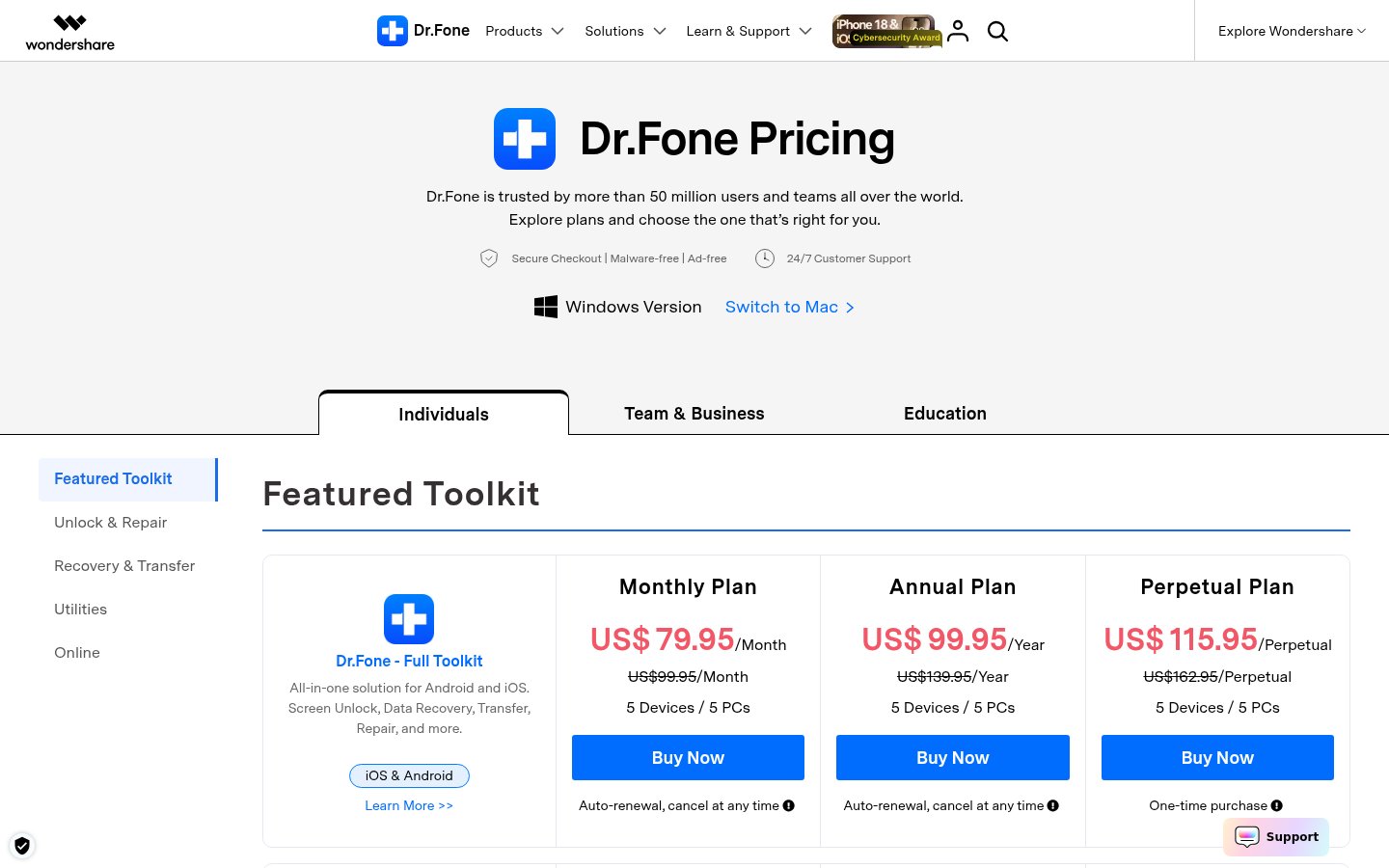
Dr.Fone pricing page screenshotView pricing page screenshot
PlanBilled monthlyBilled annuallyIncludes
Full Toolkit
$79.95/mo
$8.33/mo
$99.95 per year
Windows version; all Dr.Fone Basic features plus Screen Unlock, Data Recovery, Virtual Location, WhatsApp Transfer, Phone Transfer, Data Eraser, System Repair, and Password Manager; iOS & Android; 5 devices / 5 PCs; auto-renews monthly, cancel anytime; 7-day money-back guarantee.
Full Toolkit – Perpetual
$115.95
β€”
Windows version; all Dr.Fone Basic features plus Screen Unlock, Data Recovery, Virtual Location, WhatsApp Transfer, Phone Transfer, Data Eraser, System Repair, and Password Manager; iOS & Android; 5 devices / 5 PCs; one-time purchase; 7-day money-back guarantee.
Dr.Fone Basic
$29.95/mo
$3.33/mo
$39.95 per year
Save up to 89% with annual billing
Windows version; phone data management, one-click backup, selective restore, and screen mirroring; iOS & Android; 5 devices / 2 PCs; auto-renews monthly, cancel anytime; 7-day money-back guarantee.
Dr.Fone Basic – Perpetual
$49.95
β€”
Windows version; phone data management, one-click backup, selective restore, and screen mirroring; iOS & Android; 5 devices / 2 PCs; one-time purchase; 7-day money-back guarantee.
WhatsApp Transfer
$19.95/mo
$2.25/mo
$26.95 per year
Save up to 89% with annual billing
Windows version; transfers and backs up WhatsApp chats and media across iOS and Android; 5 devices / 2 PCs; auto-renews monthly, cancel anytime; 7-day money-back guarantee.
WhatsApp Transfer – Perpetual
$39.95
β€”
Windows version; transfers and backs up WhatsApp chats and media across iOS and Android; 5 devices / 2 PCs; one-time purchase; 7-day money-back guarantee.
Phone Transfer
$24.95/mo
$2.50/mo
$29.95 per year
Windows version; phone-to-phone transfer of contacts, messages, photos, and other data across iOS and Android; 5 devices / 2 PCs; auto-renews monthly, cancel anytime; 7-day money-back guarantee.
Phone Transfer – Perpetual
$39.95
β€”
Windows version; phone-to-phone transfer of contacts, messages, photos, and other data across iOS and Android; 5 devices / 2 PCs; one-time purchase; 7-day money-back guarantee.
Virtual Location
$4.97/mo
$1.66/mo
$19.97 per year
Save up to 67% with annual billing
Windows version; changes GPS location and simulates movement on iOS and Android; auto-renews monthly, cancel anytime

Pricing types: Monthly subscription, Yearly subscription, One-time payment

Pricing notes

On Windows, Dr.Fone Full Toolkit costs $79.95/month, $99.95/year, or $115.95 one-time (5 devices / 5 PCs). Dr.Fone Basic is $29.95/month, $39.95/year, or $49.95 one-time.

Single modules range from $4.97/month (Virtual Location) to $69.95 one-time (iOS Data Recovery or iOS System Repair).

Dr.Fone pricing: Plans from $4.97/month Billing options: Monthly subscription, Quarterly subscription, Yearly subscription, One-time payment

Cost calculator

Estimate what Dr.Fone costs for your team.

Billing
Per month
$79.95
Per year
$959.40

Full Toolkit has a flat price: the number of seats does not change the total. Estimate based on published list prices, before taxes, add-ons and discounts.

How to pay less for Dr.Fone

  • Pay annually: saves up to 89% compared with monthly billing.
  • Cheaper tools in this category start at $3.33/mo.
Visit Dr.Fone

Email me when Dr.Fone changes price

One email when we detect a price change on the vendor's pricing page. No newsletter, no deals. Unsubscribe in one click.

User Reviews

No reviews yet.

Write a Review

Write a Review for Dr.Fone
0/100 characters
0/2000 characters

Why use Dr.Fone?

Phone problems rarely come one at a time. A locked screen, a failed update, a lost WhatsApp history, and a move to a new phone can all land in the same week. Dr.Fone puts tools for each of these jobs in one desktop app. Based on what Wondershare publishes, here's where it stands out:

  • One toolkit, many jobs β€” unlock, repair, recover, transfer, erase, and change GPS location from a single install.
  • Both platforms covered β€” most modules work with iOS and Android, and the vendor lists support for Android 16 and iOS 27.
  • Buy only what you need β€” every module is sold separately, so a one-off WhatsApp move doesn't require the full suite.
  • Perpetual licenses available β€” the Full Toolkit and each module can be bought once instead of subscribed to.
  • Security credentials β€” zero-data-retention architecture, GDPR compliance, and AES-256 encryption, per the vendor.
  • Long track record β€” Wondershare cites 22+ years of experience, 50M+ active users, and 150M+ downloads.

Dr.Fone alternatives

Other tools in the Data Recovery category

View all Data Recovery tools
Recoverit

Recoverit

Data Recovery4/5

Wondershare Recoverit is a powerful data recovery expert trusted by over 100 million users worldwide. They've been recovery experts since 2003, with more than 21 years of experience and 35 patents in this field. It's available for both Windows and Mac users. This software is designed to save you from losing photos, videos, and documents after accidental deletion, system crashes, or device failures. It’s incredibly easy to use and offers recovery of unlimited data. The core technology behind Recoverit V14.0 is its innovative AI power, the industry’s first exclusive AI recovery solution. This intelligence allows for precise identification across over 1 million devices and professional solutions for over 10,000 loss scenarios.

AnyTrans

AnyTrans

Data Recovery4.1/5From $3.33/mo

AnyTrans is an all-in-one iOS manager from iMobie that runs on Windows and Mac. It moves photos, music, messages, apps, and 27 types of iOS data between iPhone, iPad, iPod, iTunes, iCloud, and your computer. It also handles full, incremental, and scheduled wireless backups, plus Android-to-iPhone and WhatsApp migration. πŸ“± The interface is built for everyday users, and the vendor says no tech knowledge is required. Paid plans start at $35.99/month, with lifetime licenses and a 5-computer Family Plan also available.

MobileTrans

MobileTrans

Data Recovery3.9/5From $3.33/mo

Wondershare MobileTrans is a comprehensive tool built for easy phone data and WhatsApp management. It's designed for users needing to move large amounts of data between iOS, Android, and PC. This powerful solution supports over 6000 devices and manages more than 18 File Formats. You can enjoy fast, secure transfers directly on your computer or using our mobile app, Mutsapper.

PhoneRescue

PhoneRescue

Data Recovery3.9/5From $4.17/mo

PhoneRescue is a comprehensive, all-around data recovery solution for both iOS and Android devices. It’s built for anyone who has experienced unexpected data loss. This software ensures you never lose a single byte ever again. βœ… The operation is completely straightforward, using an intuitive UI and step-by-step wizard. PhoneRescue asks for no technical knowledge at all. Even your grandparents can easily get back what was lost entirely by themselves, making complicated recovery simple.

Stellar Data Recovery

Stellar Data Recovery

Data Recovery4/5

Stellar Data Recovery is a fast, highly customizable file recovery tool. It’s easy to use and can help reconstruct and recover deleted data. A Mac version exists and is described as a good program that digs deep to help recover deleted data.

EaseUS

EaseUS

Data Recovery4/5

EaseUS is a prominent global technology corporation focused on creating robust data management solutions. They serve a massive audience, having earned the trust of over 530 million users globally. This platform is built for everyone, from home users managing personal photos to businesses requiring advanced backup and recovery strategies. EaseUS concentrates on delivering high value through trustworthy, cohesive products. They ensure your sensitive data is always secure and accessible.

Cheapest Data Recovery software for 1 to 25 users

Dr.Fone FAQ

How much does Dr.Fone cost?

Dr.Fone's cheapest paid plan, Virtual Location, costs $4.97 per month. Paid plans range from $4.97 to $79.95 per month. Prices checked on Oct 17, 2026 from the vendor's pricing page.

Does Dr.Fone have a free plan?

No. Dr.Fone lists no free plan; the cheapest paid plan starts at $4.97 per month.

How much do you save with annual billing on Dr.Fone?

Paying annually saves up to 89% compared with monthly billing, based on Dr.Fone's list prices.

What's the difference between Dr.Fone Basic and the Full Toolkit?

Dr.Fone Basic lets you transfer, manage, back up, and restore data across devices, and mirror your phone screen to a computer. The Full Toolkit includes everything in Basic, plus Screen Unlock, Data Recovery, Virtual Location, WhatsApp Transfer, Phone Transfer, Data Eraser, System Repair, and Password Manager. The same split applies to the Mac version.

Can I buy a single feature instead of the whole toolkit?

Yes. The store sells each module on its own β€” for example Screen Unlock (Android or iOS), System Repair (Android or iOS), Data Recovery (Android or iOS), WhatsApp Transfer, Phone Transfer, Password Manager, Data Eraser, and Virtual Location. Most module licenses cover 5 devices and 2 PCs.

Is there a refund policy?

Wondershare offers a 7-day money-back guarantee if the product does not perform as intended, subject to its refund policy. Monthly and annual plans auto-renew and can be cancelled at any time, while perpetual plans are a one-time purchase. The license key arrives within minutes of purchase.

How does Dr.Fone handle data security?

The vendor lists a zero-data-retention architecture, GDPR compliance, and AES-256 encryption, and states that Dr.Fone received a 2026 Gold Award in Data Security from Cybersecurity Insiders. Checkout is described as secure, malware-free, and ad-free.

Ready to try Dr.Fone? Check out the official site or pricing.

Are you Dr.Fone? Claim this listing Β· Get the badge