Buddy Punch

Buddy Punch review

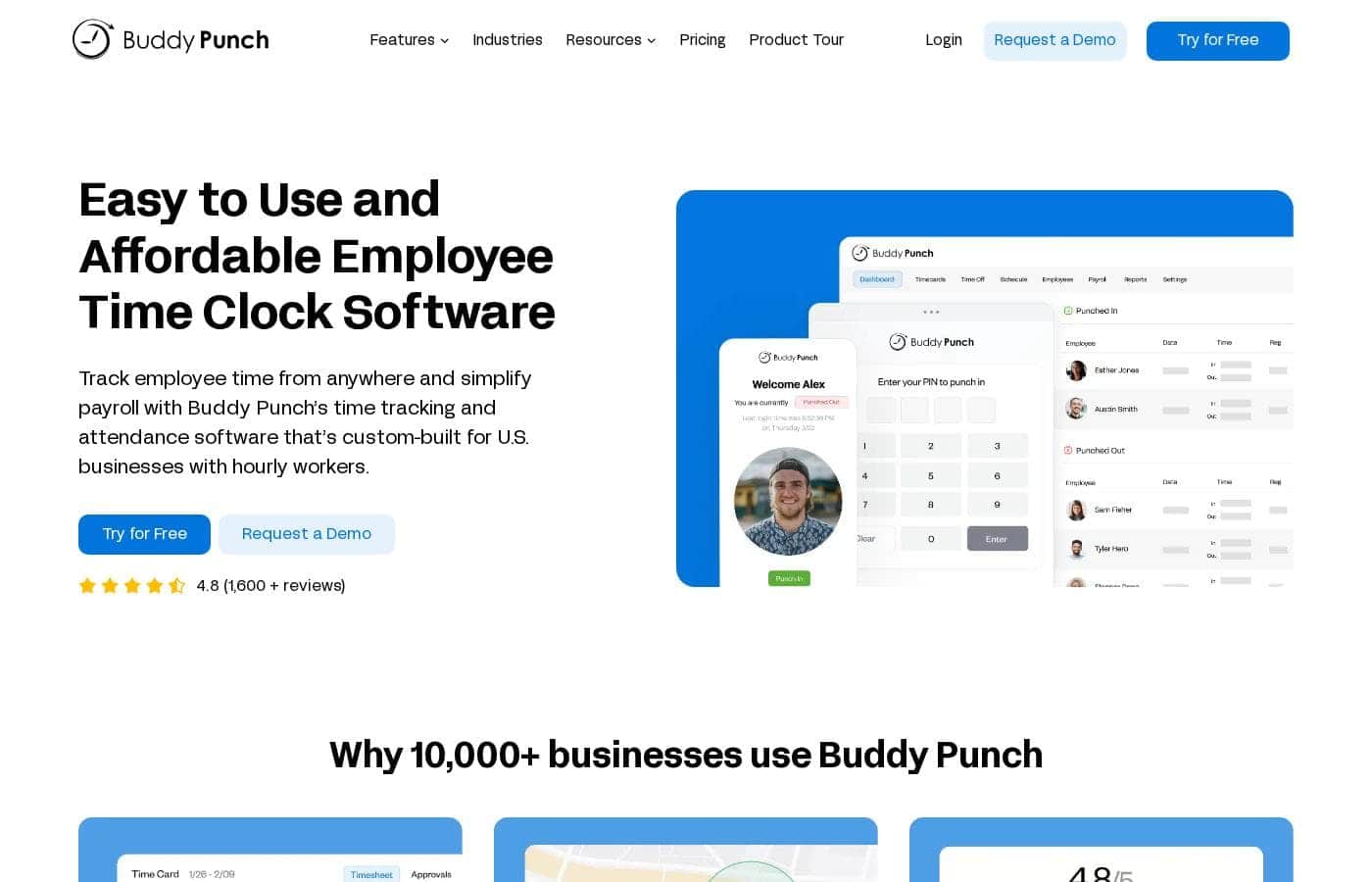
Buddy Punch is a cloud-based time clock that lets employees punch in from a smartphone, computer, kiosk, or QR code. It tracks hours, overtime, and location so payroll stays accurate across every work site and remote setup.

Buddy Punch costs from $2/mo · 5 plans · prices checked Oct 12, 2026

By Ciroapp Editorial Team · Updated Sep 16, 2026

Commission may apply at no extra cost

Buddy Punch homepage screenshot

At a glance

Quick overview for Buddy Punch: rating, pricing summary, key features, and highlights.
Pricing verified Oct 12, 2026

Ciroapp score

3.7/ 5

Buddy Punch is a cloud time clock that replaces paper timesheets. Staff punch in by phone, browser, kiosk, or QR code, and every punch records their location and hours. Payroll links to QuickBooks, Paychex, and Workday, though project-level billing needs another tool. Overall, it's a solid attendance hub for hourly teams that run payroll on supported platforms.

Pros

  • Pros:Four punch-in methods — smartphone app, computer, kiosk, and QR code — let one system cover desk staff, field crews, and shared terminals.
  • Pros:Location capture on each punch produces verifiable attendance records for remote and multi-site teams and helps deter buddy punching.
  • Pros:Native integrations with QuickBooks, Paychex, and Workday move approved hours into payroll without manual re-entry.

Cons

  • Cons:The platform is scoped to clock-based attendance tracking; teams needing project- or task-level time tracking for client billing will likely need a separate tool.
  • Cons:Reliable clock-ins depend on employees having access to a compatible device — phone, computer, kiosk, or printed QR code — which may require hardware or setup planning at some worksites.
  • Cons:Integrations are highlighted for QuickBooks, Paychex, and Workday; businesses running other payroll systems should verify compatibility before purchasing.
Best for
  • Businesses with hourly staff spread across multiple offices, stores, or job sites that need one consistent time clock
  • Companies with remote or field employees who need location-verified clock-ins from personal devices
  • Payroll teams using QuickBooks, Paychex, or Workday that want approved hours to transfer automatically
This section is a summary. Detailed sections about features, use cases, pricing, and reviews follow below.

What is Buddy Punch?

Buddy Punch is a cloud-based time clock platform built for businesses that need reliable attendance data across multiple locations, including remote staff. Employees clock in and out from a smartphone, computer, shared kiosk, or QR code, and the system records their hours, overtime, and location in real time. Managers review everything through detailed reports and can pass approved hours straight into payroll tools such as QuickBooks, Paychex, and Workday.

For companies still running on paper timesheets or spreadsheets, it replaces a slow, error-prone process with a single source of attendance truth.

Buddy Punch is time tracking software that replaces traditional punch clocks and manual timesheets with a cloud-based system. Employees punch in and out using a smartphone, computer, kiosk, or QR code, while employers see who is on the clock, where they punched, and how many hours they have worked. The platform covers regular hours, overtime, and pay-related tracking, and produces detailed reports designed to feed directly into payroll.
Should you choose Buddy Punch?

Quick buyer guidance before you compare plans or click through.

Choose it if

  • Businesses with hourly staff spread across multiple offices, stores, or job sites that need one consistent time clock
  • Companies with remote or field employees who need location-verified clock-ins from personal devices
  • Payroll teams using QuickBooks, Paychex, or Workday that want approved hours to transfer automatically
  • Small to mid-size employers replacing paper timesheets, spreadsheets, or manual punch clocks

Skip it if

  • Teams that primarily need project- or task-based time tracking for client billing rather than attendance tracking
  • Fully salaried organizations where employees don't clock hours and punch-based attendance adds little value
  • Businesses whose payroll runs on systems other than QuickBooks, Paychex, or Workday, unless integration is confirmed first

Next steps before buying

  1. 1Sign up for the free plan or free trial and onboard a small pilot group of employees before rolling it out company-wide.
  2. 2Choose the punch-in methods that fit each workforce — invite staff to the smartphone app, configure a shared kiosk at each site, or post QR codes at worksites.
  3. 3Connect your payroll platform (QuickBooks, Paychex, or Workday) so approved hours transfer without manual re-entry.
  4. 4Set your overtime rules, then review the reporting dashboard after the first pay period to confirm hours and punch locations are being captured correctly.

Buddy Punch Key Features

✨ Four Ways to Punch In

Employees can clock in and out through whichever method fits their shift: the Buddy Punch app on a smartphone, a web browser on a computer, a shared kiosk device at a worksite, or a QR code scan. This means desk staff, field crews, and shift workers sharing a single terminal can all use the same system without buying dedicated hardware for every location.

✨ Location-Aware Punches

The platform tracks where workers are when they clock in, giving employers a verifiable record of attendance across locations. For businesses dealing with buddy punching or unverified remote check-ins, this location data turns a self-reported timesheet into evidence-backed attendance.

✨ Hours, Overtime, and Pay Tracking

Buddy Punch records hours worked, calculates overtime, and maintains pay-related data as shifts happen. Managers can watch totals accumulate during the pay period instead of reconstructing them after the fact, making it easier to catch overages before they reach the payroll run.

✨ Detailed Reporting

Employers get detailed reports covering hours, attendance, and punch locations. These reports support pre-payroll review, dispute resolution, and record-keeping, and the data is structured to move into connected payroll systems.

✨ Payroll Integrations

The platform integrates with payroll software including QuickBooks, Paychex, and Workday. Approved hours flow from Buddy Punch into those systems, removing the manual transcription step that typically introduces payroll errors.

Use Cases

💡 Multi-Site Attendance Management

A business with several offices, stores, or job sites can run Buddy Punch as one time clock for all of them. Because each punch records where the employee is, head office can verify coverage and attendance at every location without phoning supervisors for confirmation.

💡 Remote and Field Team Clock-Ins

Distributed teams can punch in from their own smartphones or computers, with the platform capturing their location. Employers managing remote workers, traveling technicians, or construction crews get attendance records as dependable as those from a wall-mounted clock.

💡 Streamlining Payroll Preparation

Companies that run payroll through QuickBooks, Paychex, or Workday can pass hours directly from Buddy Punch into those platforms. This eliminates timesheet re-keying, reduces transcription errors, and shortens the gap between the end of a pay period and a completed payroll run.

💡 Overtime and Labor Cost Oversight

Managers can monitor hours and overtime as they build up during the pay period rather than discovering overages on the final payroll report. That visibility makes it practical to rebalance schedules or adjust staffing before labor costs get out of hand.

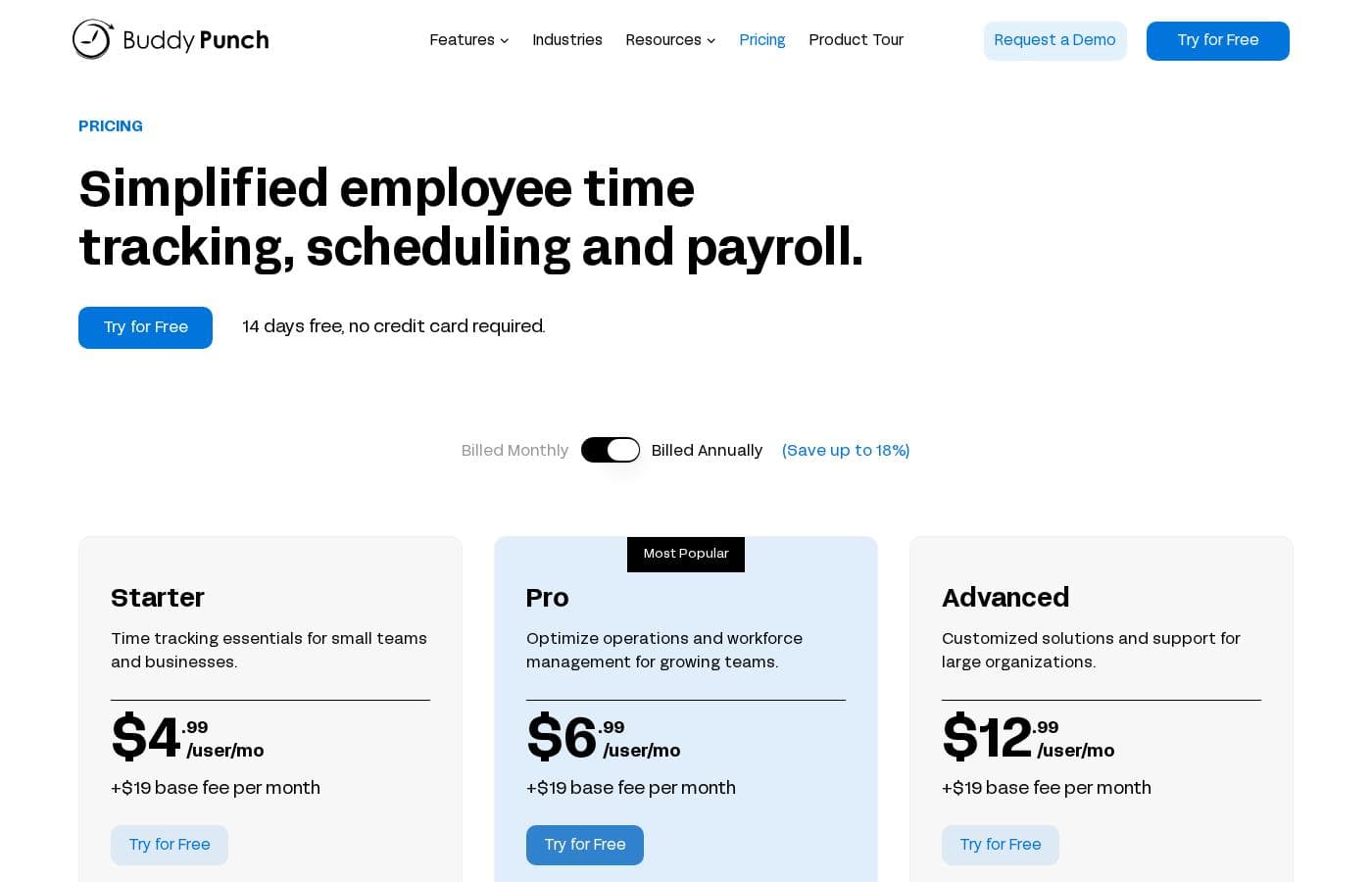
Buddy Punch pricing

From$2/mo

  • From the vendor's pricing page, checked Oct 12, 2026
  • 5 plans

Prices checked on Oct 12, 2026 from Buddy Punch's pricing page

Buddy Punch pricing page screenshotView pricing page screenshot
PlanBilled monthlyBilled annuallyIncludes
Starter
per user
$4/mo
—
per user
Pro
per user
$6/mo
—
per user
Advanced
per user
$12/mo
—
per user
Optional Add-Ons
per user
$2/mo
—
per user
Compare Plans & Pricing
per user
$4.99/mo
—
per user

Price history

Tracking prices since Oct 1, 2026. No price change detected yet.

Pricing types: Free plan, Free trial, Monthly subscription, Yearly subscription, Per seat pricing, Usage-based pricing

Pricing notes

Buddy Punch pricing: Plans from $0/month Billing options: Free plan, Free trial, Monthly subscription, Yearly subscription, Per seat pricing, Usage-based pricing

Cost calculator

Estimate what Buddy Punch costs for your team.

Billing
Per month
$20
Per year
$240

Starter is priced per user: price × 5 seats. Estimate based on published list prices, before taxes, add-ons and discounts.

How to pay less for Buddy Punch

  • Some plans are priced per user: only pay for seats people actually use.
Visit Buddy Punch

Email me when Buddy Punch changes price

One email when we detect a price change on the vendor's pricing page. No newsletter, no deals. Unsubscribe in one click.

User Reviews

No reviews yet.

Write a Review

Write a Review for Buddy Punch
0/100 characters
0/2000 characters

Why use Buddy Punch?

Accurate timekeeping is difficult when staff are spread across offices, job sites, and home offices — and every missed or falsified punch becomes a payroll problem. Buddy Punch addresses this by capturing the location of each punch, which helps deter buddy punching and verifies that remote and field workers are where they claim to be.

Automated hour and overtime tracking removes end-of-period math, and payroll integrations with QuickBooks, Paychex, and Workday cut out the manual re-entry step where most errors happen.

Buddy Punch alternatives

Other tools in the Time tracking category

View all Time tracking tools
ClickTime

ClickTime

Time tracking3.7/5

ClickTime is a powerful platform for comprehensive time tracking and resource management. It is designed to give you deep insights into how your team uses its bandwidth. This system tracks employee hours, project deadlines, and budget targets seamlessly. By using ClickTime, you get valuable information about project costs and overall profitability. It is the tool that helps you unify your planning and financial forecasting efforts.

Toggl

Toggl

Time tracking4/5

Toggl is time tracking software designed specifically for organizational teams. It is built around the idea that raw data must translate into actionable business insights. ✅ Toggl specializes in building custom, detailed reports directly from your team's tracking data. This tool is especially suited for managing larger and enterprise teams. It provides the flexible reporting required for employees and projects across departments. By ensuring easy time tracking adoption, Toggl gives you the accurate data needed to make strong, confident decisions.

Clockify

Clockify

Time tracking4.4/5

Clockify is widely known time tracking software trusted by millions of users worldwide. It functions as a comprehensive time tracker and timesheet app. This platform is perfect for teams, offering unlimited users and remaining free forever. Users have given it an excellent 4.8 rating based on thousands of reviews. The app lets you track time from anywhere, syncing data across web, desktop, and mobile devices automatically.

memtime

memtime

Time tracking4.1/5

memtime is an automated desktop application designed to solve the struggles of tedious manual time tracking. This tool eliminates the need for distracting start/stop timers entirely. Instead, it runs passively behind the scenes, memorizing the time you spend in various programs throughout the workday. It allows you to go back to any day and review precisely what you focused on, when, and for how long. This is especially valuable for anyone who bills by the hour, including consultants, legal services, agencies, and accountants, because it connects to your existing project software for instant time entry export.

Timely

Timely

Time tracking4.1/5

Timely is an automatic time tracking solution designed for businesses seeking to maximize their margins and drive profitability. It uses AI to capture work activity seamlessly in the background. This approach eliminates manual input, ensuring you receive accurate, real-time data without interrupting current workflows. It is trusted by over 5,000 businesses and helps managers gain a complete, real-time view of resource allocation and project progress easily. 💡 Notably, Timely takes user privacy seriously; it operates with a strict anti-surveillance policy. Your tracked memories remain yours, and no manager can see them until you explicitly share them.

Hubstaff

Hubstaff

Time tracking3.9/5

Hubstaff provides robust time tracking software, project management tools, and workforce analytics designed to increase productivity and operational efficiency for businesses of all sizes around the world.

Buddy Punch FAQ

How much does Buddy Punch cost?

Buddy Punch's cheapest paid plan, Optional Add-Ons, costs $2 per month. Paid plans range from $2 to $12 per month. Prices checked on Oct 12, 2026 from the vendor's pricing page.

Has Buddy Punch's price changed recently?

No. We have not detected a price change since we started tracking on Oct 1, 2026.

How do employees clock in with Buddy Punch?

Employees can punch in and out four ways: through the Buddy Punch app on a smartphone, via a web browser on a computer, on a shared kiosk device at the worksite, or by scanning a QR code. Whichever method is used, the punch records their hours and location, giving managers a consistent, verifiable attendance record.

Does Buddy Punch integrate with payroll software?

Yes. Buddy Punch integrates with payroll platforms including QuickBooks, Paychex, and Workday, so approved hours can flow into payroll without manual re-entry. Companies using a different payroll provider should confirm compatibility with Buddy Punch before committing.

Can Buddy Punch track remote employees?

Yes. The platform is built for accurate timekeeping across locations, including remote workers. Remote staff punch in from their own phone or computer, and each punch captures their location so employers can verify attendance without a physical clock.

Does Buddy Punch handle overtime?

Yes. The system tracks hours, overtime, and pay data, and its detailed reporting lets managers monitor overtime as it accumulates during the pay period instead of discovering it after the payroll run.

Ready to try Buddy Punch? Check out the official site or pricing.

Are you Buddy Punch? Claim this listing · Get the badge