Streak - CRM for Gmail

Streak - CRM for Gmail review

The CRM that lives in your Gmail inbox.

Streak - CRM for Gmail costs from $49/mo · 3 plans · prices checked Nov 21, 2026

By Ciroapp Editorial Team · Updated May 15, 2026

Commission may apply at no extra cost

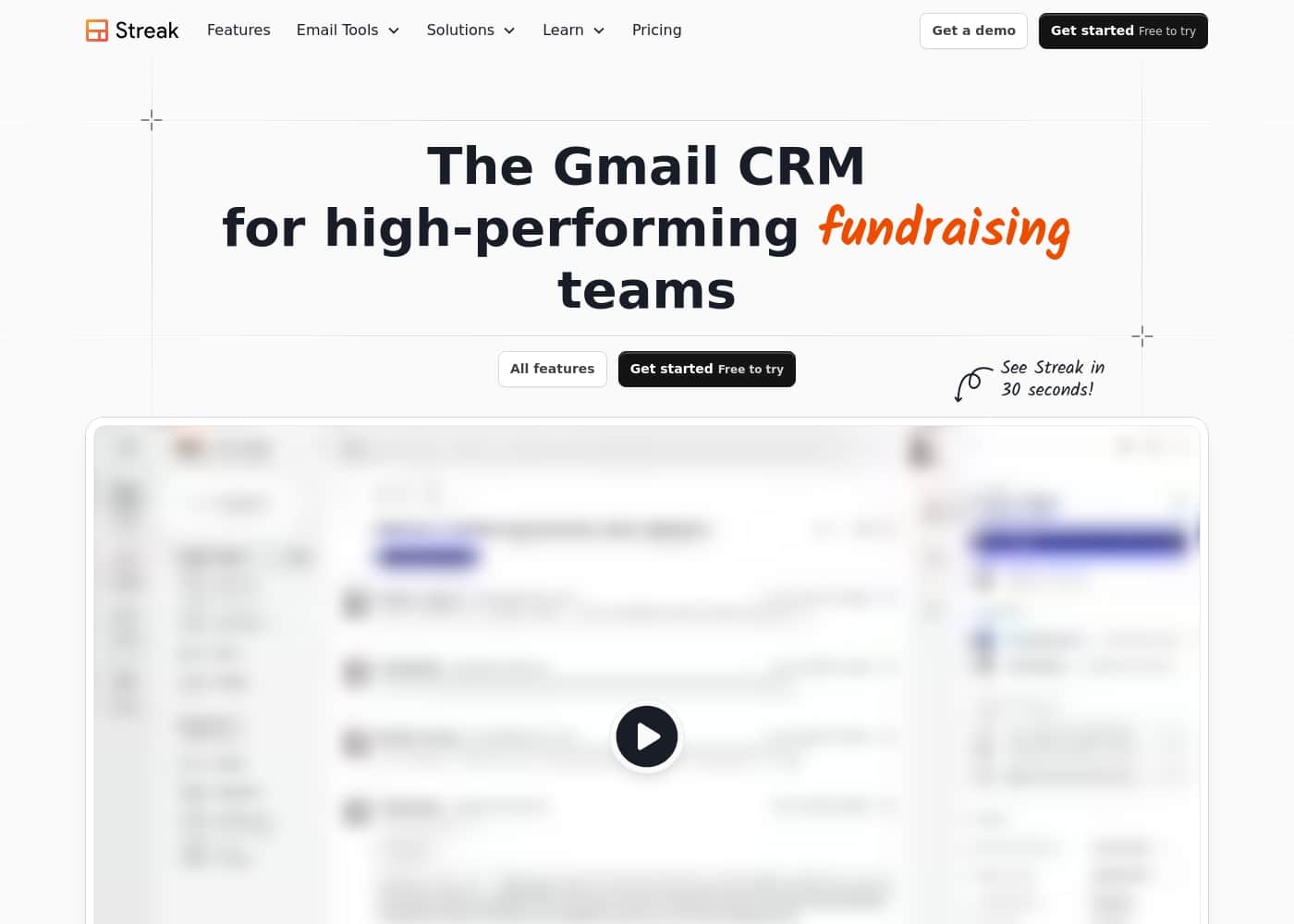
Streak - CRM for Gmail homepage screenshot

At a glance

Quick overview for Streak - CRM for Gmail: rating, pricing summary, key features, and highlights.
Pricing verified Nov 21, 2026

Ciroapp score

3.5/ 5

A powerful Gmail tool, but buyer beware.

Overall, Streak is a well-built CRM that excels at its core promise: living inside your Gmail for seamless deal tracking. However, our review is tempered by significant concerns around billing practices and inconsistent customer support reported in external user feedback.

Pros

  • Deep, native integration with Gmail keeps data updated effortlessly.
  • Intuitive interface with a very low learning curve for Google Workspace users.
  • Flexible pipelines that adapt to sales, projects, or any workflow.

Cons

  • Aggressive or confusing subscription billing is a major complaint.
  • Customer support can be slow and difficult to reach for resolving issues.
  • The free plan is very limited, pushing users toward paid tiers quickly.
Best for
  • Small to mid-sized teams living in Gmail who need a simple, integrated CRM.
  • Salespeople and account managers tracking email-heavy client relationships.
  • Founders and startups who want an affordable, easy-to-set-up CRM.
This section is a summary. Detailed sections about features, use cases, pricing, and reviews follow below.

What is Streak - CRM for Gmail?

Does your team avoid the company CRM because it feels like extra, clunky work? You're not alone. The big promise of a CRM often falls flat because it pulls people out of their workflow.

Streak - CRM for Gmail tackles this by living right inside your Gmail. It's designed to be used, not just logged into, helping your team track deals and communication without ever leaving their inbox. ✨

Streak is a customer relationship management tool built directly into Gmail. It's for salespeople, founders, and teams who manage clients, deals, or projects primarily through email. The goal is to replace separate spreadsheets and log-in-required systems with a unified, collaborative view of all your work, right where your emails already are.

💡

Should you choose Streak - CRM for Gmail?

Quick buyer guidance before you compare plans or click through.

Choose it if

  • Teams that have struggled with CRM adoption due to poor workflow integration.
  • Google Workspace users looking for a native Gmail tool without a learning curve.
  • Businesses that value customization and want a tool that fits their specific process.
  • Organizations needing real-time team visibility into client communications.

Skip it if

  • Teams not primarily using Gmail or Google Workspace. Streak requires specific browser extensions (Chrome, Safari, Edge).
  • Companies needing complex, standalone CRM functionality separate from their email.
  • Those seeking a free tool for large teams or with advanced automation needs may find the free plan limiting.
  • Businesses with strict IT policies that prohibit installing browser extensions or third-party app integrations.

Next steps before buying

  1. 1Visit the Streak website to review current pricing plans, including the free tier limits.
  2. 2Confirm your team uses Google Chrome, Safari, or Microsoft Edge, as Streak requires these browsers.
  3. 3Check for direct integrations with other tools your team uses (e.g., via Zapier) if needed.
  4. 4Install the Streak extension to explore the interface and set up a sample pipeline.
  5. 5Evaluate the support options, including live classes and direct contact, to ensure they meet your needs.

Ease of use

Users consistently praise Streak for being intuitive and easy to set up. It's frequently described as "super intuitive" and "simple to use." The integration with Gmail means the learning curve is minimal for anyone already familiar with Google's email.

Streak - CRM for Gmail Key Features

📨 Works Inside Your Gmail Inbox

Streak lives directly in your Gmail, so you never have to switch tabs or learn a new system. It's designed to be part of your natural workflow, not another chore. Your team will actually use it because it's where they already spend their day.

✨ Automatic Email Logging & Contact History

Every email you send or receive is automatically filed to the right contact and deal. You get a complete history of every relationship without searching or manual data entry. This means you always have the full context, right in your inbox.

✅ Real-Time Team Collaboration

Share emails, notes, and entire pipelines with your team. Everyone sees the same client view in real-time, which prevents duplicate work and missed follow-ups. It keeps your whole team on the same page without extra meetings.

📈 Pipelines and Deal Management

Organize your work into customizable pipelines that track deals, projects, or any process. You can see the status of every deal at a glance and move items through your workflow stages. It's a flexible way to manage your entire sales cycle or client process.

✨ AI-Powered Data Entry and Insights

Streak uses AI to keep your data fresh and answer questions about your work. It can automatically fill in deal fields based on your emails. You can also ask questions in natural language to get insights, helping you prioritize what matters most.

✨ Built-in Sales & Productivity Tools

It includes the core tools you need right inside Gmail. This includes mail merge for personalized outreach, email tracking to see opens and clicks, and the ability to make calls directly from Streak. You can manage tasks and contacts without leaving your inbox.

💡 Flexible Customization and Support

You can tailor pipelines, columns, and workflows to fit your exact process. The setup is intuitive, and the team offers fast, human support when you need it. Users consistently praise the helpfulness and quick response times from the Streak team.

Use Cases

💡 The Sales Team That Lives in Gmail

You're a salesperson managing dozens of deals. Switching between Gmail and a separate CRM is a constant context switch that kills your flow. With Streak, you never leave your inbox. You can see the deal stage, notes, and full communication history right alongside the email. When a new email arrives, you instantly know who it's from and where they are in your pipeline. You can even share an email with a teammate with one click, so everyone stays in the loop without extra meetings.

Expected outcome: Less tab-switching, faster responses, and complete deal visibility without the CRM feeling like extra work.

💡 The Founder Wearing All the Hats

As a startup founder, you need to track leads, manage partnerships, and follow up on funding conversations. You don't have time for a complex CRM setup. You install Streak, and your inbox instantly gains a simple pipeline view.

You tag incoming emails to a "Fundraising" pipeline. AI helps you fill in key details like meeting notes and next steps. Later, you can quickly pull a report to see which investors you haven't heard back from.

It's a lightweight system that grows right alongside your business.

💡 The Real Estate Agent Managing Clients

You juggle multiple buyer and seller clients, each with their own set of documents and communications. Losing track of a conversation is not an option. In Streak, you create a pipeline for each client.

Their entire history of emails, notes, and attachments is automatically organized in one place. You can set a reminder to follow up next week, and when the day comes, you'll see the email thread right where you left off. It helps you provide a seamless, personal service.

💡 The Team Needing Shared Visibility

Problem: A client emails your company, but you're not sure if a colleague already replied. You both waste time chasing the same lead.

Approach: With Streak, all emails to a client are automatically logged to a shared pipeline box. You both see the same real-time view of the conversation and any notes. Before replying, you check the pipeline and see your teammate already handled it.

Outcome: No duplicated efforts, faster customer service, and a complete audit trail of all interactions, visible to the whole team.

💡 The Freelancer Tracking Projects

You're a consultant or freelancer juggling multiple client projects. You need to track scope, invoices, and communication for each one. Instead of separate tools, you use Streak to create a "Projects" pipeline.

You move a project box through stages like "Proposal," "Active," and "Completed." All project-related emails are filed automatically. You can add internal notes and assign tasks to yourself. It turns your email into a project command center, keeping everything organized and billable.

💡 The Outreach Campaign That Gets Followed Up

You need to send a personalized outreach email to 50 potential partners. Doing it manually is slow and tracking replies is messy. With Streak, you write one template using mail merge variables. You send all 50 emails in a few clicks. Streak automatically creates a pipeline box for each recipient and tracks when they open the email or click a link. You see a clear list of who's engaged, making your follow-ups focused and effective.

> Tip: Use the "Open Tracking" and "Link Tracking" features to prioritize your outreach to the most interested prospects.

💡 The Account Manager Preventing Churn

You manage a portfolio of important clients. Your goal is to ensure they're happy and renewing. Streak helps you build a pipeline for account management.

You can log key information like renewal dates, contract values, and health scores. Automated email logging means you never miss a detail from client conversations. Before a quarterly check-in, you review the pipeline box and have the full history at your fingertips.

This proactive approach helps you spot issues early and solidify relationships.

Streak - CRM for Gmail pricing

From$49/mo

  • From the vendor's pricing page, checked Nov 21, 2026
  • 3 plans

Prices checked on Nov 21, 2026 from Streak - CRM for Gmail's pricing page

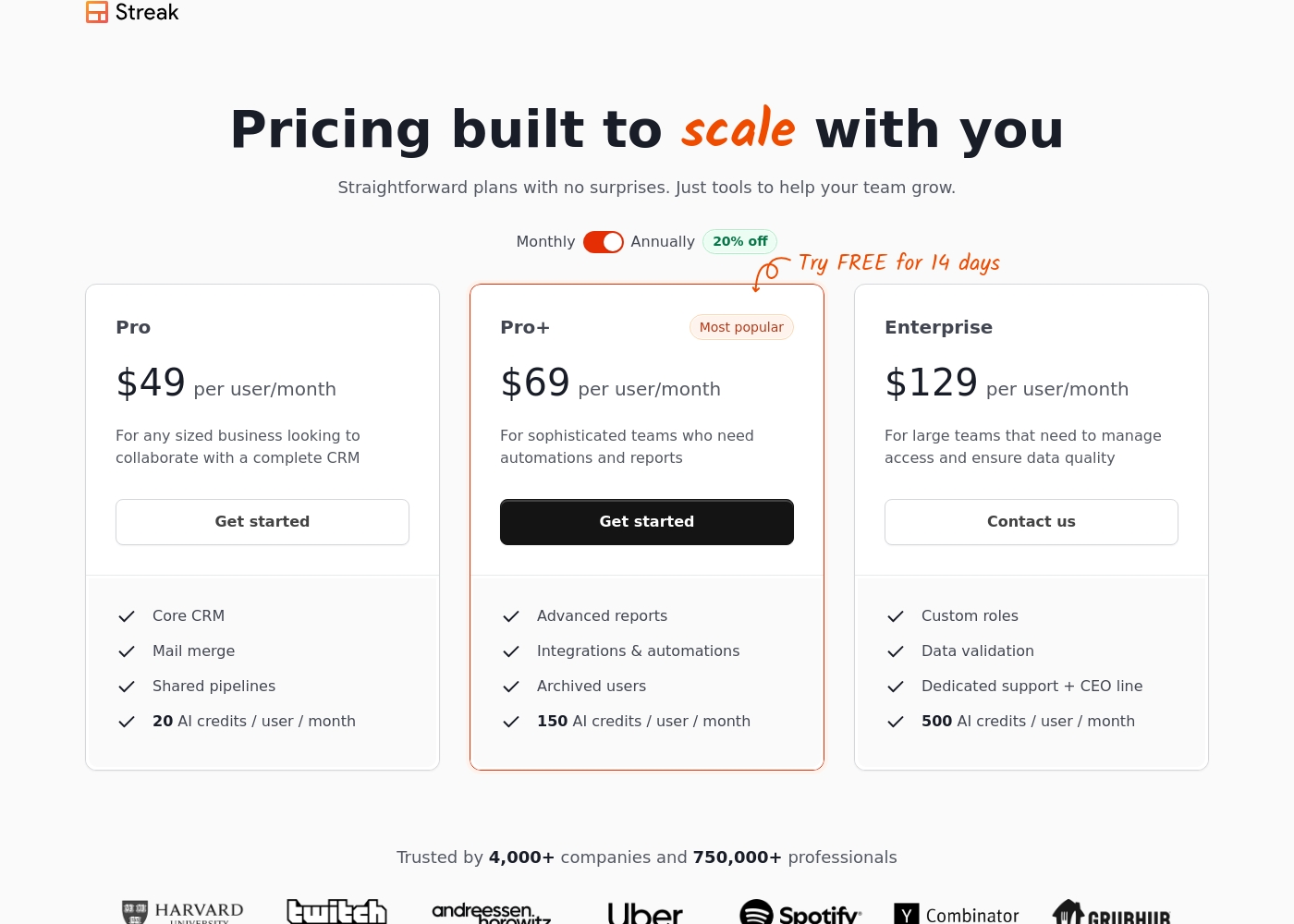
Streak - CRM for Gmail pricing page screenshotView pricing page screenshot
PlanBilled monthlyBilled annuallyIncludes
Pro
per user
—
$49/mo
$588 per year
billed annually; per user
Pro+
per user
—
$69/mo
$828 per year
billed annually; per user
Enterprise
per user
—
$129/mo
$1,548 per year
billed annually; per user

Price history

Tracking prices since Oct 1, 2026. No price change detected yet.

Pricing types: Free plan, Monthly subscription, Yearly subscription, Per seat pricing, Usage-based pricing

Pricing notes

Streak - CRM for Gmail offers flexible subscription plans starting at $49/user/month when billed annually. Pricing scales based on advanced reporting needs, automation features, and AI credit limits, with a free version also available for basic power tools. 🚀

  • Streak costs between $49 and $129 per user/month (billed annually) with 3 paid plans: Pro at $49, Pro+ at $69, and Enterprise at $129.

Pro

Price: $49 per user/month (billed annually) or $59 monthly

Best For: Any sized business looking to collaborate with a complete CRM

Other Features: Core CRM, Mail merge, Shared pipelines, 20 AI credits / user / month

This plan is ideal if you need to organize your inbox into a functional database. It provides the essential tools to track deals and share pipelines across your team without complex automation.

Pro+

Price: $69 per user/month (billed annually) or $89 monthly

Best For: Sophisticated teams who need automations and reports Refund Policy: 14-day free trial available Other Features: Advanced reports, Integrations & automations, Archived users, 150 AI credits / user / month

Choose this tier if your team is growing and needs to save time through automated workflows. It's the most popular option for teams that want to dive deep into data with advanced reporting.

Enterprise

Price: $129 per user/month (billed annually) or $159 monthly

Best For: Large teams managing access and data quality

Other Features: Custom roles, Data validation, Dedicated support + CEO line, 500 AI credits / user / month

This is the right fit for organizations that require strict data integrity and custom administrative controls. You should pick this if you have 10 or more users and need a direct line to dedicated support staff.

Streak offers a "free forever" plan for individual email power tools like link tracking and small-scale mail merges. You can also test the Pro+ features with a 14-day free trial. If you're looking to save, choosing annual billing reduces your total cost by 20% compared to monthly payments. 💡

Streak offers three main paid tiers: Pro, Pro+, and Enterprise. Each plan is billed per user, and all team members must be on the same plan level. Annual billing provides a 20% discount compared to monthly rates. The plans primarily differ in their AI credit allocation, reporting depth, and administrative controls like data validation and custom roles. Enterprise requires annual billing and is designed for teams of 10 or more users. While a free version exists for basic tools, a 14-day trial is offered for the Pro+ plan to test advanced features. 🚀

$49–$159/month ["Free", "Free Trial", "Monthly", "Yearly", "Per seat"] true 14 false

"https://www.streak.com/pricing" It provides the essential tools to track deals and share pipelines across your team without complex automation. It's the most popular option for teams that want to dive deep into data with advanced reporting. You should pick this if you have 10 or more users and need a direct line to dedicated support staff.

Streak offers a "free forever" plan for individual email power tools like link tracking and small-scale mail merges. You can also test the Pro+ features with a 14-day free trial. If you're looking to save, choosing annual billing reduces your total cost by 20% compared to monthly payments. ", "plans": [ { "name": "Pro", "monthly_price": "$59", "annual_price": "$49", "features": ["Core CRM", "Mail merge", "Shared pipelines", "20 AI credits / user / month", "Unlimited records", "Standard reports"], "limits": null, "cta": "Get started" }, { "name": "Pro+", "monthly_price": "$89", "annual_price": "$69", "features": ["Advanced reports", "Integrations & automations", "Archived users", "150 AI credits / user / month", "Priority support"], "limits": null, "cta": "Try FREE for 14 days" }, { "name": "Enterprise", "monthly_price": "$159", "annual_price": "$129", "features": ["Custom roles", "Data validation", "Dedicated support + CEO line", "500 AI credits / user / month", "Custom billing"], "limits": "10+ users required for annual plan", "cta": "Contact us" } ] } }

Streak - CRM for Gmail pricing: Streak - CRM for Gmail offers flexible subscription plans starting at $49/user/month when billed annually. Pricing scales based on advanced reporting needs, automation features, and AI credit limits, with a free version also available for basic power tools. 🚀

  • Streak costs between $49 and $129 per user/month (billed annually) with 3 paid plans: Pro at $49, Pro+ at $69, and Enterprise at $129.

Pro

Price: $49 per user/month (billed annually) or $59 monthly

Best For: Any sized business looking to collaborate with a complete CRM

Other Features: Core CRM, Mail merge, Shared pipelines, 20 AI credits / user / month

This plan is ideal if you need to organize your inbox into a functional database. It provides the essential tools to track deals and share pipelines across your team without complex automation.

Pro+

Price: $69 per user/month (billed annually) or $89 monthly

Best For: Sophisticated teams who need automations and reports Refund Policy: 14-day free trial available Other Features: Advanced reports, Integrations & automations, Archived users, 150 AI credits / user / month

Choose this tier if your team is growing and needs to save time through automated workflows. It's the most popular option for teams that want to dive deep into data with advanced reporting.

Enterprise

Price: $129 per user/month (billed annually) or $159 monthly

Best For: Large teams managing access and data quality

Other Features: Custom roles, Data validation, Dedicated support + CEO line, 500 AI credits / user / month

This is the right fit for organizations that require strict data integrity and custom administrative controls. You should pick this if you have 10 or more users and need a direct line to dedicated support staff.

Streak offers a "fr

Cost calculator

Estimate what Streak - CRM for Gmail costs for your team.

Billing

Pro has no published price for this billing cycle.

Pro is priced per user: price × 5 seats. Estimate based on published list prices, before taxes, add-ons and discounts.

How to pay less for Streak - CRM for Gmail

  • Some plans are priced per user: only pay for seats people actually use.
  • Cheaper tools in this category start at $6.58/mo.
Visit Streak - CRM for Gmail

Email me when Streak - CRM for Gmail changes price

One email when we detect a price change on the vendor's pricing page. No newsletter, no deals. Unsubscribe in one click.

User Reviews

External sentiment for Streak is highly polarized, especially on Trustpilot where it averages a low rating. A major recurring theme is billing and refund issues, with many users citing unexpected charges and difficulty canceling subscriptions.

On the positive side, users praise the core product's intuitive design and seamless Gmail integration, calling it a "game-changer" for tracking deals. However, customer support is a frequent pain point, described as slow, unresponsive, or unhelpful.

Some snippets mention the CRM being reliable and feature-rich for its price, while others warn of glitches and data sync problems. The contrast is stark: fans love the workflow, while detractors are frustrated by the business practices surrounding the service.

😕

Summarized from public reviews on Trustpilot

No reviews yet.

Write a Review

Write a Review for Streak - CRM for Gmail
0/100 characters
0/2000 characters

Why use Streak - CRM for Gmail?

The biggest win with Streak is eliminating the "log-in to log work" problem. By integrating with Gmail, it aims to make your CRM part of your natural workflow, not another chore.

  • It gets used. Because it's in Gmail, your team is more likely to keep data updated. No more fighting to get people to switch tabs and enter data.
  • Automatic context. Emails are automatically filed to contacts and deals. You see the entire history of a relationship without searching. 📨
  • Real-time collaboration. Share emails, notes, and pipelines with your team. Everyone sees the same client view, preventing duplication and missed follow-ups. ✅
  • Built for speed. Features like AI data entry, mail merge, and call logging are designed to be fast and intuitive. You spend less time on admin and more on revenue-generating work.
  • It grows with you. Users praise its flexibility, from managing simple contacts to complex sales pipelines. It's described as a game-changer for small businesses and startups. 📈
  • Outstanding support. Multiple users highlight the fast, human customer support as a key reason they stick with Streak.

Streak - CRM for Gmail alternatives

Other tools in the CRM category

View all CRM tools
Hubspot

Hubspot

CRM4.2/5

The HubSpot Customer Platform is a comprehensive system built around the Smart CRM. This Smart CRM acts as your single source of truth for all business data. It helps go-to-market teams—marketing, sales, and customer service—work together seamlessly. Over 268,000 customers across more than 135 countries already use it to scale their operations. The platform offers specialized Hubs that connect to everything you need to create content, find leads, close deals, and grow revenue.

Demodesk

Demodesk

CRM4.2/5

Demodesk is an AI meeting assistant and sales agent platform for revenue teams. It records online, phone, and in-person meetings, then transcribes and summarizes them in 98 languages. Its AI agents handle summaries, coaching, CRM updates, and deal insights. The company is based in Munich, stores data on EU servers (Azure Frankfurt), and is GDPR-native and ISO 27001:2022 certified. It fits European sales teams that want automation with strict data privacy.

Salesforce

Salesforce

CRM4.2/5

Salesforce is a leading global software company recognized for providing integrated technology solutions. It helps businesses across many sectors, offering specific tools for Financial Services, Retail, Healthcare, and more. This platform focuses on connecting proactively with customers, automating workflows, and unifying data. Importantly, Salesforce incorporates powerful AI agents like Agentforce to improve support, boost productivity, and drive business outcomes. The system aims to give you a single, unified value chain approach. You can also leverage a strong ecosystem through the AppExchange for additional tools and partners.

Pipedrive

Pipedrive

CRM4.2/5From $14/mo

Pipedrive is a trusted CRM platform already used by over 100,000 companies worldwide. It is designed specifically for sales teams and growing small businesses. The tool helps you easily manage all your leads and deals. It provides a single space for your activities and instant access to crucial sales data. The core benefit is simple: less time managing and more time closing deals.

Salesflare

Salesflare

CRM4.2/5

Salesflare is a simple yet powerful CRM designed for small and medium businesses selling B2B. It helps teams keep track of everything automatically, enrich data, and collaborate with more transparency. It connects with LinkedIn, Gmail, and Outlook to remove copy-paste and keep all details in one place.

Nutshell

Nutshell

CRM4.2/5From $16/mo

We create powerful, easy-to-use sales, marketing, and engagement software that tells teams what’s next at each stage of the sales cycle. Our CRM software supports sales teams, marketing teams, and small business owners at over 5,000 companies.

Cheapest CRM software for 1 to 25 users

Streak - CRM for Gmail FAQ

How much does Streak - CRM for Gmail cost?

Streak - CRM for Gmail's cheapest paid plan, Pro, costs $49 per month. Paid plans range from $49 to $129 per month. Prices checked on Nov 21, 2026 from the vendor's pricing page.

Has Streak - CRM for Gmail's price changed recently?

No. We have not detected a price change since we started tracking on Oct 1, 2026.

Does Streak work with Outlook or other email providers?

No, Streak is built exclusively for Gmail and Google Workspace. It requires the Google Chrome, Safari, or Microsoft Edge browser to function.

What integrations does Streak offer?

Streak offers direct integrations with Google Workspace apps (Calendar, Drive, Sheets), Calendly, Slack, and others. You can connect to over 9,000 apps via Zapier. API access for custom workflows is available on higher-tier plans.

How does Streak handle data security and privacy?

The official website does not detail specific security certifications or protocols. For sensitive data, it's recommended to review their terms or contact sales for a security questionnaire before purchasing.

Is there a limit on the number of pipelines, contacts, or records I can create?

All paid plans offer unlimited records, pipelines, and contacts. The free plan has more limited features, such as a 50-day limit on mail merge.

What does the 14-day free trial include?

The 14-day free trial gives you full access to the Pro+ plan's features. You can test advanced reports, automations, and 150 AI credits per user without payment.

How does billing work for a team? Is it per-user or per-usage?

Billing is strictly per-user. Every team member must be on the same paid plan (Pro, Pro+, or Enterprise). You can choose monthly or annual billing, with annual offering a 20% discount.

What is the refund policy?

The official pricing page does not state a clear refund policy. You should confirm this in the terms or contact support before purchasing.

What support and onboarding options are available?

Support varies by plan: Pro gets live chat, Pro+ gets priority support, and Enterprise gets dedicated support including a direct line. Onboarding and training sessions are available for a fee on higher plans.

In which languages and regions is Streak available?

The website and pricing are in English and USD, suggesting a primary focus on English-speaking markets.

How do I cancel my subscription?

Cancellation details are not outlined on the pricing page. You would manage your subscription through your billing settings, but it's wise to review the terms before signing up.

Who is Streak best for, and who should avoid it?

It's best for small-to-mid teams in Gmail/Google Workspace needing a simple, integrated CRM. It's not ideal for teams not using Gmail or those needing a standalone, complex CRM system.

What are AI credits, and how do they work?

AI credits power features like deal summaries, Q&A, and autofill. Credits are allocated per user per month (e.g., 20 on Pro, 150 on Pro+). They refresh monthly and don't roll over. You can buy more as an add-on.

Ready to try Streak - CRM for Gmail? Check out the official site or pricing.

Are you Streak - CRM for Gmail? Claim this listing · Get the badge