Learndash

Learndash review

Build, sell, and track online courses entirely on your own WordPress site.

Learndash costs from $21.58/mo · 3 plans · prices checked Oct 12, 2026

By Ciroapp Editorial Team · Updated Sep 16, 2026

Commission may apply at no extra cost

Learndash homepage screenshot

At a glance

Quick overview for Learndash: rating, pricing summary, key features, and highlights.
Pricing verified Oct 12, 2026

Ciroapp score

4.1/ 5

LearnDash packs a course builder, quizzes, memberships, and real-time reporting into one WordPress plugin, with a single license covering unlimited learners. You'll need your own site, annual billing starts at $259, and top features like AI outlines and group seat sales sit on higher tiers. Overall, it's a smart pick for creators and training teams who want full control on WordPress.

Pros

  • Pros:One annual license covers unlimited courses and unlimited learners with no per-student fees, so your costs stay flat no matter how large your audience grows.
  • Pros:MemberDash ships inside the plugin, so memberships, subscriptions, bundles, and drip content work without a third-party membership tool, with Stripe and PayPal payment support built in.
  • Pros:The real-time reporting dashboard surfaces enrollment trends, completion rates, quiz score breakdowns, and at-risk learner flags, letting you fix weak lessons before students disengage.

Cons

  • Cons:LearnDash runs as a WordPress plugin, so it's unusable if you don't have (or don't want) a WordPress site with compatible hosting — there's no standalone hosted version outside StellarSites.
  • Cons:All three plans are billed annually only, starting at $259 per year, with no monthly payment option, making the upfront commitment larger than month-to-month competitors.
  • Cons:The pricing page shows no free trial or refund window, so you can't test the plugin before committing to a full year.
Best for
  • Solo instructors and coaches selling their first courses on WordPress
  • Creators who want memberships, subscriptions, and bundles without extra plugins
  • Training businesses selling seats to companies and institutions
This section is a summary. Detailed sections about features, use cases, pricing, and reviews follow below.

What is Learndash?

Running courses across scattered plugins and tools gets messy fast. LearnDash pulls your course builder, quizzes, payments, memberships, and reporting into one WordPress platform. You keep control of your content and data, pay no per-student fees, and can start with one course, then grow into a full program.

LearnDash is a learning management system that runs as a WordPress plugin. It's built for solo instructors, coaches, businesses, and training teams that want to create, sell, and track courses on their own website. With over 100,000 active installs and 25 million learners taught, it scales from a single course to group sales for organizations.

Should you choose Learndash?

Quick buyer guidance before you compare plans or click through.

Choose it if

  • You already run (or plan to run) a WordPress site
  • You want unlimited courses and learners for one annual license fee
  • You sell directly to learners using Stripe or PayPal
  • You need reporting on enrollments, completion rates, and quiz performance
  • You plan to sell recurring subscriptions or tiered memberships over time

Skip it if

  • It's a WordPress plugin, so it's a poor fit if you don't have (or want) a WordPress site with compatible hosting
  • All plans renew annually, starting at $259 per year — a bigger upfront commitment than month-to-month tools
  • Group seat sales, instructor roles, front-end creation, and reviews are locked to the Elite plan at $599 per year
  • AI course outlines and advanced reporting require Pro ($399/year) or higher, not the entry tier
  • Trial and refund details weren't visible on the site, so verify terms before committing

Next steps before buying

  1. 1Confirm your WordPress site and hosting meet the plugin's requirements, or budget time to set them up first
  2. 2Compare Essentials, Pro, and Elite against your must-have features — groups, seats, and AI tools live on higher tiers
  3. 3Check that your payment tools (Stripe, PayPal) and key plugins like WooCommerce or MemberPress are supported
  4. 4Review the annual renewal terms and any trial or refund policy before you purchase
  5. 5Use the onboarding wizard to build one test course and validate the workflow before scaling up

Ease of use

Signals point to a manageable setup: an onboarding wizard, a drag-and-drop builder, and an AI outline generator lower the learning curve. Since it's a WordPress plugin, basic WordPress comfort and working hosting are prerequisites. On higher plans, instructors can build courses from the front end without touching the WordPress dashboard.

Learndash Key Features

🚀 Build a sellable course in a weekend

LearnDash's drag-and-drop builder lets you structure lessons, topics, and assessments fast. Describe a topic and the AI outline generator drafts a curriculum you can customize and publish. Quizzes support eight question types, from multiple choice to essays.

Rearrange anything on the fly — nothing is locked down, so your course matches your teaching style.

📊 Know what's working in your courses

Growing programs need more than gut instinct. LearnDash's dashboard tracks everything in real time, so you can fix weak lessons before learners disengage. It surfaces:

  • Enrollment trends and signups as they happen
  • Quiz score breakdowns that show where students struggle
  • Completion rates and at-risk learner flags

Use these insights to sharpen content and keep learners moving.

✨ Memberships without extra plugins

MemberDash ships inside LearnDash, so you don't need a third-party plugin to sell recurring revenue. Build free, basic, and premium tiers, sell monthly or yearly subscriptions, and bundle courses together. Drip content by membership level so members always have something new waiting.

Members manage their own payments and profiles, and you can see which offerings drive the most revenue.

✨ Sell to teams, not just individuals

Selling to organizations? On the Elite plan, LearnDash groups let companies buy seats for entire teams. You set the pricing; they assign people through group leaders, so you're not managing headcount.

Multiple instructors can collaborate on one course, building from the front end without touching your WordPress dashboard. Learner reviews add social proof and show what to improve.

Use Cases

🚀 Launch your first course as a solo instructor

You're a coach or instructor with knowledge to share. Use the drag-and-drop builder and onboarding wizard to structure lessons, topics, and quizzes, then sell directly through Stripe or PayPal on Essentials. Expected outcome: a sellable course live on your own WordPress site.

🔁 Sell memberships and recurring subscriptions

You want recurring revenue without extra plugins. MemberDash is built in: create free, basic, and premium tiers, sell monthly or yearly subscriptions and bundles, and drip content by level. Members manage their own accounts.

Tip: start with one tier, then add more as demand grows.

📊 Track learners as your program grows

Your cohort is growing and gut instinct isn't enough. On Pro, one dashboard shows enrollment trends, completion rates, quiz breakdowns, and at-risk learner flags, plus weighted grading and report cards. Tip: check quiz scores after each lesson to find where learners struggle.

🏢 Sell to organizations with a teaching team

You sell to organizations or run several instructors (Elite plan). Companies enroll teams with seat-based pricing; group leaders manage their own people. Instructors build courses from the front end, and contributors collaborate on one course without bottlenecks.

Expected outcome: B2B revenue with less hands-on admin.

Learndash pricing

From$21.58/mo

  • 3 plans

Prices checked on Oct 12, 2026 from Learndash's pricing page

Learndash pricing page screenshotView pricing page screenshot
PlanBilled monthlyBilled annuallyIncludes
Essentials
—
$21.58/mo
$259 per year
One license with unlimited courses and unlimited learners; no per-student fees
  • Drag-and-drop course builder
  • Quiz builder
  • Memberships, subscriptions, and bundles
  • Payment integrations (Stripe, PayPal)
  • Onboarding wizard
  • +5
Pro
—
$33.25/mo
$399 per year
One license with unlimited courses and unlimited learners; no per-student fees
  • Everything in Essentials
  • AI Course Outline & Quiz Builder
  • Advanced reporting and analytics
  • Enrollment tracking
  • Weighted grading
  • +3
Elite
—
$49.92/mo
$599 per year
One license with unlimited courses and unlimited learners; no per-student fees
  • Everything in Pro
  • Group course management
  • Instructor role
  • Front-end course creation
  • Multi-instructor course management
  • +2

Price history

Tracking prices since Sep 30, 2026. No price change detected yet.

Pricing types: Yearly subscription

Pricing notes

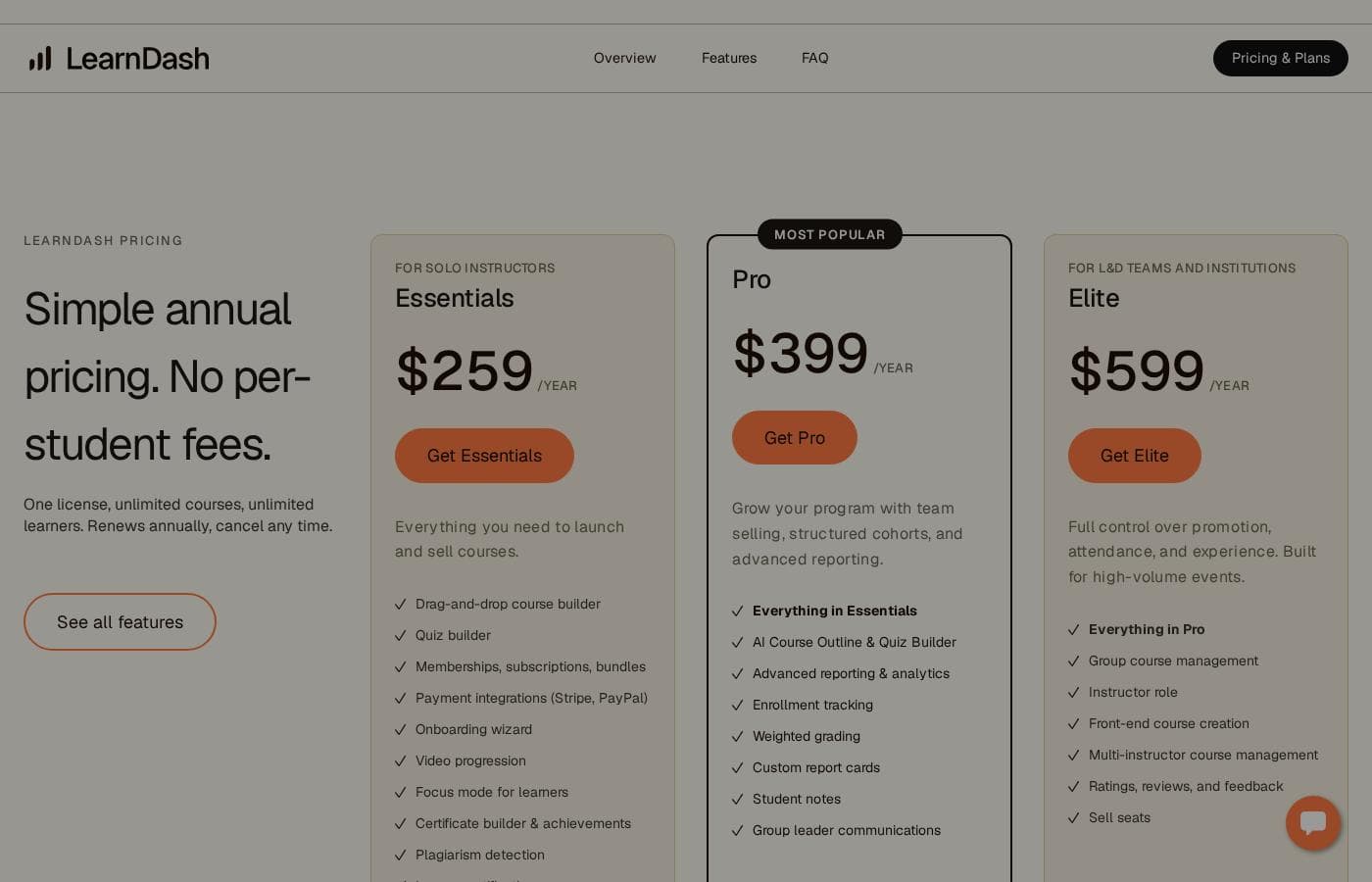
LearnDash uses simple annual pricing with three plans: Essentials at $259/year, Pro at $399/year, and Elite at $599/year. Every plan includes one license with unlimited courses and unlimited learners, and there are no per-student fees.

Learndash costs between $259 and $599 per year with 3 plans: Essentials at $259/year, Pro at $399/year, and Elite at $599/year. Every plan follows the same simple model: one license, unlimited courses, unlimited learners, and no per-student fees. Here's how the tiers break down.

Essentials

Price: $259/year Best For: solo instructors Other Features:

  • Drag-and-drop course builder and quiz builder
  • Memberships, subscriptions, and bundles
  • Payment integrations (Stripe, PayPal)
  • Certificate builder, achievements, and plagiarism detection
  • Onboarding wizard, video progression, and learner notifications

Essentials gives you everything you need to launch and sell courses. You get the core builder, quizzes, payments, and certificates in one package. If you're a solo instructor just starting out, this plan covers the fundamentals well.

Pro

Price: $399/year Other Features:

  • Everything in Essentials
  • AI Course Outline & Quiz Builder
  • Advanced reporting and analytics
  • Enrollment tracking
  • Weighted grading and custom report cards
  • Student notes and group leader communications

Pro is the step up when your program grows. You get team selling, structured cohorts, and deeper analytics on top of every Essentials feature. Pick this tier if you need to track enrollments closely or run graded programs.

Elite

Price: $599/year Best For: L&D teams and institutions Other Features:

  • Everything in Pro
  • Group course management with seat selling
  • Instructor role with front-end course creation
  • Multi-instructor course management
  • Ratings, reviews, and feedback

Elite is built for organizations, not just individuals. You can sell seats to companies, let instructors build courses without touching the WordPress dashboard, and collect learner reviews. If you'll never sell to teams or run multiple instructors, you can skip this tier and save money.

All plans renew annually, and you can cancel any time. The page doesn't show a free trial or refund window, so confirm license terms with LearnDash before you commit.

Cost calculator

Estimate what Learndash costs for your team.

Billing

Essentials has no published price for this billing cycle.

Essentials has a flat price: the number of seats does not change the total. Estimate based on published list prices, before taxes, add-ons and discounts.

How to pay less for Learndash

  • Cheaper tools in this category start at $8.25/mo.
Visit Learndash

Email me when Learndash changes price

One email when we detect a price change on the vendor's pricing page. No newsletter, no deals. Unsubscribe in one click.

User Reviews

No reviews yet.

Write a Review

Write a Review for Learndash
0/100 characters
0/2000 characters

Why use Learndash?

Most hosted platforms rent you a spot on their turf. LearnDash runs on your WordPress site, so your courses, data, and revenue stay under your control. Based on what the company publishes, here's where it earns its keep:

  • No per-student fees. One license covers unlimited courses and learners. Plans start at $259 per year, and you can cancel any time.
  • Faster course creation. Drag-and-drop building, an AI outline generator, and eight quiz question types help you go from idea to sellable course quickly.
  • Built-in memberships. MemberDash ships with the plugin, so subscriptions, tiers, bundles, and drip content don't require a third-party tool. Stripe and PayPal are supported.
  • Reporting you can act on. One dashboard surfaces enrollment trends, completion rates, quiz breakdowns, and at-risk learner flags.
  • Room to grow into B2B. The Elite plan adds group seat sales, an instructor role, front-end course creation, and multi-instructor management.
  • A track record you can check. 100,000 active installs, 25 million learners taught, and a 4.8 Trustpilot score are stated publicly.

Learndash alternatives

Other tools in the Learning Management System for WordPress category

View all Learning Management System for WordPress tools
Thinkific

Thinkific

Learning Management System for WordPress4.1/5

Thinkific’s powerful, all-in-one learning platform makes it easy to build your dream learning business through online courses, digital products & communities. Share your knowledge, grow your audience, & scale the business you already love with Thinkific!

Academy LMS

Academy LMS

Learning Management System for WordPress4/5From $8.25/mo

Academy LMS is a powerful, integrated WordPress LMS plugin. It's designed to help you create, sell, and manage a complete online course website right within your WordPress environment. This system works like a virtual classroom. Teachers easily upload lessons, quizzes, and assignments. Students then access the material fully online. It’s ideal for diverse organizations, including businesses, educational institutions, and nonprofits, looking to train employees or the public. It integrates seamlessly with any standard or customized WordPress theme, supporting both free and paid versions.

Tutor LMS

Tutor LMS

Learning Management System for WordPress4.1/5From $16.58/mo

Tutor LMS is a comprehensive platform designed to elevate your online education efforts. It serves creators, educators, and organizations looking to build robust learning environments. You can easily create unlimited courses using the intuitive, advanced course builder. This tool helps you organize all your learning materials efficiently using lessons, topics, and engaging quizzes. It's also fully equipped to launch your own profitable, multi-instructor marketplace.

LifterLMS

LifterLMS

Learning Management System for WordPress4/5

LifterLMS is the complete, easy-to-use LMS solution built specifically for WordPress. It’s an all-in-one tool designed for building a successful online learning business. You can use it to launch any type of training at any scale. This platform is used globally and earns top ratings from satisfied customers. LifterLMS has recorded over 8.3 million enrollments and 12.5 million courses and lessons completed. It's built to keep your content organized and well structured.

Learndash FAQ

How much does Learndash cost?

Learndash's cheapest paid plan, Essentials, costs $21.58 per month. Paid plans range from $21.58 to $49.92 per month. Prices checked on Oct 12, 2026 from the vendor's pricing page.

Does Learndash have a free plan?

No. Learndash lists no free plan; the cheapest paid plan starts at $21.58 per month.

Has Learndash's price changed recently?

No. We have not detected a price change since we started tracking on Sep 30, 2026.

Which tools does LearnDash integrate with?

LearnDash supports Stripe and PayPal for payments, plus integrations with WooCommerce, MemberPress, Paid Memberships Pro, Elementor, Gravity Forms, bbPress, ThriveCart, SamCart, Events Calendar, Restrict Content Pro, and multilingual options.

Does LearnDash charge per student or per seat?

No. One license covers unlimited courses and unlimited learners, with no per-student fees. Elite adds group seat selling, so organizations can enroll whole teams and you set the seat pricing.

Is there a free trial or refund policy?

Plans are billed annually and you can cancel any time. The pricing page shows no free trial or refund window, so check the purchase terms before you commit.

How does setup work if I'm moving from another platform?

Every plan includes an onboarding wizard, and migrations are listed among LearnDash's features. You'll need a WordPress site with compatible hosting ready before you install.

Ready to try Learndash? Check out the official site or pricing.

Are you Learndash? Claim this listing · Get the badge