Tutor LMS

Tutor LMS review

A WordPress LMS for creating, selling, and scaling online courses from your own site.

Tutor LMS costs from $16.58/mo · 6 plans · prices checked Oct 13, 2026

By Ciroapp Editorial Team · Updated Sep 16, 2026

Commission may apply at no extra cost

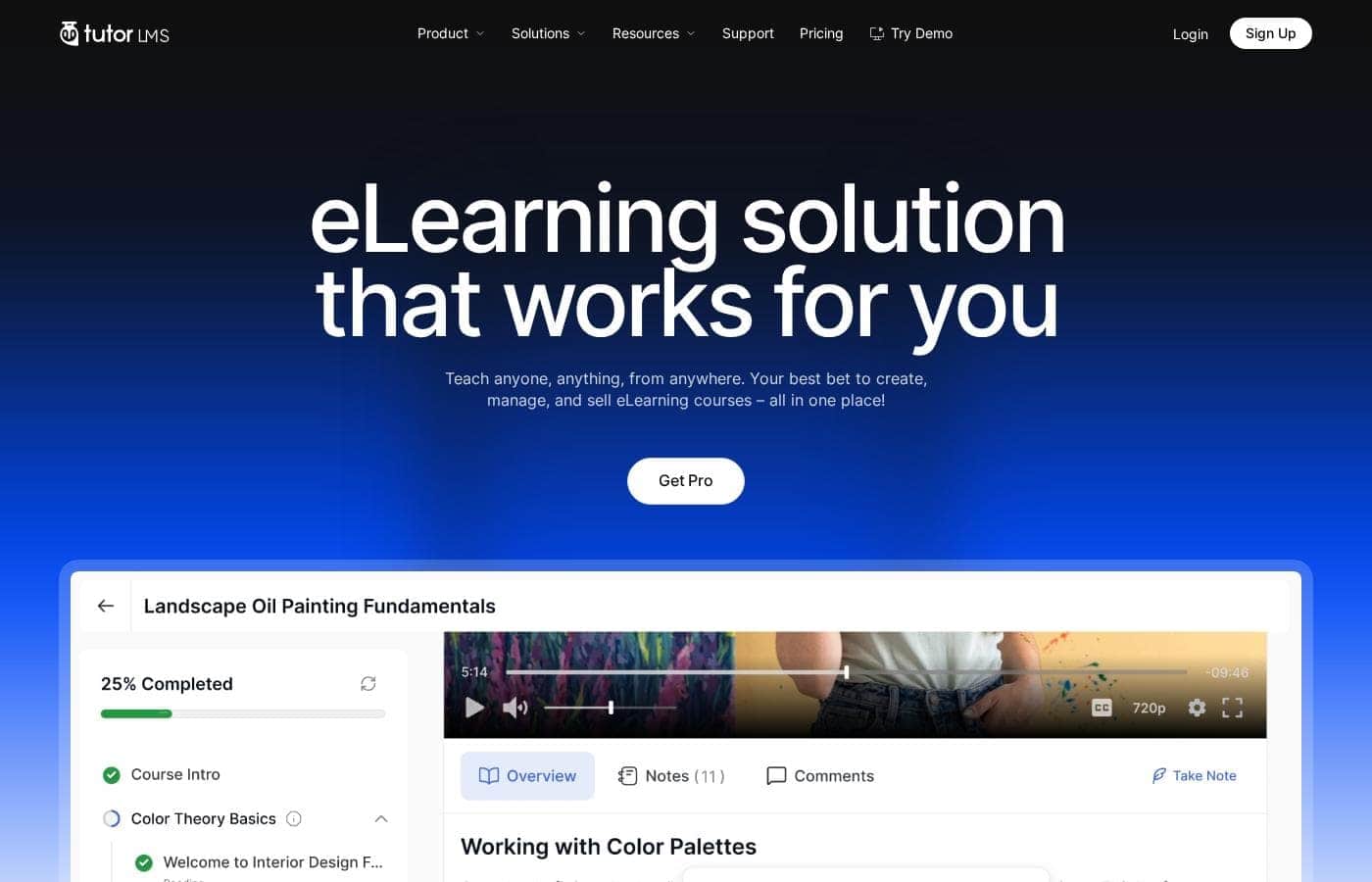
Tutor LMS homepage screenshot

At a glance

Quick overview for Tutor LMS: rating, pricing summary, key features, and highlights.
Pricing verified Oct 13, 2026

Ciroapp score

4.1/ 5

Tutor LMS packs course building, native checkout, AI drafts, and multi-instructor marketplaces into one WordPress plugin — with no revenue cut and lifetime license options. You'll need hosting, a theme, and integrations like Zoom or WooCommerce for live classes and advanced selling. Overall, it's a strong, low-risk pick for WordPress owners who want full control.

Pros

  • Pros:Native eCommerce keeps everything on your own WordPress site — checkout, order management, refunds, and coupon codes are built in, and Tutor LMS takes no percentage of your course revenue
  • Pros:AI Studio generates a full course outline, lesson content, quiz questions, and themed images from a topic description, cutting first-draft time dramatically (you supply your own OpenAI API key)
  • Pros:Unlimited courses and users on every paid tier, including the entry-level $199/year Individual plan, so a solo educator can build a complete academy on one license

Cons

  • Cons:WordPress-only — you need an existing WordPress site, hosting, and a compatible theme before Tutor LMS is usable, which is more setup effort than hosted platforms like Teachable or Thinkific
  • Cons:Many key workflows depend on third-party integrations — live classes require Zoom or Google Meet, and advanced selling often relies on WooCommerce or membership plugins you must configure separately
  • Cons:AI Studio requires you to supply and pay for your own OpenAI API key, adding an ongoing external cost and configuration step not covered by the license
Best for
  • Educators and coaches who want to sell courses from their own WordPress site
  • Teams building a multi-instructor academy or marketplace with revenue sharing
  • Studios and small businesses selling memberships or subscriptions alongside courses
Money-back guarantee
Yes — 30 days
This section is a summary. Detailed sections about features, use cases, pricing, and reviews follow below.

What is Tutor LMS?

Building an online course business often means stitching together separate tools for lessons, payments, and memberships. Tutor LMS pulls it into one WordPress plugin: drag-and-drop course building, native selling with subscriptions and memberships, and AI help for your first draft.

Tutor LMS is a WordPress plugin for creating, managing, and selling online courses. It serves two sides at once: learners get a continuous dashboard with lessons, quizzes, notes, and calendars, while instructors handle course building, gradebooks, and orders from one place. It fits solo educators, studios, academies, and multi-instructor marketplaces — the site reports 100,000+ eLearning websites running on it.

A free version is available for testing.

Should you choose Tutor LMS?

Quick buyer guidance before you compare plans or click through.

Choose it if

  • WordPress site owners who want courses, checkout, and content under one roof
  • Sellers who need native subscriptions, memberships, bundles, and coupon management
  • Instructors who reuse lessons, quizzes, and assignments across many courses
  • Programs issuing certificates that need verifiable unique IDs
  • Audiences that benefit from tailored interfaces, such as Kids Mode for younger learners

Skip it if

  • Anyone not on WordPress — this is a plugin, so you need a WordPress site and hosting first
  • Buyers who want prices upfront: the homepage shows no pricing, so you must check the pricing page before committing
  • Users who prefer zero setup — hosted platforms are simpler than assembling a WordPress site, theme, and plugins
  • Teams relying heavily on outside tools — many workflows depend on integrations like Zoom, WooCommerce, or membership plugins
  • Shoppers expecting confirmed cost comparisons — claims like being cheaper than Kajabi or Teachable come from user reviews, not published pricing

Next steps before buying

  1. 1Confirm your must-have integrations (Zoom, Google Meet, WooCommerce, payment tools) are supported
  2. 2Install the free version on a staging or live WordPress site to test the builder and learner dashboard
  3. 3Compare against hosted alternatives if you don't already run WordPress, weighing control versus setup effort
  4. 4Review support options and any trial or refund terms before paying for a plan

Ease of use

Signals point to a gentle learning curve. The course builder is drag-and-drop, management lives in a single dashboard, and several reviewers describe setup as easy — including one who tested the free version. Responsive support is a recurring theme in user testimonials. That said, basic WordPress familiarity helps since this installs on your own site.

Tutor LMS Key Features

✨ A learner hub that keeps momentum

Lessons, progress, notes, and live sessions sit together, so students don't hunt for what's next. They highlight key points, ask questions per course, and track deadlines on a built-in calendar. Assignments support file uploads, instructor feedback, and re-submissions.

Choose Modern Mode for a clean feel or Kids Mode for younger learners.

✨ Build visually, sell natively

Drag video lessons, quizzes, assignments, and live classes into place in any order. The content bank lets you reuse lessons and quizzes across courses, and bundles group related courses into learning paths. Selling is built in too: checkout, order management, refunds, and coupons all live on your own site.

🤖 AI Studio clears the blank page

Describe a topic and AI Studio returns a full course outline, lesson content, and quiz questions. It can also generate images that match your course theme in styles like Photo or Illustration. Nothing replaces your expertise — you refine the draft, add your voice, then publish when it's ready.

🎓 Certificates anyone can verify

Design certificates without design skills. Start from professionally made templates, then adjust fonts, colors, layouts, and signatures visually. Every certificate carries a unique ID that can be checked at any time, so completions carry real weight with employers and learners.

✨ Grow without switching tools

Tutor LMS connects to tools you already use, so growth doesn't mean another platform. Live classes, payments, and page design can run through your existing stack:

  • Live classes with Zoom and Google Meet
  • Selling with WooCommerce and Paid Memberships Pro
  • Design and community with Elementor and BuddyBoss

Use Cases

✍️ Launch a course without the blank page

You're a solo educator on WordPress. Describe your topic to AI Studio and get an outline, lessons, and quizzes to refine. Drag lessons into place, then sell with built-in checkout.

Expected outcome: A publishable course, drafted fast and sold from your own site.

Tip: Try the free version before you buy.

👥 Run a multi-instructor marketplace

You run an academy with several teachers. Each instructor builds courses, tracks grades, and manages orders from their own dashboard while you share revenue.

Expected outcome: A scalable marketplace where instructors self-serve and revenue splits are built in.

🔁 Sell memberships and subscriptions

Your studio wants recurring income. Group courses into bundles or learning paths, then sell them as subscriptions or memberships — checkout, coupons, and refunds included.

Expected outcome: Steady revenue without stitching together extra plugins.

Tip: Every paid plan includes a 30-day money-back guarantee.

🎥 Teach live cohorts

You train groups in real time. Add live classes through Zoom or Google Meet, while the calendar, assignments, and Q&A keep learners on track.

Expected outcome: Everyone knows what's next — and where to ask.

Tutor LMS pricing

From$16.58/mo

  • 6 plans

Prices checked on Oct 13, 2026 from Tutor LMS's pricing page

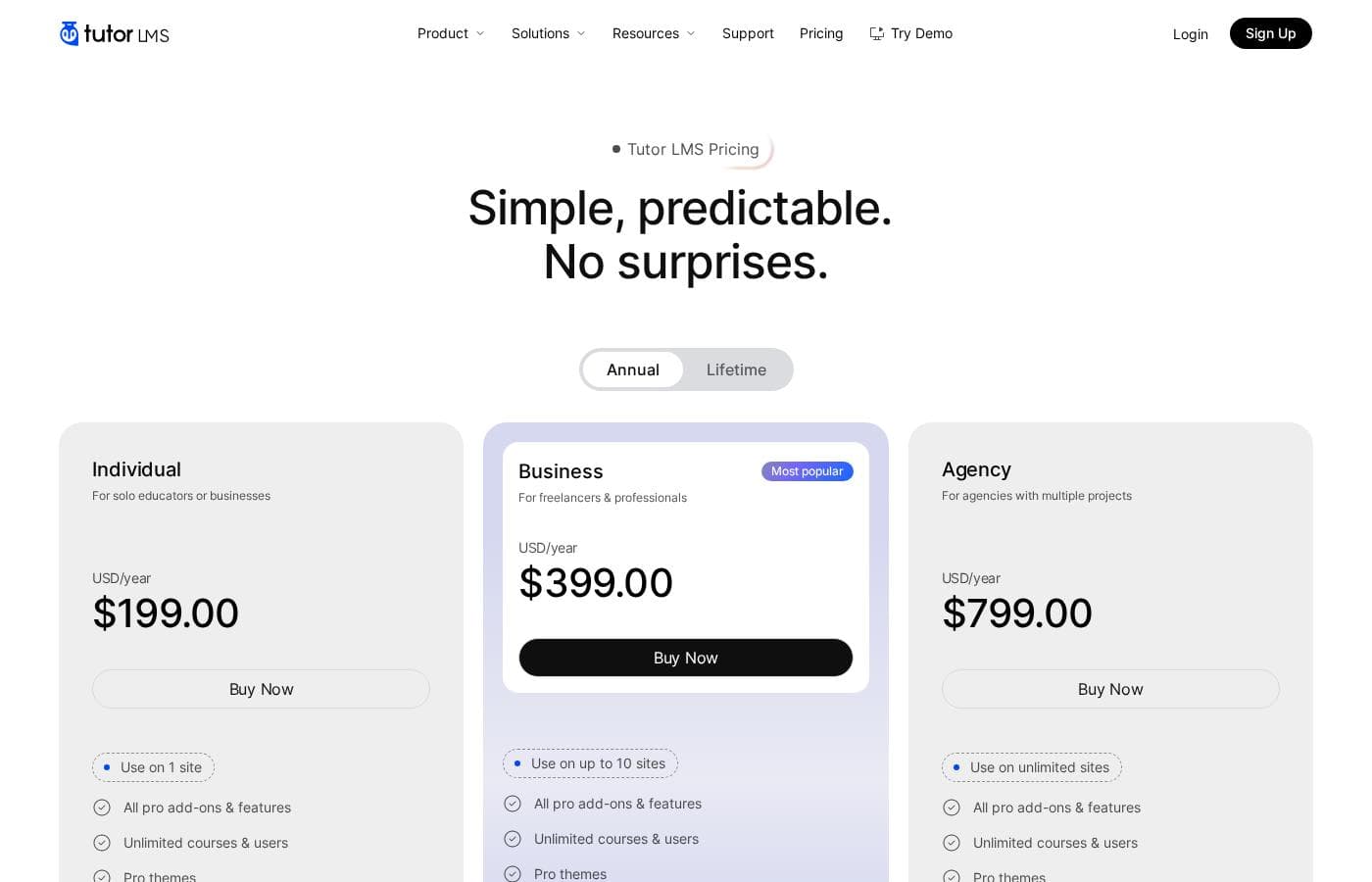
Tutor LMS pricing page screenshotView pricing page screenshot
PlanBilled monthlyBilled annuallyIncludes
Individual (Annual)
—
$16.58/mo
$199 per year
Use on 1 site
  • All pro add-ons and features
  • Unlimited courses and users
  • Pro themes
  • AI Studio (OpenAI API key required)
  • Priority support
  • +1
Business (Annual)
—
$33.25/mo
$399 per year
Use on up to 10 sites
  • All pro add-ons and features
  • Unlimited courses and users
  • Pro themes
  • AI Studio (OpenAI API key required)
  • Priority support
  • +1
Agency (Annual)
—
$66.58/mo
$799 per year
Use on unlimited sites
  • All pro add-ons and features
  • Unlimited courses and users
  • Pro themes
  • AI Studio (OpenAI API key required)
  • Priority support
  • +1
Individual (Lifetime)
$499
$499.00 one-time (lifetime license)
Use on 1 site
  • All pro add-ons and features
  • Unlimited courses and users
  • Pro themes
  • AI Studio (OpenAI API key required)
  • Priority support
  • +1
Business (Lifetime)
$999
$999.00 one-time (lifetime license)
Use on up to 10 sites
  • All pro add-ons and features
  • Unlimited courses and users
  • Pro themes
  • AI Studio (OpenAI API key required)
  • Priority support
  • +1
Agency (Lifetime)
$1,999
$1,999.00 one-time (lifetime license)
Use on up to 50 sites
  • All pro add-ons and features
  • Unlimited courses and users
  • Pro themes
  • AI Studio (OpenAI API key required)
  • Priority support
  • +1

Price history

Tracking prices since Sep 30, 2026. No price change detected yet.

Pricing types: Free plan, Yearly subscription, One-time payment

Pricing notes

Tutor LMS has a free forever core plus three paid tiers — Individual, Business, and Agency — sold as annual licenses from $199 to $799/year or as one-time lifetime licenses from $499 to $1,999. Every paid plan includes all pro add-ons, unlimited courses and users, AI Studio, and priority support.

Tutor LMS costs between $199 and $799 per year with three annual plans — Individual at $199/year, Business at $399/year, and Agency at $799/year — plus matching lifetime licenses at $499, $999, and $1,999 one-time.

Every paid tier shares the same feature set. The real differences are how many sites you can use and how long you receive updates.

Individual (Annual)

Price: $199.00 USD/year Websites Supported: 1 site Best For: Solo educators or businesses Refund Policy: 30-day money-back guarantee Other Features:

  • All pro add-ons and features
  • Unlimited courses and users
  • Pro themes
  • AI Studio (OpenAI API key required)
  • Priority support and updates for 1 year

This is the entry point for a single WordPress site. You still get unlimited courses and learners, so one teacher can build a full academy. It's the simplest way to unlock pro features without a big spend.

Business (Annual)

Price: $399.00 USD/year Websites Supported: Up to 10 sites Best For: Freelancers and professionals Refund Policy: 30-day money-back guarantee Other Features:

  • All pro add-ons and features
  • Unlimited courses and users
  • Pro themes
  • AI Studio (OpenAI API key required)
  • Priority support and updates for 1 year

The pricing page flags this tier as "Most popular." You pay double the Individual price for ten times the site licenses. Freelancers handling several client projects will likely find this the sweet spot.

Agency (Annual)

Price: $799.00 USD/year Websites Supported: Unlimited sites Best For: Agencies with multiple projects Refund Policy: 30-day money-back guarantee Other Features:

  • All pro add-ons and features
  • Unlimited courses and users
  • Pro themes
  • AI Studio (OpenAI API key required)
  • Priority support and updates for 1 year

Unlimited sites remove all license juggling across client builds. The feature list matches the lower tiers, so this upgrade is purely about scale. If you'll never go past ten sites, Business saves you money.

Individual (Lifetime)

Price: $499.00 USD one-time Websites Supported: 1 site Best For: Solo educators who want to pay once Refund Policy: 30-day money-back guarantee Other Features:

  • All pro add-ons and features
  • Unlimited courses and users
  • Pro themes
  • AI Studio (OpenAI API key required)
  • Updates for lifetime

Prefer owning your license outright? One $499 payment covers a single site forever, updates included. Against the $199 annual plan, that breaks even after roughly two and a half years.

Business (Lifetime)

Price: $999.00 USD one-time Websites Supported: Up to 10 sites Best For: Long-term freelancers and professionals Refund Policy: 30-day money-back guarantee Other Features:

  • All pro add-ons and features
  • Unlimited courses and users
  • Pro themes
  • AI Studio (OpenAI API key required)
  • Updates for lifetime

This mirrors the annual Business tier but with a single payment. Three years of the annual plan would cost $1,197, so buying once wins if you plan to stay. 🎓

Agency (Lifetime)

Price: $1,999.00 USD one-time Websites Supported: Up to 50 sites Best For: Agencies that want permanent licenses Refund Policy: 30-day money-back guarantee Other Features:

  • All pro add-ons and features
  • Unlimited courses and users
  • Pro themes
  • AI Studio (OpenAI API key required)
  • Updates for lifetime

One note: this lifetime cap is 50 sites, not unlimited like the annual Agency plan. Agencies with many permanent client sites may still prefer the yearly tier for that reason.

Not ready to commit? The full Tutor LMS core is free forever, so you can launch your first course without spending anything. Every paid purchase includes a 30-day money-back guarantee, and prices are in USD with VAT and taxes excluded. Confirm how many sites you need before choosing — that's the biggest difference between tiers. You'll also find a 15% OFF offer on the pricing page, a 30% discount for nonprofits, and Tutor LMS takes no cut of your course revenue.
Cost calculator

Estimate what Tutor LMS costs for your team.

Billing

Individual (Annual) has no published price for this billing cycle.

Individual (Annual) has a flat price: the number of seats does not change the total. Estimate based on published list prices, before taxes, add-ons and discounts.

How to pay less for Tutor LMS

  • 30-day money-back guarantee if it does not fit.
  • Cheaper tools in this category start at $8.25/mo.
Visit Tutor LMS

Email me when Tutor LMS changes price

One email when we detect a price change on the vendor's pricing page. No newsletter, no deals. Unsubscribe in one click.

User Reviews

No reviews yet.

Write a Review

Write a Review for Tutor LMS
0/100 characters
0/2000 characters

Why use Tutor LMS?

Most hosted course platforms rent you space inside their ecosystem, with their rules and their fees. Tutor LMS runs on your own WordPress site, so your academy, checkout, and learner relationships stay yours. Here's what stands out from the product's own materials:

  • Native eCommerce, no stitching required: Sell courses, subscriptions, memberships, and bundles with built-in checkout, order management, refunds, and coupon codes.
  • A learner hub built for momentum: Lessons, progress, notes, Q&A, and calendars live in one continuous dashboard, with Modern and Kids modes for different audiences.
  • AI Studio kills the blank page: Describe a topic and get a course outline, lessons, quizzes, and images you can refine and publish.
  • Faster course building: Drag-and-drop lessons, quizzes, assignments, and live classes — plus a content bank to reuse items across courses.
  • Certificates that verify: A drag-and-drop builder with ready-made templates and unique IDs anyone can check.
  • Proven and connected: 100,000+ sites run on it (4.7 on G2, 4.8 on Trustpilot), with integrations for Zoom, Google Meet, WooCommerce, Elementor, and more.

Tutor LMS alternatives

Other tools in the Learning Management System for WordPress category

View all Learning Management System for WordPress tools
Thinkific

Thinkific

Learning Management System for WordPress4.1/5

Thinkific’s powerful, all-in-one learning platform makes it easy to build your dream learning business through online courses, digital products & communities. Share your knowledge, grow your audience, & scale the business you already love with Thinkific!

Learndash

Learndash

Learning Management System for WordPress4.1/5

LearnDash is recognized as the leading Learning Management System (LMS) designed specifically for WordPress. This tool provides an essential out-of-the-box solution for building engaging, high-impact online courses. You get total control over your course structure and brand identity, ensuring your learning experience is uniquely yours 💡. For those who prefer a fully managed experience, LearnDash offers StellarSites Learning. This solution removes common challenges like installation, maintenance, and domain setup. StellarSites handles hosting and integrated security, letting you focus entirely on your learners while your business scales seamlessly.

Academy LMS

Academy LMS

Learning Management System for WordPress4/5From $8.25/mo

Academy LMS is a powerful, integrated WordPress LMS plugin. It's designed to help you create, sell, and manage a complete online course website right within your WordPress environment. This system works like a virtual classroom. Teachers easily upload lessons, quizzes, and assignments. Students then access the material fully online. It’s ideal for diverse organizations, including businesses, educational institutions, and nonprofits, looking to train employees or the public. It integrates seamlessly with any standard or customized WordPress theme, supporting both free and paid versions.

LifterLMS

LifterLMS

Learning Management System for WordPress4/5

LifterLMS is the complete, easy-to-use LMS solution built specifically for WordPress. It’s an all-in-one tool designed for building a successful online learning business. You can use it to launch any type of training at any scale. This platform is used globally and earns top ratings from satisfied customers. LifterLMS has recorded over 8.3 million enrollments and 12.5 million courses and lessons completed. It's built to keep your content organized and well structured.

Tutor LMS FAQ

How much does Tutor LMS cost?

Tutor LMS's cheapest paid plan, Individual (Annual), costs $16.58 per month. Paid plans range from $16.58 to $66.58 per month. Prices checked on Oct 13, 2026 from the vendor's pricing page.

Does Tutor LMS offer a free trial or a money-back guarantee?

It has a 30-day money-back guarantee.

Has Tutor LMS's price changed recently?

No. We have not detected a price change since we started tracking on Sep 30, 2026.

Can I migrate my courses from another LMS?

Yes. The free Tutor LMS Migration Tool plugin moves users, course data, and other content from LearnDash, LearnPress, or LifterLMS. There's no extra cost for the migration tool itself.

Does Tutor LMS support other languages?

Yes. It's a multilingual plugin, so you can translate its content into different languages using popular translation tools like WPML or Weglot.

Is there help with the initial setup?

Yes. A free installation service covers Tutor LMS setup and installation on your WordPress site at no extra cost. Third-party products aren't included. You request it by creating a support ticket.

What security and compliance features are included?

You get two-factor authentication, social login, fraud protection, and active login session management, plus GDPR compliance support. You can also export your LMS settings and course data.

Ready to try Tutor LMS? Check out the official site or pricing.

Are you Tutor LMS? Claim this listing · Get the badge