Knowmia

Knowmia review

TechSmith's retired video platform for education — and the migration path that replaced it. Knowmia Pro ended in early 2025, with Screencast officially carrying its hosting role forward.

Knowmia costs from €8.45/mo · 3 plans · prices checked Oct 13, 2026

By Ciroapp Editorial Team · Updated Sep 8, 2026

Commission may apply at no extra cost

Knowmia homepage screenshot

At a glance

Quick overview for Knowmia: rating, pricing summary, key features, and highlights.
Pricing verified Oct 13, 2026

Ciroapp score

3.4/ 5

TechSmith Knowmia served education teams as a cloud video host, but it retired in early 2025 and now points users to Screencast, which keeps the hosting core and adds AI-assisted workflows. Migration work falls on users, and institutional pricing climbs steeply. Overall, it's a well-managed exit, but new buyers should evaluate Screencast directly.

Pros

  • Pros:Free plan at $0/year means migration and evaluation cost nothing upfront — departments can test hosting before any budget approval.
  • Pros:Vendor-designated migration path — TechSmith officially recommends Screencast as the successor, so content and workflows carry over instead of being orphaned.
  • Pros:Purpose-built for education with LMS-oriented sharing, rather than generic consumer video hosting bolted onto a course workflow.

Cons

  • Cons:Knowmia Pro is retired as of early 2025 — new customers cannot adopt it, so any purchase decision today is really about Screencast.
  • Cons:Migration work falls on users — video libraries, shared links, and LMS embeds must be re-pointed, and legacy links will eventually stop resolving.
  • Cons:Institutional pricing climbs steeply, with the listed plan range reaching $91,863/year at the top per-seat tier.
Best for
  • Existing Knowmia users who need an official, vendor-supported destination for migrating their video libraries before legacy links break.
  • K-12 and higher-education instructors who embed recorded lessons in Canvas, Moodle, or Blackboard and want hosting designed for that workflow.
  • IT and teaching-and-learning teams piloting institution-wide video hosting on a free tier before committing to per-seat licensing.
This section is a summary. Detailed sections about features, use cases, pricing, and reviews follow below.

What is Knowmia?

TechSmith Knowmia built its reputation as a video hosting and lesson platform tailored to education, letting instructors record, publish, and manage course video without owning server infrastructure. In early 2025, TechSmith officially retired Knowmia Pro, leaving existing users with an important decision about where their content lives next. The vendor's designated successor is Screencast, which continues the hosting role and adds AI-assisted workflows to cut down on repetitive tasks.

This review explains what Knowmia offered, who should migrate to Screencast, and what new buyers should evaluate before committing.

Knowmia was TechSmith's cloud-based video platform for education, sitting in the learning management space alongside tools like Canvas and Moodle rather than replacing them. Instructors and video producers used it to host screen-recorded lessons, share them through links and LMS embeds, and keep course media organized in one place. The platform worked in tandem with TechSmith's capture and editing tools, so recording a lesson and publishing it to students was a single, connected workflow.

Since Knowmia Pro retired in early 2025, the same job is now handled by Screencast, TechSmith's recommended replacement.
Should you choose Knowmia?

Quick buyer guidance before you compare plans or click through.

Choose it if

  • Existing Knowmia users who need an official, vendor-supported destination for migrating their video libraries before legacy links break.
  • K-12 and higher-education instructors who embed recorded lessons in Canvas, Moodle, or Blackboard and want hosting designed for that workflow.
  • IT and teaching-and-learning teams piloting institution-wide video hosting on a free tier before committing to per-seat licensing.
  • Solo course creators and tutorial producers already using TechSmith capture tools who want hosting from the same vendor.

Skip it if

  • Anyone hoping to adopt Knowmia itself as a new platform — it retired in early 2025 and cannot accept new deployments.
  • Organizations that need advanced video capabilities such as live streaming, deep engagement analytics, or OTT delivery beyond core hosting.
  • Teams that require self-hosted or on-premise video storage for data-control reasons; this is a vendor-hosted cloud service.
  • Buyers who cannot absorb any migration effort — legacy links and embeds will need re-pointing, and postponing that work only raises the risk.

Next steps before buying

  1. 1Audit your current Knowmia library: list every video, where it is embedded, and who owns it, and download original source files as a backup.
  2. 2Create a Screencast account on the free plan (starting at $0/year) through TechSmith's store, then upload your library and confirm playback quality.
  3. 3Re-point shared links and LMS embeds from retired Knowmia URLs to the new Screencast-hosted versions, and spot-check them as a student would.
  4. 4If you're a new buyer, pilot with the free tier across a few instructors first, then model yearly versus per-seat licensing against your actual headcount before purchasing.

Knowmia Key Features

✨ Cloud Video Hosting and Organization

Knowmia's foundation was a cloud library where instructors uploaded, organized, and published course video without managing their own storage. Content could be shared through direct links or embedded in a learning management system, so students watched lessons where they already worked. Screencast carries this responsibility forward as the official host for migrated Knowmia content, which is the central reason TechSmith points retiring users there.

✨ Lesson Recording and Publishing

The platform paired with TechSmith's capture tooling so that recording a screen, narrating over slides, and publishing to students formed one continuous workflow. This tight coupling meant instructors did not juggle separate recording, storage, and sharing products. In the successor platform, the same produce-then-host pattern remains, now supported by AI-assisted steps that trim repetitive publishing tasks.

✨ Learning Management System Integration

Categorized in the LMS space, Knowmia was designed to complement systems like Canvas, Moodle, and Blackboard rather than compete with them — video lived in Knowmia while grades and course structure stayed in the LMS. Institutions evaluating the successor should confirm embed behavior in their specific LMS during a pilot, since re-pointing embedded players is one of the main migration tasks.

✨ AI-Assisted Workflows

One of the headline advantages of the successor platform is AI-assisted, low-effort handling of routine hosting work — organizing uploads, managing sharing, and day-to-day video administration. For instructors producing video weekly, reducing those small repeated tasks compounds into real time savings over a semester. It is also the clearest signal of where TechSmith is investing development effort after the Knowmia retirement.

✨ Tiered Pricing with a Free Entry Point

Plans start at $0/year with a free tier, scale through yearly subscriptions, and extend to per-seat licensing for institutions, with the listed range topping out at $91,863/year. The free tier matters practically: a department can migrate and test content before any budget is committed. Institutions should map seat counts against the per-seat tier early, since that is where costs concentrate at scale.

Use Cases

💡 Migrating a Retired Knowmia Library

The most urgent use case belongs to existing users. With Knowmia Pro retired in early 2025, teams need to inventory their video libraries, download source files, create Screencast accounts, and update every embedded player and shared link in their courses. Starting early turns a disruptive retirement into a routine maintenance window instead of a semester-breaking outage.

💡 Flipped Classroom and Course Video

Instructors running flipped or blended classrooms need lessons hosted somewhere students can reliably reach from any device. This platform family was built for exactly that pattern: record a lesson, host it in the cloud, embed it in the course page, and let students rewatch as needed. The free tier lets a single instructor validate the entire workflow before any institutional purchase is made.

💡 Department-Wide Institutional Hosting

IT and teaching-and-learning teams evaluating video hosting for many instructors can pilot with free accounts, then move to per-seat yearly licensing as adoption grows. Because hosting lives alongside TechSmith's recording tools, support teams maintain one vendor relationship for capture, editing, and hosting. Budget owners should model seat counts against the tier that runs as high as $91,863/year before committing.

💡 Tutorial and Training Video Production

Video producers who make software tutorials — a natural fit for TechSmith's screen-capture lineage — can use the successor platform as the distribution layer: produce in the capture tools, publish to the cloud, and share links with learners or customers. AI-assisted organization keeps a growing tutorial library navigable without requiring manual filing discipline from every contributor.

Knowmia pricing

From€8.45/mo

  • 3 plans

Prices checked on Oct 13, 2026 from Knowmia's pricing page

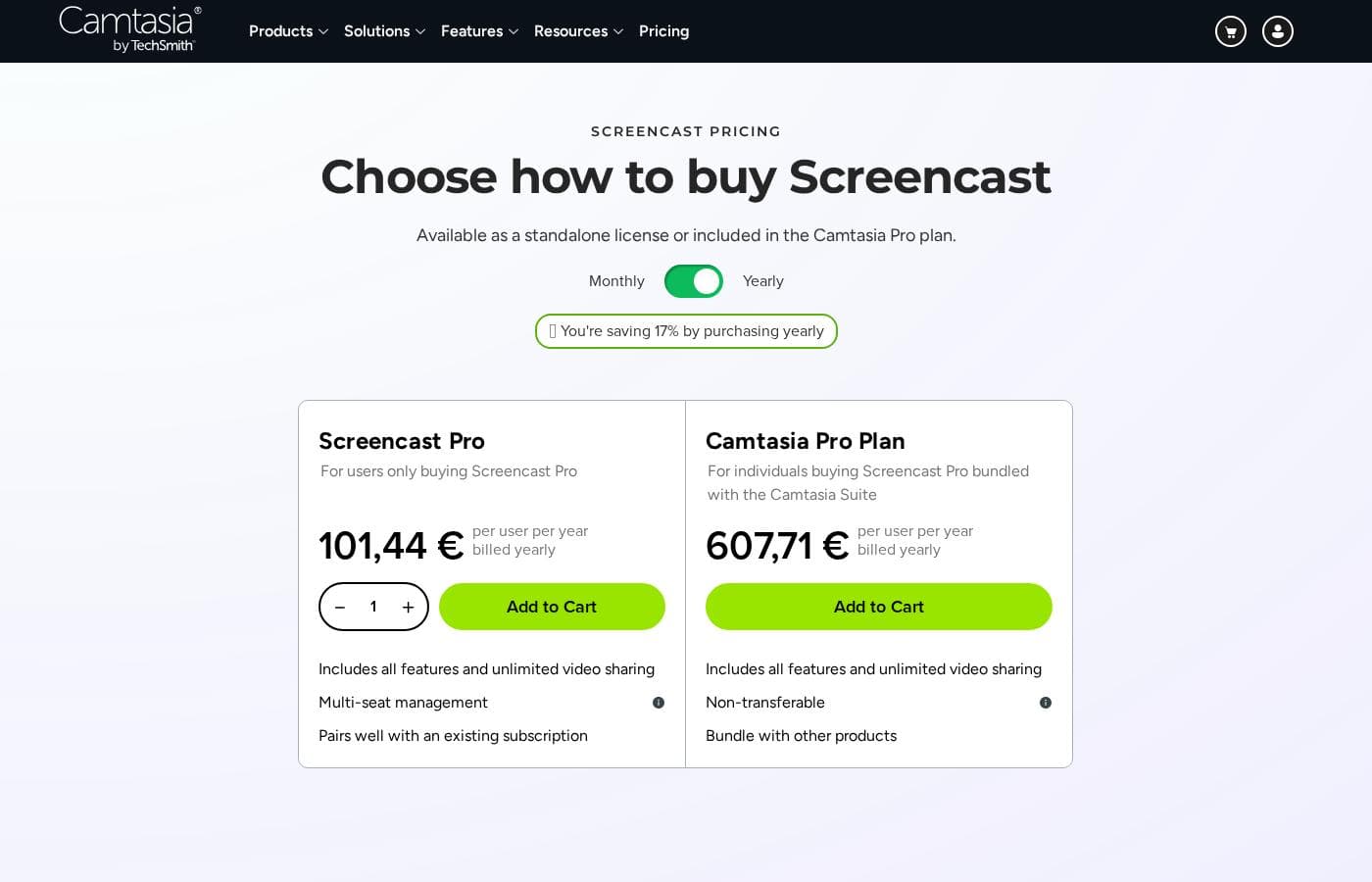
Knowmia pricing page screenshotView pricing page screenshot
PlanBilled monthlyBilled annuallyIncludes
Screencast Pro
per user
—
€8.45/mo
€101.44 per year
For users only buying Screencast Pro. Includes all features and unlimited video sharing, with multi-seat management and seat shifting.
Camtasia Pro Plan
per user
—
€50.64/mo
€607.71 per year
Best option: Screencast Pro bundled with the Camtasia Suite. Non-transferable subscription; includes all features and unlimited video sharing.
Free Screencast
See vendor page
See vendor page
Limited version included with the purchase of any product. Up to 25 video uploads with sharing and time-stamped comments.

Price history

Tracking prices since Sep 7, 2026. No price change detected yet.

Pricing types: Free plan, Yearly subscription, Per seat pricing

Pricing notes

Screencast Pro costs 101,44 € per user per year billed yearly, or it can be bundled in the Camtasia Pro plan at 607,71 € per user per year billed yearly. A limited free version of Screencast comes with the purchase of any product, allowing up to 25 video uploads.

Knowmia pricing: Plans from $0/year Billing options: Free plan, Yearly subscription, Per seat pricing

Cost calculator

Estimate what Knowmia costs for your team.

Billing

Screencast Pro has no published price for this billing cycle.

Screencast Pro is priced per user: price × 5 seats. Estimate based on published list prices, before taxes, add-ons and discounts.

How to pay less for Knowmia

  • Some plans are priced per user: only pay for seats people actually use.
Visit Knowmia

Email me when Knowmia changes price

One email when we detect a price change on the vendor's pricing page. No newsletter, no deals. Unsubscribe in one click.

User Reviews

No reviews yet.

Write a Review

Write a Review for Knowmia
0/100 characters
0/2000 characters

Why use Knowmia?

The core reason to choose this ecosystem is reliability: TechSmith has committed to a supported migration path instead of abandoning users when Knowmia wound down. Screencast keeps the essentials in place — dependable hosting, easy sharing, and a free entry tier starting at $0/year — while layering in AI-assisted workflows that reduce manual organization and distribution work.

For schools already invested in TechSmith's recording tools, staying in the same ecosystem avoids the cost and risk of retraining staff or moving video libraries to a competing platform. That said, choosing it today is really a choice about Screencast, since Knowmia itself no longer accepts new deployments.

Knowmia alternatives

Other tools in the Learning Management System category

View all Learning Management System tools
Learnworlds

Learnworlds

Learning Management System4.4/5

LearnWorlds is an AI-powered LMS designed for course creators who want to run a profitable online school from a single platform. It combines course content, sales, and marketing tools in one place and is trusted by 12,000+ customers worldwide. It supports interactive videos, ebooks, 1:1 & group sessions, assessments, certificates, SCORMs, and surveys. It also offers 50+ designer-made templates to launch your site quickly, plus white-label branding and flexible course pathways.

INE

INE

Learning Management System4/5

INE is an online training platform for IT professionals and the organizations they work for. It covers networking, cybersecurity, cloud, and data science through courses, learning paths, practice labs, and its own certifications. The site describes a continuous 'learn by doing' model built on four steps: assess skills, train, practice in labs, and certify. It serves individuals, Fortune 500 companies, and government agencies worldwide.

OnlineCourseHost

OnlineCourseHost

Learning Management System4/5

OnlineCourseHost is an all-in-one platform for creating, hosting, and selling online courses. It serves individual course creators and organizations that want either a public course website or a private course academy. The platform includes a Course Builder, Website Builder, Community, and AI tools, plus built-in email marketing, an affiliate program, shareable digital certificates, and global payments.

Adobe Learning Manager

Adobe Learning Manager

Learning Management System3.9/5

Adobe Learning Manager (ALM) is a security-focused Learning Management System designed for enterprise scalability. It helps organizations deliver tailored training experiences consistently across devices. You can use ALM to manage sophisticated programs for employees, partners, and customers. The system delivers custom learning experiences backed by robust security and features that support virtually unlimited users.

Teachable

Teachable

Learning Management System3.9/5

Teachable provides an intuitive, no-code platform for launching an online school. You can quickly create multiple product types designed to meet your audience's needs. This focused approach ensures your customization fits your specific brand and audience. The platform supports diverse offerings designed for monetization flexibility. These include comprehensive online courses and helpful digital downloads like ebooks or templates. You can also offer personalized coaching sessions and build recurring revenue through value-driven memberships. Plus, you can cultivate engagement using the private Community feature.

Podia

Podia

Learning Management System3.9/5

Podia is an integrated platform designed specifically for solo business owners, creators, coaches, and consultants. It streamlines the process of making money online by combining your necessary tools into one seamless experience. Over 150,000 entrepreneurs currently rely on Podia to grow their business and manage their sales. It removes technical frustrations so you can focus only on creating valuable content.

Knowmia FAQ

How much does Knowmia cost?

Knowmia's cheapest paid plan, Screencast Pro, costs €8.45 per month. Paid plans range from €8.45 to €50.64 per month. Prices checked on Oct 13, 2026 from the vendor's pricing page.

Has Knowmia's price changed recently?

No. We have not detected a price change since we started tracking on Sep 7, 2026.

What happened to TechSmith Knowmia?

TechSmith officially retired Knowmia Pro in early 2025 and designated Screencast as the successor platform. Existing users are expected to migrate their video libraries to Screencast, which continues the hosting role and adds AI-assisted workflows for daily tasks.

Can I still sign up for Knowmia?

No. With Knowmia Pro retired, new deployments are no longer possible. If you are evaluating this category today, the practical starting point is Screencast, which begins with a free plan at $0/year.

What happens to my existing Knowmia videos and LMS embeds?

The supported path is migrating content to Screencast and updating shared links and embedded players to the new URLs. Download and archive your original source files as well, since hosted copies on a retired platform should never be your only backup.

What does Screencast offer that Knowmia didn't?

The headline addition is AI-assisted, low-effort handling of routine tasks like organizing and sharing video, layered on top of the dependable hosting Knowmia users relied on. TechSmith positions it as delivering the features users trusted in the original platform while streamlining daily workflows.

Ready to try Knowmia? Check out the official site or pricing.

Are you Knowmia? Claim this listing · Get the badge