Teachable

Teachable review

Launch and sell courses, coaching, memberships, and digital downloads from one no-code platform. Build your online school in days, not months.

By Ciroapp Editorial Team · Updated Sep 16, 2026

Commission may apply at no extra cost

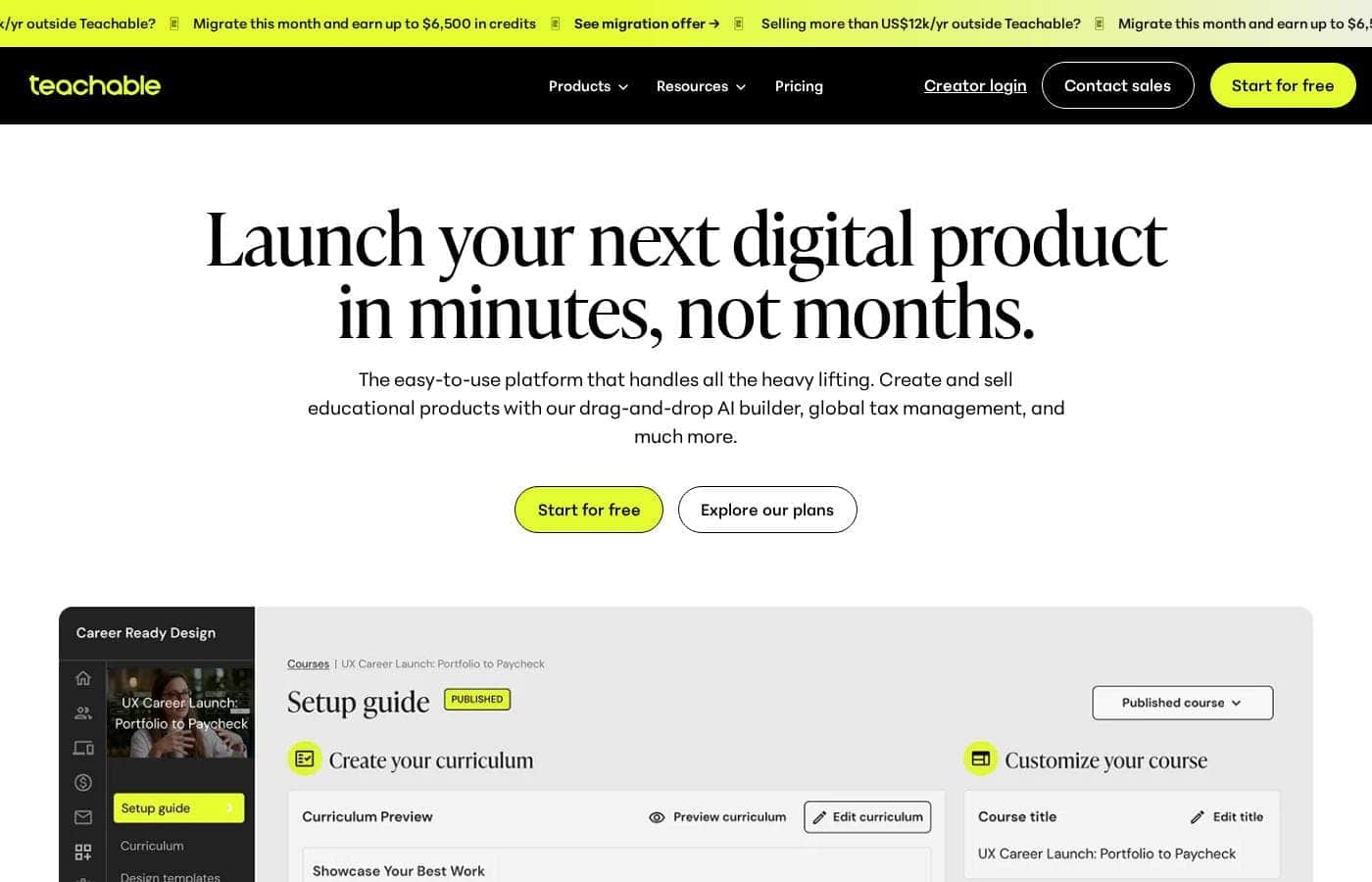
Teachable homepage screenshot

At a glance

Quick overview for Teachable: rating, pricing summary, key features, and highlights.
Vendor page checked Oct 13, 2026

Ciroapp score

3.9/ 5

Teachable bundles course hosting, checkout, memberships, coaching, downloads, and community into one no-code platform, so creators can start selling without stitching tools together. The trade-offs are limited design control and costs that scale to $600/month plus usage fees. Overall, it's a pragmatic pick for solo creators and small teams who value speed over deep customization.

Pros

  • Pros:No-code setup means a complete school with checkout, hosting, and student management can be launched without a developer or separate LMS plugin.
  • Pros:Multiple product types in one place — courses, digital downloads, coaching, memberships, and community can be combined, so you can test different monetization models from the same dashboard.
  • Pros:A free plan is available, letting you build and validate a first product before committing to paid tiers, which range up to $600/month.

Cons

  • Cons:No-code simplicity limits design and experience customization; deep branding or custom learning flows are difficult to achieve within the builder.
  • Cons:With paid plans scaling up to $600/month plus usage-based pricing, costs can climb significantly for high-volume or fast-growing schools.
  • Cons:Because hosting, checkout, and content all live on Teachable, your core business depends on the platform, leaving less control and portability than a self-hosted setup.
Best for
  • Solo creators and educators launching their first paid online course without hiring a developer.
  • Coaches and consultants bundling one-on-one sessions with self-paced content.
  • Writers and designers monetizing digital downloads such as ebooks, templates, and resource packs.
This section is a summary. Detailed sections about features, use cases, pricing, and reviews follow below.

What is Teachable?

Teachable is a hosted course platform aimed at creators who want to sell knowledge products without touching code. Beyond traditional courses, it supports digital downloads, one-on-one coaching, recurring memberships, and a private community, so a single school can mix several revenue models. The trade-off is that you exchange deep customization for speed: the builder is intentionally constrained so most schools can be launched in days rather than months.

Teachable is a cloud-based learning management system and commerce platform in one. You build a branded school, upload course content such as video and text, then attach a checkout to sell it. Product types include one-time courses, downloadable resources like ebooks and templates, scheduled coaching offers, subscription memberships, and a community space where members interact.

Hosting, payments, enrollment, and student management all run inside the platform, so no separate website, LMS plugin, or payment integration is required.
Should you choose Teachable?

Quick buyer guidance before you compare plans or click through.

Choose it if

  • Solo creators and educators launching their first paid online course without hiring a developer.
  • Coaches and consultants bundling one-on-one sessions with self-paced content.
  • Writers and designers monetizing digital downloads such as ebooks, templates, and resource packs.
  • Community-driven businesses that want subscriptions and a private member space managed in one place.

Skip it if

  • Teams that need deep visual customization or custom learning flows, since the no-code builder trades flexibility for speed.
  • Organizations requiring enterprise LMS capabilities such as advanced compliance reporting or bespoke integrations.
  • Cost-sensitive sellers at scale, as paid tiers reach $600/month plus usage-based charges; high-volume schools should compare self-hosted alternatives.

Next steps before buying

  1. 1Sign up for the free plan at teachable.com and set up your school with a name and basic branding.
  2. 2Choose your first product type, whether a course, digital download, coaching offer, or membership, and upload or structure your initial content.
  3. 3Configure pricing and the checkout flow, then publish your sales page.
  4. 4Invite a small test group or beta audience to validate the buying and learning experience before promoting widely.

Teachable Key Features

✨ No-Code School Builder

Teachable's editor lets you assemble a complete online school, including sales pages, checkout, and content delivery, without writing code. Customization is deliberately focused: you apply your brand and tailor the experience to your specific audience rather than configuring an endless options panel. This focus is what allows most creators to move from signup to a sellable product in days.

✨ Comprehensive Online Courses

The core product type is the online course. You organize lessons into a structured curriculum, upload video and written material, and students work through the content at their own pace. Progress tracking and a dedicated student view are handled by the platform, so the learning experience holds up whether you have ten students or ten thousand.

✨ Digital Downloads

Beyond courses, you can sell downloadable products such as ebooks, templates, and resource packs. This gives you a low-friction entry product with no curriculum to build, just a file and a checkout. Downloads also pair naturally with courses as lower-priced entry offers.

✨ Coaching Sessions

For personalized income, Teachable supports selling one-on-one coaching sessions alongside your self-paced products. This lets the same school serve students who want to learn independently and clients willing to pay a premium for direct access to you.

✨ Memberships for Recurring Revenue

Membership products bill subscribers on a recurring basis, converting one-time buyers into predictable ongoing income. Memberships work especially well for content libraries that update over time, since subscribers keep paying as long as the material stays valuable.

✨ Private Community

The built-in Community feature gives students a private space to ask questions and engage with each other. Engagement is a strong driver of course completion and subscription renewals, and housing it inside Teachable avoids bolting a third-party forum onto your school.

Use Cases

💡 Launching a First Paid Course

A subject-matter expert with no technical background can sign up on the free plan, structure their knowledge into a curriculum, attach a price, and start selling. Because hosting and payments are included, there is no stack to assemble before the first sale.

💡 Converting One-Time Buyers into Subscribers

Creators with an existing course audience can add a membership tier that bundles ongoing content updates and community access. The result is recurring revenue that smooths out the spikes of one-off course launch cycles.

💡 Monetizing Digital Products

Designers, writers, and consultants can sell ebooks, templates, and other downloadable assets directly through Teachable's checkout instead of a generic e-commerce store. It suits catalogs of small, evergreen digital files rather than large physical inventories.

💡 Blending Coaching with Self-Paced Learning

Coaches can package their methodology as a course for scalable income while reserving one-on-one sessions as a premium add-on. Both live under one school, one login, and one payment flow, which simplifies operations for a solo practitioner.

💡 Building a Paid Learning Community

Educators whose value comes from peer discussion, such as cohorts, masterminds, or accountability groups, can gate a private community behind a membership. Content, community, and billing stay connected, so a lapsed membership automatically ends access.

Teachable pricing

Prices not verified yet — see the vendor page.

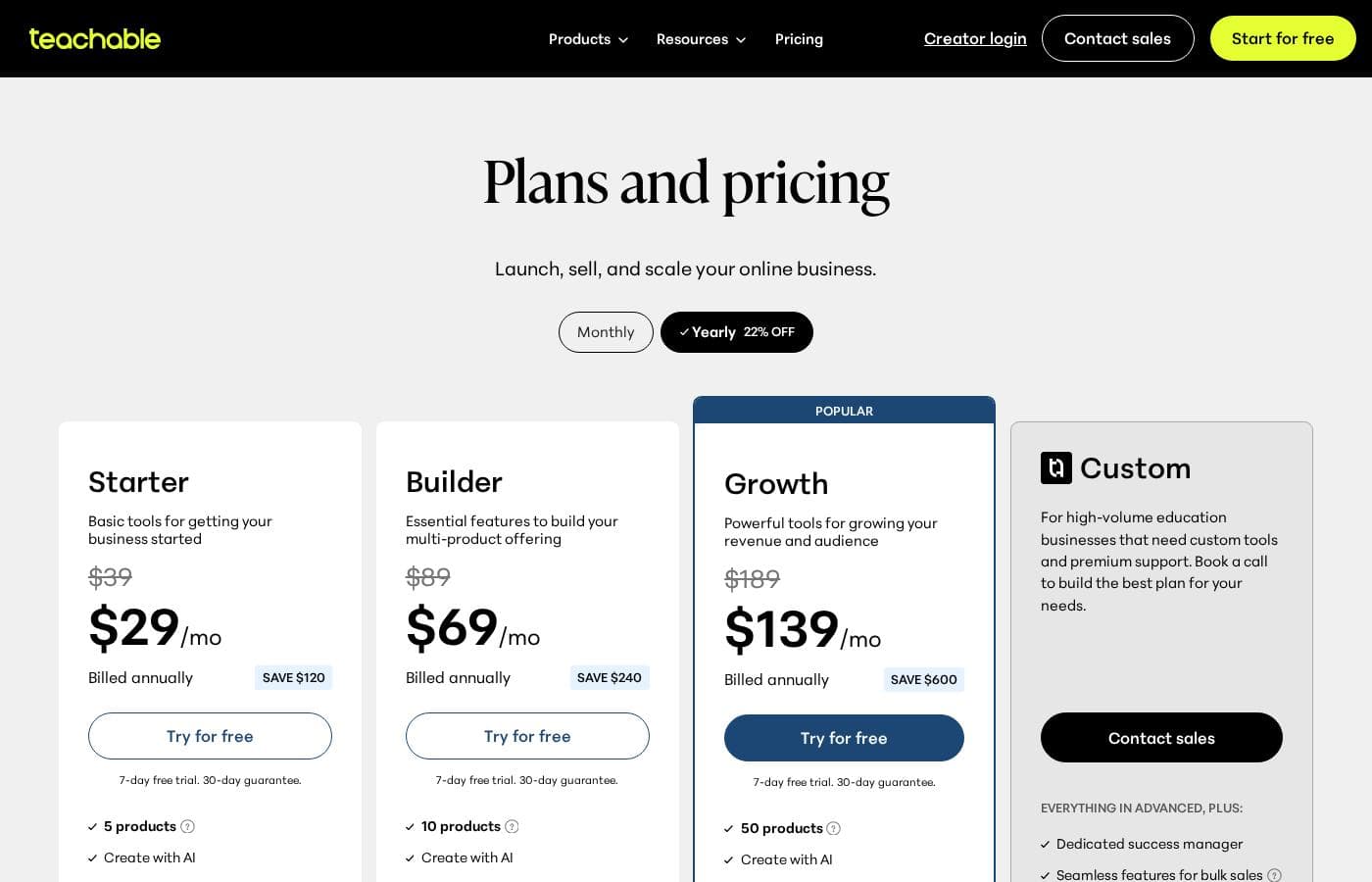
Teachable's pricing page

Teachable pricing page screenshotView pricing page screenshot

Price history

Tracking prices since Oct 1, 2026. No price change detected yet.

Pricing types: Free plan, Free trial, Monthly subscription, Yearly subscription, Usage-based pricing

Email me when Teachable changes price

One email when we detect a price change on the vendor's pricing page. No newsletter, no deals. Unsubscribe in one click.

User Reviews

No reviews yet.

Write a Review

Write a Review for Teachable
0/100 characters
0/2000 characters

Why use Teachable?

The main reason to choose Teachable over a generic website builder is that course-specific logic, such as structured curricula, student progress tracking, and learner management, comes built in. Hosting, checkout, and enrollment are bundled, which removes the need to stitch together a shopping cart, video host, and student database before you can make your first sale.

For solo creators and small teams, that consolidation usually costs less and breaks less often than an assembled stack, and the no-code editor means launching does not depend on a developer.

Teachable alternatives

Other tools in the Learning Management System category

View all Learning Management System tools
Learnworlds

Learnworlds

Learning Management System4.4/5

LearnWorlds is an AI-powered LMS designed for course creators who want to run a profitable online school from a single platform. It combines course content, sales, and marketing tools in one place and is trusted by 12,000+ customers worldwide. It supports interactive videos, ebooks, 1:1 & group sessions, assessments, certificates, SCORMs, and surveys. It also offers 50+ designer-made templates to launch your site quickly, plus white-label branding and flexible course pathways.

OnlineCourseHost

OnlineCourseHost

Learning Management System4/5

OnlineCourseHost is an all-in-one platform for creating, hosting, and selling online courses. It serves individual course creators and organizations that want either a public course website or a private course academy. The platform includes a Course Builder, Website Builder, Community, and AI tools, plus built-in email marketing, an affiliate program, shareable digital certificates, and global payments.

INE

INE

Learning Management System4/5

INE is an online training platform for IT professionals and the organizations they work for. It covers networking, cybersecurity, cloud, and data science through courses, learning paths, practice labs, and its own certifications. The site describes a continuous 'learn by doing' model built on four steps: assess skills, train, practice in labs, and certify. It serves individuals, Fortune 500 companies, and government agencies worldwide.

Adobe Learning Manager

Adobe Learning Manager

Learning Management System3.9/5

Adobe Learning Manager (ALM) is a security-focused Learning Management System designed for enterprise scalability. It helps organizations deliver tailored training experiences consistently across devices. You can use ALM to manage sophisticated programs for employees, partners, and customers. The system delivers custom learning experiences backed by robust security and features that support virtually unlimited users.

Podia

Podia

Learning Management System3.9/5

Podia is an integrated platform designed specifically for solo business owners, creators, coaches, and consultants. It streamlines the process of making money online by combining your necessary tools into one seamless experience. Over 150,000 entrepreneurs currently rely on Podia to grow their business and manage their sales. It removes technical frustrations so you can focus only on creating valuable content.

Practice Better

Practice Better

Learning Management System3.9/5

Practice Better combines a practitioner back office with a client-facing portal in one system. Practitioners manage availability, appointments, session notes, client documents, packages, and payments, while clients use the portal to book sessions, complete intake forms and questionnaires, follow programs and protocols, and message their practitioner. The result is a single source of truth for each client relationship, from first intake form through ongoing follow-up.

Teachable FAQ

Can I sell things other than courses on Teachable?

Yes. Alongside online courses, Teachable supports digital downloads such as ebooks and templates, one-on-one coaching sessions, recurring memberships, and a private community, all managed from the same school dashboard.

Does Teachable have a free plan?

Yes. Teachable offers a free plan starting at $0/month, and paid plans range up to $600/month with monthly or yearly billing options. Usage-based pricing also applies, so costs can scale with your sales volume.

Do I need coding or design skills to build a school?

No. The platform is explicitly no-code: you choose your product types, arrange your curriculum, and apply brand-focused customization through the editor. The technical work, including hosting, payments, and enrollments, is handled for you.

Is Teachable suitable for large organizations, or just solo creators?

Teachable is built primarily for creators and small businesses launching an online school. It handles multiple products and student cohorts, but organizations needing enterprise LMS capabilities such as advanced compliance reporting or deeply customized learning paths may find its focused, no-code approach too constrained.

Ready to try Teachable? Check out the official site or pricing.

Are you Teachable? Claim this listing · Get the badge