Knowmia vs Teachable
Knowmia and Teachable both serve the online education market but with different tools. Knowmia focuses strongly on seamless video hosting, creation, and internal sharing. Teachable is a dedicated Learning Management System designed entirely for content monetization and sales. Your choice depends completely on whether you need a secure content library or a full e-commerce storefront.
Best for: Existing Camtasia/Snagit users preferring seamless workflow, Small teams needing secure internal video hosting (phrase-protected)
Best for: Solo entrepreneurs launching their first course quickly, Creators selling 5+ unique digital products and coaching sessions
Essential tools with enhanced AI features.
Knowmia Pro users benefit from a clear, feature-rich transition to the Screencast platform, complete with modern AI assistance and strong integration with Camtasia and Snagit. We noted that while the software is praised universally, current user satisfaction is mixed due to frustrating changes to the annual subscription model and licensing limits. Overall, this remains a powerful and intuitive solution for quick video creation and sharing.
Pros
- Supported transition path from Knowmia to the modern Screencast platform.
- Screencast features strong integration with the TechSmith platform (Snagit, Camtasia).
- Intuitive workflow makes creating screen-based videos simple and fast.
- Screencast Pro includes modern AI features like auto-generated captions and chapters.
Cons
- Recent shift to mandatory annual subscriptions caused widespread customer backlash.
- New licensing model requires constant sign-ins when switching between personal devices.
- Email-based customer service can be slow and unresponsive.
- The free tier strictly limits video storage to 25 videos with a 12-month expiration.
Excellent functionality, questionable support reliability.
We find Teachable is an incredibly powerful platform for monetization, offering robust course creation and scaling tools across multiple product formats, including coaching and memberships. Overall, while the core functionality for building and selling is excellent, we note serious concerns regarding persistent platform bugs, dated design options, and a severe decline in timely customer support responsiveness.
Pros
- Highly intuitive and user-friendly interface for easy setup.
- Unlimited course creation across all paid plans.
- Zero transaction fees available starting with the Builder plan.
- Supports diverse product types (courses, downloads, coaching, memberships).
Cons
- Customer service responsiveness is frequently reported as poor or slow.
- Core platform bugs have reportedly remained unresolved for years.
- Course builder interface is described as clunky or linear.
- Site design and customization tools feel outdated.
AboutKnowmia
Knowmia Pro officially retired in early 2025, but video producers still require a robust hosting solution. If you were a Knowmia user, Screencast is the recommended powerful successor. This tool provides features similar to what you trusted in the original platform. It ensures your video production remains reliable, and it includes the critical benefit of AI-assisted effortless workflows to help streamline your daily tasks. 💡
AboutTeachable
Teachable provides an intuitive, no-code platform for launching an online school. You can quickly create multiple product types designed to meet your audience's needs. This focused approach ensures your customization fits your specific brand and audience.
The platform supports diverse offerings designed for monetization flexibility. These include comprehensive online courses and helpful digital downloads like ebooks or templates. You can also offer personalized coaching sessions and build recurring revenue through value-driven memberships. Plus, you can cultivate engagement using the private Community feature. 💡
Highlights
Feature Comparison
Features Overview
We highlight the main differences and pick a winner for each feature.
Primary Purpose
Knowmia is a video-first content management tool; Teachable is a creator monetization platform.
Knowmia's successor is focused on efficient video hosting and strong integration with TechSmith tools. It makes screen-based video creation and sharing effortless and fast. This platform is ideal for maintaining consistency after Knowmia Pro's 2025 retirement. Teachable is built to help experts launch and scale a full online knowledge business. It offers a complete storefront package for selling courses, coaching, and digital downloads seamlessly. The key difference is the revenue focus; Teachable handles the sales and marketing side of education. Knowmia handles the hosting and video security side of content delivery. If your goal is secure internal training videos, Knowmia is the clear choice. If you are selling to a global audience, you need Teachable's e-commerce strength.
Monetization Model
Teachable has tiered fees for sales success; Knowmia uses simple annual subscription pricing.
Knowmia Pro offers a flat annual fee per user ($99.99/year) regardless of how much content you share. There are no listed transaction fees once you are a Pro subscriber. Teachable’s monetization is based on tiered transaction fees that incentivize scaling. The Starter plan charges a high 7.5% fee on sales, which quickly cuts into profit. Upgrading to the Teachable Builder plan eliminates the 7.5% transaction fee entirely (0% fees). This switch maximizes your revenue as your course sales volume increases. For creators earning significant revenue, Teachable's 0% fee structure offers far superior value, while Knowmia’s simplicity appeals to internal teams.
AI Automation
Knowmia uses AI for video post-production flow; Teachable uses AI for initial content creation.
Knowmia Pro includes advanced AI features to streamline finishing your videos quickly. These tools instantly generate accurate captions, titles, and chapter markers. This reduces the manual time spent preparing educational recordings for students. Teachable integrates AI capabilities primarily to assist with course creation and planning workflows. It helps speed up the development of outlines or basic content drafts before you record your videos. Knowmia delivers efficiency exactly where TechSmith users need it, in the post-production phase of video editing. If your bottleneck is transcription and chaptering, Knowmia saves you time. Teachable assists the instructor in the content creation process itself. You pick Knowmia for automated delivery and Teachable for faster curriculum building.
Ecosystem Integration
Knowmia offers deep integration with creation tools; Teachable relies on third-party APIs.
Knowmia is engineered for full integration with the TechSmith product ecosystem, including Snagit and Camtasia. This means your recording and sharing workflow is perfectly seamless from start to finish. Teachable offers external integrations like Zapier, Webhooks, and a Public API starting with the pricey Growth plan. These integrations help connect your storefront to other marketing tools. Knowmia's deep feature continuity reduces friction for existing Knowmia Pro users transitioning to the new platform seamlessly. You don't need to rebuild any processes. If your primary workflow involves recording screen-based content, Knowmia's baked-in ecosystem support is far superior to Teachable's API-based integration strategy.
Product Diversity
Teachable supports various products for flexible revenue; Knowmia is strictly for video hosting.
Teachable allows creators to monetize their expertise across several income streams effortlessly. You can sell comprehensive online courses and digital downloads like templates. Teachable also supports offering personalized one-on-one coaching and building recurring revenue via memberships. This product flexibility is key to scaling your business. Knowmia is designed for sharing video and screenshots. Its focus is singular: reliable and robust hosting after the Knowmia Pro retirement. If scaling revenue is the goal through diversification, Teachable provides the infrastructure. Knowmia provides the video pipeline.
Customer Support
Knowmia staff are often praised for being responsive; Teachable support is frequently criticized by users.
Knowmia Pro subscribers get dedicated technical support, often lauded in reviews for quick responses via live chat. Staff are typically knowledgeable and help resolve issues fast. Customer service for Teachable is a major pain point, frequently described as terrible and slow to respond. Users report getting the “AI runaround” instead of human help. While some Knowmia users report slow email support, the live chat experience is a consistent bright spot. Quick fixes keep teams moving. Potential Teachable users should brace for difficulty reaching human support or solving complex, long-standing system bugs within the platform.
Security & Protection
Knowmia offers specific phrase protection; Teachable offers standard course enrollment security.
Knowmia Pro allows users to access phrase protected media for shared content. This is crucial for internal training videos or sensitive corporate materials. Teachable manages access control by ensuring only enrolled students can view course content. Course site security appears to be standard within the LMS industry. Knowmia’s protection features target specific controlled sharing scenarios beyond general subscription gating. This is ideal for regulated industries. If sensitive security or internal control is vital for your hosted video content, Knowmia Pro provides an extra layer of protection.
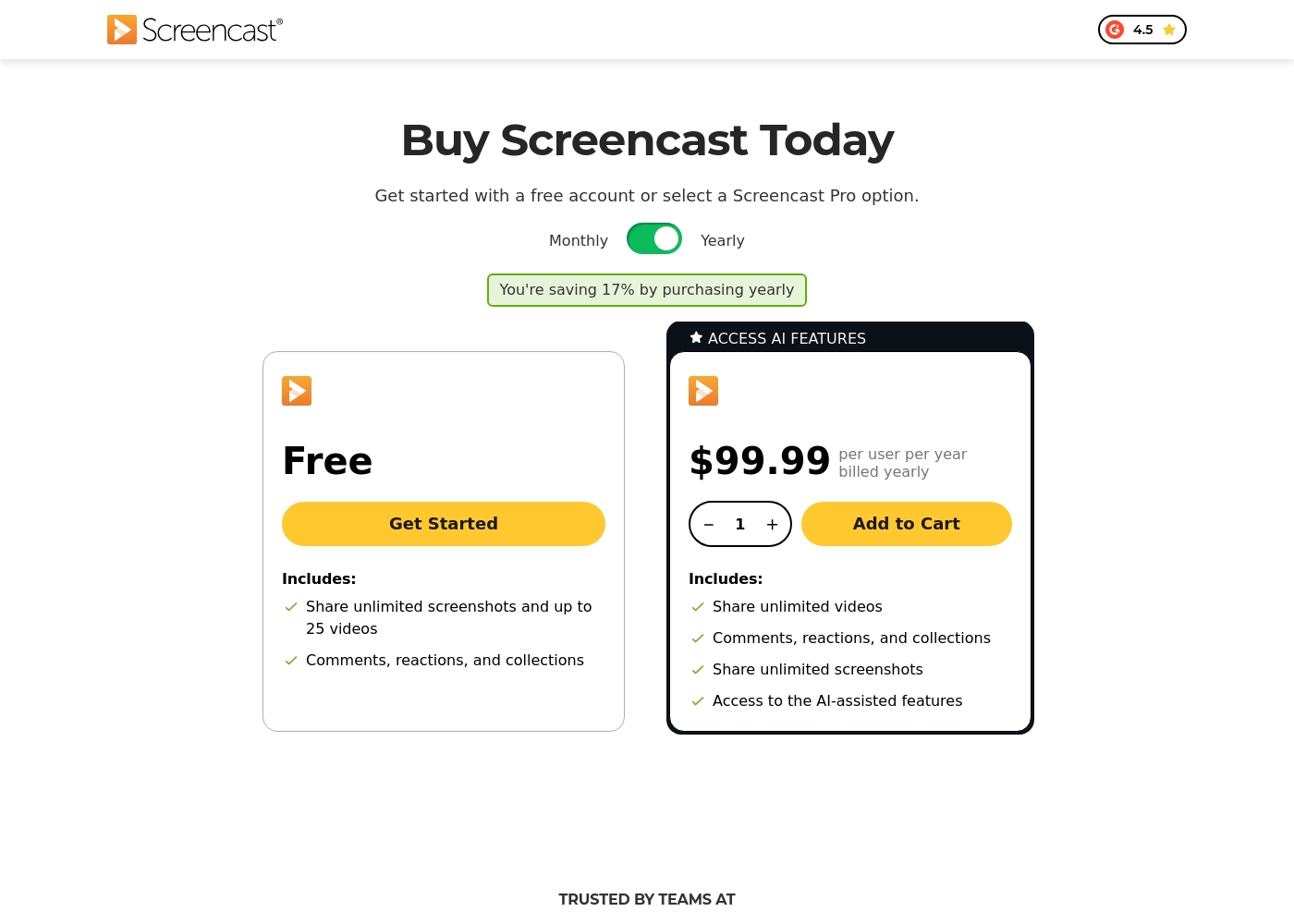
Screencast offers two tiers for knowledge sharing: a Free plan and the Screencast Pro plan, which costs $99.99 per user billed yearly.
Since Knowmia Pro was retired, the platform recommends Screencast as a similar product with integrated sharing features. We've organized the available Screencast tiers below to help you choose the best fit for your sharing needs.
Free
Price: Free Best For: Users who need to share screenshots and upload a limited quantity of video content (up to 25 videos). Refund Policy: Not applicable Other Features:
- Share unlimited screenshots
- Video storage for up to 25 videos
- Video storage limit of 12 months
- Includes Comments, reactions, and collections functionality
- Share unlimited screenshots
- Store up to 25 videos
- Includes Comments, reactions, and collections
- Share unlimited videos and screenshots
- Unlimited video and image storage
- Access to AI-assisted features (captions, titles, chapters)
- Access phrase protected media
- Custom logo and Collections organization
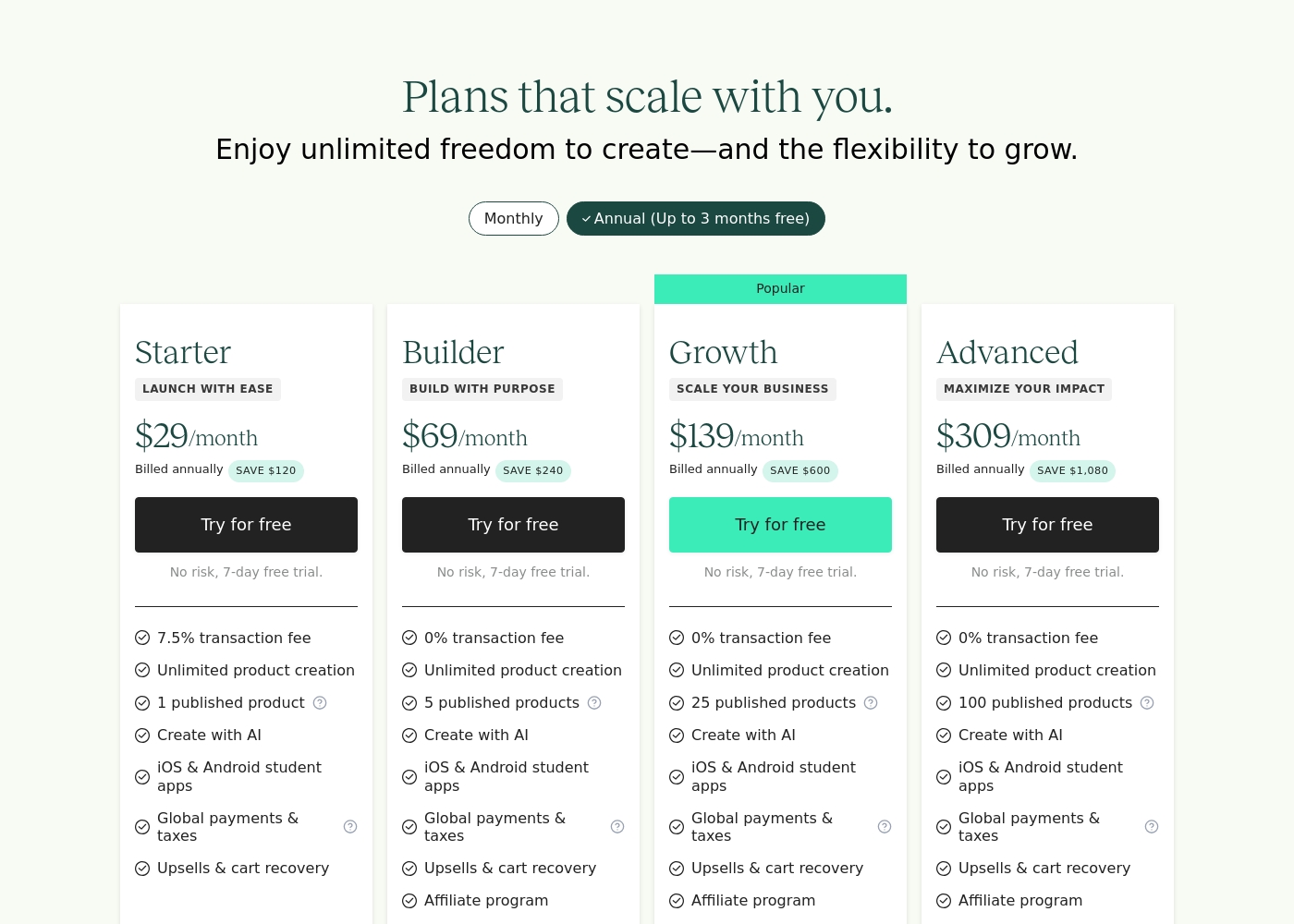
Teachable costs between $29 and $309 per month (when billed annually) across its four main plans: Starter at $29, Builder at $69, Growth at $139, and Advanced at $309.
These plans scale with your business and offer different levels of access and functionality. Let's look closer at what each one offers.
Starter
Price: $29 per month (Billed annually) Best For: Launching with ease Other Features: 7.5% transaction fee, unlimited product creation, 1 published product, AI creation tools, iOS & Android student apps, global payments & taxes handling, upsells & cart recovery.
- 7.5% transaction fee
- Unlimited product creation
- 1 published product
- Create with AI
- iOS & Android student apps
- 0% transaction fee
- Unlimited product creation
- 5 published products
- Create with AI
- iOS & Android student apps
- 0% transaction fee
- Unlimited product creation
- 25 published products
- Create with AI
- iOS & Android student apps
- 0% transaction fee
- Unlimited product creation
- 100 published products
- Create with AI
- iOS & Android student apps
Pricing Notes
- Knowmia offers a simple, consistent flat fee of $99.99 per user billed annually for unlimited storage.
- Teachable is heavily tiered, scaling cost based on published product limits (1 product vs. 100 products).
- Teachable’s entry-level Starter plan charges a steep 7.5% transaction fee on all sales.
- Teachable removes all transaction fees starting with the Builder plan ($69/month), greatly boosting net revenue.
- Knowmia offers a permanent Free plan for light users (25 video limit); Teachable offers a 7-day free trial on paid plans.
Pricing Head-to-Head
User Reviews
Users reviewing TechSmith products like Snagit and Camtasia, which integrate closely with Screencast, consistently highlight a strong duality in their experience. On the one hand, the software itself receives overwhelmingly positive feedback for being highly useful, intuitive, and simpler than powerful competitors like DaVinci Resolve.
Many users celebrate the intuitive workflow, calling the software “awesome” and essential for daily tasks. However, the recent shift to a mandatory annual subscription model is a major source of frustration 😡.
This is a great product that is dramatically simpler than other complex tools like those from Adobe. It has a deep enough feature set to handle many complex projects easily. We find the product itself essential.
External sentiment for Teachable is highly mixed, showcasing a clear divide between core product satisfaction and service reliability. Users consistently praise the platform's user-friendly interface and intuitive nature, noting that it's quick and easy for beginners to launch and manage their first course.
Many creators successfully generate significant income and commend the platform’s stability and comprehensive features. However, chronic issues regarding responsiveness and support quality serve as major drawbacks.
I am just starting out, but I am loving it already. With Teachable and ChatGPT, my course is fully ready and took only three days to complete. This platform shows my dream of course creation becoming a reality.
Our Verdict
Choosing between Knowmia and Teachable immediately clarifies your business priority. Is Knowmia or Teachable the right tool? The answer comes down to video hosting versus monetization platform. Both are powerful, but they target completely different creators. Knowmia (via Screencast) is the gold standard for video production efficiency. Knowmia is perfect if you already rely on powerful TechSmith tools like Camtasia or Snagit. It delivers deep ecosystem integration and AI tools for post-production speed. This includes automated captions, titles, and easy chapter creation. Knowmia Pro is ideal for internal teams requiring secure, phrase-protected video sharing. Teachable, however, is engineered for maximum monetization and business scaling. You can sell memberships, coaching, courses, and digital downloads from a storefront. Crucially, Teachable eliminates the steep 7.5% transaction fee on higher Builder+ plans. This switch dramatically increases your profit margin as your knowledge business grows significantly. The deciding factor is your revenue goal and support needs. Knowmia prioritizes consistent workflow and reliable, knowledgeable support staff. Teachable prioritizes high earning potential, despite persistent user complaints about slow customer service response times. You exchange robust video efficiency for high-powered sales features. Choose Teachable if your main objective is launching an online school and selling up to 100 products globally. Stick with Knowmia if you need tight integration with TechSmith tools and highly secure, AI-managed video content at a simple per-user price.
Frequently Asked Questions
Which is better for generating sales revenue: Knowmia or Teachable?
Teachable is significantly better for generating sales revenue and scaling your knowledge business. Its Builder plan removes transaction fees, letting you keep 100% of your sales. Knowmia is designed for content management and hosting, it lacks e-commerce tools.
Can I use Knowmia if I already use Camtasia or Snagit?
Yes, Knowmia’s successor platform, Screencast Pro, offers full, deep integration with Camtasia and Snagit. This seamless connection minimizes friction when recording and publishing screen-based videos. Knowmia is the ideal solution for TechSmith users.
Does Teachable have AI features like Knowmia?
Teachable uses built-in AI for content creation and outlining assistance to speed up curriculum development. Knowmia’s AI is specifically dedicated to video post-production, automatically generating captions, chapters, and titles efficiently.
Is Teachable expensive compared to Knowmia?
Knowmia Pro has a fixed price of $99.99 per user per year. Teachable is more expensive, ranging from $29 to $309 per month when billed annually. Teachable's higher price covers its full LMS features and 0% transaction fees.
Which platform offers better customer service, Knowmia or Teachable?
Knowmia (via Screencast) generally receives praise for knowledgeable and fast technical support staff. Teachable users frequently report poor customer service experiences, long delays, and unresolved platform bugs.
Can I host secure, phrase-protected media using Knowmia?
Yes, Knowmia Pro includes the ability to access phrase protected media. This specific feature is essential for organizations sharing sensitive internal training videos or proprietary content with limited distribution.
Ready to Choose?
Both tools have their strengths. Choose based on your specific needs.