OnlineCourseHost

OnlineCourseHost review

Courses, community, live sessions, and payments — one platform, one predictable bill.

OnlineCourseHost costs from $29/mo · 3 plans · prices checked Oct 13, 2026

By Ciroapp Editorial Team · Updated Sep 17, 2026

Commission may apply at no extra cost

OnlineCourseHost homepage screenshot

At a glance

Quick overview for OnlineCourseHost: rating, pricing summary, key features, and highlights.
Pricing verified Oct 13, 2026

Ciroapp score

4.0/ 5

OnlineCourseHost bundles courses, community, live webinars, and checkout into one subscription with no transaction fees and AI help on both sides. Plan caps on community and SCORM can push you up tiers, and most evidence comes from the vendor's own site. Overall, it's a solid value pick for creators who want one predictable bill.

Pros

  • Pros:All-in-one stack — course hosting, website builder, community, live webinars, email marketing, and checkout replace multiple separate subscriptions on a single bill
  • Pros:AI works on both sides — the AI Creator drafts outlines, lessons, and quizzes, while a 24/7 AI Student Assistant answers learner questions from your course content
  • Pros:Global selling is built in — Stripe and PayPal connections, 20+ payment methods in any currency, plus subscriptions, coupons, and automated tax handling

Cons

  • Cons:There is no marketplace or built-in student traffic — you get a self-branded platform on your own domain, so audience-building and marketing are entirely on you
  • Cons:Higher plans gate meaningful capacity — Basic caps community at 20 active users and 1 room with 3-month history, and Pro limits you to 100 users, 3 rooms, 10 custom pages, and 5 SCORM imports
  • Cons:Payments depend on connecting your own Stripe or PayPal account, so the platform isn't usable for selling until those gateways are set up and tested
Best for
  • Independent creators selling courses under their own brand and domain
  • Small teams and academies training members or students
  • Creators currently paying for several tools: course host, community, email, checkout
Free trial
Yes — 30 days
This section is a summary. Detailed sections about features, use cases, pricing, and reviews follow below.

What is OnlineCourseHost?

Running an online course often means juggling a course host, a website, a community app, email tools, and checkout — each with its own bill. OnlineCourseHost bundles all of that into one platform. You get drag-and-drop course building, built-in community, and global payments under a single predictable subscription.

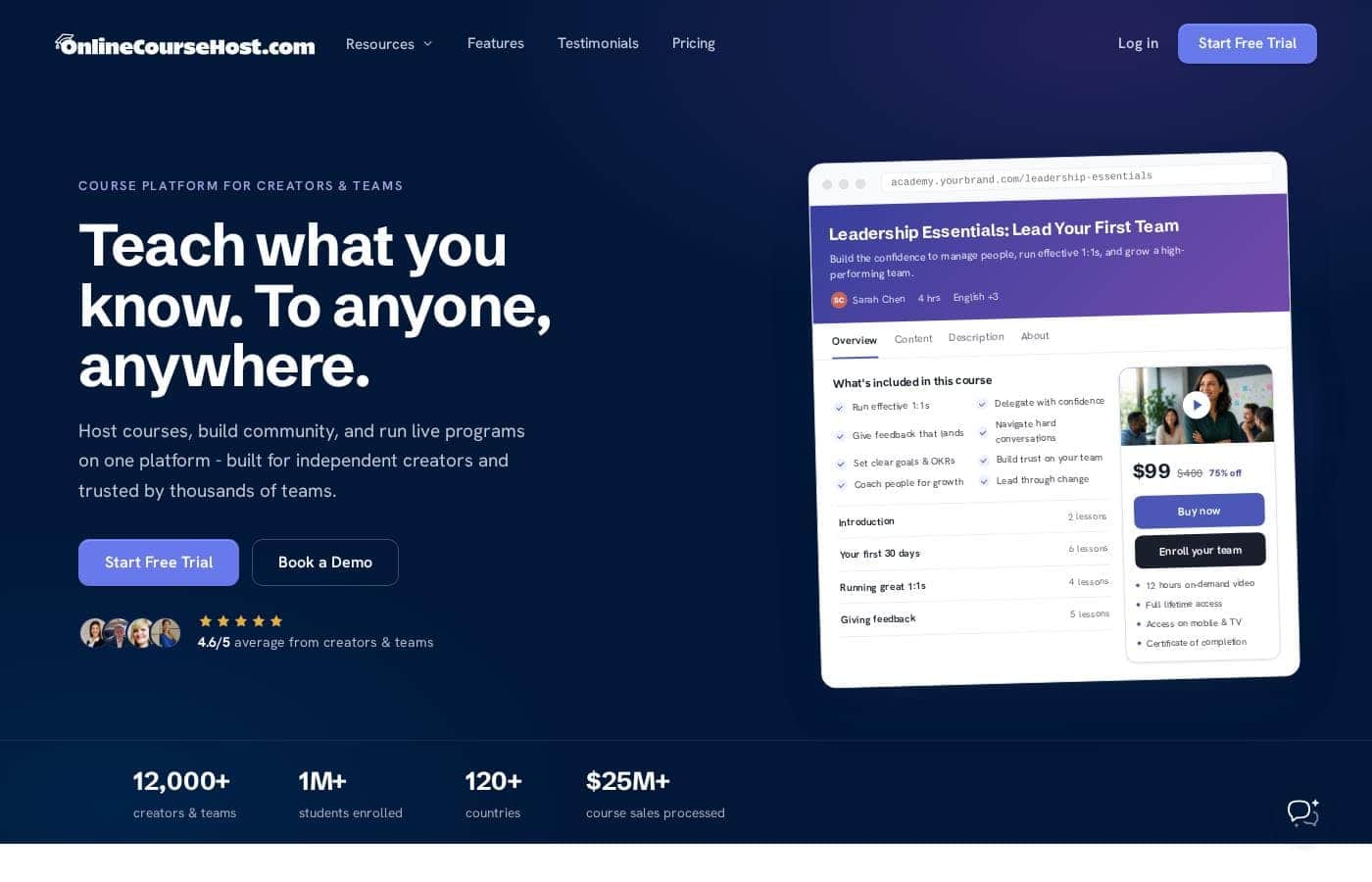
OnlineCourseHost is an all-in-one course platform for independent creators and teams. It covers course hosting, a website builder, community spaces, live sessions and webinars, email marketing, and checkout with automated tax. The company reports 12,000+ creators and teams, over one million students enrolled, and sales processed across 120+ countries.

It fits anyone who wants to teach under their own brand without stitching together multiple tools.

Should you choose OnlineCourseHost?

Quick buyer guidance before you compare plans or click through.

Choose it if

  • You want courses, community, live webinars, and checkout on one predictable bill
  • You prefer no-code, drag-and-drop building with editable templates
  • You sell internationally and want 20+ payment methods with automated tax
  • You'd value AI help drafting lessons and a 24/7 assistant answering student questions
  • You want graded quizzes, completion rules, and verifiable certificates

Skip it if

  • You want a marketplace with built-in student traffic — this is a self-branded platform on your own domain, so finding students is on you
  • Plan pricing isn't shown on the page reviewed, so tight budgets should confirm costs before a trial converts
  • Payments depend on connecting your own gateway, like Stripe or PayPal, so you'll need those accounts ready
  • Migrating an existing academy still takes work, especially from WordPress setups, even if users report it's quick
  • If you need deep enterprise or compliance features, public details on the site are thin — check with the vendor first

Next steps before buying

  1. 1Start the free 30-day trial — the site states you can cancel anytime.
  2. 2Check current plan pricing before the trial ends, since prices aren't listed on the reviewed page.
  3. 3Connect your payment gateway (Stripe or PayPal) and run a test checkout in your main currency.
  4. 4Confirm your email tool — Mailchimp, ConvertKit, MailerLite, or Zapier — connects the way you need.
  5. 5Compare your total monthly cost against Teachable or Kajabi to confirm the single bill actually saves you money.

Ease of use

We haven't tested it hands-on, but the site's signals point to a low-friction setup. Building is drag-and-drop with no code, templates edit live, and an AI assistant can draft a first course. Company-published reviews describe quick moves — one creator says they migrated from Teachable and went live in about three hours. Expect some learning time for community and automation settings, as with any all-in-one platform.

OnlineCourseHost Key Features

✨ Build a course without touching code

Building a course shouldn't take months. Drag modules, lessons, and drip schedules into place — no code needed. Upload video, PDFs, and downloads, and the platform handles hosting and streaming.

Short on time? The AI assistant drafts a first outline for you, then you edit it until it's yours.

✨ Your own branded site and domain

Your courses deserve a home that looks like you. Pick a template and edit it live — no designer required. Connect your own domain, tune SEO settings, and rely on fast hosting.

Landing pages and checkout share the same look, so students move from browsing to buying without breaking stride.

✨ Community and live sessions, built in

Recorded lessons alone can fade fast. Community and live sessions keep students engaged between modules. Here's what's built in:

  • Discussions and groups tied to specific courses and lessons
  • Direct messages, member feeds, and notifications
  • Native webinars for live sessions

✨ AI help for you and your students

AI works on both sides of your course. As the creator, you can draft outlines, lessons, and quizzes from a single prompt, then polish what it produces. Your students get help too: a 24/7 assistant answers their questions using your course content, so support doesn't wait for your inbox.

💳 Get paid worldwide, minus the admin

Selling globally shouldn't mean extra paperwork. Connect Stripe or PayPal and accept 20+ payment methods — cards, wallets, and local rails — in any currency. The platform runs subscriptions, applies coupons, and handles tax automatically.

Use it when you're ready to take payment from students anywhere in the world.

Use Cases

🚀 Launch your first course

You're a creator with knowledge to share. Use the AI assistant to draft your outline, drag lessons into place, and publish on your own domain. Start on Basic with a 30-day free trial.

Expected outcome: A sellable course live in an afternoon, not a quarter.

🔁 Switch from Teachable, Kajabi, or WordPress

Paying for five tools to teach online? Move your courses, repoint your domain, and cancel the old stack. One creator reports going live in about three hours.

Pro adds SCORM imports for existing training files. > Tip: Connect Stripe or PayPal and run a test checkout first.

💬 Keep students coming back

You've made the sale; now keep learners engaged. Tie discussions to specific lessons, run live webinars natively, and let the AI Student Assistant answer questions around the clock. Graded quizzes and completion rules keep everyone on track.

Expected outcome: A community that keeps coming back.

🌍 Sell courses worldwide

You teach anyone, anywhere. Connect Stripe or PayPal, accept 20+ payment methods, and let the platform handle subscriptions, coupons, and automated tax. Course sales are already processed across 120+ countries.

Tip: Test checkout in your main currency during the free trial.

OnlineCourseHost pricing

From$29/mo

  • 3 plans
  • Save up to 17% with annual billing

Prices checked on Oct 13, 2026 from OnlineCourseHost's pricing page

OnlineCourseHost pricing page screenshotView pricing page screenshot
PlanBilled monthlyBilled annuallyIncludes
Basic
$29/mo
$24/mo
$288 per year
Save up to 17% with annual billing
Up to 20 active community users, 1 extra admin account, AI Student Assistant covers 2 courses
  • Unlimited students & courses
  • 0% transaction fees
  • 1 community room with 3-month history
  • 1 custom page
  • AI Creator & Student Assistant
Pro
$65/mo
$54/mo
$648 per year
Save up to 17% with annual billing
Up to 100 active community users, 5 SCORM imports, AI Student Assistant covers 5 courses
  • Everything in Basic, plus:
  • 3 community rooms with 1-year history
  • 10 custom pages
  • 5 SCORM imports
  • Unlimited admin accounts
Unlimited
$99/mo
$82/mo
$984 per year
Save up to 17% with annual billing
None — all limits removed, including active community users
  • Everything in Pro, plus:
  • Unlimited community rooms and history
  • Unlimited custom pages
  • Unlimited SCORM imports
  • Priority support & account manager

Price history

Tracking prices since Sep 8, 2026. No price change detected yet.

Pricing types: Free trial, Monthly subscription, Yearly subscription

Pricing notes

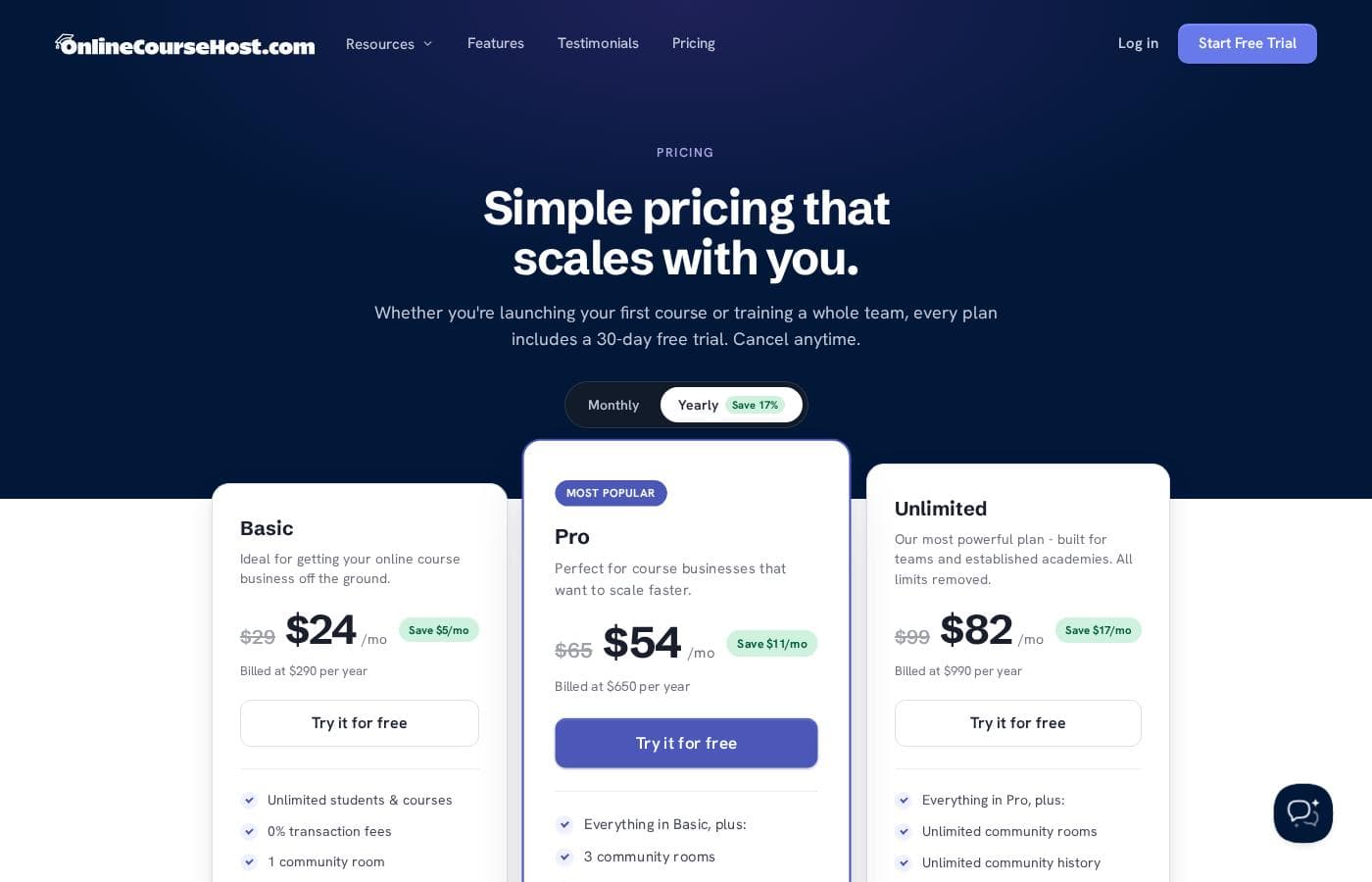
OnlineCourseHost offers three plans — Basic at $24/mo, Pro at $54/mo, and Unlimited at $82/mo when billed annually. Paying month-to-month costs more ($29–$99/mo), and you can try the platform free for 30 days before committing.

OnlineCourseHost costs between $24 and $82 per month with 3 plans: Basic at $24/mo, Pro at $54/mo, and Unlimited at $82/mo when billed annually.

Here's a closer look at each plan.

Basic

Price: $24/mo billed annually ($290 per year) — $29/mo billed monthly Best For: Getting your online course business off the ground Other Features:

  • Unlimited students & courses with 0% transaction fees
  • 1 community room with 3-month history and up to 20 active users
  • 1 custom page
  • AI Creator & Student Assistant (AI Student Assistant covers 2 courses)

Basic is a solid launchpad if you're publishing your first course. You still get unlimited students, unlimited video hosting, and no platform transaction fees. The community tools are limited, but that's fine while your audience is small. 🚀

Pro

Price: $54/mo billed annually ($650 per year) — $65/mo billed monthly Best For: Course businesses that want to scale faster Other Features:

  • Everything in Basic, plus 3 community rooms with 1-year history
  • Up to 100 active community users
  • 10 custom pages and 5 SCORM imports
  • Unlimited admin accounts

Pro is the sweet spot for growing creators. You get more room for your community, more landing pages, and SCORM imports — handy if you're moving existing training content over. Unlimited admin accounts also make it easier to bring teammates in.

Unlimited

Price: $82/mo billed annually ($990 per year) — $99/mo billed monthly Best For: Teams and established academies that want every limit removed Other Features:

  • Everything in Pro, plus unlimited community rooms and history
  • Unlimited custom pages and SCORM imports
  • No cap on active community users
  • Priority support and a dedicated account manager

Unlimited is built for teams and academies running at scale. If you manage large cohorts or multiple communities, the caps on Pro will start to pinch. Priority helpdesk support and a personal account manager are worth it once many students depend on you.

One thing to know about billing: the discounted rates apply when you pay for a year up front. Month-to-month costs more ($29, $65, or $99 per month). There are no long-term contracts, and you can upgrade, downgrade, or cancel anytime — just double-check the current billing terms at checkout before you buy.

Every tier includes the core platform: unlimited courses and students, video hosting, quizzes, certificates, Stripe and PayPal payments, and a free subdomain with SSL. Higher plans mostly add community capacity, SCORM imports, and support extras.

The easiest way to decide is to test it yourself. OnlineCourseHost offers a 30-day free trial, and since there are no contracts, you can cancel anytime. No money-back guarantee is mentioned, but the free trial lets you explore the full platform before you spend anything.
Cost calculator

Estimate what OnlineCourseHost costs for your team.

Billing
Per month
$29
Per year
$348

Basic states no user limit: shown as one price for the whole account. Check the price for 5 users with the vendor. Estimate based on published list prices, before taxes, add-ons and discounts.

How to pay less for OnlineCourseHost

  • Pay annually: saves up to 17% compared with monthly billing.
  • Use the 30-day free trial before you pay.
Start free trial

Email me when OnlineCourseHost changes price

One email when we detect a price change on the vendor's pricing page. No newsletter, no deals. Unsubscribe in one click.

User Reviews

No reviews yet.

Write a Review

Write a Review for OnlineCourseHost
0/100 characters
0/2000 characters

Why use OnlineCourseHost?

If you're paying for five different tools just to teach online, you're paying for problems this platform aims to solve. Based on what the site shows, here's where it earns its keep:

  • One bill instead of many. Replace your course host, website builder, community app, email tool, and checkout with a single platform.
  • Fast, no-code setup. Drag-and-drop lessons, quizzes, and drip schedules, plus templates you edit live on your own domain.
  • Community and live sessions built in. Discussions tie to specific lessons, and native webinars help keep students coming back.
  • AI on both sides. Draft outlines, lessons, and quizzes quickly, while a 24/7 student assistant answers questions from your course content.
  • Global selling made simpler. Connect Stripe or PayPal, accept 20+ payment methods, and let the platform handle subscriptions, coupons, and tax.
  • A proven landing spot for switchers. Creators report moving from Teachable, Kajabi, and WordPress — one says they repointed their domain and went live in about three hours.

OnlineCourseHost alternatives

Other tools in the Learning Management System category

View all Learning Management System tools
INE

INE

Learning Management System4/5

INE is an online training platform for IT professionals and the organizations they work for. It covers networking, cybersecurity, cloud, and data science through courses, learning paths, practice labs, and its own certifications. The site describes a continuous 'learn by doing' model built on four steps: assess skills, train, practice in labs, and certify. It serves individuals, Fortune 500 companies, and government agencies worldwide.

Kajabi

Kajabi

Learning Management System3.8/5

Kajabi is an all-in-one platform designed for serious digital entrepreneurs and creators. It transforms your knowledge into multiple scalable income streams. Using customizable templates, you can easily launch polished online courses, deliver impactful coaching programs, or start a subscription podcast. The platform supports numerous sources of revenue. You can launch newsletters, build your own community, or offer bundled memberships. Kajabi ensures that everything you need is smoothly integrated into one intuitive system.

Learnworlds

Learnworlds

Learning Management System4.4/5

LearnWorlds is an AI-powered LMS designed for course creators who want to run a profitable online school from a single platform. It combines course content, sales, and marketing tools in one place and is trusted by 12,000+ customers worldwide. It supports interactive videos, ebooks, 1:1 & group sessions, assessments, certificates, SCORMs, and surveys. It also offers 50+ designer-made templates to launch your site quickly, plus white-label branding and flexible course pathways.

Adobe Learning Manager

Adobe Learning Manager

Learning Management System3.9/5

Adobe Learning Manager (ALM) is a security-focused Learning Management System designed for enterprise scalability. It helps organizations deliver tailored training experiences consistently across devices. You can use ALM to manage sophisticated programs for employees, partners, and customers. The system delivers custom learning experiences backed by robust security and features that support virtually unlimited users.

Teachable

Teachable

Learning Management System3.9/5

Teachable provides an intuitive, no-code platform for launching an online school. You can quickly create multiple product types designed to meet your audience's needs. This focused approach ensures your customization fits your specific brand and audience. The platform supports diverse offerings designed for monetization flexibility. These include comprehensive online courses and helpful digital downloads like ebooks or templates. You can also offer personalized coaching sessions and build recurring revenue through value-driven memberships. Plus, you can cultivate engagement using the private Community feature.

Podia

Podia

Learning Management System3.9/5

Podia is an integrated platform designed specifically for solo business owners, creators, coaches, and consultants. It streamlines the process of making money online by combining your necessary tools into one seamless experience. Over 150,000 entrepreneurs currently rely on Podia to grow their business and manage their sales. It removes technical frustrations so you can focus only on creating valuable content.

Practice Better

Practice Better

Learning Management System3.9/5

Practice Better combines a practitioner back office with a client-facing portal in one system. Practitioners manage availability, appointments, session notes, client documents, packages, and payments, while clients use the portal to book sessions, complete intake forms and questionnaires, follow programs and protocols, and message their practitioner. The result is a single source of truth for each client relationship, from first intake form through ongoing follow-up.

Kartra, WebinarJam & EverWebinar

Kartra, WebinarJam & EverWebinar

All-in-one Marketing3.8/5

Kartra's all-in-one platform is built to help creators and entrepreneurs grow their audience, monetize content, and scale with confidence. WebinarJam & EverWebinar are the most powerful and trusted live and automated webinar platforms worldwide.

OnlineCourseHost FAQ

How much does OnlineCourseHost cost?

OnlineCourseHost's cheapest paid plan, Basic, costs $29 per month. Paid plans range from $29 to $99 per month. Prices checked on Oct 13, 2026 from the vendor's pricing page.

Does OnlineCourseHost have a free plan?

No. OnlineCourseHost lists no free plan; the cheapest paid plan starts at $29 per month.

Does OnlineCourseHost offer a free trial or a money-back guarantee?

OnlineCourseHost offers a 30-day free trial.

How much do you save with annual billing on OnlineCourseHost?

Paying annually saves up to 17% compared with monthly billing, based on OnlineCourseHost's list prices.

Has OnlineCourseHost's price changed recently?

No. We have not detected a price change since we started tracking on Sep 8, 2026.

Do I own my course content and student data?

Yes. Your content and student data stay 100% yours. OnlineCourseHost states it won't contact your students or market its own products to them, so your audience remains yours alone.

Can I connect my own domain if I already have a website?

Pro and higher plans support a custom domain, and every plan includes a free subdomain with auto-renewed SSL. Already have a site? Run courses on a subdomain like courses.yourbusiness.com and link to it.

Which tools does OnlineCourseHost integrate with?

It connects with Stripe and PayPal for payments, plus Mailchimp, ConvertKit, MailerLite, SendFox, Zapier, and Pabbly Connect. Zoom integration is also listed, and checkout accepts 20+ payment methods worldwide.

What support and migration help do I get?

Every plan includes free helpdesk support; Unlimited adds priority helpdesk and a dedicated account manager. You can bulk import existing students, and creators describe quick moves from Teachable, Kajabi, and WordPress.

Ready to try OnlineCourseHost? Check out the official site or pricing.

Are you OnlineCourseHost? Claim this listing · Get the badge