Foxit esign

Foxit esign review

Legally binding eSignatures with storage, payments, and document prep in one place

Foxit esign costs from $10/mo · 2 plans

By Ciroapp Editorial Team · Updated Sep 17, 2026

Commission may apply at no extra cost

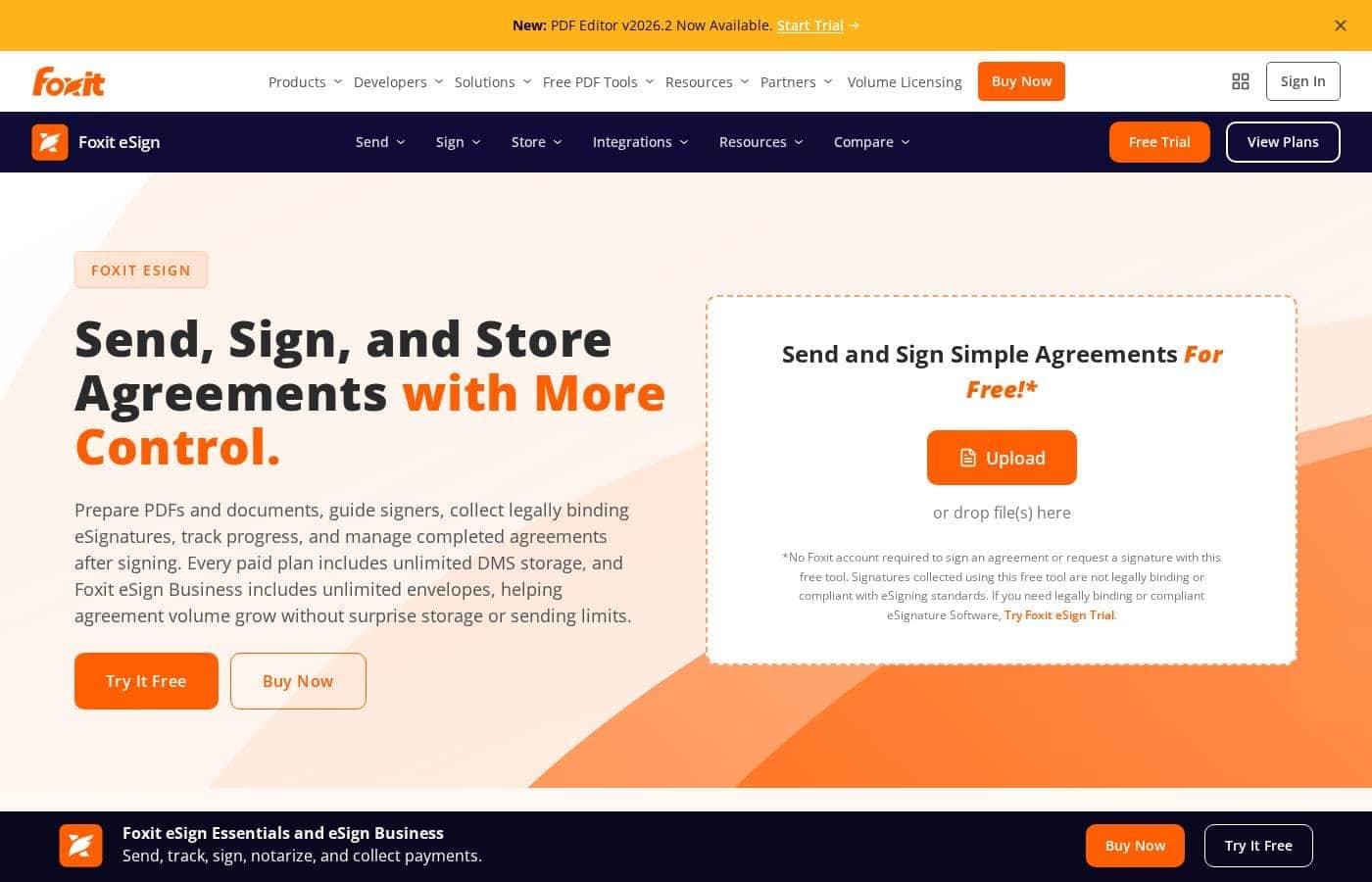
Foxit esign homepage screenshot

At a glance

Quick overview for Foxit esign: rating, pricing summary, key features, and highlights.
Vendor page checked Oct 13, 2026

Ciroapp score

4.0/ 5

Foxit eSign bundles legally binding signatures, unlimited document storage, and in-document payment collection, with audit trails and phone support even on its $120 entry plan. The catch is annual-only billing with no trial, and team features locked behind a five-license Business plan. Overall, it's a smart pick for budget-minded buyers who can commit to a full year.

Pros

  • Pros:Unlimited Foxit DMS storage for completed agreements is included on every paid plan, so signed documents stay searchable without paying for a separate repository
  • Pros:Recipients sign from a browser or mobile device without creating an account or downloading software, which reduces friction for clients and external signers
  • Pros:Payment collection is built into every paid plan via Foxit Pay, letting customers pay by credit card or ACH during signing instead of through a separate billing step

Cons

  • Cons:There is no monthly billing option — both plans are annual only, and the pricing page shows no free trial or money-back guarantee, so you commit to a full year up front
  • Cons:The Essentials license is tied to one dedicated user and cannot be reassigned or managed via the Admin Console, which is restrictive if staff change or multiple people need access
  • Cons:Key integrations cost extra — Foxit Connectors (40+ HR and CRM platforms) and the Salesforce add-on carry additional charges beyond the base plan price
Best for
  • Individuals handling occasional signature requests within Essentials' 250 envelopes per year
  • Growing teams that need unlimited envelopes, templates, and bulk sending on Business
  • Sales teams generating and tracking agreements directly from Salesforce
This section is a summary. Detailed sections about features, use cases, pricing, and reviews follow below.

What is Foxit esign?

Chasing signatures across email threads wastes time, and storing signed agreements gets messy fast. Foxit eSign tackles both by combining legally binding eSignatures, unlimited document storage on paid plans, and PDF prep tools in one workflow — so agreements move with fewer handoffs and clearer ownership.

Foxit eSign is an electronic signature platform for preparing documents, sending them to signers, collecting legally binding eSignatures, and storing completed agreements. It's built for individuals, small teams, and growing organizations — Essentials covers lower-volume signing, while Business targets teams with unlimited envelopes, templates, and admin controls. It also connects to Foxit's PDF Editor, DMS, Salesforce, and API options.

Should you choose Foxit esign?

Quick buyer guidance before you compare plans or click through.

Choose it if

  • Buyers who want unlimited DMS storage included on every paid plan
  • Teams that need unlimited reusable templates without per-template fees
  • Signers who shouldn't have to create accounts or install software
  • Organizations that want audit trails and signature certificates by default
  • Teams already using Foxit PDF Editor or Foxit DMS who want connected workflows

Skip it if

  • Very light users — Essentials caps you at 250 envelopes and 10 reusable templates per year
  • Buyers who need QES, SAML SSO, or advanced authentication — those controls are Business-only
  • Teams expecting every tool in one subscription — PDF Editor, Salesforce, and Connectors are separate add-ons
  • Anyone using the free tool for official agreements — those signatures aren't legally binding or compliant
  • Shoppers wanting full plan prices on the main page — detailed packaging lives on a separate pricing page

Next steps before buying

  1. 1Check the Foxit eSign pricing page for current plan costs and confirm which tier matches your envelope volume
  2. 2Verify the integrations you need — Salesforce, HR systems, or storage platforms — and whether they're included or paid add-ons
  3. 3Match your compliance requirements (ESIGN, eIDAS, QES, HIPAA, 21 CFR Part 11) to the right plan before buying
  4. 4Use Foxit's comparison pages to weigh it against DocuSign, Adobe Acrobat Sign, and PandaDoc for your workflow
  5. 5Review any trial or refund terms on the pricing page, since they aren't detailed on the main product page

Ease of use

Signing is deliberately simple for recipients — they review and sign from a browser or phone with no account and no downloads, and Foxit describes the experience as built for quick adoption. Admin-side setup takes more effort: user management, SSO, and MFA sit on the Business plan, and deeper PDF preparation or system integrations require connecting separate Foxit tools and add-ons.

Foxit esign Key Features

✍️ Send, Sign, and Track in One Flow

You shouldn't need three tools to get one signature. Upload a PDF, drop in signature, date, text, payment, or attachment fields, then add recipients. Choose sequential or parallel signing order and send secure links.

Signers review and sign from a browser or phone — no account or download needed. Status updates and reminders keep everything moving.

✨ Signed Records That Stay Organized

Signed agreements shouldn't scatter across folders and inboxes. Every paid plan includes unlimited Foxit DMS storage, so completed files land in one searchable, controlled place. You can find past agreements fast and keep storage predictable even as volume grows — no extra repository to buy or maintain.

✨ Proof and Compliance Built In

Audit trails and signature certificates record signer metadata, IP addresses, full event logs, and RFC 3161 timestamps. That supports the U.S. ESIGN Act, UETA, and eIDAS.

Need stricter controls? Business adds MFA, Knowledge-Based Authentication, SAML SSO, QES through ZealiD, plus HIPAA and 21 CFR Part 11 options.

✨ Workflows That Connect to Your Tools

Signing doesn't have to live in a silo. Foxit connects eSign to the tools around it, so agreements move with fewer manual handoffs:

  • Prepare signature-ready PDFs with Foxit PDF Editor's editing and organization tools.
  • Generate, send, and track agreements straight from Salesforce data.
  • Automate routing and completed-file storage across business, HR, and storage apps with Connectors.

✨ Templates and Volume Tools for Repeat Signing

If you send similar agreements often, reusable templates and payment fields cut the busywork. Save a document once, then resend it with new signers. Business teams get unlimited templates, bulk sending, bulk signing, signable web forms, custom branding, and support for 16 languages.

Use Cases

📝 Freelancers and solo consultants

You send contracts, quotes, or NDAs a few times a month. Essentials covers you with 250 envelopes a year, 10 reusable templates, and payment fields. Clients sign from a browser — no account needed.

Expected outcome: Signed, enforceable agreements with payment collected in one step.

Tip: Add a payment field to invoices so clients pay right when they sign.

🤝 Sales teams working inside Salesforce

Reps generate agreements from Salesforce data, send them for signature, and track progress without leaving the CRM. Signing activity stays close to customer records.

Expected outcome: Faster turnaround with agreement activity tied to each deal.

🚀 Growing teams with high signing volume

Your team sends agreements all day. Business lifts the caps with unlimited envelopes, unlimited templates, and bulk sending. Admins manage users, and recipients sign from any phone or browser.

Expected outcome: Room to grow without hitting sending or storage limits.

Tip: Use signable web forms so customers can start the agreement themselves.

🛡️ Regulated and compliance-focused organizations

Healthcare and regulated teams need defensible records. Audit trails, signer metadata, IP logging, and RFC 3161 timestamps support ESIGN, UETA, and eIDAS. HIPAA and 21 CFR Part 11 options are on Business.

Expected outcome: Clear records from send to signature to storage.

Foxit esign pricing

From$10/mo

  • 2 plans

Vendor page checked on Oct 13, 2026; confirm current prices on Foxit esign's pricing page

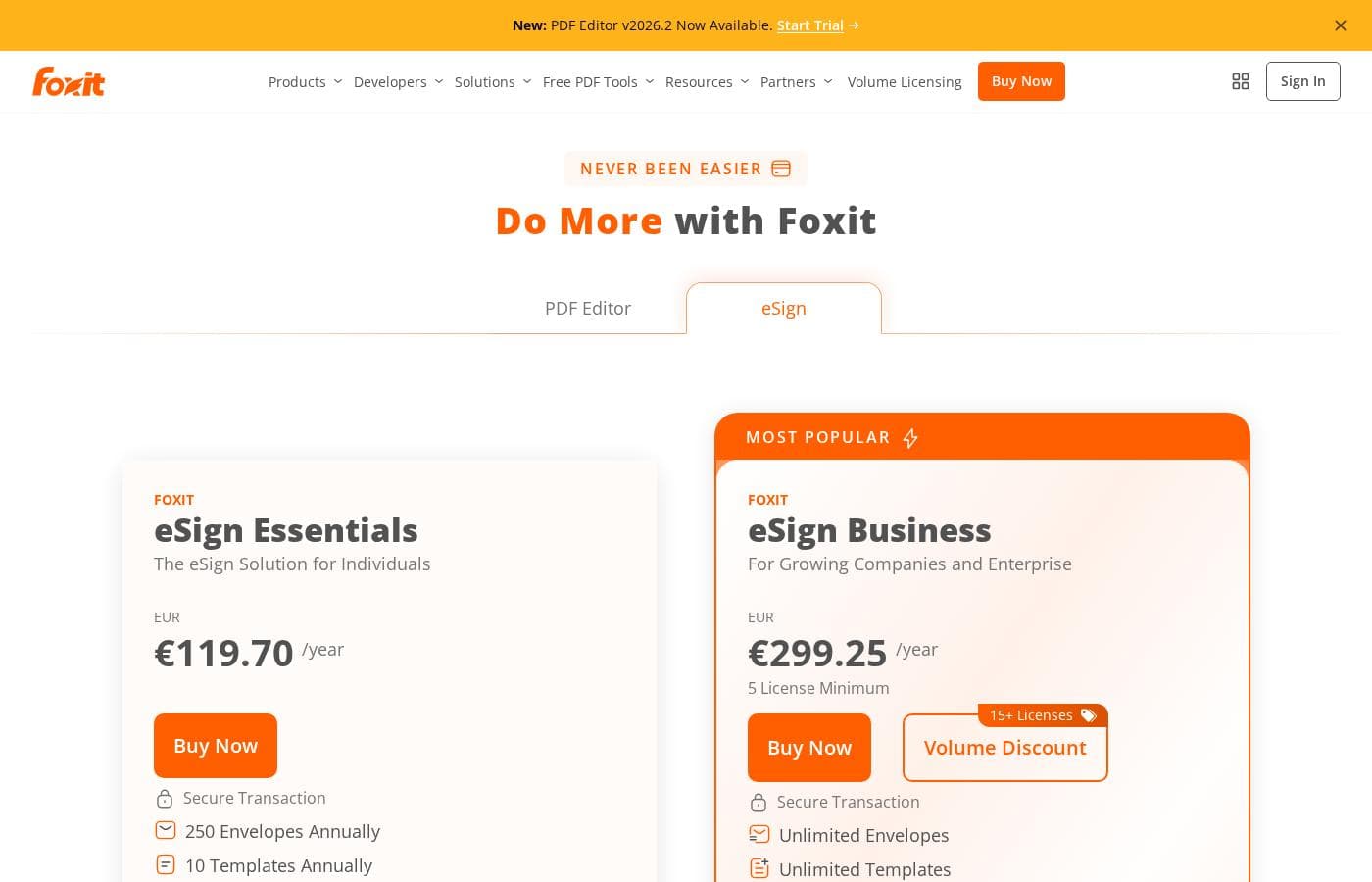
Foxit esign pricing page screenshotView pricing page screenshot
PlanBilled monthlyBilled annuallyIncludes
eSign Essentials
—
$10/mo
$120 per year
250 envelopes and 10 templates per year; license is assigned to 1 dedicated user and cannot be reassigned or managed via Admin Console
  • 250 envelopes annually
  • 10 reusable templates annually
  • Collect payments within agreements
  • Legally binding eSignatures
  • Audit trails and certificates
  • +2
eSign Business
—
$25/mo
$300 per year
5 license minimum; additional charges apply for Foxit Connectors and optional add-ons like On-Demand Notary
  • Unlimited envelopes
  • Unlimited templates
  • Custom branding
  • Bulk sending and bulk signing
  • Signable web forms and advanced form fields
  • +2

Price history

Tracking prices since Oct 1, 2026. No price change detected yet.

Pricing types: Yearly subscription

Pricing notes

Foxit eSign offers two annual plans: eSign Essentials at $120/year for individuals and eSign Business at $300/year for teams (with a 5-license minimum). Pricing scales with volume — Essentials covers 250 envelopes per year, while Business removes the caps with unlimited envelopes and templates.

Foxit eSign costs between $120 and $300 per year with two plans: eSign Essentials at $120/year and eSign Business at $300/year (5-license minimum).

Here's a closer look at what each plan includes.

eSign Essentials

Price: $120.00/year Best For: Individuals who need simple, legally binding eSignatures Other Features:

  • 250 envelopes per year
  • 10 reusable templates per year
  • Collect payments inside agreements
  • Audit trails, mobile app signing, and 16 languages

This plan fits solo users — freelancers, consultants, or anyone sending a moderate volume of documents. You get enforceable eSignatures, payment collection, and real-time document tracking without paying for team features you won't touch. One caveat: the license is tied to a single dedicated user and can't be reassigned, so it's a poor fit if multiple people need access.

eSign Business

Price: $300.00/year (5 license minimum) Best For: Growing companies and enterprise teams Other Features:

  • Unlimited envelopes and unlimited templates
  • Custom branded documents
  • Bulk sending and bulk signing
  • Signable web forms and advanced form fields
  • User management, eSigner delegation, and all integrations

Business is built for teams handling high signing volume or shared workflows. You get everything in Essentials, plus admin tools, advanced authentication options, and unlimited envelopes so growth never hits a wall. Solo users with light volume should stick with Essentials — the five-license minimum only pays off when several people are sending agreements. ✍️

A few things to know before you buy. Foxit Connectors, which link eSign to 40+ HR, CRM, and storage platforms, cost extra on both plans, so factor those fees into your budget if integrations matter to you. The pricing page doesn't mention a free trial or money-back guarantee, so you're committing to a full year up front. There is a free online tool that lets you sign PDFs without an account, but those signatures aren't legally binding — for enforceable agreements, you'll need one of these paid plans. ✅
Cost calculator

Estimate what Foxit esign costs for your team.

Billing

eSign Essentials has no published price for this billing cycle.

eSign Essentials has a flat price: the number of seats does not change the total. Estimate based on published list prices, before taxes, add-ons and discounts.

How to pay less for Foxit esign

  • Cheaper tools in this category start at $5/mo.
Visit Foxit esign

Email me when Foxit esign changes price

One email when we detect a price change on the vendor's pricing page. No newsletter, no deals. Unsubscribe in one click.

User Reviews

No reviews yet.

Write a Review

Write a Review for Foxit esign
0/100 characters
0/2000 characters

Why use Foxit esign?

Most signature tools stop at the signature. Foxit eSign pushes further into the work that happens before and after signing — and that's where buyers can save real time and money.

  • Signed agreements stay organized. Every paid plan includes unlimited Foxit DMS storage, so completed agreements remain searchable and controlled without moving files to another repository.
  • Volume won't surprise you. Foxit eSign Business includes unlimited envelopes and unlimited reusable templates, giving growing teams predictable room to scale.
  • Signers face no friction. Recipients sign from a browser or mobile device without creating an account or downloading software.
  • Compliance runs deep. Audit trails, signer metadata, IP logging, and RFC 3161 timestamps support the U.S. ESIGN Act, UETA, and eIDAS — with QES, HIPAA, and 21 CFR Part 11 options on Business.
  • It plays well with your stack. Foxit PDF Editor, Connectors, Salesforce workflows, and APIs tie signing into the systems your teams already use.
  • Payments fit the flow. Payment fields can be added to documents, keeping billing steps inside the agreement process.

Foxit esign alternatives

Other tools in the eSignature category

View all eSignature tools
QuickSigner

QuickSigner

eSignature4.1/5From $5/mo

QuickSigner delivers everything you need to sign — without the bloat. ISO 27001-certified, legally binding via Adobe's Approved Trust List, with no per-envelope fees and no surprise costs. Recipients sign in seconds, no account required. Send, sign, and collect in one flow. Free to try, effortless to adopt, ready to scale. The complete e-signature solution: simple, fast, and priced for the rest of us — the smarter alternative to enterprise overkill.

Alohi

Alohi

eSignature3.9/5

Send a fax from your browser. Sign a document in seconds. Alohi is a Swiss company behind Fax.Plus and Sign.Plus, trusted digital productivity tools used by over 5 million professionals worldwide. We build for people who need things done right, without outdated tools slowing them down. Partner with us and earn up to $180 per referral.

AirSlate

AirSlate

eSignature3.8/5

AirSlate WorkFlow is a powerful, no-code platform designed to simplify complex document tasks. It provides end-to-end automation for growing teams and enterprises of all sizes. You define your document process visually without needing technical expertise or complicated coding skills. WorkFlow revolutionizes how companies handle their critical document lifecycles. It includes document creation, automatic filling, real-time routing, and eSignatures all in one automated system. It’s easy to use and helps you enhance productivity while achieving seamless workflow automation.

PandaDoc

PandaDoc

eSignature3.7/5

PandaDoc is a 360-degree agreement management platform built for teams that create, send, track, and sign important documents. From creation to signature to payment, PandaDoc streamlines the entire process. It supports a drag-and-drop editor to tailor agreements, and it keeps everyone on the same page with real-time redlining, comments, and approvals. It also brings together CRM integrations, an embeddable API, and automation to speed up workflows while reducing errors. For signing, you can set signing order, verify identities, organize signing groups, and even notarize documents, all in a secure framework.

Blueink

Blueink

eSignature3.6/5

Blueink is a lean eSign platform that blends speed, security, and scalability. It’s designed for teams that need compliant signing at a fair price and easy workflows. The solution supports a range of signing options—SMS delivery, in-person signing, and branded signing experiences—along with reusable templates, tracking, and envelope transparency. It’s built for enterprises and regulated industries, with simple integrations and an API to fit your tech stack.

Foxit esign FAQ

How much does Foxit esign cost?

Foxit esign's cheapest paid plan, eSign Essentials, costs $10 per month. Paid plans range from $10 to $25 per month.

Does Foxit esign have a free plan?

No. Foxit esign lists no free plan; the cheapest paid plan starts at $10 per month.

Has Foxit esign's price changed recently?

No. We have not detected a price change since we started tracking on Oct 1, 2026.

How does Foxit eSign handle security and compliance?

It's SOC 2 Type 2 certified and supports ESIGN, UETA, eIDAS, GDPR, CCPA, FERPA, and FINRA. It's HIPAA ready, and a Business Associate Agreement is available where applicable. Audit trails log signer metadata, IP addresses, and timestamps.

What kind of customer support can you expect?

Every plan includes live phone support during business hours, plus 24/7 ticketing with fast resolution SLAs. Business buyers can add enterprise support for round-the-clock live access and direct contact with integration engineers.

Can you collect payments while someone signs?

Yes. Foxit Pay embeds fixed or variable payment fields into agreements, so customers can pay by credit card or ACH during signing. Payment collection is included in every paid plan.

Ready to try Foxit esign? Check out the official site or pricing.

Are you Foxit esign? Claim this listing · Get the badge