Databox

Databox review

Plain-language answers and automated reporting, built on one trusted set of numbers.

Databox costs from $71/mo · 6 plans · Free plan available · prices checked Nov 27, 2026

By Ciroapp Editorial Team · Updated Sep 9, 2026

Commission may apply at no extra cost

Prices in this video were checked Oct 24, 2026

Prices have changed since this video was made — the pricing table below shows the current prices.

At a glance

Quick overview for Databox: rating, pricing summary, key features, and highlights.
Pricing verified Nov 27, 2026

Ciroapp score

4.1/ 5

Databox pulls 130+ data sources into one workspace, gives every metric a shared definition, and layers Genie's plain-language AI answers and automated reporting on top. Lower-tier limits are tight, and AI credits can force a $200/month top-up. Overall, it's a solid pick for agencies and growing teams that want trusted numbers and less manual reporting.

Pros

  • Genie, the built-in AI Analyst, answers plain-language questions from live data and shows the reasoning behind each answer, so you can verify the work before acting on it
  • A semantic layer and data governance give every metric a shared definition, owner, and verified status — keeping dashboards, reports, and AI answers consistent across teams
  • Automated agents handle recurring analysis like weekly client reports; one customer's clients receive their report every Monday at 9 AM without manual work

Cons

  • Plan limits are tight on lower tiers — the Free plan caps at 3 data sources and 1 dashboard, and AI credits (50–1,000/month depending on plan) can run out, requiring a $200/month top-up
  • Value depends heavily on your stack — if your key tools aren't among the 130+ integrations, you'll need API or spreadsheet workarounds
  • Agents run under your oversight, so teams expecting fully hands-off AI automation will still need to review outputs
Best for
  • Agencies managing reporting across many client accounts
  • Growing businesses that want analyst-level answers without hiring analysts
  • AI consultants and implementers building agents on governed data
Free trial
Yes — 14 days
This section is a summary. Detailed sections about features, use cases, pricing, and reviews follow below.

What is Databox?

Chasing numbers across a dozen tools wastes hours you don't have. Databox connects 130+ data sources in one place, lets you ask questions in plain language, and turns recurring analysis into automated workflows — so you spend less time pulling reports and more time acting on what the numbers say.

Databox is a business intelligence and agentic analytics platform. It pulls data from 130+ tools, spreadsheets, databases, and APIs into one workspace, gives every metric a shared definition, and layers AI on top. You can ask its AI Analyst, Genie, questions in plain language, build dashboards and reports, track goals and OKRs, and hand recurring workflows to automated agents.

It targets agencies, growing businesses, and AI implementers.

Should you choose Databox?

Quick buyer guidance before you compare plans or click through.

Choose it if

  • Your data is scattered across multiple SaaS tools, spreadsheets, or databases
  • You want plain-language answers from live data instead of building reports by hand
  • You need consistent metric definitions so every team and AI answer uses the same numbers
  • You want recurring reports delivered automatically on a schedule
  • Security matters — you need SOC 2, GDPR alignment, and permission-aware AI

Skip it if

  • Value depends on your stack — if your key tools aren't among the 130+ integrations, confirm support or plan for API/spreadsheet workarounds first
  • Agents run under your oversight, so teams expecting zero-involvement AI should plan to review outputs
  • If you only need one simple chart, a platform with semantic layers, governance, and agents may be more than you need

Next steps before buying

  1. 1Check the integrations page to confirm your data sources are supported.
  2. 2Review the pricing page for plan details and limits before signing up.
  3. 3Start with the free-forever plan (no credit card) or book a demo to test the AI Analyst on your real questions.
  4. 4Compare alternatives — Databox publishes head-to-head pages vs. Looker Studio, Power BI, Tableau, and others.
  5. 5If compliance matters, review the security page and trust center first.

Ease of use

Onboarding signals look friendly: a free-forever plan with no credit card, thousands of ready-made metrics, dashboard templates, how-to guides, and a help center. Asking questions in plain language lowers the barrier. The real work is upfront — connecting sources and defining metrics — but that's what makes later answers trustworthy.

Databox Key Features

💬 Ask your data anything

Type a question in plain language and Genie, Databox's AI Analyst, answers it from your live data. It reads your metrics, goals, and history, so replies reflect how your business actually works. You also see the reasoning behind each answer, which makes it easy to check the work before you act on it.

✨ One version of every metric

Connect your tools once and define each metric a single time. The semantic layer gives every number a shared meaning, while data governance assigns it a definition, an owner, and verified status. After that, dashboards, reports, AI answers, and agents all draw on the same trusted foundation.

✨ Dashboards and reports anyone can open

Build dashboards from thousands of ready-made metrics and templates, or create your own. Track performance in real time, measure it against targets, and share a link so stakeholders and clients can view live results without logging in. Turning an analysis into a clear, shareable report takes seconds.

🤖 Put recurring work on autopilot

Agents handle the analysis you repeat every week. Hand over an entire workflow — like a weekly client report — and the agent runs it automatically, under your oversight. One customer's clients get their report every Monday at 9 AM without anyone touching it.

✨ Guardrails your security team will like

Databox treats security as a product feature. Your data stays in your account and is never used to train AI models. The essentials:

  • SOC 2 certified, with GDPR-aligned practices
  • Encrypted end-to-end, at rest and in transit
  • Permission-aware AI: answers draw only on data each user can see

Use Cases

📈 Agencies: Client reporting on autopilot

You manage lots of client accounts, and reporting eats your week. Connect each client's tools, build one template, and let agents deliver reports on a schedule. One customer's clients get their weekly report every Monday at 9 AM.

Expected outcome: More time acting on results, less time pulling data.

Tip: Automate your most-requested report first, then expand.

💡 Growing businesses: Answers without an analyst

Your numbers live in a dozen tools, and nobody has time to pull them together. Connect your sources once, then ask Genie questions in plain language. Answers come with the reasoning behind them, drawn from your metrics, goals, and history.

Expected outcome: Analyst-level answers without hiring an analyst.

🤖 AI implementers: Build on trusted data

You're building AI workflows for clients, but outputs are only as good as the data underneath. Databox gives agents governed metrics — each with a definition, an owner, and verified status. Use the MCP server to ground your AI tools in trusted numbers.

Tip: Define metrics before you build. Trustworthy answers start there.

🎯 Leadership: KPIs and goals in one place

Strategy drifts when progress lives in someone's spreadsheet. Set goals and OKRs, and Databox tracks progress automatically. Share dashboards that stakeholders can open without a login, so everyone works from one version of the truth.

Expected outcome: Fewer status meetings and one shared set of numbers.

Databox pricing

From$71/mo

  • 6 plans
  • Free plan available

Prices checked on Nov 27, 2026 from Databox's pricing page

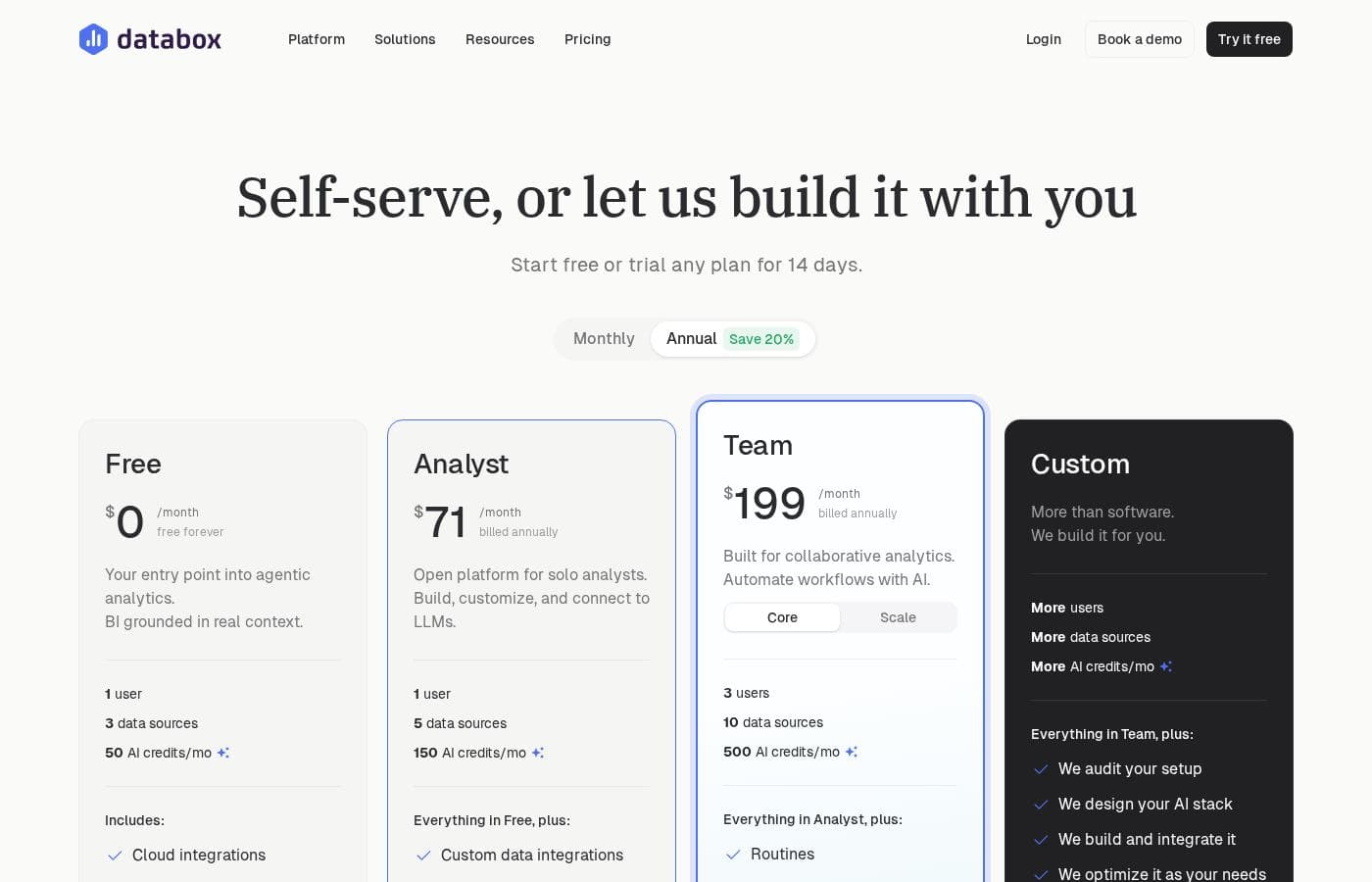
Databox pricing page screenshotView pricing page screenshot
PlanBilled monthlyBilled annuallyIncludes
Free
Free
—
Free forever; 1 user, 3 data sources, 50 AI credits/mo, daily sync, AI analyst (Genie), 1 dashboard, 10 custom metrics.
Analyst
—
$71/mo
$852 per year
For solo analysts; 1 user, 5 data sources, 150 AI credits/mo, hourly sync, adds custom integrations, API access, MCP server, pre-built skills. FAQ mentions $99/month (monthly billing).
Team Core
—
$199/mo
$2,388 per year
Collaborative analytics; 3 users, 10 data sources, 500 AI credits/mo. FAQ lists $249/month (monthly billing).
Team Scale
—
$319/mo
$3,828 per year
For growing teams; 10 users, 30 data sources, 1,000 AI credits/mo, adds sub-accounts. FAQ lists $399/month (monthly billing).
Agency
—
$79/mo
$948 per year
Starting price plus account packs as you grow; unlimited users, 4 accounts, 20 data sources, 300 AI credits/mo. Each extra account pack: $20/month (1 account, 5 data sources, 50 AI credits); the vendor FAQ mentions $25/month.
Custom
See vendor page
See vendor page
Contact for pricing; custom users, data sources, and AI credits; includes audit, AI stack design, build/integration, and embedded engineer.

Price history

Tracking prices since Sep 9, 2026. No price change detected yet.

Pricing types: Free plan, Free trial, Monthly subscription, Yearly subscription, Usage-based pricing

Pricing notes

Databox offers a Free plan ($0/month) and paid plans billed annually: Analyst at $71/month, Team Core at $199/month, Team Scale at $319/month, and Agency starting at $79/month plus client packs. A Custom plan with custom pricing and add-ons (AI credits $200/month, white-labeling $80/month, security $40/month, fiscal calendar $160/month, OKRs $14/month) is also available.

Databox costs between $0 and $319 per month with five plans: Free at $0/month, Analyst at $71/month, Team at $199–$319/month, Agency from $79/month plus client packs, and Custom with pricing built around your needs. All listed prices are billed annually, and annual billing saves you 20% over monthly.

Here's what each plan includes.

Free

Price: $0/month, free forever Best For: Getting started with basic KPI visibility Other Features:

  • 1 user, 3 data sources, and 50 AI credits per month
  • 1 dashboard and 10 custom metrics
  • Cloud integrations and the AI analyst (Genie)
  • Governed semantic layer with daily sync

Free is a genuine free-forever plan, and you don't need a credit card to start. It's a good fit if you want to track a few key metrics without any financial commitment. You can upgrade whenever you outgrow the limits.

Analyst

Price: $71/month billed annually Best For: Solo analysts who want a personal analytics workspace Other Features:

  • 1 user, 5 data sources, and 150 AI credits per month
  • Custom data integrations and API access
  • MCP server, artifacts, and pre-built skills
  • Hourly sync plus chat and email support

Analyst includes everything in Free, plus the tools a solo operator needs. You can connect custom data sources and link Databox to LLMs through the MCP server. If you work alone but want serious analysis power, start here.

Team

Price: $199/month billed annually (Core) or $319/month billed annually (Scale) Best For: Collaborative teams that want to automate workflows with AI Other Features:

  • Core: 3 users, 10 data sources, 500 AI credits per month
  • Scale: 10 users, 30 data sources, 1,000 AI credits per month
  • Routines, custom skills, and Genie in Slack
  • Sharing, notifications, and CSV export

Team comes in two sizes, so you only pay for the capacity you need. Core works well for small teams that want shared dashboards and notifications. Scale suits growing teams that need more users, data sources, and AI headroom.

Agency

Price: From $79/month billed annually, plus $20/month per client pack Best For: Agencies managing performance across multiple clients Other Features:

  • Unlimited users with bulk actions and custom templates
  • Cross-client reporting via Genie and the MCP server
  • 20 data sources and 300 AI credits, plus 5 sources and 50 credits per pack
  • Commissions through the Solutions Partner Program

Agency grows with your client roster. Each $20/month client pack adds one client with 5 data sources and 50 AI credits. White-labeling is a separate add-on at $80/month if you want fully branded client reports.

Custom

Best For: Organizations that want Databox built and managed for them Other Features:

  • Unlimited users, custom data sources, and custom AI credits
  • Setup audit, AI stack design, and full deployment
  • Embedded engineer and enablement
  • Security and compliance review

Custom is more than software — Databox builds it with you. You get hands-on services from the first audit through ongoing optimization. Pick this tier if your requirements are complex or you'd rather have experts handle setup.

Bottom line: There's a free-forever plan, and every paid plan starts with a 14-day free trial that requires no credit card. You can upgrade, downgrade, or cancel anytime — cancellations take effect at the end of your billing cycle. If you're unsure how many data sources or AI credits you'll use, confirm each plan's limits before you buy.

Cost calculator

Estimate what Databox costs for your team.

Billing

Analyst has no published price for this billing cycle.

Analyst has a flat price: the number of seats does not change the total. Estimate based on published list prices, before taxes, add-ons and discounts.

How to pay less for Databox

  • Start on the free plan and upgrade only when you hit its limits.
  • Use the 14-day free trial before you pay.
  • Cheaper tools in this category start at $5/mo.
Start free trial

Email me when Databox changes price

One email when we detect a price change on the vendor's pricing page. No newsletter, no deals. Unsubscribe in one click.

User Reviews

No reviews yet.

Write a Review

Write a Review for Databox
0/100 characters
0/2000 characters

Why use Databox?

Most analytics tools stop at charts. Databox keeps going — from connected data to answers to action — so your team spends time deciding, not assembling.

  • Plain-language answers from live data. Ask Genie, the built-in AI Analyst, a question and get an answer with the reasoning behind it, drawn from your metrics, goals, and history.
  • One version of the truth. A semantic layer and data governance give each metric a shared definition, an owner, and verified status — so dashboards, reports, and AI answers all agree.
  • Reporting on autopilot. Agents handle recurring analysis under your oversight. One customer says clients receive their weekly report automatically every Monday at 9 AM.
  • 130+ integrations. Bring in tools, spreadsheets, databases, and APIs, then start fast with thousands of ready-made metrics and dashboard templates.
  • Share with anyone. Publish dashboards and reports that stakeholders can view without a login.
  • Enterprise-grade guardrails. SOC 2 certified, GDPR-aligned, encrypted end-to-end, and your data is never used to train AI models.

Databox alternatives

Other tools in the Business Intelligence category

View all Business Intelligence tools
Splunk

Splunk

Business Intelligence4.1/5From $5/mo

Splunk is a data platform that unifies machine data at petabyte scale across security, observability, and networking. Now part of Cisco, it serves enterprises in finance, healthcare, government, retail, and more. Security teams use it to detect and respond to threats. IT teams use it to monitor apps and infrastructure. It's aimed at organizations that need to search huge data volumes in real time and act on them with AI.

ChristianSteven Software

ChristianSteven Software

Business Intelligence3.9/5

ChristianSteven Software is a reporting automation vendor that has been building BI delivery tools since 2002. Its lineup covers PBRS for Power BI and SSRS, ATRS for Tableau, CRD for Crystal Reports, and IntelliFront BI for dashboards and KPIs. The company reports serving nearly 5,000 organizations across 47 countries. It suits teams that already create reports and now need them produced, formatted and delivered on a dependable schedule without manual effort.

ElevateForward.ai

ElevateForward.ai

Business Intelligence3.8/5

ElevateForward is a strategy and execution platform built for businesses that struggle to turn plans into results. It identifies what’s slowing performance, uncovers growth opportunities, and translates them into clear, actionable strategies. With built-in execution tracking, teams stay aligned, accountable, and focused—so strategy doesn’t sit in a deck, it drives measurable outcomes.

DataHawk

DataHawk

Business Intelligence3.7/5

DataHawk brings together Amazon and Walmart data into an enterprise-grade platform. Executive-ready dashboards, daily performance alerts, and actionable AI-powered insights help sellers scale their brands across every channel.

Influencer Hero

Influencer Hero

Influencer Marketing Platform3.4/5

ALL-IN-ONE Influencer Marketing Platform. Helping brands drive ROI through influencers. Leveraging big data, automation, and AI to increase conversions, lower CAC, and collect high-quality UGC for brands worldwide.

Rebolt

Rebolt

CRM3.4/5

Rebolt is an all-in-one marketing platform built for home service companies. Its core components are an SEO-optimized website builder, social media management tools, and AI-powered content creation, all accessed from a single dashboard. It sits in the CRM category, positioning customer relationships and marketing in the same place rather than in disconnected apps. Rebolt offers a free plan alongside paid subscriptions, with published plans starting at $1/month.

Assembly

Assembly

Client Portal3.7/5

Assembly is an all-in-one client portal for service businesses such as agencies, consultancies, and professional service firms. The platform consolidates the day-to-day tools a service business uses with clients — client records, communication, payments, file sharing, contracts, forms, and help desk tickets — behind one login. Instead of stitching together separate apps for each function, teams give clients a single destination where requests, documents, and billing all live.

Tradify

Tradify

Home Service Management Platform4.1/5

Tradify is an all-in-one job management app for trade businesses. It covers the full job lifecycle — inquiries, quoting, scheduling, job tracking, invoicing, and payments — in one place. It's aimed at electricians, plumbers, gas engineers, HVAC techs, and property maintenance services, from sole operators to larger teams. A 14-day free trial is available, and no credit card is required to start.

Cheapest Business Intelligence software for 1 to 25 users

Databox FAQ

How much does Databox cost?

Databox's cheapest paid plan, Analyst, costs $71 per month. Paid plans range from $71 to $319 per month. Prices checked on Nov 27, 2026 from the vendor's pricing page.

Does Databox have a free plan?

Yes. Databox has a free plan (Free); paid plans start at $71 per month.

Does Databox offer a free trial or a money-back guarantee?

Databox offers a 14-day free trial.

Has Databox's price changed recently?

No. We have not detected a price change since we started tracking on Sep 9, 2026.

Can I upgrade, downgrade, or cancel my plan?

Yes, anytime. Upgrades and downgrades apply immediately with prorated charges or credits. Cancellations take effect at the end of your current billing cycle, so you keep access through the period you've paid for.

What counts as a data source?

It's a specific dataset, account, property, or view — not the tool itself. One Google Analytics connection, for example, can include several website properties, each counted separately. Check the integrations page before you buy.

How do AI credits work, and what if I run out?

Credits fuel Genie, AI-built dashboards, and insights. Each plan includes a monthly pool — 50 on Free up to 1,000 on Team Scale — that resets monthly. Need more? A $200/month top-up add-on extends any plan.

Ready to try Databox? Check out the official site or pricing.

Are you Databox? Claim this listing · Get the badge