Assembly

Assembly review

Every client conversation, contract, file, invoice, and support ticket in one portal. Assembly gives service businesses an all-in-one alternative to juggling separate client-facing tools.

By Ciroapp Editorial Team · Updated Sep 16, 2026

Commission may apply at no extra cost

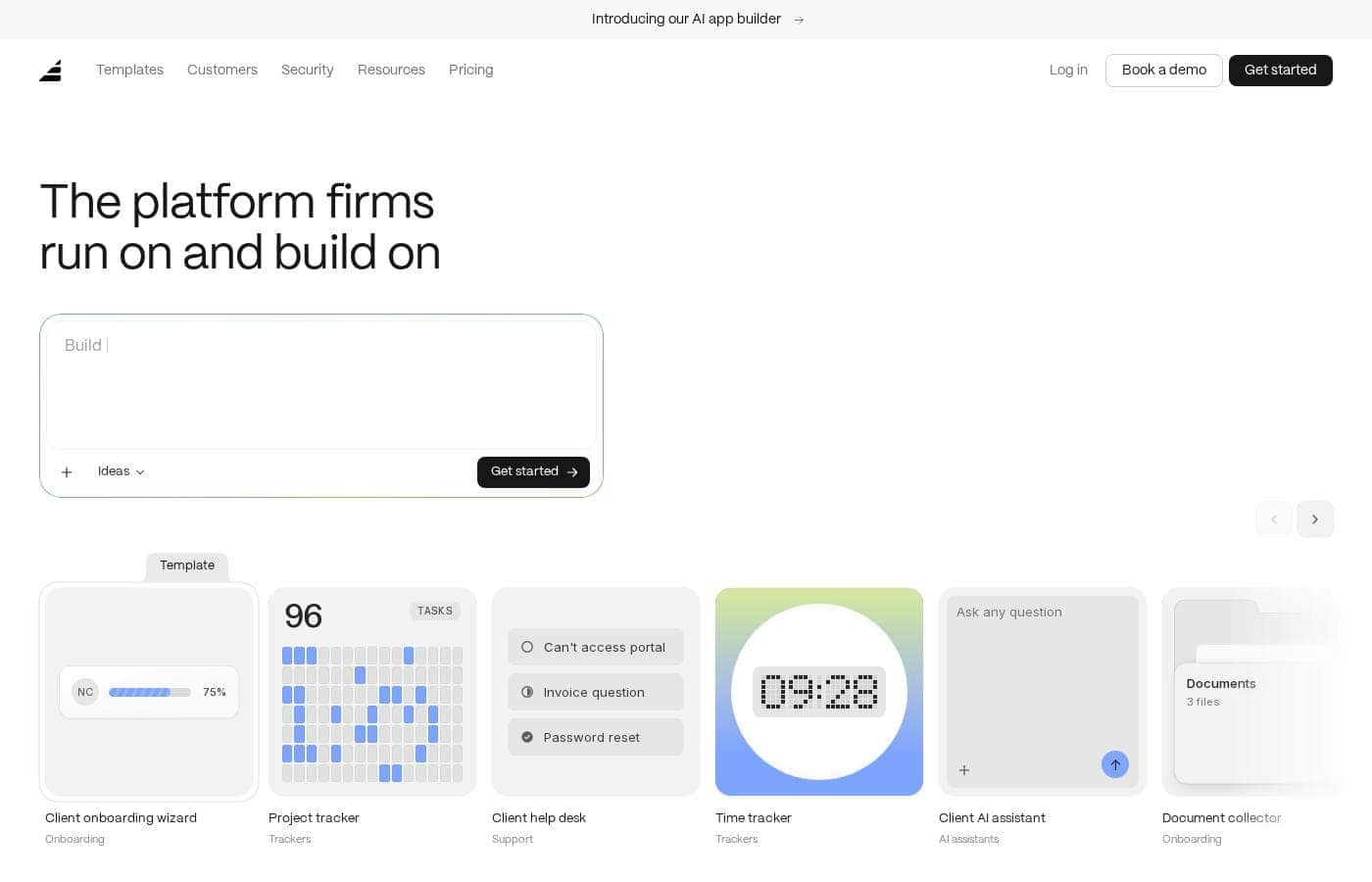
Assembly homepage screenshot

At a glance

Quick overview for Assembly: rating, pricing summary, key features, and highlights.
Vendor page checked Oct 13, 2026

Ciroapp score

3.7/ 5

Assembly bundles client messaging, payments, contracts, forms, files, and a help desk into one portal, which cuts subscription sprawl for service businesses. It's easy to try thanks to a free plan, but depth in each area may trail dedicated tools, and independent reviews are scarce. Overall, it's worth piloting with one client before committing.

Pros

  • Pros:Covers the full client lifecycle — communication, contracts, forms, files, payments, and support — so teams don't need to maintain six separate subscriptions.
  • Pros:Clients get a single login for everything — documents to review, invoices to pay, forms to complete, and a place to raise issues.
  • Pros:A free plan is available, so small service businesses can trial the portal with real clients before paying; paid tiers are listed up to $200/month.

Cons

  • Cons:All-in-one breadth means depth in any single area may trail dedicated tools — specialist e-signature, invoicing, or help desk products can offer more advanced capabilities.
  • Cons:Migrating existing client records, documents, and years of email-based communication into a new portal takes real setup effort.
  • Cons:Usage-based pricing options can make monthly costs less predictable for teams whose client volume scales quickly.
Best for
  • Agencies and studios managing several client accounts that want one portal for briefs, deliverables, approvals, and invoices.
  • Consultants, coaches, and freelancers who need contracts, intake forms, file exchange, and payment collection in a single onboarding flow.
  • Small professional service firms that want client requests tracked as help desk tickets rather than buried in a shared inbox.
This section is a summary. Detailed sections about features, use cases, pricing, and reviews follow below.

What is Assembly?

Assembly is a client portal platform aimed at service businesses that juggle client communication, documents, payments, and support across disconnected tools. Its product suite bundles client management, messaging, file sharing, contracts, forms, and a help desk into a single portal clients can log into. This review covers what the platform does, where it fits best, and what to weigh before committing.

Pricing currently starts at $0 per month, with paid tiers listed up to $200 per month.

Assembly is an all-in-one client portal for service businesses such as agencies, consultancies, and professional service firms. The platform consolidates the day-to-day tools a service business uses with clients — client records, communication, payments, file sharing, contracts, forms, and help desk tickets — behind one login. Instead of stitching together separate apps for each function, teams give clients a single destination where requests, documents, and billing all live.
Should you choose Assembly?

Quick buyer guidance before you compare plans or click through.

Choose it if

  • Agencies and studios managing several client accounts that want one portal for briefs, deliverables, approvals, and invoices.
  • Consultants, coaches, and freelancers who need contracts, intake forms, file exchange, and payment collection in a single onboarding flow.
  • Small professional service firms that want client requests tracked as help desk tickets rather than buried in a shared inbox.
  • Lean teams looking to cut subscription costs by replacing separate messaging, contract, form, and invoicing tools with one suite.

Skip it if

  • Teams that need deep, specialized functionality in one area — such as advanced e-signature workflows or enterprise help desk routing — may find dedicated tools stronger.
  • Organizations heavily invested in an established tool stack that only want to fix one narrow problem, since adopting an all-in-one suite means migrating more of their workflow.
  • Buyers who require extensive independent review history before committing; third-party review coverage for Assembly is currently limited.

Next steps before buying

  1. 1Sign up at assembly.com and start with the free plan to explore the portal with no upfront cost.
  2. 2Set up one client account end to end — add the client record, share a file, send a form or contract, and raise a test help desk ticket — to see how the pieces work together.
  3. 3Invite a real client into the portal and run one full cycle of communication, delivery, and payment before migrating the rest of your accounts.
  4. 4Compare the monthly and yearly paid tiers against your usage to decide when upgrading from the free plan makes sense.

Assembly Key Features

✨ Client Management

Assembly serves as a central record for the businesses and people you serve, so account details, active work, and history stay in one place. For service businesses handling many concurrent clients, this replaces scattered spreadsheets and inbox searches with a structured view of each relationship.

✨ Client Communication

Instead of relying on long email threads, teams can keep client conversations inside the portal alongside the work they relate to. Centralizing messages makes it easier to hand accounts between team members without losing context.

✨ Payments

The suite includes payment collection, letting service businesses invoice clients and receive payment through the same portal used for everything else. Pairing billing with day-to-day client work reduces the follow-up friction that typically surrounds getting paid.

✨ File Sharing

Documents, deliverables, and assets can be exchanged through the portal rather than email attachments or ad hoc drive links. This keeps client-facing files organized per account and accessible to the client whenever they need them.

✨ Contracts and Forms

Assembly covers agreements and intake with built-in contract and form tools. Businesses can send contracts for acceptance and collect structured information from clients without buying separate e-signature or form-builder software.

✨ Help Desk

A built-in help desk lets clients raise requests or issues as trackable tickets rather than buried emails. Support requests sit next to the client's other activity, which helps small teams prioritize and close issues faster.

Use Cases

💡 Agencies Managing Multiple Client Accounts

Agencies that serve several clients at once can give each one a dedicated space for briefs, deliverables, approvals, and invoices. With communication, files, and payments in one portal, account managers spend less time reconciling email threads and more time on the work itself.

💡 Consultants and Coaches Onboarding New Clients

Consultants and coaches can run onboarding through Assembly: collect client details with forms, send the engagement contract, share working documents, and take payment without switching tools. New clients get a single place to complete every setup step.

💡 Service Firms Centralizing Client Support

Firms that handle ongoing client requests can route them through the built-in help desk as tickets. That creates a visible queue, keeps response history attached to the right account, and stops urgent requests from disappearing into a shared inbox.

Assembly pricing

Prices not verified yet — see the vendor page.

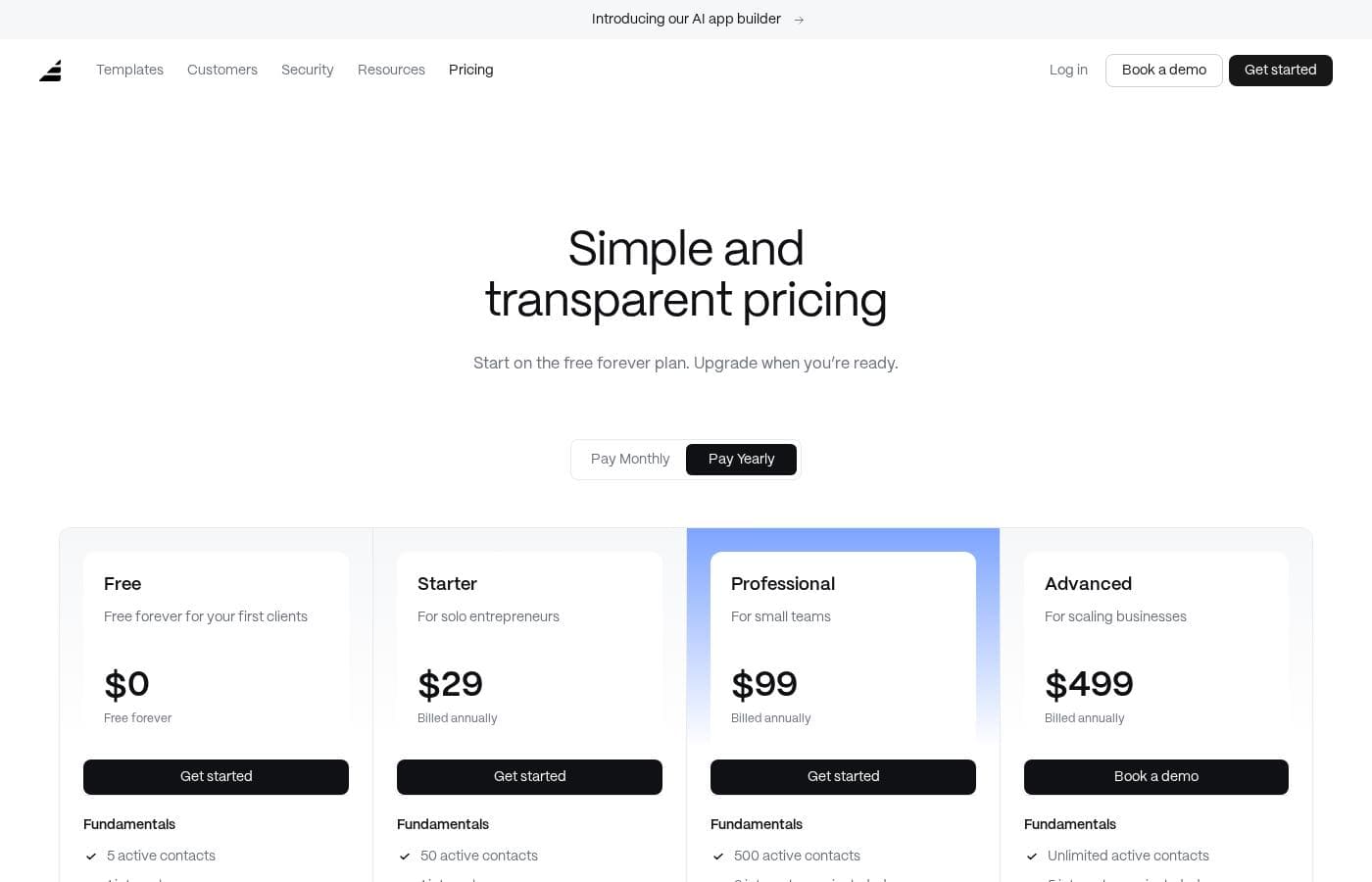
Assembly's pricing page

Assembly pricing page screenshotView pricing page screenshot

Price history

Tracking prices since Oct 1, 2026. No price change detected yet.

Pricing types: Free plan, Monthly subscription, Yearly subscription, Usage-based pricing

Email me when Assembly changes price

One email when we detect a price change on the vendor's pricing page. No newsletter, no deals. Unsubscribe in one click.

User Reviews

No reviews yet.

Write a Review

Write a Review for Assembly
0/100 characters
0/2000 characters

Why use Assembly?

Service teams lose time when client information is scattered across email threads, shared drives, e-signature tools, and payment processors. Assembly's appeal is consolidation: one portal reduces back-and-forth, gives clients a predictable place to find invoices and files, and keeps a record of contracts and approvals.

For small teams, that can mean fewer subscriptions to manage and less context switching during the workday.

Assembly alternatives

Other tools in the Client Portal category

View all Client Portal tools
AgencyAnalytics

AgencyAnalytics

Client Portal4.1/5

AgencyAnalytics is the client reporting and performance analytics platform built specifically for marketing agencies. Trusted by thousands of agencies worldwide, it centralizes data from leading marketing channels into clear, client-ready dashboards and reports. AgencyAnalytics helps agencies save time, deliver strategic insight, prove ROI, and scale client relationships with accuracy, clarity, and confidence.

Moxo

Moxo

Client Portal3.6/5

What is it? Moxo is an orchestration platform that connects people, systems, and AI to streamline complex workflows. It helps teams manage customer, vendor, and partner processes and plugs into your CRM, ERP, and other core apps so workflows flow across the tools your team relies on.

Assembly FAQ

What is Assembly?

Assembly is an all-in-one client portal platform for service businesses. Its product suite covers client management, communication, payments, file sharing, contracts, forms, and a help desk, giving clients a single place to interact with your business.

How much does Assembly cost?

Billing is available monthly or yearly, and usage-based pricing applies to some options, so costs can vary with how much you use the platform.

Who is Assembly best suited for?

It is aimed at service businesses — agencies, consultancies, coaches, and professional firms — that want to consolidate client communication, documents, contracts, invoicing, and support into one portal instead of juggling separate tools.

Does Assembly replace separate tools like e-signature software and help desks?

The suite includes contract and help desk functionality, so many teams can drop separate point solutions for those tasks. Businesses with highly specialized needs in one area should verify that Assembly's version covers their requirements before canceling an existing tool.

Ready to try Assembly? Check out the official site or pricing.

Are you Assembly? Claim this listing · Get the badge