Moxo

Moxo review

Orchestrate client, vendor, and partner workflows across your CRM, ERP, and AI tools from one shared portal.

By Ciroapp Editorial Team · Updated Sep 17, 2026
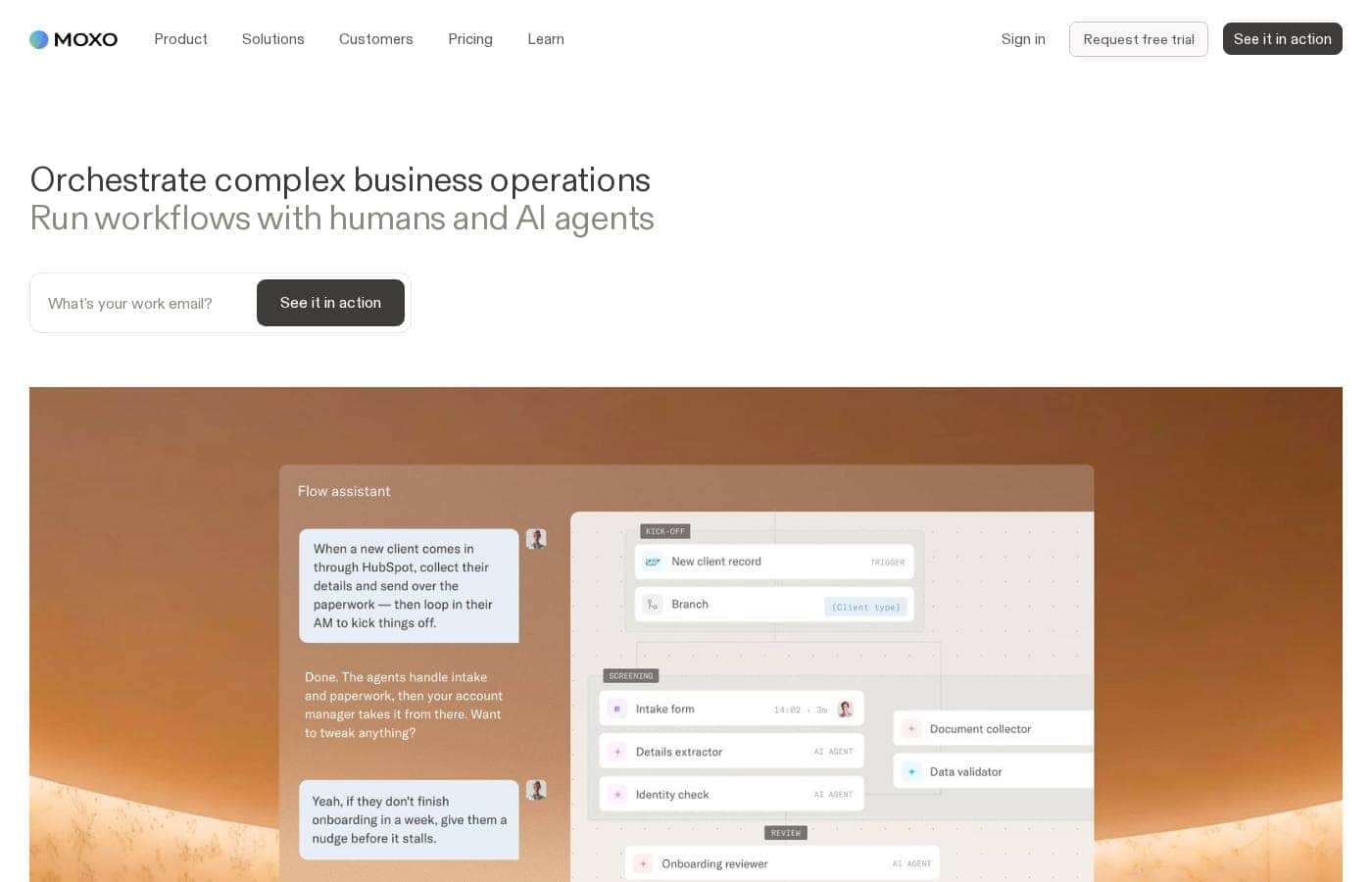
Moxo homepage screenshot

At a glance

Quick overview for Moxo: rating, pricing summary, key features, and highlights.
Vendor page checked Oct 25, 2026

Ciroapp score

3.6/ 5

Moxo turns the client portal into a workflow engine, syncing every step with your CRM or ERP and using AI to clear routine tasks like routing and document processing. It's strong for repeatable processes such as onboarding and approvals, but setup takes real effort and pricing isn't public. Overall, it's a solid pick for process-heavy teams willing to invest in implementation.

Pros

  • Connects portal activity to systems of record — CRM and ERP integrations mean portal work updates your core business data instead of creating a disconnected silo
  • Structured, repeatable workflow templates enforce consistent process execution across every client or partner engagement, rather than ad-hoc coordination
  • Handles multi-party coordination natively — clients, vendors, and internal team members each get appropriate visibility within the same workflow

Cons

  • Implementation is heavier than simple portal tools — configuring workflows, integrations, and role-based access requires meaningful setup time and ownership
  • Pricing is not published transparently in full detail, so buyers need to engage with sales to understand true cost at their team size
  • Value depends on having repeatable processes to orchestrate; teams with highly varied, one-off engagements may not use the workflow engine to its full potential
Best for
  • Professional services firms (financial services, legal, accounting, consulting) running structured client onboarding and engagement workflows
  • B2B companies coordinating vendors, suppliers, or channel partners who need a compliant, trackable portal rather than email chains
  • Deal-driven teams in lending, real estate, or enterprise sales who manage multi-party document review and sign-off
This section is a summary. Detailed sections about features, use cases, pricing, and reviews follow below.

What is Moxo?

Moxo positions itself in the client portal category, but its scope goes beyond a simple shared workspace. The platform is built to orchestrate multi-party workflows — connecting your internal team, external clients, vendors, and partners — while pulling data from core systems like your CRM and ERP. This review looks at where Moxo fits, what it does well, and the trade-offs buyers should weigh before committing.

Moxo is a workflow orchestration platform with client portal capabilities at its core. It provides structured workspaces where businesses can run processes such as client onboarding, document collection, approvals, and ongoing collaboration with external stakeholders. Unlike a standalone file-sharing portal, Moxo integrates with back-office systems — CRM, ERP, and other core applications — so that actions taken in the portal stay synchronized with the systems of record.

It also incorporates AI into workflows, allowing teams to automate routine steps and route work between people, systems, and intelligent agents.

Should you choose Moxo?

Quick buyer guidance before you compare plans or click through.

Choose it if

  • Professional services firms (financial services, legal, accounting, consulting) running structured client onboarding and engagement workflows
  • B2B companies coordinating vendors, suppliers, or channel partners who need a compliant, trackable portal rather than email chains
  • Deal-driven teams in lending, real estate, or enterprise sales who manage multi-party document review and sign-off
  • Operations leaders who want external collaboration synced with their CRM or ERP instead of tracked in disconnected spreadsheets

Skip it if

  • Small teams that only need simple, occasional file sharing with clients — a lightweight portal or shared drive will cost less and require no implementation
  • Organizations without repeatable processes — if every engagement is unique and ad-hoc, the workflow orchestration engine delivers limited value
  • Buyers expecting self-serve setup in an afternoon — configuring workflows, roles, and integrations properly takes dedicated effort

Next steps before buying

  1. 1Map one repeatable external process end to end — such as client onboarding — listing every step, participant, document, and approval before touching the tool
  2. 2Request a Moxo demo and ask specifically how the platform connects to your existing CRM and ERP, including whether those integrations are native or require configuration
  3. 3Start with a single pilot workflow for one client or partner segment rather than migrating all processes at once, and measure cycle time and error rates against your previous approach
  4. 4Involve the team member who owns the underlying process — not just IT — since workflow design decisions determine whether the orchestration actually matches how work gets done

Moxo Key Features

✨ Client and Partner Portals

Moxo provides branded workspaces where clients, vendors, and partners can complete tasks, share documents, exchange messages, and track progress. Each external party sees only what's relevant to them, while your internal team retains a full view of every workflow. This replaces scattered email threads and ad-hoc file sharing with a single structured environment per engagement.

✨ Workflow Orchestration

Processes in Moxo are modeled as structured workflows with defined steps, participants, and checkpoints. Teams can configure multi-stage flows — for example, document submission, review, approval, and sign-off — and the platform tracks status, assigns responsibilities, and escalates stalled items. Because workflows are repeatable templates, teams can enforce consistent execution across every client or engagement rather than reinventing the process each time.

✨ Integrations with Core Business Systems

Moxo connects to CRM, ERP, and other core applications so portal activity flows into your systems of record. Client data entered in a portal can update the CRM; approvals completed in a workflow can trigger ERP actions. This bidirectional connection is what separates orchestration platforms from standalone portals — work isn't trapped in the portal but synchronized with the tools your business already runs on.

✨ AI-Assisted Automation

The platform incorporates AI into its orchestration layer, helping teams automate routine steps within workflows — such as routing requests, generating responses, or processing document-related tasks. Rather than requiring manual intervention at every step, AI agents can handle predictable portions of a process and hand off to humans where judgment is needed, shortening cycle times on high-volume workflows.

✨ Document Management and E-Signatures

Because client workflows typically involve paperwork, Moxo includes document collection, storage, and approval capabilities within its workspaces. Teams can request specific documents, track which have been received, route them for internal or external review, and capture signatures — keeping the paper trail attached to the workflow instead of buried in an inbox.

Use Cases

💡 Client Onboarding for Professional Services

Firms in financial services, legal, accounting, and consulting run structured onboarding for every new client: document collection, identity verification, agreement signing, and kickoff scheduling. Moxo lets these firms turn that sequence into a repeatable workflow, giving clients a single portal to submit everything while the firm tracks completion and syncs records to its CRM.

💡 Vendor and Partner Management

Companies coordinating vendors, suppliers, or channel partners can use Moxo to run procurement, compliance, and ongoing relationship workflows. Partners get a structured portal for submitting documentation, completing required steps, and tracking status, while procurement and operations teams keep the underlying records synchronized with ERP and other internal systems.

💡 Deal Execution and Approvals

Teams that close complex transactions — lending, real estate, M&A support, enterprise sales — manage multi-party document review, negotiation, and sign-off. Moxo's workflow checkpoints and e-signature capabilities give every party visibility into what's done and what's outstanding, reducing the back-and-forth that typically stalls deals in email.

💡 Ongoing Client Service Delivery

Beyond onboarding, service firms can use Moxo as the persistent hub for an ongoing client relationship: requests come in through the portal, work is tracked through defined workflows, deliverables are shared in the same workspace, and periodic reviews follow a consistent structure. This keeps the engagement organized long after the initial onboarding is complete.

Moxo pricing

Prices not verified yet — see the vendor page.

Moxo's pricing page

Price history

Tracking prices since Oct 1, 2026. No price change detected yet.

Email me when Moxo changes price

One email when we detect a price change on the vendor's pricing page. No newsletter, no deals. Unsubscribe in one click.

User Reviews

No reviews yet.

Write a Review

Write a Review for Moxo
0/100 characters
0/2000 characters

Why use Moxo?

External collaboration is where most business software breaks down. CRMs track customers but aren't built for client-facing interaction; email and spreadsheets handle the gap poorly, leaving processes untracked and error-prone.

Moxo addresses this by giving external parties a structured portal while keeping the underlying workflow connected to internal systems. For teams running repeatable, multi-step processes with clients or partners — onboarding, compliance checks, deal execution, vendor management — this reduces manual coordination and creates an audit trail that email threads can't provide.

Moxo alternatives

Other tools in the Client Portal category

View all Client Portal tools
AgencyAnalytics

AgencyAnalytics

Client Portal4.1/5

AgencyAnalytics is the client reporting and performance analytics platform built specifically for marketing agencies. Trusted by thousands of agencies worldwide, it centralizes data from leading marketing channels into clear, client-ready dashboards and reports. AgencyAnalytics helps agencies save time, deliver strategic insight, prove ROI, and scale client relationships with accuracy, clarity, and confidence.

Assembly

Assembly

Client Portal3.7/5

Assembly is an all-in-one client portal for service businesses such as agencies, consultancies, and professional service firms. The platform consolidates the day-to-day tools a service business uses with clients — client records, communication, payments, file sharing, contracts, forms, and help desk tickets — behind one login. Instead of stitching together separate apps for each function, teams give clients a single destination where requests, documents, and billing all live.

Moxo FAQ

How is Moxo different from a standard file-sharing or document portal?

A standard portal mainly shares files and messages. Moxo models your actual business process as a structured workflow — with defined steps, assigned participants, approval checkpoints, and status tracking — and connects that workflow to internal systems like your CRM and ERP. So instead of just hosting documents, it drives the process forward and keeps your systems of record updated as work completes.

Does Moxo integrate with CRM and ERP systems?

Yes. Moxo is built to connect with CRM, ERP, and other core business applications so that data flows between the portal and your internal systems. The practical depth of integration varies by system — some connections are turnkey while others may require configuration — so buyers should confirm coverage for their specific stack during evaluation.

What role does AI play in Moxo?

Moxo uses AI within its orchestration layer to automate routine portions of workflows — such as routing tasks, handling predictable requests, and processing document-related steps. AI agents handle the predictable work and hand off to human participants where judgment is required, which reduces manual effort on high-volume, repeatable processes.

How much does Moxo cost?

Moxo does not publish complete pricing detail publicly, and plan structure can vary by team size and required capabilities. The most reliable approach is to contact Moxo directly through its website for a quote tailored to your number of users, expected portal volume, and integration needs.

Ready to try Moxo? Check out the official site or pricing.

Are you Moxo? Claim this listing · Get the badge