Capsule CRM

Capsule CRM

Win more. Do more. Grow fast. Your business in one place.

#6 dans Customer Relationship Management
1 min read Β· Updated 10/3/2025
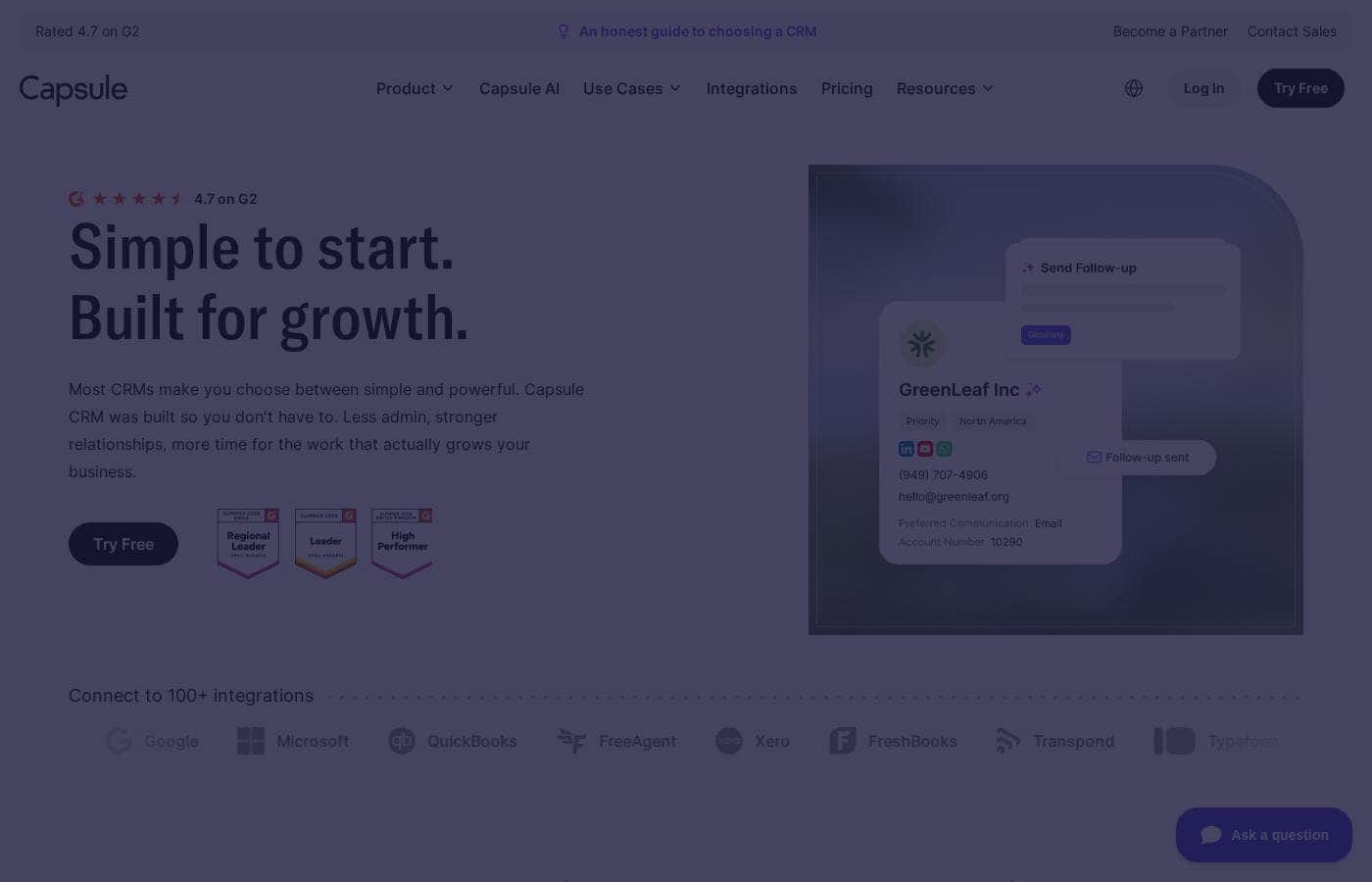
Capsule CRM homepage screenshot

At a glance

Quick overview for Capsule CRM: rating, pricing summary, key features, and highlights.

Ciroapp review

4.1
Simple, Powerful CRM for Growing Teams

We found Capsule CRM excels as an affordable, lightweight solution designed specifically for smaller teams who need simplicity without sacrificing powerful features. Its primary strength lies in its user-friendly design and commitment to fast setup, minimizing complexity and learning curves compared to larger platforms. Overall, Capsule provides excellent organizational tools and complete contact visibility at a high value for money.

Pros

  • Pro:Simple, intuitive interface that is lightweight and clean.
  • Pro:Affordable pricing structure providing consistently high value for money.
  • Pro:Extremely fast implementation; customization takes only a few hours.
  • Pro:Highly responsive and helpful customer support team.

Cons

  • Con:Removal of key social features, such as the Twitter API integration.
  • Con:Lacks requested advanced functionality, like stand-alone web form links.
  • Con:Some isolated reports of poor usability or unhelpful customer service.
Free trial
Yes β€” 14 days
Range: Free to Per user/monthFree plan, Free trial, Monthly subscription, Yearly subscription, Per seat pricing
This section is a summary. Detailed sections about features, use cases, pricing, and reviews follow below.

Capsule CRM review, pricing, features, pros & cons

Are you tired of managing scattered customer data that prevents business growth? Many small businesses find that complex systems waste time and complicate daily tasks. Capsule CRM efficiently solves this by putting your business in one place ✨.

This centralization helps teams deliver top customer experiences and confidently close more deals, faster than before.

What is Capsule CRM?

Capsule is a trusted, simple Customer Relationship Management (CRM) system built specifically for small businesses, startups, and freelancers. It has served over 40,000 customers since 2009. This online system centralizes customer data, which helps improve team collaboration and business operations overall.

It organizes contact information and facilitates communication, resulting in strong relationship management. Users praise Capsule for its simple setup and user-friendly interface πŸ’‘.

Capsule CRM Key Features

✨ Centralized Contact Management

Capsule helps you build powerful customer relationships by giving complete visibility into client history. Every interaction with a client is available in one single view. This helps your team quickly understand the customer's status.

Your team can then better plan future engagements. Using this streamlined customer data management, you'll deliver outstanding customer experiences every time.

✨ Streamlined Sales Pipeline Control

Quickly seize full control over your sales pipeline processes. You can accurately forecast sales and understand the status of every deal using just one dashboard. This visibility is designed to help you confidently close more deals, faster than before.

For growing teams, you can also support and manage multiple distinct sales pipelines simultaneously.

✨ Project Delivery and Team Collaboration

Manage and deliver exceptional results for your customers smoothly after they say 'yes.' Capsule offers multiple project boards to help you stay on track and deliver work within the defined scope. The project management features allow your team to collaborate easily, which helps smash internal departmental silos.

This functionality ensures that new customer onboarding and ongoing delivery run efficiently.

✨ Actionable Sales Analytics

Gain instant access to game-changing insights readily available at your fingertips. The system helps detect which deals are close to closure so you know exactly when to act. You can consult the dashboard to identify customers who need proactive support.

Use sales analytics and project pipelines to accurately analyze and project future business growth.

✨ Control Over Tasks and Delegations

You can start and end your working day knowing precisely which tasks you need to tackle. Capsule helps you control your to-do list effectively. When the workload is heavy, you can manually assign a task to a team member.

Alternatively, you can set up automations to delegate repetitive or tedious tasks promptly. This ensures tasks get handled and you stay focused on high-value commitments.

✨ Custom Workflows and Automation

Achieve rapid time to value by setting up Capsule workflows that just work. As soon as you sign up, you can start using the system immediately and import your existing data. Create bespoke workflows, email templates, and automations to handle tedious administrative tasks.

Teams can benefit from AI-powered email assistance to draft communications faster. Workflow automations help streamline repeatable sales processes.

πŸ”§ Flexible Integrations and Customization

Capsule works seamlessly with your existing technology stack. We offer over 60 native integrations with popular apps like QuickBooks, Xero, and Mailchimp. For unique needs, the system supports Zapier and Make, allowing you to create bespoke integrations for niche use cases.

This is your Capsule, your way. You can customize the system fully with the ability to label and tag your data exactly as your business requires it.

Use Cases

🀝 Enhanced Customer Relationship Management

Stop searching through scattered client files. Capsule puts every client interaction into one clear, single view seamlessly. This centralization allows your team to always understand the customer's current status and history thoroughly. You can confidently plan your next engagement and consistently deliver superior customer experiences.

Every piece of client knowledgeβ€”notes, emails, and call logsβ€”is logged instantly. This ensures that whether you're working remotely or collaborating in the office, your team has complete relationship visibility.

πŸ“ˆ Achieving Sales Forecasting Clarity

Sales managers often struggle to see exactly where pivotal deals stand. Use the Sales Pipeline dashboard to seize immediate control of your sales funnel today. You'll understand the status of every opportunity and forecast future performance more accurately.

Sales Analytics highlights deals nearing closure, ensuring you always take proactive, timely action. This powerful insight helps you plan strategies for consulting customers who may need assistance or support.

βš™οΈ Automating Daily Administrative Tasks

Reduce time spent on tedious, repeatable administrative tasks by implementing rapid automation. You can create bespoke workflows and email templates to save hours every single week. This process allows your team to focus on selling instead of routine data entry.

βœ… Managing Seamless Project Delivery

Once the deal is won, use Project Management features to ensure smooth delivery. Capsule helps your team onboard new clients and manage deliverables efficiently right away. You can collaborate easily with colleagues and keep everyone on track and squarely within scope.

Because relationship history and project status are unified, your business effectively smashes destructive information silos. Collaboration is simple and transparent across departments.

✨ Keeping Contact Data Accurate and Updated

Complex systems often mean valuable contact data becomes outdated quickly, requiring manual fixes. Capsule simplifies this by offering Contact Enrichment, automatically populating many missing details. Your team ensures client records are complete, reliable, and current for targeted communication.

Tip: Use custom fields, labeling, and tagging (Your Capsule; Your Way) to categorize specific data precisely how your business requires it for niche use cases.

πŸ”— Integrating Seamlessly with Existing Tools

Capsule is designed to work frictionlessly with your current technology stack immediately. You have access to over 60 native integrations for popular tools, including QuickBooks, Slack, and Xero. This feature ensures rapid implementation and rapid time to value.

For unique or specialized needs, you can easily create bespoke connections using Capsule’s robust support for Zapier and Make. Stop applications from working independently and connect your whole business.

Pricing Overview for Capsule CRM

Pricing range
Free to Per user/month
Pricing types
Free plan, Free trial, Monthly subscription, Yearly subscription, Per seat pricing

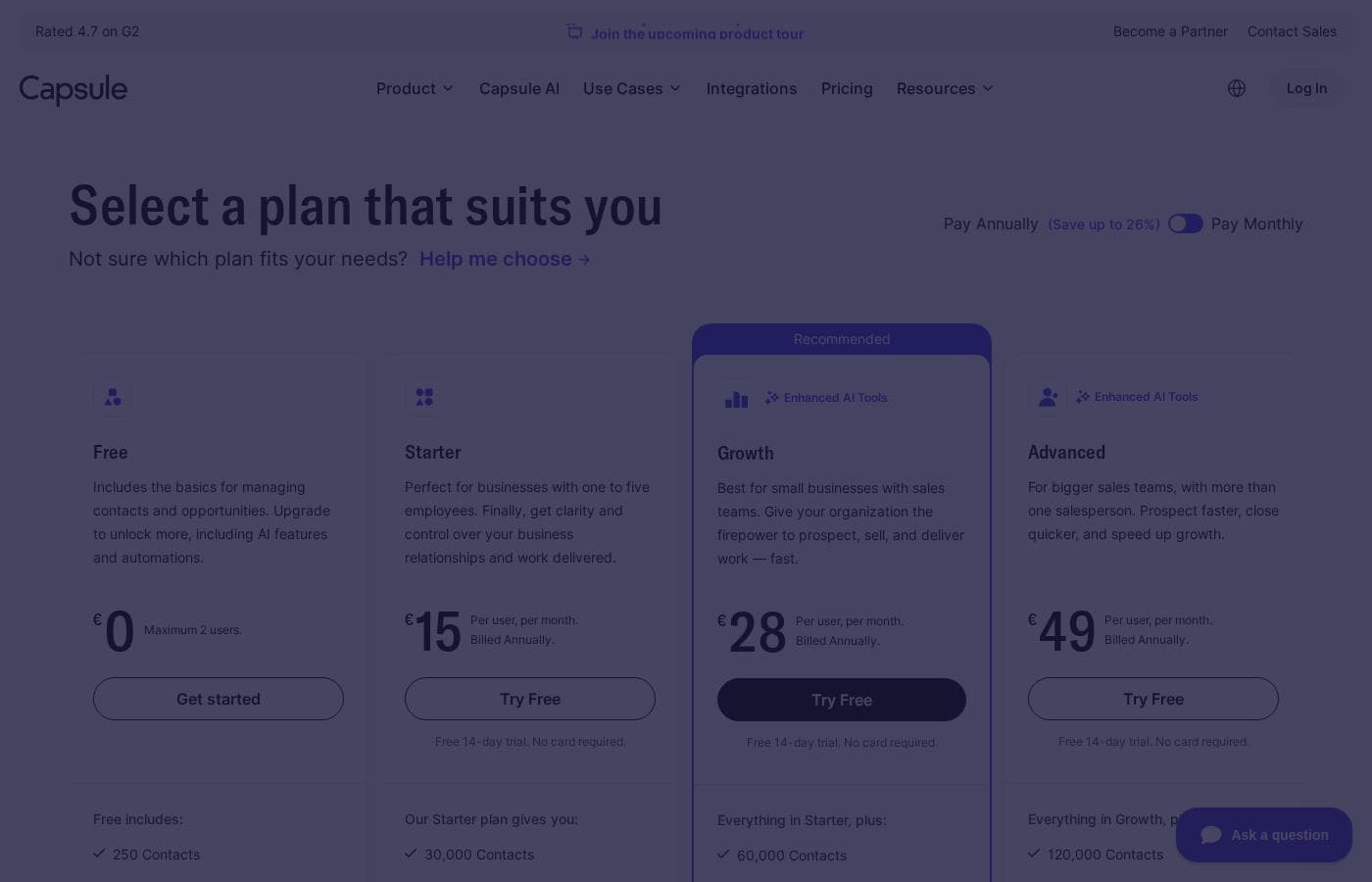
Capsule offers a permanently free plan perfect for individual users or small teams. All paid subscription tiers are priced per user, per month and offer discounts when billed annually.

Plans & Pricing

Free

MonthlyFree
YearlyFree
Maximum 2 users
  • 250 Contacts
  • 5 custom fields
  • 1 Sales Pipeline
  • Activity Log
  • Contact History
  • Outlook & Gmail add-in
  • Mobile app access

Starter

MonthlyNot explicitly stated (Per user, per month)
YearlyNot explicitly stated (Billed Annually)
  • 30,000 Contacts
  • Email Templates
  • AI-Powered Email Assistant
  • Shared Mailbox
  • Basic Reporting
  • Premium Integrations
  • Goals

Growth

MonthlyNot explicitly stated (Per user, per month)
YearlyNot explicitly stated (Billed Annually)
  • 60,000 Contacts
  • Workflow Automations
  • Advanced Sales Reporting
  • Reporting Dashboards
  • Multiple Sales Pipelines
  • Multiple Project Boards
  • Project Management
  • Team & Access Controls
  • + 1 more features

Advanced

MonthlyNot explicitly stated (Per user, per month)
YearlyNot explicitly stated (Billed Annually)
  • 120,000 Contacts
  • Contact Enrichment
  • 50 project boards

Ultimate

MonthlyNot explicitly stated (Per user, per month)
YearlyNot explicitly stated (Billed Annually)
  • Ideal for scaling teams with 5+ users
  • Own account manager
  • Custom training

Capsule CRM costs between Free and Not explicitly stated per user per month with five plans: Free, Starter, Growth, Advanced, and Ultimate.

Review the available options below to find the best fit for your team.

Free

Price: Free Forever Websites Supported: Not explicitly stated Best For: Managing opportunities and clients; testing the functionality Refund Policy: Not explicitly stated Other Features:

  • Maximum 2 users
  • 250 Contacts
  • 5 custom fields
  • 1 Sales Pipeline
  • Outlook & Gmail add-in

The Free plan is perfect for individuals or tiny teams just navigating client relationships. You get the fundamental tools needed to manage activity and history, but you are limited to only two users and 250 contacts. It's a great zero-cost way to test the core CRM features.

Starter

Price: Per user, per month. Billed Annually. Websites Supported: Not explicitly stated Best For: Businesses with one to five employees; gaining clarity and control Refund Policy: Not explicitly stated (14-day free trial available) Other Features:

  • 30,000 Contacts
  • Email Templates
  • AI-Powered Email Assistant
  • Shared Mailbox
  • Premium Integrations

This plan is designed for smaller businesses focused on organizing relationships and operations efficiently. It significantly increases your contact limit to 30,000 and adds key features like AI-powered email assistance. If you need better clarity and control over core business relationships, Starter is a smart choice.

Growth (Most Popular)

Price: Per user, per month. Billed Annually. Websites Supported: Not explicitly stated Best For: Small businesses with sales teams; accelerating prospecting and closing Refund Policy: Not explicitly stated (14-day free trial available) Other Features:

  • 60,000 Contacts
  • Workflow Automations
  • Advanced Sales Reporting
  • Multiple Sales Pipelines
  • Multiple Project Boards
  • Business Enrichment

The Growth plan provides serious firepower for sales teams ready to expand quickly. You benefit from double the contact capacity and crucial automation tools to streamline repeatable sales processes. This plan is highly recommended if you require in-depth reporting and multiple operational pipelines.

Advanced

Price: Per user, per month. Billed Annually. Websites Supported: Not explicitly stated Best For: Bigger sales teams with more than one salesperson; speeding up growth Refund Policy: Not explicitly stated (14-day free trial available) Other Features:

  • 120,000 Contacts
  • Contact Enrichment (populates contact records with data)
  • 50 project boards
  • Everything in Growth

Advanced is tailored for growth-driven teams focused on efficiency and speed. This tier quadruples the initial Starter contact limit, giving you room to manage 120,000 contacts. The addition of automatic contact enrichment helps ensure your client profiles are always complete and current.

Ultimate

Price: Per user, per month. Billed Annually. Websites Supported: Not explicitly stated Best For: Scaling teams with 5+ users; requiring dedicated support Refund Policy: Not explicitly stated (14-day free trial available) Other Features:

  • Own account manager and custom training
  • Designed for larger SMBs
  • Sign up for a trial to connect with Sales

The Ultimate plan is aimed at organizations looking for enterprise-level CRM functions without the corresponding price tag. While specific feature details are not fully listed, this tier includes dedicated service, custom training, and an account manager. Contact the sales team directly to begin your trial and discuss implementation details. πŸ“ž

Capsule offers a Free Forever plan that is great for testing the platform's functionality. For those interested in the paid Starter, Growth, Advanced, or Ultimate tiers, a 14-day free trial is readily available. No card is needed to start the trial, and there are zero setup fees associated with opening a Capsule account. You can cancel your subscription at any time.

User Reviews

Capsule CRM users consistently report high satisfaction, frequently highlighting the platform's exceptional simplicity and great value. Many reviewers confirm that Capsule is highly intuitive and easy to use, noting it took only a few hours to customizeβ€”a stark contrast to competitors that require months of expensive consultant time. This affordability and ease of setup are main draws for small and growing teams. Users feel the CRM helps them stay incredibly organized by providing complete visibility of tasks, pipelines, and client history in one specific place. Furthermore, the support team receives high praise for being quick, responsive, and thorough when resolving issues πŸ‘.

However, feedback is not entirely perfect. A small number of reviewers expressed frustration over the removal of the Twitter API integration, arguing the feature should have been retained given the subscription fees. Users also occasionally request minor quality-of-life additions, such as a stand-alone, no-code form link feature to automate data entry. Overall, the sentiment affirms Capsule as a powerful, affordable, and stress-free solution built for scalability.

What users say elsewhere

Raleigh W.
Β· Trustpilot Β· Jan 26, 2023
5.0 / 5

The problem with many CRM systems is using them requires too long of a learning curve. I love Capsule because it's super easy to use from day one. Despite its simplicity, it packs a lot of power and many useful features. Highly recommended for any small business.

Charlie V.
Β· Trustpilot Β· Feb 24, 2023
5.0 / 5

We have been Capsule customers for nearly three years and we love it. It is very simple and always easy to use. It took us only a few hours to customize for our specific business process, unlike the 12 months it took for Salesforce.

No reviews yet.

Write a Review

Write a Review for Capsule CRM
0/100 characters
0/2000 characters

Why use Capsule CRM?

Choosing the right CRM shouldn't introduce more complexity. Capsule is recognized for being fast, effortless, and easy on the eyes. It is an affordable solution that delivers rapid time to value for your business. You can immediately start using Capsule and import your data without hassle.

Here is why your small business should choose Capsule:

  • Zero Onboarding Fees: Unlike other CRMs, there are no costs associated with implementing or setting up Capsule.
  • Workflows That Just Work: Start using the system immediately and customize bespoke workflows, automations, and email templates for tedious tasks.
  • Your Capsule; Your Way: Customize the system fully with the ability to label and tag data exactly as you need.
  • Extensive Integrations: Capsule works seamlessly with your existing tech stack, offering over 60 native integrations and support for Zapier and Make.
  • Complete Visibility: Every client interaction is in a single view, allowing you to plan engagements and deliver top customer experiences βœ….
  • Game-Changing Analytics: Use sales analytics to proactively detect deals nearing closure and accurately project future business growth.

Ready to transform your workflow with Capsule CRM?

Frequently Asked Questions

How are the paid Capsule plans structured financially?

All paid subscriptions are priced per user, per month, ensuring the cost scales fairly with your team. You can choose to pay monthly or receive up to a 15% discount by choosing annual billing.

Is there a monthly payment option, or must I pay annually?

You can select either monthly or annual payment options for any of the paid plans. Though, choosing the annual plan is recommended for the best value since it saves you up to 15%.

Are there limits to the number of contacts I can manage?

Yes, contact capacity varies greatly by plan. The Free plan allows 250 contacts, while the Advanced tier supports a substantial limit of 120,000 contacts.

Can I transfer my existing customer data easily into Capsule?

Yes, Capsule offers many flexible options for migrating your data. You can easily import existing contacts and opportunities directly from spreadsheets.

Are there any required setup or implementation fees?

No, there are zero upfront setup fees associated with opening a Capsule account. The system is designed for rapid adoption and convenience, minimizing complexity.

What happens if I need to downgrade my subscription plan?

You can upgrade or downgrade plans as needed. However, you must first ensure your account adheres to the contact and feature limitations of the new plan before switching.

What key integrations does Capsule support for my existing software?

Capsule supports over 60 native integrations, including popular tools like Xero, QuickBooks, Mailchimp, and Zendesk. You can also create custom connections using Zapier and Make.

What features can I use during the 14-day free trial?

The 14-day free trial allows full access to all features of the paid plan you select. You can connect integrations and add your entire team without needing a credit card to start.

What type of customer support is available for the plans?

All users have access to the support center and a dedicated support team to answer questions. The Ultimate plan also includes an assigned account manager and custom training sessions.

Does Capsule have a money-back guarantee or refund policy?

Not explicitly stated on the official site. The documentation confirms you can cancel your subscription at any time, but details on refunds are not provided.

Who is Capsule CRM best suited for?

Capsule is ideal for small businesses, startups, and freelancers who need a simple, powerful CRM solution. Growth and Advanced tiers are better for larger SMBs seeking high contact capacity and workflow automation.

What kind of data security or compliance features are in place?

Not explicitly stated on the official site. You should review their separate service agreements to learn about data protection and security measures.

What is the Marketing add-on and what does it cost?

The Marketing add-on enables robust email campaigns and sales alignment features through Transpond. This add-on is available starting from $11 per month.

Can I cancel my Capsule subscription whenever I want?

Yes, you can cancel your Capsule subscription at any time without fees. There are also zero setup fees charged for opening an account.

Ready to try Capsule CRM? Check out the official site or pricing.