EdrawInfo

EdrawInfo

The super beginners-friendly design tool for visually striking infographics.

#2 dans Infographic Maker
2 min read · Atualizado 10/3/2025
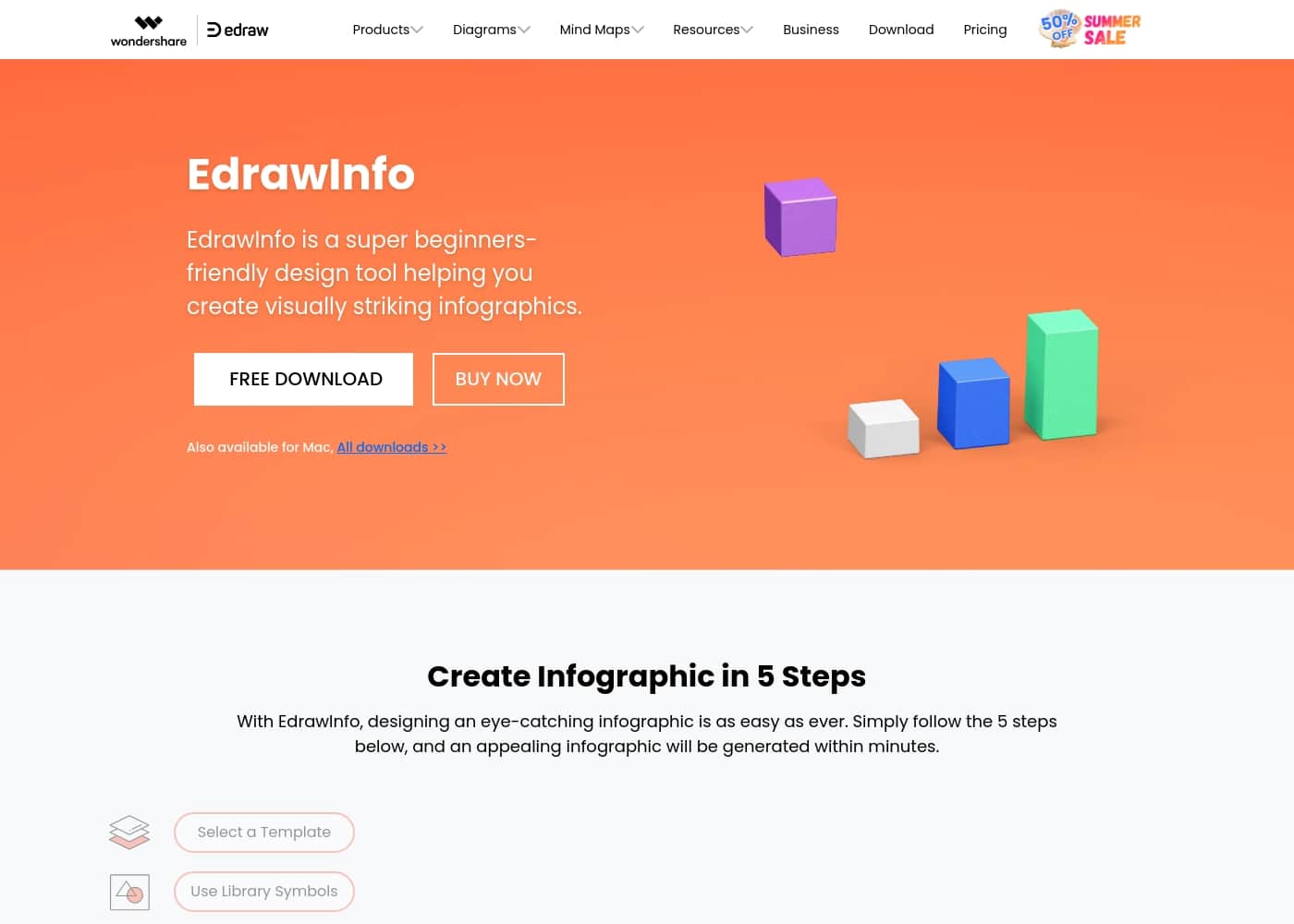
Captura de ecrã da página inicial do EdrawInfo

At a glance

Quick overview for EdrawInfo: rating, pricing summary, key features, and highlights.

Ciroapp review

3.9
Excellent Diagrams, Questionable Lifetime Value.

We found EdrawInfo excels as a stable, cross-platform tool offering powerful diagramming and infographic creation, even for beginners. The diverse templates and upfront licensing options provide high inherent value. Overall, the significant reports of deceptive practices related to template access and trial billing issues necessitate a cautious recommendation regarding long-term investment.

PrĂłs

  • Pro:Extremely beginner-friendly with a highly intuitive UI.
  • Pro:Access to a vast library of vector cliparts and customizable templates.
  • Pro:Offers one-time purchase options (Perpetual and Lifetime licenses).
  • Pro:Software is stable and works across Windows, Mac, and Linux.

Contras

  • Con:Serious reports regarding previously included lifetime templates being later paywalled.
  • Con:Some users report unauthorized charges following the free trial period.
  • Con:Support, though responsive, is frequently required due to multiple user complaints.
  • Con:The free trial version offers limited functionality.
Garantia de reembolso
Yes — 30 dias
Intervalo: $69/year – $149 one-timeYearly subscription, One-time payment
This section is a summary. Detailed sections about features, use cases, pricing, and reviews follow below.

Avaliação de EdrawInfo, preços, funcionalidades, prós e contras

It can be frustrating to create professional, visually striking graphics without specialized training or complex software. Traditional design takes too much time.

✨ EdrawInfo is built for beginners, offering a comfortable and amazing way to design whatever you want quickly. It removes the need for special programming or design skills.

O que Ă© EdrawInfo?

EdrawInfo is a super beginners-friendly design tool. It helps anyone create eye-catching infographics quickly and effortlessly. The software is available for both Mac and Windows users.

Designing a compelling visual is remarkably easy. You simply select one of the many templates, use the library symbols, add your text, customize details, and export the file. You don't need any special skills to start seeing results.

đź’ˇ It provides a vast number of vector cliparts and helps you find inspiration easily. Every element is highly customizable, letting you adjust things like colors, chart values, lines, and even shadow effects.

EdrawInfo Funcionalidades principais

✨ Beginner-Friendly Design in Five Steps

EdrawInfo is built specifically to be super friendly for beginners. You don't need any special programming or complex design skills to start creating professional visuals. The platform offers a comfortable and efficient way to design whatever you want quickly.

Designing compelling, eye-catching infographics is remarkably easy. The software guides you through the creation process using just five simple steps. By following this streamlined workflow, you can generate impressive, expertly looking graphics within minutes.

✨ Abundant Templates and Vector Cliparts

You can avoid starting from a blank screen thanks to the wide variety of existing templates. These options meet nearly every need and help you get started quickly on your project. The templates can even assist you in selecting the highly effective color combinations for your graphic.

The software provides a rich gallery of examples and a vast number of vector cliparts. Using this comprehensive library of symbols, anyone can build compelling infographics quickly and effortlessly. This ensures you always have the assets you need to communicate your ideas effectively.

✨ High Customization for Every Detail

Every single element within your infographic is highly customizable. This level of detail control ensures your final design perfectly matches your professional vision. You can easily adjust details like colors, line weights, and intricate shadow effects.

The customization extends beyond aesthetics into data representation. You can actively edit and customize chart values to accurately reflect your current figures. Even when starting with a ready-made template, you retain full ultimate control to make whatever changes you like.

✨ Unmatched Stability and Performance

EdrawInfo is designed for ultimate reliability and speed, which is critical for urgent projects. The software successfully removes technical difficulty while prioritizing fast and stable performance. This means you gain workflow efficiency every time you use the tool.

Because the software is always stable and fast, your productivity won't be interrupted. This stability holds true regardless of whether you have an active internet connection. You can truly rely on the software for consistent results, even when working offline.

✨ Versatile Design Project Support

The platform offers templates and tools to cover a wide range of creative needs, not just standard infographics. Whether you are preparing materials for business promotion or creating materials for education, EdrawInfo has covered your needs. It supports professional materials for non-profit institutes too.

This versatility allows you to reuse the software across many functions:

âś… Seamless Export and Sharing Options

Sharing your finished work and integrating it into documents is incredibly simple. It’s easy to download, save, and share your final visuals instantly. This ensures immediate usability across all your other platforms.

EdrawInfo lets you save your work into a wide variety of standard file formats. Supported formats include PDF, PPT, PNG, SVG, and HTML. This ensures seamless sharing and saving for future use in many different documents and presentations.

Casos de uso

đź’ˇ A Beginner's Guide to Infographic Design

You are new to design and need to create your very first infographic, but complex software feels daunting. EdrawInfo is expressly built for beginners, offering a comfortable and amazing way to start designing. You simply select one of the many templates, which often feature pre-selected color combinations.

Then, add your text and incorporate the vast library symbols to quickly develop your visual story. You’ll achieve expertly looking results fast without requiring any specialized training.

📊 Preparing Data for Business Presentations

When facing an urgent project, you need to communicate complicated marketing data quickly and clearly. You can start by selecting a chart template right away to fit your specific data visualization needs. It is easy to customize every detail instantly, including adjusting lines, colors, and specific chart values.

This process generates stunning visuals that are immediately ready for sharing in your next client or team meeting.

✏️ Designing Step-by-Step Educational Materials

Teachers often need visuals like flowcharts, timelines, or diagrams to explain complex topics simply. EdrawInfo helps make creating these learning aids effortless and fast. You start by choosing a template that matches your required structure, such as a Timeline or Flowchart.

Then, drag and drop relevant vector cliparts to illustrate each step. Every element is highly customizable, letting you ensure maximum clarity for your students.

📢 Creating Compelling Non-Profit Outreach Flyers

Problem: Your non-profit institute needs to design eye-catching posters or banners for a new fundraising campaign but you lack access to high-end design specialists. Approach: Begin with EdrawInfo’s rich gallery of flyer or poster templates. You can quickly customize colors and add text to communicate your mission effectively.

Outcome: You generate visually striking outreach materials easily. You can then quickly download, share, and save your finished work into various formats like PDF or PNG for immediate distribution across digital and print media.

đź’» Developing Reliable Internal Documentation

For internal training decks or critical project documentation, stability and permanent access are priorities. The software is always stable and fast, regardless of whether you have an active internet connection. Since EdrawInfo is a one-time purchase with perpetual ownership, it is a smart long-term investment for developing evergreen organizational materials.

You can confidently rely on it for documentation that must be accessible and editable for years to come.

Visão geral de preços de EdrawInfo

Pricing range
$69/year – $149 one-time
Tipos de preço
Yearly subscription, One-time payment
Garantia de reembolso
Sim — 30 dias

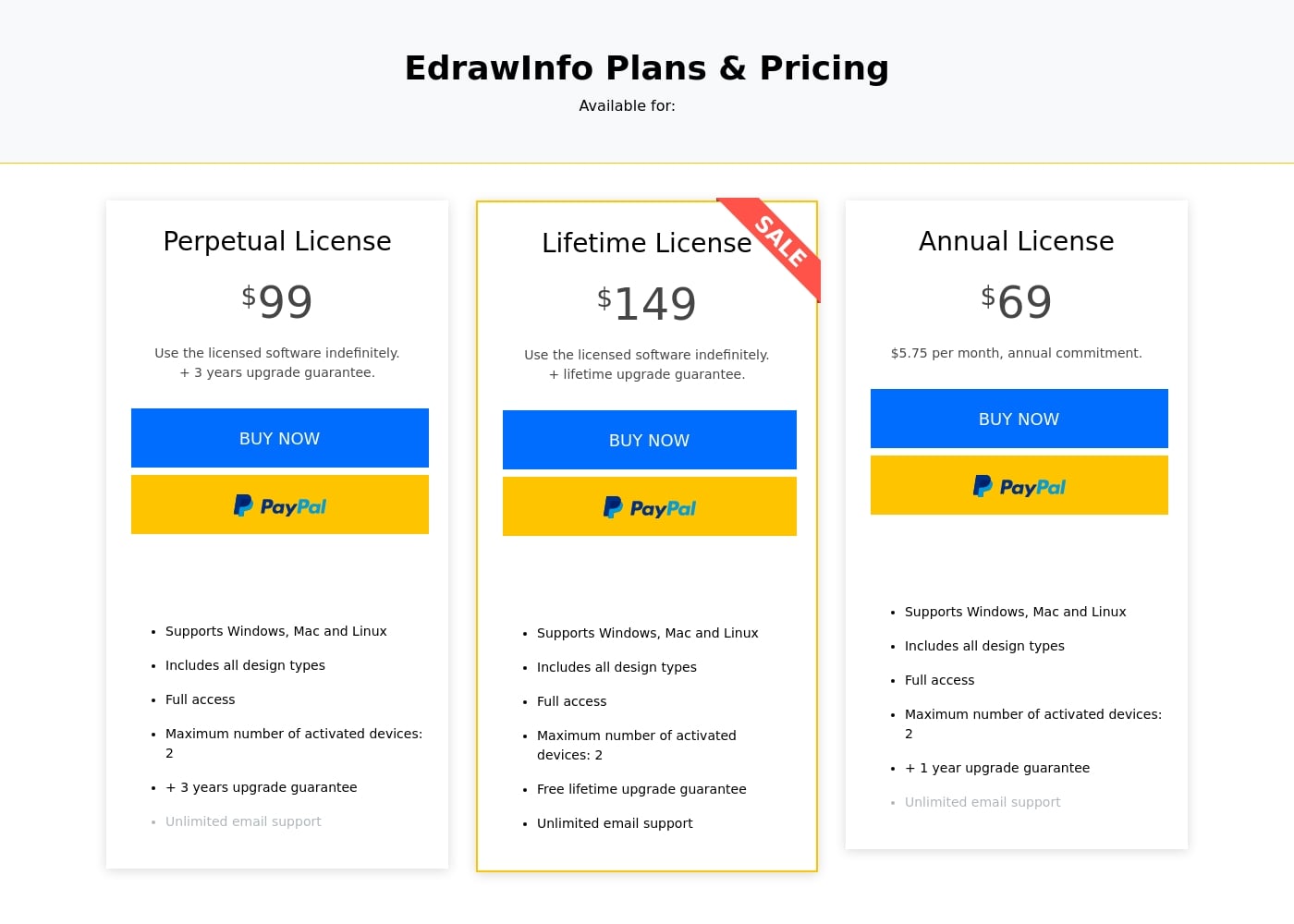
EdrawInfo offers three single-user licensing options: a recurring Annual License ($69/year), or two one-time payment options—Perpetual ($99) and Lifetime ($149). Multi-user and academic pricing with discounts are also available upon request for teams.

Planos e preços

Annual License

Monthly$5.75
Yearly$69
Maximum 2 activated devices
  • Supports Windows, Mac, and Linux
  • Includes all design types
  • Full access
  • One year upgrade guarantee
  • Unlimited email support

Perpetual License

Yearly$99
Maximum 2 activated devices
  • Supports Windows, Mac, and Linux
  • Includes all design types
  • Full access
  • Three years upgrade guarantee
  • Use licensed software indefinitely
  • Unlimited email support

Lifetime License

Yearly$149
Maximum 2 activated devices
  • Supports Windows, Mac, and Linux
  • Includes all design types
  • Full access
  • Free lifetime upgrade guarantee
  • Use licensed software indefinitely
  • Unlimited email support

EdrawInfo costs between $69 per year and $149 one-time with 3 core single-user plans: Annual License at $69, Perpetual License at $99, and Lifetime License at $149.

Review the plan details below to find the best option for your design needs. EdrawInfo offers flexibility depending on how you prefer to purchase and own your software.

Annual License

Price: $69 per year ($5.75 per month, annual commitment) Websites Supported: Not explicitly stated Best For: Users needing short-term access or lower upfront cost Refund Policy: 30-day money-back guarantee Other Features:

  • Supports Windows, Mac, and Linux
  • Includes all design types with full access
  • Maximum number of activated devices: 2
  • +1 year upgrade guarantee
  • Unlimited email support

This license is the most affordable way to get started. It's a great choice if you need the software for a specific project timeline or prefer recurring payment without a heavy initial investment. You get full functionality right away.

Perpetual License

Price: $99 one-time Websites Supported: Not explicitly stated Best For: Individuals wanting indefinite software ownership with guaranteed upgrades Refund Policy: 30-day money-back guarantee Other Features:

  • Supports Windows, Mac, and Linux
  • Includes all design types with full access
  • Maximum number of activated devices: 2
  • +3 years upgrade guarantee
  • Unlimited email support

If you prefer to own your software outright, the Perpetual License is a strong option. You pay once and can use the licensed software indefinitely. Your purchase includes robust technical support and a three-year upgrade guarantee package. Since this is a one-time purchase, it’s ideal for users who do not want recurring annual fees.

Lifetime License

Price: $149 one-time Websites Supported: Not explicitly stated Best For: Users seeking permanent ownership and lifetime software updates Refund Policy: 30-day money-back guarantee Other Features:

  • Supports Windows, Mac, and Linux
  • Includes all design types with full access
  • Maximum number of activated devices: 2
  • Free lifetime upgrade guarantee
  • Unlimited email support

For the ultimate, headache-free value, choose the Lifetime License. This single payment grants you permanent access and ensures you receive all future software upgrades at no extra cost. This is the top-tier individual plan compared to the Perpetual License package, offering greater long-term support and peace of mind. ✨

The vendor sometimes offers special sales, which can significantly drop the price on specific tiers. Discounted tiers may also include 1000M of cloud storage space. If you need licenses for a team, EdrawInfo provides multi-user discounts for 5 or more users, along with academic and non-profit pricing.

If you want to test the software before purchasing, EdrawInfo offers a free download version with limited functionality. Furthermore, every purchase is protected by a generous 30-day money-back guarantee. You can commit to a license today knowing you can request a refund if the tool isn't the right fit.
Avaliações de utilizadores

EdrawInfo, primarily reviewed on Trustpilot, currently holds a 3.7-star rating across 107 reviews. Users widely recognize the tool for its exceptional ease of use and intuitive interface.

Many find it a powerful assistant for visualizing information, utilizing rich symbol libraries and customizable templates across professional and educational settings. The software is frequently praised for saving time and delivering visually appealing results quickly.

However, community sentiment is significantly dampened by serious concerns regarding the long-term pricing model. Specifically, one user claims the initial “lifetime subscription” proved fraudulent, alleging that Edraw later deactivated useful templates and demanded further payment for access.

Another buyer reported unauthorized charges after signing up for a free trial. While core functionality is strong, buyers should investigate these reported reliability and subscription integrity issues closely.

⚠️

O que dizem por aĂ­

Sarah K.
· Trustpilot
5.0 / 5

Edrawsoft tools save me significant time managing projects. I love the interface because it is so user-friendly and intuitive, which makes navigation and drawing incredibly simple for complex jobs.

Alex J.
· Trustpilot
1.0 / 5

Buyers beware of their lifetime subscription package. I purchased it 1.5 years ago, and now they deactivated many useful templates. They subsequently asked for more money to regain template access.

Ainda não há avaliações.

Escrever avaliação

Write a Review for EdrawInfo
0/100 characters
0/2000 characters

Por que usar EdrawInfo?

Why should you choose EdrawInfo for your next visual project? It successfully removes the technical difficulty from graphic design and delivers professional results fast, whether you're creating materials for education, business promotion, or non-profit institutes.

Choosing EdrawInfo means choosing speed and stability:

  • Design Without Difficulty: It’s comfortable and efficient, letting you create expertly looking infographics even if you are new to design. The existing templates can even help you select the right color combinations.
  • Stay Flexible: The software is always stable and fast, regardless of whether you have an active internet connection. You can rely on it for urgent projects.
  • Ultimate Ownership: This isn’t a subscription service. Once you purchase the software, you can own it forever, making it a great long-term investment.
  • Seamless Sharing: âś… It’s easy to download, share, and save your finished work into a wide variety of formats, including PDF, PPT, PNG, SVG, and HTML, so you can integrate them into other documents immediately.

Pronto para transformar o seu fluxo de trabalho com EdrawInfo?

EdrawInfo Alternativas

Outras ferramentas na categoria Infographic Maker

Perguntas frequentes

Does EdrawInfo offer a traditional free trial of the full software?

You can download a free version to test the software's basic functionality. The site does not mention a full-featured, time-limited free trial, but you are covered by a 30-day money-back guarantee after purchase.

How fast can I expect to receive a response if I use email support?

EdrawInfo provides unlimited email support across all licenses. Knowledgeable representatives are available and commit to responding to your technical inquiries within 24 hours.

Is EdrawInfo still usable if I don't have an active internet connection?

Yes, flexibility and stability are core features. The software is designed to remain stable and fast even when you are not connected to the internet, allowing you to work on urgent projects anywhere.

How is the pricing structured for teams and multi-user accounts?

Specific multi-user pricing is available upon request for teams of five or more. The pricing examples shown are based on a per-seat model, often including discounts like 15% off the combined license cost.

How does the software handle data input for dynamic charts and infographics?

You can fully customize chart values and data points directly within the highly flexible tool. However, the official site does not explicitly state if it supports direct data import from external files like CSV or Excel.

What happens to my license when the 1-year or 3-year upgrade guarantee expires?

If you purchased a Perpetual or Annual license, you keep using that version of the software indefinitely. Free product upgrades stop, and you would need to inquire about purchasing future upgrade packages.

If I buy a license, on how many computers can I activate the software?

Each single-user license allows you a maximum of two activated devices. This limit applies consistently across the Annual, Perpetual, and Lifetime license tiers.

What file formats can I save or export my finished infographics as?

You can easily save, share, and export your designs to integrate them seamlessly into other documents. Supported outputs include PDF, PPT, PNG, SVG, and HTML files.

What security measures are used when I purchase a license?

The checkout process is secure and encrypted. The vendor protects your financial and personal information by using advanced encryption technologies and specialized fraud protection.

If I purchase the Annual License, how do I stop recurring renewal charges?

The Annual License requires an annual commitment and is a recurring payment. Specific details or links on how to manage or cancel this renewal are not explicitly detailed on the pricing page.

What are the specific conditions for the 30-day money-back guarantee?

Every purchase is protected by a 30-day money-back guarantee. The policy states that refunds will be approved only under accepted circumstances, which are not outlined on the main site.

Will I get cloud storage included with my purchase?

Some discounted sale tiers available periodically have specified that they include 1000M of cloud storage space. This feature is not listed as standard for the regular-priced licenses.

How do I transfer my license if I upgrade or replace my computer?

The Perpetual License includes three years of computer transferring support, and the Annual License includes one year. The premium Lifetime License ensures you receive lifetime computer transferring support.

Pronto para experimentar EdrawInfo? Confira o site oficial ou os preços.